Vulnerability Mapping:ALLOWEDThis CWE ID may be used to map to real-world vulnerabilities Abstraction:
VariantVariant - a weakness that is linked to a certain type of product, typically involving a specific language or technology. More specific than a Base weakness. Variant level weaknesses typically describe issues in terms of 3 to 5 of the following dimensions: behavior, property, technology, language, and resource.
View customized information:
For users who are interested in more notional aspects of a weakness. Example: educators, technical writers, and project/program managers.For users who are concerned with the practical application and details about the nature of a weakness and how to prevent it from happening. Example: tool developers, security researchers, pen-testers, incident response analysts.For users who are mapping an issue to CWE/CAPEC IDs, i.e., finding the most appropriate CWE for a specific issue (e.g., a CVE record). Example: tool developers, security researchers.For users who wish to see all available information for the CWE/CAPEC entry.For users who want to customize what details are displayed.
×
Edit Custom Filter
Description
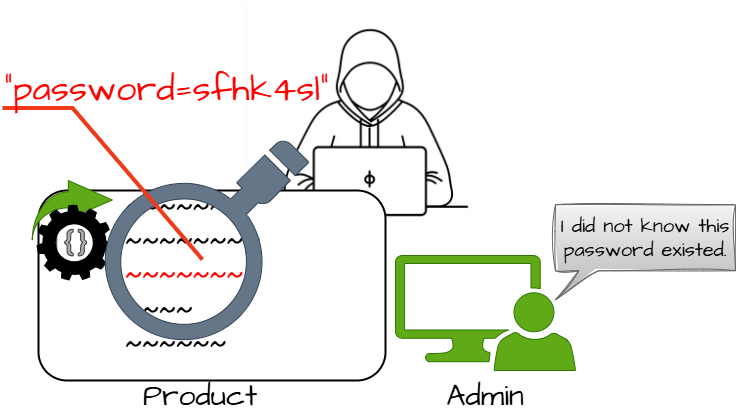
The product contains a hard-coded password, which it uses for its own inbound authentication or for outbound communication to external components.
Extended Description
There are two main variations of a hard-coded password:
Inbound: the product contains an authentication mechanism that checks for a hard-coded password.
Outbound: the product connects to another system or component, and it contains a hard-coded password for connecting to that component.
Common Consequences
This table specifies different individual consequences
associated with the weakness. The Scope identifies the application security area that is
violated, while the Impact describes the negative technical impact that arises if an
adversary succeeds in exploiting this weakness. The Likelihood provides information about
how likely the specific consequence is expected to be seen relative to the other
consequences in the list. For example, there may be high likelihood that a weakness will be
exploited to achieve a certain impact, but a low likelihood that it will be exploited to
achieve a different impact.
Impact
Details
Gain Privileges or Assume Identity
Scope: Access Control
If hard-coded passwords are used, it is almost certain that malicious users can gain access through the account in question.
Gain Privileges or Assume Identity; Hide Activities; Reduce Maintainability
Scope: Access Control
A hard-coded password typically leads to a significant authentication failure that can be difficult for the system administrator to detect. Once detected, it can be difficult to fix, so the administrator may be forced into disabling the product entirely.
Potential Mitigations
Phase(s)
Mitigation
Architecture and Design
For outbound authentication: store passwords outside of the code in a strongly-protected, encrypted configuration file or database that is protected from access by all outsiders, including other local users on the same system. Properly protect the key (CWE-320). If you cannot use encryption to protect the file, then make sure that the permissions are as restrictive as possible.
Architecture and Design
For inbound authentication: Rather than hard-code a default username and password for first time logins, utilize a "first login" mode that requires the user to enter a unique strong password.
Architecture and Design
Perform access control checks and limit which entities can access the feature that requires the hard-coded password. For example, a feature might only be enabled through the system console instead of through a network connection.
Architecture and Design
For inbound authentication: apply strong one-way hashes to your passwords and store those hashes in a configuration file or database with appropriate access control. That way, theft of the file/database still requires the attacker to try to crack the password. When receiving an incoming password during authentication, take the hash of the password and compare it to the hash that you have saved.
Use randomly assigned salts for each separate hash that you generate. This increases the amount of computation that an attacker needs to conduct a brute-force attack, possibly limiting the effectiveness of the rainbow table method.
Architecture and Design
For front-end to back-end connections: Three solutions are possible, although none are complete.
The first suggestion involves the use of generated passwords which are changed automatically and must be entered at given time intervals by a system administrator. These passwords will be held in memory and only be valid for the time intervals.
Next, the passwords used should be limited at the back end to only performing actions valid for the front end, as opposed to having full access.
Finally, the messages sent should be tagged and checksummed with time sensitive values so as to prevent replay style attacks.
Relationships
This table shows the weaknesses and high level categories that are related to this
weakness. These relationships are defined as ChildOf, ParentOf, MemberOf and give insight to
similar items that may exist at higher and lower levels of abstraction. In addition,
relationships such as PeerOf and CanAlsoBe are defined to show similar weaknesses that the user
may want to explore.
Relevant to the view "Research Concepts" (View-1000)
Nature
Type
ID
Name
ChildOf
Base - a weakness that is still mostly independent of a resource or technology, but with sufficient details to provide specific methods for detection and prevention. Base level weaknesses typically describe issues in terms of 2 or 3 of the following dimensions: behavior, property, technology, language, and resource.
Base - a weakness that is still mostly independent of a resource or technology, but with sufficient details to provide specific methods for detection and prevention. Base level weaknesses typically describe issues in terms of 2 or 3 of the following dimensions: behavior, property, technology, language, and resource.
Variant - a weakness that is linked to a certain type of product, typically involving a specific language or technology. More specific than a Base weakness. Variant level weaknesses typically describe issues in terms of 3 to 5 of the following dimensions: behavior, property, technology, language, and resource.
Class - a weakness that is described in a very abstract fashion, typically independent of any specific language or technology. More specific than a Pillar Weakness, but more general than a Base Weakness. Class level weaknesses typically describe issues in terms of 1 or 2 of the following dimensions: behavior, property, and resource.
Relevant to the view "CISQ Quality Measures (2020)" (View-1305)
Nature
Type
ID
Name
ChildOf
Base - a weakness that is still mostly independent of a resource or technology, but with sufficient details to provide specific methods for detection and prevention. Base level weaknesses typically describe issues in terms of 2 or 3 of the following dimensions: behavior, property, technology, language, and resource.
Relevant to the view "CISQ Data Protection Measures" (View-1340)
Nature
Type
ID
Name
ChildOf
Base - a weakness that is still mostly independent of a resource or technology, but with sufficient details to provide specific methods for detection and prevention. Base level weaknesses typically describe issues in terms of 2 or 3 of the following dimensions: behavior, property, technology, language, and resource.
The different Modes of Introduction provide information
about how and when this
weakness may be introduced. The Phase identifies a point in the life cycle at which
introduction
may occur, while the Note provides a typical scenario related to introduction during the
given
phase.
Phase
Note
Implementation
REALIZATION: This weakness is caused during implementation of an architectural security tactic.
Architecture and Design
Applicable Platforms
This listing shows possible areas for which the given
weakness could appear. These
may be for specific named Languages, Operating Systems, Architectures, Paradigms,
Technologies,
or a class of such platforms. The platform is listed along with how frequently the given
weakness appears for that instance.
Languages
Class: Not Language-Specific
(Undetermined Prevalence)
Technologies
Class: ICS/OT
(Undetermined Prevalence)
Likelihood Of Exploit
High
Demonstrative Examples
Example 1
The following code uses a hard-coded password to connect to a database:
This is an example of an external hard-coded password on the client-side of a connection. This code will run successfully, but anyone who has access to it will have access to the password. Once the program has shipped, there is no going back from the database user "scott" with a password of "tiger" unless the program is patched. A devious employee with access to this information can use it to break into the system. Even worse, if attackers have access to the bytecode for application, they can use the javap -c command to access the disassembled code, which will contain the values of the passwords used. The result of this operation might look something like the following for the example above:
Every instance of this program can be placed into diagnostic mode with the same password. Even worse is the fact that if this program is distributed as a binary-only distribution, it is very difficult to change that password or disable this "functionality."
Example 3
The following examples show a portion of properties and configuration files for Java and ASP.NET applications. The files include username and password information but they are stored in cleartext.
This Java example shows a properties file with a cleartext username / password pair.
The following example shows a portion of a configuration file for an ASP.Net application. This configuration file includes username and password information for a connection to a database but the pair is stored in cleartext.
Username and password information should not be included in a configuration file or a properties file in cleartext as this will allow anyone who can read the file access to the resource. If possible, encrypt this information.
Example 4
In 2022, the OT:ICEFALL study examined products by 10 different Operational Technology (OT) vendors. The researchers reported 56 vulnerabilities and said that the products were "insecure by design" [REF-1283]. If exploited, these vulnerabilities often allowed adversaries to change how the products operated, ranging from denial of service to changing the code that the products executed. Since these products were often used in industries such as power, electrical, water, and others, there could even be safety implications.
Multiple vendors used hard-coded credentials in their OT products.
Selected Observed
Examples
Note: this is a curated list of examples for users to understand the variety of ways in which this
weakness can be introduced. It is not a complete list of all CVEs that are related to this CWE entry.
Firmware for a WiFi router uses a hard-coded password for a BusyBox shell, allowing bypass of authentication through the UART port
Weakness Ordinalities
Ordinality
Description
Primary
(where the weakness exists independent of other weaknesses)
Detection
Methods
Method
Details
Manual Analysis
This weakness can be detected using tools and techniques that require manual (human) analysis, such as penetration testing, threat modeling, and interactive tools that allow the tester to record and modify an active session.
Note:These may be more effective than strictly automated techniques. This is especially the case with weaknesses that are related to design and business rules.
Black Box
Use monitoring tools that examine the software's process as it interacts with the operating system and the network. This technique is useful in cases when source code is unavailable, if the software was not developed by you, or if you want to verify that the build phase did not introduce any new weaknesses. Examples include debuggers that directly attach to the running process; system-call tracing utilities such as truss (Solaris) and strace (Linux); system activity monitors such as FileMon, RegMon, Process Monitor, and other Sysinternals utilities (Windows); and sniffers and protocol analyzers that monitor network traffic.
Attach the monitor to the process and perform a login. Using disassembled code, look at the associated instructions and see if any of them appear to be comparing the input to a fixed string or value.
Automated Static Analysis
Automated static analysis, commonly referred to as Static Application Security Testing (SAST), can find some instances of this weakness by analyzing source code (or binary/compiled code) without having to execute it. Typically, this is done by building a model of data flow and control flow, then searching for potentially-vulnerable patterns that connect "sources" (origins of input) with "sinks" (destinations where the data interacts with external components, a lower layer such as the OS, etc.)
Effectiveness: High
Memberships
This MemberOf Relationships table shows additional CWE Categories and Views that
reference this weakness as a member. This information is often useful in understanding where a
weakness fits within the context of external information sources.
Nature
Type
ID
Name
MemberOf
Category - a CWE entry that contains a set of other entries that share a common characteristic.
OWASP Top Ten 2025 Category A07:2025 - Authentication Failures
Vulnerability Mapping Notes
Usage
ALLOWED
(this CWE ID may be used to map to real-world vulnerabilities)
Reason
Acceptable-Use
Rationale
This CWE entry is at the Variant level of abstraction, which is a preferred level of abstraction for mapping to the root causes of vulnerabilities.
Comments
Carefully read both the name and description to ensure that this mapping is an appropriate fit. Do not try to 'force' a mapping to a lower-level Base/Variant simply to comply with this preferred level of abstraction.
Notes
Other
In the Inbound variant, a default administration account may be created, and a simple password is hard-coded into the product and associated with that account. This hard-coded password is the same for each installation of the product, and it usually cannot be changed or disabled by system administrators without manually modifying the program, or otherwise patching the product. If the password is ever discovered or published (a common occurrence on the Internet), then anybody with knowledge of this password can access the product. Finally, since all installations of the product will have the same password, even across different organizations, this enables massive attacks such as worms to take place.
The Outbound variant can apply to front-end systems that authenticate with a back-end service. The back-end service may require a fixed password that can be discovered easily. The programmer may simply hard-code those back-end credentials into the front-end product. Any user of that program may be able to extract the password. Client-side systems with hard-coded passwords pose even more of a threat, since the extraction of a password from a binary is usually very simple.
Maintenance
It might be appropriate to split this entry into an inbound variant and an outbound variant. These variants are likely to have different consequences, detectability, etc., although such differences are not suitable for a split. More importantly, from a vulnerability theory perspective, they might be characterized as different behaviors. The difference is in where the hard-coded password is stored - on the component performing the authentication, or the component that is connecting to the external component that requires authentication. However, as with many weaknesses, the "vulnerability topology" should not be regarded as important enough for splits. For example, separate weaknesses do not exist for client-to-server buffer overflows versus server-to-client buffer overflows.
Taxonomy
Mappings
Mapped Taxonomy Name
Node ID
Fit
Mapped Node Name
7 Pernicious Kingdoms
Password Management: Hard-Coded Password
CLASP
Use of hard-coded password
OWASP Top Ten 2004
A3
CWE More Specific
Broken Authentication and Session Management
The CERT Oracle Secure Coding Standard for Java (2011)
Michael Howard, David LeBlanc and John Viega. "24 Deadly Sins of Software Security". "Sin 19: Use of Weak Password-Based Systems." Page 279. McGraw-Hill. 2010.


 Description
 This table specifies different individual consequences
associated with the weakness. The Scope identifies the application security area that is
violated, while the Impact describes the negative technical impact that arises if an
adversary succeeds in exploiting this weakness. The Likelihood provides information about
how likely the specific consequence is expected to be seen relative to the other
consequences in the list. For example, there may be high likelihood that a weakness will be
exploited to achieve a certain impact, but a low likelihood that it will be exploited to
achieve a different impact.
This table specifies different individual consequences
associated with the weakness. The Scope identifies the application security area that is
violated, while the Impact describes the negative technical impact that arises if an
adversary succeeds in exploiting this weakness. The Likelihood provides information about
how likely the specific consequence is expected to be seen relative to the other
consequences in the list. For example, there may be high likelihood that a weakness will be
exploited to achieve a certain impact, but a low likelihood that it will be exploited to
achieve a different impact.