CWE-434: Unrestricted Upload of File with Dangerous Type
Weakness ID: 434
Vulnerability Mapping:ALLOWEDThis CWE ID may be used to map to real-world vulnerabilities Abstraction:
BaseBase - a weakness that is still mostly independent of a resource or technology, but with sufficient details to provide specific methods for detection and prevention. Base level weaknesses typically describe issues in terms of 2 or 3 of the following dimensions: behavior, property, technology, language, and resource.
View customized information:
For users who are interested in more notional aspects of a weakness. Example: educators, technical writers, and project/program managers.For users who are concerned with the practical application and details about the nature of a weakness and how to prevent it from happening. Example: tool developers, security researchers, pen-testers, incident response analysts.For users who are mapping an issue to CWE/CAPEC IDs, i.e., finding the most appropriate CWE for a specific issue (e.g., a CVE record). Example: tool developers, security researchers.For users who wish to see all available information for the CWE/CAPEC entry.For users who want to customize what details are displayed.
×
Edit Custom Filter
Description
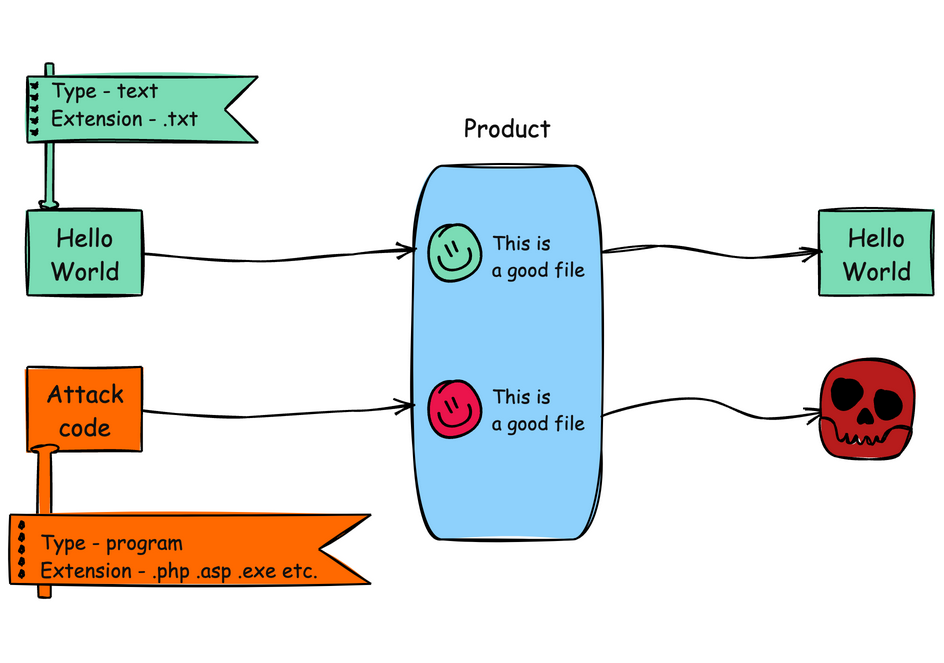
The product allows the upload or transfer of dangerous file types that are automatically processed within its environment.
Alternate Terms
Unrestricted File Upload
Used in vulnerability databases and elsewhere, but it is insufficiently precise. The phrase could be interpreted as the lack of restrictions on the size or number of uploaded files, which is a resource consumption issue.
Common Consequences
This table specifies different individual consequences
associated with the weakness. The Scope identifies the application security area that is
violated, while the Impact describes the negative technical impact that arises if an
adversary succeeds in exploiting this weakness. The Likelihood provides information about
how likely the specific consequence is expected to be seen relative to the other
consequences in the list. For example, there may be high likelihood that a weakness will be
exploited to achieve a certain impact, but a low likelihood that it will be exploited to
achieve a different impact.
Impact
Details
Execute Unauthorized Code or Commands
Scope: Integrity, Confidentiality, Availability
Arbitrary code execution is possible if an uploaded file is interpreted and executed as code by the recipient. This is especially true for web-server extensions such as .asp and .php because these file types are often treated as automatically executable, even when file system permissions do not specify execution. For example, in Unix environments, programs typically cannot run unless the execute bit is set, but PHP programs may be executed by the web server without directly invoking them on the operating system.
Potential Mitigations
Phase(s)
Mitigation
Architecture and Design
Generate a new, unique filename for an uploaded file instead of using the user-supplied filename, so that no external input is used at all.[REF-422] [REF-423]
Architecture and Design
Strategy: Enforcement by Conversion
When the set of acceptable objects, such as filenames or URLs, is limited or known, create a mapping from a set of fixed input values (such as numeric IDs) to the actual filenames or URLs, and reject all other inputs.
Architecture and Design
Consider storing the uploaded files outside of the web document root entirely. Then, use other mechanisms to deliver the files dynamically. [REF-423]
Implementation
Strategy: Input Validation
Assume all input is malicious. Use an "accept known good" input validation strategy, i.e., use a list of acceptable inputs that strictly conform to specifications. Reject any input that does not strictly conform to specifications, or transform it into something that does.
When performing input validation, consider all potentially relevant properties, including length, type of input, the full range of acceptable values, missing or extra inputs, syntax, consistency across related fields, and conformance to business rules. As an example of business rule logic, "boat" may be syntactically valid because it only contains alphanumeric characters, but it is not valid if the input is only expected to contain colors such as "red" or "blue."
Do not rely exclusively on looking for malicious or malformed inputs. This is likely to miss at least one undesirable input, especially if the code's environment changes. This can give attackers enough room to bypass the intended validation. However, denylists can be useful for detecting potential attacks or determining which inputs are so malformed that they should be rejected outright.
For example, limiting filenames to alphanumeric characters can help to restrict the introduction of unintended file extensions.
Architecture and Design
Define a very limited set of allowable extensions and only generate filenames that end in these extensions. Consider the possibility of XSS (CWE-79) before allowing .html or .htm file types.
Implementation
Strategy: Input Validation
Ensure that only one extension is used in the filename. Some web servers, including some versions of Apache, may process files based on inner extensions so that "filename.php.gif" is fed to the PHP interpreter.[REF-422] [REF-423]
Implementation
When running on a web server that supports case-insensitive filenames, perform case-insensitive evaluations of the extensions that are provided.
Architecture and Design
For any security checks that are performed on the client side, ensure that these checks are duplicated on the server side, in order to avoid CWE-602. Attackers can bypass the client-side checks by modifying values after the checks have been performed, or by changing the client to remove the client-side checks entirely. Then, these modified values would be submitted to the server.
Implementation
Do not rely exclusively on sanity checks of file contents to ensure that the file is of the expected type and size. It may be possible for an attacker to hide code in some file segments that will still be executed by the server. For example, GIF images may contain a free-form comments field.
Implementation
Do not rely exclusively on the MIME content type or filename attribute when determining how to render a file. Validating the MIME content type and ensuring that it matches the extension is only a partial solution.
Architecture and Design; Operation
Strategy: Environment Hardening
Run your code using the lowest privileges that are required to accomplish the necessary tasks [REF-76]. If possible, create isolated accounts with limited privileges that are only used for a single task. That way, a successful attack will not immediately give the attacker access to the rest of the software or its environment. For example, database applications rarely need to run as the database administrator, especially in day-to-day operations.
Architecture and Design; Operation
Strategy: Sandbox or Jail
Run the code in a "jail" or similar sandbox environment that enforces strict boundaries between the process and the operating system. This may effectively restrict which files can be accessed in a particular directory or which commands can be executed by the software.
OS-level examples include the Unix chroot jail, AppArmor, and SELinux. In general, managed code may provide some protection. For example, java.io.FilePermission in the Java SecurityManager allows the software to specify restrictions on file operations.
This may not be a feasible solution, and it only limits the impact to the operating system; the rest of the application may still be subject to compromise.
Be careful to avoid CWE-243 and other weaknesses related to jails.
Effectiveness: Limited
Note: The effectiveness of this mitigation depends on the prevention capabilities of the specific sandbox or jail being used and might only help to reduce the scope of an attack, such as restricting the attacker to certain system calls or limiting the portion of the file system that can be accessed.
Relationships
This table shows the weaknesses and high level categories that are related to this
weakness. These relationships are defined as ChildOf, ParentOf, MemberOf and give insight to
similar items that may exist at higher and lower levels of abstraction. In addition,
relationships such as PeerOf and CanAlsoBe are defined to show similar weaknesses that the user
may want to explore.
Relevant to the view "Research Concepts" (View-1000)
Nature
Type
ID
Name
ChildOf
Class - a weakness that is described in a very abstract fashion, typically independent of any specific language or technology. More specific than a Pillar Weakness, but more general than a Base Weakness. Class level weaknesses typically describe issues in terms of 1 or 2 of the following dimensions: behavior, property, and resource.
Base - a weakness that is still mostly independent of a resource or technology, but with sufficient details to provide specific methods for detection and prevention. Base level weaknesses typically describe issues in terms of 2 or 3 of the following dimensions: behavior, property, technology, language, and resource.
Base - a weakness that is still mostly independent of a resource or technology, but with sufficient details to provide specific methods for detection and prevention. Base level weaknesses typically describe issues in terms of 2 or 3 of the following dimensions: behavior, property, technology, language, and resource.
Class - a weakness that is described in a very abstract fashion, typically independent of any specific language or technology. More specific than a Pillar Weakness, but more general than a Base Weakness. Class level weaknesses typically describe issues in terms of 1 or 2 of the following dimensions: behavior, property, and resource.
Variant - a weakness that is linked to a certain type of product, typically involving a specific language or technology. More specific than a Base weakness. Variant level weaknesses typically describe issues in terms of 3 to 5 of the following dimensions: behavior, property, technology, language, and resource.
Reliance on File Name or Extension of Externally-Supplied File
CanFollow
Base - a weakness that is still mostly independent of a resource or technology, but with sufficient details to provide specific methods for detection and prevention. Base level weaknesses typically describe issues in terms of 2 or 3 of the following dimensions: behavior, property, technology, language, and resource.
Base - a weakness that is still mostly independent of a resource or technology, but with sufficient details to provide specific methods for detection and prevention. Base level weaknesses typically describe issues in terms of 2 or 3 of the following dimensions: behavior, property, technology, language, and resource.
Base - a weakness that is still mostly independent of a resource or technology, but with sufficient details to provide specific methods for detection and prevention. Base level weaknesses typically describe issues in terms of 2 or 3 of the following dimensions: behavior, property, technology, language, and resource.
Relevant to the view "Weaknesses for Simplified Mapping of Published Vulnerabilities" (View-1003)
Nature
Type
ID
Name
ChildOf
Class - a weakness that is described in a very abstract fashion, typically independent of any specific language or technology. More specific than a Pillar Weakness, but more general than a Base Weakness. Class level weaknesses typically describe issues in terms of 1 or 2 of the following dimensions: behavior, property, and resource.
The different Modes of Introduction provide information
about how and when this
weakness may be introduced. The Phase identifies a point in the life cycle at which
introduction
may occur, while the Note provides a typical scenario related to introduction during the
given
phase.
Phase
Note
Implementation
Architecture and Design
OMISSION: This weakness is caused by missing a security tactic during the architecture and design phase.
Applicable Platforms
This listing shows possible areas for which the given
weakness could appear. These
may be for specific named Languages, Operating Systems, Architectures, Paradigms,
Technologies,
or a class of such platforms. The platform is listed along with how frequently the given
weakness appears for that instance.
Languages
ASP.NET
(Sometimes Prevalent)
PHP
(Often Prevalent)
Class: Not Language-Specific
(Undetermined Prevalence)
Technologies
Web Server
(Sometimes Prevalent)
AI/ML
(Undetermined Prevalence)
Likelihood Of Exploit
Medium
Demonstrative Examples
Example 1
The following code intends to allow a user to upload a picture to the web server. The HTML code that drives the form on the user end has an input field of type "file".
Choose a file to upload: <input type="file" name="filename"/> <br/> <input type="submit" name="submit" value="Submit"/>
</form>
Once submitted, the form above sends the file to upload_picture.php on the web server. PHP stores the file in a temporary location until it is retrieved (or discarded) by the server side code. In this example, the file is moved to a more permanent pictures/ directory.
(bad code)
Example Language: PHP
// Define the target location where the picture being
// uploaded is going to be saved. $target = "pictures/" . basename($_FILES['uploadedfile']['name']);
// Move the uploaded file to the new location. if(move_uploaded_file($_FILES['uploadedfile']['tmp_name'], $target)) {
echo "The picture has been successfully uploaded.";
} else {
echo "There was an error uploading the picture, please try again.";
}
The problem with the above code is that there is no check regarding type of file being uploaded. Assuming that pictures/ is available in the web document root, an attacker could upload a file with the name:
(attack code)
malicious.php
Since this filename ends in ".php" it can be executed by the web server. In the contents of this uploaded file, the attacker could use:
(attack code)
Example Language: PHP
<?php
system($_GET['cmd']);
?>
Once this file has been installed, the attacker can enter arbitrary commands to execute using a URL such as:
which runs the "ls -l" command - or any other type of command that the attacker wants to specify.
Example 2
The following code demonstrates the unrestricted upload of a file with a Java servlet and a path traversal vulnerability. The action attribute of an HTML form is sending the upload file request to the Java servlet.
Choose a file to upload: <input type="file" name="filename"/> <br/> <input type="submit" name="submit" value="Submit"/>
</form>
When submitted the Java servlet's doPost method will receive the request, extract the name of the file from the Http request header, read the file contents from the request and output the file to the local upload directory.
(bad code)
Example Language: Java
public class FileUploadServlet extends HttpServlet {
} // output unsuccessful upload response HTML page else {...}
}
...
}
This code does not perform a check on the type of the file being uploaded (CWE-434). This could allow an attacker to upload any executable file or other file with malicious code.
Additionally, the creation of the BufferedWriter object is subject to relative path traversal (CWE-23). Since the code does not check the filename that is provided in the header, an attacker can use "../" sequences to write to files outside of the intended directory. Depending on the executing environment, the attacker may be able to specify arbitrary files to write to, leading to a wide variety of consequences, from code execution, XSS (CWE-79), or system crash.
Selected Observed
Examples
Note: this is a curated list of examples for users to understand the variety of ways in which this
weakness can be introduced. It is not a complete list of all CVEs that are related to this CWE entry.
(where the weakness exists independent of other weaknesses)
This can be primary when there is no check for the file type at all.
Resultant
(where the weakness is typically related to the presence of some other weaknesses)
This can be resultant when use of double extensions (e.g. ".php.gif") bypasses a check.
Resultant
(where the weakness is typically related to the presence of some other weaknesses)
This can be resultant from client-side enforcement (CWE-602); some products will include web script in web clients to check the filename, without verifying on the server side.
Detection
Methods
Method
Details
Dynamic Analysis with Automated Results Interpretation
According to SOAR [REF-1479], the following detection techniques may be useful:
Cost effective for partial coverage:
Web Application Scanner
Web Services Scanner
Database Scanners
Effectiveness: SOAR Partial
Dynamic Analysis with Manual Results Interpretation
According to SOAR [REF-1479], the following detection techniques may be useful:
Cost effective for partial coverage:
Fuzz Tester
Framework-based Fuzzer
Effectiveness: SOAR Partial
Manual Static Analysis - Source Code
According to SOAR [REF-1479], the following detection techniques may be useful:
Highly cost effective:
Focused Manual Spotcheck - Focused manual analysis of source
Manual Source Code Review (not inspections)
Effectiveness: High
Automated Static Analysis - Source Code
According to SOAR [REF-1479], the following detection techniques may be useful:
Highly cost effective:
Source code Weakness Analyzer
Context-configured Source Code Weakness Analyzer
Effectiveness: High
Architecture or Design Review
According to SOAR [REF-1479], the following detection techniques may be useful:
This MemberOf Relationships table shows additional CWE Categories and Views that
reference this weakness as a member. This information is often useful in understanding where a
weakness fits within the context of external information sources.
Nature
Type
ID
Name
MemberOf
Category - a CWE entry that contains a set of other entries that share a common characteristic.
2011 Top 25 - Insecure Interaction Between Components
MemberOf
View - a subset of CWE entries that provides a way of examining CWE content. The two main view structures are Slices (flat lists) and Graphs (containing relationships between entries).
View - a subset of CWE entries that provides a way of examining CWE content. The two main view structures are Slices (flat lists) and Graphs (containing relationships between entries).
View - a subset of CWE entries that provides a way of examining CWE content. The two main view structures are Slices (flat lists) and Graphs (containing relationships between entries).
Weaknesses in the 2021 CWE Top 25 Most Dangerous Software Weaknesses
MemberOf
View - a subset of CWE entries that provides a way of examining CWE content. The two main view structures are Slices (flat lists) and Graphs (containing relationships between entries).
OWASP Top Ten 2021 Category A04:2021 - Insecure Design
MemberOf
View - a subset of CWE entries that provides a way of examining CWE content. The two main view structures are Slices (flat lists) and Graphs (containing relationships between entries).
View - a subset of CWE entries that provides a way of examining CWE content. The two main view structures are Slices (flat lists) and Graphs (containing relationships between entries).
View - a subset of CWE entries that provides a way of examining CWE content. The two main view structures are Slices (flat lists) and Graphs (containing relationships between entries).
Weaknesses in the 2023 CWE Top 25 Most Dangerous Software Weaknesses
MemberOf
View - a subset of CWE entries that provides a way of examining CWE content. The two main view structures are Slices (flat lists) and Graphs (containing relationships between entries).
Weaknesses in the 2024 CWE Top 25 Most Dangerous Software Weaknesses
MemberOf
View - a subset of CWE entries that provides a way of examining CWE content. The two main view structures are Slices (flat lists) and Graphs (containing relationships between entries).
General Software Weaknesses that Appear in Products that Use or Support AI/ML Technology
Vulnerability Mapping Notes
Usage
ALLOWED
(this CWE ID may be used to map to real-world vulnerabilities)
Reason
Acceptable-Use
Rationale
This CWE entry is at the Base level of abstraction, which is a preferred level of abstraction for mapping to the root causes of vulnerabilities.
Comments
Carefully read both the name and description to ensure that this mapping is an appropriate fit. Do not try to 'force' a mapping to a lower-level Base/Variant simply to comply with this preferred level of abstraction.
Notes
Relationship
This can have a chaining relationship with incomplete denylist / permissive allowlist errors when the product tries, but fails, to properly limit which types of files are allowed (CWE-183, CWE-184).
This can also overlap multiple interpretation errors for intermediaries, e.g. anti-virus products that do not remove or quarantine attachments with certain file extensions that can be processed by client systems.
Mark Dowd, John McDonald and Justin Schuh. "The Art of Software Security Assessment". Chapter 17, "File Uploading", Page 1068. 1st Edition. Addison Wesley. 2006.


 Description
 This table specifies different individual consequences
associated with the weakness. The Scope identifies the application security area that is
violated, while the Impact describes the negative technical impact that arises if an
adversary succeeds in exploiting this weakness. The Likelihood provides information about
how likely the specific consequence is expected to be seen relative to the other
consequences in the list. For example, there may be high likelihood that a weakness will be
exploited to achieve a certain impact, but a low likelihood that it will be exploited to
achieve a different impact.
This table specifies different individual consequences
associated with the weakness. The Scope identifies the application security area that is
violated, while the Impact describes the negative technical impact that arises if an
adversary succeeds in exploiting this weakness. The Likelihood provides information about
how likely the specific consequence is expected to be seen relative to the other
consequences in the list. For example, there may be high likelihood that a weakness will be
exploited to achieve a certain impact, but a low likelihood that it will be exploited to
achieve a different impact.