CWE-79: Improper Neutralization of Input During Web Page Generation ('Cross-site Scripting')
Weakness ID: 79
Vulnerability Mapping:ALLOWEDThis CWE ID may be used to map to real-world vulnerabilities Abstraction:
BaseBase - a weakness that is still mostly independent of a resource or technology, but with sufficient details to provide specific methods for detection and prevention. Base level weaknesses typically describe issues in terms of 2 or 3 of the following dimensions: behavior, property, technology, language, and resource.
View customized information:
For users who are interested in more notional aspects of a weakness. Example: educators, technical writers, and project/program managers.For users who are concerned with the practical application and details about the nature of a weakness and how to prevent it from happening. Example: tool developers, security researchers, pen-testers, incident response analysts.For users who are mapping an issue to CWE/CAPEC IDs, i.e., finding the most appropriate CWE for a specific issue (e.g., a CVE record). Example: tool developers, security researchers.For users who wish to see all available information for the CWE/CAPEC entry.For users who want to customize what details are displayed.
×
Edit Custom Filter
Description
The product does not neutralize or incorrectly neutralizes user-controllable input before it is placed in output that is used as a web page that is served to other users.
Extended Description
There are many variants of cross-site scripting, characterized by a variety of terms or involving different attack topologies. However, they all indicate the same fundamental weakness: improper neutralization of dangerous input between the adversary and a victim.
Alternate Terms
XSS
A common abbreviation for Cross-Site Scripting.
HTML Injection
Used as a synonym of stored (Type 2) XSS.
Reflected XSS / Non-Persistent XSS / Type 1 XSS
Used when a server application reads data directly from the HTTP request and reflects it back in the HTTP response.
Stored XSS / Persistent XSS / Type 2 XSS
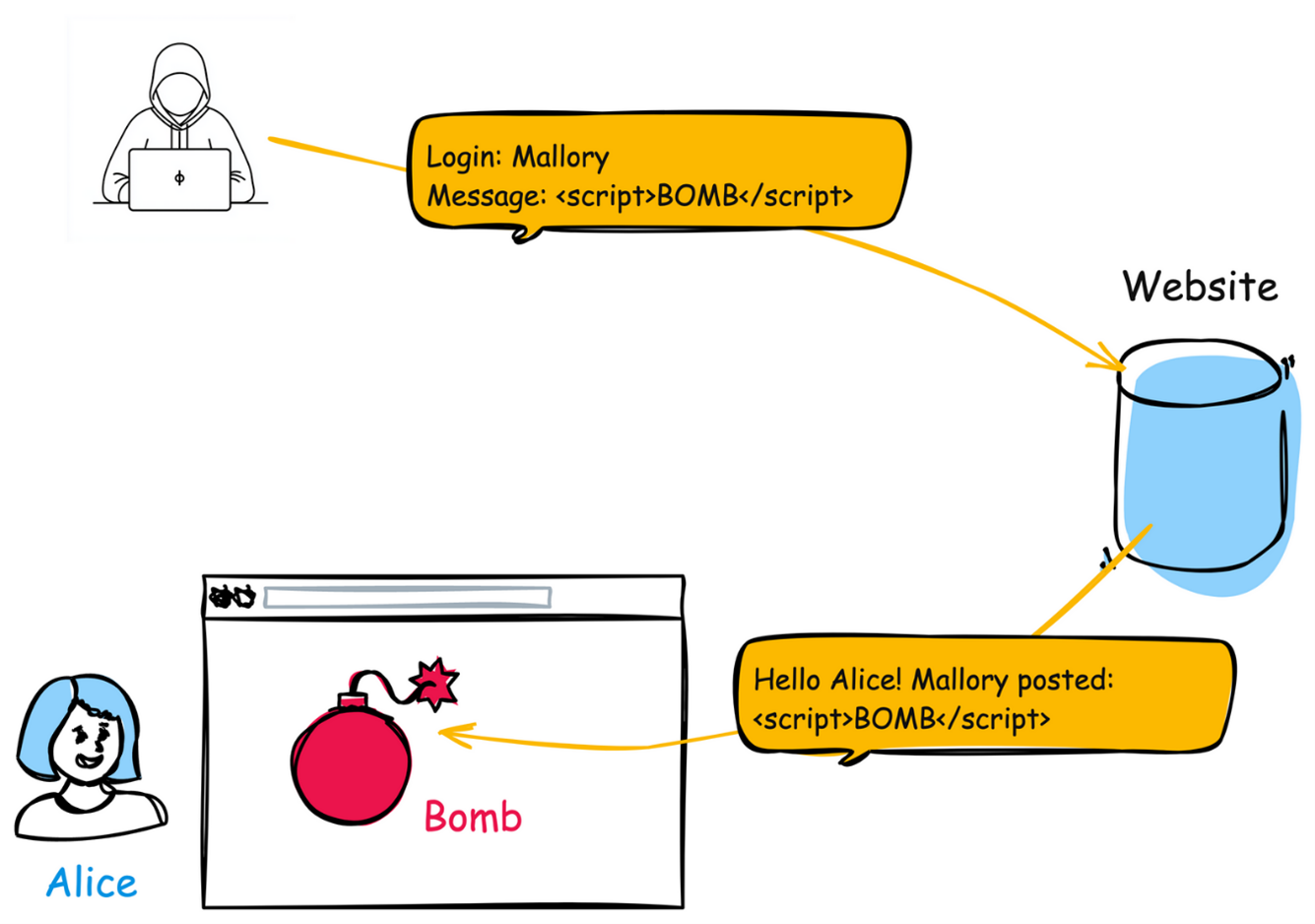
Used when a server-side application stores dangerous data in a database, message forum, visitor log, or other trusted data store. At a later time, the dangerous data is subsequently read back into the application and included in dynamic content.
DOM-Based XSS / Type 0 XSS
Used when a client-side application performs the injection of XSS into the page by manipulating the Domain Object Model (DOM).
CSS
In the early years after initial discovery of XSS, "CSS" was a commonly-used acronym. However, this would cause confusion with "Cascading Style Sheets," so usage of this acronym has declined significantly.
Common Consequences
This table specifies different individual consequences
associated with the weakness. The Scope identifies the application security area that is
violated, while the Impact describes the negative technical impact that arises if an
adversary succeeds in exploiting this weakness. The Likelihood provides information about
how likely the specific consequence is expected to be seen relative to the other
consequences in the list. For example, there may be high likelihood that a weakness will be
exploited to achieve a certain impact, but a low likelihood that it will be exploited to
achieve a different impact.
Impact
Details
Bypass Protection Mechanism; Read Application Data
Scope: Access Control, Confidentiality
The most common attack performed with cross-site scripting involves the disclosure of private information stored in user cookies, such as session information. Typically, a malicious user will craft a client-side script, which -- when parsed by a web browser -- performs some activity on behalf of the victim to an attacker-controlled system (such as sending all site cookies to a given E-mail address). This could be especially dangerous to the site if the victim has administrator privileges to manage that site. This script will be loaded and run by each user visiting the web site. Since the site requesting to run the script has access to the cookies in question, the malicious script does also.
Execute Unauthorized Code or Commands
Scope: Integrity, Confidentiality, Availability
In some circumstances it may be possible to run arbitrary code on a victim's computer when cross-site scripting is combined with other flaws, for example, "drive-by hacking."
Execute Unauthorized Code or Commands; Bypass Protection Mechanism; Read Application Data
Scope: Confidentiality, Integrity, Availability, Access Control
The consequence of an XSS attack is the same regardless of whether it is stored or reflected. The difference is in how the payload arrives at the server. XSS can cause a variety of problems for the end user that range in severity from an annoyance to complete account compromise. Some cross-site scripting vulnerabilities can be exploited to manipulate or steal cookies, create requests that can be mistaken for those of a valid user, compromise confidential information, or execute malicious code on the end user systems for a variety of nefarious purposes. Other damaging attacks include the disclosure of end user files, installation of Trojan horse programs, redirecting the user to some other page or site, running "Active X" controls (under Microsoft Internet Explorer) from sites that a user perceives as trustworthy, and modifying presentation of content.
Potential Mitigations
Phase(s)
Mitigation
Architecture and Design
Strategy: Libraries or Frameworks
Use a vetted library or framework that does not allow this weakness to occur or provides constructs that make this weakness easier to avoid [REF-1482].
Examples of libraries and frameworks that make it easier to generate properly encoded output include Microsoft's Anti-XSS library, the OWASP ESAPI Encoding module, and Apache Wicket.
Implementation; Architecture and Design
Understand the context in which your data will be used and the encoding that will be expected. This is especially important when transmitting data between different components, or when generating outputs that can contain multiple encodings at the same time, such as web pages or multi-part mail messages. Study all expected communication protocols and data representations to determine the required encoding strategies.
For any data that will be output to another web page, especially any data that was received from external inputs, use the appropriate encoding on all non-alphanumeric characters.
Parts of the same output document may require different encodings, which will vary depending on whether the output is in the:
HTML body
Element attributes (such as src="XYZ")
URIs
JavaScript sections
Cascading Style Sheets and style property
etc. Note that HTML Entity Encoding is only appropriate for the HTML body.
Consult the XSS Prevention Cheat Sheet [REF-724] for more details on the types of encoding and escaping that are needed.
Architecture and Design; Implementation
Strategy: Attack Surface Reduction
Understand all the potential areas where untrusted inputs can enter your software: parameters or arguments, cookies, anything read from the network, environment variables, reverse DNS lookups, query results, request headers, URL components, e-mail, files, filenames, databases, and any external systems that provide data to the application. Remember that such inputs may be obtained indirectly through API calls.
Effectiveness: Limited
Note: This technique has limited effectiveness, but can be helpful when it is possible to store client state and sensitive information on the server side instead of in cookies, headers, hidden form fields, etc.
Architecture and Design
For any security checks that are performed on the client side, ensure that these checks are duplicated on the server side, in order to avoid CWE-602. Attackers can bypass the client-side checks by modifying values after the checks have been performed, or by changing the client to remove the client-side checks entirely. Then, these modified values would be submitted to the server.
Architecture and Design
Strategy: Parameterization
If available, use structured mechanisms that automatically enforce the separation between data and code. These mechanisms may be able to provide the relevant quoting, encoding, and validation automatically, instead of relying on the developer to provide this capability at every point where output is generated.
Implementation
Strategy: Output Encoding
Use and specify an output encoding that can be handled by the downstream component that is reading the output. Common encodings include ISO-8859-1, UTF-7, and UTF-8. When an encoding is not specified, a downstream component may choose a different encoding, either by assuming a default encoding or automatically inferring which encoding is being used, which can be erroneous. When the encodings are inconsistent, the downstream component might treat some character or byte sequences as special, even if they are not special in the original encoding. Attackers might then be able to exploit this discrepancy and conduct injection attacks; they even might be able to bypass protection mechanisms that assume the original encoding is also being used by the downstream component.
The problem of inconsistent output encodings often arises in web pages. If an encoding is not specified in an HTTP header, web browsers often guess about which encoding is being used. This can open up the browser to subtle XSS attacks.
Implementation
With Struts, write all data from form beans with the bean's filter attribute set to true.
Implementation
Strategy: Attack Surface Reduction
To help mitigate XSS attacks against the user's session cookie, set the session cookie to be HttpOnly. In browsers that support the HttpOnly feature (such as more recent versions of Internet Explorer and Firefox), this attribute can prevent the user's session cookie from being accessible to malicious client-side scripts that use document.cookie. This is not a complete solution, since HttpOnly is not supported by all browsers. More importantly, XmlHttpRequest and other powerful browser technologies provide read access to HTTP headers, including the Set-Cookie header in which the HttpOnly flag is set.
Effectiveness: Defense in Depth
Implementation
Strategy: Input Validation
Assume all input is malicious. Use an "accept known good" input validation strategy, i.e., use a list of acceptable inputs that strictly conform to specifications. Reject any input that does not strictly conform to specifications, or transform it into something that does.
When performing input validation, consider all potentially relevant properties, including length, type of input, the full range of acceptable values, missing or extra inputs, syntax, consistency across related fields, and conformance to business rules. As an example of business rule logic, "boat" may be syntactically valid because it only contains alphanumeric characters, but it is not valid if the input is only expected to contain colors such as "red" or "blue."
Do not rely exclusively on looking for malicious or malformed inputs. This is likely to miss at least one undesirable input, especially if the code's environment changes. This can give attackers enough room to bypass the intended validation. However, denylists can be useful for detecting potential attacks or determining which inputs are so malformed that they should be rejected outright.
When dynamically constructing web pages, use stringent allowlists that limit the character set based on the expected value of the parameter in the request. All input should be validated and cleansed, not just parameters that the user is supposed to specify, but all data in the request, including hidden fields, cookies, headers, the URL itself, and so forth. A common mistake that leads to continuing XSS vulnerabilities is to validate only fields that are expected to be redisplayed by the site. It is common to see data from the request that is reflected by the application server or the application that the development team did not anticipate. Also, a field that is not currently reflected may be used by a future developer. Therefore, validating ALL parts of the HTTP request is recommended.
Note that proper output encoding, escaping, and quoting is the most effective solution for preventing XSS, although input validation may provide some defense-in-depth. This is because it effectively limits what will appear in output. Input validation will not always prevent XSS, especially if you are required to support free-form text fields that could contain arbitrary characters. For example, in a chat application, the heart emoticon ("<3") would likely pass the validation step, since it is commonly used. However, it cannot be directly inserted into the web page because it contains the "<" character, which would need to be escaped or otherwise handled. In this case, stripping the "<" might reduce the risk of XSS, but it would produce incorrect behavior because the emoticon would not be recorded. This might seem to be a minor inconvenience, but it would be more important in a mathematical forum that wants to represent inequalities.
Even if you make a mistake in your validation (such as forgetting one out of 100 input fields), appropriate encoding is still likely to protect you from injection-based attacks. As long as it is not done in isolation, input validation is still a useful technique, since it may significantly reduce your attack surface, allow you to detect some attacks, and provide other security benefits that proper encoding does not address.
Ensure that you perform input validation at well-defined interfaces within the application. This will help protect the application even if a component is reused or moved elsewhere.
Architecture and Design
Strategy: Enforcement by Conversion
When the set of acceptable objects, such as filenames or URLs, is limited or known, create a mapping from a set of fixed input values (such as numeric IDs) to the actual filenames or URLs, and reject all other inputs.
Operation
Strategy: Firewall
Use an application firewall that can detect attacks against this weakness. It can be beneficial in cases in which the code cannot be fixed (because it is controlled by a third party), as an emergency prevention measure while more comprehensive software assurance measures are applied, or to provide defense in depth [REF-1481].
Effectiveness: Moderate
Note: An application firewall might not cover all possible input vectors. In addition, attack techniques might be available to bypass the protection mechanism, such as using malformed inputs that can still be processed by the component that receives those inputs. Depending on functionality, an application firewall might inadvertently reject or modify legitimate requests. Finally, some manual effort may be required for customization.
Operation; Implementation
Strategy: Environment Hardening
When using PHP, configure the application so that it does not use register_globals. During implementation, develop the application so that it does not rely on this feature, but be wary of implementing a register_globals emulation that is subject to weaknesses such as CWE-95, CWE-621, and similar issues.
Relationships
This table shows the weaknesses and high level categories that are related to this
weakness. These relationships are defined as ChildOf, ParentOf, MemberOf and give insight to
similar items that may exist at higher and lower levels of abstraction. In addition,
relationships such as PeerOf and CanAlsoBe are defined to show similar weaknesses that the user
may want to explore.
Relevant to the view "Research Concepts" (View-1000)
Nature
Type
ID
Name
ChildOf
Class - a weakness that is described in a very abstract fashion, typically independent of any specific language or technology. More specific than a Pillar Weakness, but more general than a Base Weakness. Class level weaknesses typically describe issues in terms of 1 or 2 of the following dimensions: behavior, property, and resource.
Improper Neutralization of Special Elements in Output Used by a Downstream Component ('Injection')
ParentOf
Variant - a weakness that is linked to a certain type of product, typically involving a specific language or technology. More specific than a Base weakness. Variant level weaknesses typically describe issues in terms of 3 to 5 of the following dimensions: behavior, property, technology, language, and resource.
Improper Neutralization of Script-Related HTML Tags in a Web Page (Basic XSS)
ParentOf
Variant - a weakness that is linked to a certain type of product, typically involving a specific language or technology. More specific than a Base weakness. Variant level weaknesses typically describe issues in terms of 3 to 5 of the following dimensions: behavior, property, technology, language, and resource.
Improper Neutralization of Script in an Error Message Web Page
ParentOf
Variant - a weakness that is linked to a certain type of product, typically involving a specific language or technology. More specific than a Base weakness. Variant level weaknesses typically describe issues in terms of 3 to 5 of the following dimensions: behavior, property, technology, language, and resource.
Improper Neutralization of Script in Attributes in a Web Page
ParentOf
Variant - a weakness that is linked to a certain type of product, typically involving a specific language or technology. More specific than a Base weakness. Variant level weaknesses typically describe issues in terms of 3 to 5 of the following dimensions: behavior, property, technology, language, and resource.
Improper Neutralization of Encoded URI Schemes in a Web Page
ParentOf
Variant - a weakness that is linked to a certain type of product, typically involving a specific language or technology. More specific than a Base weakness. Variant level weaknesses typically describe issues in terms of 3 to 5 of the following dimensions: behavior, property, technology, language, and resource.
Variant - a weakness that is linked to a certain type of product, typically involving a specific language or technology. More specific than a Base weakness. Variant level weaknesses typically describe issues in terms of 3 to 5 of the following dimensions: behavior, property, technology, language, and resource.
Improper Neutralization of Invalid Characters in Identifiers in Web Pages
ParentOf
Variant - a weakness that is linked to a certain type of product, typically involving a specific language or technology. More specific than a Base weakness. Variant level weaknesses typically describe issues in terms of 3 to 5 of the following dimensions: behavior, property, technology, language, and resource.
Composite - a Compound Element that consists of two or more distinct weaknesses, in which all weaknesses must be present at the same time in order for a potential vulnerability to arise. Removing any of the weaknesses eliminates or sharply reduces the risk. One weakness, X, can be "broken down" into component weaknesses Y and Z. There can be cases in which one weakness might not be essential to a composite, but changes the nature of the composite when it becomes a vulnerability.
Variant - a weakness that is linked to a certain type of product, typically involving a specific language or technology. More specific than a Base weakness. Variant level weaknesses typically describe issues in terms of 3 to 5 of the following dimensions: behavior, property, technology, language, and resource.
Improper Neutralization of CRLF Sequences in HTTP Headers ('HTTP Request/Response Splitting')
CanFollow
Base - a weakness that is still mostly independent of a resource or technology, but with sufficient details to provide specific methods for detection and prevention. Base level weaknesses typically describe issues in terms of 2 or 3 of the following dimensions: behavior, property, technology, language, and resource.
Base - a weakness that is still mostly independent of a resource or technology, but with sufficient details to provide specific methods for detection and prevention. Base level weaknesses typically describe issues in terms of 2 or 3 of the following dimensions: behavior, property, technology, language, and resource.
Relevant to the view "Weaknesses for Simplified Mapping of Published Vulnerabilities" (View-1003)
Nature
Type
ID
Name
ChildOf
Class - a weakness that is described in a very abstract fashion, typically independent of any specific language or technology. More specific than a Pillar Weakness, but more general than a Base Weakness. Class level weaknesses typically describe issues in terms of 1 or 2 of the following dimensions: behavior, property, and resource.
The Same Origin Policy states that browsers should limit the resources accessible to scripts running on a given web site, or "origin", to the resources associated with that web site on the client-side, and not the client-side resources of any other sites or "origins". The goal is to prevent one site from being able to modify or read the contents of an unrelated site. Since the World Wide Web involves interactions between many sites, this policy is important for browsers to enforce.
When referring to XSS, the Domain of a website is roughly equivalent to the resources associated with that website on the client-side of the connection. That is, the domain can be thought of as all resources the browser is storing for the user's interactions with this particular site.
Modes
Of Introduction
The different Modes of Introduction provide information
about how and when this
weakness may be introduced. The Phase identifies a point in the life cycle at which
introduction
may occur, while the Note provides a typical scenario related to introduction during the
given
phase.
Phase
Note
Implementation
REALIZATION: This weakness is caused during implementation of an architectural security tactic.
Applicable Platforms
This listing shows possible areas for which the given
weakness could appear. These
may be for specific named Languages, Operating Systems, Architectures, Paradigms,
Technologies,
or a class of such platforms. The platform is listed along with how frequently the given
weakness appears for that instance.
Languages
Class: Not Language-Specific
(Undetermined Prevalence)
Technologies
AI/ML
(Undetermined Prevalence)
Class: Web Based
(Often Prevalent)
Web Server
(Undetermined Prevalence)
Likelihood Of Exploit
High
Demonstrative Examples
Example 1
The following code displays a welcome message on a web page based on the HTTP GET username parameter (covers a Reflected XSS (Type 1) scenario).
Because the parameter can be arbitrary, the url of the page could be modified so $username contains scripting syntax, such as
(attack code)
http://trustedSite.example.com/welcome.php?username=<Script Language="Javascript">alert("You've been attacked!");</Script>
This results in a harmless alert dialog popping up. Initially this might not appear to be much of a vulnerability. After all, why would someone enter a URL that causes malicious code to run on their own computer? The real danger is that an attacker will create the malicious URL, then use e-mail or social engineering tricks to lure victims into visiting a link to the URL. When victims click the link, they unwittingly reflect the malicious content through the vulnerable web application back to their own computers.
More realistically, the attacker can embed a fake login box on the page, tricking the user into sending the user's password to the attacker:
The trustworthy domain of the URL may falsely assure the user that it is OK to follow the link. However, an astute user may notice the suspicious text appended to the URL. An attacker may further obfuscate the URL (the following example links are broken into multiple lines for readability):
Both of these attack links will result in the fake login box appearing on the page, and users are more likely to ignore indecipherable text at the end of URLs.
Example 2
The following code displays a Reflected XSS (Type 1) scenario.
The following JSP code segment reads an employee ID, eid, from an HTTP request and displays it to the user.
The code in this example operates correctly if the Employee ID variable contains only standard alphanumeric text. If it has a value that includes meta-characters or source code, then the code will be executed by the web browser as it displays the HTTP response.
Example 3
The following code displays a Stored XSS (Type 2) scenario.
The following JSP code segment queries a database for an employee with a given ID and prints the corresponding employee's name.
(bad code)
Example Language: JSP
<%Statement stmt = conn.createStatement(); ResultSet rs = stmt.executeQuery("select * from emp where id="+eid); if (rs != null) {
rs.next(); String name = rs.getString("name");
}%>
Employee Name: <%= name %>
The following ASP.NET code segment queries a database for an employee with a given employee ID and prints the name corresponding with the ID.
(bad code)
Example Language: ASP.NET
<% protected System.Web.UI.WebControls.Label EmployeeName; ... string query = "select * from emp where id=" + eid; sda = new SqlDataAdapter(query, conn); sda.Fill(dt); string name = dt.Rows[0]["Name"]; ... EmployeeName.Text = name;%> <p><asp:label id="EmployeeName" runat="server" /></p>
This code can appear less dangerous because the value of name is read from a database, whose contents are apparently managed by the application. However, if the value of name originates from user-supplied data, then the database can be a conduit for malicious content. Without proper input validation on all data stored in the database, an attacker can execute malicious commands in the user's web browser.
Example 4
The following code consists of two separate pages in a web application, one devoted to creating user accounts and another devoted to listing active users currently logged in. It also displays a Stored XSS (Type 2) scenario.
The code is careful to avoid a SQL injection attack (CWE-89) but does not stop valid HTML from being stored in the database. This can be exploited later when ListUsers.php retrieves the information:
ListUsers.php
(bad code)
Example Language: PHP
$query = 'Select * From users Where loggedIn=true'; $results = mysql_query($query);
if (!$results) {
exit;
}
//Print list of users to page echo '<div id="userlist">Currently Active Users:'; while ($row = mysql_fetch_assoc($results)) {
The attacker can set their name to be arbitrary HTML, which will then be displayed to all visitors of the Active Users page. This HTML can, for example, be a password stealing Login message.
Example 5
The following code is a simplistic message board that saves messages in HTML format and appends them to a file. When a new user arrives in the room, it makes an announcement:
(bad code)
Example Language: PHP
$name = $_COOKIE["myname"]; $announceStr = "$name just logged in.";
//save HTML-formatted message to file; implementation details are irrelevant for this example.
saveMessage($announceStr);
An attacker may be able to perform an HTML injection (Type 2 XSS) attack by setting a cookie to a value like:
(attack code)
<script>document.alert('Hacked');</script>
The raw contents of the message file would look like:
(result)
<script>document.alert('Hacked');</script> has logged in.
For each person who visits the message page, their browser would execute the script, generating a pop-up window that says "Hacked". More malicious attacks are possible; see the rest of this entry.
Example 6
The following code attempts to stop XSS attacks by removing all occurences of "script" in an input string.
(bad code)
Example Language: Java
public String removeScriptTags(String input, String mask) {
return input.replaceAll("script", mask);
}
Because the code only checks for the lower-case "script" string, it can be easily defeated with upper-case script tags.
Selected Observed
Examples
Note: this is a curated list of examples for users to understand the variety of ways in which this
weakness can be introduced. It is not a complete list of all CVEs that are related to this CWE entry.
Chain: library file is not protected against a direct request (CWE-425), leading to reflected XSS (CWE-79).
Weakness Ordinalities
Ordinality
Description
Resultant
(where the weakness is typically related to the presence of some other weaknesses)
Detection
Methods
Method
Details
Automated Static Analysis
Use automated static analysis tools that target this type of weakness. Many modern techniques use data flow analysis to minimize the number of false positives. This is not a perfect solution, since 100% accuracy and coverage are not feasible, especially when multiple components are involved.
Effectiveness: Moderate
Black Box
Use the XSS Cheat Sheet [REF-714] or automated test-generation tools to help launch a wide variety of attacks against your web application. The Cheat Sheet contains many subtle XSS variations that are specifically targeted against weak XSS defenses.
Effectiveness: Moderate
Note:With Stored XSS, the indirection caused by the data store can make it more difficult to find the problem. The tester must first inject the XSS string into the data store, then find the appropriate application functionality in which the XSS string is sent to other users of the application. These are two distinct steps in which the activation of the XSS can take place minutes, hours, or days after the XSS was originally injected into the data store.
Memberships
This MemberOf Relationships table shows additional CWE Categories and Views that
reference this weakness as a member. This information is often useful in understanding where a
weakness fits within the context of external information sources.
Nature
Type
ID
Name
MemberOf
View - a subset of CWE entries that provides a way of examining CWE content. The two main view structures are Slices (flat lists) and Graphs (containing relationships between entries).
2011 Top 25 - Insecure Interaction Between Components
MemberOf
View - a subset of CWE entries that provides a way of examining CWE content. The two main view structures are Slices (flat lists) and Graphs (containing relationships between entries).
View - a subset of CWE entries that provides a way of examining CWE content. The two main view structures are Slices (flat lists) and Graphs (containing relationships between entries).
View - a subset of CWE entries that provides a way of examining CWE content. The two main view structures are Slices (flat lists) and Graphs (containing relationships between entries).
Weaknesses in the 2021 CWE Top 25 Most Dangerous Software Weaknesses
MemberOf
View - a subset of CWE entries that provides a way of examining CWE content. The two main view structures are Slices (flat lists) and Graphs (containing relationships between entries).
View - a subset of CWE entries that provides a way of examining CWE content. The two main view structures are Slices (flat lists) and Graphs (containing relationships between entries).
Weaknesses in the 2020 CWE Top 25 Most Dangerous Software Weaknesses
MemberOf
View - a subset of CWE entries that provides a way of examining CWE content. The two main view structures are Slices (flat lists) and Graphs (containing relationships between entries).
View - a subset of CWE entries that provides a way of examining CWE content. The two main view structures are Slices (flat lists) and Graphs (containing relationships between entries).
Weaknesses in the 2023 CWE Top 25 Most Dangerous Software Weaknesses
MemberOf
View - a subset of CWE entries that provides a way of examining CWE content. The two main view structures are Slices (flat lists) and Graphs (containing relationships between entries).
Weaknesses in the 2024 CWE Top 25 Most Dangerous Software Weaknesses
MemberOf
View - a subset of CWE entries that provides a way of examining CWE content. The two main view structures are Slices (flat lists) and Graphs (containing relationships between entries).
General Software Weaknesses that Appear in Products that Use or Support AI/ML Technology
Vulnerability Mapping Notes
Usage
ALLOWED
(this CWE ID may be used to map to real-world vulnerabilities)
Reason
Acceptable-Use
Rationale
This CWE entry is at the Base level of abstraction, which is a preferred level of abstraction for mapping to the root causes of vulnerabilities.
Comments
Carefully read both the name and description to ensure that this mapping is an appropriate fit. Do not try to 'force' a mapping to a lower-level Base/Variant simply to comply with this preferred level of abstraction.
Notes
Relationship
There can be a close relationship between XSS and CSRF (CWE-352). An attacker might use CSRF in order to trick the victim into submitting requests to the server in which the requests contain an XSS payload. A well-known example of this was the Samy worm on MySpace [REF-956]. The worm used XSS to insert malicious HTML sequences into a user's profile and add the attacker as a MySpace friend. MySpace friends of that victim would then execute the payload to modify their own profiles, causing the worm to propagate exponentially. Since the victims did not intentionally insert the malicious script themselves, CSRF was a root cause.
Applicable Platform
XSS flaws are very common in web applications, since they require a great deal of developer discipline to avoid them.
Other
The attack methods for XSS can vary depending on the type of XSS and the attacker's goal.
Reflected XSS exploits (Type 1) occur when an attacker causes a victim to supply dangerous content to a vulnerable web application, which is then reflected back to the victim and executed by the web browser. The most common mechanism for delivering malicious content is to include it as a parameter in a URL that is posted publicly or e-mailed directly to the victim. URLs constructed in this manner constitute the core of many phishing schemes, whereby an attacker convinces a victim to visit a URL that refers to a vulnerable site. After the site reflects the attacker's content back to the victim, the content is executed by the victim's browser.
In a Stored XSS exploit (Type 2), the optimal place to inject malicious content is in an area that is displayed to either many users or particularly interesting users. Interesting users typically have elevated privileges in the application or interact with sensitive data that is valuable to the attacker. If one of these users executes malicious content, the attacker may be able to perform privileged operations on behalf of the user or gain access to sensitive data belonging to the user. For example, the attacker might inject XSS into a log message, which might not be handled properly when an administrator views the logs.
DOM-based XSS (Type 0) generally involves server-controlled, trusted script that is sent to the client, such as JavaScript that performs sanity checks on a form before the user submits it. If the server-supplied script processes user-supplied data and then injects it back into the web page (such as with dynamic HTML), then DOM-based XSS is possible.
Other
Attackers frequently use a variety of methods to encode the malicious portion of the attack, such as URL encoding or Unicode, so the request looks less suspicious. Phishing attacks could be used to emulate trusted web sites and trick the victim into entering a password, allowing the attacker to compromise the victim's account on that web site.
Untrusted data enters a web application, typically from a web request.
The web application dynamically generates a web page that contains this untrusted data.
During page generation, the application does not prevent the data from containing content that is executable by a web browser, such as JavaScript, HTML tags, HTML attributes, mouse events, Flash, ActiveX, etc.
A victim visits the generated web page through a web browser, which contains malicious script that was injected using the untrusted data.
Since the script comes from a web page that was sent by the web server, the victim's web browser executes the malicious script in the context of the web server's domain.
This effectively violates the intention of the web browser's same-origin policy, which states that scripts in one domain should not be able to access resources or run code in a different domain.
Jeremiah Grossman, Robert "RSnake" Hansen, Petko "pdp" D. Petkov, Anton Rager and Seth Fogie. "XSS Attacks". Syngress. 2007.
[REF-44]
Michael Howard, David LeBlanc and John Viega. "24 Deadly Sins of Software Security". "Sin 2: Web-Server Related Vulnerabilities (XSS, XSRF, and Response Splitting)." Page 31. McGraw-Hill. 2010.
[REF-44]
Michael Howard, David LeBlanc and John Viega. "24 Deadly Sins of Software Security". "Sin 3: Web-Client Related Vulnerabilities (XSS)." Page 63. McGraw-Hill. 2010.
Mark Dowd, John McDonald and Justin Schuh. "The Art of Software Security Assessment". Chapter 17, "Cross Site Scripting", Page 1071. 1st Edition. Addison Wesley. 2006.


 Description
 This table specifies different individual consequences
associated with the weakness. The Scope identifies the application security area that is
violated, while the Impact describes the negative technical impact that arises if an
adversary succeeds in exploiting this weakness. The Likelihood provides information about
how likely the specific consequence is expected to be seen relative to the other
consequences in the list. For example, there may be high likelihood that a weakness will be
exploited to achieve a certain impact, but a low likelihood that it will be exploited to
achieve a different impact.
This table specifies different individual consequences
associated with the weakness. The Scope identifies the application security area that is
violated, while the Impact describes the negative technical impact that arises if an
adversary succeeds in exploiting this weakness. The Likelihood provides information about
how likely the specific consequence is expected to be seen relative to the other
consequences in the list. For example, there may be high likelihood that a weakness will be
exploited to achieve a certain impact, but a low likelihood that it will be exploited to
achieve a different impact.