CWE-601: URL Redirection to Untrusted Site ('Open Redirect')
Weakness ID: 601
Vulnerability Mapping:ALLOWEDThis CWE ID may be used to map to real-world vulnerabilities Abstraction:
BaseBase - a weakness that is still mostly independent of a resource or technology, but with sufficient details to provide specific methods for detection and prevention. Base level weaknesses typically describe issues in terms of 2 or 3 of the following dimensions: behavior, property, technology, language, and resource.
View customized information:
For users who are interested in more notional aspects of a weakness. Example: educators, technical writers, and project/program managers.For users who are concerned with the practical application and details about the nature of a weakness and how to prevent it from happening. Example: tool developers, security researchers, pen-testers, incident response analysts.For users who are mapping an issue to CWE/CAPEC IDs, i.e., finding the most appropriate CWE for a specific issue (e.g., a CVE record). Example: tool developers, security researchers.For users who wish to see all available information for the CWE/CAPEC entry.For users who want to customize what details are displayed.
×
Edit Custom Filter
Description
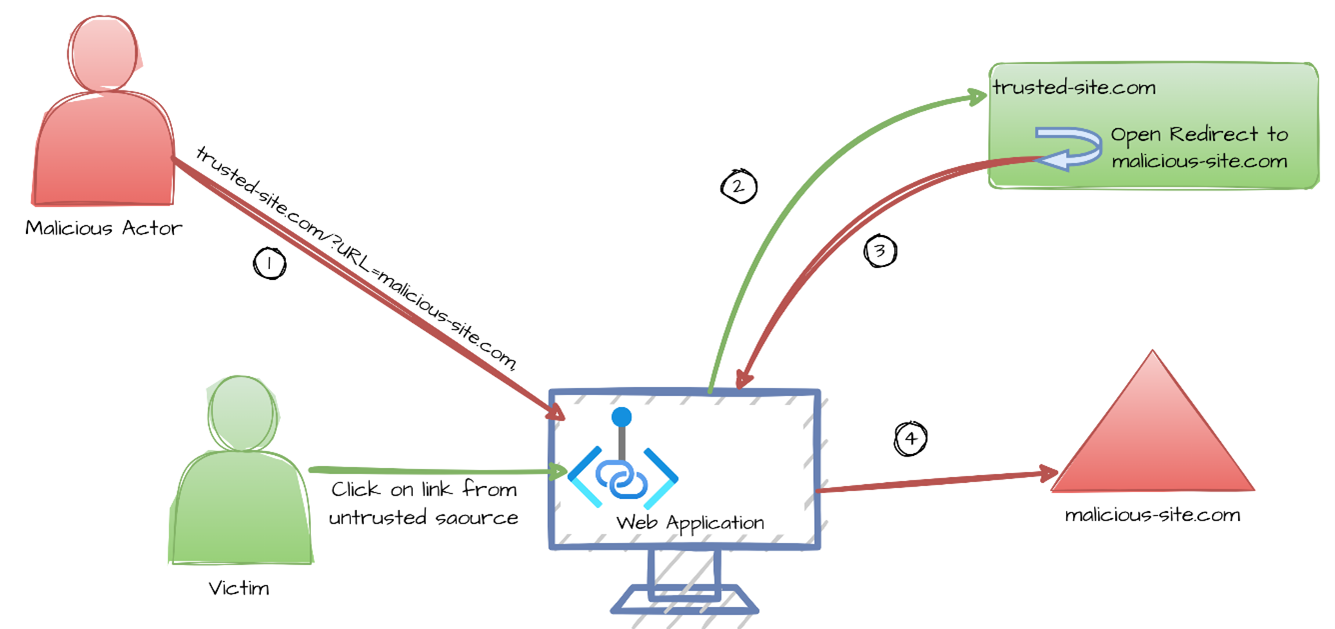
The web application accepts a user-controlled input that specifies a link to an external site, and uses that link in a redirect.
Alternate Terms
Open Redirect
Cross-site Redirect
Cross-domain Redirect
Unvalidated Redirect
Drive-by download
an attack, sometimes enabled by open redirects, which redirects the victim to a site that automatically triggers a download action of malicious software or files
Common Consequences
This table specifies different individual consequences
associated with the weakness. The Scope identifies the application security area that is
violated, while the Impact describes the negative technical impact that arises if an
adversary succeeds in exploiting this weakness. The Likelihood provides information about
how likely the specific consequence is expected to be seen relative to the other
consequences in the list. For example, there may be high likelihood that a weakness will be
exploited to achieve a certain impact, but a low likelihood that it will be exploited to
achieve a different impact.
Impact
Details
Bypass Protection Mechanism; Gain Privileges or Assume Identity
Scope: Access Control
The user may be redirected to an untrusted page
that contains malware which may then compromise the
user's system. In some cases, an open redirect can also
enable the immediate download of a file without the
user's permission, because the redirection to an
external site may lead to endpoints on those sites that
automatically trigger a download action ("drive-by
download" [REF-1478]). This will expose the user to
extensive risk. The user's interaction with the web
server may also be compromised if the malware conducts
keylogging or other attacks that steal credentials,
personally identifiable information (PII), or other
important data.
Bypass Protection Mechanism; Gain Privileges or Assume Identity; Other
Scope: Access Control, Confidentiality, Other
By modifying the URL value to a malicious site, an attacker may successfully launch a phishing scam. The user may be subjected to phishing attacks by being redirected to an untrusted page. The phishing attack may point to an attacker controlled web page that appears to be a trusted web site. The phishers may then steal the user's credentials and then use these credentials to access the legitimate web site. Because the server name in the modified link is identical to the original site, phishing attempts have a more trustworthy appearance.
Potential Mitigations
Phase(s)
Mitigation
Implementation
Strategy: Input Validation
Assume all input is malicious. Use an "accept known good" input validation strategy, i.e., use a list of acceptable inputs that strictly conform to specifications. Reject any input that does not strictly conform to specifications, or transform it into something that does.
When performing input validation, consider all potentially relevant properties, including length, type of input, the full range of acceptable values, missing or extra inputs, syntax, consistency across related fields, and conformance to business rules. As an example of business rule logic, "boat" may be syntactically valid because it only contains alphanumeric characters, but it is not valid if the input is only expected to contain colors such as "red" or "blue."
Do not rely exclusively on looking for malicious or malformed inputs. This is likely to miss at least one undesirable input, especially if the code's environment changes. This can give attackers enough room to bypass the intended validation. However, denylists can be useful for detecting potential attacks or determining which inputs are so malformed that they should be rejected outright.
Use a list of approved URLs or domains to be used for redirection.
Architecture and Design
Use an intermediate disclaimer page that provides the user with a clear warning that they are leaving the current site. Implement a long timeout before the redirect occurs, or force the user to click on the link. Be careful to avoid XSS problems (CWE-79) when generating the disclaimer page.
Architecture and Design
Strategy: Enforcement by Conversion
When the set of acceptable objects, such as filenames or URLs, is limited or known, create a mapping from a set of fixed input values (such as numeric IDs) to the actual filenames or URLs, and reject all other inputs.
For example, ID 1 could map to "/login.asp" and ID 2 could map to "http://www.example.com/". Features such as the ESAPI AccessReferenceMap [REF-45] provide this capability.
Architecture and Design
Ensure that no externally-supplied requests are honored by requiring that all redirect requests include a unique nonce generated by the application [REF-483]. Be sure that the nonce is not predictable (CWE-330).
Note: Note that this can be bypassed using XSS (CWE-79).
Architecture and Design; Implementation
Strategy: Attack Surface Reduction
Understand all the potential areas where untrusted inputs can enter your software: parameters or arguments, cookies, anything read from the network, environment variables, reverse DNS lookups, query results, request headers, URL components, e-mail, files, filenames, databases, and any external systems that provide data to the application. Remember that such inputs may be obtained indirectly through API calls.
Many open redirect problems occur because the programmer assumed that certain inputs could not be modified, such as cookies and hidden form fields.
Operation
Strategy: Firewall
Use an application firewall that can detect attacks against this weakness. It can be beneficial in cases in which the code cannot be fixed (because it is controlled by a third party), as an emergency prevention measure while more comprehensive software assurance measures are applied, or to provide defense in depth [REF-1481].
Effectiveness: Moderate
Note: An application firewall might not cover all possible input vectors. In addition, attack techniques might be available to bypass the protection mechanism, such as using malformed inputs that can still be processed by the component that receives those inputs. Depending on functionality, an application firewall might inadvertently reject or modify legitimate requests. Finally, some manual effort may be required for customization.
Relationships
This table shows the weaknesses and high level categories that are related to this
weakness. These relationships are defined as ChildOf, ParentOf, MemberOf and give insight to
similar items that may exist at higher and lower levels of abstraction. In addition,
relationships such as PeerOf and CanAlsoBe are defined to show similar weaknesses that the user
may want to explore.
Relevant to the view "Research Concepts" (View-1000)
Nature
Type
ID
Name
ChildOf
Class - a weakness that is described in a very abstract fashion, typically independent of any specific language or technology. More specific than a Pillar Weakness, but more general than a Base Weakness. Class level weaknesses typically describe issues in terms of 1 or 2 of the following dimensions: behavior, property, and resource.
Relevant to the view "Weaknesses for Simplified Mapping of Published Vulnerabilities" (View-1003)
Nature
Type
ID
Name
ChildOf
Class - a weakness that is described in a very abstract fashion, typically independent of any specific language or technology. More specific than a Pillar Weakness, but more general than a Base Weakness. Class level weaknesses typically describe issues in terms of 1 or 2 of the following dimensions: behavior, property, and resource.
Phishing is a general term for deceptive attempts to coerce private information from users that will be used for identity theft.
Modes
Of Introduction
The different Modes of Introduction provide information
about how and when this
weakness may be introduced. The Phase identifies a point in the life cycle at which
introduction
may occur, while the Note provides a typical scenario related to introduction during the
given
phase.
Phase
Note
Architecture and Design
OMISSION: This weakness is caused by missing a security tactic during the architecture and design phase.
Implementation
Applicable Platforms
This listing shows possible areas for which the given
weakness could appear. These
may be for specific named Languages, Operating Systems, Architectures, Paradigms,
Technologies,
or a class of such platforms. The platform is listed along with how frequently the given
weakness appears for that instance.
Languages
Class: Not Language-Specific
(Undetermined Prevalence)
Technologies
Class: Web Based
(Undetermined Prevalence)
Web Server
(Undetermined Prevalence)
Likelihood Of Exploit
Low
Demonstrative Examples
Example 1
The following code obtains a URL from the query string and then redirects the user to that URL.
The problem with the above code is that an attacker could use this page as part of a phishing scam by redirecting users to a malicious site. For example, assume the above code is in the file example.php. An attacker could supply a user with the following link:
The user sees the link pointing to the original trusted site (example.com) and does not realize the redirection that could take place.
Example 2
The following code is a Java servlet that will receive a GET request with a url parameter in the request to redirect the browser to the address specified in the url parameter. The servlet will retrieve the url parameter value from the request and send a response to redirect the browser to the url address.
(bad code)
Example Language: Java
public class RedirectServlet extends HttpServlet {
The problem with this Java servlet code is that an attacker could use the RedirectServlet as part of an e-mail phishing scam to redirect users to a malicious site. An attacker could send an HTML formatted e-mail directing the user to log into their account by including in the e-mail the following link:
(attack code)
Example Language: HTML
<a href="http://bank.example.com/redirect?url=http://attacker.example.net">Click here to log in</a>
The user may assume that the link is safe since the URL starts with their trusted bank, bank.example.com. However, the user will then be redirected to the attacker's web site (attacker.example.net) which the attacker may have made to appear very similar to bank.example.com. The user may then unwittingly enter credentials into the attacker's web page and compromise their bank account. A Java servlet should never redirect a user to a URL without verifying that the redirect address is a trusted site.
Selected Observed
Examples
Note: this is a curated list of examples for users to understand the variety of ways in which this
weakness can be introduced. It is not a complete list of all CVEs that are related to this CWE entry.
An open redirect vulnerability in the search script in the software allows remote attackers to redirect users to arbitrary web sites and conduct phishing attacks via a URL as a parameter to the proper function.
Open redirect vulnerability in the software allows remote attackers to redirect users to arbitrary web sites and conduct phishing attacks via a URL in the proper parameter.
Chain: Go-based Oauth2 reverse proxy can send the authenticated user to another site at the end of the authentication flow. A redirect URL with HTML-encoded whitespace characters can bypass the validation (CWE-1289) to redirect to a malicious site (CWE-601)
Weakness Ordinalities
Ordinality
Description
Primary
(where the weakness exists independent of other weaknesses)
Detection
Methods
Method
Details
Manual Static Analysis
Since this weakness does not typically appear frequently within a single software package, manual white box techniques may be able to provide sufficient code coverage and reduction of false positives if all potentially-vulnerable operations can be assessed within limited time constraints.
Effectiveness: High
Automated Dynamic Analysis
Automated black box tools that supply URLs to every input may be able to spot Location header modifications, but test case coverage is a factor, and custom redirects may not be detected.
Automated Static Analysis
Automated static analysis tools may not be able to determine whether input influences the beginning of a URL, which is important for reducing false positives.
Automated Static Analysis
Automated static analysis, commonly referred to as Static Application Security Testing (SAST), can find some instances of this weakness by analyzing source code (or binary/compiled code) without having to execute it. Typically, this is done by building a model of data flow and control flow, then searching for potentially-vulnerable patterns that connect "sources" (origins of input) with "sinks" (destinations where the data interacts with external components, a lower layer such as the OS, etc.)
Effectiveness: High
Automated Static Analysis - Binary or Bytecode
According to SOAR [REF-1479], the following detection techniques may be useful:
This MemberOf Relationships table shows additional CWE Categories and Views that
reference this weakness as a member. This information is often useful in understanding where a
weakness fits within the context of external information sources.
Nature
Type
ID
Name
MemberOf
Category - a CWE entry that contains a set of other entries that share a common characteristic.
2011 Top 25 - Insecure Interaction Between Components
MemberOf
View - a subset of CWE entries that provides a way of examining CWE content. The two main view structures are Slices (flat lists) and Graphs (containing relationships between entries).
OWASP Top Ten 2025 Category A01:2025 - Broken Access Control
Vulnerability Mapping Notes
Usage
ALLOWED
(this CWE ID may be used to map to real-world vulnerabilities)
Reason
Acceptable-Use
Rationale
This CWE entry is at the Base level of abstraction, which is a preferred level of abstraction for mapping to the root causes of vulnerabilities.
Comments
Carefully read both the name and description to ensure that this mapping is an appropriate fit. Do not try to 'force' a mapping to a lower-level Base/Variant simply to comply with this preferred level of abstraction.
Notes
Other
Whether this issue poses a vulnerability will be subject to the intended behavior of the application. For example, a search engine might intentionally provide redirects to arbitrary URLs.
Craig A. Shue, Andrew J. Kalafut and Minaxi Gupta. "Exploitable Redirects on the Web: Identification, Prevalence, and Defense". <https://www.cprogramming.com/tutorial/exceptions.html>.
(URL validated: 2023-04-07)


 Description
 This table specifies different individual consequences
associated with the weakness. The Scope identifies the application security area that is
violated, while the Impact describes the negative technical impact that arises if an
adversary succeeds in exploiting this weakness. The Likelihood provides information about
how likely the specific consequence is expected to be seen relative to the other
consequences in the list. For example, there may be high likelihood that a weakness will be
exploited to achieve a certain impact, but a low likelihood that it will be exploited to
achieve a different impact.
This table specifies different individual consequences
associated with the weakness. The Scope identifies the application security area that is
violated, while the Impact describes the negative technical impact that arises if an
adversary succeeds in exploiting this weakness. The Likelihood provides information about
how likely the specific consequence is expected to be seen relative to the other
consequences in the list. For example, there may be high likelihood that a weakness will be
exploited to achieve a certain impact, but a low likelihood that it will be exploited to
achieve a different impact.