CWE-22: Improper Limitation of a Pathname to a Restricted Directory ('Path Traversal')
Weakness ID: 22
Vulnerability Mapping:ALLOWEDThis CWE ID could be used to map to real-world vulnerabilities in limited situations requiring careful review
(with careful review of mapping notes)
Abstraction:
BaseBase - a weakness that is still mostly independent of a resource or technology, but with sufficient details to provide specific methods for detection and prevention. Base level weaknesses typically describe issues in terms of 2 or 3 of the following dimensions: behavior, property, technology, language, and resource.
View customized information:
For users who are interested in more notional aspects of a weakness. Example: educators, technical writers, and project/program managers.For users who are concerned with the practical application and details about the nature of a weakness and how to prevent it from happening. Example: tool developers, security researchers, pen-testers, incident response analysts.For users who are mapping an issue to CWE/CAPEC IDs, i.e., finding the most appropriate CWE for a specific issue (e.g., a CVE record). Example: tool developers, security researchers.For users who wish to see all available information for the CWE/CAPEC entry.For users who want to customize what details are displayed.
×
Edit Custom Filter
Description
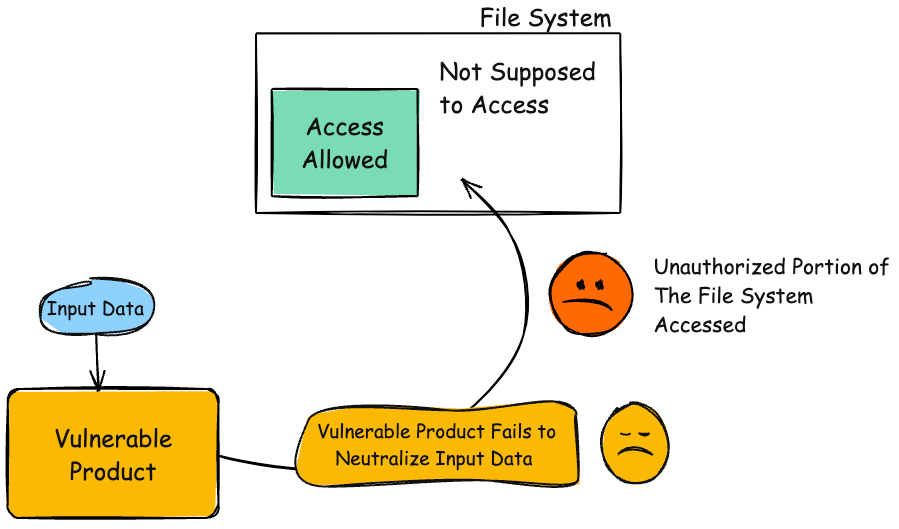
The product uses external input to construct a pathname that is intended to identify a file or directory that is located underneath a restricted parent directory, but the product does not properly neutralize special elements within the pathname that can cause the pathname to resolve to a location that is outside of the restricted directory.
Extended Description
Many file operations are intended to take place within a restricted directory. By using special elements such as ".." and "/" separators, attackers can escape outside of the restricted location to access files or directories that are elsewhere on the system. One of the most common special elements is the "../" sequence, which in most modern operating systems is interpreted as the parent directory of the current location. This is referred to as relative path traversal. Path traversal also covers the use of absolute pathnames such as "/usr/local/bin" to access unexpected files. This is referred to as absolute path traversal.
Alternate Terms
Path traversal
"Path traversal" is preferred over "directory traversal," but both terms are attack-focused.
Directory traversal
Path transversal
an alternate phrasing of "path traversal"
Common Consequences
This table specifies different individual consequences
associated with the weakness. The Scope identifies the application security area that is
violated, while the Impact describes the negative technical impact that arises if an
adversary succeeds in exploiting this weakness. The Likelihood provides information about
how likely the specific consequence is expected to be seen relative to the other
consequences in the list. For example, there may be high likelihood that a weakness will be
exploited to achieve a certain impact, but a low likelihood that it will be exploited to
achieve a different impact.
Impact
Details
Execute Unauthorized Code or Commands
Scope: Integrity, Confidentiality, Availability
The attacker may be able to create or overwrite critical files that are used to execute code, such as programs or libraries.
Modify Files or Directories
Scope: Integrity
The attacker may be able to overwrite or create critical files, such as programs, libraries, or important data. If the targeted file is used for a security mechanism, then the attacker may be able to bypass that mechanism. For example, appending a new account at the end of a password file may allow an attacker to bypass authentication.
Read Files or Directories
Scope: Confidentiality
The attacker may be able read the contents of unexpected files and expose sensitive data. If the targeted file is used for a security mechanism, then the attacker may be able to bypass that mechanism. For example, by reading a password file, the attacker could conduct brute force password guessing attacks in order to break into an account on the system.
DoS: Crash, Exit, or Restart
Scope: Availability
The attacker may be able to overwrite, delete, or corrupt unexpected critical files such as programs, libraries, or important data. This may prevent the product from working at all and in the case of protection mechanisms such as authentication, it has the potential to lock out product users.
Potential Mitigations
Phase(s)
Mitigation
Implementation
Strategy: Input Validation
Assume all input is malicious. Use an "accept known good" input validation strategy, i.e., use a list of acceptable inputs that strictly conform to specifications. Reject any input that does not strictly conform to specifications, or transform it into something that does.
When performing input validation, consider all potentially relevant properties, including length, type of input, the full range of acceptable values, missing or extra inputs, syntax, consistency across related fields, and conformance to business rules. As an example of business rule logic, "boat" may be syntactically valid because it only contains alphanumeric characters, but it is not valid if the input is only expected to contain colors such as "red" or "blue."
Do not rely exclusively on looking for malicious or malformed inputs. This is likely to miss at least one undesirable input, especially if the code's environment changes. This can give attackers enough room to bypass the intended validation. However, denylists can be useful for detecting potential attacks or determining which inputs are so malformed that they should be rejected outright.
When validating filenames, use stringent allowlists that limit the character set to be used. If feasible, only allow a single "." character in the filename to avoid weaknesses such as CWE-23, and exclude directory separators such as "/" to avoid CWE-36. Use a list of allowable file extensions, which will help to avoid CWE-434.
Do not rely exclusively on a filtering mechanism that removes potentially dangerous characters. This is equivalent to a denylist, which may be incomplete (CWE-184). For example, filtering "/" is insufficient protection if the filesystem also supports the use of "\" as a directory separator. Another possible error could occur when the filtering is applied in a way that still produces dangerous data (CWE-182). For example, if "../" sequences are removed from the ".../...//" string in a sequential fashion, two instances of "../" would be removed from the original string, but the remaining characters would still form the "../" string.
Architecture and Design
For any security checks that are performed on the client side, ensure that these checks are duplicated on the server side, in order to avoid CWE-602. Attackers can bypass the client-side checks by modifying values after the checks have been performed, or by changing the client to remove the client-side checks entirely. Then, these modified values would be submitted to the server.
Implementation
Strategy: Input Validation
Inputs should be decoded and canonicalized to the application's current internal representation before being validated (CWE-180). Make sure that the application does not decode the same input twice (CWE-174). Such errors could be used to bypass allowlist validation schemes by introducing dangerous inputs after they have been checked.
Use a built-in path canonicalization function (such as realpath() in C) that produces the canonical version of the pathname, which effectively removes ".." sequences and symbolic links (CWE-23, CWE-59). This includes:
realpath() in C
getCanonicalPath() in Java
GetFullPath() in ASP.NET
realpath() or abs_path() in Perl
realpath() in PHP
Architecture and Design
Strategy: Libraries or Frameworks
Use a vetted library or framework that does not allow this weakness to occur or provides constructs that make this weakness easier to avoid [REF-1482].
Operation
Strategy: Firewall
Use an application firewall that can detect attacks against this weakness. It can be beneficial in cases in which the code cannot be fixed (because it is controlled by a third party), as an emergency prevention measure while more comprehensive software assurance measures are applied, or to provide defense in depth [REF-1481].
Effectiveness: Moderate
Note: An application firewall might not cover all possible input vectors. In addition, attack techniques might be available to bypass the protection mechanism, such as using malformed inputs that can still be processed by the component that receives those inputs. Depending on functionality, an application firewall might inadvertently reject or modify legitimate requests. Finally, some manual effort may be required for customization.
Architecture and Design; Operation
Strategy: Environment Hardening
Run your code using the lowest privileges that are required to accomplish the necessary tasks [REF-76]. If possible, create isolated accounts with limited privileges that are only used for a single task. That way, a successful attack will not immediately give the attacker access to the rest of the software or its environment. For example, database applications rarely need to run as the database administrator, especially in day-to-day operations.
Architecture and Design
Strategy: Enforcement by Conversion
When the set of acceptable objects, such as filenames or URLs, is limited or known, create a mapping from a set of fixed input values (such as numeric IDs) to the actual filenames or URLs, and reject all other inputs.
For example, ID 1 could map to "inbox.txt" and ID 2 could map to "profile.txt". Features such as the ESAPI AccessReferenceMap [REF-185] provide this capability.
Architecture and Design; Operation
Strategy: Sandbox or Jail
Run the code in a "jail" or similar sandbox environment that enforces strict boundaries between the process and the operating system. This may effectively restrict which files can be accessed in a particular directory or which commands can be executed by the software.
OS-level examples include the Unix chroot jail, AppArmor, and SELinux. In general, managed code may provide some protection. For example, java.io.FilePermission in the Java SecurityManager allows the software to specify restrictions on file operations.
This may not be a feasible solution, and it only limits the impact to the operating system; the rest of the application may still be subject to compromise.
Be careful to avoid CWE-243 and other weaknesses related to jails.
Effectiveness: Limited
Note: The effectiveness of this mitigation depends on the prevention capabilities of the specific sandbox or jail being used and might only help to reduce the scope of an attack, such as restricting the attacker to certain system calls or limiting the portion of the file system that can be accessed.
Architecture and Design; Operation
Strategy: Attack Surface Reduction
Store library, include, and utility files outside of the web document root, if possible. Otherwise, store them in a separate directory and use the web server's access control capabilities to prevent attackers from directly requesting them. One common practice is to define a fixed constant in each calling program, then check for the existence of the constant in the library/include file; if the constant does not exist, then the file was directly requested, and it can exit immediately.
This significantly reduces the chance of an attacker being able to bypass any protection mechanisms that are in the base program but not in the include files. It will also reduce the attack surface.
Implementation
Ensure that error messages only contain minimal details that are useful to the intended audience and no one else. The messages need to strike the balance between being too cryptic (which can confuse users) or being too detailed (which may reveal more than intended). The messages should not reveal the methods that were used to determine the error. Attackers can use detailed information to refine or optimize their original attack, thereby increasing their chances of success.
If errors must be captured in some detail, record them in log messages, but consider what could occur if the log messages can be viewed by attackers. Highly sensitive information such as passwords should never be saved to log files.
Avoid inconsistent messaging that might accidentally tip off an attacker about internal state, such as whether a user account exists or not.
In the context of path traversal, error messages which disclose path information can help attackers craft the appropriate attack strings to move through the file system hierarchy.
Operation; Implementation
Strategy: Environment Hardening
When using PHP, configure the application so that it does not use register_globals. During implementation, develop the application so that it does not rely on this feature, but be wary of implementing a register_globals emulation that is subject to weaknesses such as CWE-95, CWE-621, and similar issues.
Relationships
This table shows the weaknesses and high level categories that are related to this
weakness. These relationships are defined as ChildOf, ParentOf, MemberOf and give insight to
similar items that may exist at higher and lower levels of abstraction. In addition,
relationships such as PeerOf and CanAlsoBe are defined to show similar weaknesses that the user
may want to explore.
Relevant to the view "Research Concepts" (View-1000)
Nature
Type
ID
Name
ChildOf
Class - a weakness that is described in a very abstract fashion, typically independent of any specific language or technology. More specific than a Pillar Weakness, but more general than a Base Weakness. Class level weaknesses typically describe issues in terms of 1 or 2 of the following dimensions: behavior, property, and resource.
Base - a weakness that is still mostly independent of a resource or technology, but with sufficient details to provide specific methods for detection and prevention. Base level weaknesses typically describe issues in terms of 2 or 3 of the following dimensions: behavior, property, technology, language, and resource.
Base - a weakness that is still mostly independent of a resource or technology, but with sufficient details to provide specific methods for detection and prevention. Base level weaknesses typically describe issues in terms of 2 or 3 of the following dimensions: behavior, property, technology, language, and resource.
Class - a weakness that is described in a very abstract fashion, typically independent of any specific language or technology. More specific than a Pillar Weakness, but more general than a Base Weakness. Class level weaknesses typically describe issues in terms of 1 or 2 of the following dimensions: behavior, property, and resource.
Base - a weakness that is still mostly independent of a resource or technology, but with sufficient details to provide specific methods for detection and prevention. Base level weaknesses typically describe issues in terms of 2 or 3 of the following dimensions: behavior, property, technology, language, and resource.
Class - a weakness that is described in a very abstract fashion, typically independent of any specific language or technology. More specific than a Pillar Weakness, but more general than a Base Weakness. Class level weaknesses typically describe issues in terms of 1 or 2 of the following dimensions: behavior, property, and resource.
Class - a weakness that is described in a very abstract fashion, typically independent of any specific language or technology. More specific than a Pillar Weakness, but more general than a Base Weakness. Class level weaknesses typically describe issues in terms of 1 or 2 of the following dimensions: behavior, property, and resource.
Relevant to the view "Weaknesses for Simplified Mapping of Published Vulnerabilities" (View-1003)
Nature
Type
ID
Name
ChildOf
Class - a weakness that is described in a very abstract fashion, typically independent of any specific language or technology. More specific than a Pillar Weakness, but more general than a Base Weakness. Class level weaknesses typically describe issues in terms of 1 or 2 of the following dimensions: behavior, property, and resource.
Relevant to the view "CISQ Quality Measures (2020)" (View-1305)
Nature
Type
ID
Name
ParentOf
Base - a weakness that is still mostly independent of a resource or technology, but with sufficient details to provide specific methods for detection and prevention. Base level weaknesses typically describe issues in terms of 2 or 3 of the following dimensions: behavior, property, technology, language, and resource.
Base - a weakness that is still mostly independent of a resource or technology, but with sufficient details to provide specific methods for detection and prevention. Base level weaknesses typically describe issues in terms of 2 or 3 of the following dimensions: behavior, property, technology, language, and resource.
Relevant to the view "CISQ Data Protection Measures" (View-1340)
Nature
Type
ID
Name
ParentOf
Base - a weakness that is still mostly independent of a resource or technology, but with sufficient details to provide specific methods for detection and prevention. Base level weaknesses typically describe issues in terms of 2 or 3 of the following dimensions: behavior, property, technology, language, and resource.
Base - a weakness that is still mostly independent of a resource or technology, but with sufficient details to provide specific methods for detection and prevention. Base level weaknesses typically describe issues in terms of 2 or 3 of the following dimensions: behavior, property, technology, language, and resource.
The different Modes of Introduction provide information
about how and when this
weakness may be introduced. The Phase identifies a point in the life cycle at which
introduction
may occur, while the Note provides a typical scenario related to introduction during the
given
phase.
Phase
Note
Implementation
Applicable Platforms
This listing shows possible areas for which the given
weakness could appear. These
may be for specific named Languages, Operating Systems, Architectures, Paradigms,
Technologies,
or a class of such platforms. The platform is listed along with how frequently the given
weakness appears for that instance.
Languages
Class: Not Language-Specific
(Undetermined Prevalence)
Technologies
AI/ML
(Often Prevalent)
Likelihood Of Exploit
High
Demonstrative Examples
Example 1
The following code could be for a social networking application in which each user's profile information is stored in a separate file. All files are stored in a single directory.
(bad code)
Example Language: Perl
my $dataPath = "/users/cwe/profiles"; my $username = param("user"); my $profilePath = $dataPath . "/" . $username;
While the programmer intends to access files such as "/users/cwe/profiles/alice" or "/users/cwe/profiles/bob", there is no verification of the incoming user parameter. An attacker could provide a string such as:
(attack code)
../../../etc/passwd
The program would generate a profile pathname like this:
(result)
/users/cwe/profiles/../../../etc/passwd
When the file is opened, the operating system resolves the "../" during path canonicalization and actually accesses this file:
(result)
/etc/passwd
As a result, the attacker could read the entire text of the password file.
Notice how this code also contains an error message information leak (CWE-209) if the user parameter does not produce a file that exists: the full pathname is provided. Because of the lack of output encoding of the file that is retrieved, there might also be a cross-site scripting problem (CWE-79) if profile contains any HTML, but other code would need to be examined.
Example 2
In the example below, the path to a dictionary file is read from a system property and used to initialize a File object.
(bad code)
Example Language: Java
String filename = System.getProperty("com.domain.application.dictionaryFile"); File dictionaryFile = new File(filename);
However, the path is not validated or modified to prevent it from containing relative or absolute path sequences before creating the File object. This allows anyone who can control the system property to determine what file is used. Ideally, the path should be resolved relative to some kind of application or user home directory.
Example 3
The following code takes untrusted input and uses a regular expression to filter "../" from the input. It then appends this result to the /home/user/ directory and attempts to read the file in the final resulting path.
(bad code)
Example Language: Perl
my $Username = GetUntrustedInput(); $Username =~ s/\.\.\///; my $filename = "/home/user/" . $Username; ReadAndSendFile($filename);
Since the regular expression does not have the /g global match modifier, it only removes the first instance of "../" it comes across. So an input value such as:
(attack code)
../../../etc/passwd
will have the first "../" stripped, resulting in:
(result)
../../etc/passwd
This value is then concatenated with the /home/user/ directory:
(result)
/home/user/../../etc/passwd
which causes the /etc/passwd file to be retrieved once the operating system has resolved the ../ sequences in the pathname. This leads to relative path traversal (CWE-23).
Example 4
The following code attempts to validate a given input path by checking it against an allowlist and once validated delete the given file. In this specific case, the path is considered valid if it starts with the string "/safe_dir/".
(bad code)
Example Language: Java
String path = getInputPath(); if (path.startsWith("/safe_dir/")) {
File f = new File(path); f.delete()
}
An attacker could provide an input such as this:
(attack code)
/safe_dir/../important.dat
The software assumes that the path is valid because it starts with the "/safe_path/" sequence, but the "../" sequence will cause the program to delete the important.dat file in the parent directory
Example 5
The following code demonstrates the unrestricted upload of a file with a Java servlet and a path traversal vulnerability. The action attribute of an HTML form is sending the upload file request to the Java servlet.
Choose a file to upload: <input type="file" name="filename"/> <br/> <input type="submit" name="submit" value="Submit"/>
</form>
When submitted the Java servlet's doPost method will receive the request, extract the name of the file from the Http request header, read the file contents from the request and output the file to the local upload directory.
(bad code)
Example Language: Java
public class FileUploadServlet extends HttpServlet {
} // output unsuccessful upload response HTML page else {...}
}
...
}
This code does not perform a check on the type of the file being uploaded (CWE-434). This could allow an attacker to upload any executable file or other file with malicious code.
Additionally, the creation of the BufferedWriter object is subject to relative path traversal (CWE-23). Since the code does not check the filename that is provided in the header, an attacker can use "../" sequences to write to files outside of the intended directory. Depending on the executing environment, the attacker may be able to specify arbitrary files to write to, leading to a wide variety of consequences, from code execution, XSS (CWE-79), or system crash.
Example 6
This script intends to read a user-supplied file from the current directory. The user inputs the relative path to the file and the script uses Python's os.path.join() function to combine the path to the current working directory with the provided path to the specified file. This results in an absolute path to the desired file. If the file does not exist when the script attempts to read it, an error is printed to the user.
However, if the user supplies an absolute path, the os.path.join() function will discard the path to the current working directory and use only the absolute path provided. For example, if the current working directory is /home/user/documents, but the user inputs /etc/passwd, os.path.join() will use only /etc/passwd, as it is considered an absolute path. In the above scenario, this would cause the script to access and read the /etc/passwd file.
(good code)
Example Language: Python
import os
import sys
def main():
filename = sys.argv[1]
path = os.path.normpath(f"{os.getcwd()}{os.sep}{filename}")
if path.startswith("/home/cwe/documents/"):
try:
with open(path, 'r') as f:
file_data = f.read()
except FileNotFoundError as e:
print("Error - file not found")
main()
The constructed path string uses os.sep to add the appropriate separation character for the given operating system (e.g. '\' or '/') and the call to os.path.normpath() removes any additional slashes that may have been entered - this may occur particularly when using a Windows path. The path is checked against an expected directory (/home/cwe/documents); otherwise, an attacker could provide relative path sequences like ".." to cause normpath() to generate paths that are outside the intended directory (CWE-23). By putting the pieces of the path string together in this fashion, the script avoids a call to os.path.join() and any potential issues that might arise if an absolute path is entered. With this version of the script, if the current working directory is /home/cwe/documents, and the user inputs /etc/passwd, the resulting path will be /home/cwe/documents/etc/passwd. The user is therefore contained within the current working directory as intended.
Example 7
This PHP code takes user input in a file argument, obtains its contents, and presents the contents back to the caller.
(bad code)
Example Language: PHP
$filename = $_GET['file']; // User-controlled input
echo file_get_contents($filename); // Read and display the file contents
An attacker could manipulate the file path using relative (../) or absolute paths, potentially accessing sensitive system files. For example, if an attacker provides ../../../../etc/passwd as input, the script will fetch and display the contents of the system's password file. Ideally, the file path should be validated and restricted to a specific directory to prevent unauthorized file access.
Note: this is a curated list of examples for users to understand the variety of ways in which this
weakness can be introduced. It is not a complete list of all CVEs that are related to this CWE entry.
Large language model (LLM) management tool does not
validate the format of a digest value (CWE-1287) from a
private, untrusted model registry, enabling relative
path traversal (CWE-23), a.k.a. Probllama
Chain: API for text generation using Large Language Models (LLMs) does
not include the "\" Windows folder separator in its denylist (CWE-184)
when attempting to prevent Local File Inclusion via path traversal
(CWE-22), allowing deletion of arbitrary files on Windows systems.
Product for managing datasets for AI model training and evaluation allows both relative (CWE-23) and absolute (CWE-36) path traversal to overwrite files via the Content-Disposition header
Chain: a learning management tool debugger uses external input to locate previous session logs (CWE-73) and does not properly validate the given path (CWE-20), allowing for filesystem path traversal using "../" sequences (CWE-24)
Python package manager does not correctly restrict the filename specified in a Content-Disposition header, allowing arbitrary file read using path traversal sequences such as "../"
Python package constructs filenames using an unsafe os.path.join call on untrusted input, allowing absolute path traversal because os.path.join resets the pathname to an absolute path that is specified as part of the input.
Chain: Cloud computing virtualization platform does not require authentication for upload of a tar format file (CWE-306), then uses .. path traversal sequences (CWE-23) in the file to access unexpected files, as exploited in the wild per CISA KEV.
a Kubernetes package manager written in Go allows malicious plugins to inject path traversal sequences into a plugin archive ("Zip slip") to copy a file outside the intended directory
Go-based archive library allows extraction of files to locations outside of the target folder with "../" path traversal sequences in filenames in a zip file, aka "Zip Slip"
Chain: library file sends a redirect if it is directly requested but continues to execute, allowing remote file inclusion and path traversal.
Weakness Ordinalities
Ordinality
Description
Primary
(where the weakness exists independent of other weaknesses)
Resultant
(where the weakness is typically related to the presence of some other weaknesses)
Detection
Methods
Method
Details
Automated Static Analysis
Automated techniques can find areas where path traversal weaknesses exist. However, tuning or customization may be required to remove or de-prioritize path-traversal problems that are only exploitable by the product's administrator - or other privileged users - and thus potentially valid behavior or, at worst, a bug instead of a vulnerability.
Effectiveness: High
Manual Static Analysis
Manual white box techniques may be able to provide sufficient code coverage and reduction of false positives if all file access operations can be assessed within limited time constraints.
Effectiveness: High
Automated Static Analysis - Binary or Bytecode
According to SOAR [REF-1479], the following detection techniques may be useful:
This MemberOf Relationships table shows additional CWE Categories and Views that
reference this weakness as a member. This information is often useful in understanding where a
weakness fits within the context of external information sources.
Nature
Type
ID
Name
MemberOf
View - a subset of CWE entries that provides a way of examining CWE content. The two main view structures are Slices (flat lists) and Graphs (containing relationships between entries).
CERT C++ Secure Coding Section 09 - Input Output (FIO)
MemberOf
View - a subset of CWE entries that provides a way of examining CWE content. The two main view structures are Slices (flat lists) and Graphs (containing relationships between entries).
SEI CERT Perl Coding Standard - Guidelines 01. Input Validation and Data Sanitization (IDS)
MemberOf
View - a subset of CWE entries that provides a way of examining CWE content. The two main view structures are Slices (flat lists) and Graphs (containing relationships between entries).
View - a subset of CWE entries that provides a way of examining CWE content. The two main view structures are Slices (flat lists) and Graphs (containing relationships between entries).
Weaknesses in the 2021 CWE Top 25 Most Dangerous Software Weaknesses
MemberOf
View - a subset of CWE entries that provides a way of examining CWE content. The two main view structures are Slices (flat lists) and Graphs (containing relationships between entries).
OWASP Top Ten 2021 Category A01:2021 - Broken Access Control
MemberOf
View - a subset of CWE entries that provides a way of examining CWE content. The two main view structures are Slices (flat lists) and Graphs (containing relationships between entries).
Weaknesses in the 2020 CWE Top 25 Most Dangerous Software Weaknesses
MemberOf
View - a subset of CWE entries that provides a way of examining CWE content. The two main view structures are Slices (flat lists) and Graphs (containing relationships between entries).
View - a subset of CWE entries that provides a way of examining CWE content. The two main view structures are Slices (flat lists) and Graphs (containing relationships between entries).
Weaknesses in the 2023 CWE Top 25 Most Dangerous Software Weaknesses
MemberOf
View - a subset of CWE entries that provides a way of examining CWE content. The two main view structures are Slices (flat lists) and Graphs (containing relationships between entries).
Weaknesses in the 2024 CWE Top 25 Most Dangerous Software Weaknesses
MemberOf
View - a subset of CWE entries that provides a way of examining CWE content. The two main view structures are Slices (flat lists) and Graphs (containing relationships between entries).
General Software Weaknesses that Appear in Products that Use or Support AI/ML Technology
Vulnerability Mapping Notes
Usage
ALLOWED-WITH-REVIEW
(this CWE ID could be used to map to real-world vulnerabilities in limited situations requiring careful review)
Reason
Abstraction
Rationale
This CWE entry might have children that would be more appropriate.
Comments
Examine children of this entry to see if there is a better fit. Consider children such as CWE-23 (or its descendants) for relative path traversal, or CWE-36 for absolute path traversal.
Pathname equivalence can be regarded as a type of canonicalization error.
Relationship
Some pathname equivalence issues are not directly related to directory traversal, rather are used to bypass security-relevant checks for whether a file/directory can be accessed by the attacker (e.g. a trailing "/" on a filename could bypass access rules that don't expect a trailing /, causing a server to provide the file when it normally would not).
Terminology
Like other weaknesses, terminology is often based on the types of manipulations used, instead of the underlying weaknesses. Some people use "directory traversal" only to refer to the injection of ".." and equivalent sequences whose specific meaning is to traverse directories.
Other variants like "absolute pathname" and "drive letter" have the *effect* of directory traversal, but some people may not call it such, since it doesn't involve ".." or equivalent.
Research Gap
Many variants of path traversal attacks are probably under-studied with respect to root cause. CWE-790 and CWE-182 begin to cover part of this gap.
Research Gap
Incomplete diagnosis or reporting of vulnerabilities can make it difficult to know which variant is affected. For example, a researcher might say that "..\" is vulnerable, but not test "../" which may also be vulnerable.
Any combination of directory separators ("/", "\", etc.) and numbers of "." (e.g. "....") can produce unique variants; for example, the "//../" variant is not listed (CVE-2004-0325). See this entry's children and lower-level descendants.
Other
In many programming languages, the injection of a null byte (the 0 or NUL) may allow an attacker to truncate a generated filename to apply to a wider range of files. For example, the product may add ".txt" to any pathname, thus limiting the attacker to text files, but a null injection may effectively remove this restriction.
Taxonomy
Mappings
Mapped Taxonomy Name
Node ID
Fit
Mapped Node Name
PLOVER
Path Traversal
OWASP Top Ten 2007
A4
CWE More Specific
Insecure Direct Object Reference
OWASP Top Ten 2004
A2
CWE More Specific
Broken Access Control
CERT C Secure Coding
FIO02-C
Canonicalize path names originating from untrusted sources
Mark Dowd, John McDonald and Justin Schuh. "The Art of Software Security Assessment". Chapter 9, "Filenames and Paths", Page 503. 1st Edition. Addison Wesley. 2006.


 Description
 This table specifies different individual consequences
associated with the weakness. The Scope identifies the application security area that is
violated, while the Impact describes the negative technical impact that arises if an
adversary succeeds in exploiting this weakness. The Likelihood provides information about
how likely the specific consequence is expected to be seen relative to the other
consequences in the list. For example, there may be high likelihood that a weakness will be
exploited to achieve a certain impact, but a low likelihood that it will be exploited to
achieve a different impact.
This table specifies different individual consequences
associated with the weakness. The Scope identifies the application security area that is
violated, while the Impact describes the negative technical impact that arises if an
adversary succeeds in exploiting this weakness. The Likelihood provides information about
how likely the specific consequence is expected to be seen relative to the other
consequences in the list. For example, there may be high likelihood that a weakness will be
exploited to achieve a certain impact, but a low likelihood that it will be exploited to
achieve a different impact.