CWE entries in this view (graph) are fully or partially eliminated by following the SEI CERT C++ Coding Standard, as published in 2016. This view is no longer being actively maintained, since it statically represents the coding rules as they were in 2016.
Audience
Stakeholder
Description
Software Developers
By following the CERT C++ Secure Coding Standard, developers will be able to fully or partially prevent the weaknesses that are identified in this view. In addition, developers can use a CWE coverage graph to determine which weaknesses are not directly addressed by the standard, which will help identify and resolve remaining gaps in training, tool acquisition, or other approaches for reducing weaknesses.
Product Customers
If a software developer claims to be following the CERT C++ Secure Coding Standard, then customers can search for the weaknesses in this view in order to formulate independent evidence of that claim.
Educators
Educators can use this view in multiple ways. For example, if there is a focus on teaching weaknesses, the educator could link them to the relevant Secure Coding Standard.
Relationships
The following graph shows the tree-like relationships between
weaknesses that exist at different levels of abstraction. At the highest level, categories
and pillars exist to group weaknesses. Categories (which are not technically weaknesses) are
special CWE entries used to group weaknesses that share a common characteristic. Pillars are
weaknesses that are described in the most abstract fashion. Below these top-level entries
are weaknesses are varying levels of abstraction. Classes are still very abstract, typically
independent of any specific language or technology. Base level weaknesses are used to
present a more specific type of weakness. A variant is a weakness that is described at a
very low level of detail, typically limited to a specific language or technology. A chain is
a set of weaknesses that must be reachable consecutively in order to produce an exploitable
vulnerability. While a composite is a set of weaknesses that must all be present
simultaneously in order to produce an exploitable vulnerability.
868(Weaknesses Addressed by the SEI CERT C++ Coding Standard (2016 Version)) >
869(CERT C++ Secure Coding Section 01 - Preprocessor (PRE))
Weaknesses in this category are related to rules in the Preprocessor (PRE) section of the CERT C++ Secure Coding Standard. Since not all rules map to specific weaknesses, this category may be incomplete.
868(Weaknesses Addressed by the SEI CERT C++ Coding Standard (2016 Version)) >
870(CERT C++ Secure Coding Section 02 - Declarations and Initialization (DCL))
Weaknesses in this category are related to rules in the Declarations and Initialization (DCL) section of the CERT C++ Secure Coding Standard. Since not all rules map to specific weaknesses, this category may be incomplete.
868(Weaknesses Addressed by the SEI CERT C++ Coding Standard (2016 Version)) >
871(CERT C++ Secure Coding Section 03 - Expressions (EXP))
Weaknesses in this category are related to rules in the Expressions (EXP) section of the CERT C++ Secure Coding Standard. Since not all rules map to specific weaknesses, this category may be incomplete.
Base - a weakness that is still mostly independent of a resource or technology, but with sufficient details to provide specific methods for detection and prevention. Base level weaknesses typically describe issues in terms of 2 or 3 of the following dimensions: behavior, property, technology, language, and resource.
NULL Pointer Dereference
- (476)
868(Weaknesses Addressed by the SEI CERT C++ Coding Standard (2016 Version)) >
871(CERT C++ Secure Coding Section 03 - Expressions (EXP)) >
476(NULL Pointer Dereference)
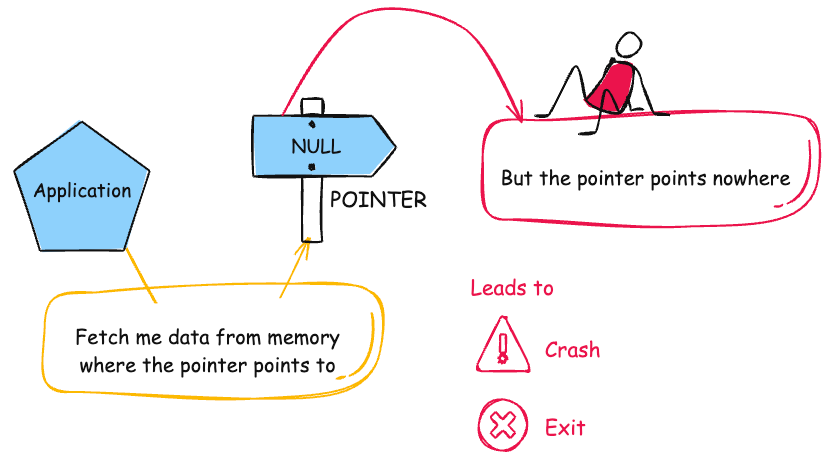
The product dereferences a pointer that it expects to be valid but is NULL.
NPDnull derefNPEnil pointer dereference
Base - a weakness that is still mostly independent of a resource or technology, but with sufficient details to provide specific methods for detection and prevention. Base level weaknesses typically describe issues in terms of 2 or 3 of the following dimensions: behavior, property, technology, language, and resource.
Use of Incorrect Operator
- (480)
868(Weaknesses Addressed by the SEI CERT C++ Coding Standard (2016 Version)) >
871(CERT C++ Secure Coding Section 03 - Expressions (EXP)) >
480(Use of Incorrect Operator)
The product accidentally uses the wrong operator, which changes the logic in security-relevant ways.
Variant - a weakness that is linked to a certain type of product, typically involving a specific language or technology. More specific than a Base weakness. Variant level weaknesses typically describe issues in terms of 3 to 5 of the following dimensions: behavior, property, technology, language, and resource.
Incorrect Short Circuit Evaluation
- (768)
868(Weaknesses Addressed by the SEI CERT C++ Coding Standard (2016 Version)) >
871(CERT C++ Secure Coding Section 03 - Expressions (EXP)) >
768(Incorrect Short Circuit Evaluation)
The product contains a conditional statement with multiple logical expressions in which one of the non-leading expressions may produce side effects. This may lead to an unexpected state in the program after the execution of the conditional, because short-circuiting logic may prevent the side effects from occurring.
868(Weaknesses Addressed by the SEI CERT C++ Coding Standard (2016 Version)) >
872(CERT C++ Secure Coding Section 04 - Integers (INT))
Weaknesses in this category are related to rules in the Integers (INT) section of the CERT C++ Secure Coding Standard. Since not all rules map to specific weaknesses, this category may be incomplete.
Variant - a weakness that is linked to a certain type of product, typically involving a specific language or technology. More specific than a Base weakness. Variant level weaknesses typically describe issues in terms of 3 to 5 of the following dimensions: behavior, property, technology, language, and resource.
Improper Validation of Array Index
- (129)
868(Weaknesses Addressed by the SEI CERT C++ Coding Standard (2016 Version)) >
872(CERT C++ Secure Coding Section 04 - Integers (INT)) >
129(Improper Validation of Array Index)
The product uses untrusted input when calculating or using an array index, but the product does not validate or incorrectly validates the index to ensure the index references a valid position within the array.
out-of-bounds array indexindex-out-of-rangearray index underflow
Base - a weakness that is still mostly independent of a resource or technology, but with sufficient details to provide specific methods for detection and prevention. Base level weaknesses typically describe issues in terms of 2 or 3 of the following dimensions: behavior, property, technology, language, and resource.
Integer Overflow or Wraparound
- (190)
868(Weaknesses Addressed by the SEI CERT C++ Coding Standard (2016 Version)) >
872(CERT C++ Secure Coding Section 04 - Integers (INT)) >
190(Integer Overflow or Wraparound)
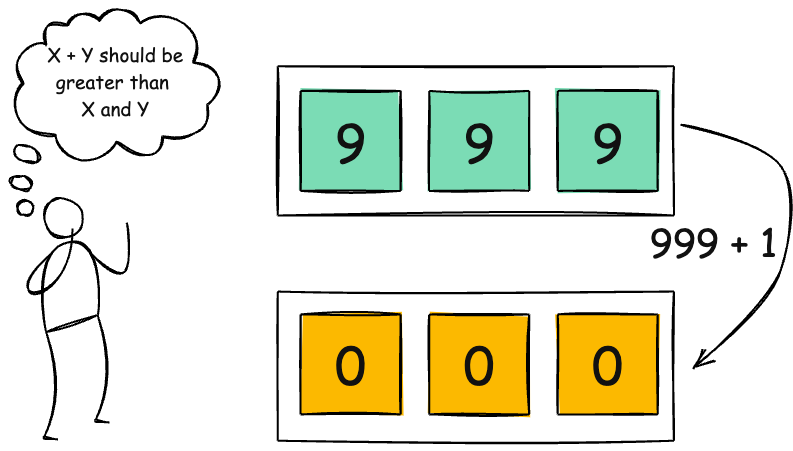
The product performs a calculation that can
produce an integer overflow or wraparound when the logic
assumes that the resulting value will always be larger than
the original value. This occurs when an integer value is
incremented to a value that is too large to store in the
associated representation. When this occurs, the value may
become a very small or negative number.
OverflowWraparoundwrap, wrap-around, wrap around
Variant - a weakness that is linked to a certain type of product, typically involving a specific language or technology. More specific than a Base weakness. Variant level weaknesses typically describe issues in terms of 3 to 5 of the following dimensions: behavior, property, technology, language, and resource.
Integer Coercion Error
- (192)
868(Weaknesses Addressed by the SEI CERT C++ Coding Standard (2016 Version)) >
872(CERT C++ Secure Coding Section 04 - Integers (INT)) >
192(Integer Coercion Error)
Integer coercion refers to a set of flaws pertaining to the type casting, extension, or truncation of primitive data types.
Base - a weakness that is still mostly independent of a resource or technology, but with sufficient details to provide specific methods for detection and prevention. Base level weaknesses typically describe issues in terms of 2 or 3 of the following dimensions: behavior, property, technology, language, and resource.
Numeric Truncation Error
- (197)
868(Weaknesses Addressed by the SEI CERT C++ Coding Standard (2016 Version)) >
872(CERT C++ Secure Coding Section 04 - Integers (INT)) >
197(Numeric Truncation Error)
Truncation errors occur when a primitive is cast to a primitive of a smaller size and data is lost in the conversion.
Class - a weakness that is described in a very abstract fashion, typically independent of any specific language or technology. More specific than a Pillar Weakness, but more general than a Base Weakness. Class level weaknesses typically describe issues in terms of 1 or 2 of the following dimensions: behavior, property, and resource.
Improper Input Validation
- (20)
868(Weaknesses Addressed by the SEI CERT C++ Coding Standard (2016 Version)) >
872(CERT C++ Secure Coding Section 04 - Integers (INT)) >
20(Improper Input Validation)
The product receives input or data, but it does
not validate or incorrectly validates that the input has the
properties that are required to process the data safely and
correctly.
Base - a weakness that is still mostly independent of a resource or technology, but with sufficient details to provide specific methods for detection and prevention. Base level weaknesses typically describe issues in terms of 2 or 3 of the following dimensions: behavior, property, technology, language, and resource.
Divide By Zero
- (369)
868(Weaknesses Addressed by the SEI CERT C++ Coding Standard (2016 Version)) >
872(CERT C++ Secure Coding Section 04 - Integers (INT)) >
369(Divide By Zero)
The product divides a value by zero.
Base - a weakness that is still mostly independent of a resource or technology, but with sufficient details to provide specific methods for detection and prevention. Base level weaknesses typically describe issues in terms of 2 or 3 of the following dimensions: behavior, property, technology, language, and resource.
Return of Pointer Value Outside of Expected Range
- (466)
868(Weaknesses Addressed by the SEI CERT C++ Coding Standard (2016 Version)) >
872(CERT C++ Secure Coding Section 04 - Integers (INT)) >
466(Return of Pointer Value Outside of Expected Range)
A function can return a pointer to memory that is outside of the buffer that the pointer is expected to reference.
Variant - a weakness that is linked to a certain type of product, typically involving a specific language or technology. More specific than a Base weakness. Variant level weaknesses typically describe issues in terms of 3 to 5 of the following dimensions: behavior, property, technology, language, and resource.
Assignment of a Fixed Address to a Pointer
- (587)
868(Weaknesses Addressed by the SEI CERT C++ Coding Standard (2016 Version)) >
872(CERT C++ Secure Coding Section 04 - Integers (INT)) >
587(Assignment of a Fixed Address to a Pointer)
The product sets a pointer to a specific address other than NULL or 0.
Base - a weakness that is still mostly independent of a resource or technology, but with sufficient details to provide specific methods for detection and prevention. Base level weaknesses typically describe issues in terms of 2 or 3 of the following dimensions: behavior, property, technology, language, and resource.
Unchecked Input for Loop Condition
- (606)
868(Weaknesses Addressed by the SEI CERT C++ Coding Standard (2016 Version)) >
872(CERT C++ Secure Coding Section 04 - Integers (INT)) >
606(Unchecked Input for Loop Condition)
The product does not properly check inputs that are used for loop conditions, potentially leading to a denial of service or other consequences because of excessive looping.
Base - a weakness that is still mostly independent of a resource or technology, but with sufficient details to provide specific methods for detection and prevention. Base level weaknesses typically describe issues in terms of 2 or 3 of the following dimensions: behavior, property, technology, language, and resource.
Use of Potentially Dangerous Function
- (676)
868(Weaknesses Addressed by the SEI CERT C++ Coding Standard (2016 Version)) >
872(CERT C++ Secure Coding Section 04 - Integers (INT)) >
676(Use of Potentially Dangerous Function)
The product invokes a potentially dangerous function that could introduce a vulnerability if it is used incorrectly, but the function can also be used safely.
Base - a weakness that is still mostly independent of a resource or technology, but with sufficient details to provide specific methods for detection and prevention. Base level weaknesses typically describe issues in terms of 2 or 3 of the following dimensions: behavior, property, technology, language, and resource.
Incorrect Conversion between Numeric Types
- (681)
868(Weaknesses Addressed by the SEI CERT C++ Coding Standard (2016 Version)) >
872(CERT C++ Secure Coding Section 04 - Integers (INT)) >
681(Incorrect Conversion between Numeric Types)
When converting from one data type to another, such as long to integer, data can be omitted or translated in a way that produces unexpected values. If the resulting values are used in a sensitive context, then dangerous behaviors may occur.
Pillar - a weakness that is the most abstract type of weakness and represents a theme for all class/base/variant weaknesses related to it. A Pillar is different from a Category as a Pillar is still technically a type of weakness that describes a mistake, while a Category represents a common characteristic used to group related things.
Incorrect Calculation
- (682)
868(Weaknesses Addressed by the SEI CERT C++ Coding Standard (2016 Version)) >
872(CERT C++ Secure Coding Section 04 - Integers (INT)) >
682(Incorrect Calculation)
The product performs a calculation that generates incorrect or unintended results that are later used in security-critical decisions or resource management.
868(Weaknesses Addressed by the SEI CERT C++ Coding Standard (2016 Version)) >
873(CERT C++ Secure Coding Section 05 - Floating Point Arithmetic (FLP))
Weaknesses in this category are related to rules in the Floating Point Arithmetic (FLP) section of the CERT C++ Secure Coding Standard. Since not all rules map to specific weaknesses, this category may be incomplete.
Base - a weakness that is still mostly independent of a resource or technology, but with sufficient details to provide specific methods for detection and prevention. Base level weaknesses typically describe issues in terms of 2 or 3 of the following dimensions: behavior, property, technology, language, and resource.
Divide By Zero
- (369)
868(Weaknesses Addressed by the SEI CERT C++ Coding Standard (2016 Version)) >
873(CERT C++ Secure Coding Section 05 - Floating Point Arithmetic (FLP)) >
369(Divide By Zero)
The product divides a value by zero.
Base - a weakness that is still mostly independent of a resource or technology, but with sufficient details to provide specific methods for detection and prevention. Base level weaknesses typically describe issues in terms of 2 or 3 of the following dimensions: behavior, property, technology, language, and resource.
Incorrect Conversion between Numeric Types
- (681)
868(Weaknesses Addressed by the SEI CERT C++ Coding Standard (2016 Version)) >
873(CERT C++ Secure Coding Section 05 - Floating Point Arithmetic (FLP)) >
681(Incorrect Conversion between Numeric Types)
When converting from one data type to another, such as long to integer, data can be omitted or translated in a way that produces unexpected values. If the resulting values are used in a sensitive context, then dangerous behaviors may occur.
Pillar - a weakness that is the most abstract type of weakness and represents a theme for all class/base/variant weaknesses related to it. A Pillar is different from a Category as a Pillar is still technically a type of weakness that describes a mistake, while a Category represents a common characteristic used to group related things.
Incorrect Calculation
- (682)
868(Weaknesses Addressed by the SEI CERT C++ Coding Standard (2016 Version)) >
873(CERT C++ Secure Coding Section 05 - Floating Point Arithmetic (FLP)) >
682(Incorrect Calculation)
The product performs a calculation that generates incorrect or unintended results that are later used in security-critical decisions or resource management.
Variant - a weakness that is linked to a certain type of product, typically involving a specific language or technology. More specific than a Base weakness. Variant level weaknesses typically describe issues in terms of 3 to 5 of the following dimensions: behavior, property, technology, language, and resource.
Function Call With Incorrect Argument Type
- (686)
868(Weaknesses Addressed by the SEI CERT C++ Coding Standard (2016 Version)) >
873(CERT C++ Secure Coding Section 05 - Floating Point Arithmetic (FLP)) >
686(Function Call With Incorrect Argument Type)
The product calls a function, procedure, or routine, but the caller specifies an argument that is the wrong data type, which may lead to resultant weaknesses.
868(Weaknesses Addressed by the SEI CERT C++ Coding Standard (2016 Version)) >
874(CERT C++ Secure Coding Section 06 - Arrays and the STL (ARR))
Weaknesses in this category are related to rules in the Arrays and the STL (ARR) section of the CERT C++ Secure Coding Standard. Since not all rules map to specific weaknesses, this category may be incomplete.
Class - a weakness that is described in a very abstract fashion, typically independent of any specific language or technology. More specific than a Pillar Weakness, but more general than a Base Weakness. Class level weaknesses typically describe issues in terms of 1 or 2 of the following dimensions: behavior, property, and resource.
Improper Restriction of Operations within the Bounds of a Memory Buffer
- (119)
868(Weaknesses Addressed by the SEI CERT C++ Coding Standard (2016 Version)) >
874(CERT C++ Secure Coding Section 06 - Arrays and the STL (ARR)) >
119(Improper Restriction of Operations within the Bounds of a Memory Buffer)
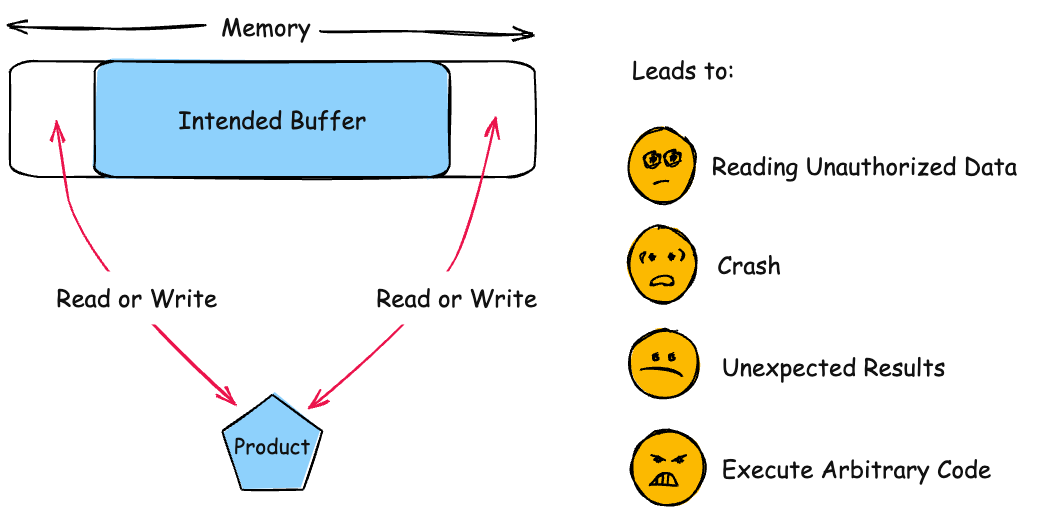
The product performs operations on a memory buffer, but it reads from or writes to a memory location outside the buffer's intended boundary. This may result in read or write operations on unexpected memory locations that could be linked to other variables, data structures, or internal program data.
Buffer Overflowbuffer overrunmemory safety
Variant - a weakness that is linked to a certain type of product, typically involving a specific language or technology. More specific than a Base weakness. Variant level weaknesses typically describe issues in terms of 3 to 5 of the following dimensions: behavior, property, technology, language, and resource.
Improper Validation of Array Index
- (129)
868(Weaknesses Addressed by the SEI CERT C++ Coding Standard (2016 Version)) >
874(CERT C++ Secure Coding Section 06 - Arrays and the STL (ARR)) >
129(Improper Validation of Array Index)
The product uses untrusted input when calculating or using an array index, but the product does not validate or incorrectly validates the index to ensure the index references a valid position within the array.
out-of-bounds array indexindex-out-of-rangearray index underflow
Variant - a weakness that is linked to a certain type of product, typically involving a specific language or technology. More specific than a Base weakness. Variant level weaknesses typically describe issues in terms of 3 to 5 of the following dimensions: behavior, property, technology, language, and resource.
Use of sizeof() on a Pointer Type
- (467)
868(Weaknesses Addressed by the SEI CERT C++ Coding Standard (2016 Version)) >
874(CERT C++ Secure Coding Section 06 - Arrays and the STL (ARR)) >
467(Use of sizeof() on a Pointer Type)
The code calls sizeof() on a pointer type, which can be an incorrect calculation if the programmer intended to determine the size of the data that is being pointed to.
Base - a weakness that is still mostly independent of a resource or technology, but with sufficient details to provide specific methods for detection and prevention. Base level weaknesses typically describe issues in terms of 2 or 3 of the following dimensions: behavior, property, technology, language, and resource.
Use of Pointer Subtraction to Determine Size
- (469)
868(Weaknesses Addressed by the SEI CERT C++ Coding Standard (2016 Version)) >
874(CERT C++ Secure Coding Section 06 - Arrays and the STL (ARR)) >
469(Use of Pointer Subtraction to Determine Size)
The product subtracts one pointer from another in order to determine size, but this calculation can be incorrect if the pointers do not exist in the same memory chunk.
Class - a weakness that is described in a very abstract fashion, typically independent of any specific language or technology. More specific than a Pillar Weakness, but more general than a Base Weakness. Class level weaknesses typically describe issues in terms of 1 or 2 of the following dimensions: behavior, property, and resource.
Improper Initialization
- (665)
868(Weaknesses Addressed by the SEI CERT C++ Coding Standard (2016 Version)) >
874(CERT C++ Secure Coding Section 06 - Arrays and the STL (ARR)) >
665(Improper Initialization)
The product does not initialize or incorrectly initializes a resource, which might leave the resource in an unexpected state when it is accessed or used.
Base - a weakness that is still mostly independent of a resource or technology, but with sufficient details to provide specific methods for detection and prevention. Base level weaknesses typically describe issues in terms of 2 or 3 of the following dimensions: behavior, property, technology, language, and resource.
Buffer Access with Incorrect Length Value
- (805)
868(Weaknesses Addressed by the SEI CERT C++ Coding Standard (2016 Version)) >
874(CERT C++ Secure Coding Section 06 - Arrays and the STL (ARR)) >
805(Buffer Access with Incorrect Length Value)
The product uses a sequential operation to read or write a buffer, but it uses an incorrect length value that causes it to access memory that is outside of the bounds of the buffer.
868(Weaknesses Addressed by the SEI CERT C++ Coding Standard (2016 Version)) >
875(CERT C++ Secure Coding Section 07 - Characters and Strings (STR))
Weaknesses in this category are related to rules in the Characters and Strings (STR) section of the CERT C++ Secure Coding Standard. Since not all rules map to specific weaknesses, this category may be incomplete.
Class - a weakness that is described in a very abstract fashion, typically independent of any specific language or technology. More specific than a Pillar Weakness, but more general than a Base Weakness. Class level weaknesses typically describe issues in terms of 1 or 2 of the following dimensions: behavior, property, and resource.
Improper Restriction of Operations within the Bounds of a Memory Buffer
- (119)
868(Weaknesses Addressed by the SEI CERT C++ Coding Standard (2016 Version)) >
875(CERT C++ Secure Coding Section 07 - Characters and Strings (STR)) >
119(Improper Restriction of Operations within the Bounds of a Memory Buffer)
The product performs operations on a memory buffer, but it reads from or writes to a memory location outside the buffer's intended boundary. This may result in read or write operations on unexpected memory locations that could be linked to other variables, data structures, or internal program data.
Buffer Overflowbuffer overrunmemory safety
Base - a weakness that is still mostly independent of a resource or technology, but with sufficient details to provide specific methods for detection and prevention. Base level weaknesses typically describe issues in terms of 2 or 3 of the following dimensions: behavior, property, technology, language, and resource.
Buffer Copy without Checking Size of Input ('Classic Buffer Overflow')
- (120)
868(Weaknesses Addressed by the SEI CERT C++ Coding Standard (2016 Version)) >
875(CERT C++ Secure Coding Section 07 - Characters and Strings (STR)) >
120(Buffer Copy without Checking Size of Input ('Classic Buffer Overflow'))
The product copies an input buffer to an output buffer without verifying that the size of the input buffer is less than the size of the output buffer.
Classic Buffer OverflowUnbounded Transfer
Base - a weakness that is still mostly independent of a resource or technology, but with sufficient details to provide specific methods for detection and prevention. Base level weaknesses typically describe issues in terms of 2 or 3 of the following dimensions: behavior, property, technology, language, and resource.
Improper Null Termination
- (170)
868(Weaknesses Addressed by the SEI CERT C++ Coding Standard (2016 Version)) >
875(CERT C++ Secure Coding Section 07 - Characters and Strings (STR)) >
170(Improper Null Termination)
The product does not terminate or incorrectly terminates a string or array with a null character or equivalent terminator.
Base - a weakness that is still mostly independent of a resource or technology, but with sufficient details to provide specific methods for detection and prevention. Base level weaknesses typically describe issues in terms of 2 or 3 of the following dimensions: behavior, property, technology, language, and resource.
Off-by-one Error
- (193)
868(Weaknesses Addressed by the SEI CERT C++ Coding Standard (2016 Version)) >
875(CERT C++ Secure Coding Section 07 - Characters and Strings (STR)) >
193(Off-by-one Error)
A product calculates or uses an incorrect maximum or minimum value that is 1 more, or 1 less, than the correct value.
off-by-five
Base - a weakness that is still mostly independent of a resource or technology, but with sufficient details to provide specific methods for detection and prevention. Base level weaknesses typically describe issues in terms of 2 or 3 of the following dimensions: behavior, property, technology, language, and resource.
Addition of Data Structure Sentinel
- (464)
868(Weaknesses Addressed by the SEI CERT C++ Coding Standard (2016 Version)) >
875(CERT C++ Secure Coding Section 07 - Characters and Strings (STR)) >
464(Addition of Data Structure Sentinel)
The accidental addition of a data-structure sentinel can cause serious programming logic problems.
Variant - a weakness that is linked to a certain type of product, typically involving a specific language or technology. More specific than a Base weakness. Variant level weaknesses typically describe issues in terms of 3 to 5 of the following dimensions: behavior, property, technology, language, and resource.
Function Call With Incorrect Argument Type
- (686)
868(Weaknesses Addressed by the SEI CERT C++ Coding Standard (2016 Version)) >
875(CERT C++ Secure Coding Section 07 - Characters and Strings (STR)) >
686(Function Call With Incorrect Argument Type)
The product calls a function, procedure, or routine, but the caller specifies an argument that is the wrong data type, which may lead to resultant weaknesses.
Class - a weakness that is described in a very abstract fashion, typically independent of any specific language or technology. More specific than a Pillar Weakness, but more general than a Base Weakness. Class level weaknesses typically describe issues in terms of 1 or 2 of the following dimensions: behavior, property, and resource.
Incorrect Type Conversion or Cast
- (704)
868(Weaknesses Addressed by the SEI CERT C++ Coding Standard (2016 Version)) >
875(CERT C++ Secure Coding Section 07 - Characters and Strings (STR)) >
704(Incorrect Type Conversion or Cast)
The product does not correctly convert an object, resource, or structure from one type to a different type.
Base - a weakness that is still mostly independent of a resource or technology, but with sufficient details to provide specific methods for detection and prevention. Base level weaknesses typically describe issues in terms of 2 or 3 of the following dimensions: behavior, property, technology, language, and resource.
Improper Neutralization of Special Elements used in an OS Command ('OS Command Injection')
- (78)
868(Weaknesses Addressed by the SEI CERT C++ Coding Standard (2016 Version)) >
875(CERT C++ Secure Coding Section 07 - Characters and Strings (STR)) >
78(Improper Neutralization of Special Elements used in an OS Command ('OS Command Injection'))
The product constructs all or part of an OS command using externally-influenced input from an upstream component, but it does not neutralize or incorrectly neutralizes special elements that could modify the intended OS command when it is sent to a downstream component.
Shell injectionShell metacharactersOS Command Injection
Base - a weakness that is still mostly independent of a resource or technology, but with sufficient details to provide specific methods for detection and prevention. Base level weaknesses typically describe issues in terms of 2 or 3 of the following dimensions: behavior, property, technology, language, and resource.
Improper Neutralization of Argument Delimiters in a Command ('Argument Injection')
- (88)
868(Weaknesses Addressed by the SEI CERT C++ Coding Standard (2016 Version)) >
875(CERT C++ Secure Coding Section 07 - Characters and Strings (STR)) >
88(Improper Neutralization of Argument Delimiters in a Command ('Argument Injection'))
The product constructs a string for a command to be executed by a separate component
in another control sphere, but it does not properly delimit the
intended arguments, options, or switches within that command string.
868(Weaknesses Addressed by the SEI CERT C++ Coding Standard (2016 Version)) >
876(CERT C++ Secure Coding Section 08 - Memory Management (MEM))
Weaknesses in this category are related to rules in the Memory Management (MEM) section of the CERT C++ Secure Coding Standard. Since not all rules map to specific weaknesses, this category may be incomplete.
Class - a weakness that is described in a very abstract fashion, typically independent of any specific language or technology. More specific than a Pillar Weakness, but more general than a Base Weakness. Class level weaknesses typically describe issues in terms of 1 or 2 of the following dimensions: behavior, property, and resource.
Improper Restriction of Operations within the Bounds of a Memory Buffer
- (119)
868(Weaknesses Addressed by the SEI CERT C++ Coding Standard (2016 Version)) >
876(CERT C++ Secure Coding Section 08 - Memory Management (MEM)) >
119(Improper Restriction of Operations within the Bounds of a Memory Buffer)
The product performs operations on a memory buffer, but it reads from or writes to a memory location outside the buffer's intended boundary. This may result in read or write operations on unexpected memory locations that could be linked to other variables, data structures, or internal program data.
Buffer Overflowbuffer overrunmemory safety
Base - a weakness that is still mostly independent of a resource or technology, but with sufficient details to provide specific methods for detection and prevention. Base level weaknesses typically describe issues in terms of 2 or 3 of the following dimensions: behavior, property, technology, language, and resource.
Wrap-around Error
- (128)
868(Weaknesses Addressed by the SEI CERT C++ Coding Standard (2016 Version)) >
876(CERT C++ Secure Coding Section 08 - Memory Management (MEM)) >
128(Wrap-around Error)
Wrap around errors occur whenever a value is incremented past the maximum value for its type and therefore "wraps around" to a very small, negative, or undefined value.
Base - a weakness that is still mostly independent of a resource or technology, but with sufficient details to provide specific methods for detection and prevention. Base level weaknesses typically describe issues in terms of 2 or 3 of the following dimensions: behavior, property, technology, language, and resource.
Incorrect Calculation of Buffer Size
- (131)
868(Weaknesses Addressed by the SEI CERT C++ Coding Standard (2016 Version)) >
876(CERT C++ Secure Coding Section 08 - Memory Management (MEM)) >
131(Incorrect Calculation of Buffer Size)
The product does not correctly calculate the size to be used when allocating a buffer, which could lead to a buffer overflow.
Base - a weakness that is still mostly independent of a resource or technology, but with sufficient details to provide specific methods for detection and prevention. Base level weaknesses typically describe issues in terms of 2 or 3 of the following dimensions: behavior, property, technology, language, and resource.
Integer Overflow or Wraparound
- (190)
868(Weaknesses Addressed by the SEI CERT C++ Coding Standard (2016 Version)) >
876(CERT C++ Secure Coding Section 08 - Memory Management (MEM)) >
190(Integer Overflow or Wraparound)
The product performs a calculation that can
produce an integer overflow or wraparound when the logic
assumes that the resulting value will always be larger than
the original value. This occurs when an integer value is
incremented to a value that is too large to store in the
associated representation. When this occurs, the value may
become a very small or negative number.
OverflowWraparoundwrap, wrap-around, wrap around
Class - a weakness that is described in a very abstract fashion, typically independent of any specific language or technology. More specific than a Pillar Weakness, but more general than a Base Weakness. Class level weaknesses typically describe issues in terms of 1 or 2 of the following dimensions: behavior, property, and resource.
Improper Input Validation
- (20)
868(Weaknesses Addressed by the SEI CERT C++ Coding Standard (2016 Version)) >
876(CERT C++ Secure Coding Section 08 - Memory Management (MEM)) >
20(Improper Input Validation)
The product receives input or data, but it does
not validate or incorrectly validates that the input has the
properties that are required to process the data safely and
correctly.
Base - a weakness that is still mostly independent of a resource or technology, but with sufficient details to provide specific methods for detection and prevention. Base level weaknesses typically describe issues in terms of 2 or 3 of the following dimensions: behavior, property, technology, language, and resource.
Sensitive Information in Resource Not Removed Before Reuse
- (226)
868(Weaknesses Addressed by the SEI CERT C++ Coding Standard (2016 Version)) >
876(CERT C++ Secure Coding Section 08 - Memory Management (MEM)) >
226(Sensitive Information in Resource Not Removed Before Reuse)
The product releases a resource such as memory or a file so that it can be made available for reuse, but it does not clear or "zeroize" the information contained in the resource before the product performs a critical state transition or makes the resource available for reuse by other entities.
Variant - a weakness that is linked to a certain type of product, typically involving a specific language or technology. More specific than a Base weakness. Variant level weaknesses typically describe issues in terms of 3 to 5 of the following dimensions: behavior, property, technology, language, and resource.
Improper Clearing of Heap Memory Before Release ('Heap Inspection')
- (244)
868(Weaknesses Addressed by the SEI CERT C++ Coding Standard (2016 Version)) >
876(CERT C++ Secure Coding Section 08 - Memory Management (MEM)) >
244(Improper Clearing of Heap Memory Before Release ('Heap Inspection'))
Using realloc() to resize buffers that store sensitive information can leave the sensitive information exposed to attack, because it is not removed from memory.
Base - a weakness that is still mostly independent of a resource or technology, but with sufficient details to provide specific methods for detection and prevention. Base level weaknesses typically describe issues in terms of 2 or 3 of the following dimensions: behavior, property, technology, language, and resource.
Unchecked Return Value
- (252)
868(Weaknesses Addressed by the SEI CERT C++ Coding Standard (2016 Version)) >
876(CERT C++ Secure Coding Section 08 - Memory Management (MEM)) >
252(Unchecked Return Value)
The product does not check the return value from a method or function, which can prevent it from detecting unexpected states and conditions.
Base - a weakness that is still mostly independent of a resource or technology, but with sufficient details to provide specific methods for detection and prevention. Base level weaknesses typically describe issues in terms of 2 or 3 of the following dimensions: behavior, property, technology, language, and resource.
Unchecked Error Condition
- (391)
868(Weaknesses Addressed by the SEI CERT C++ Coding Standard (2016 Version)) >
876(CERT C++ Secure Coding Section 08 - Memory Management (MEM)) >
391(Unchecked Error Condition)
[PLANNED FOR DEPRECATION. SEE MAINTENANCE NOTES AND CONSIDER CWE-252, CWE-248, OR CWE-1069.] Ignoring exceptions and other error conditions may allow an attacker to induce unexpected behavior unnoticed.
Class - a weakness that is described in a very abstract fashion, typically independent of any specific language or technology. More specific than a Pillar Weakness, but more general than a Base Weakness. Class level weaknesses typically describe issues in terms of 1 or 2 of the following dimensions: behavior, property, and resource.
Improper Resource Shutdown or Release
- (404)
868(Weaknesses Addressed by the SEI CERT C++ Coding Standard (2016 Version)) >
876(CERT C++ Secure Coding Section 08 - Memory Management (MEM)) >
404(Improper Resource Shutdown or Release)
The product does not release or incorrectly releases a resource before it is made available for re-use.
Variant - a weakness that is linked to a certain type of product, typically involving a specific language or technology. More specific than a Base weakness. Variant level weaknesses typically describe issues in terms of 3 to 5 of the following dimensions: behavior, property, technology, language, and resource.
Double Free
- (415)
868(Weaknesses Addressed by the SEI CERT C++ Coding Standard (2016 Version)) >
876(CERT C++ Secure Coding Section 08 - Memory Management (MEM)) >
415(Double Free)
The product calls free() twice on the same memory address.
Double-free
Variant - a weakness that is linked to a certain type of product, typically involving a specific language or technology. More specific than a Base weakness. Variant level weaknesses typically describe issues in terms of 3 to 5 of the following dimensions: behavior, property, technology, language, and resource.
Use After Free
- (416)
868(Weaknesses Addressed by the SEI CERT C++ Coding Standard (2016 Version)) >
876(CERT C++ Secure Coding Section 08 - Memory Management (MEM)) >
416(Use After Free)
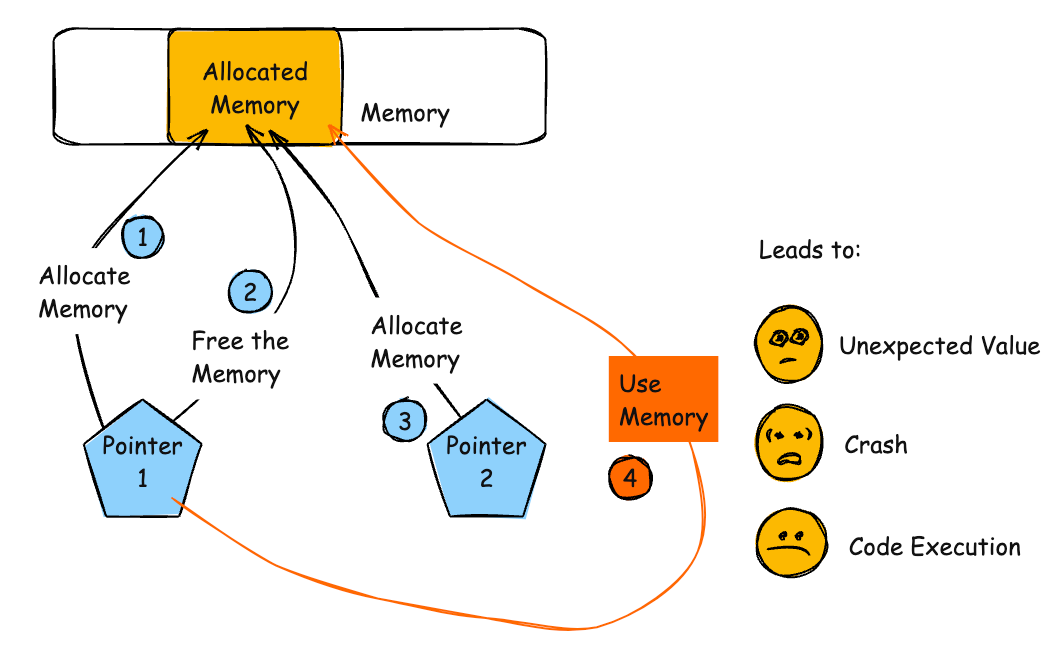
The product reuses or references memory after it has been freed. At some point afterward, the memory may be allocated again and saved in another pointer, while the original pointer references a location somewhere within the new allocation. Any operations using the original pointer are no longer valid because the memory "belongs" to the code that operates on the new pointer.
Dangling pointerUAFUse-After-Free
Base - a weakness that is still mostly independent of a resource or technology, but with sufficient details to provide specific methods for detection and prevention. Base level weaknesses typically describe issues in terms of 2 or 3 of the following dimensions: behavior, property, technology, language, and resource.
NULL Pointer Dereference
- (476)
868(Weaknesses Addressed by the SEI CERT C++ Coding Standard (2016 Version)) >
876(CERT C++ Secure Coding Section 08 - Memory Management (MEM)) >
476(NULL Pointer Dereference)
The product dereferences a pointer that it expects to be valid but is NULL.
NPDnull derefNPEnil pointer dereference
Variant - a weakness that is linked to a certain type of product, typically involving a specific language or technology. More specific than a Base weakness. Variant level weaknesses typically describe issues in terms of 3 to 5 of the following dimensions: behavior, property, technology, language, and resource.
Exposure of Core Dump File to an Unauthorized Control Sphere
- (528)
868(Weaknesses Addressed by the SEI CERT C++ Coding Standard (2016 Version)) >
876(CERT C++ Secure Coding Section 08 - Memory Management (MEM)) >
528(Exposure of Core Dump File to an Unauthorized Control Sphere)
The product generates a core dump file in a directory, archive, or other resource that is stored, transferred, or otherwise made accessible to unauthorized actors.
Variant - a weakness that is linked to a certain type of product, typically involving a specific language or technology. More specific than a Base weakness. Variant level weaknesses typically describe issues in terms of 3 to 5 of the following dimensions: behavior, property, technology, language, and resource.
Free of Memory not on the Heap
- (590)
868(Weaknesses Addressed by the SEI CERT C++ Coding Standard (2016 Version)) >
876(CERT C++ Secure Coding Section 08 - Memory Management (MEM)) >
590(Free of Memory not on the Heap)
The product calls free() on a pointer to memory that was not allocated using associated heap allocation functions such as malloc(), calloc(), or realloc().
Variant - a weakness that is linked to a certain type of product, typically involving a specific language or technology. More specific than a Base weakness. Variant level weaknesses typically describe issues in terms of 3 to 5 of the following dimensions: behavior, property, technology, language, and resource.
Sensitive Data Storage in Improperly Locked Memory
- (591)
868(Weaknesses Addressed by the SEI CERT C++ Coding Standard (2016 Version)) >
876(CERT C++ Secure Coding Section 08 - Memory Management (MEM)) >
591(Sensitive Data Storage in Improperly Locked Memory)
The product stores sensitive data in memory that is not locked, or that has been incorrectly locked, which might cause the memory to be written to swap files on disk by the virtual memory manager. This can make the data more accessible to external actors.
Class - a weakness that is described in a very abstract fashion, typically independent of any specific language or technology. More specific than a Pillar Weakness, but more general than a Base Weakness. Class level weaknesses typically describe issues in terms of 1 or 2 of the following dimensions: behavior, property, and resource.
Improper Initialization
- (665)
868(Weaknesses Addressed by the SEI CERT C++ Coding Standard (2016 Version)) >
876(CERT C++ Secure Coding Section 08 - Memory Management (MEM)) >
665(Improper Initialization)
The product does not initialize or incorrectly initializes a resource, which might leave the resource in an unexpected state when it is accessed or used.
Variant - a weakness that is linked to a certain type of product, typically involving a specific language or technology. More specific than a Base weakness. Variant level weaknesses typically describe issues in terms of 3 to 5 of the following dimensions: behavior, property, technology, language, and resource.
Function Call With Incorrectly Specified Argument Value
- (687)
868(Weaknesses Addressed by the SEI CERT C++ Coding Standard (2016 Version)) >
876(CERT C++ Secure Coding Section 08 - Memory Management (MEM)) >
687(Function Call With Incorrectly Specified Argument Value)
The product calls a function, procedure, or routine, but the caller specifies an argument that contains the wrong value, which may lead to resultant weaknesses.
Chain - a Compound Element that is a sequence of two or more separate weaknesses that can be closely linked together within software. One weakness, X, can directly create the conditions that are necessary to cause another weakness, Y, to enter a vulnerable condition. When this happens, CWE refers to X as "primary" to Y, and Y is "resultant" from X. Chains can involve more than two weaknesses, and in some cases, they might have a tree-like structure.
Unchecked Return Value to NULL Pointer Dereference
- (690)
868(Weaknesses Addressed by the SEI CERT C++ Coding Standard (2016 Version)) >
876(CERT C++ Secure Coding Section 08 - Memory Management (MEM)) >
690(Unchecked Return Value to NULL Pointer Dereference)
The product does not check for an error after calling a function that can return with a NULL pointer if the function fails, which leads to a resultant NULL pointer dereference.
Pillar - a weakness that is the most abstract type of weakness and represents a theme for all class/base/variant weaknesses related to it. A Pillar is different from a Category as a Pillar is still technically a type of weakness that describes a mistake, while a Category represents a common characteristic used to group related things.
Improper Check or Handling of Exceptional Conditions
- (703)
868(Weaknesses Addressed by the SEI CERT C++ Coding Standard (2016 Version)) >
876(CERT C++ Secure Coding Section 08 - Memory Management (MEM)) >
703(Improper Check or Handling of Exceptional Conditions)
The product does not properly anticipate or handle exceptional conditions that rarely occur during normal operation of the product.
Class - a weakness that is described in a very abstract fashion, typically independent of any specific language or technology. More specific than a Pillar Weakness, but more general than a Base Weakness. Class level weaknesses typically describe issues in terms of 1 or 2 of the following dimensions: behavior, property, and resource.
Improper Check for Unusual or Exceptional Conditions
- (754)
868(Weaknesses Addressed by the SEI CERT C++ Coding Standard (2016 Version)) >
876(CERT C++ Secure Coding Section 08 - Memory Management (MEM)) >
754(Improper Check for Unusual or Exceptional Conditions)
The product does not check or incorrectly checks for unusual or exceptional conditions that are not expected to occur frequently during day to day operation of the product.
Variant - a weakness that is linked to a certain type of product, typically involving a specific language or technology. More specific than a Base weakness. Variant level weaknesses typically describe issues in terms of 3 to 5 of the following dimensions: behavior, property, technology, language, and resource.
Mismatched Memory Management Routines
- (762)
868(Weaknesses Addressed by the SEI CERT C++ Coding Standard (2016 Version)) >
876(CERT C++ Secure Coding Section 08 - Memory Management (MEM)) >
762(Mismatched Memory Management Routines)
The product attempts to return a memory resource to the system, but it calls a release function that is not compatible with the function that was originally used to allocate that resource.
Base - a weakness that is still mostly independent of a resource or technology, but with sufficient details to provide specific methods for detection and prevention. Base level weaknesses typically describe issues in terms of 2 or 3 of the following dimensions: behavior, property, technology, language, and resource.
Allocation of Resources Without Limits or Throttling
- (770)
868(Weaknesses Addressed by the SEI CERT C++ Coding Standard (2016 Version)) >
876(CERT C++ Secure Coding Section 08 - Memory Management (MEM)) >
770(Allocation of Resources Without Limits or Throttling)
The product allocates a reusable resource or group of resources on behalf of an actor without imposing any intended restrictions on the size or number of resources that can be allocated.
Base - a weakness that is still mostly independent of a resource or technology, but with sufficient details to provide specific methods for detection and prevention. Base level weaknesses typically describe issues in terms of 2 or 3 of the following dimensions: behavior, property, technology, language, and resource.
Untrusted Pointer Dereference
- (822)
868(Weaknesses Addressed by the SEI CERT C++ Coding Standard (2016 Version)) >
876(CERT C++ Secure Coding Section 08 - Memory Management (MEM)) >
822(Untrusted Pointer Dereference)
The product obtains a value from an untrusted source, converts this value to a pointer, and dereferences the resulting pointer.
868(Weaknesses Addressed by the SEI CERT C++ Coding Standard (2016 Version)) >
877(CERT C++ Secure Coding Section 09 - Input Output (FIO))
Weaknesses in this category are related to rules in the Input Output (FIO) section of the CERT C++ Secure Coding Standard. Since not all rules map to specific weaknesses, this category may be incomplete.
Class - a weakness that is described in a very abstract fashion, typically independent of any specific language or technology. More specific than a Pillar Weakness, but more general than a Base Weakness. Class level weaknesses typically describe issues in terms of 1 or 2 of the following dimensions: behavior, property, and resource.
Improper Restriction of Operations within the Bounds of a Memory Buffer
- (119)
868(Weaknesses Addressed by the SEI CERT C++ Coding Standard (2016 Version)) >
877(CERT C++ Secure Coding Section 09 - Input Output (FIO)) >
119(Improper Restriction of Operations within the Bounds of a Memory Buffer)
The product performs operations on a memory buffer, but it reads from or writes to a memory location outside the buffer's intended boundary. This may result in read or write operations on unexpected memory locations that could be linked to other variables, data structures, or internal program data.
Buffer Overflowbuffer overrunmemory safety
Base - a weakness that is still mostly independent of a resource or technology, but with sufficient details to provide specific methods for detection and prevention. Base level weaknesses typically describe issues in terms of 2 or 3 of the following dimensions: behavior, property, technology, language, and resource.
Use of Externally-Controlled Format String
- (134)
868(Weaknesses Addressed by the SEI CERT C++ Coding Standard (2016 Version)) >
877(CERT C++ Secure Coding Section 09 - Input Output (FIO)) >
134(Use of Externally-Controlled Format String)
The product uses a function that accepts a format string as an argument, but the format string originates from an external source.
Base - a weakness that is still mostly independent of a resource or technology, but with sufficient details to provide specific methods for detection and prevention. Base level weaknesses typically describe issues in terms of 2 or 3 of the following dimensions: behavior, property, technology, language, and resource.
Improper Limitation of a Pathname to a Restricted Directory ('Path Traversal')
- (22)
868(Weaknesses Addressed by the SEI CERT C++ Coding Standard (2016 Version)) >
877(CERT C++ Secure Coding Section 09 - Input Output (FIO)) >
22(Improper Limitation of a Pathname to a Restricted Directory ('Path Traversal'))
The product uses external input to construct a pathname that is intended to identify a file or directory that is located underneath a restricted parent directory, but the product does not properly neutralize special elements within the pathname that can cause the pathname to resolve to a location that is outside of the restricted directory.
Path traversalDirectory traversalPath transversal
Base - a weakness that is still mostly independent of a resource or technology, but with sufficient details to provide specific methods for detection and prevention. Base level weaknesses typically describe issues in terms of 2 or 3 of the following dimensions: behavior, property, technology, language, and resource.
Improper Handling of Unexpected Data Type
- (241)
868(Weaknesses Addressed by the SEI CERT C++ Coding Standard (2016 Version)) >
877(CERT C++ Secure Coding Section 09 - Input Output (FIO)) >
241(Improper Handling of Unexpected Data Type)
The product does not handle or incorrectly handles when a particular element is not the expected type, e.g. it expects a digit (0-9) but is provided with a letter (A-Z).
Base - a weakness that is still mostly independent of a resource or technology, but with sufficient details to provide specific methods for detection and prevention. Base level weaknesses typically describe issues in terms of 2 or 3 of the following dimensions: behavior, property, technology, language, and resource.
Incorrect Default Permissions
- (276)
868(Weaknesses Addressed by the SEI CERT C++ Coding Standard (2016 Version)) >
877(CERT C++ Secure Coding Section 09 - Input Output (FIO)) >
276(Incorrect Default Permissions)
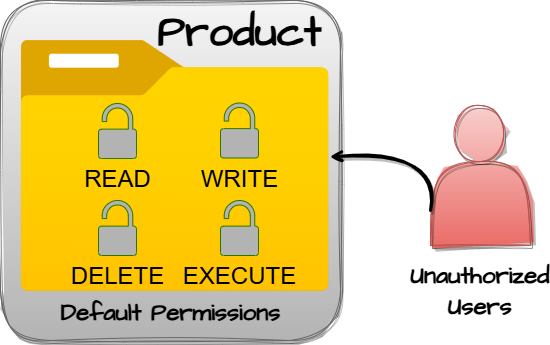
During installation, installed file permissions are set to allow anyone to modify those files.
Variant - a weakness that is linked to a certain type of product, typically involving a specific language or technology. More specific than a Base weakness. Variant level weaknesses typically describe issues in terms of 3 to 5 of the following dimensions: behavior, property, technology, language, and resource.
Incorrect Execution-Assigned Permissions
- (279)
868(Weaknesses Addressed by the SEI CERT C++ Coding Standard (2016 Version)) >
877(CERT C++ Secure Coding Section 09 - Input Output (FIO)) >
279(Incorrect Execution-Assigned Permissions)
While it is executing, the product sets the permissions of an object in a way that violates the intended permissions that have been specified by the user.
Class - a weakness that is described in a very abstract fashion, typically independent of any specific language or technology. More specific than a Pillar Weakness, but more general than a Base Weakness. Class level weaknesses typically describe issues in terms of 1 or 2 of the following dimensions: behavior, property, and resource.
Concurrent Execution using Shared Resource with Improper Synchronization ('Race Condition')
- (362)
868(Weaknesses Addressed by the SEI CERT C++ Coding Standard (2016 Version)) >
877(CERT C++ Secure Coding Section 09 - Input Output (FIO)) >
362(Concurrent Execution using Shared Resource with Improper Synchronization ('Race Condition'))
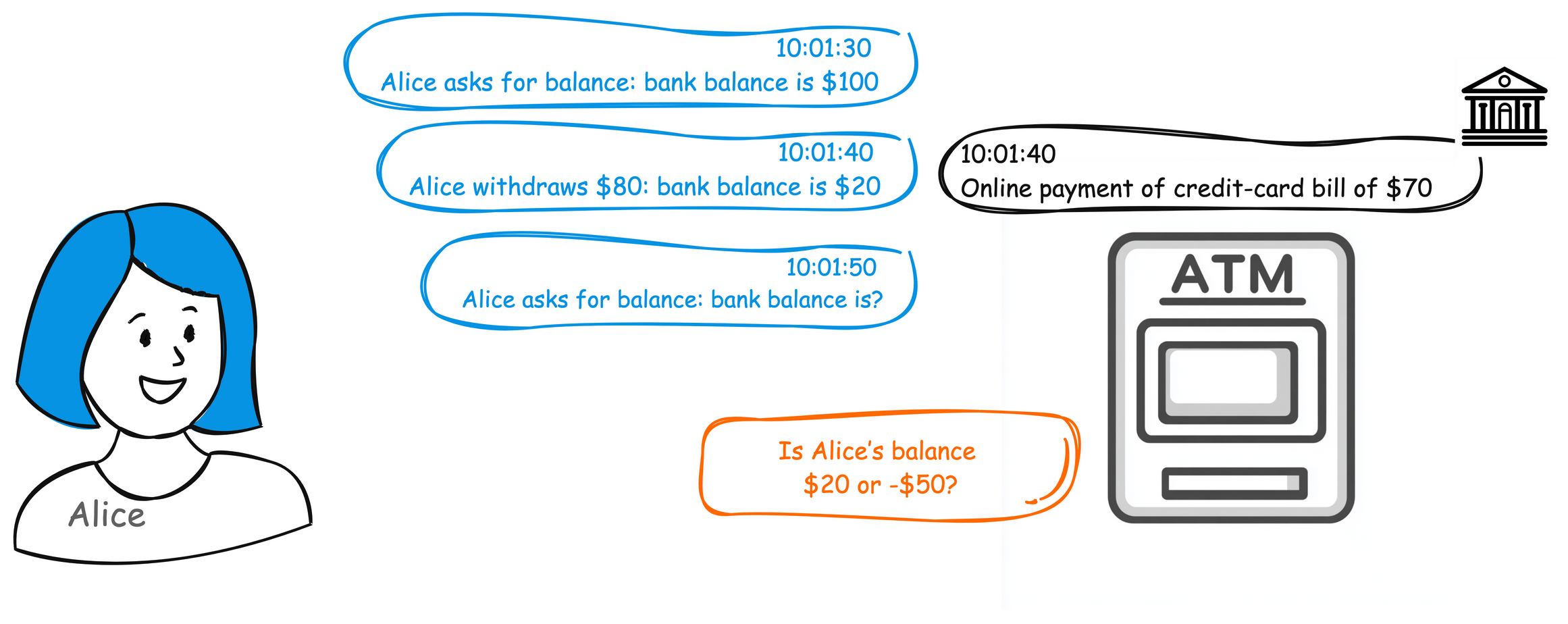
The product contains a concurrent code sequence that requires temporary, exclusive access to a shared resource, but a timing window exists in which the shared resource can be modified by another code sequence operating concurrently.
Race Condition
Base - a weakness that is still mostly independent of a resource or technology, but with sufficient details to provide specific methods for detection and prevention. Base level weaknesses typically describe issues in terms of 2 or 3 of the following dimensions: behavior, property, technology, language, and resource.
Time-of-check Time-of-use (TOCTOU) Race Condition
- (367)
868(Weaknesses Addressed by the SEI CERT C++ Coding Standard (2016 Version)) >
877(CERT C++ Secure Coding Section 09 - Input Output (FIO)) >
367(Time-of-check Time-of-use (TOCTOU) Race Condition)
The product checks the state of a resource before using that resource, but the resource's state can change between the check and the use in a way that invalidates the results of the check.
TOCTTOUTOCCTOU
Variant - a weakness that is linked to a certain type of product, typically involving a specific language or technology. More specific than a Base weakness. Variant level weaknesses typically describe issues in terms of 3 to 5 of the following dimensions: behavior, property, technology, language, and resource.
Path Traversal: '/absolute/pathname/here'
- (37)
868(Weaknesses Addressed by the SEI CERT C++ Coding Standard (2016 Version)) >
877(CERT C++ Secure Coding Section 09 - Input Output (FIO)) >
37(Path Traversal: '/absolute/pathname/here')
The product accepts input in the form of a slash absolute path ('/absolute/pathname/here') without appropriate validation, which can allow an attacker to traverse the file system to unintended locations or access arbitrary files.
Base - a weakness that is still mostly independent of a resource or technology, but with sufficient details to provide specific methods for detection and prevention. Base level weaknesses typically describe issues in terms of 2 or 3 of the following dimensions: behavior, property, technology, language, and resource.
Creation of Temporary File in Directory with Insecure Permissions
- (379)
868(Weaknesses Addressed by the SEI CERT C++ Coding Standard (2016 Version)) >
877(CERT C++ Secure Coding Section 09 - Input Output (FIO)) >
379(Creation of Temporary File in Directory with Insecure Permissions)
The product creates a temporary file in a directory whose permissions allow unintended actors to determine the file's existence or otherwise access that file.
Variant - a weakness that is linked to a certain type of product, typically involving a specific language or technology. More specific than a Base weakness. Variant level weaknesses typically describe issues in terms of 3 to 5 of the following dimensions: behavior, property, technology, language, and resource.
Path Traversal: '\absolute\pathname\here'
- (38)
868(Weaknesses Addressed by the SEI CERT C++ Coding Standard (2016 Version)) >
877(CERT C++ Secure Coding Section 09 - Input Output (FIO)) >
38(Path Traversal: '\absolute\pathname\here')
The product accepts input in the form of a backslash absolute path ('\absolute\pathname\here') without appropriate validation, which can allow an attacker to traverse the file system to unintended locations or access arbitrary files.
Variant - a weakness that is linked to a certain type of product, typically involving a specific language or technology. More specific than a Base weakness. Variant level weaknesses typically describe issues in terms of 3 to 5 of the following dimensions: behavior, property, technology, language, and resource.
Path Traversal: 'C:dirname'
- (39)
868(Weaknesses Addressed by the SEI CERT C++ Coding Standard (2016 Version)) >
877(CERT C++ Secure Coding Section 09 - Input Output (FIO)) >
39(Path Traversal: 'C:dirname')
The product accepts input that contains a drive letter or Windows volume letter ('C:dirname') that potentially redirects access to an unintended location or arbitrary file.
Base - a weakness that is still mostly independent of a resource or technology, but with sufficient details to provide specific methods for detection and prevention. Base level weaknesses typically describe issues in terms of 2 or 3 of the following dimensions: behavior, property, technology, language, and resource.
Unchecked Error Condition
- (391)
868(Weaknesses Addressed by the SEI CERT C++ Coding Standard (2016 Version)) >
877(CERT C++ Secure Coding Section 09 - Input Output (FIO)) >
391(Unchecked Error Condition)
[PLANNED FOR DEPRECATION. SEE MAINTENANCE NOTES AND CONSIDER CWE-252, CWE-248, OR CWE-1069.] Ignoring exceptions and other error conditions may allow an attacker to induce unexpected behavior unnoticed.
Base - a weakness that is still mostly independent of a resource or technology, but with sufficient details to provide specific methods for detection and prevention. Base level weaknesses typically describe issues in terms of 2 or 3 of the following dimensions: behavior, property, technology, language, and resource.
Exposure of File Descriptor to Unintended Control Sphere ('File Descriptor Leak')
- (403)
868(Weaknesses Addressed by the SEI CERT C++ Coding Standard (2016 Version)) >
877(CERT C++ Secure Coding Section 09 - Input Output (FIO)) >
403(Exposure of File Descriptor to Unintended Control Sphere ('File Descriptor Leak'))
A process does not close sensitive file descriptors before invoking a child process, which allows the child to perform unauthorized I/O operations using those descriptors.
File descriptor leak
Class - a weakness that is described in a very abstract fashion, typically independent of any specific language or technology. More specific than a Pillar Weakness, but more general than a Base Weakness. Class level weaknesses typically describe issues in terms of 1 or 2 of the following dimensions: behavior, property, and resource.
Improper Resource Shutdown or Release
- (404)
868(Weaknesses Addressed by the SEI CERT C++ Coding Standard (2016 Version)) >
877(CERT C++ Secure Coding Section 09 - Input Output (FIO)) >
404(Improper Resource Shutdown or Release)
The product does not release or incorrectly releases a resource before it is made available for re-use.
Base - a weakness that is still mostly independent of a resource or technology, but with sufficient details to provide specific methods for detection and prevention. Base level weaknesses typically describe issues in terms of 2 or 3 of the following dimensions: behavior, property, technology, language, and resource.
Improper Resolution of Path Equivalence
- (41)
868(Weaknesses Addressed by the SEI CERT C++ Coding Standard (2016 Version)) >
877(CERT C++ Secure Coding Section 09 - Input Output (FIO)) >
41(Improper Resolution of Path Equivalence)
The product is vulnerable to file system contents disclosure through path equivalence. Path equivalence involves the use of special characters in file and directory names. The associated manipulations are intended to generate multiple names for the same object.
Base - a weakness that is still mostly independent of a resource or technology, but with sufficient details to provide specific methods for detection and prevention. Base level weaknesses typically describe issues in terms of 2 or 3 of the following dimensions: behavior, property, technology, language, and resource.
Files or Directories Accessible to External Parties
- (552)
868(Weaknesses Addressed by the SEI CERT C++ Coding Standard (2016 Version)) >
877(CERT C++ Secure Coding Section 09 - Input Output (FIO)) >
552(Files or Directories Accessible to External Parties)
The product makes files or directories accessible to unauthorized actors, even though they should not be.
Base - a weakness that is still mostly independent of a resource or technology, but with sufficient details to provide specific methods for detection and prevention. Base level weaknesses typically describe issues in terms of 2 or 3 of the following dimensions: behavior, property, technology, language, and resource.
Improper Link Resolution Before File Access ('Link Following')
- (59)
868(Weaknesses Addressed by the SEI CERT C++ Coding Standard (2016 Version)) >
877(CERT C++ Secure Coding Section 09 - Input Output (FIO)) >
59(Improper Link Resolution Before File Access ('Link Following'))
The product attempts to access a file based on the filename, but it does not properly prevent that filename from identifying a link or shortcut that resolves to an unintended resource.
insecure temporary fileZip Slip
Variant - a weakness that is linked to a certain type of product, typically involving a specific language or technology. More specific than a Base weakness. Variant level weaknesses typically describe issues in terms of 3 to 5 of the following dimensions: behavior, property, technology, language, and resource.
UNIX Hard Link
- (62)
868(Weaknesses Addressed by the SEI CERT C++ Coding Standard (2016 Version)) >
877(CERT C++ Secure Coding Section 09 - Input Output (FIO)) >
62(UNIX Hard Link)
The product, when opening a file or directory, does not sufficiently account for when the name is associated with a hard link to a target that is outside of the intended control sphere. This could allow an attacker to cause the product to operate on unauthorized files.
Variant - a weakness that is linked to a certain type of product, typically involving a specific language or technology. More specific than a Base weakness. Variant level weaknesses typically describe issues in terms of 3 to 5 of the following dimensions: behavior, property, technology, language, and resource.
Windows Shortcut Following (.LNK)
- (64)
868(Weaknesses Addressed by the SEI CERT C++ Coding Standard (2016 Version)) >
877(CERT C++ Secure Coding Section 09 - Input Output (FIO)) >
64(Windows Shortcut Following (.LNK))
The product, when opening a file or directory, does not sufficiently handle when the file is a Windows shortcut (.LNK) whose target is outside of the intended control sphere. This could allow an attacker to cause the product to operate on unauthorized files.
Windows symbolic link followingsymlink
Variant - a weakness that is linked to a certain type of product, typically involving a specific language or technology. More specific than a Base weakness. Variant level weaknesses typically describe issues in terms of 3 to 5 of the following dimensions: behavior, property, technology, language, and resource.
Windows Hard Link
- (65)
868(Weaknesses Addressed by the SEI CERT C++ Coding Standard (2016 Version)) >
877(CERT C++ Secure Coding Section 09 - Input Output (FIO)) >
65(Windows Hard Link)
The product, when opening a file or directory, does not sufficiently handle when the name is associated with a hard link to a target that is outside of the intended control sphere. This could allow an attacker to cause the product to operate on unauthorized files.
Variant - a weakness that is linked to a certain type of product, typically involving a specific language or technology. More specific than a Base weakness. Variant level weaknesses typically describe issues in terms of 3 to 5 of the following dimensions: behavior, property, technology, language, and resource.
Improper Handling of Windows Device Names
- (67)
868(Weaknesses Addressed by the SEI CERT C++ Coding Standard (2016 Version)) >
877(CERT C++ Secure Coding Section 09 - Input Output (FIO)) >
67(Improper Handling of Windows Device Names)
The product constructs pathnames from user input, but it does not handle or incorrectly handles a pathname containing a Windows device name such as AUX or CON. This typically leads to denial of service or an information exposure when the application attempts to process the pathname as a regular file.
Class - a weakness that is described in a very abstract fashion, typically independent of any specific language or technology. More specific than a Pillar Weakness, but more general than a Base Weakness. Class level weaknesses typically describe issues in terms of 1 or 2 of the following dimensions: behavior, property, and resource.
Multiple Operations on Resource in Single-Operation Context
- (675)
868(Weaknesses Addressed by the SEI CERT C++ Coding Standard (2016 Version)) >
877(CERT C++ Secure Coding Section 09 - Input Output (FIO)) >
675(Multiple Operations on Resource in Single-Operation Context)
The product performs the same operation on a resource two or more times, when the operation should only be applied once.
Base - a weakness that is still mostly independent of a resource or technology, but with sufficient details to provide specific methods for detection and prevention. Base level weaknesses typically describe issues in terms of 2 or 3 of the following dimensions: behavior, property, technology, language, and resource.
Use of Potentially Dangerous Function
- (676)
868(Weaknesses Addressed by the SEI CERT C++ Coding Standard (2016 Version)) >
877(CERT C++ Secure Coding Section 09 - Input Output (FIO)) >
676(Use of Potentially Dangerous Function)
The product invokes a potentially dangerous function that could introduce a vulnerability if it is used incorrectly, but the function can also be used safely.
Base - a weakness that is still mostly independent of a resource or technology, but with sufficient details to provide specific methods for detection and prevention. Base level weaknesses typically describe issues in terms of 2 or 3 of the following dimensions: behavior, property, technology, language, and resource.
External Control of File Name or Path
- (73)
868(Weaknesses Addressed by the SEI CERT C++ Coding Standard (2016 Version)) >
877(CERT C++ Secure Coding Section 09 - Input Output (FIO)) >
73(External Control of File Name or Path)
The product allows user input to control or influence paths or file names that are used in filesystem operations.
Class - a weakness that is described in a very abstract fashion, typically independent of any specific language or technology. More specific than a Pillar Weakness, but more general than a Base Weakness. Class level weaknesses typically describe issues in terms of 1 or 2 of the following dimensions: behavior, property, and resource.
Incorrect Permission Assignment for Critical Resource
- (732)
868(Weaknesses Addressed by the SEI CERT C++ Coding Standard (2016 Version)) >
877(CERT C++ Secure Coding Section 09 - Input Output (FIO)) >
732(Incorrect Permission Assignment for Critical Resource)
The product specifies permissions for a security-critical resource in a way that allows that resource to be read or modified by unintended actors.
Base - a weakness that is still mostly independent of a resource or technology, but with sufficient details to provide specific methods for detection and prevention. Base level weaknesses typically describe issues in terms of 2 or 3 of the following dimensions: behavior, property, technology, language, and resource.
Allocation of Resources Without Limits or Throttling
- (770)
868(Weaknesses Addressed by the SEI CERT C++ Coding Standard (2016 Version)) >
877(CERT C++ Secure Coding Section 09 - Input Output (FIO)) >
770(Allocation of Resources Without Limits or Throttling)
The product allocates a reusable resource or group of resources on behalf of an actor without imposing any intended restrictions on the size or number of resources that can be allocated.
868(Weaknesses Addressed by the SEI CERT C++ Coding Standard (2016 Version)) >
878(CERT C++ Secure Coding Section 10 - Environment (ENV))
Weaknesses in this category are related to rules in the Environment (ENV) section of the CERT C++ Secure Coding Standard. Since not all rules map to specific weaknesses, this category may be incomplete.
Class - a weakness that is described in a very abstract fashion, typically independent of any specific language or technology. More specific than a Pillar Weakness, but more general than a Base Weakness. Class level weaknesses typically describe issues in terms of 1 or 2 of the following dimensions: behavior, property, and resource.
Improper Restriction of Operations within the Bounds of a Memory Buffer
- (119)
868(Weaknesses Addressed by the SEI CERT C++ Coding Standard (2016 Version)) >
878(CERT C++ Secure Coding Section 10 - Environment (ENV)) >
119(Improper Restriction of Operations within the Bounds of a Memory Buffer)
The product performs operations on a memory buffer, but it reads from or writes to a memory location outside the buffer's intended boundary. This may result in read or write operations on unexpected memory locations that could be linked to other variables, data structures, or internal program data.
Buffer Overflowbuffer overrunmemory safety
Base - a weakness that is still mostly independent of a resource or technology, but with sufficient details to provide specific methods for detection and prevention. Base level weaknesses typically describe issues in terms of 2 or 3 of the following dimensions: behavior, property, technology, language, and resource.
Untrusted Search Path
- (426)
868(Weaknesses Addressed by the SEI CERT C++ Coding Standard (2016 Version)) >
878(CERT C++ Secure Coding Section 10 - Environment (ENV)) >
426(Untrusted Search Path)
The product searches for critical resources using an externally-supplied search path that can point to resources that are not under the product's direct control.
Untrusted Path
Variant - a weakness that is linked to a certain type of product, typically involving a specific language or technology. More specific than a Base weakness. Variant level weaknesses typically describe issues in terms of 3 to 5 of the following dimensions: behavior, property, technology, language, and resource.
Duplicate Key in Associative List (Alist)
- (462)
868(Weaknesses Addressed by the SEI CERT C++ Coding Standard (2016 Version)) >
878(CERT C++ Secure Coding Section 10 - Environment (ENV)) >
462(Duplicate Key in Associative List (Alist))
Duplicate keys in associative lists can lead to non-unique keys being mistaken for an error.
Class - a weakness that is described in a very abstract fashion, typically independent of any specific language or technology. More specific than a Pillar Weakness, but more general than a Base Weakness. Class level weaknesses typically describe issues in terms of 1 or 2 of the following dimensions: behavior, property, and resource.
Incorrect Control Flow Scoping
- (705)
868(Weaknesses Addressed by the SEI CERT C++ Coding Standard (2016 Version)) >
878(CERT C++ Secure Coding Section 10 - Environment (ENV)) >
705(Incorrect Control Flow Scoping)
The product does not properly return control flow to the proper location after it has completed a task or detected an unusual condition.
Base - a weakness that is still mostly independent of a resource or technology, but with sufficient details to provide specific methods for detection and prevention. Base level weaknesses typically describe issues in terms of 2 or 3 of the following dimensions: behavior, property, technology, language, and resource.
Improper Neutralization of Special Elements used in an OS Command ('OS Command Injection')
- (78)
868(Weaknesses Addressed by the SEI CERT C++ Coding Standard (2016 Version)) >
878(CERT C++ Secure Coding Section 10 - Environment (ENV)) >
78(Improper Neutralization of Special Elements used in an OS Command ('OS Command Injection'))
The product constructs all or part of an OS command using externally-influenced input from an upstream component, but it does not neutralize or incorrectly neutralizes special elements that could modify the intended OS command when it is sent to a downstream component.
Shell injectionShell metacharactersOS Command Injection
Base - a weakness that is still mostly independent of a resource or technology, but with sufficient details to provide specific methods for detection and prevention. Base level weaknesses typically describe issues in terms of 2 or 3 of the following dimensions: behavior, property, technology, language, and resource.
Reliance on Untrusted Inputs in a Security Decision
- (807)
868(Weaknesses Addressed by the SEI CERT C++ Coding Standard (2016 Version)) >
878(CERT C++ Secure Coding Section 10 - Environment (ENV)) >
807(Reliance on Untrusted Inputs in a Security Decision)
The product uses a protection mechanism that relies on the existence or values of an input, but the input can be modified by an untrusted actor in a way that bypasses the protection mechanism.
Base - a weakness that is still mostly independent of a resource or technology, but with sufficient details to provide specific methods for detection and prevention. Base level weaknesses typically describe issues in terms of 2 or 3 of the following dimensions: behavior, property, technology, language, and resource.
Improper Neutralization of Argument Delimiters in a Command ('Argument Injection')
- (88)
868(Weaknesses Addressed by the SEI CERT C++ Coding Standard (2016 Version)) >
878(CERT C++ Secure Coding Section 10 - Environment (ENV)) >
88(Improper Neutralization of Argument Delimiters in a Command ('Argument Injection'))
The product constructs a string for a command to be executed by a separate component
in another control sphere, but it does not properly delimit the
intended arguments, options, or switches within that command string.
868(Weaknesses Addressed by the SEI CERT C++ Coding Standard (2016 Version)) >
879(CERT C++ Secure Coding Section 11 - Signals (SIG))
Weaknesses in this category are related to rules in the Signals (SIG) section of the CERT C++ Secure Coding Standard. Since not all rules map to specific weaknesses, this category may be incomplete.
Variant - a weakness that is linked to a certain type of product, typically involving a specific language or technology. More specific than a Base weakness. Variant level weaknesses typically describe issues in terms of 3 to 5 of the following dimensions: behavior, property, technology, language, and resource.
Signal Handler Use of a Non-reentrant Function
- (479)
868(Weaknesses Addressed by the SEI CERT C++ Coding Standard (2016 Version)) >
879(CERT C++ Secure Coding Section 11 - Signals (SIG)) >
479(Signal Handler Use of a Non-reentrant Function)
The product defines a signal handler that calls a non-reentrant function.
Class - a weakness that is described in a very abstract fashion, typically independent of any specific language or technology. More specific than a Pillar Weakness, but more general than a Base Weakness. Class level weaknesses typically describe issues in terms of 1 or 2 of the following dimensions: behavior, property, and resource.
Improper Synchronization
- (662)
868(Weaknesses Addressed by the SEI CERT C++ Coding Standard (2016 Version)) >
879(CERT C++ Secure Coding Section 11 - Signals (SIG)) >
662(Improper Synchronization)
The product utilizes multiple threads, processes, components, or systems to allow temporary access to a shared resource that can only be exclusive to one process at a time, but it does not properly synchronize these actions, which might cause simultaneous accesses of this resource by multiple threads or processes.
868(Weaknesses Addressed by the SEI CERT C++ Coding Standard (2016 Version)) >
880(CERT C++ Secure Coding Section 12 - Exceptions and Error Handling (ERR))
Weaknesses in this category are related to rules in the Exceptions and Error Handling (ERR) section of the CERT C++ Secure Coding Standard. Since not all rules map to specific weaknesses, this category may be incomplete.
Base - a weakness that is still mostly independent of a resource or technology, but with sufficient details to provide specific methods for detection and prevention. Base level weaknesses typically describe issues in terms of 2 or 3 of the following dimensions: behavior, property, technology, language, and resource.
Generation of Error Message Containing Sensitive Information
- (209)
868(Weaknesses Addressed by the SEI CERT C++ Coding Standard (2016 Version)) >
880(CERT C++ Secure Coding Section 12 - Exceptions and Error Handling (ERR)) >
209(Generation of Error Message Containing Sensitive Information)
The product generates an error message that includes sensitive information about its environment, users, or associated data.
Base - a weakness that is still mostly independent of a resource or technology, but with sufficient details to provide specific methods for detection and prevention. Base level weaknesses typically describe issues in terms of 2 or 3 of the following dimensions: behavior, property, technology, language, and resource.
Detection of Error Condition Without Action
- (390)
868(Weaknesses Addressed by the SEI CERT C++ Coding Standard (2016 Version)) >
880(CERT C++ Secure Coding Section 12 - Exceptions and Error Handling (ERR)) >
390(Detection of Error Condition Without Action)
The product detects a specific error, but takes no actions to handle the error.
Base - a weakness that is still mostly independent of a resource or technology, but with sufficient details to provide specific methods for detection and prevention. Base level weaknesses typically describe issues in terms of 2 or 3 of the following dimensions: behavior, property, technology, language, and resource.
Unchecked Error Condition
- (391)
868(Weaknesses Addressed by the SEI CERT C++ Coding Standard (2016 Version)) >
880(CERT C++ Secure Coding Section 12 - Exceptions and Error Handling (ERR)) >
391(Unchecked Error Condition)
[PLANNED FOR DEPRECATION. SEE MAINTENANCE NOTES AND CONSIDER CWE-252, CWE-248, OR CWE-1069.] Ignoring exceptions and other error conditions may allow an attacker to induce unexpected behavior unnoticed.
Base - a weakness that is still mostly independent of a resource or technology, but with sufficient details to provide specific methods for detection and prevention. Base level weaknesses typically describe issues in terms of 2 or 3 of the following dimensions: behavior, property, technology, language, and resource.
Improper Cleanup on Thrown Exception
- (460)
868(Weaknesses Addressed by the SEI CERT C++ Coding Standard (2016 Version)) >
880(CERT C++ Secure Coding Section 12 - Exceptions and Error Handling (ERR)) >
460(Improper Cleanup on Thrown Exception)
The product does not clean up its state or incorrectly cleans up its state when an exception is thrown, leading to unexpected state or control flow.
Base - a weakness that is still mostly independent of a resource or technology, but with sufficient details to provide specific methods for detection and prevention. Base level weaknesses typically describe issues in terms of 2 or 3 of the following dimensions: behavior, property, technology, language, and resource.
Exposure of Sensitive System Information to an Unauthorized Control Sphere
- (497)
868(Weaknesses Addressed by the SEI CERT C++ Coding Standard (2016 Version)) >
880(CERT C++ Secure Coding Section 12 - Exceptions and Error Handling (ERR)) >
497(Exposure of Sensitive System Information to an Unauthorized Control Sphere)
The product does not properly prevent sensitive system-level information from being accessed by unauthorized actors who do not have the same level of access to the underlying system as the product does.
Base - a weakness that is still mostly independent of a resource or technology, but with sufficient details to provide specific methods for detection and prevention. Base level weaknesses typically describe issues in terms of 2 or 3 of the following dimensions: behavior, property, technology, language, and resource.
Missing Standardized Error Handling Mechanism
- (544)
868(Weaknesses Addressed by the SEI CERT C++ Coding Standard (2016 Version)) >
880(CERT C++ Secure Coding Section 12 - Exceptions and Error Handling (ERR)) >
544(Missing Standardized Error Handling Mechanism)
The product does not use a standardized method for handling errors throughout the code, which might introduce inconsistent error handling and resultant weaknesses.
Pillar - a weakness that is the most abstract type of weakness and represents a theme for all class/base/variant weaknesses related to it. A Pillar is different from a Category as a Pillar is still technically a type of weakness that describes a mistake, while a Category represents a common characteristic used to group related things.
Improper Check or Handling of Exceptional Conditions
- (703)
868(Weaknesses Addressed by the SEI CERT C++ Coding Standard (2016 Version)) >
880(CERT C++ Secure Coding Section 12 - Exceptions and Error Handling (ERR)) >
703(Improper Check or Handling of Exceptional Conditions)
The product does not properly anticipate or handle exceptional conditions that rarely occur during normal operation of the product.
Class - a weakness that is described in a very abstract fashion, typically independent of any specific language or technology. More specific than a Pillar Weakness, but more general than a Base Weakness. Class level weaknesses typically describe issues in terms of 1 or 2 of the following dimensions: behavior, property, and resource.
Incorrect Control Flow Scoping
- (705)
868(Weaknesses Addressed by the SEI CERT C++ Coding Standard (2016 Version)) >
880(CERT C++ Secure Coding Section 12 - Exceptions and Error Handling (ERR)) >
705(Incorrect Control Flow Scoping)
The product does not properly return control flow to the proper location after it has completed a task or detected an unusual condition.
Class - a weakness that is described in a very abstract fashion, typically independent of any specific language or technology. More specific than a Pillar Weakness, but more general than a Base Weakness. Class level weaknesses typically describe issues in terms of 1 or 2 of the following dimensions: behavior, property, and resource.
Improper Check for Unusual or Exceptional Conditions
- (754)
868(Weaknesses Addressed by the SEI CERT C++ Coding Standard (2016 Version)) >
880(CERT C++ Secure Coding Section 12 - Exceptions and Error Handling (ERR)) >
754(Improper Check for Unusual or Exceptional Conditions)
The product does not check or incorrectly checks for unusual or exceptional conditions that are not expected to occur frequently during day to day operation of the product.
Class - a weakness that is described in a very abstract fashion, typically independent of any specific language or technology. More specific than a Pillar Weakness, but more general than a Base Weakness. Class level weaknesses typically describe issues in terms of 1 or 2 of the following dimensions: behavior, property, and resource.
Improper Handling of Exceptional Conditions
- (755)
868(Weaknesses Addressed by the SEI CERT C++ Coding Standard (2016 Version)) >
880(CERT C++ Secure Coding Section 12 - Exceptions and Error Handling (ERR)) >
755(Improper Handling of Exceptional Conditions)
The product does not handle or incorrectly handles an exceptional condition.
868(Weaknesses Addressed by the SEI CERT C++ Coding Standard (2016 Version)) >
881(CERT C++ Secure Coding Section 13 - Object Oriented Programming (OOP))
Weaknesses in this category are related to rules in the Object Oriented Programming (OOP) section of the CERT C++ Secure Coding Standard. Since not all rules map to specific weaknesses, this category may be incomplete.
868(Weaknesses Addressed by the SEI CERT C++ Coding Standard (2016 Version)) >
882(CERT C++ Secure Coding Section 14 - Concurrency (CON))
Weaknesses in this category are related to rules in the Concurrency (CON) section of the CERT C++ Secure Coding Standard. Since not all rules map to specific weaknesses, this category may be incomplete.
Class - a weakness that is described in a very abstract fashion, typically independent of any specific language or technology. More specific than a Pillar Weakness, but more general than a Base Weakness. Class level weaknesses typically describe issues in terms of 1 or 2 of the following dimensions: behavior, property, and resource.
Concurrent Execution using Shared Resource with Improper Synchronization ('Race Condition')
- (362)
868(Weaknesses Addressed by the SEI CERT C++ Coding Standard (2016 Version)) >
882(CERT C++ Secure Coding Section 14 - Concurrency (CON)) >
362(Concurrent Execution using Shared Resource with Improper Synchronization ('Race Condition'))
The product contains a concurrent code sequence that requires temporary, exclusive access to a shared resource, but a timing window exists in which the shared resource can be modified by another code sequence operating concurrently.
Race Condition
Base - a weakness that is still mostly independent of a resource or technology, but with sufficient details to provide specific methods for detection and prevention. Base level weaknesses typically describe issues in terms of 2 or 3 of the following dimensions: behavior, property, technology, language, and resource.
Race Condition within a Thread
- (366)
868(Weaknesses Addressed by the SEI CERT C++ Coding Standard (2016 Version)) >
882(CERT C++ Secure Coding Section 14 - Concurrency (CON)) >
366(Race Condition within a Thread)
If two threads of execution use a resource simultaneously, there exists the possibility that resources may be used while invalid, in turn making the state of execution undefined.
Class - a weakness that is described in a very abstract fashion, typically independent of any specific language or technology. More specific than a Pillar Weakness, but more general than a Base Weakness. Class level weaknesses typically describe issues in terms of 1 or 2 of the following dimensions: behavior, property, and resource.
Improper Resource Shutdown or Release
- (404)
868(Weaknesses Addressed by the SEI CERT C++ Coding Standard (2016 Version)) >
882(CERT C++ Secure Coding Section 14 - Concurrency (CON)) >
404(Improper Resource Shutdown or Release)
The product does not release or incorrectly releases a resource before it is made available for re-use.
Base - a weakness that is still mostly independent of a resource or technology, but with sufficient details to provide specific methods for detection and prevention. Base level weaknesses typically describe issues in terms of 2 or 3 of the following dimensions: behavior, property, technology, language, and resource.
Exposure of Data Element to Wrong Session
- (488)
868(Weaknesses Addressed by the SEI CERT C++ Coding Standard (2016 Version)) >
882(CERT C++ Secure Coding Section 14 - Concurrency (CON)) >
488(Exposure of Data Element to Wrong Session)
The product does not sufficiently enforce boundaries between the states of different sessions, causing data to be provided to, or used by, the wrong session.
Base - a weakness that is still mostly independent of a resource or technology, but with sufficient details to provide specific methods for detection and prevention. Base level weaknesses typically describe issues in terms of 2 or 3 of the following dimensions: behavior, property, technology, language, and resource.
Missing Release of Resource after Effective Lifetime
- (772)
868(Weaknesses Addressed by the SEI CERT C++ Coding Standard (2016 Version)) >
882(CERT C++ Secure Coding Section 14 - Concurrency (CON)) >
772(Missing Release of Resource after Effective Lifetime)
The product does not release a resource after its effective lifetime has ended, i.e., after the resource is no longer needed.
868(Weaknesses Addressed by the SEI CERT C++ Coding Standard (2016 Version)) >
883(CERT C++ Secure Coding Section 49 - Miscellaneous (MSC))
Weaknesses in this category are related to rules in the Miscellaneous (MSC) section of the CERT C++ Secure Coding Standard. Since not all rules map to specific weaknesses, this category may be incomplete.
Class - a weakness that is described in a very abstract fashion, typically independent of any specific language or technology. More specific than a Pillar Weakness, but more general than a Base Weakness. Class level weaknesses typically describe issues in terms of 1 or 2 of the following dimensions: behavior, property, and resource.
Improper Encoding or Escaping of Output
- (116)
868(Weaknesses Addressed by the SEI CERT C++ Coding Standard (2016 Version)) >
883(CERT C++ Secure Coding Section 49 - Miscellaneous (MSC)) >
116(Improper Encoding or Escaping of Output)
The product prepares a structured message for communication with another component, but encoding or escaping of the data is either missing or done incorrectly. As a result, the intended structure of the message is not preserved.
Output SanitizationOutput ValidationOutput Encoding
Variant - a weakness that is linked to a certain type of product, typically involving a specific language or technology. More specific than a Base weakness. Variant level weaknesses typically describe issues in terms of 3 to 5 of the following dimensions: behavior, property, technology, language, and resource.
Compiler Removal of Code to Clear Buffers
- (14)
868(Weaknesses Addressed by the SEI CERT C++ Coding Standard (2016 Version)) >
883(CERT C++ Secure Coding Section 49 - Miscellaneous (MSC)) >
14(Compiler Removal of Code to Clear Buffers)
Sensitive memory is cleared according to the source code, but compiler optimizations leave the memory untouched when it is not read from again, aka "dead store removal."
Variant - a weakness that is linked to a certain type of product, typically involving a specific language or technology. More specific than a Base weakness. Variant level weaknesses typically describe issues in terms of 3 to 5 of the following dimensions: behavior, property, technology, language, and resource.
Improper Handling of Unicode Encoding
- (176)
868(Weaknesses Addressed by the SEI CERT C++ Coding Standard (2016 Version)) >
883(CERT C++ Secure Coding Section 49 - Miscellaneous (MSC)) >
176(Improper Handling of Unicode Encoding)
The product does not properly handle when an input contains Unicode encoding.
Class - a weakness that is described in a very abstract fashion, typically independent of any specific language or technology. More specific than a Pillar Weakness, but more general than a Base Weakness. Class level weaknesses typically describe issues in terms of 1 or 2 of the following dimensions: behavior, property, and resource.
Improper Input Validation
- (20)
868(Weaknesses Addressed by the SEI CERT C++ Coding Standard (2016 Version)) >
883(CERT C++ Secure Coding Section 49 - Miscellaneous (MSC)) >
20(Improper Input Validation)
The product receives input or data, but it does
not validate or incorrectly validates that the input has the
properties that are required to process the data safely and
correctly.
Class - a weakness that is described in a very abstract fashion, typically independent of any specific language or technology. More specific than a Pillar Weakness, but more general than a Base Weakness. Class level weaknesses typically describe issues in terms of 1 or 2 of the following dimensions: behavior, property, and resource.
Use of a Broken or Risky Cryptographic Algorithm
- (327)
868(Weaknesses Addressed by the SEI CERT C++ Coding Standard (2016 Version)) >
883(CERT C++ Secure Coding Section 49 - Miscellaneous (MSC)) >
327(Use of a Broken or Risky Cryptographic Algorithm)
The product uses a broken or risky cryptographic algorithm or protocol.
Class - a weakness that is described in a very abstract fashion, typically independent of any specific language or technology. More specific than a Pillar Weakness, but more general than a Base Weakness. Class level weaknesses typically describe issues in terms of 1 or 2 of the following dimensions: behavior, property, and resource.
Use of Insufficiently Random Values
- (330)
868(Weaknesses Addressed by the SEI CERT C++ Coding Standard (2016 Version)) >
883(CERT C++ Secure Coding Section 49 - Miscellaneous (MSC)) >
330(Use of Insufficiently Random Values)
The product uses insufficiently random numbers or values in a security context that depends on unpredictable numbers.
Base - a weakness that is still mostly independent of a resource or technology, but with sufficient details to provide specific methods for detection and prevention. Base level weaknesses typically describe issues in terms of 2 or 3 of the following dimensions: behavior, property, technology, language, and resource.
Use of Incorrect Operator
- (480)
868(Weaknesses Addressed by the SEI CERT C++ Coding Standard (2016 Version)) >
883(CERT C++ Secure Coding Section 49 - Miscellaneous (MSC)) >
480(Use of Incorrect Operator)
The product accidentally uses the wrong operator, which changes the logic in security-relevant ways.
Variant - a weakness that is linked to a certain type of product, typically involving a specific language or technology. More specific than a Base weakness. Variant level weaknesses typically describe issues in terms of 3 to 5 of the following dimensions: behavior, property, technology, language, and resource.
Comparing instead of Assigning
- (482)
868(Weaknesses Addressed by the SEI CERT C++ Coding Standard (2016 Version)) >
883(CERT C++ Secure Coding Section 49 - Miscellaneous (MSC)) >
482(Comparing instead of Assigning)
The code uses an operator for comparison when the intention was to perform an assignment.
Base - a weakness that is still mostly independent of a resource or technology, but with sufficient details to provide specific methods for detection and prevention. Base level weaknesses typically describe issues in terms of 2 or 3 of the following dimensions: behavior, property, technology, language, and resource.
Dead Code
- (561)
868(Weaknesses Addressed by the SEI CERT C++ Coding Standard (2016 Version)) >
883(CERT C++ Secure Coding Section 49 - Miscellaneous (MSC)) >
561(Dead Code)
The product contains dead code, which can never be executed.
Base - a weakness that is still mostly independent of a resource or technology, but with sufficient details to provide specific methods for detection and prevention. Base level weaknesses typically describe issues in terms of 2 or 3 of the following dimensions: behavior, property, technology, language, and resource.
Assignment to Variable without Use
- (563)
868(Weaknesses Addressed by the SEI CERT C++ Coding Standard (2016 Version)) >
883(CERT C++ Secure Coding Section 49 - Miscellaneous (MSC)) >
563(Assignment to Variable without Use)
The variable's value is assigned but never used, making it a dead store.
Unused Variable
Base - a weakness that is still mostly independent of a resource or technology, but with sufficient details to provide specific methods for detection and prevention. Base level weaknesses typically describe issues in terms of 2 or 3 of the following dimensions: behavior, property, technology, language, and resource.
Expression is Always False
- (570)
868(Weaknesses Addressed by the SEI CERT C++ Coding Standard (2016 Version)) >
883(CERT C++ Secure Coding Section 49 - Miscellaneous (MSC)) >
570(Expression is Always False)
The product contains an expression that will always evaluate to false.
Base - a weakness that is still mostly independent of a resource or technology, but with sufficient details to provide specific methods for detection and prevention. Base level weaknesses typically describe issues in terms of 2 or 3 of the following dimensions: behavior, property, technology, language, and resource.
Expression is Always True
- (571)
868(Weaknesses Addressed by the SEI CERT C++ Coding Standard (2016 Version)) >
883(CERT C++ Secure Coding Section 49 - Miscellaneous (MSC)) >
571(Expression is Always True)
The product contains an expression that will always evaluate to true.
Pillar - a weakness that is the most abstract type of weakness and represents a theme for all class/base/variant weaknesses related to it. A Pillar is different from a Category as a Pillar is still technically a type of weakness that describes a mistake, while a Category represents a common characteristic used to group related things.
Incorrect Comparison
- (697)
868(Weaknesses Addressed by the SEI CERT C++ Coding Standard (2016 Version)) >
883(CERT C++ Secure Coding Section 49 - Miscellaneous (MSC)) >
697(Incorrect Comparison)
The product compares two entities in a security-relevant context, but the comparison is incorrect.
Class - a weakness that is described in a very abstract fashion, typically independent of any specific language or technology. More specific than a Pillar Weakness, but more general than a Base Weakness. Class level weaknesses typically describe issues in terms of 1 or 2 of the following dimensions: behavior, property, and resource.
Incorrect Type Conversion or Cast
- (704)
868(Weaknesses Addressed by the SEI CERT C++ Coding Standard (2016 Version)) >
883(CERT C++ Secure Coding Section 49 - Miscellaneous (MSC)) >
704(Incorrect Type Conversion or Cast)
The product does not correctly convert an object, resource, or structure from one type to a different type.
(this CWE ID must not be used to map to real-world vulnerabilities)
Reason:
View
Rationale:
This entry is a View. Views are not weaknesses and therefore inappropriate to describe the root causes of vulnerabilities.
Comments:
Use this View or other Views to search and navigate for the appropriate weakness.
Notes
Relationship
The relationships in this view were determined based on specific statements within the rules from the standard. Not all rules have direct relationships to individual weaknesses, although they likely have chaining relationships in specific circumstances.
Vulnerability Mapping:ALLOWEDThis CWE ID may be used to map to real-world vulnerabilities Abstraction:
BaseBase - a weakness that is still mostly independent of a resource or technology, but with sufficient details to provide specific methods for detection and prevention. Base level weaknesses typically describe issues in terms of 2 or 3 of the following dimensions: behavior, property, technology, language, and resource.
View customized information:
For users who are interested in more notional aspects of a weakness. Example: educators, technical writers, and project/program managers.For users who are concerned with the practical application and details about the nature of a weakness and how to prevent it from happening. Example: tool developers, security researchers, pen-testers, incident response analysts.For users who are mapping an issue to CWE/CAPEC IDs, i.e., finding the most appropriate CWE for a specific issue (e.g., a CVE record). Example: tool developers, security researchers.For users who wish to see all available information for the CWE/CAPEC entry.For users who want to customize what details are displayed.
×
Edit Custom Filter
Description
The accidental addition of a data-structure sentinel can cause serious programming logic problems.
Extended Description
Data-structure sentinels are often used to mark the structure of data. A common example of this is the null character at the end of strings or a special sentinel to mark the end of a linked list. It is dangerous to allow this type of control data to be easily accessible. Therefore, it is important to protect from the addition or modification of sentinels.
Common Consequences
This table specifies different individual consequences
associated with the weakness. The Scope identifies the application security area that is
violated, while the Impact describes the negative technical impact that arises if an
adversary succeeds in exploiting this weakness. The Likelihood provides information about
how likely the specific consequence is expected to be seen relative to the other
consequences in the list. For example, there may be high likelihood that a weakness will be
exploited to achieve a certain impact, but a low likelihood that it will be exploited to
achieve a different impact.
Impact
Details
Modify Application Data
Scope: Integrity
Generally this error will cause the data structure to not work properly by truncating the data.
Potential Mitigations
Phase(s)
Mitigation
Implementation; Architecture and Design
Encapsulate the user from interacting with data sentinels. Validate user input to verify that sentinels are not present.
Implementation
Proper error checking can reduce the risk of inadvertently introducing sentinel values into data. For example, if a parsing function fails or encounters an error, it might return a value that is the same as the sentinel.
Architecture and Design
Use an abstraction library to abstract away risky APIs. This is not a complete solution.
Operation
Use OS-level preventative functionality. This is not a complete solution.
Relationships
This table shows the weaknesses and high level categories that are related to this
weakness. These relationships are defined as ChildOf, ParentOf, MemberOf and give insight to
similar items that may exist at higher and lower levels of abstraction. In addition,
relationships such as PeerOf and CanAlsoBe are defined to show similar weaknesses that the user
may want to explore.
Relevant to the view "Research Concepts" (View-1000)
Nature
Type
ID
Name
ChildOf
Class - a weakness that is described in a very abstract fashion, typically independent of any specific language or technology. More specific than a Pillar Weakness, but more general than a Base Weakness. Class level weaknesses typically describe issues in terms of 1 or 2 of the following dimensions: behavior, property, and resource.
Base - a weakness that is still mostly independent of a resource or technology, but with sufficient details to provide specific methods for detection and prevention. Base level weaknesses typically describe issues in terms of 2 or 3 of the following dimensions: behavior, property, technology, language, and resource.
Base - a weakness that is still mostly independent of a resource or technology, but with sufficient details to provide specific methods for detection and prevention. Base level weaknesses typically describe issues in terms of 2 or 3 of the following dimensions: behavior, property, technology, language, and resource.
The different Modes of Introduction provide information
about how and when this
weakness may be introduced. The Phase identifies a point in the life cycle at which
introduction
may occur, while the Note provides a typical scenario related to introduction during the
given
phase.
Phase
Note
Implementation
Applicable Platforms
This listing shows possible areas for which the given
weakness could appear. These
may be for specific named Languages, Operating Systems, Architectures, Paradigms,
Technologies,
or a class of such platforms. The platform is listed along with how frequently the given
weakness appears for that instance.
Languages
C
(Undetermined Prevalence)
C++
(Undetermined Prevalence)
Likelihood Of Exploit
High
Demonstrative Examples
Example 1
The following example assigns some
character values to a list of characters and prints
them each individually, and then as a string. The third
character value is intended to be an integer taken from
user input and converted to an int. The first print
statement will print each character separated by a
space.
However, if a NULL byte is read from stdin
by fgetc, then it will return 0. When foo is printed as
a string, the 0 at character foo[2] will act as a NULL
terminator, and the second printf() statement will
not print foo[3].
Weakness Ordinalities
Ordinality
Description
Primary
(where the weakness exists independent of other weaknesses)
Resultant
(where the weakness is typically related to the presence of some other weaknesses)
Memberships
This MemberOf Relationships table shows additional CWE Categories and Views that
reference this weakness as a member. This information is often useful in understanding where a
weakness fits within the context of external information sources.
Nature
Type
ID
Name
MemberOf
Category - a CWE entry that contains a set of other entries that share a common characteristic.
(this CWE ID may be used to map to real-world vulnerabilities)
Reason
Acceptable-Use
Rationale
This CWE entry is at the Base level of abstraction, which is a preferred level of abstraction for mapping to the root causes of vulnerabilities.
Comments
Carefully read both the name and description to ensure that this mapping is an appropriate fit. Do not try to 'force' a mapping to a lower-level Base/Variant simply to comply with this preferred level of abstraction.
Taxonomy
Mappings
Mapped Taxonomy Name
Node ID
Fit
Mapped Node Name
CLASP
Addition of data-structure sentinel
CERT C Secure Coding
STR03-C
Do not inadvertently truncate a null-terminated byte string
CERT C Secure Coding
STR06-C
Do not assume that strtok() leaves the parse string unchanged
CWE-770: Allocation of Resources Without Limits or Throttling
Weakness ID: 770
Vulnerability Mapping:ALLOWEDThis CWE ID may be used to map to real-world vulnerabilities Abstraction:
BaseBase - a weakness that is still mostly independent of a resource or technology, but with sufficient details to provide specific methods for detection and prevention. Base level weaknesses typically describe issues in terms of 2 or 3 of the following dimensions: behavior, property, technology, language, and resource.
View customized information:
For users who are interested in more notional aspects of a weakness. Example: educators, technical writers, and project/program managers.For users who are concerned with the practical application and details about the nature of a weakness and how to prevent it from happening. Example: tool developers, security researchers, pen-testers, incident response analysts.For users who are mapping an issue to CWE/CAPEC IDs, i.e., finding the most appropriate CWE for a specific issue (e.g., a CVE record). Example: tool developers, security researchers.For users who wish to see all available information for the CWE/CAPEC entry.For users who want to customize what details are displayed.
×
Edit Custom Filter
Description
The product allocates a reusable resource or group of resources on behalf of an actor without imposing any intended restrictions on the size or number of resources that can be allocated.
Common Consequences
This table specifies different individual consequences
associated with the weakness. The Scope identifies the application security area that is
violated, while the Impact describes the negative technical impact that arises if an
adversary succeeds in exploiting this weakness. The Likelihood provides information about
how likely the specific consequence is expected to be seen relative to the other
consequences in the list. For example, there may be high likelihood that a weakness will be
exploited to achieve a certain impact, but a low likelihood that it will be exploited to
achieve a different impact.
When allocating resources without limits, an attacker could prevent other systems, applications, or processes from accessing the same type of resource. It can be easy for an attacker to consume many resources by rapidly making many requests or causing larger resources to be used than is needed.
Potential Mitigations
Phase(s)
Mitigation
Requirements
Clearly specify the minimum and maximum expectations for capabilities, and dictate which behaviors are acceptable when resource allocation reaches limits.
Architecture and Design
Limit the amount of resources that are accessible to unprivileged users. Set per-user limits for resources. Allow the system administrator to define these limits. Be careful to avoid CWE-410.
Architecture and Design
Design throttling mechanisms into the system architecture. The best protection is to limit the amount of resources that an unauthorized user can cause to be expended. A strong authentication and access control model will help prevent such attacks from occurring in the first place, and it will help the administrator to identify who is committing the abuse. The login application should be protected against DoS attacks as much as possible. Limiting the database access, perhaps by caching result sets, can help minimize the resources expended. To further limit the potential for a DoS attack, consider tracking the rate of requests received from users and blocking requests that exceed a defined rate threshold.
Implementation
Strategy: Input Validation
Assume all input is malicious. Use an "accept known good" input validation strategy, i.e., use a list of acceptable inputs that strictly conform to specifications. Reject any input that does not strictly conform to specifications, or transform it into something that does.
When performing input validation, consider all potentially relevant properties, including length, type of input, the full range of acceptable values, missing or extra inputs, syntax, consistency across related fields, and conformance to business rules. As an example of business rule logic, "boat" may be syntactically valid because it only contains alphanumeric characters, but it is not valid if the input is only expected to contain colors such as "red" or "blue."
Do not rely exclusively on looking for malicious or malformed inputs. This is likely to miss at least one undesirable input, especially if the code's environment changes. This can give attackers enough room to bypass the intended validation. However, denylists can be useful for detecting potential attacks or determining which inputs are so malformed that they should be rejected outright.
Note: This will only be applicable to cases where user input can influence the size or frequency of resource allocations.
Architecture and Design
For any security checks that are performed on the client side, ensure that these checks are duplicated on the server side, in order to avoid CWE-602. Attackers can bypass the client-side checks by modifying values after the checks have been performed, or by changing the client to remove the client-side checks entirely. Then, these modified values would be submitted to the server.
Architecture and Design
Mitigation of resource exhaustion attacks requires that the target system either:
recognizes the attack and denies that user further access for a given amount of time, typically by using increasing time delays
uniformly throttles all requests in order to make it more difficult to consume resources more quickly than they can again be freed.
The first of these solutions is an issue in itself though, since it may allow attackers to prevent the use of the system by a particular valid user. If the attacker impersonates the valid user, they may be able to prevent the user from accessing the server in question.
The second solution can be difficult to effectively institute -- and even when properly done, it does not provide a full solution. It simply requires more resources on the part of the attacker.
Architecture and Design
Ensure that protocols have specific limits of scale placed on them.
Architecture and Design; Implementation
If the program must fail, ensure that it fails gracefully (fails closed). There may be a temptation to simply let the program fail poorly in cases such as low memory conditions, but an attacker may be able to assert control before the software has fully exited. Alternately, an uncontrolled failure could cause cascading problems with other downstream components; for example, the program could send a signal to a downstream process so the process immediately knows that a problem has occurred and has a better chance of recovery.
Ensure that all failures in resource allocation place the system into a safe posture.
Operation; Architecture and Design
Strategy: Resource Limitation
Use quotas or other resource-limiting settings provided by the operating system or environment. For example, when managing system resources in POSIX, setrlimit() can be used to set limits for certain types of resources, and getrlimit() can determine how many resources are available. However, these functions are not available on all operating systems.
When the current levels get close to the maximum that is defined for the application (see CWE-770), then limit the allocation of further resources to privileged users; alternately, begin releasing resources for less-privileged users. While this mitigation may protect the system from attack, it will not necessarily stop attackers from adversely impacting other users.
Ensure that the application performs the appropriate error checks and error handling in case resources become unavailable (CWE-703).
Relationships
This table shows the weaknesses and high level categories that are related to this
weakness. These relationships are defined as ChildOf, ParentOf, MemberOf and give insight to
similar items that may exist at higher and lower levels of abstraction. In addition,
relationships such as PeerOf and CanAlsoBe are defined to show similar weaknesses that the user
may want to explore.
Relevant to the view "Research Concepts" (View-1000)
Nature
Type
ID
Name
ChildOf
Class - a weakness that is described in a very abstract fashion, typically independent of any specific language or technology. More specific than a Pillar Weakness, but more general than a Base Weakness. Class level weaknesses typically describe issues in terms of 1 or 2 of the following dimensions: behavior, property, and resource.
Class - a weakness that is described in a very abstract fashion, typically independent of any specific language or technology. More specific than a Pillar Weakness, but more general than a Base Weakness. Class level weaknesses typically describe issues in terms of 1 or 2 of the following dimensions: behavior, property, and resource.
Variant - a weakness that is linked to a certain type of product, typically involving a specific language or technology. More specific than a Base weakness. Variant level weaknesses typically describe issues in terms of 3 to 5 of the following dimensions: behavior, property, technology, language, and resource.
Allocation of File Descriptors or Handles Without Limits or Throttling
ParentOf
Variant - a weakness that is linked to a certain type of product, typically involving a specific language or technology. More specific than a Base weakness. Variant level weaknesses typically describe issues in terms of 3 to 5 of the following dimensions: behavior, property, technology, language, and resource.
Base - a weakness that is still mostly independent of a resource or technology, but with sufficient details to provide specific methods for detection and prevention. Base level weaknesses typically describe issues in terms of 2 or 3 of the following dimensions: behavior, property, technology, language, and resource.
Class - a weakness that is described in a very abstract fashion, typically independent of any specific language or technology. More specific than a Pillar Weakness, but more general than a Base Weakness. Class level weaknesses typically describe issues in terms of 1 or 2 of the following dimensions: behavior, property, and resource.
Relevant to the view "Weaknesses for Simplified Mapping of Published Vulnerabilities" (View-1003)
Nature
Type
ID
Name
ChildOf
Class - a weakness that is described in a very abstract fashion, typically independent of any specific language or technology. More specific than a Pillar Weakness, but more general than a Base Weakness. Class level weaknesses typically describe issues in terms of 1 or 2 of the following dimensions: behavior, property, and resource.
The different Modes of Introduction provide information
about how and when this
weakness may be introduced. The Phase identifies a point in the life cycle at which
introduction
may occur, while the Note provides a typical scenario related to introduction during the
given
phase.
Phase
Note
Architecture and Design
OMISSION: This weakness is caused by missing a security tactic during the architecture and design phase.
Implementation
Operation
System Configuration
Applicable Platforms
This listing shows possible areas for which the given
weakness could appear. These
may be for specific named Languages, Operating Systems, Architectures, Paradigms,
Technologies,
or a class of such platforms. The platform is listed along with how frequently the given
weakness appears for that instance.
Languages
Class: Not Language-Specific
(Often Prevalent)
Technologies
Class: Not Technology-Specific
(Undetermined Prevalence)
Likelihood Of Exploit
High
Demonstrative Examples
Example 1
This code allocates a socket and forks each time it receives a new connection.
(bad code)
Example Language: C
sock=socket(AF_INET, SOCK_STREAM, 0); while (1) {
newsock=accept(sock, ...); printf("A connection has been accepted\n"); pid = fork();
}
The program does not track how many connections have been made, and it does not limit the number of connections. Because forking is a relatively expensive operation, an attacker would be able to cause the system to run out of CPU, processes, or memory by making a large number of connections. Alternatively, an attacker could consume all available connections, preventing others from accessing the system remotely.
Example 2
In the following example a server socket connection is used to accept a request to store data on the local file system using a specified filename. The method openSocketConnection establishes a server socket to accept requests from a client. When a client establishes a connection to this service the getNextMessage method is first used to retrieve from the socket the name of the file to store the data, the openFileToWrite method will validate the filename and open a file to write to on the local file system. The getNextMessage is then used within a while loop to continuously read data from the socket and output the data to the file until there is no longer any data from the socket.
(bad code)
Example Language: C
int writeDataFromSocketToFile(char *host, int port) {
char filename[FILENAME_SIZE]; char buffer[BUFFER_SIZE]; int socket = openSocketConnection(host, port);
if (socket < 0) {
printf("Unable to open socket connection"); return(FAIL);
} if (getNextMessage(socket, filename, FILENAME_SIZE) > 0) {
if (openFileToWrite(filename) > 0) {
while (getNextMessage(socket, buffer, BUFFER_SIZE) > 0){
if (!(writeToFile(buffer) > 0))
break;
}
} closeFile();
} closeSocket(socket);
}
This example creates a situation where data can be dumped to a file on the local file system without any limits on the size of the file. This could potentially exhaust file or disk resources and/or limit other clients' ability to access the service.
Example 3
In the following example, the processMessage method receives a two dimensional character array containing the message to be processed. The two-dimensional character array contains the length of the message in the first character array and the message body in the second character array. The getMessageLength method retrieves the integer value of the length from the first character array. After validating that the message length is greater than zero, the body character array pointer points to the start of the second character array of the two-dimensional character array and memory is allocated for the new body character array.
(bad code)
Example Language: C
/* process message accepts a two-dimensional character array of the form [length][body] containing the message to be processed */ int processMessage(char **message) {
char *body;
int length = getMessageLength(message[0]);
if (length > 0) {
body = &message[1][0]; processMessageBody(body); return(SUCCESS);
} else {
printf("Unable to process message; invalid message length"); return(FAIL);
}
}
This example creates a situation where the length of the body character array can be very large and will consume excessive memory, exhausting system resources. This can be avoided by restricting the length of the second character array with a maximum length check
Also, consider changing the type from 'int' to 'unsigned int', so that you are always guaranteed that the number is positive. This might not be possible if the protocol specifically requires allowing negative values, or if you cannot control the return value from getMessageLength(), but it could simplify the check to ensure the input is positive, and eliminate other errors such as signed-to-unsigned conversion errors (CWE-195) that may occur elsewhere in the code.
(good code)
Example Language: C
unsigned int length = getMessageLength(message[0]); if ((length > 0) && (length < MAX_LENGTH)) {...}
Example 4
In the following example, a server object creates a server socket and accepts client connections to the socket. For every client connection to the socket a separate thread object is generated using the ClientSocketThread class that handles request made by the client through the socket.
(bad code)
Example Language: Java
public void acceptConnections() {
try {
ServerSocket serverSocket = new ServerSocket(SERVER_PORT); int counter = 0; boolean hasConnections = true; while (hasConnections) {
Socket client = serverSocket.accept(); Thread t = new Thread(new ClientSocketThread(client)); t.setName(client.getInetAddress().getHostName() + ":" + counter++); t.start();
} serverSocket.close();
} catch (IOException ex) {...}
}
In this example there is no limit to the number of client connections and client threads that are created. Allowing an unlimited number of client connections and threads could potentially overwhelm the system and system resources.
The server should limit the number of client connections and the client threads that are created. This can be easily done by creating a thread pool object that limits the number of threads that are generated.
(good code)
Example Language: Java
public static final int SERVER_PORT = 4444; public static final int MAX_CONNECTIONS = 10; ...
public void acceptConnections() {
try {
ServerSocket serverSocket = new ServerSocket(SERVER_PORT); int counter = 0; boolean hasConnections = true; while (hasConnections) {
hasConnections = checkForMoreConnections(); Socket client = serverSocket.accept(); Thread t = new Thread(new ClientSocketThread(client)); t.setName(client.getInetAddress().getHostName() + ":" + counter++); ExecutorService pool = Executors.newFixedThreadPool(MAX_CONNECTIONS); pool.execute(t);
} serverSocket.close();
} catch (IOException ex) {...}
}
Example 5
An unnamed web site allowed a user to purchase tickets for an event. A menu option allowed the user to purchase up to 10 tickets, but the back end did not restrict the actual number of tickets that could be purchased.
Here the problem is that every time a connection is made, more memory is allocated. So if one just opened up more and more connections, eventually the machine would run out of memory.
(bad code)
Example Language: C
bar connection() {
foo = malloc(1024); return foo;
}
endConnection(bar foo) {
free(foo);
}
int main() {
while(1) {
foo=connection();
}
endConnection(foo)
}
Selected Observed
Examples
Note: this is a curated list of examples for users to understand the variety of ways in which this
weakness can be introduced. It is not a complete list of all CVEs that are related to this CWE entry.
Chain: Python library does not limit the resources used to process images that specify a very large number of bands (CWE-1284), leading to excessive memory consumption (CWE-789) or an integer overflow (CWE-190).
Go-based workload orchestrator does not limit resource usage with unauthenticated connections, allowing a DoS by flooding the service
Weakness Ordinalities
Ordinality
Description
Primary
(where the weakness exists independent of other weaknesses)
Detection
Methods
Method
Details
Manual Static Analysis
Manual static analysis can be useful for finding this weakness, but it might not achieve desired code coverage within limited time constraints. If denial-of-service is not considered a significant risk, or if there is strong emphasis on consequences such as code execution, then manual analysis may not focus on this weakness at all.
Fuzzing
While fuzzing is typically geared toward finding low-level implementation bugs, it can inadvertently find uncontrolled resource allocation problems. This can occur when the fuzzer generates a large number of test cases but does not restart the targeted product in between test cases. If an individual test case produces a crash, but it does not do so reliably, then an inability to limit resource allocation may be the cause.
When the allocation is directly affected by numeric inputs, then fuzzing may produce indications of this weakness.
Effectiveness: Opportunistic
Automated Dynamic Analysis
Certain automated dynamic analysis techniques may be effective in producing side effects of uncontrolled resource allocation problems, especially with resources such as processes, memory, and connections. The technique may involve generating a large number of requests to the product within a short time frame. Manual analysis is likely required to interpret the results.
Automated Static Analysis
Specialized configuration or tuning may be required to train automated tools to recognize this weakness.
Automated static analysis typically has limited utility in recognizing unlimited allocation problems, except for the missing release of program-independent system resources such as files, sockets, and processes, or unchecked arguments to memory. For system resources, automated static analysis may be able to detect circumstances in which resources are not released after they have expired, or if too much of a resource is requested at once, as can occur with memory. Automated analysis of configuration files may be able to detect settings that do not specify a maximum value.
Automated static analysis tools will not be appropriate for detecting exhaustion of custom resources, such as an intended security policy in which a bulletin board user is only allowed to make a limited number of posts per day.
Memberships
This MemberOf Relationships table shows additional CWE Categories and Views that
reference this weakness as a member. This information is often useful in understanding where a
weakness fits within the context of external information sources.
Nature
Type
ID
Name
MemberOf
Category - a CWE entry that contains a set of other entries that share a common characteristic.
CERT C++ Secure Coding Section 09 - Input Output (FIO)
MemberOf
View - a subset of CWE entries that provides a way of examining CWE content. The two main view structures are Slices (flat lists) and Graphs (containing relationships between entries).
View - a subset of CWE entries that provides a way of examining CWE content. The two main view structures are Slices (flat lists) and Graphs (containing relationships between entries).
Weaknesses in the 2025 CWE Top 25 Most Dangerous Software Weaknesses
Vulnerability Mapping Notes
Usage
ALLOWED
(this CWE ID may be used to map to real-world vulnerabilities)
Reason
Acceptable-Use
Rationale
This CWE entry is at the Base level of abstraction, which is a preferred level of abstraction for mapping to the root causes of vulnerabilities.
Comments
Carefully read both the name and description to ensure that this mapping is an appropriate fit. Do not try to 'force' a mapping to a lower-level Base/Variant simply to comply with this preferred level of abstraction.
Notes
Relationship
This entry is different from uncontrolled resource consumption (CWE-400) in that there are other weaknesses that are related to inability to control resource consumption, such as holding on to a resource too long after use, or not correctly keeping track of active resources so that they can be managed and released when they are finished (CWE-771).
Theoretical
Vulnerability theory is largely about how behaviors and resources interact. "Resource exhaustion" can be regarded as either a consequence or an attack, depending on the perspective. This entry is an attempt to reflect one of the underlying weaknesses that enable these attacks (or consequences) to take place.
Taxonomy
Mappings
Mapped Taxonomy Name
Node ID
Fit
Mapped Node Name
The CERT Oracle Secure Coding Standard for Java (2011)
FIO04-J
Close resources when they are no longer needed
The CERT Oracle Secure Coding Standard for Java (2011)
SER12-J
Avoid memory and resource leaks during serialization
The CERT Oracle Secure Coding Standard for Java (2011)
Joao Antunes, Nuno Ferreira Neves and Paulo Verissimo. "Detection and Prediction of Resource-Exhaustion Vulnerabilities". Proceedings of the IEEE International Symposium on Software Reliability Engineering (ISSRE). 2008-11.
<https://www.di.fc.ul.pt/~nuno/PAPERS/ISSRE08.pdf>.
(URL validated: 2025-07-24)
Mark Dowd, John McDonald and Justin Schuh. "The Art of Software Security Assessment". Chapter 10, "Resource Limits", Page 574. 1st Edition. Addison Wesley. 2006.
Content
History
Submissions
Submission Date
Submitter
Organization
2009-05-13
(CWE 1.4, 2009-05-27)
CWE Content Team
MITRE
Contributions
Contribution Date
Contributor
Organization
2023-11-14
(CWE 4.14, 2024-02-29)
participants in the CWE ICS/OT SIG 62443 Mapping Fall Workshop
Contributed or reviewed taxonomy mappings for ISA/IEC 62443
CWE-587: Assignment of a Fixed Address to a Pointer
Weakness ID: 587
Vulnerability Mapping:ALLOWEDThis CWE ID may be used to map to real-world vulnerabilities Abstraction:
VariantVariant - a weakness that is linked to a certain type of product, typically involving a specific language or technology. More specific than a Base weakness. Variant level weaknesses typically describe issues in terms of 3 to 5 of the following dimensions: behavior, property, technology, language, and resource.
View customized information:
For users who are interested in more notional aspects of a weakness. Example: educators, technical writers, and project/program managers.For users who are concerned with the practical application and details about the nature of a weakness and how to prevent it from happening. Example: tool developers, security researchers, pen-testers, incident response analysts.For users who are mapping an issue to CWE/CAPEC IDs, i.e., finding the most appropriate CWE for a specific issue (e.g., a CVE record). Example: tool developers, security researchers.For users who wish to see all available information for the CWE/CAPEC entry.For users who want to customize what details are displayed.
×
Edit Custom Filter
Description
The product sets a pointer to a specific address other than NULL or 0.
Extended Description
Using a fixed address is not portable, because that address will probably not be valid in all environments or platforms.
Common Consequences
This table specifies different individual consequences
associated with the weakness. The Scope identifies the application security area that is
violated, while the Impact describes the negative technical impact that arises if an
adversary succeeds in exploiting this weakness. The Likelihood provides information about
how likely the specific consequence is expected to be seen relative to the other
consequences in the list. For example, there may be high likelihood that a weakness will be
exploited to achieve a certain impact, but a low likelihood that it will be exploited to
achieve a different impact.
Impact
Details
Execute Unauthorized Code or Commands
Scope: Integrity, Confidentiality, Availability
If one executes code at a known location, an attacker might be able to inject code there beforehand.
DoS: Crash, Exit, or Restart; Reduce Maintainability; Reduce Reliability
Scope: Availability
If the code is ported to another platform or environment, the pointer is likely to be invalid and cause a crash.
Read Memory; Modify Memory
Scope: Confidentiality, Integrity
The data at a known pointer location can be easily read or influenced by an attacker.
Potential Mitigations
Phase(s)
Mitigation
Implementation
Never set a pointer to a fixed address.
Relationships
This table shows the weaknesses and high level categories that are related to this
weakness. These relationships are defined as ChildOf, ParentOf, MemberOf and give insight to
similar items that may exist at higher and lower levels of abstraction. In addition,
relationships such as PeerOf and CanAlsoBe are defined to show similar weaknesses that the user
may want to explore.
Relevant to the view "Research Concepts" (View-1000)
Nature
Type
ID
Name
ChildOf
Base - a weakness that is still mostly independent of a resource or technology, but with sufficient details to provide specific methods for detection and prevention. Base level weaknesses typically describe issues in terms of 2 or 3 of the following dimensions: behavior, property, technology, language, and resource.
Use of Invariant Value in Dynamically Changing Context
ChildOf
Class - a weakness that is described in a very abstract fashion, typically independent of any specific language or technology. More specific than a Pillar Weakness, but more general than a Base Weakness. Class level weaknesses typically describe issues in terms of 1 or 2 of the following dimensions: behavior, property, and resource.
The different Modes of Introduction provide information
about how and when this
weakness may be introduced. The Phase identifies a point in the life cycle at which
introduction
may occur, while the Note provides a typical scenario related to introduction during the
given
phase.
Phase
Note
Implementation
Applicable Platforms
This listing shows possible areas for which the given
weakness could appear. These
may be for specific named Languages, Operating Systems, Architectures, Paradigms,
Technologies,
or a class of such platforms. The platform is listed along with how frequently the given
weakness appears for that instance.
Languages
Class: Memory-Unsafe
(Undetermined Prevalence)
C
(Undetermined Prevalence)
C++
(Undetermined Prevalence)
C#
(Undetermined Prevalence)
Class: Assembly
(Undetermined Prevalence)
Demonstrative Examples
Example 1
This code assumes a particular function will always be found at a particular address. It assigns a pointer to that address and calls the function.
(bad code)
Example Language: C
int (*pt2Function) (float, char, char)=0x08040000; int result2 = (*pt2Function) (12, 'a', 'b'); // Here we can inject code to execute.
The same function may not always be found at the same memory address. This could lead to a crash, or an attacker may alter the memory at the expected address, leading to arbitrary code execution.
Weakness Ordinalities
Ordinality
Description
Indirect
(where the weakness is a quality issue that might indirectly make it easier to introduce security-relevant weaknesses or make them more difficult to detect)
Detection
Methods
Method
Details
Automated Static Analysis
Automated static analysis, commonly referred to as Static Application Security Testing (SAST), can find some instances of this weakness by analyzing source code (or binary/compiled code) without having to execute it. Typically, this is done by building a model of data flow and control flow, then searching for potentially-vulnerable patterns that connect "sources" (origins of input) with "sinks" (destinations where the data interacts with external components, a lower layer such as the OS, etc.)
Automated Dynamic Analysis
Use tools that are integrated during
compilation to insert runtime error-checking mechanisms
related to memory safety errors, such as AddressSanitizer
(ASan) for C/C++ [REF-1518].
Effectiveness: Moderate
Note:Crafted inputs are necessary to
reach the code containing the error, such as generated
by fuzzers. Also, these tools may reduce performance,
and they only report the error condition - not the
original mistake that led to the
error.
Functional Areas
Memory Management
Affected Resources
Memory
Memberships
This MemberOf Relationships table shows additional CWE Categories and Views that
reference this weakness as a member. This information is often useful in understanding where a
weakness fits within the context of external information sources.
Nature
Type
ID
Name
MemberOf
Category - a CWE entry that contains a set of other entries that share a common characteristic.
CERT C++ Secure Coding Section 04 - Integers (INT)
MemberOf
View - a subset of CWE entries that provides a way of examining CWE content. The two main view structures are Slices (flat lists) and Graphs (containing relationships between entries).
(this CWE ID may be used to map to real-world vulnerabilities)
Reason
Acceptable-Use
Rationale
This CWE entry is at the Variant level of abstraction, which is a preferred level of abstraction for mapping to the root causes of vulnerabilities.
Comments
Carefully read both the name and description to ensure that this mapping is an appropriate fit. Do not try to 'force' a mapping to a lower-level Base/Variant simply to comply with this preferred level of abstraction.
Taxonomy
Mappings
Mapped Taxonomy Name
Node ID
Fit
Mapped Node Name
CERT C Secure Coding
INT36-C
Imprecise
Converting a pointer to integer or integer to pointer
Vulnerability Mapping:ALLOWEDThis CWE ID may be used to map to real-world vulnerabilities Abstraction:
BaseBase - a weakness that is still mostly independent of a resource or technology, but with sufficient details to provide specific methods for detection and prevention. Base level weaknesses typically describe issues in terms of 2 or 3 of the following dimensions: behavior, property, technology, language, and resource.
View customized information:
For users who are interested in more notional aspects of a weakness. Example: educators, technical writers, and project/program managers.For users who are concerned with the practical application and details about the nature of a weakness and how to prevent it from happening. Example: tool developers, security researchers, pen-testers, incident response analysts.For users who are mapping an issue to CWE/CAPEC IDs, i.e., finding the most appropriate CWE for a specific issue (e.g., a CVE record). Example: tool developers, security researchers.For users who wish to see all available information for the CWE/CAPEC entry.For users who want to customize what details are displayed.
×
Edit Custom Filter
Description
The variable's value is assigned but never used, making it a dead store.
Extended Description
After the assignment, the variable is either assigned another value or goes out of scope. It is likely that the variable is simply vestigial, but it is also possible that the unused variable points out a bug.
Alternate Terms
Unused Variable
Common Consequences
This table specifies different individual consequences
associated with the weakness. The Scope identifies the application security area that is
violated, while the Impact describes the negative technical impact that arises if an
adversary succeeds in exploiting this weakness. The Likelihood provides information about
how likely the specific consequence is expected to be seen relative to the other
consequences in the list. For example, there may be high likelihood that a weakness will be
exploited to achieve a certain impact, but a low likelihood that it will be exploited to
achieve a different impact.
Impact
Details
Quality Degradation; Varies by Context
Scope: Other
This weakness could be an indication of a bug in the program or a deprecated variable that was not removed and is an indication of poor quality. This could lead to further bugs and the introduction of weaknesses.
Potential Mitigations
Phase(s)
Mitigation
Implementation
Remove unused variables from the code.
Relationships
This table shows the weaknesses and high level categories that are related to this
weakness. These relationships are defined as ChildOf, ParentOf, MemberOf and give insight to
similar items that may exist at higher and lower levels of abstraction. In addition,
relationships such as PeerOf and CanAlsoBe are defined to show similar weaknesses that the user
may want to explore.
Relevant to the view "Research Concepts" (View-1000)
Nature
Type
ID
Name
ChildOf
Class - a weakness that is described in a very abstract fashion, typically independent of any specific language or technology. More specific than a Pillar Weakness, but more general than a Base Weakness. Class level weaknesses typically describe issues in terms of 1 or 2 of the following dimensions: behavior, property, and resource.
The different Modes of Introduction provide information
about how and when this
weakness may be introduced. The Phase identifies a point in the life cycle at which
introduction
may occur, while the Note provides a typical scenario related to introduction during the
given
phase.
Phase
Note
Implementation
Applicable Platforms
This listing shows possible areas for which the given
weakness could appear. These
may be for specific named Languages, Operating Systems, Architectures, Paradigms,
Technologies,
or a class of such platforms. The platform is listed along with how frequently the given
weakness appears for that instance.
Languages
Class: Not Language-Specific
(Undetermined Prevalence)
Demonstrative Examples
Example 1
The following code excerpt assigns to the variable r and then overwrites the value without using it.
(bad code)
Example Language: C
r = getName(); r = getNewBuffer(buf);
Weakness Ordinalities
Ordinality
Description
Indirect
(where the weakness is a quality issue that might indirectly make it easier to introduce security-relevant weaknesses or make them more difficult to detect)
Detection
Methods
Method
Details
Automated Static Analysis
Automated static analysis, commonly referred to as Static Application Security Testing (SAST), can find some instances of this weakness by analyzing source code (or binary/compiled code) without having to execute it. Typically, this is done by building a model of data flow and control flow, then searching for potentially-vulnerable patterns that connect "sources" (origins of input) with "sinks" (destinations where the data interacts with external components, a lower layer such as the OS, etc.)
Effectiveness: High
Memberships
This MemberOf Relationships table shows additional CWE Categories and Views that
reference this weakness as a member. This information is often useful in understanding where a
weakness fits within the context of external information sources.
Nature
Type
ID
Name
MemberOf
Category - a CWE entry that contains a set of other entries that share a common characteristic.
CERT C++ Secure Coding Section 49 - Miscellaneous (MSC)
MemberOf
View - a subset of CWE entries that provides a way of examining CWE content. The two main view structures are Slices (flat lists) and Graphs (containing relationships between entries).
(this CWE ID may be used to map to real-world vulnerabilities)
Reason
Acceptable-Use
Rationale
This CWE entry is at the Base level of abstraction, which is a preferred level of abstraction for mapping to the root causes of vulnerabilities.
Comments
Carefully read both the name and description to ensure that this mapping is an appropriate fit. Do not try to 'force' a mapping to a lower-level Base/Variant simply to comply with this preferred level of abstraction.
CWE-805: Buffer Access with Incorrect Length Value
Weakness ID: 805
Vulnerability Mapping:ALLOWEDThis CWE ID may be used to map to real-world vulnerabilities Abstraction:
BaseBase - a weakness that is still mostly independent of a resource or technology, but with sufficient details to provide specific methods for detection and prevention. Base level weaknesses typically describe issues in terms of 2 or 3 of the following dimensions: behavior, property, technology, language, and resource.
View customized information:
For users who are interested in more notional aspects of a weakness. Example: educators, technical writers, and project/program managers.For users who are concerned with the practical application and details about the nature of a weakness and how to prevent it from happening. Example: tool developers, security researchers, pen-testers, incident response analysts.For users who are mapping an issue to CWE/CAPEC IDs, i.e., finding the most appropriate CWE for a specific issue (e.g., a CVE record). Example: tool developers, security researchers.For users who wish to see all available information for the CWE/CAPEC entry.For users who want to customize what details are displayed.
×
Edit Custom Filter
Description
The product uses a sequential operation to read or write a buffer, but it uses an incorrect length value that causes it to access memory that is outside of the bounds of the buffer.
Extended Description
When the length value exceeds the size of the destination, a buffer overflow could occur.
Common Consequences
This table specifies different individual consequences
associated with the weakness. The Scope identifies the application security area that is
violated, while the Impact describes the negative technical impact that arises if an
adversary succeeds in exploiting this weakness. The Likelihood provides information about
how likely the specific consequence is expected to be seen relative to the other
consequences in the list. For example, there may be high likelihood that a weakness will be
exploited to achieve a certain impact, but a low likelihood that it will be exploited to
achieve a different impact.
Impact
Details
Read Memory; Modify Memory; Execute Unauthorized Code or Commands
Scope: Integrity, Confidentiality, Availability
Buffer overflows often can be used to execute arbitrary code, which is usually outside the scope of a program's implicit security policy. This can often be used to subvert any other security service.
Buffer overflows generally lead to crashes. Other attacks leading to lack of availability are possible, including putting the program into an infinite loop.
Potential Mitigations
Phase(s)
Mitigation
Requirements
Strategy: Language Selection
Use a language that does not allow this weakness to occur or provides constructs that make this weakness easier to avoid.
For example, many languages that perform their own memory management, such as Java and Perl, are not subject to buffer overflows. Other languages, such as Ada and C#, typically provide overflow protection, but the protection can be disabled by the programmer.
Be wary that a language's interface to native code may still be subject to overflows, even if the language itself is theoretically safe.
Architecture and Design
Strategy: Libraries or Frameworks
Use a vetted library or framework that does not allow this weakness to occur or provides constructs that make this weakness easier to avoid.
Examples include the Safe C String Library (SafeStr) by Messier and Viega [REF-57], and the Strsafe.h library from Microsoft [REF-56]. These libraries provide safer versions of overflow-prone string-handling functions.
Note: This is not a complete solution, since many buffer overflows are not related to strings.
Operation; Build and Compilation
Strategy: Environment Hardening
Use automatic buffer overflow detection mechanisms that are offered by certain compilers or compiler extensions. Examples include: the Microsoft Visual Studio /GS flag, Fedora/Red Hat FORTIFY_SOURCE GCC flag, StackGuard, and ProPolice, which provide various mechanisms including canary-based detection and range/index checking.
D3-SFCV (Stack Frame Canary Validation) from D3FEND [REF-1334] discusses canary-based detection in detail.
Effectiveness: Defense in Depth
Note:
This is not necessarily a complete solution, since these mechanisms only detect certain types of overflows. In addition, the result is still a denial of service, since the typical response is to exit the application.
Implementation
Consider adhering to the following rules when allocating and managing an application's memory:
Double check that the buffer is as large as specified.
When using functions that accept a number of bytes to copy, such as strncpy(), be aware that if the destination buffer size is equal to the source buffer size, it may not NULL-terminate the string.
Check buffer boundaries if accessing the buffer in a loop and make sure there is no danger of writing past the allocated space.
If necessary, truncate all input strings to a reasonable length before passing them to the copy and concatenation functions.
Architecture and Design
For any security checks that are performed on the client side, ensure that these checks are duplicated on the server side, in order to avoid CWE-602. Attackers can bypass the client-side checks by modifying values after the checks have been performed, or by changing the client to remove the client-side checks entirely. Then, these modified values would be submitted to the server.
Operation; Build and Compilation
Strategy: Environment Hardening
Run or compile the software using features or extensions that randomly arrange the positions of a program's executable and libraries in memory. Because this makes the addresses unpredictable, it can prevent an attacker from reliably jumping to exploitable code.
Examples include Address Space Layout Randomization (ASLR) [REF-58] [REF-60] and Position-Independent Executables (PIE) [REF-64]. Imported modules may be similarly realigned if their default memory addresses conflict with other modules, in a process known as "rebasing" (for Windows) and "prelinking" (for Linux) [REF-1332] using randomly generated addresses. ASLR for libraries cannot be used in conjunction with prelink since it would require relocating the libraries at run-time, defeating the whole purpose of prelinking.
For more information on these techniques see D3-SAOR (Segment Address Offset Randomization) from D3FEND [REF-1335].
Effectiveness: Defense in Depth
Note: These techniques do not provide a complete solution. For instance, exploits frequently use a bug that discloses memory addresses in order to maximize reliability of code execution [REF-1337]. It has also been shown that a side-channel attack can bypass ASLR [REF-1333].
Operation
Strategy: Environment Hardening
Use a CPU and operating system that offers Data Execution Protection (using hardware NX or XD bits) or the equivalent techniques that simulate this feature in software, such as PaX [REF-60] [REF-61]. These techniques ensure that any instruction executed is exclusively at a memory address that is part of the code segment.
For more information on these techniques see D3-PSEP (Process Segment Execution Prevention) from D3FEND [REF-1336].
Effectiveness: Defense in Depth
Note: This is not a complete solution, since buffer overflows could be used to overwrite nearby variables to modify the software's state in dangerous ways. In addition, it cannot be used in cases in which self-modifying code is required. Finally, an attack could still cause a denial of service, since the typical response is to exit the application.
Architecture and Design; Operation
Strategy: Environment Hardening
Run your code using the lowest privileges that are required to accomplish the necessary tasks [REF-76]. If possible, create isolated accounts with limited privileges that are only used for a single task. That way, a successful attack will not immediately give the attacker access to the rest of the product or its environment. For example, database applications rarely need to run as the database administrator, especially in day-to-day operations.
Architecture and Design; Operation
Strategy: Sandbox or Jail
Run the code in a "jail" or similar sandbox environment that enforces strict boundaries between the process and the operating system. This may effectively restrict which files can be accessed in a particular directory or which commands can be executed by the software.
OS-level examples include the Unix chroot jail, AppArmor, and SELinux. In general, managed code may provide some protection. For example, java.io.FilePermission in the Java SecurityManager allows the software to specify restrictions on file operations.
This may not be a feasible solution, and it only limits the impact to the operating system; the rest of the application may still be subject to compromise.
Be careful to avoid CWE-243 and other weaknesses related to jails.
Effectiveness: Limited
Note: The effectiveness of this mitigation depends on the prevention capabilities of the specific sandbox or jail being used and might only help to reduce the scope of an attack, such as restricting the attacker to certain system calls or limiting the portion of the file system that can be accessed.
Relationships
This table shows the weaknesses and high level categories that are related to this
weakness. These relationships are defined as ChildOf, ParentOf, MemberOf and give insight to
similar items that may exist at higher and lower levels of abstraction. In addition,
relationships such as PeerOf and CanAlsoBe are defined to show similar weaknesses that the user
may want to explore.
Relevant to the view "Research Concepts" (View-1000)
Nature
Type
ID
Name
ChildOf
Class - a weakness that is described in a very abstract fashion, typically independent of any specific language or technology. More specific than a Pillar Weakness, but more general than a Base Weakness. Class level weaknesses typically describe issues in terms of 1 or 2 of the following dimensions: behavior, property, and resource.
Improper Restriction of Operations within the Bounds of a Memory Buffer
ParentOf
Variant - a weakness that is linked to a certain type of product, typically involving a specific language or technology. More specific than a Base weakness. Variant level weaknesses typically describe issues in terms of 3 to 5 of the following dimensions: behavior, property, technology, language, and resource.
Base - a weakness that is still mostly independent of a resource or technology, but with sufficient details to provide specific methods for detection and prevention. Base level weaknesses typically describe issues in terms of 2 or 3 of the following dimensions: behavior, property, technology, language, and resource.
Relevant to the view "CISQ Quality Measures (2020)" (View-1305)
Nature
Type
ID
Name
ChildOf
Class - a weakness that is described in a very abstract fashion, typically independent of any specific language or technology. More specific than a Pillar Weakness, but more general than a Base Weakness. Class level weaknesses typically describe issues in terms of 1 or 2 of the following dimensions: behavior, property, and resource.
Improper Restriction of Operations within the Bounds of a Memory Buffer
Relevant to the view "CISQ Data Protection Measures" (View-1340)
Nature
Type
ID
Name
ChildOf
Class - a weakness that is described in a very abstract fashion, typically independent of any specific language or technology. More specific than a Pillar Weakness, but more general than a Base Weakness. Class level weaknesses typically describe issues in terms of 1 or 2 of the following dimensions: behavior, property, and resource.
Improper Restriction of Operations within the Bounds of a Memory Buffer
Modes
Of Introduction
The different Modes of Introduction provide information
about how and when this
weakness may be introduced. The Phase identifies a point in the life cycle at which
introduction
may occur, while the Note provides a typical scenario related to introduction during the
given
phase.
Phase
Note
Implementation
Applicable Platforms
This listing shows possible areas for which the given
weakness could appear. These
may be for specific named Languages, Operating Systems, Architectures, Paradigms,
Technologies,
or a class of such platforms. The platform is listed along with how frequently the given
weakness appears for that instance.
Languages
Class: Memory-Unsafe
(Undetermined Prevalence)
C
(Often Prevalent)
C++
(Often Prevalent)
Class: Assembly
(Undetermined Prevalence)
Likelihood Of Exploit
High
Demonstrative Examples
Example 1
This example takes an IP address from a user, verifies that it is well formed and then looks up the hostname and copies it into a buffer.
This function allocates a buffer of 64 bytes to store the hostname under the assumption that the maximum length value of hostname is 64 bytes, however there is no guarantee that the hostname will not be larger than 64 bytes. If an attacker specifies an address which resolves to a very large hostname, then the function may overwrite sensitive data or even relinquish control flow to the attacker.
Note that this example also contains an unchecked return value (CWE-252) that can lead to a NULL pointer dereference (CWE-476).
Example 2
In the following example, it is possible to request that memcpy move a much larger segment of memory than assumed:
(bad code)
Example Language: C
int returnChunkSize(void *) {
/* if chunk info is valid, return the size of usable memory,
If returnChunkSize() happens to encounter an error it will return -1. Notice that the return value is not checked before the memcpy operation (CWE-252), so -1 can be passed as the size argument to memcpy() (CWE-805). Because memcpy() assumes that the value is unsigned, it will be interpreted as MAXINT-1 (CWE-195), and therefore will copy far more memory than is likely available to the destination buffer (CWE-787, CWE-788).
Example 3
In the following example, the source character string is copied to the dest character string using the method strncpy.
(bad code)
Example Language: C
... char source[21] = "the character string"; char dest[12]; strncpy(dest, source, sizeof(source)-1); ...
However, in the call to strncpy the source character string is used within the sizeof call to determine the number of characters to copy. This will create a buffer overflow as the size of the source character string is greater than the dest character string. The dest character string should be used within the sizeof call to ensure that the correct number of characters are copied, as shown below.
(good code)
Example Language: C
... char source[21] = "the character string"; char dest[12]; strncpy(dest, source, sizeof(dest)-1); ...
Example 4
In this example, the method outputFilenameToLog outputs a filename to a log file. The method arguments include a pointer to a character string containing the file name and an integer for the number of characters in the string. The filename is copied to a buffer where the buffer size is set to a maximum size for inputs to the log file. The method then calls another method to save the contents of the buffer to the log file.
(bad code)
Example Language: C
#define LOG_INPUT_SIZE 40
// saves the file name to a log file int outputFilenameToLog(char *filename, int length) {
int success;
// buffer with size set to maximum size for input to log file char buf[LOG_INPUT_SIZE];
// copy filename to buffer strncpy(buf, filename, length);
// save to log file success = saveToLogFile(buf);
return success;
}
However, in this case the string copy method, strncpy, mistakenly uses the length method argument to determine the number of characters to copy rather than using the size of the local character string, buf. This can lead to a buffer overflow if the number of characters contained in character string pointed to by filename is larger then the number of characters allowed for the local character string. The string copy method should use the buf character string within a sizeof call to ensure that only characters up to the size of the buf array are copied to avoid a buffer overflow, as shown below.
(good code)
Example Language: C
... // copy filename to buffer strncpy(buf, filename, sizeof(buf)-1); ...
Example 5
Windows provides the MultiByteToWideChar(), WideCharToMultiByte(), UnicodeToBytes(), and BytesToUnicode() functions to convert between arbitrary multibyte (usually ANSI) character strings and Unicode (wide character) strings. The size arguments to these functions are specified in different units, (one in bytes, the other in characters) making their use prone to error.
In a multibyte character string, each character occupies a varying number of bytes, and therefore the size of such strings is most easily specified as a total number of bytes. In Unicode, however, characters are always a fixed size, and string lengths are typically given by the number of characters they contain. Mistakenly specifying the wrong units in a size argument can lead to a buffer overflow.
The following function takes a username specified as a multibyte string and a pointer to a structure for user information and populates the structure with information about the specified user. Since Windows authentication uses Unicode for usernames, the username argument is first converted from a multibyte string to a Unicode string.
This function incorrectly passes the size of unicodeUser in bytes instead of characters. The call to MultiByteToWideChar() can therefore write up to (UNLEN+1)*sizeof(WCHAR) wide characters, or (UNLEN+1)*sizeof(WCHAR)*sizeof(WCHAR) bytes, to the unicodeUser array, which has only (UNLEN+1)*sizeof(WCHAR) bytes allocated.
If the username string contains more than UNLEN characters, the call to MultiByteToWideChar() will overflow the buffer unicodeUser.
Selected Observed
Examples
Note: this is a curated list of examples for users to understand the variety of ways in which this
weakness can be introduced. It is not a complete list of all CVEs that are related to this CWE entry.
Language interpreter API function doesn't validate length argument, leading to information exposure
Weakness Ordinalities
Ordinality
Description
Resultant
(where the weakness is typically related to the presence of some other weaknesses)
Primary
(where the weakness exists independent of other weaknesses)
Detection
Methods
Method
Details
Automated Static Analysis
This weakness can often be detected using automated static analysis tools. Many modern tools use data flow analysis or constraint-based techniques to minimize the number of false positives.
Automated static analysis generally does not account for environmental considerations when reporting out-of-bounds memory operations. This can make it difficult for users to determine which warnings should be investigated first. For example, an analysis tool might report buffer overflows that originate from command line arguments in a program that is not expected to run with setuid or other special privileges.
Effectiveness: High
Note:Detection techniques for buffer-related errors are more mature than for most other weakness types.
Automated Dynamic Analysis
This weakness can be detected using dynamic tools and techniques that interact with the product using large test suites with many diverse inputs, such as fuzz testing (fuzzing), robustness testing, and fault injection. The product's operation may slow down, but it should not become unstable, crash, or generate incorrect results.
Effectiveness: Moderate
Note:Without visibility into the code, black box methods may not be able to sufficiently distinguish this weakness from others, requiring manual methods to diagnose the underlying problem.
Manual Analysis
Manual analysis can be useful for finding this weakness, but it might not achieve desired code coverage within limited time constraints. This becomes difficult for weaknesses that must be considered for all inputs, since the attack surface can be too large.
Automated Dynamic Analysis
Use tools that are integrated during
compilation to insert runtime error-checking mechanisms
related to memory safety errors, such as AddressSanitizer
(ASan) for C/C++ [REF-1518].
Effectiveness: Moderate
Note:Crafted inputs are necessary to
reach the code containing the error, such as generated
by fuzzers. Also, these tools may reduce performance,
and they only report the error condition - not the
original mistake that led to the
error.
Functional Areas
Memory Management
Affected Resources
Memory
Memberships
This MemberOf Relationships table shows additional CWE Categories and Views that
reference this weakness as a member. This information is often useful in understanding where a
weakness fits within the context of external information sources.
Nature
Type
ID
Name
MemberOf
Category - a CWE entry that contains a set of other entries that share a common characteristic.
CERT C++ Secure Coding Section 06 - Arrays and the STL (ARR)
MemberOf
View - a subset of CWE entries that provides a way of examining CWE content. The two main view structures are Slices (flat lists) and Graphs (containing relationships between entries).
(this CWE ID may be used to map to real-world vulnerabilities)
Reason
Acceptable-Use
Rationale
This CWE entry is at the Base level of abstraction, which is a preferred level of abstraction for mapping to the root causes of vulnerabilities.
Comments
Carefully read both the name and description to ensure that this mapping is an appropriate fit. Do not try to 'force' a mapping to a lower-level Base/Variant simply to comply with this preferred level of abstraction.
Taxonomy
Mappings
Mapped Taxonomy Name
Node ID
Fit
Mapped Node Name
CERT C Secure Coding
ARR38-C
Imprecise
Guarantee that library functions do not form invalid pointers
CWE-120: Buffer Copy without Checking Size of Input ('Classic Buffer Overflow')
Weakness ID: 120
Vulnerability Mapping:ALLOWEDThis CWE ID could be used to map to real-world vulnerabilities in limited situations requiring careful review
(with careful review of mapping notes)
Abstraction:
BaseBase - a weakness that is still mostly independent of a resource or technology, but with sufficient details to provide specific methods for detection and prevention. Base level weaknesses typically describe issues in terms of 2 or 3 of the following dimensions: behavior, property, technology, language, and resource.
View customized information:
For users who are interested in more notional aspects of a weakness. Example: educators, technical writers, and project/program managers.For users who are concerned with the practical application and details about the nature of a weakness and how to prevent it from happening. Example: tool developers, security researchers, pen-testers, incident response analysts.For users who are mapping an issue to CWE/CAPEC IDs, i.e., finding the most appropriate CWE for a specific issue (e.g., a CVE record). Example: tool developers, security researchers.For users who wish to see all available information for the CWE/CAPEC entry.For users who want to customize what details are displayed.
×
Edit Custom Filter
Description
The product copies an input buffer to an output buffer without verifying that the size of the input buffer is less than the size of the output buffer.
Alternate Terms
Classic Buffer Overflow
This term was frequently used by vulnerability researchers during approximately 1995 to 2005 to differentiate buffer copies without length checks (which had been known about for decades) from other emerging weaknesses that still involved invalid accesses of buffers, as vulnerability researchers began to develop advanced exploitation techniques.
Unbounded Transfer
Common Consequences
This table specifies different individual consequences
associated with the weakness. The Scope identifies the application security area that is
violated, while the Impact describes the negative technical impact that arises if an
adversary succeeds in exploiting this weakness. The Likelihood provides information about
how likely the specific consequence is expected to be seen relative to the other
consequences in the list. For example, there may be high likelihood that a weakness will be
exploited to achieve a certain impact, but a low likelihood that it will be exploited to
achieve a different impact.
Impact
Details
Modify Memory; Execute Unauthorized Code or Commands
Scope: Integrity, Confidentiality, Availability
Buffer overflows often can be used to execute arbitrary code, which is usually outside the scope of the product's implicit security policy. This can often be used to subvert any other security service.
Buffer overflows generally lead to crashes. Other attacks leading to lack of availability are possible, including putting the product into an infinite loop.
Potential Mitigations
Phase(s)
Mitigation
Requirements
Strategy: Language Selection
Use a language that does not allow this weakness to occur or provides constructs that make this weakness easier to avoid.
For example, many languages that perform their own memory management, such as Java and Perl, are not subject to buffer overflows. Other languages, such as Ada and C#, typically provide overflow protection, but the protection can be disabled by the programmer.
Be wary that a language's interface to native code may still be subject to overflows, even if the language itself is theoretically safe.
Architecture and Design
Strategy: Libraries or Frameworks
Use a vetted library or framework that does not allow this weakness to occur or provides constructs that make this weakness easier to avoid.
Examples include the Safe C String Library (SafeStr) by Messier and Viega [REF-57], and the Strsafe.h library from Microsoft [REF-56]. These libraries provide safer versions of overflow-prone string-handling functions.
Note: This is not a complete solution, since many buffer overflows are not related to strings.
Operation; Build and Compilation
Strategy: Environment Hardening
Use automatic buffer overflow detection mechanisms that are offered by certain compilers or compiler extensions. Examples include: the Microsoft Visual Studio /GS flag, Fedora/Red Hat FORTIFY_SOURCE GCC flag, StackGuard, and ProPolice, which provide various mechanisms including canary-based detection and range/index checking.
D3-SFCV (Stack Frame Canary Validation) from D3FEND [REF-1334] discusses canary-based detection in detail.
Effectiveness: Defense in Depth
Note:
This is not necessarily a complete solution, since these mechanisms only detect certain types of overflows. In addition, the result is still a denial of service, since the typical response is to exit the application.
Implementation
Consider adhering to the following rules when allocating and managing an application's memory:
Double check that your buffer is as large as you specify.
When using functions that accept a number of bytes to copy, such as strncpy(), be aware that if the destination buffer size is equal to the source buffer size, it may not NULL-terminate the string.
Check buffer boundaries if accessing the buffer in a loop and make sure there is no danger of writing past the allocated space.
If necessary, truncate all input strings to a reasonable length before passing them to the copy and concatenation functions.
Implementation
Strategy: Input Validation
Assume all input is malicious. Use an "accept known good" input validation strategy, i.e., use a list of acceptable inputs that strictly conform to specifications. Reject any input that does not strictly conform to specifications, or transform it into something that does.
When performing input validation, consider all potentially relevant properties, including length, type of input, the full range of acceptable values, missing or extra inputs, syntax, consistency across related fields, and conformance to business rules. As an example of business rule logic, "boat" may be syntactically valid because it only contains alphanumeric characters, but it is not valid if the input is only expected to contain colors such as "red" or "blue."
Do not rely exclusively on looking for malicious or malformed inputs. This is likely to miss at least one undesirable input, especially if the code's environment changes. This can give attackers enough room to bypass the intended validation. However, denylists can be useful for detecting potential attacks or determining which inputs are so malformed that they should be rejected outright.
Architecture and Design
For any security checks that are performed on the client side, ensure that these checks are duplicated on the server side, in order to avoid CWE-602. Attackers can bypass the client-side checks by modifying values after the checks have been performed, or by changing the client to remove the client-side checks entirely. Then, these modified values would be submitted to the server.
Operation; Build and Compilation
Strategy: Environment Hardening
Run or compile the software using features or extensions that randomly arrange the positions of a program's executable and libraries in memory. Because this makes the addresses unpredictable, it can prevent an attacker from reliably jumping to exploitable code.
Examples include Address Space Layout Randomization (ASLR) [REF-58] [REF-60] and Position-Independent Executables (PIE) [REF-64]. Imported modules may be similarly realigned if their default memory addresses conflict with other modules, in a process known as "rebasing" (for Windows) and "prelinking" (for Linux) [REF-1332] using randomly generated addresses. ASLR for libraries cannot be used in conjunction with prelink since it would require relocating the libraries at run-time, defeating the whole purpose of prelinking.
For more information on these techniques see D3-SAOR (Segment Address Offset Randomization) from D3FEND [REF-1335].
Effectiveness: Defense in Depth
Note: These techniques do not provide a complete solution. For instance, exploits frequently use a bug that discloses memory addresses in order to maximize reliability of code execution [REF-1337]. It has also been shown that a side-channel attack can bypass ASLR [REF-1333].
Operation
Strategy: Environment Hardening
Use a CPU and operating system that offers Data Execution Protection (using hardware NX or XD bits) or the equivalent techniques that simulate this feature in software, such as PaX [REF-60] [REF-61]. These techniques ensure that any instruction executed is exclusively at a memory address that is part of the code segment.
For more information on these techniques see D3-PSEP (Process Segment Execution Prevention) from D3FEND [REF-1336].
Effectiveness: Defense in Depth
Note: This is not a complete solution, since buffer overflows could be used to overwrite nearby variables to modify the software's state in dangerous ways. In addition, it cannot be used in cases in which self-modifying code is required. Finally, an attack could still cause a denial of service, since the typical response is to exit the application.
Build and Compilation; Operation
Most mitigating technologies at the compiler or OS level to date address only a subset of buffer overflow problems and rarely provide complete protection against even that subset. It is good practice to implement strategies to increase the workload of an attacker, such as leaving the attacker to guess an unknown value that changes every program execution.
Implementation
Replace unbounded copy functions with analogous functions that support length arguments, such as strcpy with strncpy. Create these if they are not available.
Effectiveness: Moderate
Note: This approach is still susceptible to calculation errors, including issues such as off-by-one errors (CWE-193) and incorrectly calculating buffer lengths (CWE-131).
Architecture and Design
Strategy: Enforcement by Conversion
When the set of acceptable objects, such as filenames or URLs, is limited or known, create a mapping from a set of fixed input values (such as numeric IDs) to the actual filenames or URLs, and reject all other inputs.
Architecture and Design; Operation
Strategy: Environment Hardening
Run your code using the lowest privileges that are required to accomplish the necessary tasks [REF-76]. If possible, create isolated accounts with limited privileges that are only used for a single task. That way, a successful attack will not immediately give the attacker access to the rest of the software or its environment. For example, database applications rarely need to run as the database administrator, especially in day-to-day operations.
Architecture and Design; Operation
Strategy: Sandbox or Jail
Run the code in a "jail" or similar sandbox environment that enforces strict boundaries between the process and the operating system. This may effectively restrict which files can be accessed in a particular directory or which commands can be executed by the software.
OS-level examples include the Unix chroot jail, AppArmor, and SELinux. In general, managed code may provide some protection. For example, java.io.FilePermission in the Java SecurityManager allows the software to specify restrictions on file operations.
This may not be a feasible solution, and it only limits the impact to the operating system; the rest of the application may still be subject to compromise.
Be careful to avoid CWE-243 and other weaknesses related to jails.
Effectiveness: Limited
Note: The effectiveness of this mitigation depends on the prevention capabilities of the specific sandbox or jail being used and might only help to reduce the scope of an attack, such as restricting the attacker to certain system calls or limiting the portion of the file system that can be accessed.
Relationships
This table shows the weaknesses and high level categories that are related to this
weakness. These relationships are defined as ChildOf, ParentOf, MemberOf and give insight to
similar items that may exist at higher and lower levels of abstraction. In addition,
relationships such as PeerOf and CanAlsoBe are defined to show similar weaknesses that the user
may want to explore.
Relevant to the view "Research Concepts" (View-1000)
Nature
Type
ID
Name
ChildOf
Base - a weakness that is still mostly independent of a resource or technology, but with sufficient details to provide specific methods for detection and prevention. Base level weaknesses typically describe issues in terms of 2 or 3 of the following dimensions: behavior, property, technology, language, and resource.
Variant - a weakness that is linked to a certain type of product, typically involving a specific language or technology. More specific than a Base weakness. Variant level weaknesses typically describe issues in terms of 3 to 5 of the following dimensions: behavior, property, technology, language, and resource.
Use of Path Manipulation Function without Maximum-sized Buffer
CanFollow
Base - a weakness that is still mostly independent of a resource or technology, but with sufficient details to provide specific methods for detection and prevention. Base level weaknesses typically describe issues in terms of 2 or 3 of the following dimensions: behavior, property, technology, language, and resource.
Variant - a weakness that is linked to a certain type of product, typically involving a specific language or technology. More specific than a Base weakness. Variant level weaknesses typically describe issues in terms of 3 to 5 of the following dimensions: behavior, property, technology, language, and resource.
Variant - a weakness that is linked to a certain type of product, typically involving a specific language or technology. More specific than a Base weakness. Variant level weaknesses typically describe issues in terms of 3 to 5 of the following dimensions: behavior, property, technology, language, and resource.
Variant - a weakness that is linked to a certain type of product, typically involving a specific language or technology. More specific than a Base weakness. Variant level weaknesses typically describe issues in terms of 3 to 5 of the following dimensions: behavior, property, technology, language, and resource.
Base - a weakness that is still mostly independent of a resource or technology, but with sufficient details to provide specific methods for detection and prevention. Base level weaknesses typically describe issues in terms of 2 or 3 of the following dimensions: behavior, property, technology, language, and resource.
Relevant to the view "Weaknesses for Simplified Mapping of Published Vulnerabilities" (View-1003)
Nature
Type
ID
Name
ChildOf
Class - a weakness that is described in a very abstract fashion, typically independent of any specific language or technology. More specific than a Pillar Weakness, but more general than a Base Weakness. Class level weaknesses typically describe issues in terms of 1 or 2 of the following dimensions: behavior, property, and resource.
Improper Restriction of Operations within the Bounds of a Memory Buffer
Relevant to the view "CISQ Quality Measures (2020)" (View-1305)
Nature
Type
ID
Name
ChildOf
Base - a weakness that is still mostly independent of a resource or technology, but with sufficient details to provide specific methods for detection and prevention. Base level weaknesses typically describe issues in terms of 2 or 3 of the following dimensions: behavior, property, technology, language, and resource.
Relevant to the view "CISQ Data Protection Measures" (View-1340)
Nature
Type
ID
Name
ChildOf
Base - a weakness that is still mostly independent of a resource or technology, but with sufficient details to provide specific methods for detection and prevention. Base level weaknesses typically describe issues in terms of 2 or 3 of the following dimensions: behavior, property, technology, language, and resource.
Relevant to the view "Seven Pernicious Kingdoms" (View-700)
Nature
Type
ID
Name
ChildOf
Class - a weakness that is described in a very abstract fashion, typically independent of any specific language or technology. More specific than a Pillar Weakness, but more general than a Base Weakness. Class level weaknesses typically describe issues in terms of 1 or 2 of the following dimensions: behavior, property, and resource.
The different Modes of Introduction provide information
about how and when this
weakness may be introduced. The Phase identifies a point in the life cycle at which
introduction
may occur, while the Note provides a typical scenario related to introduction during the
given
phase.
Phase
Note
Implementation
Applicable Platforms
This listing shows possible areas for which the given
weakness could appear. These
may be for specific named Languages, Operating Systems, Architectures, Paradigms,
Technologies,
or a class of such platforms. The platform is listed along with how frequently the given
weakness appears for that instance.
Languages
Class: Memory-Unsafe
(Undetermined Prevalence)
C
(Often Prevalent)
C++
(Often Prevalent)
Class: Assembly
(Undetermined Prevalence)
Likelihood Of Exploit
High
Demonstrative Examples
Example 1
The following code asks the user to enter their last name and then attempts to store the value entered in the last_name array.
(bad code)
Example Language: C
char last_name[20]; printf ("Enter your last name: "); scanf ("%s", last_name);
The problem with the code above is that it does not restrict or limit the size of the name entered by the user. If the user enters "Very_very_long_last_name" which is 24 characters long, then a buffer overflow will occur since the array can only hold 20 characters total.
Example 2
The following code attempts to create a local copy of a buffer to perform some manipulations to the data.
(bad code)
Example Language: C
void manipulate_string(char * string){
char buf[24]; strcpy(buf, string); ...
}
However, the programmer does not ensure that the size of the data pointed to by string will fit in the local buffer and copies the data with the potentially dangerous strcpy() function. This may result in a buffer overflow condition if an attacker can influence the contents of the string parameter.
Example 3
The code below calls the gets() function to read in data from the command line.
(bad code)
Example Language: C
char buf[24]; printf("Please enter your name and press <Enter>\n"); gets(buf); ...
}
However, gets() is inherently unsafe, because it copies all input from STDIN to the buffer without checking size. This allows the user to provide a string that is larger than the buffer size, resulting in an overflow condition.
Example 4
In the following example, a server accepts connections from a client and processes the client request. After accepting a client connection, the program will obtain client information using the gethostbyaddr method, copy the hostname of the client that connected to a local variable and output the hostname of the client to a log file.
(bad code)
Example Language: C
...
struct hostent *clienthp; char hostname[MAX_LEN];
// create server socket, bind to server address and listen on socket ...
// accept client connections and process requests int count = 0; for (count = 0; count < MAX_CONNECTIONS; count++) {
int clientlen = sizeof(struct sockaddr_in); int clientsocket = accept(serversocket, (struct sockaddr *)&clientaddr, &clientlen);
// process client request ... close(clientsocket);
}
} close(serversocket);
...
However, the hostname of the client that connected may be longer than the allocated size for the local hostname variable. This will result in a buffer overflow when copying the client hostname to the local variable using the strcpy method.
Selected Observed
Examples
Note: this is a curated list of examples for users to understand the variety of ways in which this
weakness can be introduced. It is not a complete list of all CVEs that are related to this CWE entry.
By replacing a valid cookie value with an extremely long string of characters, an attacker may overflow the application's buffers.
Weakness Ordinalities
Ordinality
Description
Resultant
(where the weakness is typically related to the presence of some other weaknesses)
Primary
(where the weakness exists independent of other weaknesses)
Detection
Methods
Method
Details
Automated Static Analysis
This weakness can often be detected using automated static analysis tools. Many modern tools use data flow analysis or constraint-based techniques to minimize the number of false positives.
Automated static analysis generally does not account for environmental considerations when reporting out-of-bounds memory operations. This can make it difficult for users to determine which warnings should be investigated first. For example, an analysis tool might report buffer overflows that originate from command line arguments in a program that is not expected to run with setuid or other special privileges.
Effectiveness: High
Note:Detection techniques for buffer-related errors are more mature than for most other weakness types.
Automated Dynamic Analysis
This weakness can be detected using dynamic tools and techniques that interact with the software using large test suites with many diverse inputs, such as fuzz testing (fuzzing), robustness testing, and fault injection. The software's operation may slow down, but it should not become unstable, crash, or generate incorrect results.
Manual Analysis
Manual analysis can be useful for finding this weakness, but it might not achieve desired code coverage within limited time constraints. This becomes difficult for weaknesses that must be considered for all inputs, since the attack surface can be too large.
Automated Dynamic Analysis
Use tools that are integrated during
compilation to insert runtime error-checking mechanisms
related to memory safety errors, such as AddressSanitizer
(ASan) for C/C++ [REF-1518].
Effectiveness: Moderate
Note:Crafted inputs are necessary to
reach the code containing the error, such as generated
by fuzzers. Also, these tools may reduce performance,
and they only report the error condition - not the
original mistake that led to the
error.
Automated Static Analysis - Binary or Bytecode
According to SOAR [REF-1479], the following detection techniques may be useful:
This MemberOf Relationships table shows additional CWE Categories and Views that
reference this weakness as a member. This information is often useful in understanding where a
weakness fits within the context of external information sources.
Nature
Type
ID
Name
MemberOf
Category - a CWE entry that contains a set of other entries that share a common characteristic.
CERT C++ Secure Coding Section 07 - Characters and Strings (STR)
MemberOf
View - a subset of CWE entries that provides a way of examining CWE content. The two main view structures are Slices (flat lists) and Graphs (containing relationships between entries).
View - a subset of CWE entries that provides a way of examining CWE content. The two main view structures are Slices (flat lists) and Graphs (containing relationships between entries).
Weaknesses in the 2025 CWE Top 25 Most Dangerous Software Weaknesses
Vulnerability Mapping Notes
Usage
ALLOWED-WITH-REVIEW
(this CWE ID could be used to map to real-world vulnerabilities in limited situations requiring careful review)
Reason
Frequent Misuse
Rationale
There are some indications that this CWE ID might be misused and selected simply because it mentions "buffer overflow" - an increasingly vague term. This CWE entry is only appropriate for "Buffer Copy" operations (not buffer reads), in which where there is no "Checking [the] Size of Input", and (by implication of the copy) writing past the end of the buffer.
Comments
If the vulnerability being analyzed involves out-of-bounds reads, then consider CWE-125 or descendants. For root cause analysis: if there is any input validation, consider children of CWE-20 such as CWE-1284. If there is a calculation error for buffer sizes, consider CWE-131 or similar.
Notes
Relationship
At the code level, stack-based and heap-based overflows do not differ significantly, so there usually is not a need to distinguish them. From the attacker perspective, they can be quite different, since different techniques are required to exploit them.
Terminology
There is significant inconsistency
regarding the "buffer overflow" term, which can have
multiple interpretations and uses. Many people mean
"writing past the end of a buffer." Others mean "writing
past the end of a buffer, or before the beginning of a
buffer." Still others might include "read" in the term.
Other
A buffer overflow condition exists when a product attempts to put more data in a buffer than it can hold, or when it attempts to put data in a memory area outside of the boundaries of a buffer. The simplest type of error, and the most common cause of buffer overflows, is the "classic" case in which the product copies the buffer without restricting how much data is copied. Other variants exist, but the existence of a classic overflow strongly suggests that the programmer is not considering even the most basic of security protections.
Taxonomy
Mappings
Mapped Taxonomy Name
Node ID
Fit
Mapped Node Name
PLOVER
Unbounded Transfer ('classic overflow')
7 Pernicious Kingdoms
Buffer Overflow
CLASP
Buffer overflow
OWASP Top Ten 2004
A1
CWE More Specific
Unvalidated Input
OWASP Top Ten 2004
A5
CWE More Specific
Buffer Overflows
CERT C Secure Coding
STR31-C
Exact
Guarantee that storage for strings has sufficient space for character data and the null terminator
Mark Dowd, John McDonald and Justin Schuh. "The Art of Software Security Assessment". Chapter 3, "Nonexecutable Stack", Page 76. 1st Edition. Addison Wesley. 2006.
[REF-62]
Mark Dowd, John McDonald and Justin Schuh. "The Art of Software Security Assessment". Chapter 5, "Protection Mechanisms", Page 189. 1st Edition. Addison Wesley. 2006.
[REF-62]
Mark Dowd, John McDonald and Justin Schuh. "The Art of Software Security Assessment". Chapter 8, "C String Handling", Page 388. 1st Edition. Addison Wesley. 2006.
Vulnerability Mapping:PROHIBITEDThis CWE ID must not be used to map to real-world vulnerabilities
Summary
Weaknesses in this category are related to rules in the Preprocessor (PRE) section of the CERT C++ Secure Coding Standard. Since not all rules map to specific weaknesses, this category may be incomplete.
Membership
Nature
Type
ID
Name
MemberOf
View - a subset of CWE entries that provides a way of examining CWE content. The two main view structures are Slices (flat lists) and Graphs (containing relationships between entries).
(this CWE ID must not be used to map to real-world vulnerabilities)
Reason:
Category
Rationale:
This entry is a Category. Using categories for mapping has been discouraged since 2019. Categories are informal organizational groupings of weaknesses that can help CWE users with data aggregation, navigation, and browsing. However, they are not weaknesses in themselves.
CWE CATEGORY: CERT C++ Secure Coding Section 02 - Declarations and Initialization (DCL)
Category ID: 870
Vulnerability Mapping:PROHIBITEDThis CWE ID must not be used to map to real-world vulnerabilities
Summary
Weaknesses in this category are related to rules in the Declarations and Initialization (DCL) section of the CERT C++ Secure Coding Standard. Since not all rules map to specific weaknesses, this category may be incomplete.
Membership
Nature
Type
ID
Name
MemberOf
View - a subset of CWE entries that provides a way of examining CWE content. The two main view structures are Slices (flat lists) and Graphs (containing relationships between entries).
(this CWE ID must not be used to map to real-world vulnerabilities)
Reason:
Category
Rationale:
This entry is a Category. Using categories for mapping has been discouraged since 2019. Categories are informal organizational groupings of weaknesses that can help CWE users with data aggregation, navigation, and browsing. However, they are not weaknesses in themselves.
Vulnerability Mapping:PROHIBITEDThis CWE ID must not be used to map to real-world vulnerabilities
Summary
Weaknesses in this category are related to rules in the Expressions (EXP) section of the CERT C++ Secure Coding Standard. Since not all rules map to specific weaknesses, this category may be incomplete.
Membership
Nature
Type
ID
Name
MemberOf
View - a subset of CWE entries that provides a way of examining CWE content. The two main view structures are Slices (flat lists) and Graphs (containing relationships between entries).
Base - a weakness that is still mostly independent of a resource or technology, but with sufficient details to provide specific methods for detection and prevention. Base level weaknesses typically describe issues in terms of 2 or 3 of the following dimensions: behavior, property, technology, language, and resource.
Base - a weakness that is still mostly independent of a resource or technology, but with sufficient details to provide specific methods for detection and prevention. Base level weaknesses typically describe issues in terms of 2 or 3 of the following dimensions: behavior, property, technology, language, and resource.
Variant - a weakness that is linked to a certain type of product, typically involving a specific language or technology. More specific than a Base weakness. Variant level weaknesses typically describe issues in terms of 3 to 5 of the following dimensions: behavior, property, technology, language, and resource.
(this CWE ID must not be used to map to real-world vulnerabilities)
Reason:
Category
Rationale:
This entry is a Category. Using categories for mapping has been discouraged since 2019. Categories are informal organizational groupings of weaknesses that can help CWE users with data aggregation, navigation, and browsing. However, they are not weaknesses in themselves.
Vulnerability Mapping:PROHIBITEDThis CWE ID must not be used to map to real-world vulnerabilities
Summary
Weaknesses in this category are related to rules in the Integers (INT) section of the CERT C++ Secure Coding Standard. Since not all rules map to specific weaknesses, this category may be incomplete.
Membership
Nature
Type
ID
Name
MemberOf
View - a subset of CWE entries that provides a way of examining CWE content. The two main view structures are Slices (flat lists) and Graphs (containing relationships between entries).
Class - a weakness that is described in a very abstract fashion, typically independent of any specific language or technology. More specific than a Pillar Weakness, but more general than a Base Weakness. Class level weaknesses typically describe issues in terms of 1 or 2 of the following dimensions: behavior, property, and resource.
Variant - a weakness that is linked to a certain type of product, typically involving a specific language or technology. More specific than a Base weakness. Variant level weaknesses typically describe issues in terms of 3 to 5 of the following dimensions: behavior, property, technology, language, and resource.
Base - a weakness that is still mostly independent of a resource or technology, but with sufficient details to provide specific methods for detection and prevention. Base level weaknesses typically describe issues in terms of 2 or 3 of the following dimensions: behavior, property, technology, language, and resource.
Variant - a weakness that is linked to a certain type of product, typically involving a specific language or technology. More specific than a Base weakness. Variant level weaknesses typically describe issues in terms of 3 to 5 of the following dimensions: behavior, property, technology, language, and resource.
Base - a weakness that is still mostly independent of a resource or technology, but with sufficient details to provide specific methods for detection and prevention. Base level weaknesses typically describe issues in terms of 2 or 3 of the following dimensions: behavior, property, technology, language, and resource.
Base - a weakness that is still mostly independent of a resource or technology, but with sufficient details to provide specific methods for detection and prevention. Base level weaknesses typically describe issues in terms of 2 or 3 of the following dimensions: behavior, property, technology, language, and resource.
Base - a weakness that is still mostly independent of a resource or technology, but with sufficient details to provide specific methods for detection and prevention. Base level weaknesses typically describe issues in terms of 2 or 3 of the following dimensions: behavior, property, technology, language, and resource.
Variant - a weakness that is linked to a certain type of product, typically involving a specific language or technology. More specific than a Base weakness. Variant level weaknesses typically describe issues in terms of 3 to 5 of the following dimensions: behavior, property, technology, language, and resource.
Base - a weakness that is still mostly independent of a resource or technology, but with sufficient details to provide specific methods for detection and prevention. Base level weaknesses typically describe issues in terms of 2 or 3 of the following dimensions: behavior, property, technology, language, and resource.
Base - a weakness that is still mostly independent of a resource or technology, but with sufficient details to provide specific methods for detection and prevention. Base level weaknesses typically describe issues in terms of 2 or 3 of the following dimensions: behavior, property, technology, language, and resource.
Base - a weakness that is still mostly independent of a resource or technology, but with sufficient details to provide specific methods for detection and prevention. Base level weaknesses typically describe issues in terms of 2 or 3 of the following dimensions: behavior, property, technology, language, and resource.
Pillar - a weakness that is the most abstract type of weakness and represents a theme for all class/base/variant weaknesses related to it. A Pillar is different from a Category as a Pillar is still technically a type of weakness that describes a mistake, while a Category represents a common characteristic used to group related things.
(this CWE ID must not be used to map to real-world vulnerabilities)
Reason:
Category
Rationale:
This entry is a Category. Using categories for mapping has been discouraged since 2019. Categories are informal organizational groupings of weaknesses that can help CWE users with data aggregation, navigation, and browsing. However, they are not weaknesses in themselves.
CWE CATEGORY: CERT C++ Secure Coding Section 05 - Floating Point Arithmetic (FLP)
Category ID: 873
Vulnerability Mapping:PROHIBITEDThis CWE ID must not be used to map to real-world vulnerabilities
Summary
Weaknesses in this category are related to rules in the Floating Point Arithmetic (FLP) section of the CERT C++ Secure Coding Standard. Since not all rules map to specific weaknesses, this category may be incomplete.
Membership
Nature
Type
ID
Name
MemberOf
View - a subset of CWE entries that provides a way of examining CWE content. The two main view structures are Slices (flat lists) and Graphs (containing relationships between entries).
Base - a weakness that is still mostly independent of a resource or technology, but with sufficient details to provide specific methods for detection and prevention. Base level weaknesses typically describe issues in terms of 2 or 3 of the following dimensions: behavior, property, technology, language, and resource.
Base - a weakness that is still mostly independent of a resource or technology, but with sufficient details to provide specific methods for detection and prevention. Base level weaknesses typically describe issues in terms of 2 or 3 of the following dimensions: behavior, property, technology, language, and resource.
Pillar - a weakness that is the most abstract type of weakness and represents a theme for all class/base/variant weaknesses related to it. A Pillar is different from a Category as a Pillar is still technically a type of weakness that describes a mistake, while a Category represents a common characteristic used to group related things.
Variant - a weakness that is linked to a certain type of product, typically involving a specific language or technology. More specific than a Base weakness. Variant level weaknesses typically describe issues in terms of 3 to 5 of the following dimensions: behavior, property, technology, language, and resource.
(this CWE ID must not be used to map to real-world vulnerabilities)
Reason:
Category
Rationale:
This entry is a Category. Using categories for mapping has been discouraged since 2019. Categories are informal organizational groupings of weaknesses that can help CWE users with data aggregation, navigation, and browsing. However, they are not weaknesses in themselves.
CWE CATEGORY: CERT C++ Secure Coding Section 06 - Arrays and the STL (ARR)
Category ID: 874
Vulnerability Mapping:PROHIBITEDThis CWE ID must not be used to map to real-world vulnerabilities
Summary
Weaknesses in this category are related to rules in the Arrays and the STL (ARR) section of the CERT C++ Secure Coding Standard. Since not all rules map to specific weaknesses, this category may be incomplete.
Membership
Nature
Type
ID
Name
MemberOf
View - a subset of CWE entries that provides a way of examining CWE content. The two main view structures are Slices (flat lists) and Graphs (containing relationships between entries).
Class - a weakness that is described in a very abstract fashion, typically independent of any specific language or technology. More specific than a Pillar Weakness, but more general than a Base Weakness. Class level weaknesses typically describe issues in terms of 1 or 2 of the following dimensions: behavior, property, and resource.
Variant - a weakness that is linked to a certain type of product, typically involving a specific language or technology. More specific than a Base weakness. Variant level weaknesses typically describe issues in terms of 3 to 5 of the following dimensions: behavior, property, technology, language, and resource.
Variant - a weakness that is linked to a certain type of product, typically involving a specific language or technology. More specific than a Base weakness. Variant level weaknesses typically describe issues in terms of 3 to 5 of the following dimensions: behavior, property, technology, language, and resource.
Base - a weakness that is still mostly independent of a resource or technology, but with sufficient details to provide specific methods for detection and prevention. Base level weaknesses typically describe issues in terms of 2 or 3 of the following dimensions: behavior, property, technology, language, and resource.
Class - a weakness that is described in a very abstract fashion, typically independent of any specific language or technology. More specific than a Pillar Weakness, but more general than a Base Weakness. Class level weaknesses typically describe issues in terms of 1 or 2 of the following dimensions: behavior, property, and resource.
Base - a weakness that is still mostly independent of a resource or technology, but with sufficient details to provide specific methods for detection and prevention. Base level weaknesses typically describe issues in terms of 2 or 3 of the following dimensions: behavior, property, technology, language, and resource.
(this CWE ID must not be used to map to real-world vulnerabilities)
Reason:
Category
Rationale:
This entry is a Category. Using categories for mapping has been discouraged since 2019. Categories are informal organizational groupings of weaknesses that can help CWE users with data aggregation, navigation, and browsing. However, they are not weaknesses in themselves.
CWE CATEGORY: CERT C++ Secure Coding Section 07 - Characters and Strings (STR)
Category ID: 875
Vulnerability Mapping:PROHIBITEDThis CWE ID must not be used to map to real-world vulnerabilities
Summary
Weaknesses in this category are related to rules in the Characters and Strings (STR) section of the CERT C++ Secure Coding Standard. Since not all rules map to specific weaknesses, this category may be incomplete.
Membership
Nature
Type
ID
Name
MemberOf
View - a subset of CWE entries that provides a way of examining CWE content. The two main view structures are Slices (flat lists) and Graphs (containing relationships between entries).
Base - a weakness that is still mostly independent of a resource or technology, but with sufficient details to provide specific methods for detection and prevention. Base level weaknesses typically describe issues in terms of 2 or 3 of the following dimensions: behavior, property, technology, language, and resource.
Base - a weakness that is still mostly independent of a resource or technology, but with sufficient details to provide specific methods for detection and prevention. Base level weaknesses typically describe issues in terms of 2 or 3 of the following dimensions: behavior, property, technology, language, and resource.
Class - a weakness that is described in a very abstract fashion, typically independent of any specific language or technology. More specific than a Pillar Weakness, but more general than a Base Weakness. Class level weaknesses typically describe issues in terms of 1 or 2 of the following dimensions: behavior, property, and resource.
Base - a weakness that is still mostly independent of a resource or technology, but with sufficient details to provide specific methods for detection and prevention. Base level weaknesses typically describe issues in terms of 2 or 3 of the following dimensions: behavior, property, technology, language, and resource.
Base - a weakness that is still mostly independent of a resource or technology, but with sufficient details to provide specific methods for detection and prevention. Base level weaknesses typically describe issues in terms of 2 or 3 of the following dimensions: behavior, property, technology, language, and resource.
Base - a weakness that is still mostly independent of a resource or technology, but with sufficient details to provide specific methods for detection and prevention. Base level weaknesses typically describe issues in terms of 2 or 3 of the following dimensions: behavior, property, technology, language, and resource.
Base - a weakness that is still mostly independent of a resource or technology, but with sufficient details to provide specific methods for detection and prevention. Base level weaknesses typically describe issues in terms of 2 or 3 of the following dimensions: behavior, property, technology, language, and resource.
Variant - a weakness that is linked to a certain type of product, typically involving a specific language or technology. More specific than a Base weakness. Variant level weaknesses typically describe issues in terms of 3 to 5 of the following dimensions: behavior, property, technology, language, and resource.
Class - a weakness that is described in a very abstract fashion, typically independent of any specific language or technology. More specific than a Pillar Weakness, but more general than a Base Weakness. Class level weaknesses typically describe issues in terms of 1 or 2 of the following dimensions: behavior, property, and resource.
(this CWE ID must not be used to map to real-world vulnerabilities)
Reason:
Category
Rationale:
This entry is a Category. Using categories for mapping has been discouraged since 2019. Categories are informal organizational groupings of weaknesses that can help CWE users with data aggregation, navigation, and browsing. However, they are not weaknesses in themselves.
Vulnerability Mapping:PROHIBITEDThis CWE ID must not be used to map to real-world vulnerabilities
Summary
Weaknesses in this category are related to rules in the Memory Management (MEM) section of the CERT C++ Secure Coding Standard. Since not all rules map to specific weaknesses, this category may be incomplete.
Membership
Nature
Type
ID
Name
MemberOf
View - a subset of CWE entries that provides a way of examining CWE content. The two main view structures are Slices (flat lists) and Graphs (containing relationships between entries).
Class - a weakness that is described in a very abstract fashion, typically independent of any specific language or technology. More specific than a Pillar Weakness, but more general than a Base Weakness. Class level weaknesses typically describe issues in terms of 1 or 2 of the following dimensions: behavior, property, and resource.
Class - a weakness that is described in a very abstract fashion, typically independent of any specific language or technology. More specific than a Pillar Weakness, but more general than a Base Weakness. Class level weaknesses typically describe issues in terms of 1 or 2 of the following dimensions: behavior, property, and resource.
Base - a weakness that is still mostly independent of a resource or technology, but with sufficient details to provide specific methods for detection and prevention. Base level weaknesses typically describe issues in terms of 2 or 3 of the following dimensions: behavior, property, technology, language, and resource.
Base - a weakness that is still mostly independent of a resource or technology, but with sufficient details to provide specific methods for detection and prevention. Base level weaknesses typically describe issues in terms of 2 or 3 of the following dimensions: behavior, property, technology, language, and resource.
Base - a weakness that is still mostly independent of a resource or technology, but with sufficient details to provide specific methods for detection and prevention. Base level weaknesses typically describe issues in terms of 2 or 3 of the following dimensions: behavior, property, technology, language, and resource.
Base - a weakness that is still mostly independent of a resource or technology, but with sufficient details to provide specific methods for detection and prevention. Base level weaknesses typically describe issues in terms of 2 or 3 of the following dimensions: behavior, property, technology, language, and resource.
Variant - a weakness that is linked to a certain type of product, typically involving a specific language or technology. More specific than a Base weakness. Variant level weaknesses typically describe issues in terms of 3 to 5 of the following dimensions: behavior, property, technology, language, and resource.
Base - a weakness that is still mostly independent of a resource or technology, but with sufficient details to provide specific methods for detection and prevention. Base level weaknesses typically describe issues in terms of 2 or 3 of the following dimensions: behavior, property, technology, language, and resource.
Base - a weakness that is still mostly independent of a resource or technology, but with sufficient details to provide specific methods for detection and prevention. Base level weaknesses typically describe issues in terms of 2 or 3 of the following dimensions: behavior, property, technology, language, and resource.
Class - a weakness that is described in a very abstract fashion, typically independent of any specific language or technology. More specific than a Pillar Weakness, but more general than a Base Weakness. Class level weaknesses typically describe issues in terms of 1 or 2 of the following dimensions: behavior, property, and resource.
Variant - a weakness that is linked to a certain type of product, typically involving a specific language or technology. More specific than a Base weakness. Variant level weaknesses typically describe issues in terms of 3 to 5 of the following dimensions: behavior, property, technology, language, and resource.
Variant - a weakness that is linked to a certain type of product, typically involving a specific language or technology. More specific than a Base weakness. Variant level weaknesses typically describe issues in terms of 3 to 5 of the following dimensions: behavior, property, technology, language, and resource.
Base - a weakness that is still mostly independent of a resource or technology, but with sufficient details to provide specific methods for detection and prevention. Base level weaknesses typically describe issues in terms of 2 or 3 of the following dimensions: behavior, property, technology, language, and resource.
Variant - a weakness that is linked to a certain type of product, typically involving a specific language or technology. More specific than a Base weakness. Variant level weaknesses typically describe issues in terms of 3 to 5 of the following dimensions: behavior, property, technology, language, and resource.
Variant - a weakness that is linked to a certain type of product, typically involving a specific language or technology. More specific than a Base weakness. Variant level weaknesses typically describe issues in terms of 3 to 5 of the following dimensions: behavior, property, technology, language, and resource.
Variant - a weakness that is linked to a certain type of product, typically involving a specific language or technology. More specific than a Base weakness. Variant level weaknesses typically describe issues in terms of 3 to 5 of the following dimensions: behavior, property, technology, language, and resource.
Class - a weakness that is described in a very abstract fashion, typically independent of any specific language or technology. More specific than a Pillar Weakness, but more general than a Base Weakness. Class level weaknesses typically describe issues in terms of 1 or 2 of the following dimensions: behavior, property, and resource.
Variant - a weakness that is linked to a certain type of product, typically involving a specific language or technology. More specific than a Base weakness. Variant level weaknesses typically describe issues in terms of 3 to 5 of the following dimensions: behavior, property, technology, language, and resource.
Chain - a Compound Element that is a sequence of two or more separate weaknesses that can be closely linked together within software. One weakness, X, can directly create the conditions that are necessary to cause another weakness, Y, to enter a vulnerable condition. When this happens, CWE refers to X as "primary" to Y, and Y is "resultant" from X. Chains can involve more than two weaknesses, and in some cases, they might have a tree-like structure.
Pillar - a weakness that is the most abstract type of weakness and represents a theme for all class/base/variant weaknesses related to it. A Pillar is different from a Category as a Pillar is still technically a type of weakness that describes a mistake, while a Category represents a common characteristic used to group related things.
Class - a weakness that is described in a very abstract fashion, typically independent of any specific language or technology. More specific than a Pillar Weakness, but more general than a Base Weakness. Class level weaknesses typically describe issues in terms of 1 or 2 of the following dimensions: behavior, property, and resource.
Variant - a weakness that is linked to a certain type of product, typically involving a specific language or technology. More specific than a Base weakness. Variant level weaknesses typically describe issues in terms of 3 to 5 of the following dimensions: behavior, property, technology, language, and resource.
Base - a weakness that is still mostly independent of a resource or technology, but with sufficient details to provide specific methods for detection and prevention. Base level weaknesses typically describe issues in terms of 2 or 3 of the following dimensions: behavior, property, technology, language, and resource.
Base - a weakness that is still mostly independent of a resource or technology, but with sufficient details to provide specific methods for detection and prevention. Base level weaknesses typically describe issues in terms of 2 or 3 of the following dimensions: behavior, property, technology, language, and resource.
(this CWE ID must not be used to map to real-world vulnerabilities)
Reason:
Category
Rationale:
This entry is a Category. Using categories for mapping has been discouraged since 2019. Categories are informal organizational groupings of weaknesses that can help CWE users with data aggregation, navigation, and browsing. However, they are not weaknesses in themselves.
Vulnerability Mapping:PROHIBITEDThis CWE ID must not be used to map to real-world vulnerabilities
Summary
Weaknesses in this category are related to rules in the Input Output (FIO) section of the CERT C++ Secure Coding Standard. Since not all rules map to specific weaknesses, this category may be incomplete.
Membership
Nature
Type
ID
Name
MemberOf
View - a subset of CWE entries that provides a way of examining CWE content. The two main view structures are Slices (flat lists) and Graphs (containing relationships between entries).
Base - a weakness that is still mostly independent of a resource or technology, but with sufficient details to provide specific methods for detection and prevention. Base level weaknesses typically describe issues in terms of 2 or 3 of the following dimensions: behavior, property, technology, language, and resource.
Variant - a weakness that is linked to a certain type of product, typically involving a specific language or technology. More specific than a Base weakness. Variant level weaknesses typically describe issues in terms of 3 to 5 of the following dimensions: behavior, property, technology, language, and resource.
Variant - a weakness that is linked to a certain type of product, typically involving a specific language or technology. More specific than a Base weakness. Variant level weaknesses typically describe issues in terms of 3 to 5 of the following dimensions: behavior, property, technology, language, and resource.
Variant - a weakness that is linked to a certain type of product, typically involving a specific language or technology. More specific than a Base weakness. Variant level weaknesses typically describe issues in terms of 3 to 5 of the following dimensions: behavior, property, technology, language, and resource.
Base - a weakness that is still mostly independent of a resource or technology, but with sufficient details to provide specific methods for detection and prevention. Base level weaknesses typically describe issues in terms of 2 or 3 of the following dimensions: behavior, property, technology, language, and resource.
Base - a weakness that is still mostly independent of a resource or technology, but with sufficient details to provide specific methods for detection and prevention. Base level weaknesses typically describe issues in terms of 2 or 3 of the following dimensions: behavior, property, technology, language, and resource.
Variant - a weakness that is linked to a certain type of product, typically involving a specific language or technology. More specific than a Base weakness. Variant level weaknesses typically describe issues in terms of 3 to 5 of the following dimensions: behavior, property, technology, language, and resource.
Variant - a weakness that is linked to a certain type of product, typically involving a specific language or technology. More specific than a Base weakness. Variant level weaknesses typically describe issues in terms of 3 to 5 of the following dimensions: behavior, property, technology, language, and resource.
Variant - a weakness that is linked to a certain type of product, typically involving a specific language or technology. More specific than a Base weakness. Variant level weaknesses typically describe issues in terms of 3 to 5 of the following dimensions: behavior, property, technology, language, and resource.
Variant - a weakness that is linked to a certain type of product, typically involving a specific language or technology. More specific than a Base weakness. Variant level weaknesses typically describe issues in terms of 3 to 5 of the following dimensions: behavior, property, technology, language, and resource.
Base - a weakness that is still mostly independent of a resource or technology, but with sufficient details to provide specific methods for detection and prevention. Base level weaknesses typically describe issues in terms of 2 or 3 of the following dimensions: behavior, property, technology, language, and resource.
Class - a weakness that is described in a very abstract fashion, typically independent of any specific language or technology. More specific than a Pillar Weakness, but more general than a Base Weakness. Class level weaknesses typically describe issues in terms of 1 or 2 of the following dimensions: behavior, property, and resource.
Base - a weakness that is still mostly independent of a resource or technology, but with sufficient details to provide specific methods for detection and prevention. Base level weaknesses typically describe issues in terms of 2 or 3 of the following dimensions: behavior, property, technology, language, and resource.
Base - a weakness that is still mostly independent of a resource or technology, but with sufficient details to provide specific methods for detection and prevention. Base level weaknesses typically describe issues in terms of 2 or 3 of the following dimensions: behavior, property, technology, language, and resource.
Base - a weakness that is still mostly independent of a resource or technology, but with sufficient details to provide specific methods for detection and prevention. Base level weaknesses typically describe issues in terms of 2 or 3 of the following dimensions: behavior, property, technology, language, and resource.
Variant - a weakness that is linked to a certain type of product, typically involving a specific language or technology. More specific than a Base weakness. Variant level weaknesses typically describe issues in terms of 3 to 5 of the following dimensions: behavior, property, technology, language, and resource.
Class - a weakness that is described in a very abstract fashion, typically independent of any specific language or technology. More specific than a Pillar Weakness, but more general than a Base Weakness. Class level weaknesses typically describe issues in terms of 1 or 2 of the following dimensions: behavior, property, and resource.
Base - a weakness that is still mostly independent of a resource or technology, but with sufficient details to provide specific methods for detection and prevention. Base level weaknesses typically describe issues in terms of 2 or 3 of the following dimensions: behavior, property, technology, language, and resource.
Base - a weakness that is still mostly independent of a resource or technology, but with sufficient details to provide specific methods for detection and prevention. Base level weaknesses typically describe issues in terms of 2 or 3 of the following dimensions: behavior, property, technology, language, and resource.
Base - a weakness that is still mostly independent of a resource or technology, but with sufficient details to provide specific methods for detection and prevention. Base level weaknesses typically describe issues in terms of 2 or 3 of the following dimensions: behavior, property, technology, language, and resource.
Base - a weakness that is still mostly independent of a resource or technology, but with sufficient details to provide specific methods for detection and prevention. Base level weaknesses typically describe issues in terms of 2 or 3 of the following dimensions: behavior, property, technology, language, and resource.
Class - a weakness that is described in a very abstract fashion, typically independent of any specific language or technology. More specific than a Pillar Weakness, but more general than a Base Weakness. Class level weaknesses typically describe issues in terms of 1 or 2 of the following dimensions: behavior, property, and resource.
Base - a weakness that is still mostly independent of a resource or technology, but with sufficient details to provide specific methods for detection and prevention. Base level weaknesses typically describe issues in terms of 2 or 3 of the following dimensions: behavior, property, technology, language, and resource.
Class - a weakness that is described in a very abstract fashion, typically independent of any specific language or technology. More specific than a Pillar Weakness, but more general than a Base Weakness. Class level weaknesses typically describe issues in terms of 1 or 2 of the following dimensions: behavior, property, and resource.
Base - a weakness that is still mostly independent of a resource or technology, but with sufficient details to provide specific methods for detection and prevention. Base level weaknesses typically describe issues in terms of 2 or 3 of the following dimensions: behavior, property, technology, language, and resource.
Class - a weakness that is described in a very abstract fashion, typically independent of any specific language or technology. More specific than a Pillar Weakness, but more general than a Base Weakness. Class level weaknesses typically describe issues in terms of 1 or 2 of the following dimensions: behavior, property, and resource.
Base - a weakness that is still mostly independent of a resource or technology, but with sufficient details to provide specific methods for detection and prevention. Base level weaknesses typically describe issues in terms of 2 or 3 of the following dimensions: behavior, property, technology, language, and resource.
(this CWE ID must not be used to map to real-world vulnerabilities)
Reason:
Category
Rationale:
This entry is a Category. Using categories for mapping has been discouraged since 2019. Categories are informal organizational groupings of weaknesses that can help CWE users with data aggregation, navigation, and browsing. However, they are not weaknesses in themselves.
Vulnerability Mapping:PROHIBITEDThis CWE ID must not be used to map to real-world vulnerabilities
Summary
Weaknesses in this category are related to rules in the Environment (ENV) section of the CERT C++ Secure Coding Standard. Since not all rules map to specific weaknesses, this category may be incomplete.
Membership
Nature
Type
ID
Name
MemberOf
View - a subset of CWE entries that provides a way of examining CWE content. The two main view structures are Slices (flat lists) and Graphs (containing relationships between entries).
Base - a weakness that is still mostly independent of a resource or technology, but with sufficient details to provide specific methods for detection and prevention. Base level weaknesses typically describe issues in terms of 2 or 3 of the following dimensions: behavior, property, technology, language, and resource.
Base - a weakness that is still mostly independent of a resource or technology, but with sufficient details to provide specific methods for detection and prevention. Base level weaknesses typically describe issues in terms of 2 or 3 of the following dimensions: behavior, property, technology, language, and resource.
Class - a weakness that is described in a very abstract fashion, typically independent of any specific language or technology. More specific than a Pillar Weakness, but more general than a Base Weakness. Class level weaknesses typically describe issues in terms of 1 or 2 of the following dimensions: behavior, property, and resource.
Base - a weakness that is still mostly independent of a resource or technology, but with sufficient details to provide specific methods for detection and prevention. Base level weaknesses typically describe issues in terms of 2 or 3 of the following dimensions: behavior, property, technology, language, and resource.
Variant - a weakness that is linked to a certain type of product, typically involving a specific language or technology. More specific than a Base weakness. Variant level weaknesses typically describe issues in terms of 3 to 5 of the following dimensions: behavior, property, technology, language, and resource.
Class - a weakness that is described in a very abstract fashion, typically independent of any specific language or technology. More specific than a Pillar Weakness, but more general than a Base Weakness. Class level weaknesses typically describe issues in terms of 1 or 2 of the following dimensions: behavior, property, and resource.
Base - a weakness that is still mostly independent of a resource or technology, but with sufficient details to provide specific methods for detection and prevention. Base level weaknesses typically describe issues in terms of 2 or 3 of the following dimensions: behavior, property, technology, language, and resource.
(this CWE ID must not be used to map to real-world vulnerabilities)
Reason:
Category
Rationale:
This entry is a Category. Using categories for mapping has been discouraged since 2019. Categories are informal organizational groupings of weaknesses that can help CWE users with data aggregation, navigation, and browsing. However, they are not weaknesses in themselves.
Vulnerability Mapping:PROHIBITEDThis CWE ID must not be used to map to real-world vulnerabilities
Summary
Weaknesses in this category are related to rules in the Signals (SIG) section of the CERT C++ Secure Coding Standard. Since not all rules map to specific weaknesses, this category may be incomplete.
Membership
Nature
Type
ID
Name
MemberOf
View - a subset of CWE entries that provides a way of examining CWE content. The two main view structures are Slices (flat lists) and Graphs (containing relationships between entries).
Variant - a weakness that is linked to a certain type of product, typically involving a specific language or technology. More specific than a Base weakness. Variant level weaknesses typically describe issues in terms of 3 to 5 of the following dimensions: behavior, property, technology, language, and resource.
Class - a weakness that is described in a very abstract fashion, typically independent of any specific language or technology. More specific than a Pillar Weakness, but more general than a Base Weakness. Class level weaknesses typically describe issues in terms of 1 or 2 of the following dimensions: behavior, property, and resource.
(this CWE ID must not be used to map to real-world vulnerabilities)
Reason:
Category
Rationale:
This entry is a Category. Using categories for mapping has been discouraged since 2019. Categories are informal organizational groupings of weaknesses that can help CWE users with data aggregation, navigation, and browsing. However, they are not weaknesses in themselves.
CWE CATEGORY: CERT C++ Secure Coding Section 12 - Exceptions and Error Handling (ERR)
Category ID: 880
Vulnerability Mapping:PROHIBITEDThis CWE ID must not be used to map to real-world vulnerabilities
Summary
Weaknesses in this category are related to rules in the Exceptions and Error Handling (ERR) section of the CERT C++ Secure Coding Standard. Since not all rules map to specific weaknesses, this category may be incomplete.
Membership
Nature
Type
ID
Name
MemberOf
View - a subset of CWE entries that provides a way of examining CWE content. The two main view structures are Slices (flat lists) and Graphs (containing relationships between entries).
Base - a weakness that is still mostly independent of a resource or technology, but with sufficient details to provide specific methods for detection and prevention. Base level weaknesses typically describe issues in terms of 2 or 3 of the following dimensions: behavior, property, technology, language, and resource.
Base - a weakness that is still mostly independent of a resource or technology, but with sufficient details to provide specific methods for detection and prevention. Base level weaknesses typically describe issues in terms of 2 or 3 of the following dimensions: behavior, property, technology, language, and resource.
Base - a weakness that is still mostly independent of a resource or technology, but with sufficient details to provide specific methods for detection and prevention. Base level weaknesses typically describe issues in terms of 2 or 3 of the following dimensions: behavior, property, technology, language, and resource.
Base - a weakness that is still mostly independent of a resource or technology, but with sufficient details to provide specific methods for detection and prevention. Base level weaknesses typically describe issues in terms of 2 or 3 of the following dimensions: behavior, property, technology, language, and resource.
Base - a weakness that is still mostly independent of a resource or technology, but with sufficient details to provide specific methods for detection and prevention. Base level weaknesses typically describe issues in terms of 2 or 3 of the following dimensions: behavior, property, technology, language, and resource.
Base - a weakness that is still mostly independent of a resource or technology, but with sufficient details to provide specific methods for detection and prevention. Base level weaknesses typically describe issues in terms of 2 or 3 of the following dimensions: behavior, property, technology, language, and resource.
Pillar - a weakness that is the most abstract type of weakness and represents a theme for all class/base/variant weaknesses related to it. A Pillar is different from a Category as a Pillar is still technically a type of weakness that describes a mistake, while a Category represents a common characteristic used to group related things.
Class - a weakness that is described in a very abstract fashion, typically independent of any specific language or technology. More specific than a Pillar Weakness, but more general than a Base Weakness. Class level weaknesses typically describe issues in terms of 1 or 2 of the following dimensions: behavior, property, and resource.
Class - a weakness that is described in a very abstract fashion, typically independent of any specific language or technology. More specific than a Pillar Weakness, but more general than a Base Weakness. Class level weaknesses typically describe issues in terms of 1 or 2 of the following dimensions: behavior, property, and resource.
Class - a weakness that is described in a very abstract fashion, typically independent of any specific language or technology. More specific than a Pillar Weakness, but more general than a Base Weakness. Class level weaknesses typically describe issues in terms of 1 or 2 of the following dimensions: behavior, property, and resource.
(this CWE ID must not be used to map to real-world vulnerabilities)
Reason:
Category
Rationale:
This entry is a Category. Using categories for mapping has been discouraged since 2019. Categories are informal organizational groupings of weaknesses that can help CWE users with data aggregation, navigation, and browsing. However, they are not weaknesses in themselves.
Vulnerability Mapping:PROHIBITEDThis CWE ID must not be used to map to real-world vulnerabilities
Summary
Weaknesses in this category are related to rules in the Object Oriented Programming (OOP) section of the CERT C++ Secure Coding Standard. Since not all rules map to specific weaknesses, this category may be incomplete.
Membership
Nature
Type
ID
Name
MemberOf
View - a subset of CWE entries that provides a way of examining CWE content. The two main view structures are Slices (flat lists) and Graphs (containing relationships between entries).
(this CWE ID must not be used to map to real-world vulnerabilities)
Reason:
Category
Rationale:
This entry is a Category. Using categories for mapping has been discouraged since 2019. Categories are informal organizational groupings of weaknesses that can help CWE users with data aggregation, navigation, and browsing. However, they are not weaknesses in themselves.
Vulnerability Mapping:PROHIBITEDThis CWE ID must not be used to map to real-world vulnerabilities
Summary
Weaknesses in this category are related to rules in the Concurrency (CON) section of the CERT C++ Secure Coding Standard. Since not all rules map to specific weaknesses, this category may be incomplete.
Membership
Nature
Type
ID
Name
MemberOf
View - a subset of CWE entries that provides a way of examining CWE content. The two main view structures are Slices (flat lists) and Graphs (containing relationships between entries).
Class - a weakness that is described in a very abstract fashion, typically independent of any specific language or technology. More specific than a Pillar Weakness, but more general than a Base Weakness. Class level weaknesses typically describe issues in terms of 1 or 2 of the following dimensions: behavior, property, and resource.
Base - a weakness that is still mostly independent of a resource or technology, but with sufficient details to provide specific methods for detection and prevention. Base level weaknesses typically describe issues in terms of 2 or 3 of the following dimensions: behavior, property, technology, language, and resource.
Class - a weakness that is described in a very abstract fashion, typically independent of any specific language or technology. More specific than a Pillar Weakness, but more general than a Base Weakness. Class level weaknesses typically describe issues in terms of 1 or 2 of the following dimensions: behavior, property, and resource.
Base - a weakness that is still mostly independent of a resource or technology, but with sufficient details to provide specific methods for detection and prevention. Base level weaknesses typically describe issues in terms of 2 or 3 of the following dimensions: behavior, property, technology, language, and resource.
Base - a weakness that is still mostly independent of a resource or technology, but with sufficient details to provide specific methods for detection and prevention. Base level weaknesses typically describe issues in terms of 2 or 3 of the following dimensions: behavior, property, technology, language, and resource.
(this CWE ID must not be used to map to real-world vulnerabilities)
Reason:
Category
Rationale:
This entry is a Category. Using categories for mapping has been discouraged since 2019. Categories are informal organizational groupings of weaknesses that can help CWE users with data aggregation, navigation, and browsing. However, they are not weaknesses in themselves.
Vulnerability Mapping:PROHIBITEDThis CWE ID must not be used to map to real-world vulnerabilities
Summary
Weaknesses in this category are related to rules in the Miscellaneous (MSC) section of the CERT C++ Secure Coding Standard. Since not all rules map to specific weaknesses, this category may be incomplete.
Membership
Nature
Type
ID
Name
MemberOf
View - a subset of CWE entries that provides a way of examining CWE content. The two main view structures are Slices (flat lists) and Graphs (containing relationships between entries).
Variant - a weakness that is linked to a certain type of product, typically involving a specific language or technology. More specific than a Base weakness. Variant level weaknesses typically describe issues in terms of 3 to 5 of the following dimensions: behavior, property, technology, language, and resource.
Class - a weakness that is described in a very abstract fashion, typically independent of any specific language or technology. More specific than a Pillar Weakness, but more general than a Base Weakness. Class level weaknesses typically describe issues in terms of 1 or 2 of the following dimensions: behavior, property, and resource.
Class - a weakness that is described in a very abstract fashion, typically independent of any specific language or technology. More specific than a Pillar Weakness, but more general than a Base Weakness. Class level weaknesses typically describe issues in terms of 1 or 2 of the following dimensions: behavior, property, and resource.
Variant - a weakness that is linked to a certain type of product, typically involving a specific language or technology. More specific than a Base weakness. Variant level weaknesses typically describe issues in terms of 3 to 5 of the following dimensions: behavior, property, technology, language, and resource.
Class - a weakness that is described in a very abstract fashion, typically independent of any specific language or technology. More specific than a Pillar Weakness, but more general than a Base Weakness. Class level weaknesses typically describe issues in terms of 1 or 2 of the following dimensions: behavior, property, and resource.
Class - a weakness that is described in a very abstract fashion, typically independent of any specific language or technology. More specific than a Pillar Weakness, but more general than a Base Weakness. Class level weaknesses typically describe issues in terms of 1 or 2 of the following dimensions: behavior, property, and resource.
Base - a weakness that is still mostly independent of a resource or technology, but with sufficient details to provide specific methods for detection and prevention. Base level weaknesses typically describe issues in terms of 2 or 3 of the following dimensions: behavior, property, technology, language, and resource.
Variant - a weakness that is linked to a certain type of product, typically involving a specific language or technology. More specific than a Base weakness. Variant level weaknesses typically describe issues in terms of 3 to 5 of the following dimensions: behavior, property, technology, language, and resource.
Base - a weakness that is still mostly independent of a resource or technology, but with sufficient details to provide specific methods for detection and prevention. Base level weaknesses typically describe issues in terms of 2 or 3 of the following dimensions: behavior, property, technology, language, and resource.
Base - a weakness that is still mostly independent of a resource or technology, but with sufficient details to provide specific methods for detection and prevention. Base level weaknesses typically describe issues in terms of 2 or 3 of the following dimensions: behavior, property, technology, language, and resource.
Base - a weakness that is still mostly independent of a resource or technology, but with sufficient details to provide specific methods for detection and prevention. Base level weaknesses typically describe issues in terms of 2 or 3 of the following dimensions: behavior, property, technology, language, and resource.
Base - a weakness that is still mostly independent of a resource or technology, but with sufficient details to provide specific methods for detection and prevention. Base level weaknesses typically describe issues in terms of 2 or 3 of the following dimensions: behavior, property, technology, language, and resource.
Pillar - a weakness that is the most abstract type of weakness and represents a theme for all class/base/variant weaknesses related to it. A Pillar is different from a Category as a Pillar is still technically a type of weakness that describes a mistake, while a Category represents a common characteristic used to group related things.
Class - a weakness that is described in a very abstract fashion, typically independent of any specific language or technology. More specific than a Pillar Weakness, but more general than a Base Weakness. Class level weaknesses typically describe issues in terms of 1 or 2 of the following dimensions: behavior, property, and resource.
(this CWE ID must not be used to map to real-world vulnerabilities)
Reason:
Category
Rationale:
This entry is a Category. Using categories for mapping has been discouraged since 2019. Categories are informal organizational groupings of weaknesses that can help CWE users with data aggregation, navigation, and browsing. However, they are not weaknesses in themselves.
Vulnerability Mapping:ALLOWEDThis CWE ID may be used to map to real-world vulnerabilities Abstraction:
VariantVariant - a weakness that is linked to a certain type of product, typically involving a specific language or technology. More specific than a Base weakness. Variant level weaknesses typically describe issues in terms of 3 to 5 of the following dimensions: behavior, property, technology, language, and resource.
View customized information:
For users who are interested in more notional aspects of a weakness. Example: educators, technical writers, and project/program managers.For users who are concerned with the practical application and details about the nature of a weakness and how to prevent it from happening. Example: tool developers, security researchers, pen-testers, incident response analysts.For users who are mapping an issue to CWE/CAPEC IDs, i.e., finding the most appropriate CWE for a specific issue (e.g., a CVE record). Example: tool developers, security researchers.For users who wish to see all available information for the CWE/CAPEC entry.For users who want to customize what details are displayed.
×
Edit Custom Filter
Description
The code uses an operator for comparison when the intention was to perform an assignment.
Extended Description
In many languages, the compare statement is very close in appearance to the assignment statement; they are often confused.
Common Consequences
This table specifies different individual consequences
associated with the weakness. The Scope identifies the application security area that is
violated, while the Impact describes the negative technical impact that arises if an
adversary succeeds in exploiting this weakness. The Likelihood provides information about
how likely the specific consequence is expected to be seen relative to the other
consequences in the list. For example, there may be high likelihood that a weakness will be
exploited to achieve a certain impact, but a low likelihood that it will be exploited to
achieve a different impact.
Impact
Details
Unexpected State
Scope: Availability, Integrity
The assignment will not take place, which should cause obvious program execution problems.
Potential Mitigations
Phase(s)
Mitigation
Testing
Many IDEs and static analysis products will detect this problem.
Relationships
This table shows the weaknesses and high level categories that are related to this
weakness. These relationships are defined as ChildOf, ParentOf, MemberOf and give insight to
similar items that may exist at higher and lower levels of abstraction. In addition,
relationships such as PeerOf and CanAlsoBe are defined to show similar weaknesses that the user
may want to explore.
Relevant to the view "Research Concepts" (View-1000)
Nature
Type
ID
Name
ChildOf
Base - a weakness that is still mostly independent of a resource or technology, but with sufficient details to provide specific methods for detection and prevention. Base level weaknesses typically describe issues in terms of 2 or 3 of the following dimensions: behavior, property, technology, language, and resource.
The different Modes of Introduction provide information
about how and when this
weakness may be introduced. The Phase identifies a point in the life cycle at which
introduction
may occur, while the Note provides a typical scenario related to introduction during the
given
phase.
Phase
Note
Implementation
This bug primarily originates from a typo.
Applicable Platforms
This listing shows possible areas for which the given
weakness could appear. These
may be for specific named Languages, Operating Systems, Architectures, Paradigms,
Technologies,
or a class of such platforms. The platform is listed along with how frequently the given
weakness appears for that instance.
Languages
C
(Undetermined Prevalence)
C++
(Undetermined Prevalence)
Likelihood Of Exploit
Low
Demonstrative Examples
Example 1
The following example demonstrates the weakness.
(bad code)
Example Language: Java
void called(int foo) {
foo==1; if (foo==1) System.out.println("foo\n");
} int main() {
called(2); return 0;
}
Example 2
The following C/C++ example shows a simple implementation of a stack that includes methods for adding and removing integer values from the stack. The example uses pointers to add and remove integer values to the stack array variable.
(bad code)
Example Language: C
#define SIZE 50 int *tos, *p1, stack[SIZE];
void push(int i) {
p1++; if(p1==(tos+SIZE)) {
// Print stack overflow error message and exit
} *p1 == i;
}
int pop(void) {
if(p1==tos) {
// Print stack underflow error message and exit
} p1--; return *(p1+1);
}
int main(int argc, char *argv[]) {
// initialize tos and p1 to point to the top of stack tos = stack; p1 = stack; // code to add and remove items from stack ... return 0;
}
The push method includes an expression to assign the integer value to the location in the stack pointed to by the pointer variable.
However, this expression uses the comparison operator "==" rather than the assignment operator "=". The result of using the comparison operator instead of the assignment operator causes erroneous values to be entered into the stack and can cause unexpected results.
Weakness Ordinalities
Ordinality
Description
Primary
(where the weakness exists independent of other weaknesses)
Detection
Methods
Method
Details
Automated Static Analysis
Automated static analysis, commonly referred to as Static Application Security Testing (SAST), can find some instances of this weakness by analyzing source code (or binary/compiled code) without having to execute it. Typically, this is done by building a model of data flow and control flow, then searching for potentially-vulnerable patterns that connect "sources" (origins of input) with "sinks" (destinations where the data interacts with external components, a lower layer such as the OS, etc.)
Effectiveness: High
Automated Static Analysis - Source Code
An Integrated Development Environment (IDE) or linter can report or highlight this weaknesses.
Memberships
This MemberOf Relationships table shows additional CWE Categories and Views that
reference this weakness as a member. This information is often useful in understanding where a
weakness fits within the context of external information sources.
Nature
Type
ID
Name
MemberOf
Category - a CWE entry that contains a set of other entries that share a common characteristic.
Comprehensive Categorization: Insufficient Control Flow Management
Vulnerability Mapping Notes
Usage
ALLOWED
(this CWE ID may be used to map to real-world vulnerabilities)
Reason
Acceptable-Use
Rationale
This CWE entry is at the Variant level of abstraction, which is a preferred level of abstraction for mapping to the root causes of vulnerabilities.
Comments
Carefully read both the name and description to ensure that this mapping is an appropriate fit. Do not try to 'force' a mapping to a lower-level Base/Variant simply to comply with this preferred level of abstraction.
Vulnerability Mapping:ALLOWEDThis CWE ID may be used to map to real-world vulnerabilities Abstraction:
VariantVariant - a weakness that is linked to a certain type of product, typically involving a specific language or technology. More specific than a Base weakness. Variant level weaknesses typically describe issues in terms of 3 to 5 of the following dimensions: behavior, property, technology, language, and resource.
View customized information:
For users who are interested in more notional aspects of a weakness. Example: educators, technical writers, and project/program managers.For users who are concerned with the practical application and details about the nature of a weakness and how to prevent it from happening. Example: tool developers, security researchers, pen-testers, incident response analysts.For users who are mapping an issue to CWE/CAPEC IDs, i.e., finding the most appropriate CWE for a specific issue (e.g., a CVE record). Example: tool developers, security researchers.For users who wish to see all available information for the CWE/CAPEC entry.For users who want to customize what details are displayed.
×
Edit Custom Filter
Description
Sensitive memory is cleared according to the source code, but compiler optimizations leave the memory untouched when it is not read from again, aka "dead store removal."
Extended Description
This compiler optimization error occurs when:
Secret data are stored in memory.
The secret data are scrubbed from memory by overwriting its contents.
The source code is compiled using an optimizing compiler, which identifies and removes the function that overwrites the contents as a dead store because the memory is not used subsequently.
Common Consequences
This table specifies different individual consequences
associated with the weakness. The Scope identifies the application security area that is
violated, while the Impact describes the negative technical impact that arises if an
adversary succeeds in exploiting this weakness. The Likelihood provides information about
how likely the specific consequence is expected to be seen relative to the other
consequences in the list. For example, there may be high likelihood that a weakness will be
exploited to achieve a certain impact, but a low likelihood that it will be exploited to
achieve a different impact.
Impact
Details
Read Memory; Bypass Protection Mechanism
Scope: Confidentiality, Access Control
This weakness will allow data that has not been cleared from memory to be read. If this data contains sensitive password information, then an attacker can read the password and use the information to bypass protection mechanisms.
Potential Mitigations
Phase(s)
Mitigation
Implementation
Store the sensitive data in a "volatile" memory location if available.
Build and Compilation
If possible, configure your compiler so that it does not remove dead stores.
Architecture and Design
Where possible, encrypt sensitive data that are used by a software system.
Relationships
This table shows the weaknesses and high level categories that are related to this
weakness. These relationships are defined as ChildOf, ParentOf, MemberOf and give insight to
similar items that may exist at higher and lower levels of abstraction. In addition,
relationships such as PeerOf and CanAlsoBe are defined to show similar weaknesses that the user
may want to explore.
Relevant to the view "Research Concepts" (View-1000)
Nature
Type
ID
Name
ChildOf
Base - a weakness that is still mostly independent of a resource or technology, but with sufficient details to provide specific methods for detection and prevention. Base level weaknesses typically describe issues in terms of 2 or 3 of the following dimensions: behavior, property, technology, language, and resource.
Compiler Optimization Removal or Modification of Security-critical Code
Modes
Of Introduction
The different Modes of Introduction provide information
about how and when this
weakness may be introduced. The Phase identifies a point in the life cycle at which
introduction
may occur, while the Note provides a typical scenario related to introduction during the
given
phase.
Phase
Note
Implementation
Build and Compilation
Applicable Platforms
This listing shows possible areas for which the given
weakness could appear. These
may be for specific named Languages, Operating Systems, Architectures, Paradigms,
Technologies,
or a class of such platforms. The platform is listed along with how frequently the given
weakness appears for that instance.
Languages
C
(Undetermined Prevalence)
C++
(Undetermined Prevalence)
Class: Compiled
(Undetermined Prevalence)
Demonstrative Examples
Example 1
The following code reads a password from the
user, uses the password to connect to a back-end
mainframe, and then attempts to scrub the password from
memory using memset().
(bad code)
Example Language: C
void GetData(char *MFAddr) {
char pwd[64];
if (GetPasswordFromUser(pwd, sizeof(pwd))) {
if (ConnectToMainframe(MFAddr, pwd)) {
// Interaction with mainframe
}
}
memset(pwd, 0, sizeof(pwd));
}
The code in the example will behave
correctly if it is executed verbatim, but if the code
is compiled using an optimizing compiler, then the call to
memset() might be removed as a dead store, because the
buffer pwd is not used after its value is overwritten.
Because the buffer pwd contains a sensitive
value, the application may be vulnerable to attack if
the data are left memory resident. If attackers are
able to access the correct region of memory, they may
use the recovered password to gain control of the
system.
It is common practice to overwrite sensitive
data manipulated in memory, such as passwords or
cryptographic keys, in order to prevent attackers from
learning system secrets. However, with the advent of
optimizing compilers, programs do not always behave as
their source code alone would suggest. In the example,
the compiler interprets the call to memset() as dead
code because the memory being written to is not
subsequently used, despite the fact that there is
clearly a security motivation for the operation to
occur. The problem here is that many compilers, and in
fact many programming languages, do not take this and
other security concerns into consideration in their
efforts to improve efficiency.
Attackers typically exploit this type of
vulnerability by using a core dump or runtime mechanism
to access the memory used by a particular application
and recover the secret information. Once an attacker
has access to the secret information, it is relatively
straightforward to further exploit the system and
possibly compromise other resources with which the
application interacts.
Weakness Ordinalities
Ordinality
Description
Primary
(where the weakness exists independent of other weaknesses)
Detection
Methods
Method
Details
Black Box
This specific weakness is impossible to detect using black box methods. While an analyst could examine memory to see that it has not been scrubbed, an analysis of the executable would not be successful. This is because the compiler has already removed the relevant code. Only the source code shows whether the programmer intended to clear the memory or not, so this weakness is indistinguishable from others.
Effectiveness: Limited
White Box
This weakness is only detectable using white box methods (see black box detection factor). Careful analysis is required to determine if the code is likely to be removed by the compiler.
Affected Resources
Memory
Memberships
This MemberOf Relationships table shows additional CWE Categories and Views that
reference this weakness as a member. This information is often useful in understanding where a
weakness fits within the context of external information sources.
Nature
Type
ID
Name
MemberOf
Category - a CWE entry that contains a set of other entries that share a common characteristic.
CERT C++ Secure Coding Section 49 - Miscellaneous (MSC)
MemberOf
View - a subset of CWE entries that provides a way of examining CWE content. The two main view structures are Slices (flat lists) and Graphs (containing relationships between entries).
(this CWE ID may be used to map to real-world vulnerabilities)
Reason
Acceptable-Use
Rationale
This CWE entry is at the Variant level of abstraction, which is a preferred level of abstraction for mapping to the root causes of vulnerabilities.
Comments
Carefully read both the name and description to ensure that this mapping is an appropriate fit. Do not try to 'force' a mapping to a lower-level Base/Variant simply to comply with this preferred level of abstraction.
Taxonomy
Mappings
Mapped Taxonomy Name
Node ID
Fit
Mapped Node Name
7 Pernicious Kingdoms
Insecure Compiler Optimization
PLOVER
Sensitive memory uncleared by compiler optimization
OWASP Top Ten 2004
A8
CWE More Specific
Insecure Storage
CERT C Secure Coding
MSC06-C
Be aware of compiler optimization when dealing with sensitive data
CWE-362: Concurrent Execution using Shared Resource with Improper Synchronization ('Race Condition')
Weakness ID: 362
Vulnerability Mapping:ALLOWEDThis CWE ID could be used to map to real-world vulnerabilities in limited situations requiring careful review
(with careful review of mapping notes)
Abstraction:
ClassClass - a weakness that is described in a very abstract fashion, typically independent of any specific language or technology. More specific than a Pillar Weakness, but more general than a Base Weakness. Class level weaknesses typically describe issues in terms of 1 or 2 of the following dimensions: behavior, property, and resource.
View customized information:
For users who are interested in more notional aspects of a weakness. Example: educators, technical writers, and project/program managers.For users who are concerned with the practical application and details about the nature of a weakness and how to prevent it from happening. Example: tool developers, security researchers, pen-testers, incident response analysts.For users who are mapping an issue to CWE/CAPEC IDs, i.e., finding the most appropriate CWE for a specific issue (e.g., a CVE record). Example: tool developers, security researchers.For users who wish to see all available information for the CWE/CAPEC entry.For users who want to customize what details are displayed.
×
Edit Custom Filter
Description
The product contains a concurrent code sequence that requires temporary, exclusive access to a shared resource, but a timing window exists in which the shared resource can be modified by another code sequence operating concurrently.
Extended Description
A race condition occurs within concurrent environments, and it is effectively a property of a code sequence. Depending on the context, a code sequence may be in the form of a function call, a small number of instructions, a series of program invocations, etc.
A race condition violates these properties, which are closely related:
Exclusivity - the code sequence is given exclusive access to the shared resource, i.e., no other code sequence can modify properties of the shared resource before the original sequence has completed execution.
Atomicity - the code sequence is behaviorally atomic, i.e., no other thread or process can concurrently execute the same sequence of instructions (or a subset) against the same resource.
A race condition exists when an "interfering code sequence" can still access the shared resource, violating exclusivity.
The interfering code sequence could be "trusted" or "untrusted." A trusted interfering code sequence occurs within the product; it cannot be modified by the attacker, and it can only be invoked indirectly. An untrusted interfering code sequence can be authored directly by the attacker, and typically it is external to the vulnerable product.
Alternate Terms
Race Condition
Common Consequences
This table specifies different individual consequences
associated with the weakness. The Scope identifies the application security area that is
violated, while the Impact describes the negative technical impact that arises if an
adversary succeeds in exploiting this weakness. The Likelihood provides information about
how likely the specific consequence is expected to be seen relative to the other
consequences in the list. For example, there may be high likelihood that a weakness will be
exploited to achieve a certain impact, but a low likelihood that it will be exploited to
achieve a different impact.
When a race condition makes it possible to bypass a resource cleanup routine or trigger multiple initialization routines, it may lead to resource exhaustion.
DoS: Crash, Exit, or Restart; DoS: Instability
Scope: Availability
When a race condition allows multiple control flows to access a resource simultaneously, it might lead the product(s) into unexpected states, possibly resulting in a crash.
Read Files or Directories; Read Application Data
Scope: Confidentiality, Integrity
When a race condition is combined with predictable resource names and loose permissions, it may be possible for an attacker to overwrite or access confidential data (CWE-59).
Execute Unauthorized Code or Commands; Gain Privileges or Assume Identity; Bypass Protection Mechanism
Scope: Access Control
This can have security implications when the expected synchronization is in security-critical code, such as recording whether a user is authenticated or modifying important state information that should not be influenced by an outsider.
Potential Mitigations
Phase(s)
Mitigation
Architecture and Design
In languages that support it, use synchronization primitives. Only wrap these around critical code to minimize the impact on performance.
Architecture and Design
Use thread-safe capabilities such as the data access abstraction in Spring.
Architecture and Design
Minimize the usage of shared resources in order to remove as much complexity as possible from the control flow and to reduce the likelihood of unexpected conditions occurring.
Additionally, this will minimize the amount of synchronization necessary and may even help to reduce the likelihood of a denial of service where an attacker may be able to repeatedly trigger a critical section (CWE-400).
Implementation
When using multithreading and operating on shared variables, only use thread-safe functions.
Implementation
Use atomic operations on shared variables. Be wary of innocent-looking constructs such as "x++". This may appear atomic at the code layer, but it is actually non-atomic at the instruction layer, since it involves a read, followed by a computation, followed by a write.
Implementation
Use a mutex if available, but be sure to avoid related weaknesses such as CWE-412.
Implementation
Avoid double-checked locking (CWE-609) and other implementation errors that arise when trying to avoid the overhead of synchronization.
Implementation
Disable interrupts or signals over critical parts of the code, but also make sure that the code does not go into a large or infinite loop.
Implementation
Use the volatile type modifier for critical variables to avoid unexpected compiler optimization or reordering. This does not necessarily solve the synchronization problem, but it can help.
Architecture and Design; Operation
Strategy: Environment Hardening
Run your code using the lowest privileges that are required to accomplish the necessary tasks [REF-76]. If possible, create isolated accounts with limited privileges that are only used for a single task. That way, a successful attack will not immediately give the attacker access to the rest of the software or its environment. For example, database applications rarely need to run as the database administrator, especially in day-to-day operations.
Relationships
This table shows the weaknesses and high level categories that are related to this
weakness. These relationships are defined as ChildOf, ParentOf, MemberOf and give insight to
similar items that may exist at higher and lower levels of abstraction. In addition,
relationships such as PeerOf and CanAlsoBe are defined to show similar weaknesses that the user
may want to explore.
Relevant to the view "Research Concepts" (View-1000)
Nature
Type
ID
Name
ChildOf
Class - a weakness that is described in a very abstract fashion, typically independent of any specific language or technology. More specific than a Pillar Weakness, but more general than a Base Weakness. Class level weaknesses typically describe issues in terms of 1 or 2 of the following dimensions: behavior, property, and resource.
Base - a weakness that is still mostly independent of a resource or technology, but with sufficient details to provide specific methods for detection and prevention. Base level weaknesses typically describe issues in terms of 2 or 3 of the following dimensions: behavior, property, technology, language, and resource.
Base - a weakness that is still mostly independent of a resource or technology, but with sufficient details to provide specific methods for detection and prevention. Base level weaknesses typically describe issues in terms of 2 or 3 of the following dimensions: behavior, property, technology, language, and resource.
Base - a weakness that is still mostly independent of a resource or technology, but with sufficient details to provide specific methods for detection and prevention. Base level weaknesses typically describe issues in terms of 2 or 3 of the following dimensions: behavior, property, technology, language, and resource.
Base - a weakness that is still mostly independent of a resource or technology, but with sufficient details to provide specific methods for detection and prevention. Base level weaknesses typically describe issues in terms of 2 or 3 of the following dimensions: behavior, property, technology, language, and resource.
Base - a weakness that is still mostly independent of a resource or technology, but with sufficient details to provide specific methods for detection and prevention. Base level weaknesses typically describe issues in terms of 2 or 3 of the following dimensions: behavior, property, technology, language, and resource.
Composite - a Compound Element that consists of two or more distinct weaknesses, in which all weaknesses must be present at the same time in order for a potential vulnerability to arise. Removing any of the weaknesses eliminates or sharply reduces the risk. One weakness, X, can be "broken down" into component weaknesses Y and Z. There can be cases in which one weakness might not be essential to a composite, but changes the nature of the composite when it becomes a vulnerability.
Base - a weakness that is still mostly independent of a resource or technology, but with sufficient details to provide specific methods for detection and prevention. Base level weaknesses typically describe issues in terms of 2 or 3 of the following dimensions: behavior, property, technology, language, and resource.
Base - a weakness that is still mostly independent of a resource or technology, but with sufficient details to provide specific methods for detection and prevention. Base level weaknesses typically describe issues in terms of 2 or 3 of the following dimensions: behavior, property, technology, language, and resource.
Class - a weakness that is described in a very abstract fashion, typically independent of any specific language or technology. More specific than a Pillar Weakness, but more general than a Base Weakness. Class level weaknesses typically describe issues in terms of 1 or 2 of the following dimensions: behavior, property, and resource.
Variant - a weakness that is linked to a certain type of product, typically involving a specific language or technology. More specific than a Base weakness. Variant level weaknesses typically describe issues in terms of 3 to 5 of the following dimensions: behavior, property, technology, language, and resource.
Base - a weakness that is still mostly independent of a resource or technology, but with sufficient details to provide specific methods for detection and prevention. Base level weaknesses typically describe issues in terms of 2 or 3 of the following dimensions: behavior, property, technology, language, and resource.
Relevant to the view "Weaknesses for Simplified Mapping of Published Vulnerabilities" (View-1003)
Nature
Type
ID
Name
MemberOf
View - a subset of CWE entries that provides a way of examining CWE content. The two main view structures are Slices (flat lists) and Graphs (containing relationships between entries).
Weaknesses for Simplified Mapping of Published Vulnerabilities
ParentOf
Base - a weakness that is still mostly independent of a resource or technology, but with sufficient details to provide specific methods for detection and prevention. Base level weaknesses typically describe issues in terms of 2 or 3 of the following dimensions: behavior, property, technology, language, and resource.
The different Modes of Introduction provide information
about how and when this
weakness may be introduced. The Phase identifies a point in the life cycle at which
introduction
may occur, while the Note provides a typical scenario related to introduction during the
given
phase.
Phase
Note
Architecture and Design
Implementation
Programmers may assume that certain code sequences execute too quickly to be affected by an interfering code sequence; when they are not, this violates atomicity. For example, the single "x++" statement may appear atomic at the code layer, but it is actually non-atomic at the instruction layer, since it involves a read (the original value of x), followed by a computation (x+1), followed by a write (save the result to x).
Applicable Platforms
This listing shows possible areas for which the given
weakness could appear. These
may be for specific named Languages, Operating Systems, Architectures, Paradigms,
Technologies,
or a class of such platforms. The platform is listed along with how frequently the given
weakness appears for that instance.
Languages
C
(Sometimes Prevalent)
C++
(Sometimes Prevalent)
Java
(Sometimes Prevalent)
Technologies
Class: Mobile
(Undetermined Prevalence)
Class: ICS/OT
(Undetermined Prevalence)
Likelihood Of Exploit
Medium
Demonstrative Examples
Example 1
This code could be used in an e-commerce application that supports transfers between accounts. It takes the total amount of the transfer, sends it to the new account, and deducts the amount from the original account.
} SendNewBalanceToDatabase($newbalance); NotifyUser("Transfer of $transfer_amount succeeded."); NotifyUser("New balance: $newbalance");
A race condition could occur between the calls to GetBalanceFromDatabase() and SendNewBalanceToDatabase().
Suppose the balance is initially 100.00. An attack could be constructed as follows:
(attack code)
Example Language: Other
In the following pseudocode, the attacker makes two simultaneous calls of the program, CALLER-1 and CALLER-2. Both callers are for the same user account. CALLER-1 (the attacker) is associated with PROGRAM-1 (the instance that handles CALLER-1). CALLER-2 is associated with PROGRAM-2. CALLER-1 makes a transfer request of 80.00. PROGRAM-1 calls GetBalanceFromDatabase and sets $balance to 100.00 PROGRAM-1 calculates $newbalance as 20.00, then calls SendNewBalanceToDatabase(). Due to high server load, the PROGRAM-1 call to SendNewBalanceToDatabase() encounters a delay. CALLER-2 makes a transfer request of 1.00. PROGRAM-2 calls GetBalanceFromDatabase() and sets $balance to 100.00. This happens because the previous PROGRAM-1 request was not processed yet. PROGRAM-2 determines the new balance as 99.00. After the initial delay, PROGRAM-1 commits its balance to the database, setting it to 20.00. PROGRAM-2 sends a request to update the database, setting the balance to 99.00
At this stage, the attacker should have a balance of 19.00 (due to 81.00 worth of transfers), but the balance is 99.00, as recorded in the database.
To prevent this weakness, the programmer has several options, including using a lock to prevent multiple simultaneous requests to the web application, or using a synchronization mechanism that includes all the code between GetBalanceFromDatabase() and SendNewBalanceToDatabase().
Example 2
The following function attempts to acquire a lock in order to perform operations on a shared resource.
(bad code)
Example Language: C
void f(pthread_mutex_t *mutex) {
pthread_mutex_lock(mutex);
/* access shared resource */
pthread_mutex_unlock(mutex);
}
However, the code does not check the value returned by pthread_mutex_lock() for errors. If pthread_mutex_lock() cannot acquire the mutex for any reason, the function may introduce a race condition into the program and result in undefined behavior.
In order to avoid data races, correctly written programs must check the result of thread synchronization functions and appropriately handle all errors, either by attempting to recover from them or reporting them to higher levels.
(good code)
Example Language: C
int f(pthread_mutex_t *mutex) {
int result;
result = pthread_mutex_lock(mutex); if (0 != result)
return result;
/* access shared resource */
return pthread_mutex_unlock(mutex);
}
Example 3
Suppose a processor's Memory Management Unit (MMU) has 5 other shadow MMUs to distribute its workload for its various cores. Each MMU has the start address and end address of "accessible" memory. Any time this accessible range changes (as per the processor's boot status), the main MMU sends an update message to all the shadow MMUs.
Suppose the interconnect fabric does not prioritize such "update" packets over other general traffic packets. This introduces a race condition. If an attacker can flood the target with enough messages so that some of those attack packets reach the target before the new access ranges gets updated, then the attacker can leverage this scenario.
Selected Observed
Examples
Note: this is a curated list of examples for users to understand the variety of ways in which this
weakness can be introduced. It is not a complete list of all CVEs that are related to this CWE entry.
Go application for cloud management creates a world-writable sudoers file that allows local attackers to inject sudo rules and escalate privileges to root by winning a race condition.
Chain: race condition (CWE-362) in anti-malware product allows deletion of files by creating a junction (CWE-1386) and using hard links during the time window in which a temporary file is created and deleted.
Chain: chipset has a race condition (CWE-362) between when an interrupt handler detects an attempt to write-enable the BIOS (in violation of the lock bit), and when the handler resets the write-enable bit back to 0, allowing attackers to issue BIOS writes during the timing window [REF-1237].
chain: time-of-check time-of-use (TOCTOU) race condition in program allows bypass of protection mechanism that was designed to prevent symlink attacks.
chain: time-of-check time-of-use (TOCTOU) race condition in program allows bypass of protection mechanism that was designed to prevent symlink attacks.
Chain: Signal handler contains too much functionality (CWE-828), introducing a race condition (CWE-362) that leads to a double free (CWE-415).
Weakness Ordinalities
Ordinality
Description
Primary
(where the weakness exists independent of other weaknesses)
Resultant
(where the weakness is typically related to the presence of some other weaknesses)
Detection
Methods
Method
Details
Black Box
Black box methods may be able to identify evidence of race conditions via methods such as multiple simultaneous connections, which may cause the software to become instable or crash. However, race conditions with very narrow timing windows would not be detectable.
White Box
Common idioms are detectable in white box analysis, such as time-of-check-time-of-use (TOCTOU) file operations (CWE-367), or double-checked locking (CWE-609).
Automated Dynamic Analysis
This weakness can be detected using dynamic tools and techniques that interact with the software using large test suites with many diverse inputs, such as fuzz testing (fuzzing), robustness testing, and fault injection. The software's operation may slow down, but it should not become unstable, crash, or generate incorrect results.
Race conditions may be detected with a stress-test by calling the software simultaneously from a large number of threads or processes, and look for evidence of any unexpected behavior.
Insert breakpoints or delays in between relevant code statements to artificially expand the race window so that it will be easier to detect.
Effectiveness: Moderate
Automated Static Analysis - Binary or Bytecode
According to SOAR [REF-1479], the following detection techniques may be useful:
This MemberOf Relationships table shows additional CWE Categories and Views that
reference this weakness as a member. This information is often useful in understanding where a
weakness fits within the context of external information sources.
Nature
Type
ID
Name
MemberOf
View - a subset of CWE entries that provides a way of examining CWE content. The two main view structures are Slices (flat lists) and Graphs (containing relationships between entries).
ICS Engineering (Construction/Deployment): Security Gaps in Commissioning
MemberOf
View - a subset of CWE entries that provides a way of examining CWE content. The two main view structures are Slices (flat lists) and Graphs (containing relationships between entries).
View - a subset of CWE entries that provides a way of examining CWE content. The two main view structures are Slices (flat lists) and Graphs (containing relationships between entries).
OWASP Top Ten 2025 Category A06:2025 - Insecure Design
Vulnerability Mapping Notes
Usage
ALLOWED-WITH-REVIEW
(this CWE ID could be used to map to real-world vulnerabilities in limited situations requiring careful review)
Reason
Abstraction
Rationale
This CWE entry is a Class and might have Base-level children that would be more appropriate
Comments
Examine children of this entry to see if there is a better fit
Notes
Research Gap
Race conditions in web applications are under-studied and probably under-reported. However, in 2008 there has been growing interest in this area.
Research Gap
Much of the focus of race condition research has been in Time-of-check Time-of-use (TOCTOU) variants (CWE-367), but many race conditions are related to synchronization problems that do not necessarily require a time-of-check.
Research Gap
From a classification/taxonomy perspective, the relationships between concurrency and program state need closer investigation and may be useful in organizing related issues.
Maintenance
The relationship between race conditions and synchronization problems (CWE-662) needs to be further developed. They are not necessarily two perspectives of the same core concept, since synchronization is only one technique for avoiding race conditions, and synchronization can be used for other purposes besides race condition prevention.
Taxonomy
Mappings
Mapped Taxonomy Name
Node ID
Fit
Mapped Node Name
PLOVER
Race Conditions
The CERT Oracle Secure Coding Standard for Java (2011)
VNA03-J
Do not assume that a group of calls to independently atomic methods is atomic
CWE-379: Creation of Temporary File in Directory with Insecure Permissions
Weakness ID: 379
Vulnerability Mapping:ALLOWEDThis CWE ID may be used to map to real-world vulnerabilities Abstraction:
BaseBase - a weakness that is still mostly independent of a resource or technology, but with sufficient details to provide specific methods for detection and prevention. Base level weaknesses typically describe issues in terms of 2 or 3 of the following dimensions: behavior, property, technology, language, and resource.
View customized information:
For users who are interested in more notional aspects of a weakness. Example: educators, technical writers, and project/program managers.For users who are concerned with the practical application and details about the nature of a weakness and how to prevent it from happening. Example: tool developers, security researchers, pen-testers, incident response analysts.For users who are mapping an issue to CWE/CAPEC IDs, i.e., finding the most appropriate CWE for a specific issue (e.g., a CVE record). Example: tool developers, security researchers.For users who wish to see all available information for the CWE/CAPEC entry.For users who want to customize what details are displayed.
×
Edit Custom Filter
Description
The product creates a temporary file in a directory whose permissions allow unintended actors to determine the file's existence or otherwise access that file.
Extended Description
On some operating systems, the fact that the temporary file exists may be apparent to any user with sufficient privileges to access that directory. Since the file is visible, the application that is using the temporary file could be known. If one has access to list the processes on the system, the attacker has gained information about what the user is doing at that time. By correlating this with the applications the user is running, an attacker could potentially discover what a user's actions are. From this, higher levels of security could be breached.
Common Consequences
This table specifies different individual consequences
associated with the weakness. The Scope identifies the application security area that is
violated, while the Impact describes the negative technical impact that arises if an
adversary succeeds in exploiting this weakness. The Likelihood provides information about
how likely the specific consequence is expected to be seen relative to the other
consequences in the list. For example, there may be high likelihood that a weakness will be
exploited to achieve a certain impact, but a low likelihood that it will be exploited to
achieve a different impact.
Impact
Details
Read Application Data
Scope: Confidentiality
Since the file is visible and the application which is using the temp file could be known, the attacker has gained information about what the user is doing at that time.
Potential Mitigations
Phase(s)
Mitigation
Requirements
Many contemporary languages have functions which properly handle this condition. Older C temp file functions are especially susceptible.
Implementation
Try to store sensitive tempfiles in a directory which is not world readable -- i.e., per-user directories.
Implementation
Avoid using vulnerable temp file functions.
Relationships
This table shows the weaknesses and high level categories that are related to this
weakness. These relationships are defined as ChildOf, ParentOf, MemberOf and give insight to
similar items that may exist at higher and lower levels of abstraction. In addition,
relationships such as PeerOf and CanAlsoBe are defined to show similar weaknesses that the user
may want to explore.
Relevant to the view "Research Concepts" (View-1000)
Nature
Type
ID
Name
ChildOf
Class - a weakness that is described in a very abstract fashion, typically independent of any specific language or technology. More specific than a Pillar Weakness, but more general than a Base Weakness. Class level weaknesses typically describe issues in terms of 1 or 2 of the following dimensions: behavior, property, and resource.
The different Modes of Introduction provide information
about how and when this
weakness may be introduced. The Phase identifies a point in the life cycle at which
introduction
may occur, while the Note provides a typical scenario related to introduction during the
given
phase.
Phase
Note
Implementation
Applicable Platforms
This listing shows possible areas for which the given
weakness could appear. These
may be for specific named Languages, Operating Systems, Architectures, Paradigms,
Technologies,
or a class of such platforms. The platform is listed along with how frequently the given
weakness appears for that instance.
Languages
Class: Not Language-Specific
(Undetermined Prevalence)
Likelihood Of Exploit
Low
Demonstrative Examples
Example 1
In the following code examples a temporary file is created and written to. After using the temporary file, the file is closed and deleted from the file system.
perror("Could not open new temporary file\n"); return (-1);
} // write data to tmp file ... // remove tmp file rmtmp();
However, within this C/C++ code the method tmpfile() is used to create and open the temp file. The tmpfile() method works the same way as the fopen() method would with read/write permission, allowing attackers to read potentially sensitive information contained in the temp file or modify the contents of the file.
(bad code)
Example Language: Java
try {
File temp = File.createTempFile("pattern", ".suffix"); temp.deleteOnExit(); BufferedWriter out = new BufferedWriter(new FileWriter(temp)); out.write("aString"); out.close();
} catch (IOException e) { }
Similarly, the createTempFile() method used in the Java code creates a temp file that may be readable and writable to all users.
Additionally both methods used above place the file into a default directory. On UNIX systems the default directory is usually "/tmp" or "/var/tmp" and on Windows systems the default directory is usually "C:\\Windows\\Temp", which may be easily accessible to attackers, possibly enabling them to read and modify the contents of the temp file.
Selected Observed
Examples
Note: this is a curated list of examples for users to understand the variety of ways in which this
weakness can be introduced. It is not a complete list of all CVEs that are related to this CWE entry.
A Java-based application for a rapid-development framework uses File.createTempFile() to create a random temporary file with insecure default permissions.
Weakness Ordinalities
Ordinality
Description
Primary
(where the weakness exists independent of other weaknesses)
Detection
Methods
Method
Details
Automated Static Analysis
Automated static analysis, commonly referred to as Static Application Security Testing (SAST), can find some instances of this weakness by analyzing source code (or binary/compiled code) without having to execute it. Typically, this is done by building a model of data flow and control flow, then searching for potentially-vulnerable patterns that connect "sources" (origins of input) with "sinks" (destinations where the data interacts with external components, a lower layer such as the OS, etc.)
Effectiveness: High
Memberships
This MemberOf Relationships table shows additional CWE Categories and Views that
reference this weakness as a member. This information is often useful in understanding where a
weakness fits within the context of external information sources.
Nature
Type
ID
Name
MemberOf
Category - a CWE entry that contains a set of other entries that share a common characteristic.
OWASP Top Ten 2025 Category A01:2025 - Broken Access Control
Vulnerability Mapping Notes
Usage
ALLOWED
(this CWE ID may be used to map to real-world vulnerabilities)
Reason
Acceptable-Use
Rationale
This CWE entry is at the Base level of abstraction, which is a preferred level of abstraction for mapping to the root causes of vulnerabilities.
Comments
Carefully read both the name and description to ensure that this mapping is an appropriate fit. Do not try to 'force' a mapping to a lower-level Base/Variant simply to comply with this preferred level of abstraction.
Taxonomy
Mappings
Mapped Taxonomy Name
Node ID
Fit
Mapped Node Name
CLASP
Guessed or visible temporary file
CERT C Secure Coding
FIO15-C
Ensure that file operations are performed in a secure directory
Mark Dowd, John McDonald and Justin Schuh. "The Art of Software Security Assessment". Chapter 9, "Temporary Files", Page 538. 1st Edition. Addison Wesley. 2006.
Vulnerability Mapping:ALLOWEDThis CWE ID may be used to map to real-world vulnerabilities Abstraction:
BaseBase - a weakness that is still mostly independent of a resource or technology, but with sufficient details to provide specific methods for detection and prevention. Base level weaknesses typically describe issues in terms of 2 or 3 of the following dimensions: behavior, property, technology, language, and resource.
View customized information:
For users who are interested in more notional aspects of a weakness. Example: educators, technical writers, and project/program managers.For users who are concerned with the practical application and details about the nature of a weakness and how to prevent it from happening. Example: tool developers, security researchers, pen-testers, incident response analysts.For users who are mapping an issue to CWE/CAPEC IDs, i.e., finding the most appropriate CWE for a specific issue (e.g., a CVE record). Example: tool developers, security researchers.For users who wish to see all available information for the CWE/CAPEC entry.For users who want to customize what details are displayed.
×
Edit Custom Filter
Description
The product contains dead code, which can never be executed.
Extended Description
Dead code is code that can never be executed in a running program. The surrounding code makes it impossible for a section of code to ever be executed.
Common Consequences
This table specifies different individual consequences
associated with the weakness. The Scope identifies the application security area that is
violated, while the Impact describes the negative technical impact that arises if an
adversary succeeds in exploiting this weakness. The Likelihood provides information about
how likely the specific consequence is expected to be seen relative to the other
consequences in the list. For example, there may be high likelihood that a weakness will be
exploited to achieve a certain impact, but a low likelihood that it will be exploited to
achieve a different impact.
Impact
Details
Quality Degradation
Scope: Other
Dead code that results from code that can never be executed is an indication of problems with the source code that needs to be fixed and is an indication of poor quality.
Reduce Maintainability
Scope: Other
Potential Mitigations
Phase(s)
Mitigation
Implementation
Remove dead code before deploying the application.
Relationships
This table shows the weaknesses and high level categories that are related to this
weakness. These relationships are defined as ChildOf, ParentOf, MemberOf and give insight to
similar items that may exist at higher and lower levels of abstraction. In addition,
relationships such as PeerOf and CanAlsoBe are defined to show similar weaknesses that the user
may want to explore.
Relevant to the view "Research Concepts" (View-1000)
Nature
Type
ID
Name
ChildOf
Class - a weakness that is described in a very abstract fashion, typically independent of any specific language or technology. More specific than a Pillar Weakness, but more general than a Base Weakness. Class level weaknesses typically describe issues in terms of 1 or 2 of the following dimensions: behavior, property, and resource.
Base - a weakness that is still mostly independent of a resource or technology, but with sufficient details to provide specific methods for detection and prevention. Base level weaknesses typically describe issues in terms of 2 or 3 of the following dimensions: behavior, property, technology, language, and resource.
Base - a weakness that is still mostly independent of a resource or technology, but with sufficient details to provide specific methods for detection and prevention. Base level weaknesses typically describe issues in terms of 2 or 3 of the following dimensions: behavior, property, technology, language, and resource.
The different Modes of Introduction provide information
about how and when this
weakness may be introduced. The Phase identifies a point in the life cycle at which
introduction
may occur, while the Note provides a typical scenario related to introduction during the
given
phase.
Phase
Note
Implementation
Applicable Platforms
This listing shows possible areas for which the given
weakness could appear. These
may be for specific named Languages, Operating Systems, Architectures, Paradigms,
Technologies,
or a class of such platforms. The platform is listed along with how frequently the given
weakness appears for that instance.
Languages
Class: Not Language-Specific
(Undetermined Prevalence)
Demonstrative Examples
Example 1
The condition for the second if statement is impossible to satisfy. It requires that the variables be non-null. However, on the only path where s can be assigned a non-null value, there is a return statement.
(bad code)
Example Language: C++
String s = null; if (b) {
s = "Yes"; return;
}
if (s != null) {
Dead();
}
Example 2
In the following class, two private methods call each other, but since neither one is ever invoked from anywhere else, they are both dead code.
(bad code)
Example Language: Java
public class DoubleDead {
private void doTweedledee() {
doTweedledumb();
} private void doTweedledumb() {
doTweedledee();
} public static void main(String[] args) {
System.out.println("running DoubleDead");
}
}
(In this case it is a good thing that the methods are dead: invoking either one would cause an infinite loop.)
Example 3
The field named glue is not used in the following class. The author of the class has accidentally put quotes around the field name, transforming it into a string constant.
(bad code)
Example Language: Java
public class Dead {
String glue;
public String getGlue() {
return "glue";
}
}
Selected Observed
Examples
Note: this is a curated list of examples for users to understand the variety of ways in which this
weakness can be introduced. It is not a complete list of all CVEs that are related to this CWE entry.
Chain: incorrect "goto" in Apple SSL product bypasses certificate validation, allowing Adversary-in-the-Middle (AITM) attack (Apple "goto fail" bug). CWE-705 (Incorrect Control Flow Scoping) -> CWE-561 (Dead Code) -> CWE-295 (Improper Certificate Validation) -> CWE-393 (Return of Wrong Status Code) -> CWE-300 (Channel Accessible by Non-Endpoint). The code's whitespace indentation did not reflect the actual control flow (CWE-1114) and did not explicitly delimit the block (CWE-483), which could have made it more difficult for human code auditors to detect the vulnerability.
Weakness Ordinalities
Ordinality
Description
Indirect
(where the weakness is a quality issue that might indirectly make it easier to introduce security-relevant weaknesses or make them more difficult to detect)
Detection
Methods
Method
Details
Architecture or Design Review
According to SOAR [REF-1479], the following detection techniques may be useful:
According to SOAR [REF-1479], the following detection techniques may be useful:
Highly cost effective:
Binary / Bytecode Quality Analysis
Compare binary / bytecode to application permission manifest
Effectiveness: High
Dynamic Analysis with Manual Results Interpretation
According to SOAR [REF-1479], the following detection techniques may be useful:
Cost effective for partial coverage:
Automated Monitored Execution
Effectiveness: SOAR Partial
Automated Static Analysis
According to SOAR [REF-1479], the following detection techniques may be useful:
Cost effective for partial coverage:
Permission Manifest Analysis
Effectiveness: SOAR Partial
Automated Static Analysis - Source Code
According to SOAR [REF-1479], the following detection techniques may be useful:
Highly cost effective:
Source Code Quality Analyzer
Cost effective for partial coverage:
Warning Flags
Source code Weakness Analyzer
Context-configured Source Code Weakness Analyzer
Effectiveness: High
Dynamic Analysis with Automated Results Interpretation
According to SOAR [REF-1479], the following detection techniques may be useful:
Cost effective for partial coverage:
Web Application Scanner
Web Services Scanner
Database Scanners
Effectiveness: SOAR Partial
Manual Static Analysis - Source Code
According to SOAR [REF-1479], the following detection techniques may be useful:
Highly cost effective:
Manual Source Code Review (not inspections)
Cost effective for partial coverage:
Focused Manual Spotcheck - Focused manual analysis of source
Effectiveness: High
Memberships
This MemberOf Relationships table shows additional CWE Categories and Views that
reference this weakness as a member. This information is often useful in understanding where a
weakness fits within the context of external information sources.
Nature
Type
ID
Name
MemberOf
Category - a CWE entry that contains a set of other entries that share a common characteristic.
CERT C++ Secure Coding Section 49 - Miscellaneous (MSC)
MemberOf
View - a subset of CWE entries that provides a way of examining CWE content. The two main view structures are Slices (flat lists) and Graphs (containing relationships between entries).
(this CWE ID may be used to map to real-world vulnerabilities)
Reason
Acceptable-Use
Rationale
This CWE entry is at the Base level of abstraction, which is a preferred level of abstraction for mapping to the root causes of vulnerabilities.
Comments
Carefully read both the name and description to ensure that this mapping is an appropriate fit. Do not try to 'force' a mapping to a lower-level Base/Variant simply to comply with this preferred level of abstraction.
CWE-390: Detection of Error Condition Without Action
Weakness ID: 390
Vulnerability Mapping:ALLOWEDThis CWE ID may be used to map to real-world vulnerabilities Abstraction:
BaseBase - a weakness that is still mostly independent of a resource or technology, but with sufficient details to provide specific methods for detection and prevention. Base level weaknesses typically describe issues in terms of 2 or 3 of the following dimensions: behavior, property, technology, language, and resource.
View customized information:
For users who are interested in more notional aspects of a weakness. Example: educators, technical writers, and project/program managers.For users who are concerned with the practical application and details about the nature of a weakness and how to prevent it from happening. Example: tool developers, security researchers, pen-testers, incident response analysts.For users who are mapping an issue to CWE/CAPEC IDs, i.e., finding the most appropriate CWE for a specific issue (e.g., a CVE record). Example: tool developers, security researchers.For users who wish to see all available information for the CWE/CAPEC entry.For users who want to customize what details are displayed.
×
Edit Custom Filter
Description
The product detects a specific error, but takes no actions to handle the error.
Common Consequences
This table specifies different individual consequences
associated with the weakness. The Scope identifies the application security area that is
violated, while the Impact describes the negative technical impact that arises if an
adversary succeeds in exploiting this weakness. The Likelihood provides information about
how likely the specific consequence is expected to be seen relative to the other
consequences in the list. For example, there may be high likelihood that a weakness will be
exploited to achieve a certain impact, but a low likelihood that it will be exploited to
achieve a different impact.
Impact
Details
Varies by Context; Unexpected State; Alter Execution Logic
Scope: Integrity, Other
An attacker could utilize an ignored error condition to place the system in an unexpected state that could lead to the execution of unintended logic and could cause other unintended behavior.
Potential Mitigations
Phase(s)
Mitigation
Implementation
Properly handle each exception. This is the recommended solution. Ensure that all exceptions are handled in such a way that you can be sure of the state of your system at any given moment.
Implementation
If a function returns an error, it is important to either fix the problem and try again, alert the user that an error has happened and let the program continue, or alert the user and close and cleanup the program.
Testing
Subject the product to extensive testing to discover some of the possible instances of where/how errors or return values are not handled. Consider testing techniques such as ad hoc, equivalence partitioning, robustness and fault tolerance, mutation, and fuzzing.
Relationships
This table shows the weaknesses and high level categories that are related to this
weakness. These relationships are defined as ChildOf, ParentOf, MemberOf and give insight to
similar items that may exist at higher and lower levels of abstraction. In addition,
relationships such as PeerOf and CanAlsoBe are defined to show similar weaknesses that the user
may want to explore.
Relevant to the view "Research Concepts" (View-1000)
Nature
Type
ID
Name
ChildOf
Class - a weakness that is described in a very abstract fashion, typically independent of any specific language or technology. More specific than a Pillar Weakness, but more general than a Base Weakness. Class level weaknesses typically describe issues in terms of 1 or 2 of the following dimensions: behavior, property, and resource.
Variant - a weakness that is linked to a certain type of product, typically involving a specific language or technology. More specific than a Base weakness. Variant level weaknesses typically describe issues in terms of 3 to 5 of the following dimensions: behavior, property, technology, language, and resource.
Variant - a weakness that is linked to a certain type of product, typically involving a specific language or technology. More specific than a Base weakness. Variant level weaknesses typically describe issues in terms of 3 to 5 of the following dimensions: behavior, property, technology, language, and resource.
The different Modes of Introduction provide information
about how and when this
weakness may be introduced. The Phase identifies a point in the life cycle at which
introduction
may occur, while the Note provides a typical scenario related to introduction during the
given
phase.
Phase
Note
Implementation
REALIZATION: This weakness is caused during implementation of an architectural security tactic.
Applicable Platforms
This listing shows possible areas for which the given
weakness could appear. These
may be for specific named Languages, Operating Systems, Architectures, Paradigms,
Technologies,
or a class of such platforms. The platform is listed along with how frequently the given
weakness appears for that instance.
Languages
Class: Not Language-Specific
(Undetermined Prevalence)
Likelihood Of Exploit
Medium
Demonstrative Examples
Example 1
The following example attempts to allocate memory for a character. After the call to malloc, an if statement is used to check whether the malloc function failed.
(bad code)
Example Language: C
foo=malloc(sizeof(char)); //the next line checks to see if malloc failed if (foo==NULL) {
//We do nothing so we just ignore the error.
}
The conditional successfully detects a NULL return value from malloc indicating a failure, however it does not do anything to handle the problem. Unhandled errors may have unexpected results and may cause the program to crash or terminate.
Instead, the if block should contain statements that either attempt to fix the problem or notify the user that an error has occurred and continue processing or perform some cleanup and gracefully terminate the program. The following example notifies the user that the malloc function did not allocate the required memory resources and returns an error code.
(good code)
Example Language: C
foo=malloc(sizeof(char)); //the next line checks to see if malloc failed if (foo==NULL) {
printf("Malloc failed to allocate memory resources"); return -1;
}
Example 2
In the following C++ example the method readFile() will read the file whose name is provided in the input parameter and will return the contents of the file in char string. The method calls open() and read() may result in errors if the file does not exist or does not contain any data to read. These errors will be thrown when the is_open() method and good() method indicate errors opening or reading the file. However, these errors are not handled within the catch statement. Catch statements that do not perform any processing will have unexpected results. In this case an empty char string will be returned, and the file will not be properly closed.
(bad code)
Example Language: C++
char* readfile (char *filename) {
try {
// open input file ifstream infile; infile.open(filename);
if (!infile.is_open()) {
throw "Unable to open file " + filename;
}
// get length of file infile.seekg (0, ios::end); int length = infile.tellg(); infile.seekg (0, ios::beg);
// allocate memory char *buffer = new char [length];
// read data from file infile.read (buffer,length);
if (!infile.good()) {
throw "Unable to read from file " + filename;
}
infile.close();
return buffer;
} catch (...) {
/* bug: insert code to handle this later */
}
}
The catch statement should contain statements that either attempt to fix the problem or notify the user that an error has occurred and continue processing or perform some cleanup and gracefully terminate the program. The following C++ example contains two catch statements. The first of these will catch a specific error thrown within the try block, and the second catch statement will catch all other errors from within the catch block. Both catch statements will notify the user that an error has occurred, close the file, and rethrow to the block that called the readFile() method for further handling or possible termination of the program.
(good code)
Example Language: C++
char* readFile (char *filename) {
try {
// open input file ifstream infile; infile.open(filename);
if (!infile.is_open()) {
throw "Unable to open file " + filename;
}
// get length of file infile.seekg (0, ios::end); int length = infile.tellg(); infile.seekg (0, ios::beg);
// allocate memory char *buffer = new char [length];
// read data from file infile.read (buffer,length);
printf("Error occurred trying to read from file \n"); infile.close(); throw;
}
}
Example 3
In the following Java example the method readFile will read the file whose name is provided in the input parameter and will return the contents of the file in a String object. The constructor of the FileReader object and the read method call may throw exceptions and therefore must be within a try/catch block. While the catch statement in this example will catch thrown exceptions in order for the method to compile, no processing is performed to handle the thrown exceptions. Catch statements that do not perform any processing will have unexpected results. In this case, this will result in the return of a null String.
(bad code)
Example Language: Java
public String readFile(String filename) {
String retString = null; try {
// initialize File and FileReader objects File file = new File(filename); FileReader fr = new FileReader(file);
// initialize character buffer long fLen = file.length(); char[] cBuf = new char[(int) fLen];
// read data from file int iRead = fr.read(cBuf, 0, (int) fLen);
// close file fr.close();
retString = new String(cBuf);
} catch (Exception ex) {
/* do nothing, but catch so it'll compile... */
} return retString;
}
The catch statement should contain statements that either attempt to fix the problem, notify the user that an exception has been raised and continue processing, or perform some cleanup and gracefully terminate the program. The following Java example contains three catch statements. The first of these will catch the FileNotFoundException that may be thrown by the FileReader constructor called within the try/catch block. The second catch statement will catch the IOException that may be thrown by the read method called within the try/catch block. The third catch statement will catch all other exceptions thrown within the try block. For all catch statements the user is notified that the exception has been thrown and the exception is rethrown to the block that called the readFile() method for further processing or possible termination of the program. Note that with Java it is usually good practice to use the getMessage() method of the exception class to provide more information to the user about the exception raised.
(good code)
Example Language: Java
public String readFile(String filename) throws FileNotFoundException, IOException, Exception {
String retString = null; try {
// initialize File and FileReader objects File file = new File(filename); FileReader fr = new FileReader(file);
// initialize character buffer long fLen = file.length(); char [] cBuf = new char[(int) fLen];
// read data from file int iRead = fr.read(cBuf, 0, (int) fLen);
// close file fr.close();
retString = new String(cBuf);
} catch (FileNotFoundException ex) {
System.err.println ("Error: FileNotFoundException opening the input file: " + filename ); System.err.println ("" + ex.getMessage() ); throw new FileNotFoundException(ex.getMessage());
} catch (IOException ex) {
System.err.println("Error: IOException reading the input file.\n" + ex.getMessage() ); throw new IOException(ex);
} catch (Exception ex) {
System.err.println("Error: Exception reading the input file.\n" + ex.getMessage() ); throw new Exception(ex);
} return retString;
}
Selected Observed
Examples
Note: this is a curated list of examples for users to understand the variety of ways in which this
weakness can be introduced. It is not a complete list of all CVEs that are related to this CWE entry.
A GPU data center manager detects an error due to a malformed request but does not act on it, leading to memory corruption.
Weakness Ordinalities
Ordinality
Description
Primary
(where the weakness exists independent of other weaknesses)
Detection
Methods
Method
Details
Automated Static Analysis
Automated static analysis, commonly referred to as Static Application Security Testing (SAST), can find some instances of this weakness by analyzing source code (or binary/compiled code) without having to execute it. Typically, this is done by building a model of data flow and control flow, then searching for potentially-vulnerable patterns that connect "sources" (origins of input) with "sinks" (destinations where the data interacts with external components, a lower layer such as the OS, etc.)
Effectiveness: High
Memberships
This MemberOf Relationships table shows additional CWE Categories and Views that
reference this weakness as a member. This information is often useful in understanding where a
weakness fits within the context of external information sources.
Nature
Type
ID
Name
MemberOf
Category - a CWE entry that contains a set of other entries that share a common characteristic.
CERT C++ Secure Coding Section 12 - Exceptions and Error Handling (ERR)
MemberOf
View - a subset of CWE entries that provides a way of examining CWE content. The two main view structures are Slices (flat lists) and Graphs (containing relationships between entries).
OWASP Top Ten 2025 Category A10:2025 - Mishandling of Exceptional Conditions
Vulnerability Mapping Notes
Usage
ALLOWED
(this CWE ID may be used to map to real-world vulnerabilities)
Reason
Acceptable-Use
Rationale
This CWE entry is at the Base level of abstraction, which is a preferred level of abstraction for mapping to the root causes of vulnerabilities.
Comments
Carefully read both the name and description to ensure that this mapping is an appropriate fit. Do not try to 'force' a mapping to a lower-level Base/Variant simply to comply with this preferred level of abstraction.
Taxonomy
Mappings
Mapped Taxonomy Name
Node ID
Fit
Mapped Node Name
CLASP
Improper error handling
The CERT Oracle Secure Coding Standard for Java (2011)
Michael Howard, David LeBlanc and John Viega. "24 Deadly Sins of Software Security". "Sin 11: Failure to Handle Errors Correctly." Page 183. McGraw-Hill. 2010.
Vulnerability Mapping:ALLOWEDThis CWE ID may be used to map to real-world vulnerabilities Abstraction:
BaseBase - a weakness that is still mostly independent of a resource or technology, but with sufficient details to provide specific methods for detection and prevention. Base level weaknesses typically describe issues in terms of 2 or 3 of the following dimensions: behavior, property, technology, language, and resource.
View customized information:
For users who are interested in more notional aspects of a weakness. Example: educators, technical writers, and project/program managers.For users who are concerned with the practical application and details about the nature of a weakness and how to prevent it from happening. Example: tool developers, security researchers, pen-testers, incident response analysts.For users who are mapping an issue to CWE/CAPEC IDs, i.e., finding the most appropriate CWE for a specific issue (e.g., a CVE record). Example: tool developers, security researchers.For users who wish to see all available information for the CWE/CAPEC entry.For users who want to customize what details are displayed.
×
Edit Custom Filter
Description
The product divides a value by zero.
Extended Description
This weakness typically occurs when an unexpected value is provided to the product, or if an error occurs that is not properly detected. It frequently occurs in calculations involving physical dimensions such as size, length, width, and height.
Common Consequences
This table specifies different individual consequences
associated with the weakness. The Scope identifies the application security area that is
violated, while the Impact describes the negative technical impact that arises if an
adversary succeeds in exploiting this weakness. The Likelihood provides information about
how likely the specific consequence is expected to be seen relative to the other
consequences in the list. For example, there may be high likelihood that a weakness will be
exploited to achieve a certain impact, but a low likelihood that it will be exploited to
achieve a different impact.
Impact
Details
DoS: Crash, Exit, or Restart
Scope: Availability
A Divide by Zero results in a crash.
Relationships
This table shows the weaknesses and high level categories that are related to this
weakness. These relationships are defined as ChildOf, ParentOf, MemberOf and give insight to
similar items that may exist at higher and lower levels of abstraction. In addition,
relationships such as PeerOf and CanAlsoBe are defined to show similar weaknesses that the user
may want to explore.
Relevant to the view "Research Concepts" (View-1000)
Nature
Type
ID
Name
ChildOf
Pillar - a weakness that is the most abstract type of weakness and represents a theme for all class/base/variant weaknesses related to it. A Pillar is different from a Category as a Pillar is still technically a type of weakness that describes a mistake, while a Category represents a common characteristic used to group related things.
Relevant to the view "Weaknesses for Simplified Mapping of Published Vulnerabilities" (View-1003)
Nature
Type
ID
Name
ChildOf
Pillar - a weakness that is the most abstract type of weakness and represents a theme for all class/base/variant weaknesses related to it. A Pillar is different from a Category as a Pillar is still technically a type of weakness that describes a mistake, while a Category represents a common characteristic used to group related things.
Relevant to the view "CISQ Quality Measures (2020)" (View-1305)
Nature
Type
ID
Name
ChildOf
Pillar - a weakness that is the most abstract type of weakness and represents a theme for all class/base/variant weaknesses related to it. A Pillar is different from a Category as a Pillar is still technically a type of weakness that describes a mistake, while a Category represents a common characteristic used to group related things.
Relevant to the view "CISQ Data Protection Measures" (View-1340)
Nature
Type
ID
Name
ChildOf
Pillar - a weakness that is the most abstract type of weakness and represents a theme for all class/base/variant weaknesses related to it. A Pillar is different from a Category as a Pillar is still technically a type of weakness that describes a mistake, while a Category represents a common characteristic used to group related things.
The different Modes of Introduction provide information
about how and when this
weakness may be introduced. The Phase identifies a point in the life cycle at which
introduction
may occur, while the Note provides a typical scenario related to introduction during the
given
phase.
Phase
Note
Implementation
Applicable Platforms
This listing shows possible areas for which the given
weakness could appear. These
may be for specific named Languages, Operating Systems, Architectures, Paradigms,
Technologies,
or a class of such platforms. The platform is listed along with how frequently the given
weakness appears for that instance.
Languages
Class: Not Language-Specific
(Undetermined Prevalence)
Likelihood Of Exploit
Medium
Demonstrative Examples
Example 1
The following Java example contains a function to compute an average but does not validate that the input value used as the denominator is not zero. This will create an exception for attempting to divide by zero. If this error is not handled by Java exception handling, unexpected results can occur.
(bad code)
Example Language: Java
public int computeAverageResponseTime (int totalTime, int numRequests) {
return totalTime / numRequests;
}
By validating the input value used as the denominator the following code will ensure that a divide by zero error will not cause unexpected results. The following Java code example will validate the input value, output an error message, and throw an exception.
(good code)
Example Language: Java
public int computeAverageResponseTime (int totalTime, int numRequests) throws ArithmeticException {
if (numRequests == 0) {
System.out.println("Division by zero attempted!"); throw ArithmeticException;
} return totalTime / numRequests;
}
Example 2
The following C/C++ example contains a function that divides two numeric values without verifying that the input value used as the denominator is not zero. This will create an error for attempting to divide by zero, if this error is not caught by the error handling capabilities of the language, unexpected results can occur.
(bad code)
Example Language: C
double divide(double x, double y){
return x/y;
}
By validating the input value used as the denominator the following code will ensure that a divide by zero error will not cause unexpected results. If the method is called and a zero is passed as the second argument a DivideByZero error will be thrown and should be caught by the calling block with an output message indicating the error.
(good code)
Example Language: C
const int DivideByZero = 10; double divide(double x, double y){
The following C# example contains a function that divides two numeric values without verifying that the input value used as the denominator is not zero. This will create an error for attempting to divide by zero, if this error is not caught by the error handling capabilities of the language, unexpected results can occur.
(bad code)
Example Language: C#
int Division(int x, int y){
return (x / y);
}
The method can be modified to raise, catch and handle the DivideByZeroException if the input value used as the denominator is zero.
(good code)
Example Language: C#
int SafeDivision(int x, int y){
try{
return (x / y);
} catch (System.DivideByZeroException dbz){
System.Console.WriteLine("Division by zero attempted!"); return 0;
Note: this is a curated list of examples for users to understand the variety of ways in which this
weakness can be introduced. It is not a complete list of all CVEs that are related to this CWE entry.
(where the weakness is typically related to the presence of some other weaknesses)
Detection
Methods
Method
Details
Automated Static Analysis
Automated static analysis, commonly referred to as Static Application Security Testing (SAST), can find some instances of this weakness by analyzing source code (or binary/compiled code) without having to execute it. Typically, this is done by building a model of data flow and control flow, then searching for potentially-vulnerable patterns that connect "sources" (origins of input) with "sinks" (destinations where the data interacts with external components, a lower layer such as the OS, etc.)
Effectiveness: High
Fuzzing
Fuzz testing (fuzzing) is a powerful technique for generating large numbers of diverse inputs - either randomly or algorithmically - and dynamically invoking the code with those inputs. Even with random inputs, it is often capable of generating unexpected results such as crashes, memory corruption, or resource consumption. Fuzzing effectively produces repeatable test cases that clearly indicate bugs, which helps developers to diagnose the issues.
Effectiveness: High
Memberships
This MemberOf Relationships table shows additional CWE Categories and Views that
reference this weakness as a member. This information is often useful in understanding where a
weakness fits within the context of external information sources.
Nature
Type
ID
Name
MemberOf
Category - a CWE entry that contains a set of other entries that share a common characteristic.
CERT C++ Secure Coding Section 05 - Floating Point Arithmetic (FLP)
MemberOf
View - a subset of CWE entries that provides a way of examining CWE content. The two main view structures are Slices (flat lists) and Graphs (containing relationships between entries).
OWASP Top Ten 2025 Category A10:2025 - Mishandling of Exceptional Conditions
Vulnerability Mapping Notes
Usage
ALLOWED
(this CWE ID may be used to map to real-world vulnerabilities)
Reason
Acceptable-Use
Rationale
This CWE entry is at the Base level of abstraction, which is a preferred level of abstraction for mapping to the root causes of vulnerabilities.
Comments
Carefully read both the name and description to ensure that this mapping is an appropriate fit. Do not try to 'force' a mapping to a lower-level Base/Variant simply to comply with this preferred level of abstraction.
Taxonomy
Mappings
Mapped Taxonomy Name
Node ID
Fit
Mapped Node Name
OWASP Top Ten 2004
A9
CWE More Specific
Denial of Service
CERT C Secure Coding
FLP03-C
Detect and handle floating point errors
CERT C Secure Coding
INT33-C
Exact
Ensure that division and remainder operations do not result in divide-by-zero errors
The CERT Oracle Secure Coding Standard for Java (2011)
NUM02-J
Ensure that division and modulo operations do not result in divide-by-zero errors
Vulnerability Mapping:ALLOWEDThis CWE ID may be used to map to real-world vulnerabilities Abstraction:
VariantVariant - a weakness that is linked to a certain type of product, typically involving a specific language or technology. More specific than a Base weakness. Variant level weaknesses typically describe issues in terms of 3 to 5 of the following dimensions: behavior, property, technology, language, and resource.
View customized information:
For users who are interested in more notional aspects of a weakness. Example: educators, technical writers, and project/program managers.For users who are concerned with the practical application and details about the nature of a weakness and how to prevent it from happening. Example: tool developers, security researchers, pen-testers, incident response analysts.For users who are mapping an issue to CWE/CAPEC IDs, i.e., finding the most appropriate CWE for a specific issue (e.g., a CVE record). Example: tool developers, security researchers.For users who wish to see all available information for the CWE/CAPEC entry.For users who want to customize what details are displayed.
×
Edit Custom Filter
Description
The product calls free() twice on the same memory address.
Alternate Terms
Double-free
Common Consequences
This table specifies different individual consequences
associated with the weakness. The Scope identifies the application security area that is
violated, while the Impact describes the negative technical impact that arises if an
adversary succeeds in exploiting this weakness. The Likelihood provides information about
how likely the specific consequence is expected to be seen relative to the other
consequences in the list. For example, there may be high likelihood that a weakness will be
exploited to achieve a certain impact, but a low likelihood that it will be exploited to
achieve a different impact.
Impact
Details
Modify Memory; Execute Unauthorized Code or Commands
Scope: Integrity, Confidentiality, Availability
When a program calls free() twice with the same argument, the program's memory management data structures may become corrupted, potentially leading to the reading or modification of unexpected memory addresses. This corruption can cause the program to crash or, in some circumstances, cause two later calls to malloc() to return the same pointer. If malloc() returns the same value twice and the program later gives the attacker control over the data that is written into this doubly-allocated memory, the program becomes vulnerable to a buffer overflow attack.
Doubly freeing memory may result in a write-what-where condition, allowing an attacker to execute arbitrary code.
Potential Mitigations
Phase(s)
Mitigation
Architecture and Design
Choose a language that provides automatic memory management.
Implementation
Ensure that each allocation is freed only once. After freeing a chunk, set the pointer to NULL to ensure the pointer cannot be freed again. In complicated error conditions, be sure that clean-up routines respect the state of allocation properly. If the language is object oriented, ensure that object destructors delete each chunk of memory only once.
Implementation
Use a static analysis tool to find double free instances.
Relationships
This table shows the weaknesses and high level categories that are related to this
weakness. These relationships are defined as ChildOf, ParentOf, MemberOf and give insight to
similar items that may exist at higher and lower levels of abstraction. In addition,
relationships such as PeerOf and CanAlsoBe are defined to show similar weaknesses that the user
may want to explore.
Relevant to the view "Research Concepts" (View-1000)
Nature
Type
ID
Name
ChildOf
Class - a weakness that is described in a very abstract fashion, typically independent of any specific language or technology. More specific than a Pillar Weakness, but more general than a Base Weakness. Class level weaknesses typically describe issues in terms of 1 or 2 of the following dimensions: behavior, property, and resource.
Base - a weakness that is still mostly independent of a resource or technology, but with sufficient details to provide specific methods for detection and prevention. Base level weaknesses typically describe issues in terms of 2 or 3 of the following dimensions: behavior, property, technology, language, and resource.
Base - a weakness that is still mostly independent of a resource or technology, but with sufficient details to provide specific methods for detection and prevention. Base level weaknesses typically describe issues in terms of 2 or 3 of the following dimensions: behavior, property, technology, language, and resource.
Base - a weakness that is still mostly independent of a resource or technology, but with sufficient details to provide specific methods for detection and prevention. Base level weaknesses typically describe issues in terms of 2 or 3 of the following dimensions: behavior, property, technology, language, and resource.
Variant - a weakness that is linked to a certain type of product, typically involving a specific language or technology. More specific than a Base weakness. Variant level weaknesses typically describe issues in terms of 3 to 5 of the following dimensions: behavior, property, technology, language, and resource.
Base - a weakness that is still mostly independent of a resource or technology, but with sufficient details to provide specific methods for detection and prevention. Base level weaknesses typically describe issues in terms of 2 or 3 of the following dimensions: behavior, property, technology, language, and resource.
Relevant to the view "Weaknesses for Simplified Mapping of Published Vulnerabilities" (View-1003)
Nature
Type
ID
Name
ChildOf
Class - a weakness that is described in a very abstract fashion, typically independent of any specific language or technology. More specific than a Pillar Weakness, but more general than a Base Weakness. Class level weaknesses typically describe issues in terms of 1 or 2 of the following dimensions: behavior, property, and resource.
Operation on a Resource after Expiration or Release
Relevant to the view "CISQ Quality Measures (2020)" (View-1305)
Nature
Type
ID
Name
ChildOf
Class - a weakness that is described in a very abstract fashion, typically independent of any specific language or technology. More specific than a Pillar Weakness, but more general than a Base Weakness. Class level weaknesses typically describe issues in terms of 1 or 2 of the following dimensions: behavior, property, and resource.
Operation on a Resource after Expiration or Release
Relevant to the view "CISQ Data Protection Measures" (View-1340)
Nature
Type
ID
Name
ChildOf
Class - a weakness that is described in a very abstract fashion, typically independent of any specific language or technology. More specific than a Pillar Weakness, but more general than a Base Weakness. Class level weaknesses typically describe issues in terms of 1 or 2 of the following dimensions: behavior, property, and resource.
Operation on a Resource after Expiration or Release
Modes
Of Introduction
The different Modes of Introduction provide information
about how and when this
weakness may be introduced. The Phase identifies a point in the life cycle at which
introduction
may occur, while the Note provides a typical scenario related to introduction during the
given
phase.
Phase
Note
Implementation
Applicable Platforms
This listing shows possible areas for which the given
weakness could appear. These
may be for specific named Languages, Operating Systems, Architectures, Paradigms,
Technologies,
or a class of such platforms. The platform is listed along with how frequently the given
weakness appears for that instance.
Languages
Class: Memory-Unsafe
(Often Prevalent)
C
(Undetermined Prevalence)
C++
(Undetermined Prevalence)
Likelihood Of Exploit
High
Demonstrative Examples
Example 1
The following code shows a simple example of a double free vulnerability.
(bad code)
Example Language: C
char* ptr = (char*)malloc (SIZE);
...
if (abrt) {
free(ptr);
}
...
free(ptr);
Double free vulnerabilities have two common (and sometimes overlapping) causes:
Error conditions and other exceptional circumstances
Confusion over which part of the program is responsible for freeing the memory
Although some double free vulnerabilities are not much more complicated than this example, most are spread out across hundreds of lines of code or even different files. Programmers seem particularly susceptible to freeing global variables more than once.
Example 2
While contrived, this code should be exploitable on Linux distributions that do not ship with heap-chunk check summing turned on.
Note: this is a curated list of examples for users to understand the variety of ways in which this
weakness can be introduced. It is not a complete list of all CVEs that are related to this CWE entry.
(where the weakness is typically related to the presence of some other weaknesses)
Detection
Methods
Method
Details
Fuzzing
Fuzz testing (fuzzing) is a powerful technique for generating large numbers of diverse inputs - either randomly or algorithmically - and dynamically invoking the code with those inputs. Even with random inputs, it is often capable of generating unexpected results such as crashes, memory corruption, or resource consumption. Fuzzing effectively produces repeatable test cases that clearly indicate bugs, which helps developers to diagnose the issues.
Effectiveness: High
Automated Static Analysis
Automated static analysis, commonly referred to as Static Application Security Testing (SAST), can find some instances of this weakness by analyzing source code (or binary/compiled code) without having to execute it. Typically, this is done by building a model of data flow and control flow, then searching for potentially-vulnerable patterns that connect "sources" (origins of input) with "sinks" (destinations where the data interacts with external components, a lower layer such as the OS, etc.)
Effectiveness: High
Automated Dynamic Analysis
Use tools that are integrated during
compilation to insert runtime error-checking mechanisms
related to memory safety errors, such as AddressSanitizer
(ASan) for C/C++ [REF-1518].
Effectiveness: Moderate
Note:Crafted inputs are necessary to
reach the code containing the error, such as generated
by fuzzers. Also, these tools may reduce performance,
and they only report the error condition - not the
original mistake that led to the
error.
Functional Areas
Memory Management
Affected Resources
Memory
Memberships
This MemberOf Relationships table shows additional CWE Categories and Views that
reference this weakness as a member. This information is often useful in understanding where a
weakness fits within the context of external information sources.
Nature
Type
ID
Name
MemberOf
Category - a CWE entry that contains a set of other entries that share a common characteristic.
(this CWE ID may be used to map to real-world vulnerabilities)
Reason
Acceptable-Use
Rationale
This CWE entry is at the Variant level of abstraction, which is a preferred level of abstraction for mapping to the root causes of vulnerabilities.
Comments
Carefully read both the name and description to ensure that this mapping is an appropriate fit. Do not try to 'force' a mapping to a lower-level Base/Variant simply to comply with this preferred level of abstraction.
Notes
Relationship
This is usually resultant from another weakness, such as an unhandled error or race condition between threads. It could also be primary to weaknesses such as buffer overflows.
Theoretical
It could be argued that Double Free would be most appropriately located as a child of "Use after Free", but "Use" and "Release" are considered to be distinct operations within vulnerability theory, therefore this is more accurately "Release of a Resource after Expiration or Release", which doesn't exist yet.
Taxonomy
Mappings
Mapped Taxonomy Name
Node ID
Fit
Mapped Node Name
PLOVER
DFREE - Double-Free Vulnerability
7 Pernicious Kingdoms
Double Free
CLASP
Doubly freeing memory
CERT C Secure Coding
MEM00-C
Allocate and free memory in the same module, at the same level of abstraction
CERT C Secure Coding
MEM01-C
Store a new value in pointers immediately after free()
CERT C Secure Coding
MEM30-C
CWE More Specific
Do not access freed memory
CERT C Secure Coding
MEM31-C
Free dynamically allocated memory exactly once
Software Fault Patterns
SFP12
Faulty Memory Release
References
[REF-44]
Michael Howard, David LeBlanc and John Viega. "24 Deadly Sins of Software Security". "Sin 8: C++ Catastrophes." Page 143. McGraw-Hill. 2010.
[REF-62]
Mark Dowd, John McDonald and Justin Schuh. "The Art of Software Security Assessment". Chapter 7, "Double Frees", Page 379. 1st Edition. Addison Wesley. 2006.
CWE-462: Duplicate Key in Associative List (Alist)
Weakness ID: 462
Vulnerability Mapping:ALLOWEDThis CWE ID may be used to map to real-world vulnerabilities Abstraction:
VariantVariant - a weakness that is linked to a certain type of product, typically involving a specific language or technology. More specific than a Base weakness. Variant level weaknesses typically describe issues in terms of 3 to 5 of the following dimensions: behavior, property, technology, language, and resource.
View customized information:
For users who are interested in more notional aspects of a weakness. Example: educators, technical writers, and project/program managers.For users who are concerned with the practical application and details about the nature of a weakness and how to prevent it from happening. Example: tool developers, security researchers, pen-testers, incident response analysts.For users who are mapping an issue to CWE/CAPEC IDs, i.e., finding the most appropriate CWE for a specific issue (e.g., a CVE record). Example: tool developers, security researchers.For users who wish to see all available information for the CWE/CAPEC entry.For users who want to customize what details are displayed.
×
Edit Custom Filter
Description
Duplicate keys in associative lists can lead to non-unique keys being mistaken for an error.
Extended Description
A duplicate key entry -- if the alist is designed properly -- could be used as a constant time replace function. However, duplicate key entries could be inserted by mistake. Because of this ambiguity, duplicate key entries in an association list are not recommended and should not be allowed.
Common Consequences
This table specifies different individual consequences
associated with the weakness. The Scope identifies the application security area that is
violated, while the Impact describes the negative technical impact that arises if an
adversary succeeds in exploiting this weakness. The Likelihood provides information about
how likely the specific consequence is expected to be seen relative to the other
consequences in the list. For example, there may be high likelihood that a weakness will be
exploited to achieve a certain impact, but a low likelihood that it will be exploited to
achieve a different impact.
Impact
Details
Quality Degradation; Varies by Context
Scope: Other
Potential Mitigations
Phase(s)
Mitigation
Architecture and Design
Use a hash table instead of an alist.
Architecture and Design
Use an alist which checks the uniqueness of hash keys with each entry before inserting the entry.
Relationships
This table shows the weaknesses and high level categories that are related to this
weakness. These relationships are defined as ChildOf, ParentOf, MemberOf and give insight to
similar items that may exist at higher and lower levels of abstraction. In addition,
relationships such as PeerOf and CanAlsoBe are defined to show similar weaknesses that the user
may want to explore.
Relevant to the view "Research Concepts" (View-1000)
Nature
Type
ID
Name
ChildOf
Base - a weakness that is still mostly independent of a resource or technology, but with sufficient details to provide specific methods for detection and prevention. Base level weaknesses typically describe issues in terms of 2 or 3 of the following dimensions: behavior, property, technology, language, and resource.
Use of Multiple Resources with Duplicate Identifier
Modes
Of Introduction
The different Modes of Introduction provide information
about how and when this
weakness may be introduced. The Phase identifies a point in the life cycle at which
introduction
may occur, while the Note provides a typical scenario related to introduction during the
given
phase.
Phase
Note
Implementation
Applicable Platforms
This listing shows possible areas for which the given
weakness could appear. These
may be for specific named Languages, Operating Systems, Architectures, Paradigms,
Technologies,
or a class of such platforms. The platform is listed along with how frequently the given
weakness appears for that instance.
Languages
C
(Undetermined Prevalence)
C++
(Undetermined Prevalence)
Java
(Undetermined Prevalence)
C#
(Undetermined Prevalence)
Likelihood Of Exploit
Low
Demonstrative Examples
Example 1
The following code adds data to a list and then attempts to sort the data.
(bad code)
Example Language: Python
alist = [] while (foo()): #now assume there is a string data with a key basename
queue.append(basename,data) queue.sort()
Since basename is not necessarily unique, this may not sort how one would like it to be.
Weakness Ordinalities
Ordinality
Description
Primary
(where the weakness exists independent of other weaknesses)
Memberships
This MemberOf Relationships table shows additional CWE Categories and Views that
reference this weakness as a member. This information is often useful in understanding where a
weakness fits within the context of external information sources.
Nature
Type
ID
Name
MemberOf
Category - a CWE entry that contains a set of other entries that share a common characteristic.
(this CWE ID may be used to map to real-world vulnerabilities)
Reason
Acceptable-Use
Rationale
This CWE entry is at the Variant level of abstraction, which is a preferred level of abstraction for mapping to the root causes of vulnerabilities.
Comments
Carefully read both the name and description to ensure that this mapping is an appropriate fit. Do not try to 'force' a mapping to a lower-level Base/Variant simply to comply with this preferred level of abstraction.
Taxonomy
Mappings
Mapped Taxonomy Name
Node ID
Fit
Mapped Node Name
CLASP
Duplicate key in associative list (alist)
CERT C Secure Coding
ENV02-C
Beware of multiple environment variables with the same effective name
CWE-528: Exposure of Core Dump File to an Unauthorized Control Sphere
Weakness ID: 528
Vulnerability Mapping:ALLOWEDThis CWE ID may be used to map to real-world vulnerabilities Abstraction:
VariantVariant - a weakness that is linked to a certain type of product, typically involving a specific language or technology. More specific than a Base weakness. Variant level weaknesses typically describe issues in terms of 3 to 5 of the following dimensions: behavior, property, technology, language, and resource.
View customized information:
For users who are interested in more notional aspects of a weakness. Example: educators, technical writers, and project/program managers.For users who are concerned with the practical application and details about the nature of a weakness and how to prevent it from happening. Example: tool developers, security researchers, pen-testers, incident response analysts.For users who are mapping an issue to CWE/CAPEC IDs, i.e., finding the most appropriate CWE for a specific issue (e.g., a CVE record). Example: tool developers, security researchers.For users who wish to see all available information for the CWE/CAPEC entry.For users who want to customize what details are displayed.
×
Edit Custom Filter
Description
The product generates a core dump file in a directory, archive, or other resource that is stored, transferred, or otherwise made accessible to unauthorized actors.
Common Consequences
This table specifies different individual consequences
associated with the weakness. The Scope identifies the application security area that is
violated, while the Impact describes the negative technical impact that arises if an
adversary succeeds in exploiting this weakness. The Likelihood provides information about
how likely the specific consequence is expected to be seen relative to the other
consequences in the list. For example, there may be high likelihood that a weakness will be
exploited to achieve a certain impact, but a low likelihood that it will be exploited to
achieve a different impact.
Impact
Details
Read Application Data; Read Files or Directories
Scope: Confidentiality
Potential Mitigations
Phase(s)
Mitigation
System Configuration
Protect the core dump files from unauthorized access.
Relationships
This table shows the weaknesses and high level categories that are related to this
weakness. These relationships are defined as ChildOf, ParentOf, MemberOf and give insight to
similar items that may exist at higher and lower levels of abstraction. In addition,
relationships such as PeerOf and CanAlsoBe are defined to show similar weaknesses that the user
may want to explore.
Relevant to the view "Research Concepts" (View-1000)
Nature
Type
ID
Name
ChildOf
Base - a weakness that is still mostly independent of a resource or technology, but with sufficient details to provide specific methods for detection and prevention. Base level weaknesses typically describe issues in terms of 2 or 3 of the following dimensions: behavior, property, technology, language, and resource.
The different Modes of Introduction provide information
about how and when this
weakness may be introduced. The Phase identifies a point in the life cycle at which
introduction
may occur, while the Note provides a typical scenario related to introduction during the
given
phase.
Phase
Note
Operation
OMISSION: This weakness is caused by missing a security tactic during the architecture and design phase.
Applicable Platforms
This listing shows possible areas for which the given
weakness could appear. These
may be for specific named Languages, Operating Systems, Architectures, Paradigms,
Technologies,
or a class of such platforms. The platform is listed along with how frequently the given
weakness appears for that instance.
Languages
Class: Not Language-Specific
(Undetermined Prevalence)
Selected Observed
Examples
Note: this is a curated list of examples for users to understand the variety of ways in which this
weakness can be introduced. It is not a complete list of all CVEs that are related to this CWE entry.
SAN firmware OS includes SFTP/FTP server password in a core dump
Weakness Ordinalities
Ordinality
Description
Primary
(where the weakness exists independent of other weaknesses)
Detection
Methods
Method
Details
Automated Static Analysis
Automated static analysis, commonly referred to as Static Application Security Testing (SAST), can find some instances of this weakness by analyzing source code (or binary/compiled code) without having to execute it. Typically, this is done by building a model of data flow and control flow, then searching for potentially-vulnerable patterns that connect "sources" (origins of input) with "sinks" (destinations where the data interacts with external components, a lower layer such as the OS, etc.)
Effectiveness: High
Memberships
This MemberOf Relationships table shows additional CWE Categories and Views that
reference this weakness as a member. This information is often useful in understanding where a
weakness fits within the context of external information sources.
Nature
Type
ID
Name
MemberOf
Category - a CWE entry that contains a set of other entries that share a common characteristic.
(this CWE ID may be used to map to real-world vulnerabilities)
Reason
Acceptable-Use
Rationale
This CWE entry is at the Variant level of abstraction, which is a preferred level of abstraction for mapping to the root causes of vulnerabilities.
Comments
Carefully read both the name and description to ensure that this mapping is an appropriate fit. Do not try to 'force' a mapping to a lower-level Base/Variant simply to comply with this preferred level of abstraction.
Taxonomy
Mappings
Mapped Taxonomy Name
Node ID
Fit
Mapped Node Name
CERT C Secure Coding
MEM06-C
Ensure that sensitive data is not written out to disk
CWE-488: Exposure of Data Element to Wrong Session
Weakness ID: 488
Vulnerability Mapping:ALLOWEDThis CWE ID may be used to map to real-world vulnerabilities Abstraction:
BaseBase - a weakness that is still mostly independent of a resource or technology, but with sufficient details to provide specific methods for detection and prevention. Base level weaknesses typically describe issues in terms of 2 or 3 of the following dimensions: behavior, property, technology, language, and resource.
View customized information:
For users who are interested in more notional aspects of a weakness. Example: educators, technical writers, and project/program managers.For users who are concerned with the practical application and details about the nature of a weakness and how to prevent it from happening. Example: tool developers, security researchers, pen-testers, incident response analysts.For users who are mapping an issue to CWE/CAPEC IDs, i.e., finding the most appropriate CWE for a specific issue (e.g., a CVE record). Example: tool developers, security researchers.For users who wish to see all available information for the CWE/CAPEC entry.For users who want to customize what details are displayed.
×
Edit Custom Filter
Description
The product does not sufficiently enforce boundaries between the states of different sessions, causing data to be provided to, or used by, the wrong session.
Extended Description
Data can "bleed" from one session to another through member variables of singleton objects, such as Servlets, and objects from a shared pool.
In the case of Servlets, developers sometimes do not understand that, unless a Servlet implements the SingleThreadModel interface, the Servlet is a singleton; there is only one instance of the Servlet, and that single instance is used and re-used to handle multiple requests that are processed simultaneously by different threads. A common result is that developers use Servlet member fields in such a way that one user may inadvertently see another user's data. In other words, storing user data in Servlet member fields introduces a data access race condition.
Common Consequences
This table specifies different individual consequences
associated with the weakness. The Scope identifies the application security area that is
violated, while the Impact describes the negative technical impact that arises if an
adversary succeeds in exploiting this weakness. The Likelihood provides information about
how likely the specific consequence is expected to be seen relative to the other
consequences in the list. For example, there may be high likelihood that a weakness will be
exploited to achieve a certain impact, but a low likelihood that it will be exploited to
achieve a different impact.
Impact
Details
Read Application Data
Scope: Confidentiality
Potential Mitigations
Phase(s)
Mitigation
Architecture and Design
Protect the application's sessions from information leakage. Make sure that a session's data is not used or visible by other sessions.
Testing
Use a static analysis tool to scan the code for information leakage vulnerabilities (e.g. Singleton Member Field).
Architecture and Design
In a multithreading environment, storing user data in Servlet member fields introduces a data access race condition. Do not use member fields to store information in the Servlet.
Relationships
This table shows the weaknesses and high level categories that are related to this
weakness. These relationships are defined as ChildOf, ParentOf, MemberOf and give insight to
similar items that may exist at higher and lower levels of abstraction. In addition,
relationships such as PeerOf and CanAlsoBe are defined to show similar weaknesses that the user
may want to explore.
Relevant to the view "Research Concepts" (View-1000)
Nature
Type
ID
Name
ChildOf
Class - a weakness that is described in a very abstract fashion, typically independent of any specific language or technology. More specific than a Pillar Weakness, but more general than a Base Weakness. Class level weaknesses typically describe issues in terms of 1 or 2 of the following dimensions: behavior, property, and resource.
Base - a weakness that is still mostly independent of a resource or technology, but with sufficient details to provide specific methods for detection and prevention. Base level weaknesses typically describe issues in terms of 2 or 3 of the following dimensions: behavior, property, technology, language, and resource.
The different Modes of Introduction provide information
about how and when this
weakness may be introduced. The Phase identifies a point in the life cycle at which
introduction
may occur, while the Note provides a typical scenario related to introduction during the
given
phase.
Phase
Note
Implementation
REALIZATION: This weakness is caused during implementation of an architectural security tactic.
Applicable Platforms
This listing shows possible areas for which the given
weakness could appear. These
may be for specific named Languages, Operating Systems, Architectures, Paradigms,
Technologies,
or a class of such platforms. The platform is listed along with how frequently the given
weakness appears for that instance.
Languages
Class: Not Language-Specific
(Undetermined Prevalence)
Demonstrative Examples
Example 1
The following Servlet stores the value of a request parameter in a member field and then later echoes the parameter value to the response output stream.
name = req.getParameter("name"); ... out.println(name + ", thanks for visiting!");
}
}
While this code will work perfectly in a single-user environment, if two users access the Servlet at approximately the same time, it is possible for the two request handler threads to interleave in the following way: Thread 1: assign "Dick" to name Thread 2: assign "Jane" to name Thread 1: print "Jane, thanks for visiting!" Thread 2: print "Jane, thanks for visiting!" Thereby showing the first user the second user's name.
Weakness Ordinalities
Ordinality
Description
Resultant
(where the weakness is typically related to the presence of some other weaknesses)
Detection
Methods
Method
Details
Automated Static Analysis
Automated static analysis, commonly referred to as Static Application Security Testing (SAST), can find some instances of this weakness by analyzing source code (or binary/compiled code) without having to execute it. Typically, this is done by building a model of data flow and control flow, then searching for potentially-vulnerable patterns that connect "sources" (origins of input) with "sinks" (destinations where the data interacts with external components, a lower layer such as the OS, etc.)
Effectiveness: High
Memberships
This MemberOf Relationships table shows additional CWE Categories and Views that
reference this weakness as a member. This information is often useful in understanding where a
weakness fits within the context of external information sources.
Nature
Type
ID
Name
MemberOf
Category - a CWE entry that contains a set of other entries that share a common characteristic.
(this CWE ID may be used to map to real-world vulnerabilities)
Reason
Acceptable-Use
Rationale
This CWE entry is at the Base level of abstraction, which is a preferred level of abstraction for mapping to the root causes of vulnerabilities.
Comments
Carefully read both the name and description to ensure that this mapping is an appropriate fit. Do not try to 'force' a mapping to a lower-level Base/Variant simply to comply with this preferred level of abstraction.
CWE-403: Exposure of File Descriptor to Unintended Control Sphere ('File Descriptor Leak')
Weakness ID: 403
Vulnerability Mapping:ALLOWEDThis CWE ID may be used to map to real-world vulnerabilities Abstraction:
BaseBase - a weakness that is still mostly independent of a resource or technology, but with sufficient details to provide specific methods for detection and prevention. Base level weaknesses typically describe issues in terms of 2 or 3 of the following dimensions: behavior, property, technology, language, and resource.
View customized information:
For users who are interested in more notional aspects of a weakness. Example: educators, technical writers, and project/program managers.For users who are concerned with the practical application and details about the nature of a weakness and how to prevent it from happening. Example: tool developers, security researchers, pen-testers, incident response analysts.For users who are mapping an issue to CWE/CAPEC IDs, i.e., finding the most appropriate CWE for a specific issue (e.g., a CVE record). Example: tool developers, security researchers.For users who wish to see all available information for the CWE/CAPEC entry.For users who want to customize what details are displayed.
×
Edit Custom Filter
Description
A process does not close sensitive file descriptors before invoking a child process, which allows the child to perform unauthorized I/O operations using those descriptors.
Extended Description
When a new process is forked or executed, the child process inherits any open file descriptors. When the child process has fewer privileges than the parent process, this might introduce a vulnerability if the child process can access the file descriptor but does not have the privileges to access the associated file.
Alternate Terms
File descriptor leak
While this issue is frequently called a file descriptor leak, the "leak" term is often used in two different ways - exposure of a resource, or consumption of a resource. Use of this term could cause confusion.
Common Consequences
This table specifies different individual consequences
associated with the weakness. The Scope identifies the application security area that is
violated, while the Impact describes the negative technical impact that arises if an
adversary succeeds in exploiting this weakness. The Likelihood provides information about
how likely the specific consequence is expected to be seen relative to the other
consequences in the list. For example, there may be high likelihood that a weakness will be
exploited to achieve a certain impact, but a low likelihood that it will be exploited to
achieve a different impact.
Impact
Details
Read Application Data; Modify Application Data
Scope: Confidentiality, Integrity
Relationships
This table shows the weaknesses and high level categories that are related to this
weakness. These relationships are defined as ChildOf, ParentOf, MemberOf and give insight to
similar items that may exist at higher and lower levels of abstraction. In addition,
relationships such as PeerOf and CanAlsoBe are defined to show similar weaknesses that the user
may want to explore.
Relevant to the view "Research Concepts" (View-1000)
Nature
Type
ID
Name
ChildOf
Class - a weakness that is described in a very abstract fashion, typically independent of any specific language or technology. More specific than a Pillar Weakness, but more general than a Base Weakness. Class level weaknesses typically describe issues in terms of 1 or 2 of the following dimensions: behavior, property, and resource.
The different Modes of Introduction provide information
about how and when this
weakness may be introduced. The Phase identifies a point in the life cycle at which
introduction
may occur, while the Note provides a typical scenario related to introduction during the
given
phase.
Phase
Note
Implementation
REALIZATION: This weakness is caused during implementation of an architectural security tactic.
Applicable Platforms
This listing shows possible areas for which the given
weakness could appear. These
may be for specific named Languages, Operating Systems, Architectures, Paradigms,
Technologies,
or a class of such platforms. The platform is listed along with how frequently the given
weakness appears for that instance.
Languages
C
(Undetermined Prevalence)
Class: Not Language-Specific
(Undetermined Prevalence)
Operating Systems
Class: Unix
(Undetermined Prevalence)
Selected Observed
Examples
Note: this is a curated list of examples for users to understand the variety of ways in which this
weakness can be introduced. It is not a complete list of all CVEs that are related to this CWE entry.
Module opens a file for reading twice, allowing attackers to read files.
Weakness Ordinalities
Ordinality
Description
Resultant
(where the weakness is typically related to the presence of some other weaknesses)
Detection
Methods
Method
Details
Automated Static Analysis
Automated static analysis, commonly referred to as Static Application Security Testing (SAST), can find some instances of this weakness by analyzing source code (or binary/compiled code) without having to execute it. Typically, this is done by building a model of data flow and control flow, then searching for potentially-vulnerable patterns that connect "sources" (origins of input) with "sinks" (destinations where the data interacts with external components, a lower layer such as the OS, etc.)
Effectiveness: High
Functional Areas
Program Invocation
Affected Resources
System Process
File or Directory
Memberships
This MemberOf Relationships table shows additional CWE Categories and Views that
reference this weakness as a member. This information is often useful in understanding where a
weakness fits within the context of external information sources.
Nature
Type
ID
Name
MemberOf
Category - a CWE entry that contains a set of other entries that share a common characteristic.
(this CWE ID may be used to map to real-world vulnerabilities)
Reason
Acceptable-Use
Rationale
This CWE entry is at the Base level of abstraction, which is a preferred level of abstraction for mapping to the root causes of vulnerabilities.
Comments
Carefully read both the name and description to ensure that this mapping is an appropriate fit. Do not try to 'force' a mapping to a lower-level Base/Variant simply to comply with this preferred level of abstraction.
Taxonomy
Mappings
Mapped Taxonomy Name
Node ID
Fit
Mapped Node Name
PLOVER
UNIX file descriptor leak
CERT C Secure Coding
FIO42-C
Ensure files are properly closed when they are no longer needed
CWE-497: Exposure of Sensitive System Information to an Unauthorized Control Sphere
Weakness ID: 497
Vulnerability Mapping:ALLOWEDThis CWE ID may be used to map to real-world vulnerabilities Abstraction:
BaseBase - a weakness that is still mostly independent of a resource or technology, but with sufficient details to provide specific methods for detection and prevention. Base level weaknesses typically describe issues in terms of 2 or 3 of the following dimensions: behavior, property, technology, language, and resource.
View customized information:
For users who are interested in more notional aspects of a weakness. Example: educators, technical writers, and project/program managers.For users who are concerned with the practical application and details about the nature of a weakness and how to prevent it from happening. Example: tool developers, security researchers, pen-testers, incident response analysts.For users who are mapping an issue to CWE/CAPEC IDs, i.e., finding the most appropriate CWE for a specific issue (e.g., a CVE record). Example: tool developers, security researchers.For users who wish to see all available information for the CWE/CAPEC entry.For users who want to customize what details are displayed.
×
Edit Custom Filter
Description
The product does not properly prevent sensitive system-level information from being accessed by unauthorized actors who do not have the same level of access to the underlying system as the product does.
Extended Description
Network-based products, such as web applications, often run on top of an operating system or similar environment. When the product communicates with outside parties, details about the underlying system are expected to remain hidden, such as path names for data files, other OS users, installed packages, the application environment, etc. This system information may be provided by the product itself, or buried within diagnostic or debugging messages. Debugging information helps an adversary learn about the system and form an attack plan.
An information exposure occurs when system data or debugging information leaves the program through an output stream or logging function that makes it accessible to unauthorized parties. Using other weaknesses, an attacker could cause errors to occur; the response to these errors can reveal detailed system information, along with other impacts. An attacker can use messages that reveal technologies, operating systems, and product versions to tune the attack against known vulnerabilities in these technologies. A product may use diagnostic methods that provide significant implementation details such as stack traces as part of its error handling mechanism.
Common Consequences
This table specifies different individual consequences
associated with the weakness. The Scope identifies the application security area that is
violated, while the Impact describes the negative technical impact that arises if an
adversary succeeds in exploiting this weakness. The Likelihood provides information about
how likely the specific consequence is expected to be seen relative to the other
consequences in the list. For example, there may be high likelihood that a weakness will be
exploited to achieve a certain impact, but a low likelihood that it will be exploited to
achieve a different impact.
Impact
Details
Read Application Data
Scope: Confidentiality
Potential Mitigations
Phase(s)
Mitigation
Architecture and Design; Implementation
Production applications should never use methods that generate internal details such as stack traces and error messages unless that information is directly committed to a log that is not viewable by the end user. All error message text should be HTML entity encoded before being written to the log file to protect against potential cross-site scripting attacks against the viewer of the logs
Relationships
This table shows the weaknesses and high level categories that are related to this
weakness. These relationships are defined as ChildOf, ParentOf, MemberOf and give insight to
similar items that may exist at higher and lower levels of abstraction. In addition,
relationships such as PeerOf and CanAlsoBe are defined to show similar weaknesses that the user
may want to explore.
Relevant to the view "Research Concepts" (View-1000)
Nature
Type
ID
Name
ChildOf
Class - a weakness that is described in a very abstract fashion, typically independent of any specific language or technology. More specific than a Pillar Weakness, but more general than a Base Weakness. Class level weaknesses typically describe issues in terms of 1 or 2 of the following dimensions: behavior, property, and resource.
Exposure of Sensitive Information to an Unauthorized Actor
ParentOf
Base - a weakness that is still mostly independent of a resource or technology, but with sufficient details to provide specific methods for detection and prevention. Base level weaknesses typically describe issues in terms of 2 or 3 of the following dimensions: behavior, property, technology, language, and resource.
Invocation of Process Using Visible Sensitive Information
ParentOf
Variant - a weakness that is linked to a certain type of product, typically involving a specific language or technology. More specific than a Base weakness. Variant level weaknesses typically describe issues in terms of 3 to 5 of the following dimensions: behavior, property, technology, language, and resource.
Base - a weakness that is still mostly independent of a resource or technology, but with sufficient details to provide specific methods for detection and prevention. Base level weaknesses typically describe issues in terms of 2 or 3 of the following dimensions: behavior, property, technology, language, and resource.
The different Modes of Introduction provide information
about how and when this
weakness may be introduced. The Phase identifies a point in the life cycle at which
introduction
may occur, while the Note provides a typical scenario related to introduction during the
given
phase.
Phase
Note
Implementation
Applicable Platforms
This listing shows possible areas for which the given
weakness could appear. These
may be for specific named Languages, Operating Systems, Architectures, Paradigms,
Technologies,
or a class of such platforms. The platform is listed along with how frequently the given
weakness appears for that instance.
Languages
Class: Not Language-Specific
(Undetermined Prevalence)
Technologies
Class: Not Technology-Specific
(Undetermined Prevalence)
Class: Web Based
(Undetermined Prevalence)
Demonstrative Examples
Example 1
The following code prints the path environment variable to the standard error stream:
This code prints all of the running processes belonging to the current user.
(bad code)
Example Language: PHP
//assume getCurrentUser() returns a username that is guaranteed to be alphanumeric (avoiding CWE-78) $userName = getCurrentUser(); $command = 'ps aux | grep ' . $userName; system($command);
If invoked by an unauthorized web user, it is providing a web page of potentially sensitive information on the underlying system, such as command-line arguments (CWE-497). This program is also potentially vulnerable to a PATH based attack (CWE-426), as an attacker may be able to create malicious versions of the ps or grep commands. While the program does not explicitly raise privileges to run the system commands, the PHP interpreter may by default be running with higher privileges than users.
Example 3
The following code prints an exception to the standard error stream:
(bad code)
Example Language: Java
try {
...
} catch (Exception e) {
e.printStackTrace();
}
(bad code)
Example Language: Java
try {
...
} catch (Exception e) {
Console.Writeline(e);
}
Depending upon the system configuration, this information can be dumped to a console, written to a log file, or exposed to a remote user. In some cases the error message tells the attacker precisely what sort of an attack the system will be vulnerable to. For example, a database error message can reveal that the application is vulnerable to a SQL injection attack. Other error messages can reveal more oblique clues about the system. In the example above, the search path could imply information about the type of operating system, the applications installed on the system, and the amount of care that the administrators have put into configuring the program.
Example 4
The following code constructs a database connection string, uses it to create a new connection to the database, and prints it to the console.
Depending on the system configuration, this information can be dumped to a console, written to a log file, or exposed to a remote user. In some cases the error message tells the attacker precisely what sort of an attack the system is vulnerable to. For example, a database error message can reveal that the application is vulnerable to a SQL injection attack. Other error messages can reveal more oblique clues about the system. In the example above, the search path could imply information about the type of operating system, the applications installed on the system, and the amount of care that the administrators have put into configuring the program.
Selected Observed
Examples
Note: this is a curated list of examples for users to understand the variety of ways in which this
weakness can be introduced. It is not a complete list of all CVEs that are related to this CWE entry.
Code analysis product passes access tokens as a command-line parameter or through an environment variable, making them visible to other processes via the ps command.
Weakness Ordinalities
Ordinality
Description
Primary
(where the weakness exists independent of other weaknesses)
Resultant
(where the weakness is typically related to the presence of some other weaknesses)
Detection
Methods
Method
Details
Automated Static Analysis
Automated static analysis, commonly referred to as Static Application Security Testing (SAST), can find some instances of this weakness by analyzing source code (or binary/compiled code) without having to execute it. Typically, this is done by building a model of data flow and control flow, then searching for potentially-vulnerable patterns that connect "sources" (origins of input) with "sinks" (destinations where the data interacts with external components, a lower layer such as the OS, etc.)
Effectiveness: High
Memberships
This MemberOf Relationships table shows additional CWE Categories and Views that
reference this weakness as a member. This information is often useful in understanding where a
weakness fits within the context of external information sources.
Nature
Type
ID
Name
MemberOf
Category - a CWE entry that contains a set of other entries that share a common characteristic.
OWASP Top Ten 2025 Category A01:2025 - Broken Access Control
Vulnerability Mapping Notes
Usage
ALLOWED
(this CWE ID may be used to map to real-world vulnerabilities)
Reason
Acceptable-Use
Rationale
This CWE entry is at the Base level of abstraction, which is a preferred level of abstraction for mapping to the root causes of vulnerabilities.
Comments
Carefully read both the name and description to ensure that this mapping is an appropriate fit. Do not try to 'force' a mapping to a lower-level Base/Variant simply to comply with this preferred level of abstraction.
Taxonomy
Mappings
Mapped Taxonomy Name
Node ID
Fit
Mapped Node Name
7 Pernicious Kingdoms
System Information Leak
The CERT Oracle Secure Coding Standard for Java (2011)
ERR01-J
Do not allow exceptions to expose sensitive information
Vulnerability Mapping:ALLOWEDThis CWE ID may be used to map to real-world vulnerabilities Abstraction:
BaseBase - a weakness that is still mostly independent of a resource or technology, but with sufficient details to provide specific methods for detection and prevention. Base level weaknesses typically describe issues in terms of 2 or 3 of the following dimensions: behavior, property, technology, language, and resource.
View customized information:
For users who are interested in more notional aspects of a weakness. Example: educators, technical writers, and project/program managers.For users who are concerned with the practical application and details about the nature of a weakness and how to prevent it from happening. Example: tool developers, security researchers, pen-testers, incident response analysts.For users who are mapping an issue to CWE/CAPEC IDs, i.e., finding the most appropriate CWE for a specific issue (e.g., a CVE record). Example: tool developers, security researchers.For users who wish to see all available information for the CWE/CAPEC entry.For users who want to customize what details are displayed.
×
Edit Custom Filter
Description
The product contains an expression that will always evaluate to false.
Common Consequences
This table specifies different individual consequences
associated with the weakness. The Scope identifies the application security area that is
violated, while the Impact describes the negative technical impact that arises if an
adversary succeeds in exploiting this weakness. The Likelihood provides information about
how likely the specific consequence is expected to be seen relative to the other
consequences in the list. For example, there may be high likelihood that a weakness will be
exploited to achieve a certain impact, but a low likelihood that it will be exploited to
achieve a different impact.
Impact
Details
Quality Degradation; Varies by Context
Scope: Other
Potential Mitigations
Phase(s)
Mitigation
Implementation
Strategy: Refactoring
Consider refactoring the code, or determine if the code is not including a condition that could cause the expression to become false.
Relationships
This table shows the weaknesses and high level categories that are related to this
weakness. These relationships are defined as ChildOf, ParentOf, MemberOf and give insight to
similar items that may exist at higher and lower levels of abstraction. In addition,
relationships such as PeerOf and CanAlsoBe are defined to show similar weaknesses that the user
may want to explore.
Relevant to the view "Research Concepts" (View-1000)
Nature
Type
ID
Name
ChildOf
Pillar - a weakness that is the most abstract type of weakness and represents a theme for all class/base/variant weaknesses related to it. A Pillar is different from a Category as a Pillar is still technically a type of weakness that describes a mistake, while a Category represents a common characteristic used to group related things.
Base - a weakness that is still mostly independent of a resource or technology, but with sufficient details to provide specific methods for detection and prevention. Base level weaknesses typically describe issues in terms of 2 or 3 of the following dimensions: behavior, property, technology, language, and resource.
The different Modes of Introduction provide information
about how and when this
weakness may be introduced. The Phase identifies a point in the life cycle at which
introduction
may occur, while the Note provides a typical scenario related to introduction during the
given
phase.
Phase
Note
Implementation
Applicable Platforms
This listing shows possible areas for which the given
weakness could appear. These
may be for specific named Languages, Operating Systems, Architectures, Paradigms,
Technologies,
or a class of such platforms. The platform is listed along with how frequently the given
weakness appears for that instance.
Languages
Class: Not Language-Specific
(Undetermined Prevalence)
Demonstrative Examples
Example 1
In the following Java example the updateUserAccountOrder() method used within an e-business product ordering/inventory application will validate the product number that was ordered and the user account number. If they are valid, the method will update the product inventory, the user account, and the user order appropriately.
(bad code)
Example Language: Java
public void updateUserAccountOrder(String productNumber, String accountNumber) {
However, the method never sets the isValidAccount variable after initializing it to false so the isValidProduct is mistakenly used twice. The result is that the expression "isValidProduct && isValidAccount" will always evaluate to false, so the updateAccountOrder() method will never be invoked. This will create serious problems with the product ordering application since the user account and inventory databases will be updated but the order will not be updated.
This can be easily corrected by updating the appropriate variable.
In the following example, the hasReadWriteAccess method uses bit masks and bit operators to determine if a user has read and write privileges for a particular process. The variable mask is defined as a bit mask from the BIT_READ and BIT_WRITE constants that have been defined. The variable mask is used within the predicate of the hasReadWriteAccess method to determine if the userMask input parameter has the read and write bits set.
unsigned int mask = BIT_READ & BIT_WRITE; /* intended to use "|" */
// using "&", mask = 00000000 // using "|", mask = 00010001
// determine if user has read and write access int hasReadWriteAccess(unsigned int userMask) {
// if the userMask has read and write bits set // then return 1 (true) if (userMask & mask) {
return 1;
}
// otherwise return 0 (false) return 0;
}
However the bit operator used to initialize the mask variable is the AND operator rather than the intended OR operator (CWE-480), this resulted in the variable mask being set to 0. As a result, the if statement will always evaluate to false and never get executed.
The use of bit masks, bit operators and bitwise operations on variables can be difficult. If possible, try to use frameworks or libraries that provide appropriate functionality and abstract the implementation.
Example 3
In the following example, the updateInventory method used within an e-business inventory application will update the inventory for a particular product. This method includes an if statement with an expression that will always evaluate to false. This is a common practice in C/C++ to introduce debugging statements quickly by simply changing the expression to evaluate to true and then removing those debugging statements by changing expression to evaluate to false. This is also a common practice for disabling features no longer needed.
(bad code)
Example Language: C
int updateInventory(char* productNumber, int numberOfItems) {
int initCount = getProductCount(productNumber);
int updatedCount = initCount + numberOfItems;
int updated = updateProductCount(updatedCount);
// if statement for debugging purposes only if (1 == 0) {
printf("product %s initially has %d items in inventory \n", productName, initCount); printf("adding %d items to inventory for %s \n", numberOfItems, productName);
if (updated == 0) {
printf("Inventory updated for product %s to %d items \n", productName, updatedCount);
}
else {
printf("Inventory not updated for product: %s \n", productName);
}
}
return updated;
}
Using this practice for introducing debugging statements or disabling features creates dead code that can cause problems during code maintenance and potentially introduce vulnerabilities. To avoid using expressions that evaluate to false for debugging purposes a logging API or debugging API should be used for the output of debugging messages.
Weakness Ordinalities
Ordinality
Description
Primary
(where the weakness exists independent of other weaknesses)
Detection
Methods
Method
Details
Automated Static Analysis
Automated static analysis, commonly referred to as Static Application Security Testing (SAST), can find some instances of this weakness by analyzing source code (or binary/compiled code) without having to execute it. Typically, this is done by building a model of data flow and control flow, then searching for potentially-vulnerable patterns that connect "sources" (origins of input) with "sinks" (destinations where the data interacts with external components, a lower layer such as the OS, etc.)
Effectiveness: High
Memberships
This MemberOf Relationships table shows additional CWE Categories and Views that
reference this weakness as a member. This information is often useful in understanding where a
weakness fits within the context of external information sources.
Nature
Type
ID
Name
MemberOf
Category - a CWE entry that contains a set of other entries that share a common characteristic.
(this CWE ID may be used to map to real-world vulnerabilities)
Reason
Acceptable-Use
Rationale
This CWE entry is at the Base level of abstraction, which is a preferred level of abstraction for mapping to the root causes of vulnerabilities.
Comments
Carefully read both the name and description to ensure that this mapping is an appropriate fit. Do not try to 'force' a mapping to a lower-level Base/Variant simply to comply with this preferred level of abstraction.
Taxonomy
Mappings
Mapped Taxonomy Name
Node ID
Fit
Mapped Node Name
CERT C Secure Coding
MSC00-C
Compile cleanly at high warning levels
Software Fault Patterns
SFP1
Glitch in computation
Content
History
Submissions
Submission Date
Submitter
Organization
2006-12-15
(CWE Draft 5, 2006-12-15)
CWE Community
Submitted by members of the CWE community to extend early CWE versions
Vulnerability Mapping:ALLOWEDThis CWE ID may be used to map to real-world vulnerabilities Abstraction:
BaseBase - a weakness that is still mostly independent of a resource or technology, but with sufficient details to provide specific methods for detection and prevention. Base level weaknesses typically describe issues in terms of 2 or 3 of the following dimensions: behavior, property, technology, language, and resource.
View customized information:
For users who are interested in more notional aspects of a weakness. Example: educators, technical writers, and project/program managers.For users who are concerned with the practical application and details about the nature of a weakness and how to prevent it from happening. Example: tool developers, security researchers, pen-testers, incident response analysts.For users who are mapping an issue to CWE/CAPEC IDs, i.e., finding the most appropriate CWE for a specific issue (e.g., a CVE record). Example: tool developers, security researchers.For users who wish to see all available information for the CWE/CAPEC entry.For users who want to customize what details are displayed.
×
Edit Custom Filter
Description
The product contains an expression that will always evaluate to true.
Common Consequences
This table specifies different individual consequences
associated with the weakness. The Scope identifies the application security area that is
violated, while the Impact describes the negative technical impact that arises if an
adversary succeeds in exploiting this weakness. The Likelihood provides information about
how likely the specific consequence is expected to be seen relative to the other
consequences in the list. For example, there may be high likelihood that a weakness will be
exploited to achieve a certain impact, but a low likelihood that it will be exploited to
achieve a different impact.
Impact
Details
Quality Degradation; Varies by Context
Scope: Other
Potential Mitigations
Phase(s)
Mitigation
Implementation
Strategy: Refactoring
Consider refactoring the code, or determine if the code is not including a condition that could cause the expression to become false.
Relationships
This table shows the weaknesses and high level categories that are related to this
weakness. These relationships are defined as ChildOf, ParentOf, MemberOf and give insight to
similar items that may exist at higher and lower levels of abstraction. In addition,
relationships such as PeerOf and CanAlsoBe are defined to show similar weaknesses that the user
may want to explore.
Relevant to the view "Research Concepts" (View-1000)
Nature
Type
ID
Name
ChildOf
Pillar - a weakness that is the most abstract type of weakness and represents a theme for all class/base/variant weaknesses related to it. A Pillar is different from a Category as a Pillar is still technically a type of weakness that describes a mistake, while a Category represents a common characteristic used to group related things.
Base - a weakness that is still mostly independent of a resource or technology, but with sufficient details to provide specific methods for detection and prevention. Base level weaknesses typically describe issues in terms of 2 or 3 of the following dimensions: behavior, property, technology, language, and resource.
The different Modes of Introduction provide information
about how and when this
weakness may be introduced. The Phase identifies a point in the life cycle at which
introduction
may occur, while the Note provides a typical scenario related to introduction during the
given
phase.
Phase
Note
Implementation
Applicable Platforms
This listing shows possible areas for which the given
weakness could appear. These
may be for specific named Languages, Operating Systems, Architectures, Paradigms,
Technologies,
or a class of such platforms. The platform is listed along with how frequently the given
weakness appears for that instance.
Languages
Class: Not Language-Specific
(Undetermined Prevalence)
Demonstrative Examples
Example 1
In the following Java example the updateInventory() method used within an e-business product ordering/inventory application will check if the input product number is in the store or in the warehouse. If the product is found, the method will update the store or warehouse database as well as the aggregate product database. If the product is not found, the method intends to do some special processing without updating any database.
(bad code)
Example Language: Java
public void updateInventory(String productNumber) {
/* Warn customer about delay before order processing */ ...
}
}
However, the method never sets the isDelayed variable and instead will always update the isProductAvailable variable to true. The result is that the predicate testing the isProductAvailable boolean will always evaluate to true and therefore always update the product database. Further, since the isDelayed variable is initialized to false and never changed, the expression always evaluates to false and the customer will never be warned of a delay on their product.
Weakness Ordinalities
Ordinality
Description
Primary
(where the weakness exists independent of other weaknesses)
Detection
Methods
Method
Details
Automated Static Analysis
Automated static analysis, commonly referred to as Static Application Security Testing (SAST), can find some instances of this weakness by analyzing source code (or binary/compiled code) without having to execute it. Typically, this is done by building a model of data flow and control flow, then searching for potentially-vulnerable patterns that connect "sources" (origins of input) with "sinks" (destinations where the data interacts with external components, a lower layer such as the OS, etc.)
Effectiveness: High
Memberships
This MemberOf Relationships table shows additional CWE Categories and Views that
reference this weakness as a member. This information is often useful in understanding where a
weakness fits within the context of external information sources.
Nature
Type
ID
Name
MemberOf
Category - a CWE entry that contains a set of other entries that share a common characteristic.
(this CWE ID may be used to map to real-world vulnerabilities)
Reason
Acceptable-Use
Rationale
This CWE entry is at the Base level of abstraction, which is a preferred level of abstraction for mapping to the root causes of vulnerabilities.
Comments
Carefully read both the name and description to ensure that this mapping is an appropriate fit. Do not try to 'force' a mapping to a lower-level Base/Variant simply to comply with this preferred level of abstraction.
Taxonomy
Mappings
Mapped Taxonomy Name
Node ID
Fit
Mapped Node Name
CERT C Secure Coding
MSC00-C
Compile cleanly at high warning levels
Software Fault Patterns
SFP1
Glitch in computation
Content
History
Submissions
Submission Date
Submitter
Organization
2006-12-15
(CWE Draft 5, 2006-12-15)
CWE Community
Submitted by members of the CWE community to extend early CWE versions
Vulnerability Mapping:ALLOWEDThis CWE ID may be used to map to real-world vulnerabilities Abstraction:
BaseBase - a weakness that is still mostly independent of a resource or technology, but with sufficient details to provide specific methods for detection and prevention. Base level weaknesses typically describe issues in terms of 2 or 3 of the following dimensions: behavior, property, technology, language, and resource.
View customized information:
For users who are interested in more notional aspects of a weakness. Example: educators, technical writers, and project/program managers.For users who are concerned with the practical application and details about the nature of a weakness and how to prevent it from happening. Example: tool developers, security researchers, pen-testers, incident response analysts.For users who are mapping an issue to CWE/CAPEC IDs, i.e., finding the most appropriate CWE for a specific issue (e.g., a CVE record). Example: tool developers, security researchers.For users who wish to see all available information for the CWE/CAPEC entry.For users who want to customize what details are displayed.
×
Edit Custom Filter
Description
The product allows user input to control or influence paths or file names that are used in filesystem operations.
Extended Description
This could allow an attacker to access or modify system files or other files that are critical to the application.
Path manipulation errors occur when the following two conditions are met:
1. An attacker can specify a path used in an operation on the filesystem.
2. By specifying the resource, the attacker gains a capability that would not otherwise be permitted.
For example, the program may give the attacker the ability to overwrite the specified file or run with a configuration controlled by the attacker.
Common Consequences
This table specifies different individual consequences
associated with the weakness. The Scope identifies the application security area that is
violated, while the Impact describes the negative technical impact that arises if an
adversary succeeds in exploiting this weakness. The Likelihood provides information about
how likely the specific consequence is expected to be seen relative to the other
consequences in the list. For example, there may be high likelihood that a weakness will be
exploited to achieve a certain impact, but a low likelihood that it will be exploited to
achieve a different impact.
Impact
Details
Read Files or Directories; Modify Files or Directories
Scope: Integrity, Confidentiality
The application can operate on unexpected files. Confidentiality is violated when the targeted filename is not directly readable by the attacker.
Modify Files or Directories; Execute Unauthorized Code or Commands
Scope: Integrity, Confidentiality, Availability
The application can operate on unexpected files. This may violate integrity if the filename is written to, or if the filename is for a program or other form of executable code.
DoS: Crash, Exit, or Restart; DoS: Resource Consumption (Other)
Scope: Availability
The application can operate on unexpected files. Availability can be violated if the attacker specifies an unexpected file that the application modifies. Availability can also be affected if the attacker specifies a filename for a large file, or points to a special device or a file that does not have the format that the application expects.
Potential Mitigations
Phase(s)
Mitigation
Architecture and Design
When the set of filenames is limited or known, create a mapping from a set of fixed input values (such as numeric IDs) to the actual filenames, and reject all other inputs. For example, ID 1 could map to "inbox.txt" and ID 2 could map to "profile.txt". Features such as the ESAPI AccessReferenceMap provide this capability.
Architecture and Design; Operation
Run your code in a "jail" or similar sandbox environment that enforces strict boundaries between the process and the operating system. This may effectively restrict all access to files within a particular directory.
Examples include the Unix chroot jail and AppArmor. In general, managed code may provide some protection.
This may not be a feasible solution, and it only limits the impact to the operating system; the rest of your application may still be subject to compromise.
Be careful to avoid CWE-243 and other weaknesses related to jails.
Architecture and Design
For any security checks that are performed on the client side, ensure that these checks are duplicated on the server side, in order to avoid CWE-602. Attackers can bypass the client-side checks by modifying values after the checks have been performed, or by changing the client to remove the client-side checks entirely. Then, these modified values would be submitted to the server.
Implementation
Strategy: Input Validation
Assume all input is malicious. Use an "accept known good" input validation strategy, i.e., use a list of acceptable inputs that strictly conform to specifications. Reject any input that does not strictly conform to specifications, or transform it into something that does.
When performing input validation, consider all potentially relevant properties, including length, type of input, the full range of acceptable values, missing or extra inputs, syntax, consistency across related fields, and conformance to business rules. As an example of business rule logic, "boat" may be syntactically valid because it only contains alphanumeric characters, but it is not valid if the input is only expected to contain colors such as "red" or "blue."
Do not rely exclusively on looking for malicious or malformed inputs. This is likely to miss at least one undesirable input, especially if the code's environment changes. This can give attackers enough room to bypass the intended validation. However, denylists can be useful for detecting potential attacks or determining which inputs are so malformed that they should be rejected outright.
When validating filenames, use stringent allowlists that limit the character set to be used. If feasible, only allow a single "." character in the filename to avoid weaknesses such as CWE-23, and exclude directory separators such as "/" to avoid CWE-36. Use a list of allowable file extensions, which will help to avoid CWE-434.
Do not rely exclusively on a filtering mechanism that removes potentially dangerous characters. This is equivalent to a denylist, which may be incomplete (CWE-184). For example, filtering "/" is insufficient protection if the filesystem also supports the use of "\" as a directory separator. Another possible error could occur when the filtering is applied in a way that still produces dangerous data (CWE-182). For example, if "../" sequences are removed from the ".../...//" string in a sequential fashion, two instances of "../" would be removed from the original string, but the remaining characters would still form the "../" string.
Effectiveness: High
Implementation
Use a built-in path canonicalization function (such as realpath() in C) that produces the canonical version of the pathname, which effectively removes ".." sequences and symbolic links (CWE-23, CWE-59).
Installation; Operation
Use OS-level permissions and run as a low-privileged user to limit the scope of any successful attack.
Operation; Implementation
If you are using PHP, configure your application so that it does not use register_globals. During implementation, develop your application so that it does not rely on this feature, but be wary of implementing a register_globals emulation that is subject to weaknesses such as CWE-95, CWE-621, and similar issues.
Testing
Use tools and techniques that require manual (human) analysis, such as penetration testing, threat modeling, and interactive tools that allow the tester to record and modify an active session. These may be more effective than strictly automated techniques. This is especially the case with weaknesses that are related to design and business rules.
Relationships
This table shows the weaknesses and high level categories that are related to this
weakness. These relationships are defined as ChildOf, ParentOf, MemberOf and give insight to
similar items that may exist at higher and lower levels of abstraction. In addition,
relationships such as PeerOf and CanAlsoBe are defined to show similar weaknesses that the user
may want to explore.
Relevant to the view "Research Concepts" (View-1000)
Nature
Type
ID
Name
ChildOf
Class - a weakness that is described in a very abstract fashion, typically independent of any specific language or technology. More specific than a Pillar Weakness, but more general than a Base Weakness. Class level weaknesses typically describe issues in terms of 1 or 2 of the following dimensions: behavior, property, and resource.
Externally Controlled Reference to a Resource in Another Sphere
ChildOf
Class - a weakness that is described in a very abstract fashion, typically independent of any specific language or technology. More specific than a Pillar Weakness, but more general than a Base Weakness. Class level weaknesses typically describe issues in terms of 1 or 2 of the following dimensions: behavior, property, and resource.
Class - a weakness that is described in a very abstract fashion, typically independent of any specific language or technology. More specific than a Pillar Weakness, but more general than a Base Weakness. Class level weaknesses typically describe issues in terms of 1 or 2 of the following dimensions: behavior, property, and resource.
Base - a weakness that is still mostly independent of a resource or technology, but with sufficient details to provide specific methods for detection and prevention. Base level weaknesses typically describe issues in terms of 2 or 3 of the following dimensions: behavior, property, technology, language, and resource.
Improper Limitation of a Pathname to a Restricted Directory ('Path Traversal')
CanPrecede
Base - a weakness that is still mostly independent of a resource or technology, but with sufficient details to provide specific methods for detection and prevention. Base level weaknesses typically describe issues in terms of 2 or 3 of the following dimensions: behavior, property, technology, language, and resource.
Base - a weakness that is still mostly independent of a resource or technology, but with sufficient details to provide specific methods for detection and prevention. Base level weaknesses typically describe issues in terms of 2 or 3 of the following dimensions: behavior, property, technology, language, and resource.
Improper Link Resolution Before File Access ('Link Following')
CanPrecede
Variant - a weakness that is linked to a certain type of product, typically involving a specific language or technology. More specific than a Base weakness. Variant level weaknesses typically describe issues in terms of 3 to 5 of the following dimensions: behavior, property, technology, language, and resource.
Improper Control of Filename for Include/Require Statement in PHP Program ('PHP Remote File Inclusion')
CanPrecede
Base - a weakness that is still mostly independent of a resource or technology, but with sufficient details to provide specific methods for detection and prevention. Base level weaknesses typically describe issues in terms of 2 or 3 of the following dimensions: behavior, property, technology, language, and resource.
Relevant to the view "Seven Pernicious Kingdoms" (View-700)
Nature
Type
ID
Name
ChildOf
Class - a weakness that is described in a very abstract fashion, typically independent of any specific language or technology. More specific than a Pillar Weakness, but more general than a Base Weakness. Class level weaknesses typically describe issues in terms of 1 or 2 of the following dimensions: behavior, property, and resource.
The different Modes of Introduction provide information
about how and when this
weakness may be introduced. The Phase identifies a point in the life cycle at which
introduction
may occur, while the Note provides a typical scenario related to introduction during the
given
phase.
Phase
Note
Architecture and Design
Implementation
REALIZATION: This weakness is caused during implementation of an architectural security tactic.
Applicable Platforms
This listing shows possible areas for which the given
weakness could appear. These
may be for specific named Languages, Operating Systems, Architectures, Paradigms,
Technologies,
or a class of such platforms. The platform is listed along with how frequently the given
weakness appears for that instance.
Languages
Class: Not Language-Specific
(Undetermined Prevalence)
Operating Systems
Class: Unix
(Often Prevalent)
Class: Windows
(Often Prevalent)
Class: macOS
(Often Prevalent)
Likelihood Of Exploit
High
Demonstrative Examples
Example 1
The following code uses input from an HTTP request to create a file name. The programmer has not considered the possibility that an attacker could provide a file name such as "../../tomcat/conf/server.xml", which causes the application to delete one of its own configuration files (CWE-22).
The following code uses input from a configuration file to determine which file to open and echo back to the user. If the program runs with privileges and malicious users can change the configuration file, they can use the program to read any file on the system that ends with the extension .txt.
(bad code)
Example Language: Java
fis = new FileInputStream(cfg.getProperty("sub")+".txt"); amt = fis.read(arr); out.println(arr);
Selected Observed
Examples
Note: this is a curated list of examples for users to understand the variety of ways in which this
weakness can be introduced. It is not a complete list of all CVEs that are related to this CWE entry.
Chain: a learning management tool debugger uses external input to locate previous session logs (CWE-73) and does not properly validate the given path (CWE-20), allowing for filesystem path traversal using "../" sequences (CWE-24)
Chain: external control of user's target language enables remote file inclusion.
Weakness Ordinalities
Ordinality
Description
Primary
(where the weakness exists independent of other weaknesses)
Detection
Methods
Method
Details
Automated Static Analysis
The external control or influence of filenames can often be detected using automated static analysis that models data flow within the product.
Automated static analysis might not be able to recognize when proper input validation is being performed, leading to false positives - i.e., warnings that do not have any security consequences or require any code changes.
Memberships
This MemberOf Relationships table shows additional CWE Categories and Views that
reference this weakness as a member. This information is often useful in understanding where a
weakness fits within the context of external information sources.
Nature
Type
ID
Name
MemberOf
Category - a CWE entry that contains a set of other entries that share a common characteristic.
OWASP Top Ten 2025 Category A06:2025 - Insecure Design
Vulnerability Mapping Notes
Usage
ALLOWED
(this CWE ID may be used to map to real-world vulnerabilities)
Reason
Acceptable-Use
Rationale
This CWE entry is at the Base level of abstraction, which is a preferred level of abstraction for mapping to the root causes of vulnerabilities.
Comments
Carefully read both the name and description to ensure that this mapping is an appropriate fit. Do not try to 'force' a mapping to a lower-level Base/Variant simply to comply with this preferred level of abstraction.
Notes
Relationship
The external control of filenames can be the primary link in chains with other file-related weaknesses, as seen in the CanPrecede relationships. This is because software systems use files for many different purposes: to execute programs, load code libraries, to store application data, to store configuration settings, record temporary data, act as signals or semaphores to other processes, etc.
However, those weaknesses do not always require external control. For example, link-following weaknesses (CWE-59) often involve pathnames that are not controllable by the attacker at all.
The external control can be resultant from other issues. For example, in PHP applications, the register_globals setting can allow an attacker to modify variables that the programmer thought were immutable, enabling file inclusion (CWE-98) and path traversal (CWE-22). Operating with excessive privileges (CWE-250) might allow an attacker to specify an input filename that is not directly readable by the attacker, but is accessible to the privileged program. A buffer overflow (CWE-119) might give an attacker control over nearby memory locations that are related to pathnames, but were not directly modifiable by the attacker.
Maintenance
CWE-114 is a Class, but it is listed a child of CWE-73 in view 1000. This suggests some abstraction problems that should be resolved in future versions.
CWE-552: Files or Directories Accessible to External Parties
Weakness ID: 552
Vulnerability Mapping:ALLOWEDThis CWE ID may be used to map to real-world vulnerabilities Abstraction:
BaseBase - a weakness that is still mostly independent of a resource or technology, but with sufficient details to provide specific methods for detection and prevention. Base level weaknesses typically describe issues in terms of 2 or 3 of the following dimensions: behavior, property, technology, language, and resource.
View customized information:
For users who are interested in more notional aspects of a weakness. Example: educators, technical writers, and project/program managers.For users who are concerned with the practical application and details about the nature of a weakness and how to prevent it from happening. Example: tool developers, security researchers, pen-testers, incident response analysts.For users who are mapping an issue to CWE/CAPEC IDs, i.e., finding the most appropriate CWE for a specific issue (e.g., a CVE record). Example: tool developers, security researchers.For users who wish to see all available information for the CWE/CAPEC entry.For users who want to customize what details are displayed.
×
Edit Custom Filter
Description
The product makes files or directories accessible to unauthorized actors, even though they should not be.
Extended Description
Web servers, FTP servers, and similar servers may store a set of files underneath a "root" directory that is accessible to the server's users. Applications may store sensitive files underneath this root without also using access control to limit which users may request those files, if any. Alternately, an application might package multiple files or directories into an archive file (e.g., ZIP or tar), but the application might not exclude sensitive files that are underneath those directories.
In cloud technologies and containers, this weakness might present itself in the form of misconfigured storage accounts that can be read or written by a public or anonymous user.
Common Consequences
This table specifies different individual consequences
associated with the weakness. The Scope identifies the application security area that is
violated, while the Impact describes the negative technical impact that arises if an
adversary succeeds in exploiting this weakness. The Likelihood provides information about
how likely the specific consequence is expected to be seen relative to the other
consequences in the list. For example, there may be high likelihood that a weakness will be
exploited to achieve a certain impact, but a low likelihood that it will be exploited to
achieve a different impact.
Impact
Details
Read Files or Directories; Modify Files or Directories
Scope: Confidentiality, Integrity
Potential Mitigations
Phase(s)
Mitigation
Implementation; System Configuration; Operation
When storing data in the cloud (e.g., S3 buckets, Azure blobs, Google Cloud Storage, etc.), use the provider's controls to disable public access.
Relationships
This table shows the weaknesses and high level categories that are related to this
weakness. These relationships are defined as ChildOf, ParentOf, MemberOf and give insight to
similar items that may exist at higher and lower levels of abstraction. In addition,
relationships such as PeerOf and CanAlsoBe are defined to show similar weaknesses that the user
may want to explore.
Relevant to the view "Research Concepts" (View-1000)
Nature
Type
ID
Name
ChildOf
Class - a weakness that is described in a very abstract fashion, typically independent of any specific language or technology. More specific than a Pillar Weakness, but more general than a Base Weakness. Class level weaknesses typically describe issues in terms of 1 or 2 of the following dimensions: behavior, property, and resource.
Class - a weakness that is described in a very abstract fashion, typically independent of any specific language or technology. More specific than a Pillar Weakness, but more general than a Base Weakness. Class level weaknesses typically describe issues in terms of 1 or 2 of the following dimensions: behavior, property, and resource.
Variant - a weakness that is linked to a certain type of product, typically involving a specific language or technology. More specific than a Base weakness. Variant level weaknesses typically describe issues in terms of 3 to 5 of the following dimensions: behavior, property, technology, language, and resource.
Storage of File with Sensitive Data Under Web Root
ParentOf
Variant - a weakness that is linked to a certain type of product, typically involving a specific language or technology. More specific than a Base weakness. Variant level weaknesses typically describe issues in terms of 3 to 5 of the following dimensions: behavior, property, technology, language, and resource.
Storage of File With Sensitive Data Under FTP Root
ParentOf
Variant - a weakness that is linked to a certain type of product, typically involving a specific language or technology. More specific than a Base weakness. Variant level weaknesses typically describe issues in terms of 3 to 5 of the following dimensions: behavior, property, technology, language, and resource.
Exposure of Version-Control Repository to an Unauthorized Control Sphere
ParentOf
Variant - a weakness that is linked to a certain type of product, typically involving a specific language or technology. More specific than a Base weakness. Variant level weaknesses typically describe issues in terms of 3 to 5 of the following dimensions: behavior, property, technology, language, and resource.
Exposure of Core Dump File to an Unauthorized Control Sphere
ParentOf
Variant - a weakness that is linked to a certain type of product, typically involving a specific language or technology. More specific than a Base weakness. Variant level weaknesses typically describe issues in terms of 3 to 5 of the following dimensions: behavior, property, technology, language, and resource.
Exposure of Access Control List Files to an Unauthorized Control Sphere
ParentOf
Variant - a weakness that is linked to a certain type of product, typically involving a specific language or technology. More specific than a Base weakness. Variant level weaknesses typically describe issues in terms of 3 to 5 of the following dimensions: behavior, property, technology, language, and resource.
Exposure of Backup File to an Unauthorized Control Sphere
ParentOf
Variant - a weakness that is linked to a certain type of product, typically involving a specific language or technology. More specific than a Base weakness. Variant level weaknesses typically describe issues in terms of 3 to 5 of the following dimensions: behavior, property, technology, language, and resource.
Use of Persistent Cookies Containing Sensitive Information
ParentOf
Variant - a weakness that is linked to a certain type of product, typically involving a specific language or technology. More specific than a Base weakness. Variant level weaknesses typically describe issues in terms of 3 to 5 of the following dimensions: behavior, property, technology, language, and resource.
Relevant to the view "Weaknesses for Simplified Mapping of Published Vulnerabilities" (View-1003)
Nature
Type
ID
Name
ChildOf
Class - a weakness that is described in a very abstract fashion, typically independent of any specific language or technology. More specific than a Pillar Weakness, but more general than a Base Weakness. Class level weaknesses typically describe issues in terms of 1 or 2 of the following dimensions: behavior, property, and resource.
The different Modes of Introduction provide information
about how and when this
weakness may be introduced. The Phase identifies a point in the life cycle at which
introduction
may occur, while the Note provides a typical scenario related to introduction during the
given
phase.
Phase
Note
Architecture and Design
Implementation
OMISSION: This weakness is caused by missing a security tactic during the architecture and design phase.
Operation
OMISSION: This weakness is caused by missing a security tactic during the architecture and design phase.
Applicable Platforms
This listing shows possible areas for which the given
weakness could appear. These
may be for specific named Languages, Operating Systems, Architectures, Paradigms,
Technologies,
or a class of such platforms. The platform is listed along with how frequently the given
weakness appears for that instance.
Languages
Class: Not Language-Specific
(Undetermined Prevalence)
Technologies
Class: Not Technology-Specific
(Undetermined Prevalence)
Class: Cloud Computing
(Often Prevalent)
Demonstrative Examples
Example 1
The following Azure command updates the settings for a storage account:
(bad code)
Example Language: Shell
az storage account update --name <storage-account> --resource-group <resource-group> --allow-blob-public-access true
However, "Allow Blob Public Access" is set to true, meaning that anonymous/public users can access blobs.
The command could be modified to disable "Allow Blob Public Access" by setting it to false.
(good code)
Example Language: Shell
az storage account update --name <storage-account> --resource-group <resource-group> --allow-blob-public-access false
Example 2
The following Google Cloud Storage command gets the settings for a storage account named 'BUCKET_NAME':
This result includes the "allUsers" or IAM role added as members, causing this policy configuration to allow public access to cloud storage resources. There would be a similar concern if "allAuthenticatedUsers" was present.
The command could be modified to remove "allUsers" and/or "allAuthenticatedUsers" as follows:
(good code)
Example Language: Shell
gsutil iam ch -d allUsers gs://BUCKET_NAME
gsutil iam ch -d allAuthenticatedUsers gs://BUCKET_NAME
Selected Observed
Examples
Note: this is a curated list of examples for users to understand the variety of ways in which this
weakness can be introduced. It is not a complete list of all CVEs that are related to this CWE entry.
(where the weakness exists independent of other weaknesses)
Resultant
(where the weakness is typically related to the presence of some other weaknesses)
Detection
Methods
Method
Details
Automated Static Analysis
Automated static analysis, commonly referred to as Static Application Security Testing (SAST), can find some instances of this weakness by analyzing source code (or binary/compiled code) without having to execute it. Typically, this is done by building a model of data flow and control flow, then searching for potentially-vulnerable patterns that connect "sources" (origins of input) with "sinks" (destinations where the data interacts with external components, a lower layer such as the OS, etc.)
Effectiveness: High
Affected Resources
File or Directory
Memberships
This MemberOf Relationships table shows additional CWE Categories and Views that
reference this weakness as a member. This information is often useful in understanding where a
weakness fits within the context of external information sources.
Nature
Type
ID
Name
MemberOf
Category - a CWE entry that contains a set of other entries that share a common characteristic.
OWASP Top Ten 2025 Category A01:2025 - Broken Access Control
Vulnerability Mapping Notes
Usage
ALLOWED
(this CWE ID may be used to map to real-world vulnerabilities)
Reason
Acceptable-Use
Rationale
This CWE entry is at the Base level of abstraction, which is a preferred level of abstraction for mapping to the root causes of vulnerabilities.
Comments
Carefully read both the name and description to ensure that this mapping is an appropriate fit. Do not try to 'force' a mapping to a lower-level Base/Variant simply to comply with this preferred level of abstraction.
Taxonomy
Mappings
Mapped Taxonomy Name
Node ID
Fit
Mapped Node Name
OWASP Top Ten 2004
A10
CWE More Specific
Insecure Configuration Management
CERT C Secure Coding
FIO15-C
Ensure that file operations are performed in a secure directory
Center for Internet Security. "CIS Microsoft Azure Foundations Benchmark version 1.5.0". Section 3.7. 2022-08-16.
<https://www.cisecurity.org/benchmark/azure>.
(URL validated: 2023-01-19)
Vulnerability Mapping:ALLOWEDThis CWE ID may be used to map to real-world vulnerabilities Abstraction:
VariantVariant - a weakness that is linked to a certain type of product, typically involving a specific language or technology. More specific than a Base weakness. Variant level weaknesses typically describe issues in terms of 3 to 5 of the following dimensions: behavior, property, technology, language, and resource.
View customized information:
For users who are interested in more notional aspects of a weakness. Example: educators, technical writers, and project/program managers.For users who are concerned with the practical application and details about the nature of a weakness and how to prevent it from happening. Example: tool developers, security researchers, pen-testers, incident response analysts.For users who are mapping an issue to CWE/CAPEC IDs, i.e., finding the most appropriate CWE for a specific issue (e.g., a CVE record). Example: tool developers, security researchers.For users who wish to see all available information for the CWE/CAPEC entry.For users who want to customize what details are displayed.
×
Edit Custom Filter
Description
The product calls free() on a pointer to memory that was not allocated using associated heap allocation functions such as malloc(), calloc(), or realloc().
Extended Description
When free() is called on an invalid pointer, the program's memory management data structures may become corrupted. This corruption can cause the program to crash or, in some circumstances, an attacker may be able to cause free() to operate on controllable memory locations to modify critical program variables or execute code.
Common Consequences
This table specifies different individual consequences
associated with the weakness. The Scope identifies the application security area that is
violated, while the Impact describes the negative technical impact that arises if an
adversary succeeds in exploiting this weakness. The Likelihood provides information about
how likely the specific consequence is expected to be seen relative to the other
consequences in the list. For example, there may be high likelihood that a weakness will be
exploited to achieve a certain impact, but a low likelihood that it will be exploited to
achieve a different impact.
Impact
Details
Execute Unauthorized Code or Commands; Modify Memory
Scope: Integrity, Confidentiality, Availability
There is the potential for arbitrary code execution with privileges of the vulnerable program via a "write, what where" primitive. If pointers to memory which hold user information are freed, a malicious user will be able to write 4 bytes anywhere in memory.
Potential Mitigations
Phase(s)
Mitigation
Implementation
Only free pointers that you have called malloc on previously. This is the recommended solution. Keep track of which pointers point at the beginning of valid chunks and free them only once.
Implementation
Before freeing a pointer, the programmer should make sure that the pointer was previously allocated on the heap and that the memory belongs to the programmer. Freeing an unallocated pointer will cause undefined behavior in the program.
Architecture and Design
Strategy: Libraries or Frameworks
Use a vetted library or framework that does not allow this weakness to occur or provides constructs that make this weakness easier to avoid.
For example, glibc in Linux provides protection against free of invalid pointers.
Architecture and Design
Use a language that provides abstractions for memory allocation and deallocation.
Relationships
This table shows the weaknesses and high level categories that are related to this
weakness. These relationships are defined as ChildOf, ParentOf, MemberOf and give insight to
similar items that may exist at higher and lower levels of abstraction. In addition,
relationships such as PeerOf and CanAlsoBe are defined to show similar weaknesses that the user
may want to explore.
Relevant to the view "Research Concepts" (View-1000)
Nature
Type
ID
Name
ChildOf
Variant - a weakness that is linked to a certain type of product, typically involving a specific language or technology. More specific than a Base weakness. Variant level weaknesses typically describe issues in terms of 3 to 5 of the following dimensions: behavior, property, technology, language, and resource.
Base - a weakness that is still mostly independent of a resource or technology, but with sufficient details to provide specific methods for detection and prevention. Base level weaknesses typically describe issues in terms of 2 or 3 of the following dimensions: behavior, property, technology, language, and resource.
The different Modes of Introduction provide information
about how and when this
weakness may be introduced. The Phase identifies a point in the life cycle at which
introduction
may occur, while the Note provides a typical scenario related to introduction during the
given
phase.
Phase
Note
Implementation
Applicable Platforms
This listing shows possible areas for which the given
weakness could appear. These
may be for specific named Languages, Operating Systems, Architectures, Paradigms,
Technologies,
or a class of such platforms. The platform is listed along with how frequently the given
weakness appears for that instance.
Languages
Class: Memory-Unsafe
(Undetermined Prevalence)
C
(Undetermined Prevalence)
Demonstrative Examples
Example 1
In this example, an array of record_t structs, bar, is allocated automatically on the stack as a local variable and the programmer attempts to call free() on the array. The consequences will vary based on the implementation of free(), but it will not succeed in deallocating the memory.
(bad code)
Example Language: C
void foo(){
record_t bar[MAX_SIZE];
/* do something interesting with bar */
... free(bar);
}
This example shows the array allocated globally, as part of the data segment of memory and the programmer attempts to call free() on the array.
(bad code)
Example Language: C
record_t bar[MAX_SIZE]; //Global var void foo(){
/* do something interesting with bar */ ... free(bar);
}
Instead, if the programmer wanted to dynamically manage the memory, malloc() or calloc() should have been used.
Additionally, global variables could be passed to free() when they are pointers to dynamically allocated memory.
(good code)
Example Language: C
record_t *bar; //Global var void foo(){
bar = (record_t*)malloc(MAX_SIZE*sizeof(record_t));
/* do something interesting with bar */
... free(bar);
}
Selected Observed
Examples
Note: this is a curated list of examples for users to understand the variety of ways in which this
weakness can be introduced. It is not a complete list of all CVEs that are related to this CWE entry.
parser for a word processor attempts to free a stack pointer when intending to expand memory to hold a larger buffer
Weakness Ordinalities
Ordinality
Description
Primary
(where the weakness exists independent of other weaknesses)
Resultant
(where the weakness is typically related to the presence of some other weaknesses)
Detection
Methods
Method
Details
Fuzzing
Fuzz testing (fuzzing) is a powerful technique for generating large numbers of diverse inputs - either randomly or algorithmically - and dynamically invoking the code with those inputs. Even with random inputs, it is often capable of generating unexpected results such as crashes, memory corruption, or resource consumption. Fuzzing effectively produces repeatable test cases that clearly indicate bugs, which helps developers to diagnose the issues.
Effectiveness: High
Automated Static Analysis
Automated static analysis, commonly referred to as Static Application Security Testing (SAST), can find some instances of this weakness by analyzing source code (or binary/compiled code) without having to execute it. Typically, this is done by building a model of data flow and control flow, then searching for potentially-vulnerable patterns that connect "sources" (origins of input) with "sinks" (destinations where the data interacts with external components, a lower layer such as the OS, etc.)
Effectiveness: High
Automated Dynamic Analysis
Use tools that are integrated during
compilation to insert runtime error-checking mechanisms
related to memory safety errors, such as AddressSanitizer
(ASan) for C/C++ [REF-1518] or valgrind [REF-480].
Effectiveness: Moderate
Note:Crafted inputs are necessary to
reach the code containing the error, such as generated
by fuzzers. Also, these tools may reduce performance,
and they only report the error condition - not the
original mistake that led to the
error.
Functional Areas
Memory Management
Affected Resources
Memory
Memberships
This MemberOf Relationships table shows additional CWE Categories and Views that
reference this weakness as a member. This information is often useful in understanding where a
weakness fits within the context of external information sources.
Nature
Type
ID
Name
MemberOf
Category - a CWE entry that contains a set of other entries that share a common characteristic.
(this CWE ID may be used to map to real-world vulnerabilities)
Reason
Acceptable-Use
Rationale
This CWE entry is at the Variant level of abstraction, which is a preferred level of abstraction for mapping to the root causes of vulnerabilities.
Comments
Carefully read both the name and description to ensure that this mapping is an appropriate fit. Do not try to 'force' a mapping to a lower-level Base/Variant simply to comply with this preferred level of abstraction.
Notes
Other
In C++, if the new operator was used to allocate the memory, it may be allocated with the malloc(), calloc() or realloc() family of functions in the implementation. Someone aware of this behavior might choose to map this problem to CWE-590 or to its parent, CWE-762, depending on their perspective.
Taxonomy
Mappings
Mapped Taxonomy Name
Node ID
Fit
Mapped Node Name
CERT C Secure Coding
MEM34-C
Exact
Only free memory allocated dynamically
CERT C Secure Coding
WIN30-C
Imprecise
Properly pair allocation and deallocation functions
CWE-686: Function Call With Incorrect Argument Type
Weakness ID: 686
Vulnerability Mapping:ALLOWEDThis CWE ID may be used to map to real-world vulnerabilities Abstraction:
VariantVariant - a weakness that is linked to a certain type of product, typically involving a specific language or technology. More specific than a Base weakness. Variant level weaknesses typically describe issues in terms of 3 to 5 of the following dimensions: behavior, property, technology, language, and resource.
View customized information:
For users who are interested in more notional aspects of a weakness. Example: educators, technical writers, and project/program managers.For users who are concerned with the practical application and details about the nature of a weakness and how to prevent it from happening. Example: tool developers, security researchers, pen-testers, incident response analysts.For users who are mapping an issue to CWE/CAPEC IDs, i.e., finding the most appropriate CWE for a specific issue (e.g., a CVE record). Example: tool developers, security researchers.For users who wish to see all available information for the CWE/CAPEC entry.For users who want to customize what details are displayed.
×
Edit Custom Filter
Description
The product calls a function, procedure, or routine, but the caller specifies an argument that is the wrong data type, which may lead to resultant weaknesses.
Extended Description
This weakness is most likely to occur in loosely typed languages, or in strongly typed languages in which the types of variable arguments cannot be enforced at compilation time, or where there is implicit casting.
Common Consequences
This table specifies different individual consequences
associated with the weakness. The Scope identifies the application security area that is
violated, while the Impact describes the negative technical impact that arises if an
adversary succeeds in exploiting this weakness. The Likelihood provides information about
how likely the specific consequence is expected to be seen relative to the other
consequences in the list. For example, there may be high likelihood that a weakness will be
exploited to achieve a certain impact, but a low likelihood that it will be exploited to
achieve a different impact.
Impact
Details
Quality Degradation
Scope: Other
Relationships
This table shows the weaknesses and high level categories that are related to this
weakness. These relationships are defined as ChildOf, ParentOf, MemberOf and give insight to
similar items that may exist at higher and lower levels of abstraction. In addition,
relationships such as PeerOf and CanAlsoBe are defined to show similar weaknesses that the user
may want to explore.
Relevant to the view "Research Concepts" (View-1000)
Nature
Type
ID
Name
ChildOf
Base - a weakness that is still mostly independent of a resource or technology, but with sufficient details to provide specific methods for detection and prevention. Base level weaknesses typically describe issues in terms of 2 or 3 of the following dimensions: behavior, property, technology, language, and resource.
Function Call with Incorrectly Specified Arguments
Modes
Of Introduction
The different Modes of Introduction provide information
about how and when this
weakness may be introduced. The Phase identifies a point in the life cycle at which
introduction
may occur, while the Note provides a typical scenario related to introduction during the
given
phase.
Phase
Note
Implementation
Applicable Platforms
This listing shows possible areas for which the given
weakness could appear. These
may be for specific named Languages, Operating Systems, Architectures, Paradigms,
Technologies,
or a class of such platforms. The platform is listed along with how frequently the given
weakness appears for that instance.
Languages
Class: Not Language-Specific
(Undetermined Prevalence)
Weakness Ordinalities
Ordinality
Description
Primary
(where the weakness exists independent of other weaknesses)
Detection
Methods
Method
Details
Other
Because this function call often produces
incorrect behavior, it will usually be detected during
testing or normal operation of the product.
Effectiveness: Opportunistic
Memberships
This MemberOf Relationships table shows additional CWE Categories and Views that
reference this weakness as a member. This information is often useful in understanding where a
weakness fits within the context of external information sources.
Nature
Type
ID
Name
MemberOf
Category - a CWE entry that contains a set of other entries that share a common characteristic.
(this CWE ID may be used to map to real-world vulnerabilities)
Reason
Acceptable-Use
Rationale
This CWE entry is at the Variant level of abstraction, which is a preferred level of abstraction for mapping to the root causes of vulnerabilities.
Comments
Carefully read both the name and description to ensure that this mapping is an appropriate fit. Do not try to 'force' a mapping to a lower-level Base/Variant simply to comply with this preferred level of abstraction.
Taxonomy
Mappings
Mapped Taxonomy Name
Node ID
Fit
Mapped Node Name
CERT C Secure Coding
EXP37-C
CWE More Specific
Call functions with the correct number and type of arguments
CERT C Secure Coding
FIO47-C
Imprecise
Use valid format strings
CERT C Secure Coding
POS34-C
Do not call putenv() with a pointer to an automatic variable as the argument
CERT C Secure Coding
STR37-C
Arguments to character handling functions must be representable as an unsigned char
CWE-687: Function Call With Incorrectly Specified Argument Value
Weakness ID: 687
Vulnerability Mapping:ALLOWEDThis CWE ID may be used to map to real-world vulnerabilities Abstraction:
VariantVariant - a weakness that is linked to a certain type of product, typically involving a specific language or technology. More specific than a Base weakness. Variant level weaknesses typically describe issues in terms of 3 to 5 of the following dimensions: behavior, property, technology, language, and resource.
View customized information:
For users who are interested in more notional aspects of a weakness. Example: educators, technical writers, and project/program managers.For users who are concerned with the practical application and details about the nature of a weakness and how to prevent it from happening. Example: tool developers, security researchers, pen-testers, incident response analysts.For users who are mapping an issue to CWE/CAPEC IDs, i.e., finding the most appropriate CWE for a specific issue (e.g., a CVE record). Example: tool developers, security researchers.For users who wish to see all available information for the CWE/CAPEC entry.For users who want to customize what details are displayed.
×
Edit Custom Filter
Description
The product calls a function, procedure, or routine, but the caller specifies an argument that contains the wrong value, which may lead to resultant weaknesses.
Common Consequences
This table specifies different individual consequences
associated with the weakness. The Scope identifies the application security area that is
violated, while the Impact describes the negative technical impact that arises if an
adversary succeeds in exploiting this weakness. The Likelihood provides information about
how likely the specific consequence is expected to be seen relative to the other
consequences in the list. For example, there may be high likelihood that a weakness will be
exploited to achieve a certain impact, but a low likelihood that it will be exploited to
achieve a different impact.
Impact
Details
Quality Degradation
Scope: Other
Relationships
This table shows the weaknesses and high level categories that are related to this
weakness. These relationships are defined as ChildOf, ParentOf, MemberOf and give insight to
similar items that may exist at higher and lower levels of abstraction. In addition,
relationships such as PeerOf and CanAlsoBe are defined to show similar weaknesses that the user
may want to explore.
Relevant to the view "Research Concepts" (View-1000)
Nature
Type
ID
Name
ChildOf
Base - a weakness that is still mostly independent of a resource or technology, but with sufficient details to provide specific methods for detection and prevention. Base level weaknesses typically describe issues in terms of 2 or 3 of the following dimensions: behavior, property, technology, language, and resource.
Function Call with Incorrectly Specified Arguments
ParentOf
Variant - a weakness that is linked to a certain type of product, typically involving a specific language or technology. More specific than a Base weakness. Variant level weaknesses typically describe issues in terms of 3 to 5 of the following dimensions: behavior, property, technology, language, and resource.
The different Modes of Introduction provide information
about how and when this
weakness may be introduced. The Phase identifies a point in the life cycle at which
introduction
may occur, while the Note provides a typical scenario related to introduction during the
given
phase.
Phase
Note
Implementation
Applicable Platforms
This listing shows possible areas for which the given
weakness could appear. These
may be for specific named Languages, Operating Systems, Architectures, Paradigms,
Technologies,
or a class of such platforms. The platform is listed along with how frequently the given
weakness appears for that instance.
Languages
Class: Not Language-Specific
(Undetermined Prevalence)
Demonstrative Examples
Example 1
This Perl code intends to record whether a user authenticated successfully or not, and to exit if the user fails to authenticate. However, when it calls ReportAuth(), the third argument is specified as 0 instead of 1, so it does not exit.
(bad code)
Example Language: Perl
sub ReportAuth {
my ($username, $result, $fatal) = @_; PrintLog("auth: username=%s, result=%d", $username, $result); if (($result ne "success") && $fatal) {
die "Failed!\n";
}
}
sub PrivilegedFunc {
my $result = CheckAuth($username); ReportAuth($username, $result, 0); DoReallyImportantStuff();
}
Weakness Ordinalities
Ordinality
Description
Primary
(where the weakness exists independent of other weaknesses)
Detection
Methods
Method
Details
Manual Static Analysis
This might require an understanding of intended program behavior or design to determine whether the value is incorrect.
Memberships
This MemberOf Relationships table shows additional CWE Categories and Views that
reference this weakness as a member. This information is often useful in understanding where a
weakness fits within the context of external information sources.
Nature
Type
ID
Name
MemberOf
Category - a CWE entry that contains a set of other entries that share a common characteristic.
(this CWE ID may be used to map to real-world vulnerabilities)
Reason
Acceptable-Use
Rationale
This CWE entry is at the Variant level of abstraction, which is a preferred level of abstraction for mapping to the root causes of vulnerabilities.
Comments
Carefully read both the name and description to ensure that this mapping is an appropriate fit. Do not try to 'force' a mapping to a lower-level Base/Variant simply to comply with this preferred level of abstraction.
Notes
Relationship
When primary, this weakness is most likely to occur in rarely-tested code, since the wrong value can change the semantic meaning of the program's execution and lead to obviously-incorrect behavior. It can also be resultant from issues in which the program assigns the wrong value to a variable, and that variable is later used in a function call. In that sense, this issue could be argued as having chaining relationships with many implementation errors in CWE.
CWE-209: Generation of Error Message Containing Sensitive Information
Weakness ID: 209
Vulnerability Mapping:ALLOWEDThis CWE ID may be used to map to real-world vulnerabilities Abstraction:
BaseBase - a weakness that is still mostly independent of a resource or technology, but with sufficient details to provide specific methods for detection and prevention. Base level weaknesses typically describe issues in terms of 2 or 3 of the following dimensions: behavior, property, technology, language, and resource.
View customized information:
For users who are interested in more notional aspects of a weakness. Example: educators, technical writers, and project/program managers.For users who are concerned with the practical application and details about the nature of a weakness and how to prevent it from happening. Example: tool developers, security researchers, pen-testers, incident response analysts.For users who are mapping an issue to CWE/CAPEC IDs, i.e., finding the most appropriate CWE for a specific issue (e.g., a CVE record). Example: tool developers, security researchers.For users who wish to see all available information for the CWE/CAPEC entry.For users who want to customize what details are displayed.
×
Edit Custom Filter
Description
The product generates an error message that includes sensitive information about its environment, users, or associated data.
Common Consequences
This table specifies different individual consequences
associated with the weakness. The Scope identifies the application security area that is
violated, while the Impact describes the negative technical impact that arises if an
adversary succeeds in exploiting this weakness. The Likelihood provides information about
how likely the specific consequence is expected to be seen relative to the other
consequences in the list. For example, there may be high likelihood that a weakness will be
exploited to achieve a certain impact, but a low likelihood that it will be exploited to
achieve a different impact.
Impact
Details
Read Application Data
Scope: Confidentiality
Often this will either reveal sensitive information which may be used to launch another, more focused attack or disclose private information stored in the server. For example, an attempt to exploit a path traversal weakness (CWE-22) might yield the full pathname of the installed application. In turn, this could be used to select the proper number of ".." sequences to navigate to the targeted file. An attack using SQL injection (CWE-89) might not initially succeed, but an error message could reveal the malformed query, which would expose query logic and possibly even passwords or other sensitive information used within the query.
Potential Mitigations
Phase(s)
Mitigation
Implementation
Ensure that error messages only contain minimal details that are useful to the intended audience and no one else. The messages need to strike the balance between being too cryptic (which can confuse users) or being too detailed (which may reveal more than intended). The messages should not reveal the methods that were used to determine the error. Attackers can use detailed information to refine or optimize their original attack, thereby increasing their chances of success.
If errors must be captured in some detail, record them in log messages, but consider what could occur if the log messages can be viewed by attackers. Highly sensitive information such as passwords should never be saved to log files.
Avoid inconsistent messaging that might accidentally tip off an attacker about internal state, such as whether a user account exists or not.
Implementation
Handle exceptions internally and do not display errors containing potentially sensitive information to a user.
Implementation
Strategy: Attack Surface Reduction
Use naming conventions and strong types to make it easier to spot when sensitive data is being used. When creating structures, objects, or other complex entities, separate the sensitive and non-sensitive data as much as possible.
Effectiveness: Defense in Depth
Note: This makes it easier to spot places in the code where data is being used that is unencrypted.
Implementation; Build and Compilation
Strategy: Compilation or Build Hardening
Debugging information should not make its way into a production release.
Implementation; Build and Compilation
Strategy: Environment Hardening
Debugging information should not make its way into a production release.
System Configuration
Where available, configure the environment to use less verbose error messages. For example, in PHP, disable the display_errors setting during configuration, or at runtime using the error_reporting() function.
System Configuration
Create default error pages or messages that do not leak any information.
Relationships
This table shows the weaknesses and high level categories that are related to this
weakness. These relationships are defined as ChildOf, ParentOf, MemberOf and give insight to
similar items that may exist at higher and lower levels of abstraction. In addition,
relationships such as PeerOf and CanAlsoBe are defined to show similar weaknesses that the user
may want to explore.
Relevant to the view "Research Concepts" (View-1000)
Nature
Type
ID
Name
ChildOf
Class - a weakness that is described in a very abstract fashion, typically independent of any specific language or technology. More specific than a Pillar Weakness, but more general than a Base Weakness. Class level weaknesses typically describe issues in terms of 1 or 2 of the following dimensions: behavior, property, and resource.
Exposure of Sensitive Information to an Unauthorized Actor
ChildOf
Class - a weakness that is described in a very abstract fashion, typically independent of any specific language or technology. More specific than a Pillar Weakness, but more general than a Base Weakness. Class level weaknesses typically describe issues in terms of 1 or 2 of the following dimensions: behavior, property, and resource.
Base - a weakness that is still mostly independent of a resource or technology, but with sufficient details to provide specific methods for detection and prevention. Base level weaknesses typically describe issues in terms of 2 or 3 of the following dimensions: behavior, property, technology, language, and resource.
Self-generated Error Message Containing Sensitive Information
ParentOf
Base - a weakness that is still mostly independent of a resource or technology, but with sufficient details to provide specific methods for detection and prevention. Base level weaknesses typically describe issues in terms of 2 or 3 of the following dimensions: behavior, property, technology, language, and resource.
Externally-Generated Error Message Containing Sensitive Information
ParentOf
Variant - a weakness that is linked to a certain type of product, typically involving a specific language or technology. More specific than a Base weakness. Variant level weaknesses typically describe issues in terms of 3 to 5 of the following dimensions: behavior, property, technology, language, and resource.
Server-generated Error Message Containing Sensitive Information
PeerOf
Base - a weakness that is still mostly independent of a resource or technology, but with sufficient details to provide specific methods for detection and prevention. Base level weaknesses typically describe issues in terms of 2 or 3 of the following dimensions: behavior, property, technology, language, and resource.
Variant - a weakness that is linked to a certain type of product, typically involving a specific language or technology. More specific than a Base weakness. Variant level weaknesses typically describe issues in terms of 3 to 5 of the following dimensions: behavior, property, technology, language, and resource.
Base - a weakness that is still mostly independent of a resource or technology, but with sufficient details to provide specific methods for detection and prevention. Base level weaknesses typically describe issues in terms of 2 or 3 of the following dimensions: behavior, property, technology, language, and resource.
Relevant to the view "Weaknesses for Simplified Mapping of Published Vulnerabilities" (View-1003)
Nature
Type
ID
Name
ChildOf
Class - a weakness that is described in a very abstract fashion, typically independent of any specific language or technology. More specific than a Pillar Weakness, but more general than a Base Weakness. Class level weaknesses typically describe issues in terms of 1 or 2 of the following dimensions: behavior, property, and resource.
The different Modes of Introduction provide information
about how and when this
weakness may be introduced. The Phase identifies a point in the life cycle at which
introduction
may occur, while the Note provides a typical scenario related to introduction during the
given
phase.
Phase
Note
Architecture and Design
Implementation
REALIZATION: This weakness is caused during implementation of an architectural security tactic.
System Configuration
Operation
Applicable Platforms
This listing shows possible areas for which the given
weakness could appear. These
may be for specific named Languages, Operating Systems, Architectures, Paradigms,
Technologies,
or a class of such platforms. The platform is listed along with how frequently the given
weakness appears for that instance.
Languages
PHP
(Often Prevalent)
Java
(Often Prevalent)
Class: Not Language-Specific
(Undetermined Prevalence)
Technologies
Class: Not Technology-Specific
(Undetermined Prevalence)
Likelihood Of Exploit
High
Demonstrative Examples
Example 1
In the following example, sensitive information might be printed depending on the exception that occurs.
(bad code)
Example Language: Java
try {
/.../
} catch (Exception e) {
System.out.println(e);
}
If an exception related to SQL is handled by the catch, then the output might contain sensitive information such as SQL query structure or private information. If this output is redirected to a web user, this may represent a security problem.
Example 2
This code tries to open a database connection, and prints any exceptions that occur.
(bad code)
Example Language: PHP
try {
openDbConnection();
} //print exception message that includes exception message and configuration file location catch (Exception $e) {
If an exception occurs, the printed message exposes the location of the configuration file the script is using. An attacker can use this information to target the configuration file (perhaps exploiting a Path Traversal weakness). If the file can be read, the attacker could gain credentials for accessing the database. The attacker may also be able to replace the file with a malicious one, causing the application to use an arbitrary database.
Example 3
The following code generates an error message that leaks the full pathname of the configuration file.
# avoid CWE-22, CWE-78, others. ExitError("Bad hacker!") if ($uname !~ /^\w+$/); $file = "$ConfigDir/$uname.txt"; if (! (-e $file)) {
ExitError("Error: $file does not exist");
} ...
If this code is running on a server, such as a web application, then the person making the request should not know what the full pathname of the configuration directory is. By submitting a username that does not produce a $file that exists, an attacker could get this pathname. It could then be used to exploit path traversal or symbolic link following problems that may exist elsewhere in the application.
Example 4
In the example below, the method getUserBankAccount retrieves a bank account object from a database using the supplied username and account number to query the database. If an SQLException is raised when querying the database, an error message is created and output to a log file.
(bad code)
Example Language: Java
public BankAccount getUserBankAccount(String username, String accountNumber) {
query = "SELECT * FROM accounts WHERE owner = " + username + " AND accountID = " + accountNumber; DatabaseManager dbManager = new DatabaseManager(); Connection conn = dbManager.getConnection(); Statement stmt = conn.createStatement(); ResultSet queryResult = stmt.executeQuery(query); userAccount = (BankAccount)queryResult.getObject(accountNumber);
}
} catch (SQLException ex) {
String logMessage = "Unable to retrieve account information from database,\nquery: " + query; Logger.getLogger(BankManager.class.getName()).log(Level.SEVERE, logMessage, ex);
} return userAccount;
}
The error message that is created includes information about the database query that may contain sensitive information about the database or query logic. In this case, the error message will expose the table name and column names used in the database. This data could be used to simplify other attacks, such as SQL injection (CWE-89) to directly access the database.
Selected Observed
Examples
Note: this is a curated list of examples for users to understand the variety of ways in which this
weakness can be introduced. It is not a complete list of all CVEs that are related to this CWE entry.
Composite: application running with high privileges (CWE-250) allows user to specify a restricted file to process, which generates a parsing error that leaks the contents of the file (CWE-209).
(where the weakness exists independent of other weaknesses)
Resultant
(where the weakness is typically related to the presence of some other weaknesses)
Detection
Methods
Method
Details
Manual Analysis
This weakness generally requires domain-specific interpretation using manual analysis. However, the number of potential error conditions may be too large to cover completely within limited time constraints.
Effectiveness: High
Automated Analysis
Automated methods may be able to detect certain idioms automatically, such as exposed stack traces or pathnames, but violation of business rules or privacy requirements is not typically feasible.
Effectiveness: Moderate
Automated Dynamic Analysis
This weakness can be detected using dynamic tools and techniques that interact with the software using large test suites with many diverse inputs, such as fuzz testing (fuzzing), robustness testing, and fault injection. The software's operation may slow down, but it should not become unstable, crash, or generate incorrect results.
Error conditions may be triggered with a stress-test by calling the software simultaneously from a large number of threads or processes, and look for evidence of any unexpected behavior.
Effectiveness: Moderate
Manual Dynamic Analysis
Identify error conditions that are not likely to occur during normal usage and trigger them. For example, run the program under low memory conditions, run with insufficient privileges or permissions, interrupt a transaction before it is completed, or disable connectivity to basic network services such as DNS. Monitor the software for any unexpected behavior. If you trigger an unhandled exception or similar error that was discovered and handled by the application's environment, it may still indicate unexpected conditions that were not handled by the application itself.
Automated Static Analysis
Automated static analysis, commonly referred to as Static Application Security Testing (SAST), can find some instances of this weakness by analyzing source code (or binary/compiled code) without having to execute it. Typically, this is done by building a model of data flow and control flow, then searching for potentially-vulnerable patterns that connect "sources" (origins of input) with "sinks" (destinations where the data interacts with external components, a lower layer such as the OS, etc.)
Memberships
This MemberOf Relationships table shows additional CWE Categories and Views that
reference this weakness as a member. This information is often useful in understanding where a
weakness fits within the context of external information sources.
Nature
Type
ID
Name
MemberOf
Category - a CWE entry that contains a set of other entries that share a common characteristic.
CERT C++ Secure Coding Section 12 - Exceptions and Error Handling (ERR)
MemberOf
View - a subset of CWE entries that provides a way of examining CWE content. The two main view structures are Slices (flat lists) and Graphs (containing relationships between entries).
OWASP Top Ten 2025 Category A10:2025 - Mishandling of Exceptional Conditions
Vulnerability Mapping Notes
Usage
ALLOWED
(this CWE ID may be used to map to real-world vulnerabilities)
Reason
Acceptable-Use
Rationale
This CWE entry is at the Base level of abstraction, which is a preferred level of abstraction for mapping to the root causes of vulnerabilities.
Comments
Carefully read both the name and description to ensure that this mapping is an appropriate fit. Do not try to 'force' a mapping to a lower-level Base/Variant simply to comply with this preferred level of abstraction.
Notes
Other
The sensitive information may be valuable information on its own (such as a password), or it may be useful for launching other, more serious attacks.
The error message may be created in different ways:
self-generated: the source code explicitly constructs the error message and delivers it
externally-generated: the external environment, such as a language interpreter, handles the error and constructs its own message, whose contents are not under direct control by the programmer
Taxonomy
Mappings
Mapped Taxonomy Name
Node ID
Fit
Mapped Node Name
CLASP
Accidental leaking of sensitive information through error messages
OWASP Top Ten 2007
A6
CWE More Specific
Information Leakage and Improper Error Handling
OWASP Top Ten 2004
A7
CWE More Specific
Improper Error Handling
OWASP Top Ten 2004
A10
CWE More Specific
Insecure Configuration Management
The CERT Oracle Secure Coding Standard for Java (2011)
ERR01-J
Do not allow exceptions to expose sensitive information
Brian Chess and Jacob West. "Secure Programming with Static Analysis". Section 9.2, Page 326. Addison-Wesley. 2007.
[REF-176]
Michael Howard and David LeBlanc. "Writing Secure Code". Chapter 16, "General Good Practices." Page 415. 1st Edition. Microsoft Press. 2001-11-13.
[REF-44]
Michael Howard, David LeBlanc and John Viega. "24 Deadly Sins of Software Security". "Sin 11: Failure to Handle Errors Correctly." Page 183. McGraw-Hill. 2010.
[REF-44]
Michael Howard, David LeBlanc and John Viega. "24 Deadly Sins of Software Security". "Sin 12: Information Leakage." Page 191. McGraw-Hill. 2010.
Mark Dowd, John McDonald and Justin Schuh. "The Art of Software Security Assessment". Chapter 3, "Overly Verbose Error Messages", Page 75. 1st Edition. Addison Wesley. 2006.
CWE-754: Improper Check for Unusual or Exceptional Conditions
Weakness ID: 754
Vulnerability Mapping:ALLOWEDThis CWE ID could be used to map to real-world vulnerabilities in limited situations requiring careful review
(with careful review of mapping notes)
Abstraction:
ClassClass - a weakness that is described in a very abstract fashion, typically independent of any specific language or technology. More specific than a Pillar Weakness, but more general than a Base Weakness. Class level weaknesses typically describe issues in terms of 1 or 2 of the following dimensions: behavior, property, and resource.
View customized information:
For users who are interested in more notional aspects of a weakness. Example: educators, technical writers, and project/program managers.For users who are concerned with the practical application and details about the nature of a weakness and how to prevent it from happening. Example: tool developers, security researchers, pen-testers, incident response analysts.For users who are mapping an issue to CWE/CAPEC IDs, i.e., finding the most appropriate CWE for a specific issue (e.g., a CVE record). Example: tool developers, security researchers.For users who wish to see all available information for the CWE/CAPEC entry.For users who want to customize what details are displayed.
×
Edit Custom Filter
Description
The product does not check or incorrectly checks for unusual or exceptional conditions that are not expected to occur frequently during day to day operation of the product.
Extended Description
The programmer may assume that certain events or conditions will never occur or do not need to be worried about, such as low memory conditions, lack of access to resources due to restrictive permissions, or misbehaving clients or components. However, attackers may intentionally trigger these unusual conditions, thus violating the programmer's assumptions, possibly introducing instability, incorrect behavior, or a vulnerability.
Note that this entry is not exclusively about the use of exceptions and exception handling, which are mechanisms for both checking and handling unusual or unexpected conditions.
Common Consequences
This table specifies different individual consequences
associated with the weakness. The Scope identifies the application security area that is
violated, while the Impact describes the negative technical impact that arises if an
adversary succeeds in exploiting this weakness. The Likelihood provides information about
how likely the specific consequence is expected to be seen relative to the other
consequences in the list. For example, there may be high likelihood that a weakness will be
exploited to achieve a certain impact, but a low likelihood that it will be exploited to
achieve a different impact.
Impact
Details
DoS: Crash, Exit, or Restart; Unexpected State
Scope: Integrity, Availability
The data which were produced as a result of a function call could be in a bad state upon return. If the return value is not checked, then this bad data may be used in operations, possibly leading to a crash or other unintended behaviors.
Potential Mitigations
Phase(s)
Mitigation
Requirements
Strategy: Language Selection
Use a language that does not allow this weakness to occur or provides constructs that make this weakness easier to avoid.
Choose languages with features such as exception handling that force the programmer to anticipate unusual conditions that may generate exceptions. Custom exceptions may need to be developed to handle unusual business-logic conditions. Be careful not to pass sensitive exceptions back to the user (CWE-209, CWE-248).
Implementation
Check the results of all functions that return a value and verify that the value is expected.
Effectiveness: High
Note: Checking the return value of the function will typically be sufficient, however beware of race conditions (CWE-362) in a concurrent environment.
Implementation
If using exception handling, catch and throw specific exceptions instead of overly-general exceptions (CWE-396, CWE-397). Catch and handle exceptions as locally as possible so that exceptions do not propagate too far up the call stack (CWE-705). Avoid unchecked or uncaught exceptions where feasible (CWE-248).
Effectiveness: High
Note: Using specific exceptions, and ensuring that exceptions are checked, helps programmers to anticipate and appropriately handle many unusual events that could occur.
Implementation
Ensure that error messages only contain minimal details that are useful to the intended audience and no one else. The messages need to strike the balance between being too cryptic (which can confuse users) or being too detailed (which may reveal more than intended). The messages should not reveal the methods that were used to determine the error. Attackers can use detailed information to refine or optimize their original attack, thereby increasing their chances of success.
If errors must be captured in some detail, record them in log messages, but consider what could occur if the log messages can be viewed by attackers. Highly sensitive information such as passwords should never be saved to log files.
Avoid inconsistent messaging that might accidentally tip off an attacker about internal state, such as whether a user account exists or not.
Exposing additional information to a potential attacker in the context of an exceptional condition can help the attacker determine what attack vectors are most likely to succeed beyond DoS.
Implementation
Strategy: Input Validation
Assume all input is malicious. Use an "accept known good" input validation strategy, i.e., use a list of acceptable inputs that strictly conform to specifications. Reject any input that does not strictly conform to specifications, or transform it into something that does.
When performing input validation, consider all potentially relevant properties, including length, type of input, the full range of acceptable values, missing or extra inputs, syntax, consistency across related fields, and conformance to business rules. As an example of business rule logic, "boat" may be syntactically valid because it only contains alphanumeric characters, but it is not valid if the input is only expected to contain colors such as "red" or "blue."
Do not rely exclusively on looking for malicious or malformed inputs. This is likely to miss at least one undesirable input, especially if the code's environment changes. This can give attackers enough room to bypass the intended validation. However, denylists can be useful for detecting potential attacks or determining which inputs are so malformed that they should be rejected outright.
Note: Performing extensive input validation does not help with handling unusual conditions, but it will minimize their occurrences and will make it more difficult for attackers to trigger them.
Architecture and Design; Implementation
If the program must fail, ensure that it fails gracefully (fails closed). There may be a temptation to simply let the program fail poorly in cases such as low memory conditions, but an attacker may be able to assert control before the software has fully exited. Alternately, an uncontrolled failure could cause cascading problems with other downstream components; for example, the program could send a signal to a downstream process so the process immediately knows that a problem has occurred and has a better chance of recovery.
Architecture and Design
Use system limits, which should help to prevent resource exhaustion. However, the product should still handle low resource conditions since they may still occur.
Relationships
This table shows the weaknesses and high level categories that are related to this
weakness. These relationships are defined as ChildOf, ParentOf, MemberOf and give insight to
similar items that may exist at higher and lower levels of abstraction. In addition,
relationships such as PeerOf and CanAlsoBe are defined to show similar weaknesses that the user
may want to explore.
Relevant to the view "Research Concepts" (View-1000)
Nature
Type
ID
Name
ChildOf
Pillar - a weakness that is the most abstract type of weakness and represents a theme for all class/base/variant weaknesses related to it. A Pillar is different from a Category as a Pillar is still technically a type of weakness that describes a mistake, while a Category represents a common characteristic used to group related things.
Improper Check or Handling of Exceptional Conditions
ParentOf
Base - a weakness that is still mostly independent of a resource or technology, but with sufficient details to provide specific methods for detection and prevention. Base level weaknesses typically describe issues in terms of 2 or 3 of the following dimensions: behavior, property, technology, language, and resource.
Base - a weakness that is still mostly independent of a resource or technology, but with sufficient details to provide specific methods for detection and prevention. Base level weaknesses typically describe issues in terms of 2 or 3 of the following dimensions: behavior, property, technology, language, and resource.
Base - a weakness that is still mostly independent of a resource or technology, but with sufficient details to provide specific methods for detection and prevention. Base level weaknesses typically describe issues in terms of 2 or 3 of the following dimensions: behavior, property, technology, language, and resource.
Base - a weakness that is still mostly independent of a resource or technology, but with sufficient details to provide specific methods for detection and prevention. Base level weaknesses typically describe issues in terms of 2 or 3 of the following dimensions: behavior, property, technology, language, and resource.
Base - a weakness that is still mostly independent of a resource or technology, but with sufficient details to provide specific methods for detection and prevention. Base level weaknesses typically describe issues in terms of 2 or 3 of the following dimensions: behavior, property, technology, language, and resource.
Base - a weakness that is still mostly independent of a resource or technology, but with sufficient details to provide specific methods for detection and prevention. Base level weaknesses typically describe issues in terms of 2 or 3 of the following dimensions: behavior, property, technology, language, and resource.
Base - a weakness that is still mostly independent of a resource or technology, but with sufficient details to provide specific methods for detection and prevention. Base level weaknesses typically describe issues in terms of 2 or 3 of the following dimensions: behavior, property, technology, language, and resource.
Variant - a weakness that is linked to a certain type of product, typically involving a specific language or technology. More specific than a Base weakness. Variant level weaknesses typically describe issues in terms of 3 to 5 of the following dimensions: behavior, property, technology, language, and resource.
Relevant to the view "Weaknesses for Simplified Mapping of Published Vulnerabilities" (View-1003)
Nature
Type
ID
Name
MemberOf
View - a subset of CWE entries that provides a way of examining CWE content. The two main view structures are Slices (flat lists) and Graphs (containing relationships between entries).
Weaknesses for Simplified Mapping of Published Vulnerabilities
ParentOf
Base - a weakness that is still mostly independent of a resource or technology, but with sufficient details to provide specific methods for detection and prevention. Base level weaknesses typically describe issues in terms of 2 or 3 of the following dimensions: behavior, property, technology, language, and resource.
Base - a weakness that is still mostly independent of a resource or technology, but with sufficient details to provide specific methods for detection and prevention. Base level weaknesses typically describe issues in terms of 2 or 3 of the following dimensions: behavior, property, technology, language, and resource.
Base - a weakness that is still mostly independent of a resource or technology, but with sufficient details to provide specific methods for detection and prevention. Base level weaknesses typically describe issues in terms of 2 or 3 of the following dimensions: behavior, property, technology, language, and resource.
Many functions will return some value about the success of their actions. This will alert the program whether or not to handle any errors caused by that function.
Modes
Of Introduction
The different Modes of Introduction provide information
about how and when this
weakness may be introduced. The Phase identifies a point in the life cycle at which
introduction
may occur, while the Note provides a typical scenario related to introduction during the
given
phase.
Phase
Note
Implementation
REALIZATION: This weakness is caused during implementation of an architectural security tactic.
Applicable Platforms
This listing shows possible areas for which the given
weakness could appear. These
may be for specific named Languages, Operating Systems, Architectures, Paradigms,
Technologies,
or a class of such platforms. The platform is listed along with how frequently the given
weakness appears for that instance.
Languages
Class: Not Language-Specific
(Undetermined Prevalence)
Technologies
Class: Not Technology-Specific
(Undetermined Prevalence)
The programmer expects that when fgets() returns, buf will contain a null-terminated string of length 9 or less. But if an I/O error occurs, fgets() will not null-terminate buf. Furthermore, if the end of the file is reached before any characters are read, fgets() returns without writing anything to buf. In both of these situations, fgets() signals that something unusual has happened by returning NULL, but in this code, the warning will not be noticed. The lack of a null terminator in buf can result in a buffer overflow in the subsequent call to strcpy().
Example 2
The following code does not check to see if memory allocation succeeded before attempting to use the pointer returned by malloc().
The traditional defense of this coding error is: "If my program runs out of memory, it will fail. It doesn't matter whether I handle the error or simply allow the program to die with a segmentation fault when it tries to dereference the null pointer." This argument ignores three important considerations:
Depending upon the type and size of the application, it may be possible to free memory that is being used elsewhere so that execution can continue.
It is impossible for the program to perform a graceful exit if required. If the program is performing an atomic operation, it can leave the system in an inconsistent state.
The programmer has lost the opportunity to record diagnostic information. Did the call to malloc() fail because req_size was too large or because there were too many requests being handled at the same time? Or was it caused by a memory leak that has built up over time? Without handling the error, there is no way to know.
Example 3
The following examples read a file into a byte array.
(bad code)
Example Language: C#
char[] byteArray = new char[1024]; for (IEnumerator i=users.GetEnumerator(); i.MoveNext() ;i.Current()) {
String userName = (String) i.Current(); String pFileName = PFILE_ROOT + "/" + userName; StreamReader sr = new StreamReader(pFileName); sr.Read(byteArray,0,1024);//the file is always 1k bytes sr.Close(); processPFile(userName, byteArray);
}
(bad code)
Example Language: Java
FileInputStream fis; byte[] byteArray = new byte[1024]; for (Iterator i=users.iterator(); i.hasNext();) {
String userName = (String) i.next(); String pFileName = PFILE_ROOT + "/" + userName; FileInputStream fis = new FileInputStream(pFileName); fis.read(byteArray); // the file is always 1k bytes fis.close(); processPFile(userName, byteArray);
The code loops through a set of users, reading a private data file for each user. The programmer assumes that the files are always 1 kilobyte in size and therefore ignores the return value from Read(). If an attacker can create a smaller file, the program will recycle the remainder of the data from the previous user and treat it as though it belongs to the attacker.
Example 4
The following code does not check to see if the string returned by getParameter() is null before calling the member function compareTo(), potentially causing a NULL dereference.
(bad code)
Example Language: Java
String itemName = request.getParameter(ITEM_NAME); if (itemName.compareTo(IMPORTANT_ITEM) == 0) {
...
} ...
The following code does not check to see if the string returned by the Item property is null before calling the member function Equals(), potentially causing a NULL dereference.
(bad code)
Example Language: Java
String itemName = request.Item(ITEM_NAME); if (itemName.Equals(IMPORTANT_ITEM)) {
...
} ...
The traditional defense of this coding error is: "I know the requested value will always exist because.... If it does not exist, the program cannot perform the desired behavior so it doesn't matter whether I handle the error or simply allow the program to die dereferencing a null value." But attackers are skilled at finding unexpected paths through programs, particularly when exceptions are involved.
Example 5
The following code shows a system property that is set to null and later dereferenced by a programmer who mistakenly assumes it will always be defined.
(bad code)
Example Language: Java
System.clearProperty("os.name"); ... String os = System.getProperty("os.name"); if (os.equalsIgnoreCase("Windows 95")) System.out.println("Not supported");
The traditional defense of this coding error is: "I know the requested value will always exist because.... If it does not exist, the program cannot perform the desired behavior so it doesn't matter whether I handle the error or simply allow the program to die dereferencing a null value." But attackers are skilled at finding unexpected paths through programs, particularly when exceptions are involved.
Example 6
The following VB.NET code does not check to make sure that it has read 50 bytes from myfile.txt. This can cause DoDangerousOperation() to operate on an unexpected value.
(bad code)
Example Language: C#
Dim MyFile As New FileStream("myfile.txt", FileMode.Open, FileAccess.Read, FileShare.Read) Dim MyArray(50) As Byte MyFile.Read(MyArray, 0, 50) DoDangerousOperation(MyArray(20))
In .NET, it is not uncommon for programmers to misunderstand Read() and related methods that are part of many System.IO classes. The stream and reader classes do not consider it to be unusual or exceptional if only a small amount of data becomes available. These classes simply add the small amount of data to the return buffer, and set the return value to the number of bytes or characters read. There is no guarantee that the amount of data returned is equal to the amount of data requested.
Example 7
This example takes an IP address from a user, verifies that it is well formed and then looks up the hostname and copies it into a buffer.
If an attacker provides an address that appears to be well-formed, but the address does not resolve to a hostname, then the call to gethostbyaddr() will return NULL. Since the code does not check the return value from gethostbyaddr (CWE-252), a NULL pointer dereference
(CWE-476) would then occur in the call to strcpy().
Note that this code is also vulnerable to a buffer overflow (CWE-119).
Example 8
In the following C/C++ example the method outputStringToFile opens a file in the local filesystem and outputs a string to the file. The input parameters output and filename contain the string to output to the file and the name of the file respectively.
(bad code)
Example Language: C++
int outputStringToFile(char *output, char *filename) {
However, this code does not check the return values of the methods openFileToWrite, writeToFile, closeFile to verify that the file was properly opened and closed and that the string was successfully written to the file. The return values for these methods should be checked to determine if the method was successful and allow for detection of errors or unexpected conditions as in the following example.
(good code)
Example Language: C++
int outputStringToFile(char *output, char *filename) {
int isOutput = SUCCESS;
int isOpen = openFileToWrite(filename); if (isOpen == FAIL) {
printf("Unable to open file %s", filename); isOutput = FAIL;
} else {
int isWrite = writeToFile(output); if (isWrite == FAIL) {
printf("Unable to write to file %s", filename); isOutput = FAIL;
}
int isClose = closeFile(filename); if (isClose == FAIL)
isOutput = FAIL;
} return isOutput;
}
Example 9
In the following Java example the method readFromFile uses a FileReader object to read the contents of a file. The FileReader object is created using the File object readFile, the readFile object is initialized using the setInputFile method. The setInputFile method should be called before calling the readFromFile method.
(bad code)
Example Language: Java
private File readFile = null;
public void setInputFile(String inputFile) {
// create readFile File object from string containing name of file
}
public void readFromFile() {
try {
reader = new FileReader(readFile);
// read input file
} catch (FileNotFoundException ex) {...}
}
However, the readFromFile method does not check to see if the readFile object is null, i.e. has not been initialized, before creating the FileReader object and reading from the input file. The readFromFile method should verify whether the readFile object is null and output an error message and raise an exception if the readFile object is null, as in the following code.
(good code)
Example Language: Java
private File readFile = null;
public void setInputFile(String inputFile) {
// create readFile File object from string containing name of file
}
public void readFromFile() {
try {
if (readFile == null) {
System.err.println("Input file has not been set, call setInputFile method before calling openInputFile"); throw NullPointerException;
Note: this is a curated list of examples for users to understand the variety of ways in which this
weakness can be introduced. It is not a complete list of all CVEs that are related to this CWE entry.
Program does not check return value when invoking functions to drop privileges, which could leave users with higher privileges than expected by forcing those functions to fail.
Program does not check return value when invoking functions to drop privileges, which could leave users with higher privileges than expected by forcing those functions to fail.
Weakness Ordinalities
Ordinality
Description
Primary
(where the weakness exists independent of other weaknesses)
Resultant
(where the weakness is typically related to the presence of some other weaknesses)
Detection
Methods
Method
Details
Automated Static Analysis
Automated static analysis may be useful for detecting unusual conditions involving system resources or common programming idioms, but not for violations of business rules.
Effectiveness: Moderate
Manual Dynamic Analysis
Identify error conditions that are not likely to occur during normal usage and trigger them. For example, run the program under low memory conditions, run with insufficient privileges or permissions, interrupt a transaction before it is completed, or disable connectivity to basic network services such as DNS. Monitor the software for any unexpected behavior. If you trigger an unhandled exception or similar error that was discovered and handled by the application's environment, it may still indicate unexpected conditions that were not handled by the application itself.
Memberships
This MemberOf Relationships table shows additional CWE Categories and Views that
reference this weakness as a member. This information is often useful in understanding where a
weakness fits within the context of external information sources.
Nature
Type
ID
Name
MemberOf
Category - a CWE entry that contains a set of other entries that share a common characteristic.
OWASP Top Ten 2025 Category A10:2025 - Mishandling of Exceptional Conditions
Vulnerability Mapping Notes
Usage
ALLOWED-WITH-REVIEW
(this CWE ID could be used to map to real-world vulnerabilities in limited situations requiring careful review)
Reason
Abstraction
Rationale
This CWE entry is a Class and might have Base-level children that would be more appropriate
Comments
Examine children of this entry to see if there is a better fit
Notes
Relationship
Sometimes, when a return value can be used to indicate an error, an unchecked return value is a code-layer instance of a missing application-layer check for exceptional conditions. However, return values are not always needed to communicate exceptional conditions. For example, expiration of resources, values passed by reference, asynchronously modified data, sockets, etc. may indicate exceptional conditions without the use of a return value.
Taxonomy
Mappings
Mapped Taxonomy Name
Node ID
Fit
Mapped Node Name
SEI CERT Perl Coding Standard
EXP31-PL
CWE More Abstract
Do not suppress or ignore exceptions
ISA/IEC 62443
Part 4-2
Req CR 3.5
ISA/IEC 62443
Part 4-2
Req CR 3.7
References
[REF-62]
Mark Dowd, John McDonald and Justin Schuh. "The Art of Software Security Assessment". Chapter 7, "Program Building Blocks" Page 341. 1st Edition. Addison Wesley. 2006.
[REF-62]
Mark Dowd, John McDonald and Justin Schuh. "The Art of Software Security Assessment". Chapter 1, "Exceptional Conditions," Page 22. 1st Edition. Addison Wesley. 2006.
[REF-44]
Michael Howard, David LeBlanc and John Viega. "24 Deadly Sins of Software Security". "Sin 11: Failure to Handle Errors Correctly." Page 183. McGraw-Hill. 2010.
CWE-703: Improper Check or Handling of Exceptional Conditions
Weakness ID: 703
Vulnerability Mapping:DISCOURAGEDThis CWE ID should not be used to map to real-world vulnerabilities Abstraction:
PillarPillar - a weakness that is the most abstract type of weakness and represents a theme for all class/base/variant weaknesses related to it. A Pillar is different from a Category as a Pillar is still technically a type of weakness that describes a mistake, while a Category represents a common characteristic used to group related things.
View customized information:
For users who are interested in more notional aspects of a weakness. Example: educators, technical writers, and project/program managers.For users who are concerned with the practical application and details about the nature of a weakness and how to prevent it from happening. Example: tool developers, security researchers, pen-testers, incident response analysts.For users who are mapping an issue to CWE/CAPEC IDs, i.e., finding the most appropriate CWE for a specific issue (e.g., a CVE record). Example: tool developers, security researchers.For users who wish to see all available information for the CWE/CAPEC entry.For users who want to customize what details are displayed.
×
Edit Custom Filter
Description
The product does not properly anticipate or handle exceptional conditions that rarely occur during normal operation of the product.
Common Consequences
This table specifies different individual consequences
associated with the weakness. The Scope identifies the application security area that is
violated, while the Impact describes the negative technical impact that arises if an
adversary succeeds in exploiting this weakness. The Likelihood provides information about
how likely the specific consequence is expected to be seen relative to the other
consequences in the list. For example, there may be high likelihood that a weakness will be
exploited to achieve a certain impact, but a low likelihood that it will be exploited to
achieve a different impact.
Impact
Details
Read Application Data; DoS: Crash, Exit, or Restart; Unexpected State
Scope: Confidentiality, Availability, Integrity
Relationships
This table shows the weaknesses and high level categories that are related to this
weakness. These relationships are defined as ChildOf, ParentOf, MemberOf and give insight to
similar items that may exist at higher and lower levels of abstraction. In addition,
relationships such as PeerOf and CanAlsoBe are defined to show similar weaknesses that the user
may want to explore.
Relevant to the view "Research Concepts" (View-1000)
Nature
Type
ID
Name
MemberOf
View - a subset of CWE entries that provides a way of examining CWE content. The two main view structures are Slices (flat lists) and Graphs (containing relationships between entries).
Class - a weakness that is described in a very abstract fashion, typically independent of any specific language or technology. More specific than a Pillar Weakness, but more general than a Base Weakness. Class level weaknesses typically describe issues in terms of 1 or 2 of the following dimensions: behavior, property, and resource.
Improper Handling of Syntactically Invalid Structure
ParentOf
Base - a weakness that is still mostly independent of a resource or technology, but with sufficient details to provide specific methods for detection and prevention. Base level weaknesses typically describe issues in terms of 2 or 3 of the following dimensions: behavior, property, technology, language, and resource.
Base - a weakness that is still mostly independent of a resource or technology, but with sufficient details to provide specific methods for detection and prevention. Base level weaknesses typically describe issues in terms of 2 or 3 of the following dimensions: behavior, property, technology, language, and resource.
Class - a weakness that is described in a very abstract fashion, typically independent of any specific language or technology. More specific than a Pillar Weakness, but more general than a Base Weakness. Class level weaknesses typically describe issues in terms of 1 or 2 of the following dimensions: behavior, property, and resource.
Improper Check for Unusual or Exceptional Conditions
ParentOf
Class - a weakness that is described in a very abstract fashion, typically independent of any specific language or technology. More specific than a Pillar Weakness, but more general than a Base Weakness. Class level weaknesses typically describe issues in terms of 1 or 2 of the following dimensions: behavior, property, and resource.
Class - a weakness that is described in a very abstract fashion, typically independent of any specific language or technology. More specific than a Pillar Weakness, but more general than a Base Weakness. Class level weaknesses typically describe issues in terms of 1 or 2 of the following dimensions: behavior, property, and resource.
Relevant to the view "CISQ Quality Measures (2020)" (View-1305)
Nature
Type
ID
Name
ParentOf
Base - a weakness that is still mostly independent of a resource or technology, but with sufficient details to provide specific methods for detection and prevention. Base level weaknesses typically describe issues in terms of 2 or 3 of the following dimensions: behavior, property, technology, language, and resource.
Base - a weakness that is still mostly independent of a resource or technology, but with sufficient details to provide specific methods for detection and prevention. Base level weaknesses typically describe issues in terms of 2 or 3 of the following dimensions: behavior, property, technology, language, and resource.
Base - a weakness that is still mostly independent of a resource or technology, but with sufficient details to provide specific methods for detection and prevention. Base level weaknesses typically describe issues in terms of 2 or 3 of the following dimensions: behavior, property, technology, language, and resource.
Relevant to the view "CISQ Data Protection Measures" (View-1340)
Nature
Type
ID
Name
ParentOf
Base - a weakness that is still mostly independent of a resource or technology, but with sufficient details to provide specific methods for detection and prevention. Base level weaknesses typically describe issues in terms of 2 or 3 of the following dimensions: behavior, property, technology, language, and resource.
Base - a weakness that is still mostly independent of a resource or technology, but with sufficient details to provide specific methods for detection and prevention. Base level weaknesses typically describe issues in terms of 2 or 3 of the following dimensions: behavior, property, technology, language, and resource.
Base - a weakness that is still mostly independent of a resource or technology, but with sufficient details to provide specific methods for detection and prevention. Base level weaknesses typically describe issues in terms of 2 or 3 of the following dimensions: behavior, property, technology, language, and resource.
The different Modes of Introduction provide information
about how and when this
weakness may be introduced. The Phase identifies a point in the life cycle at which
introduction
may occur, while the Note provides a typical scenario related to introduction during the
given
phase.
Phase
Note
Architecture and Design
Implementation
REALIZATION: This weakness is caused during implementation of an architectural security tactic.
Operation
Applicable Platforms
This listing shows possible areas for which the given
weakness could appear. These
may be for specific named Languages, Operating Systems, Architectures, Paradigms,
Technologies,
or a class of such platforms. The platform is listed along with how frequently the given
weakness appears for that instance.
Languages
Class: Not Language-Specific
(Undetermined Prevalence)
Technologies
Class: Not Technology-Specific
(Undetermined Prevalence)
The programmer expects that when fgets() returns, buf will contain a null-terminated string of length 9 or less. But if an I/O error occurs, fgets() will not null-terminate buf. Furthermore, if the end of the file is reached before any characters are read, fgets() returns without writing anything to buf. In both of these situations, fgets() signals that something unusual has happened by returning NULL, but in this code, the warning will not be noticed. The lack of a null terminator in buf can result in a buffer overflow in the subsequent call to strcpy().
Example 2
The following method throws three types of exceptions.
(good code)
Example Language: Java
public void doExchange() throws IOException, InvocationTargetException, SQLException {
...
}
While it might seem tidier to write
(bad code)
Example Language: Java
public void doExchange() throws Exception {
...
}
doing so hampers the caller's ability to understand and handle the exceptions that occur. Further, if a later revision of doExchange() introduces a new type of exception that should be treated differently than previous exceptions, there is no easy way to enforce this requirement.
Selected Observed
Examples
Note: this is a curated list of examples for users to understand the variety of ways in which this
weakness can be introduced. It is not a complete list of all CVEs that are related to this CWE entry.
Reference
Description
Chain: JavaScript-based cryptocurrency library can fall back to the insecure Math.random() function instead of reporting a failure (CWE-392), thus reducing the entropy (CWE-332) and leading to generation of non-unique cryptographic keys for Bitcoin wallets (CWE-1391)
Chain: an operating system does not properly process malformed Open Shortest Path First (OSPF) Type/Length/Value Identifiers (TLV) (CWE-703), which can cause the process to enter an infinite loop (CWE-835)
Weakness Ordinalities
Ordinality
Description
Primary
(where the weakness exists independent of other weaknesses)
Resultant
(where the weakness is typically related to the presence of some other weaknesses)
Detection
Methods
Method
Details
Dynamic Analysis with Manual Results Interpretation
According to SOAR [REF-1479], the following detection techniques may be useful:
Highly cost effective:
Fault Injection - source code
Fault Injection - binary
Cost effective for partial coverage:
Forced Path Execution
Effectiveness: High
Manual Static Analysis - Source Code
According to SOAR [REF-1479], the following detection techniques may be useful:
Highly cost effective:
Manual Source Code Review (not inspections)
Cost effective for partial coverage:
Focused Manual Spotcheck - Focused manual analysis of source
Effectiveness: High
Automated Static Analysis - Source Code
According to SOAR [REF-1479], the following detection techniques may be useful:
Cost effective for partial coverage:
Source code Weakness Analyzer
Context-configured Source Code Weakness Analyzer
Effectiveness: SOAR Partial
Architecture or Design Review
According to SOAR [REF-1479], the following detection techniques may be useful:
This MemberOf Relationships table shows additional CWE Categories and Views that
reference this weakness as a member. This information is often useful in understanding where a
weakness fits within the context of external information sources.
Nature
Type
ID
Name
MemberOf
Category - a CWE entry that contains a set of other entries that share a common characteristic.
View - a subset of CWE entries that provides a way of examining CWE content. The two main view structures are Slices (flat lists) and Graphs (containing relationships between entries).
OWASP Top Ten 2025 Category A10:2025 - Mishandling of Exceptional Conditions
Vulnerability Mapping Notes
Usage
DISCOURAGED
(this CWE ID should not be used to map to real-world vulnerabilities)
Reason
Abstraction
Rationale
This CWE entry is extremely high-level, a Pillar.
Comments
Consider children or descendants of this entry instead.
Notes
Relationship
This is a high-level class that might have some overlap with other classes. It could be argued that even "normal" weaknesses such as buffer overflows involve unusual or exceptional conditions. In that sense, this might be an inherent aspect of most other weaknesses within CWE, similar to API Abuse (CWE-227) and Indicator of Poor Code Quality (CWE-398). However, this entry is currently intended to unify disparate concepts that do not have other places within the Research Concepts view (CWE-1000).
Taxonomy
Mappings
Mapped Taxonomy Name
Node ID
Fit
Mapped Node Name
The CERT Oracle Secure Coding Standard for Java (2011)
Note: this date reflects when the entry was first published. Draft versions of this entry were provided to members of the CWE community and modified between Draft 9 and 1.0.
Vulnerability Mapping:ALLOWEDThis CWE ID may be used to map to real-world vulnerabilities Abstraction:
BaseBase - a weakness that is still mostly independent of a resource or technology, but with sufficient details to provide specific methods for detection and prevention. Base level weaknesses typically describe issues in terms of 2 or 3 of the following dimensions: behavior, property, technology, language, and resource.
View customized information:
For users who are interested in more notional aspects of a weakness. Example: educators, technical writers, and project/program managers.For users who are concerned with the practical application and details about the nature of a weakness and how to prevent it from happening. Example: tool developers, security researchers, pen-testers, incident response analysts.For users who are mapping an issue to CWE/CAPEC IDs, i.e., finding the most appropriate CWE for a specific issue (e.g., a CVE record). Example: tool developers, security researchers.For users who wish to see all available information for the CWE/CAPEC entry.For users who want to customize what details are displayed.
×
Edit Custom Filter
Description
The product does not clean up its state or incorrectly cleans up its state when an exception is thrown, leading to unexpected state or control flow.
Extended Description
Often, when functions or loops become complicated, some level of resource cleanup is needed throughout execution. Exceptions can disturb the flow of the code and prevent the necessary cleanup from happening.
Common Consequences
This table specifies different individual consequences
associated with the weakness. The Scope identifies the application security area that is
violated, while the Impact describes the negative technical impact that arises if an
adversary succeeds in exploiting this weakness. The Likelihood provides information about
how likely the specific consequence is expected to be seen relative to the other
consequences in the list. For example, there may be high likelihood that a weakness will be
exploited to achieve a certain impact, but a low likelihood that it will be exploited to
achieve a different impact.
Impact
Details
Varies by Context
Scope: Other
The code could be left in a bad state.
Potential Mitigations
Phase(s)
Mitigation
Implementation
If one breaks from a loop or function by throwing an exception, make sure that cleanup happens or that you should exit the program. Use throwing exceptions sparsely.
Relationships
This table shows the weaknesses and high level categories that are related to this
weakness. These relationships are defined as ChildOf, ParentOf, MemberOf and give insight to
similar items that may exist at higher and lower levels of abstraction. In addition,
relationships such as PeerOf and CanAlsoBe are defined to show similar weaknesses that the user
may want to explore.
Relevant to the view "Research Concepts" (View-1000)
Nature
Type
ID
Name
ChildOf
Base - a weakness that is still mostly independent of a resource or technology, but with sufficient details to provide specific methods for detection and prevention. Base level weaknesses typically describe issues in terms of 2 or 3 of the following dimensions: behavior, property, technology, language, and resource.
Class - a weakness that is described in a very abstract fashion, typically independent of any specific language or technology. More specific than a Pillar Weakness, but more general than a Base Weakness. Class level weaknesses typically describe issues in terms of 1 or 2 of the following dimensions: behavior, property, and resource.
The different Modes of Introduction provide information
about how and when this
weakness may be introduced. The Phase identifies a point in the life cycle at which
introduction
may occur, while the Note provides a typical scenario related to introduction during the
given
phase.
Phase
Note
Implementation
REALIZATION: This weakness is caused during implementation of an architectural security tactic.
Applicable Platforms
This listing shows possible areas for which the given
weakness could appear. These
may be for specific named Languages, Operating Systems, Architectures, Paradigms,
Technologies,
or a class of such platforms. The platform is listed along with how frequently the given
weakness appears for that instance.
threadLock=true; //do some stuff to truthvalue threadLock=false;
}
} catch (Exception e){
System.err.println("You did something bad"); if (something) return truthvalue;
} return truthvalue;
}
}
In this case, a thread might be left locked accidentally.
Weakness Ordinalities
Ordinality
Description
Primary
(where the weakness exists independent of other weaknesses)
Detection
Methods
Method
Details
Automated Static Analysis
Automated static analysis, commonly referred to as Static Application Security Testing (SAST), can find some instances of this weakness by analyzing source code (or binary/compiled code) without having to execute it. Typically, this is done by building a model of data flow and control flow, then searching for potentially-vulnerable patterns that connect "sources" (origins of input) with "sinks" (destinations where the data interacts with external components, a lower layer such as the OS, etc.)
Effectiveness: High
Memberships
This MemberOf Relationships table shows additional CWE Categories and Views that
reference this weakness as a member. This information is often useful in understanding where a
weakness fits within the context of external information sources.
Nature
Type
ID
Name
MemberOf
Category - a CWE entry that contains a set of other entries that share a common characteristic.
OWASP Top Ten 2025 Category A10:2025 - Mishandling of Exceptional Conditions
Vulnerability Mapping Notes
Usage
ALLOWED
(this CWE ID may be used to map to real-world vulnerabilities)
Reason
Acceptable-Use
Rationale
This CWE entry is at the Base level of abstraction, which is a preferred level of abstraction for mapping to the root causes of vulnerabilities.
Comments
Carefully read both the name and description to ensure that this mapping is an appropriate fit. Do not try to 'force' a mapping to a lower-level Base/Variant simply to comply with this preferred level of abstraction.
Taxonomy
Mappings
Mapped Taxonomy Name
Node ID
Fit
Mapped Node Name
CLASP
Improper cleanup on thrown exception
The CERT Oracle Secure Coding Standard for Java (2011)
ERR03-J
Restore prior object state on method failure
The CERT Oracle Secure Coding Standard for Java (2011)
ERR05-J
Do not let checked exceptions escape from a finally block
CWE-244: Improper Clearing of Heap Memory Before Release ('Heap Inspection')
Weakness ID: 244
Vulnerability Mapping:ALLOWEDThis CWE ID may be used to map to real-world vulnerabilities Abstraction:
VariantVariant - a weakness that is linked to a certain type of product, typically involving a specific language or technology. More specific than a Base weakness. Variant level weaknesses typically describe issues in terms of 3 to 5 of the following dimensions: behavior, property, technology, language, and resource.
View customized information:
For users who are interested in more notional aspects of a weakness. Example: educators, technical writers, and project/program managers.For users who are concerned with the practical application and details about the nature of a weakness and how to prevent it from happening. Example: tool developers, security researchers, pen-testers, incident response analysts.For users who are mapping an issue to CWE/CAPEC IDs, i.e., finding the most appropriate CWE for a specific issue (e.g., a CVE record). Example: tool developers, security researchers.For users who wish to see all available information for the CWE/CAPEC entry.For users who want to customize what details are displayed.
×
Edit Custom Filter
Description
Using realloc() to resize buffers that store sensitive information can leave the sensitive information exposed to attack, because it is not removed from memory.
Extended Description
When sensitive data such as a password or an encryption key is not removed from memory, it could be exposed to an attacker using a "heap inspection" attack that reads the sensitive data using memory dumps or other methods. The realloc() function is commonly used to increase the size of a block of allocated memory. This operation often requires copying the contents of the old memory block into a new and larger block. This operation leaves the contents of the original block intact but inaccessible to the program, preventing the program from being able to scrub sensitive data from memory. If an attacker can later examine the contents of a memory dump, the sensitive data could be exposed.
Common Consequences
This table specifies different individual consequences
associated with the weakness. The Scope identifies the application security area that is
violated, while the Impact describes the negative technical impact that arises if an
adversary succeeds in exploiting this weakness. The Likelihood provides information about
how likely the specific consequence is expected to be seen relative to the other
consequences in the list. For example, there may be high likelihood that a weakness will be
exploited to achieve a certain impact, but a low likelihood that it will be exploited to
achieve a different impact.
Impact
Details
Read Memory; Other
Scope: Confidentiality, Other
Be careful using vfork() and fork() in security sensitive code. The process state will not be cleaned up and will contain traces of data from past use.
Relationships
This table shows the weaknesses and high level categories that are related to this
weakness. These relationships are defined as ChildOf, ParentOf, MemberOf and give insight to
similar items that may exist at higher and lower levels of abstraction. In addition,
relationships such as PeerOf and CanAlsoBe are defined to show similar weaknesses that the user
may want to explore.
Relevant to the view "Research Concepts" (View-1000)
Nature
Type
ID
Name
ChildOf
Base - a weakness that is still mostly independent of a resource or technology, but with sufficient details to provide specific methods for detection and prevention. Base level weaknesses typically describe issues in terms of 2 or 3 of the following dimensions: behavior, property, technology, language, and resource.
Sensitive Information in Resource Not Removed Before Reuse
CanPrecede
Class - a weakness that is described in a very abstract fashion, typically independent of any specific language or technology. More specific than a Pillar Weakness, but more general than a Base Weakness. Class level weaknesses typically describe issues in terms of 1 or 2 of the following dimensions: behavior, property, and resource.
The different Modes of Introduction provide information
about how and when this
weakness may be introduced. The Phase identifies a point in the life cycle at which
introduction
may occur, while the Note provides a typical scenario related to introduction during the
given
phase.
Phase
Note
Implementation
Applicable Platforms
This listing shows possible areas for which the given
weakness could appear. These
may be for specific named Languages, Operating Systems, Architectures, Paradigms,
Technologies,
or a class of such platforms. The platform is listed along with how frequently the given
weakness appears for that instance.
Languages
Class: Memory-Unsafe
(Undetermined Prevalence)
C
(Undetermined Prevalence)
C++
(Undetermined Prevalence)
Demonstrative Examples
Example 1
The following code calls realloc() on a buffer containing sensitive data:
There is an attempt to scrub the sensitive data from memory, but realloc() is used, so it could return a pointer to a different part of memory. The memory that was originally allocated for cleartext_buffer could still contain an uncleared copy of the data.
Selected Observed
Examples
Note: this is a curated list of examples for users to understand the variety of ways in which this
weakness can be introduced. It is not a complete list of all CVEs that are related to this CWE entry.
Cryptography library does not clear heap memory before release
Weakness Ordinalities
Ordinality
Description
Primary
(where the weakness exists independent of other weaknesses)
Detection
Methods
Method
Details
Automated Static Analysis
Automated static analysis, commonly referred to as Static Application Security Testing (SAST), can find some instances of this weakness by analyzing source code (or binary/compiled code) without having to execute it. Typically, this is done by building a model of data flow and control flow, then searching for potentially-vulnerable patterns that connect "sources" (origins of input) with "sinks" (destinations where the data interacts with external components, a lower layer such as the OS, etc.)
Functional Areas
Memory Management
Affected Resources
Memory
Memberships
This MemberOf Relationships table shows additional CWE Categories and Views that
reference this weakness as a member. This information is often useful in understanding where a
weakness fits within the context of external information sources.
Nature
Type
ID
Name
MemberOf
Category - a CWE entry that contains a set of other entries that share a common characteristic.
CERT C++ Secure Coding Section 08 - Memory Management (MEM)
MemberOf
View - a subset of CWE entries that provides a way of examining CWE content. The two main view structures are Slices (flat lists) and Graphs (containing relationships between entries).
(this CWE ID may be used to map to real-world vulnerabilities)
Reason
Acceptable-Use
Rationale
This CWE entry is at the Variant level of abstraction, which is a preferred level of abstraction for mapping to the root causes of vulnerabilities.
Comments
Carefully read both the name and description to ensure that this mapping is an appropriate fit. Do not try to 'force' a mapping to a lower-level Base/Variant simply to comply with this preferred level of abstraction.
Taxonomy
Mappings
Mapped Taxonomy Name
Node ID
Fit
Mapped Node Name
7 Pernicious Kingdoms
Heap Inspection
CERT C Secure Coding
MEM03-C
Clear sensitive information stored in reusable resources returned for reuse
Vulnerability Mapping:ALLOWEDThis CWE ID could be used to map to real-world vulnerabilities in limited situations requiring careful review
(with careful review of mapping notes)
Abstraction:
ClassClass - a weakness that is described in a very abstract fashion, typically independent of any specific language or technology. More specific than a Pillar Weakness, but more general than a Base Weakness. Class level weaknesses typically describe issues in terms of 1 or 2 of the following dimensions: behavior, property, and resource.
View customized information:
For users who are interested in more notional aspects of a weakness. Example: educators, technical writers, and project/program managers.For users who are concerned with the practical application and details about the nature of a weakness and how to prevent it from happening. Example: tool developers, security researchers, pen-testers, incident response analysts.For users who are mapping an issue to CWE/CAPEC IDs, i.e., finding the most appropriate CWE for a specific issue (e.g., a CVE record). Example: tool developers, security researchers.For users who wish to see all available information for the CWE/CAPEC entry.For users who want to customize what details are displayed.
×
Edit Custom Filter
Description
The product prepares a structured message for communication with another component, but encoding or escaping of the data is either missing or done incorrectly. As a result, the intended structure of the message is not preserved.
Extended Description
Improper encoding or escaping can allow attackers to change the commands that are sent to another component, inserting malicious commands instead.
Most products follow a certain protocol that uses structured messages for communication between components, such as queries or commands. These structured messages can contain raw data interspersed with metadata or control information. For example, "GET /index.html HTTP/1.1" is a structured message containing a command ("GET") with a single argument ("/index.html") and metadata about which protocol version is being used ("HTTP/1.1").
If an application uses attacker-supplied inputs to construct a structured message without properly encoding or escaping, then the attacker could insert special characters that will cause the data to be interpreted as control information or metadata. Consequently, the component that receives the output will perform the wrong operations, or otherwise interpret the data incorrectly.
Alternate Terms
Output Sanitization
Output Validation
Output Encoding
Common Consequences
This table specifies different individual consequences
associated with the weakness. The Scope identifies the application security area that is
violated, while the Impact describes the negative technical impact that arises if an
adversary succeeds in exploiting this weakness. The Likelihood provides information about
how likely the specific consequence is expected to be seen relative to the other
consequences in the list. For example, there may be high likelihood that a weakness will be
exploited to achieve a certain impact, but a low likelihood that it will be exploited to
achieve a different impact.
Impact
Details
Modify Application Data
Scope: Integrity
The communications between components can be modified in unexpected ways. Unexpected commands can be executed, bypassing other security mechanisms. Incoming data can be misinterpreted.
Execute Unauthorized Code or Commands
Scope: Integrity, Confidentiality, Availability, Access Control
The communications between components can be modified in unexpected ways. Unexpected commands can be executed, bypassing other security mechanisms. Incoming data can be misinterpreted.
Bypass Protection Mechanism
Scope: Confidentiality
The communications between components can be modified in unexpected ways. Unexpected commands can be executed, bypassing other security mechanisms. Incoming data can be misinterpreted.
Potential Mitigations
Phase(s)
Mitigation
Architecture and Design
Strategy: Libraries or Frameworks
Use a vetted library or framework that does not allow this weakness to occur or provides constructs that make this weakness easier to avoid.
For example, consider using the ESAPI Encoding control [REF-45] or a similar tool, library, or framework. These will help the programmer encode outputs in a manner less prone to error.
Alternately, use built-in functions, but consider using wrappers in case those functions are discovered to have a vulnerability.
Architecture and Design
Strategy: Parameterization
If available, use structured mechanisms that automatically enforce the separation between data and code. These mechanisms may be able to provide the relevant quoting, encoding, and validation automatically, instead of relying on the developer to provide this capability at every point where output is generated.
For example, stored procedures can enforce database query structure and reduce the likelihood of SQL injection.
Architecture and Design; Implementation
Understand the context in which your data will be used and the encoding that will be expected. This is especially important when transmitting data between different components, or when generating outputs that can contain multiple encodings at the same time, such as web pages or multi-part mail messages. Study all expected communication protocols and data representations to determine the required encoding strategies.
Architecture and Design
In some cases, input validation may be an important strategy when output encoding is not a complete solution. For example, you may be providing the same output that will be processed by multiple consumers that use different encodings or representations. In other cases, you may be required to allow user-supplied input to contain control information, such as limited HTML tags that support formatting in a wiki or bulletin board. When this type of requirement must be met, use an extremely strict allowlist to limit which control sequences can be used. Verify that the resulting syntactic structure is what you expect. Use your normal encoding methods for the remainder of the input.
Architecture and Design
Use input validation as a defense-in-depth measure to reduce the likelihood of output encoding errors (see CWE-20).
Requirements
Fully specify which encodings are required by components that will be communicating with each other.
Implementation
When exchanging data between components, ensure that both components are using the same character encoding. Ensure that the proper encoding is applied at each interface. Explicitly set the encoding you are using whenever the protocol allows you to do so.
Relationships
This table shows the weaknesses and high level categories that are related to this
weakness. These relationships are defined as ChildOf, ParentOf, MemberOf and give insight to
similar items that may exist at higher and lower levels of abstraction. In addition,
relationships such as PeerOf and CanAlsoBe are defined to show similar weaknesses that the user
may want to explore.
Relevant to the view "Research Concepts" (View-1000)
Nature
Type
ID
Name
ChildOf
Pillar - a weakness that is the most abstract type of weakness and represents a theme for all class/base/variant weaknesses related to it. A Pillar is different from a Category as a Pillar is still technically a type of weakness that describes a mistake, while a Category represents a common characteristic used to group related things.
Base - a weakness that is still mostly independent of a resource or technology, but with sufficient details to provide specific methods for detection and prevention. Base level weaknesses typically describe issues in terms of 2 or 3 of the following dimensions: behavior, property, technology, language, and resource.
Variant - a weakness that is linked to a certain type of product, typically involving a specific language or technology. More specific than a Base weakness. Variant level weaknesses typically describe issues in terms of 3 to 5 of the following dimensions: behavior, property, technology, language, and resource.
Improper Neutralization of HTTP Headers for Scripting Syntax
ParentOf
Base - a weakness that is still mostly independent of a resource or technology, but with sufficient details to provide specific methods for detection and prevention. Base level weaknesses typically describe issues in terms of 2 or 3 of the following dimensions: behavior, property, technology, language, and resource.
Class - a weakness that is described in a very abstract fashion, typically independent of any specific language or technology. More specific than a Pillar Weakness, but more general than a Base Weakness. Class level weaknesses typically describe issues in terms of 1 or 2 of the following dimensions: behavior, property, and resource.
Improper Neutralization of Special Elements in Output Used by a Downstream Component ('Injection')
Relevant to the view "Weaknesses for Simplified Mapping of Published Vulnerabilities" (View-1003)
Nature
Type
ID
Name
MemberOf
View - a subset of CWE entries that provides a way of examining CWE content. The two main view structures are Slices (flat lists) and Graphs (containing relationships between entries).
Weaknesses for Simplified Mapping of Published Vulnerabilities
ParentOf
Base - a weakness that is still mostly independent of a resource or technology, but with sufficient details to provide specific methods for detection and prevention. Base level weaknesses typically describe issues in terms of 2 or 3 of the following dimensions: behavior, property, technology, language, and resource.
The different Modes of Introduction provide information
about how and when this
weakness may be introduced. The Phase identifies a point in the life cycle at which
introduction
may occur, while the Note provides a typical scenario related to introduction during the
given
phase.
Phase
Note
Implementation
Operation
Applicable Platforms
This listing shows possible areas for which the given
weakness could appear. These
may be for specific named Languages, Operating Systems, Architectures, Paradigms,
Technologies,
or a class of such platforms. The platform is listed along with how frequently the given
weakness appears for that instance.
Languages
Class: Not Language-Specific
(Often Prevalent)
Technologies
Class: Not Technology-Specific
(Undetermined Prevalence)
AI/ML
(Undetermined Prevalence)
Database Server
(Often Prevalent)
Web Server
(Often Prevalent)
Likelihood Of Exploit
High
Demonstrative Examples
Example 1
This code displays an email address that was submitted as part of a form.
The value read from the form parameter is reflected back to the client browser without having been encoded prior to output, allowing various XSS attacks (CWE-79).
Example 2
Consider a chat application in which a front-end web application communicates with a back-end server. The back-end is legacy code that does not perform authentication or authorization, so the front-end must implement it. The chat protocol supports two commands, SAY and BAN, although only administrators can use the BAN command. Each argument must be separated by a single space. The raw inputs are URL-encoded. The messaging protocol allows multiple commands to be specified on the same line if they are separated by a "|" character.
First let's look at the back end command processor code
(bad code)
Example Language: Perl
$inputString = readLineFromFileHandle($serverFH);
# generate an array of strings separated by the "|" character. @commands = split(/\|/, $inputString);
foreach $cmd (@commands) {
# separate the operator from its arguments based on a single whitespace ($operator, $args) = split(/ /, $cmd, 2);
$args = UrlDecode($args); if ($operator eq "BAN") {
ExecuteBan($args);
} elsif ($operator eq "SAY") {
ExecuteSay($args);
}
}
The front end web application receives a command, encodes it for sending to the server, performs the authorization check, and sends the command to the server.
# communicate with file server using a file handle $fh = GetServerFileHandle("myserver");
print $fh "$cmd $argstr\n";
It is clear that, while the protocol and back-end allow multiple commands to be sent in a single request, the front end only intends to send a single command. However, the UrlEncode function could leave the "|" character intact. If an attacker provides:
(attack code)
SAY hello world|BAN user12
then the front end will see this is a "SAY" command, and the $argstr will look like "hello world | BAN user12". Since the command is "SAY", the check for the "BAN" command will fail, and the front end will send the URL-encoded command to the back end:
(result)
SAY hello%20world|BAN%20user12
The back end, however, will treat these as two separate commands:
(result)
SAY hello world BAN user12
Notice, however, that if the front end properly encodes the "|" with "%7C", then the back end will only process a single command.
Example 3
This example takes user input, passes it through an encoding scheme, then lists the contents of the user's home directory based on the user name.
The programmer attempts to encode dangerous characters, however the denylist for encoding is incomplete (CWE-184) and an attacker can still pass a semicolon, resulting in a chain with OS command injection (CWE-78).
Additionally, the encoding routine is used inappropriately with command execution. An attacker doesn't even need to insert their own semicolon. The attacker can instead leverage the encoding routine to provide the semicolon to separate the commands. If an attacker supplies a string of the form:
(attack code)
' pwd
then the program will encode the apostrophe and insert the semicolon, which functions as a command separator when passed to the system function. This allows the attacker to complete the command injection.
Selected Observed
Examples
Note: this is a curated list of examples for users to understand the variety of ways in which this
weakness can be introduced. It is not a complete list of all CVEs that are related to this CWE entry.
OS command injection in backup software using shell metacharacters in a filename; correct behavior would require that this filename could not be changed.
Web application does not set the charset when sending a page to a browser, allowing for XSS exploitation when a browser chooses an unexpected encoding.
Cross-site scripting in chat application via a message, which normally might be allowed to contain arbitrary content.
Weakness Ordinalities
Ordinality
Description
Primary
(where the weakness exists independent of other weaknesses)
Resultant
(where the weakness is typically related to the presence of some other weaknesses)
Detection
Methods
Method
Details
Automated Static Analysis
This weakness can often be detected using automated static analysis tools. Many modern tools use data flow analysis or constraint-based techniques to minimize the number of false positives.
Effectiveness: Moderate
Note:This is not a perfect solution, since 100% accuracy and coverage are not feasible.
Automated Dynamic Analysis
This weakness can be detected using dynamic tools and techniques that interact with the software using large test suites with many diverse inputs, such as fuzz testing (fuzzing), robustness testing, and fault injection. The software's operation may slow down, but it should not become unstable, crash, or generate incorrect results.
Memberships
This MemberOf Relationships table shows additional CWE Categories and Views that
reference this weakness as a member. This information is often useful in understanding where a
weakness fits within the context of external information sources.
Nature
Type
ID
Name
MemberOf
Category - a CWE entry that contains a set of other entries that share a common characteristic.
General Software Weaknesses that Appear in Products that Use or Support AI/ML Technology
Vulnerability Mapping Notes
Usage
ALLOWED-WITH-REVIEW
(this CWE ID could be used to map to real-world vulnerabilities in limited situations requiring careful review)
Reason
Abstraction
Rationale
This CWE entry is a Class and might have Base-level children that would be more appropriate
Comments
Examine children of this entry to see if there is a better fit
Notes
Relationship
This weakness is primary to all weaknesses related to injection (CWE-74) since the inherent nature of injection involves the violation of structured messages.
Relationship
CWE-116 and CWE-20 have a close association because, depending on the nature of the structured message, proper input validation can indirectly prevent special characters from changing the meaning of a structured message. For example, by validating that a numeric ID field should only contain the 0-9 characters, the programmer effectively prevents injection attacks.
However, input validation is not always sufficient, especially when less stringent data types must be supported, such as free-form text. Consider a SQL injection scenario in which a last name is inserted into a query. The name "O'Reilly" would likely pass the validation step since it is a common last name in the English language. However, it cannot be directly inserted into the database because it contains the "'" apostrophe character, which would need to be escaped or otherwise neutralized. In this case, stripping the apostrophe might reduce the risk of SQL injection, but it would produce incorrect behavior because the wrong name would be recorded.
Terminology
The usage of the "encoding" and "escaping" terms varies widely. For example, in some programming languages, the terms are used interchangeably, while other languages provide APIs that use both terms for different tasks. This overlapping usage extends to the Web, such as the "escape" JavaScript function whose purpose is stated to be encoding. The concepts of encoding and escaping predate the Web by decades. Given such a context, it is difficult for CWE to adopt a consistent vocabulary that will not be misinterpreted by some constituency.
Theoretical
This is a data/directive boundary error in which data boundaries are not sufficiently enforced before it is sent to a different control sphere.
Research Gap
While many published vulnerabilities are related to insufficient output encoding, there is such an emphasis on input validation as a protection mechanism that the underlying causes are rarely described. Within CVE, the focus is primarily on well-understood issues like cross-site scripting and SQL injection. It is likely that this weakness frequently occurs in custom protocols that support multiple encodings, which are not necessarily detectable with automated techniques.
Taxonomy
Mappings
Mapped Taxonomy Name
Node ID
Fit
Mapped Node Name
WASC
22
Improper Output Handling
The CERT Oracle Secure Coding Standard for Java (2011)
IDS00-J
Exact
Sanitize untrusted data passed across a trust boundary
The CERT Oracle Secure Coding Standard for Java (2011)
IDS05-J
Use a subset of ASCII for file and path names
SEI CERT Oracle Coding Standard for Java
IDS00-J
Imprecise
Prevent SQL injection
SEI CERT Perl Coding Standard
IDS33-PL
Exact
Sanitize untrusted data passed across a trust boundary
CWE-755: Improper Handling of Exceptional Conditions
Weakness ID: 755
Vulnerability Mapping:DISCOURAGEDThis CWE ID should not be used to map to real-world vulnerabilities Abstraction:
ClassClass - a weakness that is described in a very abstract fashion, typically independent of any specific language or technology. More specific than a Pillar Weakness, but more general than a Base Weakness. Class level weaknesses typically describe issues in terms of 1 or 2 of the following dimensions: behavior, property, and resource.
View customized information:
For users who are interested in more notional aspects of a weakness. Example: educators, technical writers, and project/program managers.For users who are concerned with the practical application and details about the nature of a weakness and how to prevent it from happening. Example: tool developers, security researchers, pen-testers, incident response analysts.For users who are mapping an issue to CWE/CAPEC IDs, i.e., finding the most appropriate CWE for a specific issue (e.g., a CVE record). Example: tool developers, security researchers.For users who wish to see all available information for the CWE/CAPEC entry.For users who want to customize what details are displayed.
×
Edit Custom Filter
Description
The product does not handle or incorrectly handles an exceptional condition.
Common Consequences
This table specifies different individual consequences
associated with the weakness. The Scope identifies the application security area that is
violated, while the Impact describes the negative technical impact that arises if an
adversary succeeds in exploiting this weakness. The Likelihood provides information about
how likely the specific consequence is expected to be seen relative to the other
consequences in the list. For example, there may be high likelihood that a weakness will be
exploited to achieve a certain impact, but a low likelihood that it will be exploited to
achieve a different impact.
Impact
Details
Other
Scope: Other
Relationships
This table shows the weaknesses and high level categories that are related to this
weakness. These relationships are defined as ChildOf, ParentOf, MemberOf and give insight to
similar items that may exist at higher and lower levels of abstraction. In addition,
relationships such as PeerOf and CanAlsoBe are defined to show similar weaknesses that the user
may want to explore.
Relevant to the view "Research Concepts" (View-1000)
Nature
Type
ID
Name
ChildOf
Pillar - a weakness that is the most abstract type of weakness and represents a theme for all class/base/variant weaknesses related to it. A Pillar is different from a Category as a Pillar is still technically a type of weakness that describes a mistake, while a Category represents a common characteristic used to group related things.
Improper Check or Handling of Exceptional Conditions
ParentOf
Base - a weakness that is still mostly independent of a resource or technology, but with sufficient details to provide specific methods for detection and prevention. Base level weaknesses typically describe issues in terms of 2 or 3 of the following dimensions: behavior, property, technology, language, and resource.
Generation of Error Message Containing Sensitive Information
ParentOf
Base - a weakness that is still mostly independent of a resource or technology, but with sufficient details to provide specific methods for detection and prevention. Base level weaknesses typically describe issues in terms of 2 or 3 of the following dimensions: behavior, property, technology, language, and resource.
Base - a weakness that is still mostly independent of a resource or technology, but with sufficient details to provide specific methods for detection and prevention. Base level weaknesses typically describe issues in terms of 2 or 3 of the following dimensions: behavior, property, technology, language, and resource.
Base - a weakness that is still mostly independent of a resource or technology, but with sufficient details to provide specific methods for detection and prevention. Base level weaknesses typically describe issues in terms of 2 or 3 of the following dimensions: behavior, property, technology, language, and resource.
Improper Handling of Insufficient Permissions or Privileges
ParentOf
Variant - a weakness that is linked to a certain type of product, typically involving a specific language or technology. More specific than a Base weakness. Variant level weaknesses typically describe issues in terms of 3 to 5 of the following dimensions: behavior, property, technology, language, and resource.
Base - a weakness that is still mostly independent of a resource or technology, but with sufficient details to provide specific methods for detection and prevention. Base level weaknesses typically describe issues in terms of 2 or 3 of the following dimensions: behavior, property, technology, language, and resource.
Base - a weakness that is still mostly independent of a resource or technology, but with sufficient details to provide specific methods for detection and prevention. Base level weaknesses typically describe issues in terms of 2 or 3 of the following dimensions: behavior, property, technology, language, and resource.
Base - a weakness that is still mostly independent of a resource or technology, but with sufficient details to provide specific methods for detection and prevention. Base level weaknesses typically describe issues in terms of 2 or 3 of the following dimensions: behavior, property, technology, language, and resource.
Use of NullPointerException Catch to Detect NULL Pointer Dereference
ParentOf
Base - a weakness that is still mostly independent of a resource or technology, but with sufficient details to provide specific methods for detection and prevention. Base level weaknesses typically describe issues in terms of 2 or 3 of the following dimensions: behavior, property, technology, language, and resource.
Base - a weakness that is still mostly independent of a resource or technology, but with sufficient details to provide specific methods for detection and prevention. Base level weaknesses typically describe issues in terms of 2 or 3 of the following dimensions: behavior, property, technology, language, and resource.
Base - a weakness that is still mostly independent of a resource or technology, but with sufficient details to provide specific methods for detection and prevention. Base level weaknesses typically describe issues in terms of 2 or 3 of the following dimensions: behavior, property, technology, language, and resource.
Class - a weakness that is described in a very abstract fashion, typically independent of any specific language or technology. More specific than a Pillar Weakness, but more general than a Base Weakness. Class level weaknesses typically describe issues in terms of 1 or 2 of the following dimensions: behavior, property, and resource.
Base - a weakness that is still mostly independent of a resource or technology, but with sufficient details to provide specific methods for detection and prevention. Base level weaknesses typically describe issues in terms of 2 or 3 of the following dimensions: behavior, property, technology, language, and resource.
Relevant to the view "Weaknesses for Simplified Mapping of Published Vulnerabilities" (View-1003)
Nature
Type
ID
Name
MemberOf
View - a subset of CWE entries that provides a way of examining CWE content. The two main view structures are Slices (flat lists) and Graphs (containing relationships between entries).
The different Modes of Introduction provide information
about how and when this
weakness may be introduced. The Phase identifies a point in the life cycle at which
introduction
may occur, while the Note provides a typical scenario related to introduction during the
given
phase.
Phase
Note
Implementation
REALIZATION: This weakness is caused during implementation of an architectural security tactic.
Applicable Platforms
This listing shows possible areas for which the given
weakness could appear. These
may be for specific named Languages, Operating Systems, Architectures, Paradigms,
Technologies,
or a class of such platforms. The platform is listed along with how frequently the given
weakness appears for that instance.
Languages
Class: Not Language-Specific
(Undetermined Prevalence)
Likelihood Of Exploit
Medium
Demonstrative Examples
Example 1
The following example attempts to resolve a hostname.
A DNS lookup failure will cause the Servlet to throw an exception.
Example 2
The following example attempts to allocate memory for a character. After the call to malloc, an if statement is used to check whether the malloc function failed.
(bad code)
Example Language: C
foo=malloc(sizeof(char)); //the next line checks to see if malloc failed if (foo==NULL) {
//We do nothing so we just ignore the error.
}
The conditional successfully detects a NULL return value from malloc indicating a failure, however it does not do anything to handle the problem. Unhandled errors may have unexpected results and may cause the program to crash or terminate.
Instead, the if block should contain statements that either attempt to fix the problem or notify the user that an error has occurred and continue processing or perform some cleanup and gracefully terminate the program. The following example notifies the user that the malloc function did not allocate the required memory resources and returns an error code.
(good code)
Example Language: C
foo=malloc(sizeof(char)); //the next line checks to see if malloc failed if (foo==NULL) {
printf("Malloc failed to allocate memory resources"); return -1;
}
Example 3
The following code mistakenly catches a NullPointerException.
(bad code)
Example Language: Java
try {
mysteryMethod();
} catch (NullPointerException npe) {
}
Selected Observed
Examples
Note: this is a curated list of examples for users to understand the variety of ways in which this
weakness can be introduced. It is not a complete list of all CVEs that are related to this CWE entry.
SDK for OPC Unified Architecture (OPC UA) server has uncaught exception when a socket is blocked for writing but the server tries to send an error
Chain: JavaScript-based cryptocurrency library can fall back to the insecure Math.random() function instead of reporting a failure (CWE-392), thus reducing the entropy (CWE-332) and leading to generation of non-unique cryptographic keys for Bitcoin wallets (CWE-1391)
virtual interrupt controller in a virtualization product allows crash of host by writing a certain invalid value to a register, which triggers a fatal error instead of returning an error code
Chain: OS kernel does not properly handle a failure of a function call (CWE-755), leading to an unlock of a resource that was not locked (CWE-832), with resultant crash.
Weakness Ordinalities
Ordinality
Description
Primary
(where the weakness exists independent of other weaknesses)
Resultant
(where the weakness is typically related to the presence of some other weaknesses)
Detection
Methods
Method
Details
Automated Static Analysis
Automated static analysis, commonly referred to as Static Application Security Testing (SAST), can find some instances of this weakness by analyzing source code (or binary/compiled code) without having to execute it. Typically, this is done by building a model of data flow and control flow, then searching for potentially-vulnerable patterns that connect "sources" (origins of input) with "sinks" (destinations where the data interacts with external components, a lower layer such as the OS, etc.)
Memberships
This MemberOf Relationships table shows additional CWE Categories and Views that
reference this weakness as a member. This information is often useful in understanding where a
weakness fits within the context of external information sources.
Nature
Type
ID
Name
MemberOf
Category - a CWE entry that contains a set of other entries that share a common characteristic.
CWE-241: Improper Handling of Unexpected Data Type
Weakness ID: 241
Vulnerability Mapping:ALLOWEDThis CWE ID may be used to map to real-world vulnerabilities Abstraction:
BaseBase - a weakness that is still mostly independent of a resource or technology, but with sufficient details to provide specific methods for detection and prevention. Base level weaknesses typically describe issues in terms of 2 or 3 of the following dimensions: behavior, property, technology, language, and resource.
View customized information:
For users who are interested in more notional aspects of a weakness. Example: educators, technical writers, and project/program managers.For users who are concerned with the practical application and details about the nature of a weakness and how to prevent it from happening. Example: tool developers, security researchers, pen-testers, incident response analysts.For users who are mapping an issue to CWE/CAPEC IDs, i.e., finding the most appropriate CWE for a specific issue (e.g., a CVE record). Example: tool developers, security researchers.For users who wish to see all available information for the CWE/CAPEC entry.For users who want to customize what details are displayed.
×
Edit Custom Filter
Description
The product does not handle or incorrectly handles when a particular element is not the expected type, e.g. it expects a digit (0-9) but is provided with a letter (A-Z).
Common Consequences
This table specifies different individual consequences
associated with the weakness. The Scope identifies the application security area that is
violated, while the Impact describes the negative technical impact that arises if an
adversary succeeds in exploiting this weakness. The Likelihood provides information about
how likely the specific consequence is expected to be seen relative to the other
consequences in the list. For example, there may be high likelihood that a weakness will be
exploited to achieve a certain impact, but a low likelihood that it will be exploited to
achieve a different impact.
Impact
Details
Varies by Context; Unexpected State
Scope: Integrity, Other
Potential Mitigations
Phase(s)
Mitigation
Implementation
Strategy: Input Validation
Assume all input is malicious. Use an "accept known good" input validation strategy, i.e., use a list of acceptable inputs that strictly conform to specifications. Reject any input that does not strictly conform to specifications, or transform it into something that does.
When performing input validation, consider all potentially relevant properties, including length, type of input, the full range of acceptable values, missing or extra inputs, syntax, consistency across related fields, and conformance to business rules. As an example of business rule logic, "boat" may be syntactically valid because it only contains alphanumeric characters, but it is not valid if the input is only expected to contain colors such as "red" or "blue."
Do not rely exclusively on looking for malicious or malformed inputs. This is likely to miss at least one undesirable input, especially if the code's environment changes. This can give attackers enough room to bypass the intended validation. However, denylists can be useful for detecting potential attacks or determining which inputs are so malformed that they should be rejected outright.
Implementation
Strategy: Input Validation
Inputs should be decoded and canonicalized to the application's current internal representation before being validated (CWE-180). Make sure that the application does not decode the same input twice (CWE-174). Such errors could be used to bypass allowlist validation schemes by introducing dangerous inputs after they have been checked.
Relationships
This table shows the weaknesses and high level categories that are related to this
weakness. These relationships are defined as ChildOf, ParentOf, MemberOf and give insight to
similar items that may exist at higher and lower levels of abstraction. In addition,
relationships such as PeerOf and CanAlsoBe are defined to show similar weaknesses that the user
may want to explore.
Relevant to the view "Research Concepts" (View-1000)
Nature
Type
ID
Name
ChildOf
Class - a weakness that is described in a very abstract fashion, typically independent of any specific language or technology. More specific than a Pillar Weakness, but more general than a Base Weakness. Class level weaknesses typically describe issues in terms of 1 or 2 of the following dimensions: behavior, property, and resource.
The different Modes of Introduction provide information
about how and when this
weakness may be introduced. The Phase identifies a point in the life cycle at which
introduction
may occur, while the Note provides a typical scenario related to introduction during the
given
phase.
Phase
Note
Implementation
Applicable Platforms
This listing shows possible areas for which the given
weakness could appear. These
may be for specific named Languages, Operating Systems, Architectures, Paradigms,
Technologies,
or a class of such platforms. The platform is listed along with how frequently the given
weakness appears for that instance.
Languages
Class: Not Language-Specific
(Undetermined Prevalence)
Selected Observed
Examples
Note: this is a curated list of examples for users to understand the variety of ways in which this
weakness can be introduced. It is not a complete list of all CVEs that are related to this CWE entry.
Anti-virus product has assert error when line length is non-numeric.
Weakness Ordinalities
Ordinality
Description
Primary
(where the weakness exists independent of other weaknesses)
Resultant
(where the weakness is typically related to the presence of some other weaknesses)
Memberships
This MemberOf Relationships table shows additional CWE Categories and Views that
reference this weakness as a member. This information is often useful in understanding where a
weakness fits within the context of external information sources.
Nature
Type
ID
Name
MemberOf
Category - a CWE entry that contains a set of other entries that share a common characteristic.
(this CWE ID may be used to map to real-world vulnerabilities)
Reason
Acceptable-Use
Rationale
This CWE entry is at the Base level of abstraction, which is a preferred level of abstraction for mapping to the root causes of vulnerabilities.
Comments
Carefully read both the name and description to ensure that this mapping is an appropriate fit. Do not try to 'force' a mapping to a lower-level Base/Variant simply to comply with this preferred level of abstraction.
Notes
Research Gap
Probably under-studied.
Taxonomy
Mappings
Mapped Taxonomy Name
Node ID
Fit
Mapped Node Name
PLOVER
Wrong Data Type
CERT C Secure Coding
FIO37-C
CWE More Abstract
Do not assume that fgets() or fgetws() returns a nonempty string when successful
Vulnerability Mapping:ALLOWEDThis CWE ID may be used to map to real-world vulnerabilities Abstraction:
VariantVariant - a weakness that is linked to a certain type of product, typically involving a specific language or technology. More specific than a Base weakness. Variant level weaknesses typically describe issues in terms of 3 to 5 of the following dimensions: behavior, property, technology, language, and resource.
View customized information:
For users who are interested in more notional aspects of a weakness. Example: educators, technical writers, and project/program managers.For users who are concerned with the practical application and details about the nature of a weakness and how to prevent it from happening. Example: tool developers, security researchers, pen-testers, incident response analysts.For users who are mapping an issue to CWE/CAPEC IDs, i.e., finding the most appropriate CWE for a specific issue (e.g., a CVE record). Example: tool developers, security researchers.For users who wish to see all available information for the CWE/CAPEC entry.For users who want to customize what details are displayed.
×
Edit Custom Filter
Description
The product does not properly handle when an input contains Unicode encoding.
Common Consequences
This table specifies different individual consequences
associated with the weakness. The Scope identifies the application security area that is
violated, while the Impact describes the negative technical impact that arises if an
adversary succeeds in exploiting this weakness. The Likelihood provides information about
how likely the specific consequence is expected to be seen relative to the other
consequences in the list. For example, there may be high likelihood that a weakness will be
exploited to achieve a certain impact, but a low likelihood that it will be exploited to
achieve a different impact.
Impact
Details
Unexpected State
Scope: Integrity
Potential Mitigations
Phase(s)
Mitigation
Architecture and Design
Strategy: Input Validation
Avoid making decisions based on names of resources (e.g. files) if those resources can have alternate names.
Implementation
Strategy: Input Validation
Assume all input is malicious. Use an "accept known good" input validation strategy, i.e., use a list of acceptable inputs that strictly conform to specifications. Reject any input that does not strictly conform to specifications, or transform it into something that does.
When performing input validation, consider all potentially relevant properties, including length, type of input, the full range of acceptable values, missing or extra inputs, syntax, consistency across related fields, and conformance to business rules. As an example of business rule logic, "boat" may be syntactically valid because it only contains alphanumeric characters, but it is not valid if the input is only expected to contain colors such as "red" or "blue."
Do not rely exclusively on looking for malicious or malformed inputs. This is likely to miss at least one undesirable input, especially if the code's environment changes. This can give attackers enough room to bypass the intended validation. However, denylists can be useful for detecting potential attacks or determining which inputs are so malformed that they should be rejected outright.
Implementation
Strategy: Input Validation
Inputs should be decoded and canonicalized to the application's current internal representation before being validated (CWE-180). Make sure that the application does not decode the same input twice (CWE-174). Such errors could be used to bypass allowlist validation schemes by introducing dangerous inputs after they have been checked.
Relationships
This table shows the weaknesses and high level categories that are related to this
weakness. These relationships are defined as ChildOf, ParentOf, MemberOf and give insight to
similar items that may exist at higher and lower levels of abstraction. In addition,
relationships such as PeerOf and CanAlsoBe are defined to show similar weaknesses that the user
may want to explore.
Relevant to the view "Research Concepts" (View-1000)
Nature
Type
ID
Name
ChildOf
Class - a weakness that is described in a very abstract fashion, typically independent of any specific language or technology. More specific than a Pillar Weakness, but more general than a Base Weakness. Class level weaknesses typically describe issues in terms of 1 or 2 of the following dimensions: behavior, property, and resource.
The different Modes of Introduction provide information
about how and when this
weakness may be introduced. The Phase identifies a point in the life cycle at which
introduction
may occur, while the Note provides a typical scenario related to introduction during the
given
phase.
Phase
Note
Implementation
Applicable Platforms
This listing shows possible areas for which the given
weakness could appear. These
may be for specific named Languages, Operating Systems, Architectures, Paradigms,
Technologies,
or a class of such platforms. The platform is listed along with how frequently the given
weakness appears for that instance.
Languages
Class: Not Language-Specific
(Undetermined Prevalence)
Technologies
Class: Not Technology-Specific
(Undetermined Prevalence)
Demonstrative Examples
Example 1
Windows provides the MultiByteToWideChar(), WideCharToMultiByte(), UnicodeToBytes(), and BytesToUnicode() functions to convert between arbitrary multibyte (usually ANSI) character strings and Unicode (wide character) strings. The size arguments to these functions are specified in different units, (one in bytes, the other in characters) making their use prone to error.
In a multibyte character string, each character occupies a varying number of bytes, and therefore the size of such strings is most easily specified as a total number of bytes. In Unicode, however, characters are always a fixed size, and string lengths are typically given by the number of characters they contain. Mistakenly specifying the wrong units in a size argument can lead to a buffer overflow.
The following function takes a username specified as a multibyte string and a pointer to a structure for user information and populates the structure with information about the specified user. Since Windows authentication uses Unicode for usernames, the username argument is first converted from a multibyte string to a Unicode string.
This function incorrectly passes the size of unicodeUser in bytes instead of characters. The call to MultiByteToWideChar() can therefore write up to (UNLEN+1)*sizeof(WCHAR) wide characters, or (UNLEN+1)*sizeof(WCHAR)*sizeof(WCHAR) bytes, to the unicodeUser array, which has only (UNLEN+1)*sizeof(WCHAR) bytes allocated.
If the username string contains more than UNLEN characters, the call to MultiByteToWideChar() will overflow the buffer unicodeUser.
Selected Observed
Examples
Note: this is a curated list of examples for users to understand the variety of ways in which this
weakness can be introduced. It is not a complete list of all CVEs that are related to this CWE entry.
Server allows remote attackers to read documents outside of the web root, and possibly execute arbitrary commands, via malformed URLs that contain Unicode encoded characters.
(where the weakness exists independent of other weaknesses)
Memberships
This MemberOf Relationships table shows additional CWE Categories and Views that
reference this weakness as a member. This information is often useful in understanding where a
weakness fits within the context of external information sources.
Nature
Type
ID
Name
MemberOf
Category - a CWE entry that contains a set of other entries that share a common characteristic.
(this CWE ID may be used to map to real-world vulnerabilities)
Reason
Acceptable-Use
Rationale
This CWE entry is at the Variant level of abstraction, which is a preferred level of abstraction for mapping to the root causes of vulnerabilities.
Comments
Carefully read both the name and description to ensure that this mapping is an appropriate fit. Do not try to 'force' a mapping to a lower-level Base/Variant simply to comply with this preferred level of abstraction.
Mark Dowd, John McDonald and Justin Schuh. "The Art of Software Security Assessment". Chapter 8, "Character Sets and Unicode", Page 446. 1st Edition. Addison Wesley. 2006.
Vulnerability Mapping:ALLOWEDThis CWE ID may be used to map to real-world vulnerabilities Abstraction:
VariantVariant - a weakness that is linked to a certain type of product, typically involving a specific language or technology. More specific than a Base weakness. Variant level weaknesses typically describe issues in terms of 3 to 5 of the following dimensions: behavior, property, technology, language, and resource.
View customized information:
For users who are interested in more notional aspects of a weakness. Example: educators, technical writers, and project/program managers.For users who are concerned with the practical application and details about the nature of a weakness and how to prevent it from happening. Example: tool developers, security researchers, pen-testers, incident response analysts.For users who are mapping an issue to CWE/CAPEC IDs, i.e., finding the most appropriate CWE for a specific issue (e.g., a CVE record). Example: tool developers, security researchers.For users who wish to see all available information for the CWE/CAPEC entry.For users who want to customize what details are displayed.
×
Edit Custom Filter
Description
The product constructs pathnames from user input, but it does not handle or incorrectly handles a pathname containing a Windows device name such as AUX or CON. This typically leads to denial of service or an information exposure when the application attempts to process the pathname as a regular file.
Extended Description
Not properly handling virtual filenames (e.g. AUX, CON, PRN, COM1, LPT1) can result in different types of vulnerabilities. In some cases an attacker can request a device via injection of a virtual filename in a URL, which may cause an error that leads to a denial of service or an error page that reveals sensitive information. A product that allows device names to bypass filtering runs the risk of an attacker injecting malicious code in a file with the name of a device.
Common Consequences
This table specifies different individual consequences
associated with the weakness. The Scope identifies the application security area that is
violated, while the Impact describes the negative technical impact that arises if an
adversary succeeds in exploiting this weakness. The Likelihood provides information about
how likely the specific consequence is expected to be seen relative to the other
consequences in the list. For example, there may be high likelihood that a weakness will be
exploited to achieve a certain impact, but a low likelihood that it will be exploited to
achieve a different impact.
Impact
Details
DoS: Crash, Exit, or Restart; Read Application Data; Other
Scope: Availability, Confidentiality, Other
Potential Mitigations
Phase(s)
Mitigation
Implementation
Be familiar with the device names in the operating system where your system is deployed. Check input for these device names.
Relationships
This table shows the weaknesses and high level categories that are related to this
weakness. These relationships are defined as ChildOf, ParentOf, MemberOf and give insight to
similar items that may exist at higher and lower levels of abstraction. In addition,
relationships such as PeerOf and CanAlsoBe are defined to show similar weaknesses that the user
may want to explore.
Relevant to the view "Research Concepts" (View-1000)
Nature
Type
ID
Name
ChildOf
Base - a weakness that is still mostly independent of a resource or technology, but with sufficient details to provide specific methods for detection and prevention. Base level weaknesses typically describe issues in terms of 2 or 3 of the following dimensions: behavior, property, technology, language, and resource.
Improper Handling of File Names that Identify Virtual Resources
Background Details
Historically, there was a bug in the Windows operating system that caused a blue screen of death. Even after that issue was fixed DOS device names continue to be a factor.
Modes
Of Introduction
The different Modes of Introduction provide information
about how and when this
weakness may be introduced. The Phase identifies a point in the life cycle at which
introduction
may occur, while the Note provides a typical scenario related to introduction during the
given
phase.
Phase
Note
Implementation
Operation
Applicable Platforms
This listing shows possible areas for which the given
weakness could appear. These
may be for specific named Languages, Operating Systems, Architectures, Paradigms,
Technologies,
or a class of such platforms. The platform is listed along with how frequently the given
weakness appears for that instance.
Languages
Class: Not Language-Specific
(Undetermined Prevalence)
Operating Systems
Class: Windows
(Undetermined Prevalence)
Likelihood Of Exploit
High
Selected Observed
Examples
Note: this is a curated list of examples for users to understand the variety of ways in which this
weakness can be introduced. It is not a complete list of all CVEs that are related to this CWE entry.
Microsoft Windows 9x operating systems allow an attacker to cause a denial of service via a pathname that includes file device names, aka the "DOS Device in Path Name" vulnerability.
Product does not properly handle files whose names contain reserved MS-DOS device names, which can allow malicious code to bypass detection when it is installed, copied, or executed.
Server allows remote attackers to cause a denial of service (application crash) via a URL with a filename containing a .cgi extension and an MS-DOS device name.
Weakness Ordinalities
Ordinality
Description
Resultant
(where the weakness is typically related to the presence of some other weaknesses)
Functional Areas
File Processing
Affected Resources
File or Directory
Memberships
This MemberOf Relationships table shows additional CWE Categories and Views that
reference this weakness as a member. This information is often useful in understanding where a
weakness fits within the context of external information sources.
Nature
Type
ID
Name
MemberOf
Category - a CWE entry that contains a set of other entries that share a common characteristic.
(this CWE ID may be used to map to real-world vulnerabilities)
Reason
Acceptable-Use
Rationale
This CWE entry is at the Variant level of abstraction, which is a preferred level of abstraction for mapping to the root causes of vulnerabilities.
Comments
Carefully read both the name and description to ensure that this mapping is an appropriate fit. Do not try to 'force' a mapping to a lower-level Base/Variant simply to comply with this preferred level of abstraction.
Taxonomy
Mappings
Mapped Taxonomy Name
Node ID
Fit
Mapped Node Name
PLOVER
Windows MS-DOS device names
CERT C Secure Coding
FIO32-C
CWE More Specific
Do not perform operations on devices that are only appropriate for files
The CERT Oracle Secure Coding Standard for Java (2011)
Mark Dowd, John McDonald and Justin Schuh. "The Art of Software Security Assessment". Chapter 11, "Device Files", Page 666. 1st Edition. Addison Wesley. 2006.
Vulnerability Mapping:DISCOURAGEDThis CWE ID should not be used to map to real-world vulnerabilities Abstraction:
ClassClass - a weakness that is described in a very abstract fashion, typically independent of any specific language or technology. More specific than a Pillar Weakness, but more general than a Base Weakness. Class level weaknesses typically describe issues in terms of 1 or 2 of the following dimensions: behavior, property, and resource.
View customized information:
For users who are interested in more notional aspects of a weakness. Example: educators, technical writers, and project/program managers.For users who are concerned with the practical application and details about the nature of a weakness and how to prevent it from happening. Example: tool developers, security researchers, pen-testers, incident response analysts.For users who are mapping an issue to CWE/CAPEC IDs, i.e., finding the most appropriate CWE for a specific issue (e.g., a CVE record). Example: tool developers, security researchers.For users who wish to see all available information for the CWE/CAPEC entry.For users who want to customize what details are displayed.
×
Edit Custom Filter
Description
The product does not initialize or incorrectly initializes a resource, which might leave the resource in an unexpected state when it is accessed or used.
Extended Description
This can have security implications when the associated resource is expected to have certain properties or values, such as a variable that determines whether a user has been authenticated or not.
Common Consequences
This table specifies different individual consequences
associated with the weakness. The Scope identifies the application security area that is
violated, while the Impact describes the negative technical impact that arises if an
adversary succeeds in exploiting this weakness. The Likelihood provides information about
how likely the specific consequence is expected to be seen relative to the other
consequences in the list. For example, there may be high likelihood that a weakness will be
exploited to achieve a certain impact, but a low likelihood that it will be exploited to
achieve a different impact.
Impact
Details
Read Memory; Read Application Data
Scope: Confidentiality
When reusing a resource such as memory or a program variable, the original contents of that resource may not be cleared before it is sent to an untrusted party.
Bypass Protection Mechanism
Scope: Access Control
If security-critical decisions rely on a variable having a "0" or equivalent value, and the programming language performs this initialization on behalf of the programmer, then a bypass of security may occur.
DoS: Crash, Exit, or Restart
Scope: Availability
The uninitialized data may contain values that cause program flow to change in ways that the programmer did not intend. For example, if an uninitialized variable is used as an array index in C, then its previous contents may produce an index that is outside the range of the array, possibly causing a crash or an exit in other environments.
Potential Mitigations
Phase(s)
Mitigation
Requirements
Strategy: Language Selection
Use a language that does not allow this weakness to occur or provides constructs that make this weakness easier to avoid.
For example, in Java, if the programmer does not explicitly initialize a variable, then the code could produce a compile-time error (if the variable is local) or automatically initialize the variable to the default value for the variable's type. In Perl, if explicit initialization is not performed, then a default value of undef is assigned, which is interpreted as 0, false, or an equivalent value depending on the context in which the variable is accessed.
Architecture and Design
Identify all variables and data stores that receive information from external sources, and apply input validation to make sure that they are only initialized to expected values.
Implementation
Explicitly initialize all your variables and other data stores, either during declaration or just before the first usage.
Implementation
Pay close attention to complex conditionals that affect initialization, since some conditions might not perform the initialization.
Implementation
Avoid race conditions (CWE-362) during initialization routines.
Build and Compilation
Run or compile your product with settings that generate warnings about uninitialized variables or data.
Relationships
This table shows the weaknesses and high level categories that are related to this
weakness. These relationships are defined as ChildOf, ParentOf, MemberOf and give insight to
similar items that may exist at higher and lower levels of abstraction. In addition,
relationships such as PeerOf and CanAlsoBe are defined to show similar weaknesses that the user
may want to explore.
Relevant to the view "Research Concepts" (View-1000)
Nature
Type
ID
Name
ChildOf
Pillar - a weakness that is the most abstract type of weakness and represents a theme for all class/base/variant weaknesses related to it. A Pillar is different from a Category as a Pillar is still technically a type of weakness that describes a mistake, while a Category represents a common characteristic used to group related things.
Improper Control of a Resource Through its Lifetime
ParentOf
Base - a weakness that is still mostly independent of a resource or technology, but with sufficient details to provide specific methods for detection and prevention. Base level weaknesses typically describe issues in terms of 2 or 3 of the following dimensions: behavior, property, technology, language, and resource.
Base - a weakness that is still mostly independent of a resource or technology, but with sufficient details to provide specific methods for detection and prevention. Base level weaknesses typically describe issues in terms of 2 or 3 of the following dimensions: behavior, property, technology, language, and resource.
Allocation of Resources Without Limits or Throttling
ParentOf
Base - a weakness that is still mostly independent of a resource or technology, but with sufficient details to provide specific methods for detection and prevention. Base level weaknesses typically describe issues in terms of 2 or 3 of the following dimensions: behavior, property, technology, language, and resource.
Class - a weakness that is described in a very abstract fashion, typically independent of any specific language or technology. More specific than a Pillar Weakness, but more general than a Base Weakness. Class level weaknesses typically describe issues in terms of 1 or 2 of the following dimensions: behavior, property, and resource.
Base - a weakness that is still mostly independent of a resource or technology, but with sufficient details to provide specific methods for detection and prevention. Base level weaknesses typically describe issues in terms of 2 or 3 of the following dimensions: behavior, property, technology, language, and resource.
Cryptographic Operations are run Before Supporting Units are Ready
ParentOf
Class - a weakness that is described in a very abstract fashion, typically independent of any specific language or technology. More specific than a Pillar Weakness, but more general than a Base Weakness. Class level weaknesses typically describe issues in terms of 1 or 2 of the following dimensions: behavior, property, and resource.
Base - a weakness that is still mostly independent of a resource or technology, but with sufficient details to provide specific methods for detection and prevention. Base level weaknesses typically describe issues in terms of 2 or 3 of the following dimensions: behavior, property, technology, language, and resource.
Insecure Setting of Generative AI/ML Model Inference Parameters
Relevant to the view "Weaknesses for Simplified Mapping of Published Vulnerabilities" (View-1003)
Nature
Type
ID
Name
MemberOf
View - a subset of CWE entries that provides a way of examining CWE content. The two main view structures are Slices (flat lists) and Graphs (containing relationships between entries).
Weaknesses for Simplified Mapping of Published Vulnerabilities
ParentOf
Base - a weakness that is still mostly independent of a resource or technology, but with sufficient details to provide specific methods for detection and prevention. Base level weaknesses typically describe issues in terms of 2 or 3 of the following dimensions: behavior, property, technology, language, and resource.
Class - a weakness that is described in a very abstract fashion, typically independent of any specific language or technology. More specific than a Pillar Weakness, but more general than a Base Weakness. Class level weaknesses typically describe issues in terms of 1 or 2 of the following dimensions: behavior, property, and resource.
Base - a weakness that is still mostly independent of a resource or technology, but with sufficient details to provide specific methods for detection and prevention. Base level weaknesses typically describe issues in terms of 2 or 3 of the following dimensions: behavior, property, technology, language, and resource.
Initialization of a Resource with an Insecure Default
Relevant to the view "CISQ Quality Measures (2020)" (View-1305)
Nature
Type
ID
Name
ParentOf
Variant - a weakness that is linked to a certain type of product, typically involving a specific language or technology. More specific than a Base weakness. Variant level weaknesses typically describe issues in terms of 3 to 5 of the following dimensions: behavior, property, technology, language, and resource.
Variant - a weakness that is linked to a certain type of product, typically involving a specific language or technology. More specific than a Base weakness. Variant level weaknesses typically describe issues in terms of 3 to 5 of the following dimensions: behavior, property, technology, language, and resource.
Relevant to the view "CISQ Data Protection Measures" (View-1340)
Nature
Type
ID
Name
ParentOf
Variant - a weakness that is linked to a certain type of product, typically involving a specific language or technology. More specific than a Base weakness. Variant level weaknesses typically describe issues in terms of 3 to 5 of the following dimensions: behavior, property, technology, language, and resource.
Variant - a weakness that is linked to a certain type of product, typically involving a specific language or technology. More specific than a Base weakness. Variant level weaknesses typically describe issues in terms of 3 to 5 of the following dimensions: behavior, property, technology, language, and resource.
The different Modes of Introduction provide information
about how and when this
weakness may be introduced. The Phase identifies a point in the life cycle at which
introduction
may occur, while the Note provides a typical scenario related to introduction during the
given
phase.
Phase
Note
Implementation
This weakness can occur in code paths that are not well-tested, such as rare error conditions. This is because the use of uninitialized data would be noticed as a bug during frequently-used functionality.
Operation
Applicable Platforms
This listing shows possible areas for which the given
weakness could appear. These
may be for specific named Languages, Operating Systems, Architectures, Paradigms,
Technologies,
or a class of such platforms. The platform is listed along with how frequently the given
weakness appears for that instance.
Languages
Class: Not Language-Specific
(Undetermined Prevalence)
Likelihood Of Exploit
Medium
Demonstrative Examples
Example 1
Here, a boolean initiailized field is consulted to ensure that initialization tasks are only completed once. However, the field is mistakenly set to true during static initialization, so the initialization code is never reached.
(bad code)
Example Language: Java
private boolean initialized = true; public void someMethod() {
if (!initialized) {
// perform initialization tasks ...
initialized = true;
}
Example 2
The following code intends to limit certain operations to the administrator only.
(bad code)
Example Language: Perl
$username = GetCurrentUser(); $state = GetStateData($username); if (defined($state)) {
$uid = ExtractUserID($state);
}
# do stuff if ($uid == 0) {
DoAdminThings();
}
If the application is unable to extract the state information - say, due to a database timeout - then the $uid variable will not be explicitly set by the programmer. This will cause $uid to be regarded as equivalent to "0" in the conditional, allowing the original user to perform administrator actions. Even if the attacker cannot directly influence the state data, unexpected errors could cause incorrect privileges to be assigned to a user just by accident.
Example 3
The following code intends to concatenate a string to a variable and print the string.
This might seem innocent enough, but str was not initialized, so it contains random memory. As a result, str[0] might not contain the null terminator, so the copy might start at an offset other than 0. The consequences can vary, depending on the underlying memory.
If a null terminator is found before str[8], then some bytes of random garbage will be printed before the "hello world" string. The memory might contain sensitive information from previous uses, such as a password (which might occur as a result of CWE-14 or CWE-244). In this example, it might not be a big deal, but consider what could happen if large amounts of memory are printed out before the null terminator is found.
If a null terminator isn't found before str[8], then a buffer overflow could occur, since strcat will first look for the null terminator, then copy 12 bytes starting with that location. Alternately, a buffer over-read might occur (CWE-126) if a null terminator isn't found before the end of the memory segment is reached, leading to a segmentation fault and crash.
Selected Observed
Examples
Note: this is a curated list of examples for users to understand the variety of ways in which this
weakness can be introduced. It is not a complete list of all CVEs that are related to this CWE entry.
Chain: Bypass of access restrictions due to improper authorization (CWE-862) of a user results from an improperly initialized (CWE-909) I/O permission bitmap
Chain: Use of an unimplemented network socket operation pointing to an uninitialized handler function (CWE-456) causes a crash because of a null pointer dereference (CWE-476)
chain: some unprivileged ioctls do not verify that a structure has been initialized before invocation, leading to NULL dereference
Weakness Ordinalities
Ordinality
Description
Primary
(where the weakness exists independent of other weaknesses)
Resultant
(where the weakness is typically related to the presence of some other weaknesses)
Detection
Methods
Method
Details
Automated Dynamic Analysis
This weakness can be detected using dynamic tools and techniques that interact with the software using large test suites with many diverse inputs, such as fuzz testing (fuzzing), robustness testing, and fault injection. The software's operation may slow down, but it should not become unstable, crash, or generate incorrect results.
Initialization problems may be detected with a stress-test by calling the software simultaneously from a large number of threads or processes, and look for evidence of any unexpected behavior. The software's operation may slow down, but it should not become unstable, crash, or generate incorrect results.
Effectiveness: Moderate
Manual Dynamic Analysis
Identify error conditions that are not likely to occur during normal usage and trigger them. For example, run the program under low memory conditions, run with insufficient privileges or permissions, interrupt a transaction before it is completed, or disable connectivity to basic network services such as DNS. Monitor the software for any unexpected behavior. If you trigger an unhandled exception or similar error that was discovered and handled by the application's environment, it may still indicate unexpected conditions that were not handled by the application itself.
Automated Static Analysis
Automated static analysis, commonly referred to as Static Application Security Testing (SAST), can find some instances of this weakness by analyzing source code (or binary/compiled code) without having to execute it. Typically, this is done by building a model of data flow and control flow, then searching for potentially-vulnerable patterns that connect "sources" (origins of input) with "sinks" (destinations where the data interacts with external components, a lower layer such as the OS, etc.)
Effectiveness: High
Memberships
This MemberOf Relationships table shows additional CWE Categories and Views that
reference this weakness as a member. This information is often useful in understanding where a
weakness fits within the context of external information sources.
Nature
Type
ID
Name
MemberOf
Category - a CWE entry that contains a set of other entries that share a common characteristic.
View - a subset of CWE entries that provides a way of examining CWE content. The two main view structures are Slices (flat lists) and Graphs (containing relationships between entries).
Mark Dowd, John McDonald and Justin Schuh. "The Art of Software Security Assessment". Chapter 7, "Variable Initialization", Page 312. 1st Edition. Addison Wesley. 2006.
Vulnerability Mapping:DISCOURAGEDThis CWE ID should not be used to map to real-world vulnerabilities Abstraction:
ClassClass - a weakness that is described in a very abstract fashion, typically independent of any specific language or technology. More specific than a Pillar Weakness, but more general than a Base Weakness. Class level weaknesses typically describe issues in terms of 1 or 2 of the following dimensions: behavior, property, and resource.
View customized information:
For users who are interested in more notional aspects of a weakness. Example: educators, technical writers, and project/program managers.For users who are concerned with the practical application and details about the nature of a weakness and how to prevent it from happening. Example: tool developers, security researchers, pen-testers, incident response analysts.For users who are mapping an issue to CWE/CAPEC IDs, i.e., finding the most appropriate CWE for a specific issue (e.g., a CVE record). Example: tool developers, security researchers.For users who wish to see all available information for the CWE/CAPEC entry.For users who want to customize what details are displayed.
×
Edit Custom Filter
Description
The product receives input or data, but it does
not validate or incorrectly validates that the input has the
properties that are required to process the data safely and
correctly.
Extended Description
Input validation is a frequently-used technique
for checking potentially dangerous inputs in order to
ensure that the inputs are safe for processing within the
code, or when communicating with other components.
Input can consist of:
raw data - strings, numbers, parameters, file contents, etc.
metadata - information about the raw data, such as headers or size
Data can be simple or structured. Structured data
can be composed of many nested layers, composed of
combinations of metadata and raw data, with other simple or
structured data.
Many properties of raw data or metadata may need
to be validated upon entry into the code, such
as:
specified quantities such as size, length, frequency, price, rate, number of operations, time, etc.
implied or derived quantities, such as the actual size of a file instead of a specified size
indexes, offsets, or positions into more complex data structures
symbolic keys or other elements into hash tables, associative arrays, etc.
well-formedness, i.e. syntactic correctness - compliance with expected syntax
lexical token correctness - compliance with rules for what is treated as a token
specified or derived type - the actual type of the input (or what the input appears to be)
consistency - between individual data elements, between raw data and metadata, between references, etc.
conformance to domain-specific rules, e.g. business logic
equivalence - ensuring that equivalent inputs are treated the same
authenticity, ownership, or other attestations about the input, e.g. a cryptographic signature to prove the source of the data
Implied or derived properties of data must often
be calculated or inferred by the code itself. Errors in
deriving properties may be considered a contributing factor
to improper input validation.
Common Consequences
This table specifies different individual consequences
associated with the weakness. The Scope identifies the application security area that is
violated, while the Impact describes the negative technical impact that arises if an
adversary succeeds in exploiting this weakness. The Likelihood provides information about
how likely the specific consequence is expected to be seen relative to the other
consequences in the list. For example, there may be high likelihood that a weakness will be
exploited to achieve a certain impact, but a low likelihood that it will be exploited to
achieve a different impact.
An attacker could provide unexpected values and cause a program crash or arbitrary control of resource allocation, leading to excessive consumption of resources such as memory and CPU.
Read Memory; Read Files or Directories
Scope: Confidentiality
An attacker could read confidential data if they are able to control resource references.
Modify Memory; Execute Unauthorized Code or Commands
Scope: Integrity, Confidentiality, Availability
An attacker could use malicious input to modify data or possibly alter control flow in unexpected ways, including arbitrary command execution.
Potential Mitigations
Phase(s)
Mitigation
Architecture and Design
Strategy: Attack Surface Reduction
Consider using language-theoretic security (LangSec) techniques that characterize inputs using a formal language and build "recognizers" for that language. This effectively requires parsing to be a distinct layer that effectively enforces a boundary between raw input and internal data representations, instead of allowing parser code to be scattered throughout the program, where it could be subject to errors or inconsistencies that create weaknesses. [REF-1109] [REF-1110] [REF-1111]
Architecture and Design
Strategy: Libraries or Frameworks
Use an input validation framework such as Struts or the OWASP ESAPI Validation API. Note that using a framework does not automatically address all input validation problems; be mindful of weaknesses that could arise from misusing the framework itself (CWE-1173).
Architecture and Design; Implementation
Strategy: Attack Surface Reduction
Understand all the potential areas where untrusted inputs can enter the product, including but not limited to: parameters or arguments, cookies, anything read from the network, environment variables, reverse DNS lookups, query results, request headers, URL components, e-mail, files, filenames, databases, and any external systems that provide data to the application. Remember that such inputs may be obtained indirectly through API calls.
Implementation
Strategy: Input Validation
Assume all input is malicious. Use an "accept known good" input validation strategy, i.e., use a list of acceptable inputs that strictly conform to specifications. Reject any input that does not strictly conform to specifications, or transform it into something that does.
When performing input validation, consider all potentially relevant properties, including length, type of input, the full range of acceptable values, missing or extra inputs, syntax, consistency across related fields, and conformance to business rules. As an example of business rule logic, "boat" may be syntactically valid because it only contains alphanumeric characters, but it is not valid if the input is only expected to contain colors such as "red" or "blue."
Do not rely exclusively on looking for malicious or malformed inputs. This is likely to miss at least one undesirable input, especially if the code's environment changes. This can give attackers enough room to bypass the intended validation. However, denylists can be useful for detecting potential attacks or determining which inputs are so malformed that they should be rejected outright.
Effectiveness: High
Architecture and Design
For any security checks that are performed on the client side, ensure that these checks are duplicated on the server side, in order to avoid CWE-602. Attackers can bypass the client-side checks by modifying values after the checks have been performed, or by changing the client to remove the client-side checks entirely. Then, these modified values would be submitted to the server.
Even though client-side checks provide minimal benefits with respect to server-side security, they are still useful. First, they can support intrusion detection. If the server receives input that should have been rejected by the client, then it may be an indication of an attack. Second, client-side error-checking can provide helpful feedback to the user about the expectations for valid input. Third, there may be a reduction in server-side processing time for accidental input errors, although this is typically a small savings.
Implementation
When your application combines data from multiple sources, perform the validation after the sources have been combined. The individual data elements may pass the validation step but violate the intended restrictions after they have been combined.
Implementation
Be especially careful to validate all input when invoking code that crosses language boundaries, such as from an interpreted language to native code. This could create an unexpected interaction between the language boundaries. Ensure that you are not violating any of the expectations of the language with which you are interfacing. For example, even though Java may not be susceptible to buffer overflows, providing a large argument in a call to native code might trigger an overflow.
Implementation
Directly convert your input type into the expected data type, such as using a conversion function that translates a string into a number. After converting to the expected data type, ensure that the input's values fall within the expected range of allowable values and that multi-field consistencies are maintained.
Implementation
Inputs should be decoded and canonicalized to the application's current internal representation before being validated (CWE-180, CWE-181). Make sure that your application does not inadvertently decode the same input twice (CWE-174). Such errors could be used to bypass allowlist schemes by introducing dangerous inputs after they have been checked. Use libraries such as the OWASP ESAPI Canonicalization control.
Consider performing repeated canonicalization until your input does not change any more. This will avoid double-decoding and similar scenarios, but it might inadvertently modify inputs that are allowed to contain properly-encoded dangerous content.
Implementation
When exchanging data between components, ensure that both components are using the same character encoding. Ensure that the proper encoding is applied at each interface. Explicitly set the encoding you are using whenever the protocol allows you to do so.
Relationships
This table shows the weaknesses and high level categories that are related to this
weakness. These relationships are defined as ChildOf, ParentOf, MemberOf and give insight to
similar items that may exist at higher and lower levels of abstraction. In addition,
relationships such as PeerOf and CanAlsoBe are defined to show similar weaknesses that the user
may want to explore.
Relevant to the view "Research Concepts" (View-1000)
Nature
Type
ID
Name
ChildOf
Pillar - a weakness that is the most abstract type of weakness and represents a theme for all class/base/variant weaknesses related to it. A Pillar is different from a Category as a Pillar is still technically a type of weakness that describes a mistake, while a Category represents a common characteristic used to group related things.
Base - a weakness that is still mostly independent of a resource or technology, but with sufficient details to provide specific methods for detection and prevention. Base level weaknesses typically describe issues in terms of 2 or 3 of the following dimensions: behavior, property, technology, language, and resource.
Variant - a weakness that is linked to a certain type of product, typically involving a specific language or technology. More specific than a Base weakness. Variant level weaknesses typically describe issues in terms of 3 to 5 of the following dimensions: behavior, property, technology, language, and resource.
Base - a weakness that is still mostly independent of a resource or technology, but with sufficient details to provide specific methods for detection and prevention. Base level weaknesses typically describe issues in terms of 2 or 3 of the following dimensions: behavior, property, technology, language, and resource.
Base - a weakness that is still mostly independent of a resource or technology, but with sufficient details to provide specific methods for detection and prevention. Base level weaknesses typically describe issues in terms of 2 or 3 of the following dimensions: behavior, property, technology, language, and resource.
Improper Validation of Specified Quantity in Input
ParentOf
Base - a weakness that is still mostly independent of a resource or technology, but with sufficient details to provide specific methods for detection and prevention. Base level weaknesses typically describe issues in terms of 2 or 3 of the following dimensions: behavior, property, technology, language, and resource.
Improper Validation of Specified Index, Position, or Offset in Input
ParentOf
Base - a weakness that is still mostly independent of a resource or technology, but with sufficient details to provide specific methods for detection and prevention. Base level weaknesses typically describe issues in terms of 2 or 3 of the following dimensions: behavior, property, technology, language, and resource.
Improper Validation of Syntactic Correctness of Input
ParentOf
Base - a weakness that is still mostly independent of a resource or technology, but with sufficient details to provide specific methods for detection and prevention. Base level weaknesses typically describe issues in terms of 2 or 3 of the following dimensions: behavior, property, technology, language, and resource.
Base - a weakness that is still mostly independent of a resource or technology, but with sufficient details to provide specific methods for detection and prevention. Base level weaknesses typically describe issues in terms of 2 or 3 of the following dimensions: behavior, property, technology, language, and resource.
Base - a weakness that is still mostly independent of a resource or technology, but with sufficient details to provide specific methods for detection and prevention. Base level weaknesses typically describe issues in terms of 2 or 3 of the following dimensions: behavior, property, technology, language, and resource.
Improper Validation of Unsafe Equivalence in Input
PeerOf
Class - a weakness that is described in a very abstract fashion, typically independent of any specific language or technology. More specific than a Pillar Weakness, but more general than a Base Weakness. Class level weaknesses typically describe issues in terms of 1 or 2 of the following dimensions: behavior, property, and resource.
Base - a weakness that is still mostly independent of a resource or technology, but with sufficient details to provide specific methods for detection and prevention. Base level weaknesses typically describe issues in terms of 2 or 3 of the following dimensions: behavior, property, technology, language, and resource.
Improper Limitation of a Pathname to a Restricted Directory ('Path Traversal')
CanPrecede
Base - a weakness that is still mostly independent of a resource or technology, but with sufficient details to provide specific methods for detection and prevention. Base level weaknesses typically describe issues in terms of 2 or 3 of the following dimensions: behavior, property, technology, language, and resource.
Class - a weakness that is described in a very abstract fashion, typically independent of any specific language or technology. More specific than a Pillar Weakness, but more general than a Base Weakness. Class level weaknesses typically describe issues in terms of 1 or 2 of the following dimensions: behavior, property, and resource.
Improper Neutralization of Special Elements in Output Used by a Downstream Component ('Injection')
CanPrecede
Class - a weakness that is described in a very abstract fashion, typically independent of any specific language or technology. More specific than a Pillar Weakness, but more general than a Base Weakness. Class level weaknesses typically describe issues in terms of 1 or 2 of the following dimensions: behavior, property, and resource.
Improper Restriction of Operations within the Bounds of a Memory Buffer
CanPrecede
Base - a weakness that is still mostly independent of a resource or technology, but with sufficient details to provide specific methods for detection and prevention. Base level weaknesses typically describe issues in terms of 2 or 3 of the following dimensions: behavior, property, technology, language, and resource.
Allocation of Resources Without Limits or Throttling
Relevant to the view "Weaknesses for Simplified Mapping of Published Vulnerabilities" (View-1003)
Nature
Type
ID
Name
MemberOf
View - a subset of CWE entries that provides a way of examining CWE content. The two main view structures are Slices (flat lists) and Graphs (containing relationships between entries).
Weaknesses for Simplified Mapping of Published Vulnerabilities
ParentOf
Variant - a weakness that is linked to a certain type of product, typically involving a specific language or technology. More specific than a Base weakness. Variant level weaknesses typically describe issues in terms of 3 to 5 of the following dimensions: behavior, property, technology, language, and resource.
Base - a weakness that is still mostly independent of a resource or technology, but with sufficient details to provide specific methods for detection and prevention. Base level weaknesses typically describe issues in terms of 2 or 3 of the following dimensions: behavior, property, technology, language, and resource.
Relevant to the view "Seven Pernicious Kingdoms" (View-700)
Nature
Type
ID
Name
ParentOf
Base - a weakness that is still mostly independent of a resource or technology, but with sufficient details to provide specific methods for detection and prevention. Base level weaknesses typically describe issues in terms of 2 or 3 of the following dimensions: behavior, property, technology, language, and resource.
External Control of System or Configuration Setting
ParentOf
Base - a weakness that is still mostly independent of a resource or technology, but with sufficient details to provide specific methods for detection and prevention. Base level weaknesses typically describe issues in terms of 2 or 3 of the following dimensions: behavior, property, technology, language, and resource.
Variant - a weakness that is linked to a certain type of product, typically involving a specific language or technology. More specific than a Base weakness. Variant level weaknesses typically describe issues in terms of 3 to 5 of the following dimensions: behavior, property, technology, language, and resource.
Variant - a weakness that is linked to a certain type of product, typically involving a specific language or technology. More specific than a Base weakness. Variant level weaknesses typically describe issues in terms of 3 to 5 of the following dimensions: behavior, property, technology, language, and resource.
Variant - a weakness that is linked to a certain type of product, typically involving a specific language or technology. More specific than a Base weakness. Variant level weaknesses typically describe issues in terms of 3 to 5 of the following dimensions: behavior, property, technology, language, and resource.
Struts: Form Bean Does Not Extend Validation Class
ParentOf
Variant - a weakness that is linked to a certain type of product, typically involving a specific language or technology. More specific than a Base weakness. Variant level weaknesses typically describe issues in terms of 3 to 5 of the following dimensions: behavior, property, technology, language, and resource.
Variant - a weakness that is linked to a certain type of product, typically involving a specific language or technology. More specific than a Base weakness. Variant level weaknesses typically describe issues in terms of 3 to 5 of the following dimensions: behavior, property, technology, language, and resource.
Variant - a weakness that is linked to a certain type of product, typically involving a specific language or technology. More specific than a Base weakness. Variant level weaknesses typically describe issues in terms of 3 to 5 of the following dimensions: behavior, property, technology, language, and resource.
Variant - a weakness that is linked to a certain type of product, typically involving a specific language or technology. More specific than a Base weakness. Variant level weaknesses typically describe issues in terms of 3 to 5 of the following dimensions: behavior, property, technology, language, and resource.
Variant - a weakness that is linked to a certain type of product, typically involving a specific language or technology. More specific than a Base weakness. Variant level weaknesses typically describe issues in terms of 3 to 5 of the following dimensions: behavior, property, technology, language, and resource.
Variant - a weakness that is linked to a certain type of product, typically involving a specific language or technology. More specific than a Base weakness. Variant level weaknesses typically describe issues in terms of 3 to 5 of the following dimensions: behavior, property, technology, language, and resource.
Variant - a weakness that is linked to a certain type of product, typically involving a specific language or technology. More specific than a Base weakness. Variant level weaknesses typically describe issues in terms of 3 to 5 of the following dimensions: behavior, property, technology, language, and resource.
Base - a weakness that is still mostly independent of a resource or technology, but with sufficient details to provide specific methods for detection and prevention. Base level weaknesses typically describe issues in terms of 2 or 3 of the following dimensions: behavior, property, technology, language, and resource.
Variant - a weakness that is linked to a certain type of product, typically involving a specific language or technology. More specific than a Base weakness. Variant level weaknesses typically describe issues in terms of 3 to 5 of the following dimensions: behavior, property, technology, language, and resource.
Improper Neutralization of CRLF Sequences in HTTP Headers ('HTTP Request/Response Splitting')
ParentOf
Class - a weakness that is described in a very abstract fashion, typically independent of any specific language or technology. More specific than a Pillar Weakness, but more general than a Base Weakness. Class level weaknesses typically describe issues in terms of 1 or 2 of the following dimensions: behavior, property, and resource.
Base - a weakness that is still mostly independent of a resource or technology, but with sufficient details to provide specific methods for detection and prevention. Base level weaknesses typically describe issues in terms of 2 or 3 of the following dimensions: behavior, property, technology, language, and resource.
Class - a weakness that is described in a very abstract fashion, typically independent of any specific language or technology. More specific than a Pillar Weakness, but more general than a Base Weakness. Class level weaknesses typically describe issues in terms of 1 or 2 of the following dimensions: behavior, property, and resource.
Improper Restriction of Operations within the Bounds of a Memory Buffer
ParentOf
Base - a weakness that is still mostly independent of a resource or technology, but with sufficient details to provide specific methods for detection and prevention. Base level weaknesses typically describe issues in terms of 2 or 3 of the following dimensions: behavior, property, technology, language, and resource.
Buffer Copy without Checking Size of Input ('Classic Buffer Overflow')
ParentOf
Base - a weakness that is still mostly independent of a resource or technology, but with sufficient details to provide specific methods for detection and prevention. Base level weaknesses typically describe issues in terms of 2 or 3 of the following dimensions: behavior, property, technology, language, and resource.
Base - a weakness that is still mostly independent of a resource or technology, but with sufficient details to provide specific methods for detection and prevention. Base level weaknesses typically describe issues in terms of 2 or 3 of the following dimensions: behavior, property, technology, language, and resource.
Base - a weakness that is still mostly independent of a resource or technology, but with sufficient details to provide specific methods for detection and prevention. Base level weaknesses typically describe issues in terms of 2 or 3 of the following dimensions: behavior, property, technology, language, and resource.
Base - a weakness that is still mostly independent of a resource or technology, but with sufficient details to provide specific methods for detection and prevention. Base level weaknesses typically describe issues in terms of 2 or 3 of the following dimensions: behavior, property, technology, language, and resource.
Base - a weakness that is still mostly independent of a resource or technology, but with sufficient details to provide specific methods for detection and prevention. Base level weaknesses typically describe issues in terms of 2 or 3 of the following dimensions: behavior, property, technology, language, and resource.
Use of Externally-Controlled Input to Select Classes or Code ('Unsafe Reflection')
ParentOf
Variant - a weakness that is linked to a certain type of product, typically involving a specific language or technology. More specific than a Base weakness. Variant level weaknesses typically describe issues in terms of 3 to 5 of the following dimensions: behavior, property, technology, language, and resource.
Use of Path Manipulation Function without Maximum-sized Buffer
Modes
Of Introduction
The different Modes of Introduction provide information
about how and when this
weakness may be introduced. The Phase identifies a point in the life cycle at which
introduction
may occur, while the Note provides a typical scenario related to introduction during the
given
phase.
Phase
Note
Architecture and Design
Implementation
REALIZATION: This weakness is caused during implementation of an architectural security tactic.
If a programmer believes that an attacker cannot modify certain inputs, then the programmer might not perform any input validation at all. For example, in web applications, many programmers believe that cookies and hidden form fields can not be modified from a web browser (CWE-472), although they can be altered using a proxy or a custom program. In a client-server architecture, the programmer might assume that client-side security checks cannot be bypassed, even when a custom client could be written that skips those checks (CWE-602).
Applicable Platforms
This listing shows possible areas for which the given
weakness could appear. These
may be for specific named Languages, Operating Systems, Architectures, Paradigms,
Technologies,
or a class of such platforms. The platform is listed along with how frequently the given
weakness appears for that instance.
Languages
Class: Not Language-Specific
(Often Prevalent)
Technologies
AI/ML
(Often Prevalent)
Likelihood Of Exploit
High
Demonstrative Examples
Example 1
This example demonstrates a shopping interaction in which the user is free to specify the quantity of items to be purchased and a total is calculated.
(bad code)
Example Language: Java
... public static final double price = 20.00; int quantity = currentUser.getAttribute("quantity"); double total = price * quantity; chargeUser(total); ...
The user has no control over the price variable, however the code does not prevent a negative value from being specified for quantity. If an attacker were to provide a negative value, then the user would have their account credited instead of debited.
Example 2
This example asks the user for a height and width of an m X n game board with a maximum dimension of 100 squares.
int m,n, error; board_square_t *board; printf("Please specify the board height: \n"); error = scanf("%d", &m); if ( EOF == error ){
die("No integer passed: Die evil hacker!\n");
} printf("Please specify the board width: \n"); error = scanf("%d", &n); if ( EOF == error ){
die("No integer passed: Die evil hacker!\n");
} if ( m > MAX_DIM || n > MAX_DIM ) {
die("Value too large: Die evil hacker!\n");
} board = (board_square_t*) malloc( m * n * sizeof(board_square_t)); ...
While this code checks to make sure the user cannot specify large, positive integers and consume too much memory, it does not check for negative values supplied by the user. As a result, an attacker can perform a resource consumption (CWE-400) attack against this program by specifying two, large negative values that will not overflow, resulting in a very large memory allocation (CWE-789) and possibly a system crash. Alternatively, an attacker can provide very large negative values which will cause an integer overflow (CWE-190) and unexpected behavior will follow depending on how the values are treated in the remainder of the program.
Example 3
The following example shows a PHP application in which the programmer attempts to display a user's birthday and homepage.
The programmer intended for $birthday to be in a date format and $homepage to be a valid URL. However, since the values are derived from an HTTP request, if an attacker can trick a victim into clicking a crafted URL with <script> tags providing the values for birthday and / or homepage, then the script will run on the client's browser when the web server echoes the content. Notice that even if the programmer were to defend the $birthday variable by restricting input to integers and dashes, it would still be possible for an attacker to provide a string of the form:
(attack code)
2009-01-09--
If this data were used in a SQL statement, it would treat the remainder of the statement as a comment. The comment could disable other security-related logic in the statement. In this case, encoding combined with input validation would be a more useful protection mechanism.
Furthermore, an XSS (CWE-79) attack or SQL injection (CWE-89) are just a few of the potential consequences when input validation is not used. Depending on the context of the code, CRLF Injection (CWE-93), Argument Injection (CWE-88), or Command Injection (CWE-77) may also be possible.
Example 4
The following example takes a user-supplied value to allocate an array of objects and then operates on the array.
(bad code)
Example Language: Java
private void buildList ( int untrustedListSize ){
if ( 0 > untrustedListSize ){
die("Negative value supplied for list size, die evil hacker!");
} Widget[] list = new Widget [ untrustedListSize ]; list[0] = new Widget();
}
This example attempts to build a list from a user-specified value, and even checks to ensure a non-negative value is supplied. If, however, a 0 value is provided, the code will build an array of size 0 and then try to store a new Widget in the first location, causing an exception to be thrown.
Example 5
This Android application has registered to handle a URL when sent an intent:
(bad code)
Example Language: Java
... IntentFilter filter = new IntentFilter("com.example.URLHandler.openURL"); MyReceiver receiver = new MyReceiver(); registerReceiver(receiver, filter); ...
public class UrlHandlerReceiver extends BroadcastReceiver {
@Override public void onReceive(Context context, Intent intent) {
String URL = intent.getStringExtra("URLToOpen"); int length = URL.length();
... }
}
}
The application assumes the URL will always be included in the intent. When the URL is not present, the call to getStringExtra() will return null, thus causing a null pointer exception when length() is called.
Selected Observed
Examples
Note: this is a curated list of examples for users to understand the variety of ways in which this
weakness can be introduced. It is not a complete list of all CVEs that are related to this CWE entry.
Large language model (LLM) management tool does not
validate the format of a digest value (CWE-1287) from a
private, untrusted model registry, enabling relative
path traversal (CWE-23), a.k.a. Probllama
Chain: a learning management tool debugger uses external input to locate previous session logs (CWE-73) and does not properly validate the given path (CWE-20), allowing for filesystem path traversal using "../" sequences (CWE-24)
Chain: backslash followed by a newline can bypass a validation step (CWE-20), leading to eval injection (CWE-95), as exploited in the wild per CISA KEV.
crash via multiple "." characters in file extension
Weakness Ordinalities
Ordinality
Description
Primary
(where the weakness exists independent of other weaknesses)
Detection
Methods
Method
Details
Automated Static Analysis
Some instances of improper input validation can be detected using automated static analysis.
A static analysis tool might allow the user to specify which application-specific methods or functions perform input validation; the tool might also have built-in knowledge of validation frameworks such as Struts. The tool may then suppress or de-prioritize any associated warnings. This allows the analyst to focus on areas of the software in which input validation does not appear to be present.
Except in the cases described in the previous paragraph, automated static analysis might not be able to recognize when proper input validation is being performed, leading to false positives - i.e., warnings that do not have any security consequences or require any code changes.
Manual Static Analysis
When custom input validation is required, such as when enforcing business rules, manual analysis is necessary to ensure that the validation is properly implemented.
Fuzzing
Fuzzing techniques can be useful for detecting input validation errors. When unexpected inputs are provided to the software, the software should not crash or otherwise become unstable, and it should generate application-controlled error messages. If exceptions or interpreter-generated error messages occur, this indicates that the input was not detected and handled within the application logic itself.
Automated Static Analysis - Binary or Bytecode
According to SOAR [REF-1479], the following detection techniques may be useful:
This MemberOf Relationships table shows additional CWE Categories and Views that
reference this weakness as a member. This information is often useful in understanding where a
weakness fits within the context of external information sources.
Nature
Type
ID
Name
MemberOf
View - a subset of CWE entries that provides a way of examining CWE content. The two main view structures are Slices (flat lists) and Graphs (containing relationships between entries).
SEI CERT C Coding Standard - Guidelines 09. Input Output (FIO)
MemberOf
View - a subset of CWE entries that provides a way of examining CWE content. The two main view structures are Slices (flat lists) and Graphs (containing relationships between entries).
Weaknesses in the 2019 CWE Top 25 Most Dangerous Software Errors
MemberOf
View - a subset of CWE entries that provides a way of examining CWE content. The two main view structures are Slices (flat lists) and Graphs (containing relationships between entries).
View - a subset of CWE entries that provides a way of examining CWE content. The two main view structures are Slices (flat lists) and Graphs (containing relationships between entries).
ICS Operations (& Maintenance): Emerging Energy Technologies
MemberOf
View - a subset of CWE entries that provides a way of examining CWE content. The two main view structures are Slices (flat lists) and Graphs (containing relationships between entries).
View - a subset of CWE entries that provides a way of examining CWE content. The two main view structures are Slices (flat lists) and Graphs (containing relationships between entries).
Weaknesses in the 2023 CWE Top 25 Most Dangerous Software Weaknesses
MemberOf
View - a subset of CWE entries that provides a way of examining CWE content. The two main view structures are Slices (flat lists) and Graphs (containing relationships between entries).
Weaknesses in the 2024 CWE Top 25 Most Dangerous Software Weaknesses
MemberOf
View - a subset of CWE entries that provides a way of examining CWE content. The two main view structures are Slices (flat lists) and Graphs (containing relationships between entries).
CWE-20 is commonly misused in low-information vulnerability reports when lower-level CWEs could be used instead, or when more details about the vulnerability are available [REF-1287]. It is not useful for trend analysis. It is also a level-1 Class (i.e., a child of a Pillar). Finally, CWE-20 is often misused when the root cause issue is related to how input is incorrectly transformed, instead of "validated" to be correct as-is.
Comments
Within CWE, the "input validation" term focuses on the act of checking whether an input is already safe, which is different from other techniques that ensure safe processing of input. Carefully perform root-cause analysis to be sure that the issue is not due to techniques that attempt to transform potentially-dangerous input into something safe, such as filtering (CWE-790) - which attempts to remove dangerous inputs - or encoding/escaping (CWE-116), which attempts to ensure that the input is not misinterpreted when it is included in output to another component.
If the issue is truly due to imroper input validation, consider using lower-level children.
CWE-116 and CWE-20 have a close association because, depending on the nature of the structured message, proper input validation can indirectly prevent special characters from changing the meaning of a structured message. For example, by validating that a numeric ID field should only contain the 0-9 characters, the programmer effectively prevents injection attacks.
Multiple techniques exist to transform potentially dangerous input into something safe, which is different than "validation," which is a technique to check if an input is already safe. CWE users need to be cautious during root cause analysis to ensure that an issue is truly an input-validation problem.
Terminology
The "input validation" term is extremely common, but it is used in many different ways. In some cases its usage can obscure the real underlying weakness or otherwise hide chaining and composite relationships.
Some people use "input validation" as a general term that covers many different neutralization techniques for ensuring that input is appropriate, such as filtering, i.e., attempting to remove dangerous inputs (related to CWE-790); encoding/escaping, i.e., attempting to ensure that the input is not misinterpreted when it is included in output to another component (related to CWE-116); or canonicalization, which often indirectly removes otherwise-dangerous inputs. Others use the term in a narrower context to simply mean "checking if an input conforms to expectations without changing it." CWE uses this narrow interpretation.
Note that "input validation" has very different
meanings to different people, or within different
classification schemes. Caution must be used when
referencing this CWE entry or mapping to it. For example,
some weaknesses might involve inadvertently giving control
to an attacker over an input when they should not be able
to provide an input at all, but sometimes this is referred
to as input validation.
Finally, it is important to emphasize that the
distinctions between input validation and output escaping
are often blurred. Developers must be careful to
understand the difference, including how input validation
is not always sufficient to prevent vulnerabilities,
especially when less stringent data types must be
supported, such as free-form text. Consider a SQL injection
scenario in which a person's last name is inserted into a
query. The name "O'Reilly" would likely pass the validation
step since it is a common last name in the English
language. However, this valid name cannot be directly
inserted into the database because it contains the "'"
apostrophe character, which would need to be escaped or
otherwise transformed. In this case, removing the
apostrophe might reduce the risk of SQL injection, but it
would produce incorrect behavior because the wrong name
would be recorded.
Maintenance
As of 2020, this entry is used more often than preferred, and it is a source of frequent confusion. It is being actively modified for CWE 4.1 and subsequent versions.
Maintenance
Concepts such as validation, data transformation, and neutralization are being refined, so relationships between CWE-20 and other entries such as CWE-707 may change in future versions, along with an update to the Vulnerability Theory document.
Maintenance
Input validation - whether missing or incorrect - is such an essential and widespread part of secure development that it is implicit in many different weaknesses. Traditionally, problems such as buffer overflows and XSS have been classified as input validation problems by many security professionals. However, input validation is not necessarily the only protection mechanism available for avoiding such problems, and in some cases it is not even sufficient. The CWE team has begun capturing these subtleties in chains within the Research Concepts view (CWE-1000), but more work is needed.
Taxonomy
Mappings
Mapped Taxonomy Name
Node ID
Fit
Mapped Node Name
7 Pernicious Kingdoms
Input validation and representation
OWASP Top Ten 2004
A1
CWE More Specific
Unvalidated Input
CERT C Secure Coding
ERR07-C
Prefer functions that support error checking over equivalent functions that don't
CWE-22: Improper Limitation of a Pathname to a Restricted Directory ('Path Traversal')
Weakness ID: 22
Vulnerability Mapping:ALLOWEDThis CWE ID could be used to map to real-world vulnerabilities in limited situations requiring careful review
(with careful review of mapping notes)
Abstraction:
BaseBase - a weakness that is still mostly independent of a resource or technology, but with sufficient details to provide specific methods for detection and prevention. Base level weaknesses typically describe issues in terms of 2 or 3 of the following dimensions: behavior, property, technology, language, and resource.
View customized information:
For users who are interested in more notional aspects of a weakness. Example: educators, technical writers, and project/program managers.For users who are concerned with the practical application and details about the nature of a weakness and how to prevent it from happening. Example: tool developers, security researchers, pen-testers, incident response analysts.For users who are mapping an issue to CWE/CAPEC IDs, i.e., finding the most appropriate CWE for a specific issue (e.g., a CVE record). Example: tool developers, security researchers.For users who wish to see all available information for the CWE/CAPEC entry.For users who want to customize what details are displayed.
×
Edit Custom Filter
Description
The product uses external input to construct a pathname that is intended to identify a file or directory that is located underneath a restricted parent directory, but the product does not properly neutralize special elements within the pathname that can cause the pathname to resolve to a location that is outside of the restricted directory.
Extended Description
Many file operations are intended to take place within a restricted directory. By using special elements such as ".." and "/" separators, attackers can escape outside of the restricted location to access files or directories that are elsewhere on the system. One of the most common special elements is the "../" sequence, which in most modern operating systems is interpreted as the parent directory of the current location. This is referred to as relative path traversal. Path traversal also covers the use of absolute pathnames such as "/usr/local/bin" to access unexpected files. This is referred to as absolute path traversal.
Alternate Terms
Path traversal
"Path traversal" is preferred over "directory traversal," but both terms are attack-focused.
Directory traversal
Path transversal
an alternate phrasing of "path traversal"
Common Consequences
This table specifies different individual consequences
associated with the weakness. The Scope identifies the application security area that is
violated, while the Impact describes the negative technical impact that arises if an
adversary succeeds in exploiting this weakness. The Likelihood provides information about
how likely the specific consequence is expected to be seen relative to the other
consequences in the list. For example, there may be high likelihood that a weakness will be
exploited to achieve a certain impact, but a low likelihood that it will be exploited to
achieve a different impact.
Impact
Details
Execute Unauthorized Code or Commands
Scope: Integrity, Confidentiality, Availability
The attacker may be able to create or overwrite critical files that are used to execute code, such as programs or libraries.
Modify Files or Directories
Scope: Integrity
The attacker may be able to overwrite or create critical files, such as programs, libraries, or important data. If the targeted file is used for a security mechanism, then the attacker may be able to bypass that mechanism. For example, appending a new account at the end of a password file may allow an attacker to bypass authentication.
Read Files or Directories
Scope: Confidentiality
The attacker may be able read the contents of unexpected files and expose sensitive data. If the targeted file is used for a security mechanism, then the attacker may be able to bypass that mechanism. For example, by reading a password file, the attacker could conduct brute force password guessing attacks in order to break into an account on the system.
DoS: Crash, Exit, or Restart
Scope: Availability
The attacker may be able to overwrite, delete, or corrupt unexpected critical files such as programs, libraries, or important data. This may prevent the product from working at all and in the case of protection mechanisms such as authentication, it has the potential to lock out product users.
Potential Mitigations
Phase(s)
Mitigation
Implementation
Strategy: Input Validation
Assume all input is malicious. Use an "accept known good" input validation strategy, i.e., use a list of acceptable inputs that strictly conform to specifications. Reject any input that does not strictly conform to specifications, or transform it into something that does.
When performing input validation, consider all potentially relevant properties, including length, type of input, the full range of acceptable values, missing or extra inputs, syntax, consistency across related fields, and conformance to business rules. As an example of business rule logic, "boat" may be syntactically valid because it only contains alphanumeric characters, but it is not valid if the input is only expected to contain colors such as "red" or "blue."
Do not rely exclusively on looking for malicious or malformed inputs. This is likely to miss at least one undesirable input, especially if the code's environment changes. This can give attackers enough room to bypass the intended validation. However, denylists can be useful for detecting potential attacks or determining which inputs are so malformed that they should be rejected outright.
When validating filenames, use stringent allowlists that limit the character set to be used. If feasible, only allow a single "." character in the filename to avoid weaknesses such as CWE-23, and exclude directory separators such as "/" to avoid CWE-36. Use a list of allowable file extensions, which will help to avoid CWE-434.
Do not rely exclusively on a filtering mechanism that removes potentially dangerous characters. This is equivalent to a denylist, which may be incomplete (CWE-184). For example, filtering "/" is insufficient protection if the filesystem also supports the use of "\" as a directory separator. Another possible error could occur when the filtering is applied in a way that still produces dangerous data (CWE-182). For example, if "../" sequences are removed from the ".../...//" string in a sequential fashion, two instances of "../" would be removed from the original string, but the remaining characters would still form the "../" string.
Architecture and Design
For any security checks that are performed on the client side, ensure that these checks are duplicated on the server side, in order to avoid CWE-602. Attackers can bypass the client-side checks by modifying values after the checks have been performed, or by changing the client to remove the client-side checks entirely. Then, these modified values would be submitted to the server.
Implementation
Strategy: Input Validation
Inputs should be decoded and canonicalized to the application's current internal representation before being validated (CWE-180). Make sure that the application does not decode the same input twice (CWE-174). Such errors could be used to bypass allowlist validation schemes by introducing dangerous inputs after they have been checked.
Use a built-in path canonicalization function (such as realpath() in C) that produces the canonical version of the pathname, which effectively removes ".." sequences and symbolic links (CWE-23, CWE-59). This includes:
realpath() in C
getCanonicalPath() in Java
GetFullPath() in ASP.NET
realpath() or abs_path() in Perl
realpath() in PHP
Architecture and Design
Strategy: Libraries or Frameworks
Use a vetted library or framework that does not allow this weakness to occur or provides constructs that make this weakness easier to avoid [REF-1482].
Operation
Strategy: Firewall
Use an application firewall that can detect attacks against this weakness. It can be beneficial in cases in which the code cannot be fixed (because it is controlled by a third party), as an emergency prevention measure while more comprehensive software assurance measures are applied, or to provide defense in depth [REF-1481].
Effectiveness: Moderate
Note: An application firewall might not cover all possible input vectors. In addition, attack techniques might be available to bypass the protection mechanism, such as using malformed inputs that can still be processed by the component that receives those inputs. Depending on functionality, an application firewall might inadvertently reject or modify legitimate requests. Finally, some manual effort may be required for customization.
Architecture and Design; Operation
Strategy: Environment Hardening
Run your code using the lowest privileges that are required to accomplish the necessary tasks [REF-76]. If possible, create isolated accounts with limited privileges that are only used for a single task. That way, a successful attack will not immediately give the attacker access to the rest of the software or its environment. For example, database applications rarely need to run as the database administrator, especially in day-to-day operations.
Architecture and Design
Strategy: Enforcement by Conversion
When the set of acceptable objects, such as filenames or URLs, is limited or known, create a mapping from a set of fixed input values (such as numeric IDs) to the actual filenames or URLs, and reject all other inputs.
For example, ID 1 could map to "inbox.txt" and ID 2 could map to "profile.txt". Features such as the ESAPI AccessReferenceMap [REF-185] provide this capability.
Architecture and Design; Operation
Strategy: Sandbox or Jail
Run the code in a "jail" or similar sandbox environment that enforces strict boundaries between the process and the operating system. This may effectively restrict which files can be accessed in a particular directory or which commands can be executed by the software.
OS-level examples include the Unix chroot jail, AppArmor, and SELinux. In general, managed code may provide some protection. For example, java.io.FilePermission in the Java SecurityManager allows the software to specify restrictions on file operations.
This may not be a feasible solution, and it only limits the impact to the operating system; the rest of the application may still be subject to compromise.
Be careful to avoid CWE-243 and other weaknesses related to jails.
Effectiveness: Limited
Note: The effectiveness of this mitigation depends on the prevention capabilities of the specific sandbox or jail being used and might only help to reduce the scope of an attack, such as restricting the attacker to certain system calls or limiting the portion of the file system that can be accessed.
Architecture and Design; Operation
Strategy: Attack Surface Reduction
Store library, include, and utility files outside of the web document root, if possible. Otherwise, store them in a separate directory and use the web server's access control capabilities to prevent attackers from directly requesting them. One common practice is to define a fixed constant in each calling program, then check for the existence of the constant in the library/include file; if the constant does not exist, then the file was directly requested, and it can exit immediately.
This significantly reduces the chance of an attacker being able to bypass any protection mechanisms that are in the base program but not in the include files. It will also reduce the attack surface.
Implementation
Ensure that error messages only contain minimal details that are useful to the intended audience and no one else. The messages need to strike the balance between being too cryptic (which can confuse users) or being too detailed (which may reveal more than intended). The messages should not reveal the methods that were used to determine the error. Attackers can use detailed information to refine or optimize their original attack, thereby increasing their chances of success.
If errors must be captured in some detail, record them in log messages, but consider what could occur if the log messages can be viewed by attackers. Highly sensitive information such as passwords should never be saved to log files.
Avoid inconsistent messaging that might accidentally tip off an attacker about internal state, such as whether a user account exists or not.
In the context of path traversal, error messages which disclose path information can help attackers craft the appropriate attack strings to move through the file system hierarchy.
Operation; Implementation
Strategy: Environment Hardening
When using PHP, configure the application so that it does not use register_globals. During implementation, develop the application so that it does not rely on this feature, but be wary of implementing a register_globals emulation that is subject to weaknesses such as CWE-95, CWE-621, and similar issues.
Relationships
This table shows the weaknesses and high level categories that are related to this
weakness. These relationships are defined as ChildOf, ParentOf, MemberOf and give insight to
similar items that may exist at higher and lower levels of abstraction. In addition,
relationships such as PeerOf and CanAlsoBe are defined to show similar weaknesses that the user
may want to explore.
Relevant to the view "Research Concepts" (View-1000)
Nature
Type
ID
Name
ChildOf
Class - a weakness that is described in a very abstract fashion, typically independent of any specific language or technology. More specific than a Pillar Weakness, but more general than a Base Weakness. Class level weaknesses typically describe issues in terms of 1 or 2 of the following dimensions: behavior, property, and resource.
Base - a weakness that is still mostly independent of a resource or technology, but with sufficient details to provide specific methods for detection and prevention. Base level weaknesses typically describe issues in terms of 2 or 3 of the following dimensions: behavior, property, technology, language, and resource.
Base - a weakness that is still mostly independent of a resource or technology, but with sufficient details to provide specific methods for detection and prevention. Base level weaknesses typically describe issues in terms of 2 or 3 of the following dimensions: behavior, property, technology, language, and resource.
Class - a weakness that is described in a very abstract fashion, typically independent of any specific language or technology. More specific than a Pillar Weakness, but more general than a Base Weakness. Class level weaknesses typically describe issues in terms of 1 or 2 of the following dimensions: behavior, property, and resource.
Base - a weakness that is still mostly independent of a resource or technology, but with sufficient details to provide specific methods for detection and prevention. Base level weaknesses typically describe issues in terms of 2 or 3 of the following dimensions: behavior, property, technology, language, and resource.
Class - a weakness that is described in a very abstract fashion, typically independent of any specific language or technology. More specific than a Pillar Weakness, but more general than a Base Weakness. Class level weaknesses typically describe issues in terms of 1 or 2 of the following dimensions: behavior, property, and resource.
Class - a weakness that is described in a very abstract fashion, typically independent of any specific language or technology. More specific than a Pillar Weakness, but more general than a Base Weakness. Class level weaknesses typically describe issues in terms of 1 or 2 of the following dimensions: behavior, property, and resource.
Relevant to the view "Weaknesses for Simplified Mapping of Published Vulnerabilities" (View-1003)
Nature
Type
ID
Name
ChildOf
Class - a weakness that is described in a very abstract fashion, typically independent of any specific language or technology. More specific than a Pillar Weakness, but more general than a Base Weakness. Class level weaknesses typically describe issues in terms of 1 or 2 of the following dimensions: behavior, property, and resource.
Relevant to the view "CISQ Quality Measures (2020)" (View-1305)
Nature
Type
ID
Name
ParentOf
Base - a weakness that is still mostly independent of a resource or technology, but with sufficient details to provide specific methods for detection and prevention. Base level weaknesses typically describe issues in terms of 2 or 3 of the following dimensions: behavior, property, technology, language, and resource.
Base - a weakness that is still mostly independent of a resource or technology, but with sufficient details to provide specific methods for detection and prevention. Base level weaknesses typically describe issues in terms of 2 or 3 of the following dimensions: behavior, property, technology, language, and resource.
Relevant to the view "CISQ Data Protection Measures" (View-1340)
Nature
Type
ID
Name
ParentOf
Base - a weakness that is still mostly independent of a resource or technology, but with sufficient details to provide specific methods for detection and prevention. Base level weaknesses typically describe issues in terms of 2 or 3 of the following dimensions: behavior, property, technology, language, and resource.
Base - a weakness that is still mostly independent of a resource or technology, but with sufficient details to provide specific methods for detection and prevention. Base level weaknesses typically describe issues in terms of 2 or 3 of the following dimensions: behavior, property, technology, language, and resource.
The different Modes of Introduction provide information
about how and when this
weakness may be introduced. The Phase identifies a point in the life cycle at which
introduction
may occur, while the Note provides a typical scenario related to introduction during the
given
phase.
Phase
Note
Implementation
Applicable Platforms
This listing shows possible areas for which the given
weakness could appear. These
may be for specific named Languages, Operating Systems, Architectures, Paradigms,
Technologies,
or a class of such platforms. The platform is listed along with how frequently the given
weakness appears for that instance.
Languages
Class: Not Language-Specific
(Undetermined Prevalence)
Technologies
AI/ML
(Often Prevalent)
Likelihood Of Exploit
High
Demonstrative Examples
Example 1
The following code could be for a social networking application in which each user's profile information is stored in a separate file. All files are stored in a single directory.
(bad code)
Example Language: Perl
my $dataPath = "/users/cwe/profiles"; my $username = param("user"); my $profilePath = $dataPath . "/" . $username;
While the programmer intends to access files such as "/users/cwe/profiles/alice" or "/users/cwe/profiles/bob", there is no verification of the incoming user parameter. An attacker could provide a string such as:
(attack code)
../../../etc/passwd
The program would generate a profile pathname like this:
(result)
/users/cwe/profiles/../../../etc/passwd
When the file is opened, the operating system resolves the "../" during path canonicalization and actually accesses this file:
(result)
/etc/passwd
As a result, the attacker could read the entire text of the password file.
Notice how this code also contains an error message information leak (CWE-209) if the user parameter does not produce a file that exists: the full pathname is provided. Because of the lack of output encoding of the file that is retrieved, there might also be a cross-site scripting problem (CWE-79) if profile contains any HTML, but other code would need to be examined.
Example 2
In the example below, the path to a dictionary file is read from a system property and used to initialize a File object.
(bad code)
Example Language: Java
String filename = System.getProperty("com.domain.application.dictionaryFile"); File dictionaryFile = new File(filename);
However, the path is not validated or modified to prevent it from containing relative or absolute path sequences before creating the File object. This allows anyone who can control the system property to determine what file is used. Ideally, the path should be resolved relative to some kind of application or user home directory.
Example 3
The following code takes untrusted input and uses a regular expression to filter "../" from the input. It then appends this result to the /home/user/ directory and attempts to read the file in the final resulting path.
(bad code)
Example Language: Perl
my $Username = GetUntrustedInput(); $Username =~ s/\.\.\///; my $filename = "/home/user/" . $Username; ReadAndSendFile($filename);
Since the regular expression does not have the /g global match modifier, it only removes the first instance of "../" it comes across. So an input value such as:
(attack code)
../../../etc/passwd
will have the first "../" stripped, resulting in:
(result)
../../etc/passwd
This value is then concatenated with the /home/user/ directory:
(result)
/home/user/../../etc/passwd
which causes the /etc/passwd file to be retrieved once the operating system has resolved the ../ sequences in the pathname. This leads to relative path traversal (CWE-23).
Example 4
The following code attempts to validate a given input path by checking it against an allowlist and once validated delete the given file. In this specific case, the path is considered valid if it starts with the string "/safe_dir/".
(bad code)
Example Language: Java
String path = getInputPath(); if (path.startsWith("/safe_dir/")) {
File f = new File(path); f.delete()
}
An attacker could provide an input such as this:
(attack code)
/safe_dir/../important.dat
The software assumes that the path is valid because it starts with the "/safe_path/" sequence, but the "../" sequence will cause the program to delete the important.dat file in the parent directory
Example 5
The following code demonstrates the unrestricted upload of a file with a Java servlet and a path traversal vulnerability. The action attribute of an HTML form is sending the upload file request to the Java servlet.
Choose a file to upload: <input type="file" name="filename"/> <br/> <input type="submit" name="submit" value="Submit"/>
</form>
When submitted the Java servlet's doPost method will receive the request, extract the name of the file from the Http request header, read the file contents from the request and output the file to the local upload directory.
(bad code)
Example Language: Java
public class FileUploadServlet extends HttpServlet {
} // output unsuccessful upload response HTML page else {...}
}
...
}
This code does not perform a check on the type of the file being uploaded (CWE-434). This could allow an attacker to upload any executable file or other file with malicious code.
Additionally, the creation of the BufferedWriter object is subject to relative path traversal (CWE-23). Since the code does not check the filename that is provided in the header, an attacker can use "../" sequences to write to files outside of the intended directory. Depending on the executing environment, the attacker may be able to specify arbitrary files to write to, leading to a wide variety of consequences, from code execution, XSS (CWE-79), or system crash.
Example 6
This script intends to read a user-supplied file from the current directory. The user inputs the relative path to the file and the script uses Python's os.path.join() function to combine the path to the current working directory with the provided path to the specified file. This results in an absolute path to the desired file. If the file does not exist when the script attempts to read it, an error is printed to the user.
However, if the user supplies an absolute path, the os.path.join() function will discard the path to the current working directory and use only the absolute path provided. For example, if the current working directory is /home/user/documents, but the user inputs /etc/passwd, os.path.join() will use only /etc/passwd, as it is considered an absolute path. In the above scenario, this would cause the script to access and read the /etc/passwd file.
(good code)
Example Language: Python
import os
import sys
def main():
filename = sys.argv[1]
path = os.path.normpath(f"{os.getcwd()}{os.sep}{filename}")
if path.startswith("/home/cwe/documents/"):
try:
with open(path, 'r') as f:
file_data = f.read()
except FileNotFoundError as e:
print("Error - file not found")
main()
The constructed path string uses os.sep to add the appropriate separation character for the given operating system (e.g. '\' or '/') and the call to os.path.normpath() removes any additional slashes that may have been entered - this may occur particularly when using a Windows path. The path is checked against an expected directory (/home/cwe/documents); otherwise, an attacker could provide relative path sequences like ".." to cause normpath() to generate paths that are outside the intended directory (CWE-23). By putting the pieces of the path string together in this fashion, the script avoids a call to os.path.join() and any potential issues that might arise if an absolute path is entered. With this version of the script, if the current working directory is /home/cwe/documents, and the user inputs /etc/passwd, the resulting path will be /home/cwe/documents/etc/passwd. The user is therefore contained within the current working directory as intended.
Example 7
This PHP code takes user input in a file argument, obtains its contents, and presents the contents back to the caller.
(bad code)
Example Language: PHP
$filename = $_GET['file']; // User-controlled input
echo file_get_contents($filename); // Read and display the file contents
An attacker could manipulate the file path using relative (../) or absolute paths, potentially accessing sensitive system files. For example, if an attacker provides ../../../../etc/passwd as input, the script will fetch and display the contents of the system's password file. Ideally, the file path should be validated and restricted to a specific directory to prevent unauthorized file access.
Note: this is a curated list of examples for users to understand the variety of ways in which this
weakness can be introduced. It is not a complete list of all CVEs that are related to this CWE entry.
Large language model (LLM) management tool does not
validate the format of a digest value (CWE-1287) from a
private, untrusted model registry, enabling relative
path traversal (CWE-23), a.k.a. Probllama
Chain: API for text generation using Large Language Models (LLMs) does
not include the "\" Windows folder separator in its denylist (CWE-184)
when attempting to prevent Local File Inclusion via path traversal
(CWE-22), allowing deletion of arbitrary files on Windows systems.
Product for managing datasets for AI model training and evaluation allows both relative (CWE-23) and absolute (CWE-36) path traversal to overwrite files via the Content-Disposition header
Chain: a learning management tool debugger uses external input to locate previous session logs (CWE-73) and does not properly validate the given path (CWE-20), allowing for filesystem path traversal using "../" sequences (CWE-24)
Python package manager does not correctly restrict the filename specified in a Content-Disposition header, allowing arbitrary file read using path traversal sequences such as "../"
Python package constructs filenames using an unsafe os.path.join call on untrusted input, allowing absolute path traversal because os.path.join resets the pathname to an absolute path that is specified as part of the input.
Chain: Cloud computing virtualization platform does not require authentication for upload of a tar format file (CWE-306), then uses .. path traversal sequences (CWE-23) in the file to access unexpected files, as exploited in the wild per CISA KEV.
a Kubernetes package manager written in Go allows malicious plugins to inject path traversal sequences into a plugin archive ("Zip slip") to copy a file outside the intended directory
Go-based archive library allows extraction of files to locations outside of the target folder with "../" path traversal sequences in filenames in a zip file, aka "Zip Slip"
Chain: library file sends a redirect if it is directly requested but continues to execute, allowing remote file inclusion and path traversal.
Weakness Ordinalities
Ordinality
Description
Primary
(where the weakness exists independent of other weaknesses)
Resultant
(where the weakness is typically related to the presence of some other weaknesses)
Detection
Methods
Method
Details
Automated Static Analysis
Automated techniques can find areas where path traversal weaknesses exist. However, tuning or customization may be required to remove or de-prioritize path-traversal problems that are only exploitable by the product's administrator - or other privileged users - and thus potentially valid behavior or, at worst, a bug instead of a vulnerability.
Effectiveness: High
Manual Static Analysis
Manual white box techniques may be able to provide sufficient code coverage and reduction of false positives if all file access operations can be assessed within limited time constraints.
Effectiveness: High
Automated Static Analysis - Binary or Bytecode
According to SOAR [REF-1479], the following detection techniques may be useful:
This MemberOf Relationships table shows additional CWE Categories and Views that
reference this weakness as a member. This information is often useful in understanding where a
weakness fits within the context of external information sources.
Nature
Type
ID
Name
MemberOf
View - a subset of CWE entries that provides a way of examining CWE content. The two main view structures are Slices (flat lists) and Graphs (containing relationships between entries).
CERT C++ Secure Coding Section 09 - Input Output (FIO)
MemberOf
View - a subset of CWE entries that provides a way of examining CWE content. The two main view structures are Slices (flat lists) and Graphs (containing relationships between entries).
SEI CERT Perl Coding Standard - Guidelines 01. Input Validation and Data Sanitization (IDS)
MemberOf
View - a subset of CWE entries that provides a way of examining CWE content. The two main view structures are Slices (flat lists) and Graphs (containing relationships between entries).
View - a subset of CWE entries that provides a way of examining CWE content. The two main view structures are Slices (flat lists) and Graphs (containing relationships between entries).
Weaknesses in the 2021 CWE Top 25 Most Dangerous Software Weaknesses
MemberOf
View - a subset of CWE entries that provides a way of examining CWE content. The two main view structures are Slices (flat lists) and Graphs (containing relationships between entries).
OWASP Top Ten 2021 Category A01:2021 - Broken Access Control
MemberOf
View - a subset of CWE entries that provides a way of examining CWE content. The two main view structures are Slices (flat lists) and Graphs (containing relationships between entries).
Weaknesses in the 2020 CWE Top 25 Most Dangerous Software Weaknesses
MemberOf
View - a subset of CWE entries that provides a way of examining CWE content. The two main view structures are Slices (flat lists) and Graphs (containing relationships between entries).
View - a subset of CWE entries that provides a way of examining CWE content. The two main view structures are Slices (flat lists) and Graphs (containing relationships between entries).
Weaknesses in the 2023 CWE Top 25 Most Dangerous Software Weaknesses
MemberOf
View - a subset of CWE entries that provides a way of examining CWE content. The two main view structures are Slices (flat lists) and Graphs (containing relationships between entries).
Weaknesses in the 2024 CWE Top 25 Most Dangerous Software Weaknesses
MemberOf
View - a subset of CWE entries that provides a way of examining CWE content. The two main view structures are Slices (flat lists) and Graphs (containing relationships between entries).
General Software Weaknesses that Appear in Products that Use or Support AI/ML Technology
Vulnerability Mapping Notes
Usage
ALLOWED-WITH-REVIEW
(this CWE ID could be used to map to real-world vulnerabilities in limited situations requiring careful review)
Reason
Abstraction
Rationale
This CWE entry might have children that would be more appropriate.
Comments
Examine children of this entry to see if there is a better fit. Consider children such as CWE-23 (or its descendants) for relative path traversal, or CWE-36 for absolute path traversal.
Pathname equivalence can be regarded as a type of canonicalization error.
Relationship
Some pathname equivalence issues are not directly related to directory traversal, rather are used to bypass security-relevant checks for whether a file/directory can be accessed by the attacker (e.g. a trailing "/" on a filename could bypass access rules that don't expect a trailing /, causing a server to provide the file when it normally would not).
Terminology
Like other weaknesses, terminology is often based on the types of manipulations used, instead of the underlying weaknesses. Some people use "directory traversal" only to refer to the injection of ".." and equivalent sequences whose specific meaning is to traverse directories.
Other variants like "absolute pathname" and "drive letter" have the *effect* of directory traversal, but some people may not call it such, since it doesn't involve ".." or equivalent.
Research Gap
Many variants of path traversal attacks are probably under-studied with respect to root cause. CWE-790 and CWE-182 begin to cover part of this gap.
Research Gap
Incomplete diagnosis or reporting of vulnerabilities can make it difficult to know which variant is affected. For example, a researcher might say that "..\" is vulnerable, but not test "../" which may also be vulnerable.
Any combination of directory separators ("/", "\", etc.) and numbers of "." (e.g. "....") can produce unique variants; for example, the "//../" variant is not listed (CVE-2004-0325). See this entry's children and lower-level descendants.
Other
In many programming languages, the injection of a null byte (the 0 or NUL) may allow an attacker to truncate a generated filename to apply to a wider range of files. For example, the product may add ".txt" to any pathname, thus limiting the attacker to text files, but a null injection may effectively remove this restriction.
Taxonomy
Mappings
Mapped Taxonomy Name
Node ID
Fit
Mapped Node Name
PLOVER
Path Traversal
OWASP Top Ten 2007
A4
CWE More Specific
Insecure Direct Object Reference
OWASP Top Ten 2004
A2
CWE More Specific
Broken Access Control
CERT C Secure Coding
FIO02-C
Canonicalize path names originating from untrusted sources
Mark Dowd, John McDonald and Justin Schuh. "The Art of Software Security Assessment". Chapter 9, "Filenames and Paths", Page 503. 1st Edition. Addison Wesley. 2006.
CWE-59: Improper Link Resolution Before File Access ('Link Following')
Weakness ID: 59
Vulnerability Mapping:ALLOWEDThis CWE ID may be used to map to real-world vulnerabilities Abstraction:
BaseBase - a weakness that is still mostly independent of a resource or technology, but with sufficient details to provide specific methods for detection and prevention. Base level weaknesses typically describe issues in terms of 2 or 3 of the following dimensions: behavior, property, technology, language, and resource.
View customized information:
For users who are interested in more notional aspects of a weakness. Example: educators, technical writers, and project/program managers.For users who are concerned with the practical application and details about the nature of a weakness and how to prevent it from happening. Example: tool developers, security researchers, pen-testers, incident response analysts.For users who are mapping an issue to CWE/CAPEC IDs, i.e., finding the most appropriate CWE for a specific issue (e.g., a CVE record). Example: tool developers, security researchers.For users who wish to see all available information for the CWE/CAPEC entry.For users who want to customize what details are displayed.
×
Edit Custom Filter
Description
The product attempts to access a file based on the filename, but it does not properly prevent that filename from identifying a link or shortcut that resolves to an unintended resource.
Alternate Terms
insecure temporary file
Some people use the phrase "insecure temporary file" when referring to a link following weakness, but other weaknesses can produce insecure temporary files without any symlink involvement at all.
Zip Slip
"Zip slip" is an attack that uses file archives (e.g., ZIP, tar, rar, etc.) that contain filenames with path traversal sequences that cause the files to be written outside of the directory under which the archive is expected to be extracted [REF-1282]. It is most commonly used for relative path traversal (CWE-23) and link following (CWE-59).
Common Consequences
This table specifies different individual consequences
associated with the weakness. The Scope identifies the application security area that is
violated, while the Impact describes the negative technical impact that arises if an
adversary succeeds in exploiting this weakness. The Likelihood provides information about
how likely the specific consequence is expected to be seen relative to the other
consequences in the list. For example, there may be high likelihood that a weakness will be
exploited to achieve a certain impact, but a low likelihood that it will be exploited to
achieve a different impact.
Impact
Details
Read Files or Directories; Modify Files or Directories; Bypass Protection Mechanism
Scope: Confidentiality, Integrity, Access Control
An attacker may be able to traverse the file system to unintended locations and read or overwrite the contents of unexpected files. If the files are used for a security mechanism then an attacker may be able to bypass the mechanism.
Execute Unauthorized Code or Commands
Scope: Other
Windows simple shortcuts, sometimes referred to as soft links, can be exploited remotely since a ".LNK" file can be uploaded like a normal file. This can enable remote execution.
Potential Mitigations
Phase(s)
Mitigation
Architecture and Design
Strategy: Separation of Privilege
Follow the principle of least privilege when assigning access rights to entities in a software system.
Denying access to a file can prevent an attacker from replacing that file with a link to a sensitive file. Ensure good compartmentalization in the system to provide protected areas that can be trusted.
Relationships
This table shows the weaknesses and high level categories that are related to this
weakness. These relationships are defined as ChildOf, ParentOf, MemberOf and give insight to
similar items that may exist at higher and lower levels of abstraction. In addition,
relationships such as PeerOf and CanAlsoBe are defined to show similar weaknesses that the user
may want to explore.
Relevant to the view "Research Concepts" (View-1000)
Nature
Type
ID
Name
ChildOf
Class - a weakness that is described in a very abstract fashion, typically independent of any specific language or technology. More specific than a Pillar Weakness, but more general than a Base Weakness. Class level weaknesses typically describe issues in terms of 1 or 2 of the following dimensions: behavior, property, and resource.
Composite - a Compound Element that consists of two or more distinct weaknesses, in which all weaknesses must be present at the same time in order for a potential vulnerability to arise. Removing any of the weaknesses eliminates or sharply reduces the risk. One weakness, X, can be "broken down" into component weaknesses Y and Z. There can be cases in which one weakness might not be essential to a composite, but changes the nature of the composite when it becomes a vulnerability.
Variant - a weakness that is linked to a certain type of product, typically involving a specific language or technology. More specific than a Base weakness. Variant level weaknesses typically describe issues in terms of 3 to 5 of the following dimensions: behavior, property, technology, language, and resource.
Variant - a weakness that is linked to a certain type of product, typically involving a specific language or technology. More specific than a Base weakness. Variant level weaknesses typically describe issues in terms of 3 to 5 of the following dimensions: behavior, property, technology, language, and resource.
Variant - a weakness that is linked to a certain type of product, typically involving a specific language or technology. More specific than a Base weakness. Variant level weaknesses typically describe issues in terms of 3 to 5 of the following dimensions: behavior, property, technology, language, and resource.
Base - a weakness that is still mostly independent of a resource or technology, but with sufficient details to provide specific methods for detection and prevention. Base level weaknesses typically describe issues in terms of 2 or 3 of the following dimensions: behavior, property, technology, language, and resource.
Insecure Operation on Windows Junction / Mount Point
CanFollow
Base - a weakness that is still mostly independent of a resource or technology, but with sufficient details to provide specific methods for detection and prevention. Base level weaknesses typically describe issues in terms of 2 or 3 of the following dimensions: behavior, property, technology, language, and resource.
Base - a weakness that is still mostly independent of a resource or technology, but with sufficient details to provide specific methods for detection and prevention. Base level weaknesses typically describe issues in terms of 2 or 3 of the following dimensions: behavior, property, technology, language, and resource.
Relevant to the view "Weaknesses for Simplified Mapping of Published Vulnerabilities" (View-1003)
Nature
Type
ID
Name
ChildOf
Class - a weakness that is described in a very abstract fashion, typically independent of any specific language or technology. More specific than a Pillar Weakness, but more general than a Base Weakness. Class level weaknesses typically describe issues in terms of 1 or 2 of the following dimensions: behavior, property, and resource.
Soft links are a UNIX term that is synonymous with simple shortcuts on Windows-based platforms.
Modes
Of Introduction
The different Modes of Introduction provide information
about how and when this
weakness may be introduced. The Phase identifies a point in the life cycle at which
introduction
may occur, while the Note provides a typical scenario related to introduction during the
given
phase.
Phase
Note
Implementation
REALIZATION: This weakness is caused during implementation of an architectural security tactic.
Applicable Platforms
This listing shows possible areas for which the given
weakness could appear. These
may be for specific named Languages, Operating Systems, Architectures, Paradigms,
Technologies,
or a class of such platforms. The platform is listed along with how frequently the given
weakness appears for that instance.
Languages
Class: Not Language-Specific
(Undetermined Prevalence)
Operating Systems
Class: Windows
(Sometimes Prevalent)
Class: Unix
(Often Prevalent)
Technologies
Class: Not Technology-Specific
(Undetermined Prevalence)
Likelihood Of Exploit
Medium
Selected Observed
Examples
Note: this is a curated list of examples for users to understand the variety of ways in which this
weakness can be introduced. It is not a complete list of all CVEs that are related to this CWE entry.
Some versions of Perl follow symbolic links when running with the -e option, which allows local users to overwrite arbitrary files via a symlink attack.
Text editor follows symbolic links when creating a rescue copy during an abnormal exit, which allows local users to overwrite the files of other users.
Window manager does not properly handle when certain symbolic links point to "stale" locations, which could allow local users to create or truncate arbitrary files.
Setuid product allows file reading by replacing a file being edited with a symlink to the targeted file, leaking the result in error messages when parsing fails.
Mail client allows remote attackers to bypass the user warning for executable attachments such as .exe, .com, and .bat by using a .lnk file that refers to the attachment, aka "Stealth Attachment."
Browser allows remote malicious web sites to overwrite arbitrary files by tricking the user into downloading a .LNK (link) file twice, which overwrites the file that was referenced in the first .LNK file.
File system allows local attackers to hide file usage activities via a hard link to the target file, which causes the link to be recorded in the audit trail instead of the target file.
A Libcontainer used in Docker Engine allows local users to escape containerization and write to an arbitrary file on the host system via a symlink attack in an image when respawning a container.
"Zip Slip" vulnerability in Go-based Open Container Initiative (OCI) registries product allows writing arbitrary files outside intended directory via symbolic links or hard links in a gzipped tarball.
"Zip Slip" vulnerability in container management product allows writing arbitrary files outside intended directory via a container image (.tar format) with filenames that are symbolic links that point to other files within the same tar file; however, the files being pointed to can also be symbolic links to destinations outside the intended directory, bypassing the initial check.
Weakness Ordinalities
Ordinality
Description
Resultant
(where the weakness is typically related to the presence of some other weaknesses)
Detection
Methods
Method
Details
Automated Static Analysis - Binary or Bytecode
According to SOAR [REF-1479], the following detection techniques may be useful:
This MemberOf Relationships table shows additional CWE Categories and Views that
reference this weakness as a member. This information is often useful in understanding where a
weakness fits within the context of external information sources.
Nature
Type
ID
Name
MemberOf
View - a subset of CWE entries that provides a way of examining CWE content. The two main view structures are Slices (flat lists) and Graphs (containing relationships between entries).
CERT C++ Secure Coding Section 09 - Input Output (FIO)
MemberOf
View - a subset of CWE entries that provides a way of examining CWE content. The two main view structures are Slices (flat lists) and Graphs (containing relationships between entries).
OWASP Top Ten 2025 Category A01:2025 - Broken Access Control
Vulnerability Mapping Notes
Usage
ALLOWED
(this CWE ID may be used to map to real-world vulnerabilities)
Reason
Acceptable-Use
Rationale
This CWE entry is at the Base level of abstraction, which is a preferred level of abstraction for mapping to the root causes of vulnerabilities.
Comments
Carefully read both the name and description to ensure that this mapping is an appropriate fit. Do not try to 'force' a mapping to a lower-level Base/Variant simply to comply with this preferred level of abstraction.
Notes
Theoretical
Link following vulnerabilities are Multi-factor Vulnerabilities (MFV). They are the combination of multiple elements: file or directory permissions, filename predictability, race conditions, and in some cases, a design limitation in which there is no mechanism for performing atomic file creation operations.
Some potential factors are race conditions, permissions, and predictability.
Taxonomy
Mappings
Mapped Taxonomy Name
Node ID
Fit
Mapped Node Name
PLOVER
Link Following
CERT C Secure Coding
FIO02-C
Canonicalize path names originating from untrusted sources
CERT C Secure Coding
POS01-C
Check for the existence of links when dealing with files
SEI CERT Perl Coding Standard
FIO01-PL
CWE More Specific
Do not operate on files that can be modified by untrusted users
Mark Dowd, John McDonald and Justin Schuh. "The Art of Software Security Assessment". Chapter 9, "Symbolic Link Attacks", Page 518. 1st Edition. Addison Wesley. 2006.
CWE-88: Improper Neutralization of Argument Delimiters in a Command ('Argument Injection')
Weakness ID: 88
Vulnerability Mapping:ALLOWEDThis CWE ID may be used to map to real-world vulnerabilities Abstraction:
BaseBase - a weakness that is still mostly independent of a resource or technology, but with sufficient details to provide specific methods for detection and prevention. Base level weaknesses typically describe issues in terms of 2 or 3 of the following dimensions: behavior, property, technology, language, and resource.
View customized information:
For users who are interested in more notional aspects of a weakness. Example: educators, technical writers, and project/program managers.For users who are concerned with the practical application and details about the nature of a weakness and how to prevent it from happening. Example: tool developers, security researchers, pen-testers, incident response analysts.For users who are mapping an issue to CWE/CAPEC IDs, i.e., finding the most appropriate CWE for a specific issue (e.g., a CVE record). Example: tool developers, security researchers.For users who wish to see all available information for the CWE/CAPEC entry.For users who want to customize what details are displayed.
×
Edit Custom Filter
Description
The product constructs a string for a command to be executed by a separate component
in another control sphere, but it does not properly delimit the
intended arguments, options, or switches within that command string.
Extended Description
When creating commands using interpolation into a string, developers may assume that only the arguments/options that they specify will be processed. This assumption may be even stronger when the programmer has encoded the command in a way that prevents separate commands from being provided maliciously, e.g. in the case of shell metacharacters. When constructing the command, the developer may use whitespace or other delimiters that are required to separate arguments when the command. However, if an attacker can provide an untrusted input that contains argument-separating delimiters, then the resulting command will have more arguments than intended by the developer. The attacker may then be able to change the behavior of the command. Depending on the functionality supported by the extraneous arguments, this may have security-relevant consequences.
Common Consequences
This table specifies different individual consequences
associated with the weakness. The Scope identifies the application security area that is
violated, while the Impact describes the negative technical impact that arises if an
adversary succeeds in exploiting this weakness. The Likelihood provides information about
how likely the specific consequence is expected to be seen relative to the other
consequences in the list. For example, there may be high likelihood that a weakness will be
exploited to achieve a certain impact, but a low likelihood that it will be exploited to
achieve a different impact.
Impact
Details
Execute Unauthorized Code or Commands; Alter Execution Logic; Read Application Data; Modify Application Data
Scope: Confidentiality, Integrity, Availability, Other
An attacker could include arguments that allow unintended commands or code to be executed, allow sensitive data to be read or modified or could cause other unintended behavior.
Potential Mitigations
Phase(s)
Mitigation
Implementation
Strategy: Parameterization
Where possible, avoid building a single string that contains the command and its arguments. Some languages or frameworks have functions that support specifying independent arguments, e.g. as an array, which is used to automatically perform the appropriate quoting or escaping while building the command. For example, in PHP, escapeshellarg() can be used to escape a single argument to system(), or exec() can be called with an array of arguments. In C, code can often be refactored from using system() - which accepts a single string - to using exec(), which requires separate function arguments for each parameter.
Effectiveness: High
Architecture and Design
Strategy: Input Validation
Understand all the potential areas where untrusted inputs can enter your product: parameters or arguments, cookies, anything read from the network, environment variables, request headers as well as content, URL components, e-mail, files, databases, and any external systems that provide data to the application. Perform input validation at well-defined interfaces.
Implementation
Strategy: Input Validation
Assume all input is malicious. Use an "accept known good" input validation strategy, i.e., use a list of acceptable inputs that strictly conform to specifications. Reject any input that does not strictly conform to specifications, or transform it into something that does.
When performing input validation, consider all potentially relevant properties, including length, type of input, the full range of acceptable values, missing or extra inputs, syntax, consistency across related fields, and conformance to business rules. As an example of business rule logic, "boat" may be syntactically valid because it only contains alphanumeric characters, but it is not valid if the input is only expected to contain colors such as "red" or "blue."
Do not rely exclusively on looking for malicious or malformed inputs. This is likely to miss at least one undesirable input, especially if the code's environment changes. This can give attackers enough room to bypass the intended validation. However, denylists can be useful for detecting potential attacks or determining which inputs are so malformed that they should be rejected outright.
Implementation
Directly convert your input type into the expected data type, such as using a conversion function that translates a string into a number. After converting to the expected data type, ensure that the input's values fall within the expected range of allowable values and that multi-field consistencies are maintained.
Implementation
Inputs should be decoded and canonicalized to the application's current internal representation before being validated (CWE-180, CWE-181). Make sure that your application does not inadvertently decode the same input twice (CWE-174). Such errors could be used to bypass allowlist schemes by introducing dangerous inputs after they have been checked. Use libraries such as the OWASP ESAPI Canonicalization control.
Consider performing repeated canonicalization until your input does not change any more. This will avoid double-decoding and similar scenarios, but it might inadvertently modify inputs that are allowed to contain properly-encoded dangerous content.
Implementation
When exchanging data between components, ensure that both components are using the same character encoding. Ensure that the proper encoding is applied at each interface. Explicitly set the encoding you are using whenever the protocol allows you to do so.
Implementation
When your application combines data from multiple sources, perform the validation after the sources have been combined. The individual data elements may pass the validation step but violate the intended restrictions after they have been combined.
Testing
Use dynamic tools and techniques that interact with the product using large test suites with many diverse inputs, such as fuzz testing (fuzzing), robustness testing, and fault injection. The product's operation may slow down, but it should not become unstable, crash, or generate incorrect results.
Relationships
This table shows the weaknesses and high level categories that are related to this
weakness. These relationships are defined as ChildOf, ParentOf, MemberOf and give insight to
similar items that may exist at higher and lower levels of abstraction. In addition,
relationships such as PeerOf and CanAlsoBe are defined to show similar weaknesses that the user
may want to explore.
Relevant to the view "Research Concepts" (View-1000)
Nature
Type
ID
Name
ChildOf
Class - a weakness that is described in a very abstract fashion, typically independent of any specific language or technology. More specific than a Pillar Weakness, but more general than a Base Weakness. Class level weaknesses typically describe issues in terms of 1 or 2 of the following dimensions: behavior, property, and resource.
Relevant to the view "Weaknesses for Simplified Mapping of Published Vulnerabilities" (View-1003)
Nature
Type
ID
Name
ChildOf
Class - a weakness that is described in a very abstract fashion, typically independent of any specific language or technology. More specific than a Pillar Weakness, but more general than a Base Weakness. Class level weaknesses typically describe issues in terms of 1 or 2 of the following dimensions: behavior, property, and resource.
Relevant to the view "CISQ Quality Measures (2020)" (View-1305)
Nature
Type
ID
Name
ChildOf
Class - a weakness that is described in a very abstract fashion, typically independent of any specific language or technology. More specific than a Pillar Weakness, but more general than a Base Weakness. Class level weaknesses typically describe issues in terms of 1 or 2 of the following dimensions: behavior, property, and resource.
Improper Neutralization of Special Elements used in a Command ('Command Injection')
Relevant to the view "CISQ Data Protection Measures" (View-1340)
Nature
Type
ID
Name
ChildOf
Class - a weakness that is described in a very abstract fashion, typically independent of any specific language or technology. More specific than a Pillar Weakness, but more general than a Base Weakness. Class level weaknesses typically describe issues in terms of 1 or 2 of the following dimensions: behavior, property, and resource.
Improper Neutralization of Special Elements used in a Command ('Command Injection')
Modes
Of Introduction
The different Modes of Introduction provide information
about how and when this
weakness may be introduced. The Phase identifies a point in the life cycle at which
introduction
may occur, while the Note provides a typical scenario related to introduction during the
given
phase.
Phase
Note
Implementation
REALIZATION: This weakness is caused during implementation of an architectural security tactic.
Applicable Platforms
This listing shows possible areas for which the given
weakness could appear. These
may be for specific named Languages, Operating Systems, Architectures, Paradigms,
Technologies,
or a class of such platforms. The platform is listed along with how frequently the given
weakness appears for that instance.
Languages
Class: Not Language-Specific
(Undetermined Prevalence)
PHP
(Often Prevalent)
Technologies
Class: Not Technology-Specific
(Undetermined Prevalence)
Demonstrative Examples
Example 1
Consider the following program. It intends to perform an "ls -l" on an input filename. The validate_name() subroutine performs validation on the input to make sure that only alphanumeric and "-" characters are allowed, which avoids path traversal (CWE-22) and OS command injection (CWE-78) weaknesses. Only filenames like "abc" or "d-e-f" are intended to be allowed.
(bad code)
Example Language: Perl
my $arg = GetArgument("filename");
do_listing($arg);
sub do_listing {
my($fname) = @_;
if (! validate_name($fname)) {
print "Error: name is not well-formed!\n";
return;
However, validate_name() allows
filenames that begin with a "-". An adversary could
supply a filename like "-aR", producing the "ls -l -aR"
command (CWE-88), thereby getting a full recursive
listing of the entire directory and all of its
sub-directories.
There are a couple possible mitigations for this
weakness. One would be to refactor the code to avoid
using system() altogether, instead relying on internal
functions.
Another option could be to add a "--" argument
to the ls command, such as "ls -l --", so that any
remaining arguments are treated as filenames, causing
any leading "-" to be treated as part of a filename
instead of another option.
Another fix might be to change the regular expression used in validate_name to force the first character of the filename to be a letter or number, such as:
(good code)
Example Language: Perl
if ($name =~ /^\w[\w\-]+$/) ...
Example 2
CVE-2016-10033 / [REF-1249] provides a useful real-world example of this weakness within PHPMailer.
The program calls PHP's mail() function to compose and send mail. The fifth argument to mail() is a set of parameters. The program intends to provide a "-fSENDER" parameter, where SENDER is expected to be a well-formed email address. The program has already validated the e-mail address before invoking mail(), but there is a lot of flexibility in what constitutes a well-formed email address, including whitespace. With some additional allowed characters to perform some escaping, the adversary can specify an additional "-o" argument (listing an output file) and a "-X" argument (giving a program to execute). Additional details for this kind of exploit are in [REF-1250].
Selected Observed
Examples
Note: this is a curated list of examples for users to understand the variety of ways in which this
weakness can be introduced. It is not a complete list of all CVEs that are related to this CWE entry.
Python-based dependency management tool avoids OS command injection when generating Git commands but allows injection of optional arguments with input beginning with a dash (CWE-88), potentially allowing for code execution.
Web browser executes Telnet sessions using command line arguments that are specified by the web site, which could allow remote attackers to execute arbitrary commands.
Web browser allows remote attackers to execute commands by spawning Telnet with a log file option on the command line and writing arbitrary code into an executable file which is later executed.
Argument injection vulnerability in the mail function for PHP may allow attackers to bypass safe mode restrictions and modify command line arguments to the MTA (e.g. sendmail) possibly executing commands.
Help and Support center in windows does not properly validate HCP URLs, which allows remote attackers to execute arbitrary code via quotation marks in an "hcp://" URL.
Mail client does not sufficiently filter parameters of mailto: URLs when using them as arguments to mail executable, which allows remote attackers to execute arbitrary programs.
Mail client allows remote attackers to execute arbitrary code via a URI that uses a UNC network share pathname to provide an alternate configuration file.
Argument injection vulnerability in TellMe 1.2 and earlier allows remote attackers to modify command line arguments for the Whois program and obtain sensitive information via "--" style options in the q_Host parameter.
Beagle before 0.2.5 can produce certain insecure command lines to launch external helper applications while indexing, which allows attackers to execute arbitrary commands. NOTE: it is not immediately clear whether this issue involves argument injection, shell metacharacters, or other issues.
Argument injection vulnerability in Internet Explorer 6 for Windows XP SP2 allows user-assisted remote attackers to modify command line arguments to an invoked mail client via " (double quote) characters in a mailto: scheme handler, as demonstrated by launching Microsoft Outlook with an arbitrary filename as an attachment. NOTE: it is not clear whether this issue is implementation-specific or a problem in the Microsoft API.
Argument injection vulnerability in Mozilla Firefox 1.0.6 allows user-assisted remote attackers to modify command line arguments to an invoked mail client via " (double quote) characters in a mailto: scheme handler, as demonstrated by launching Microsoft Outlook with an arbitrary filename as an attachment. NOTE: it is not clear whether this issue is implementation-specific or a problem in the Microsoft API.
Argument injection vulnerability in Avant Browser 10.1 Build 17 allows user-assisted remote attackers to modify command line arguments to an invoked mail client via " (double quote) characters in a mailto: scheme handler, as demonstrated by launching Microsoft Outlook with an arbitrary filename as an attachment. NOTE: it is not clear whether this issue is implementation-specific or a problem in the Microsoft API.
Argument injection vulnerability in the URI handler in Skype 2.0.*.104 and 2.5.*.0 through 2.5.*.78 for Windows allows remote authorized attackers to download arbitrary files via a URL that contains certain command-line switches.
Argument injection vulnerability in WinSCP 3.8.1 build 328 allows remote attackers to upload or download arbitrary files via encoded spaces and double-quote characters in a scp or sftp URI.
Argument injection vulnerability in the Windows Object Packager (packager.exe) in Microsoft Windows XP SP1 and SP2 and Server 2003 SP1 and earlier allows remote user-assisted attackers to execute arbitrary commands via a crafted file with a "/" (slash) character in the filename of the Command Line property, followed by a valid file extension, which causes the command before the slash to be executed, aka "Object Packager Dialogue Spoofing Vulnerability."
Argument injection vulnerability in HyperAccess 8.4 allows user-assisted remote attackers to execute arbitrary vbscript and commands via the /r option in a telnet:// URI, which is configured to use hawin32.exe.
Argument injection vulnerability in the telnet daemon (in.telnetd) in Solaris 10 and 11 (SunOS 5.10 and 5.11) misinterprets certain client "-f" sequences as valid requests for the login program to skip authentication, which allows remote attackers to log into certain accounts, as demonstrated by the bin account.
Language interpreter's mail function accepts another argument that is concatenated to a string used in a dangerous popen() call. Since there is no neutralization of this argument, both OS Command Injection (CWE-78) and Argument Injection (CWE-88) are possible.
Argument injection in mail-processing function allows writing unxpected files and executing programs using tecnically-valid email addresses that insert "-o" and "-X" switches.
Weakness Ordinalities
Ordinality
Description
Primary
(where the weakness exists independent of other weaknesses)
Detection
Methods
Method
Details
Automated Static Analysis
Automated static analysis, commonly referred to as Static Application Security Testing (SAST), can find some instances of this weakness by analyzing source code (or binary/compiled code) without having to execute it. Typically, this is done by building a model of data flow and control flow, then searching for potentially-vulnerable patterns that connect "sources" (origins of input) with "sinks" (destinations where the data interacts with external components, a lower layer such as the OS, etc.)
Effectiveness: High
Functional Areas
Program Invocation
Affected Resources
System Process
Memberships
This MemberOf Relationships table shows additional CWE Categories and Views that
reference this weakness as a member. This information is often useful in understanding where a
weakness fits within the context of external information sources.
Nature
Type
ID
Name
MemberOf
Category - a CWE entry that contains a set of other entries that share a common characteristic.
CERT C++ Secure Coding Section 10 - Environment (ENV)
MemberOf
View - a subset of CWE entries that provides a way of examining CWE content. The two main view structures are Slices (flat lists) and Graphs (containing relationships between entries).
(this CWE ID may be used to map to real-world vulnerabilities)
Reason
Acceptable-Use
Rationale
This CWE entry is at the Base level of abstraction, which is a preferred level of abstraction for mapping to the root causes of vulnerabilities.
Comments
Carefully read both the name and description to ensure that this mapping is an appropriate fit. Do not try to 'force' a mapping to a lower-level Base/Variant simply to comply with this preferred level of abstraction.
Notes
Relationship
At one layer of abstraction, this can overlap other weaknesses that have whitespace problems, e.g. injection of javascript into attributes of HTML tags.
Taxonomy
Mappings
Mapped Taxonomy Name
Node ID
Fit
Mapped Node Name
PLOVER
Argument Injection or Modification
CERT C Secure Coding
ENV03-C
Sanitize the environment when invoking external programs
Mark Dowd, John McDonald and Justin Schuh. "The Art of Software Security Assessment". Chapter 10, "The Argument Array", Page 567. 1st Edition. Addison Wesley. 2006.
CWE-78: Improper Neutralization of Special Elements used in an OS Command ('OS Command Injection')
Weakness ID: 78
Vulnerability Mapping:ALLOWEDThis CWE ID may be used to map to real-world vulnerabilities Abstraction:
BaseBase - a weakness that is still mostly independent of a resource or technology, but with sufficient details to provide specific methods for detection and prevention. Base level weaknesses typically describe issues in terms of 2 or 3 of the following dimensions: behavior, property, technology, language, and resource.
View customized information:
For users who are interested in more notional aspects of a weakness. Example: educators, technical writers, and project/program managers.For users who are concerned with the practical application and details about the nature of a weakness and how to prevent it from happening. Example: tool developers, security researchers, pen-testers, incident response analysts.For users who are mapping an issue to CWE/CAPEC IDs, i.e., finding the most appropriate CWE for a specific issue (e.g., a CVE record). Example: tool developers, security researchers.For users who wish to see all available information for the CWE/CAPEC entry.For users who want to customize what details are displayed.
×
Edit Custom Filter
Description
The product constructs all or part of an OS command using externally-influenced input from an upstream component, but it does not neutralize or incorrectly neutralizes special elements that could modify the intended OS command when it is sent to a downstream component.
Extended Description
This weakness can lead to a vulnerability in environments in which the attacker does not have direct access to the operating system, such as in web applications. Alternately, if the weakness occurs in a privileged program, it could allow the attacker to specify commands that normally would not be accessible, or to call alternate commands with privileges that the attacker does not have. The problem is exacerbated if the compromised process does not follow the principle of least privilege, because the attacker-controlled commands may run with special system privileges that increases the amount of damage.
There are at least two subtypes of OS command injection:
The application intends to execute a single, fixed program that is under its own control. It intends to use externally-supplied inputs as arguments to that program. For example, the program might use system("nslookup [HOSTNAME]") to run nslookup and allow the user to supply a HOSTNAME, which is used as an argument. Attackers cannot prevent nslookup from executing. However, if the program does not remove command separators from the HOSTNAME argument, attackers could place the separators into the arguments, which allows them to execute their own program after nslookup has finished executing.
The application accepts an input that it uses to fully select which program to run, as well as which commands to use. The application simply redirects this entire command to the operating system. For example, the program might use "exec([COMMAND])" to execute the [COMMAND] that was supplied by the user. If the COMMAND is under attacker control, then the attacker can execute arbitrary commands or programs. If the command is being executed using functions like exec() and CreateProcess(), the attacker might not be able to combine multiple commands together in the same line.
From a weakness standpoint, these variants represent distinct programmer errors. In the first variant, the programmer clearly intends that input from untrusted parties will be part of the arguments in the command to be executed. In the second variant, the programmer does not intend for the command to be accessible to any untrusted party, but the programmer probably has not accounted for alternate ways in which malicious attackers can provide input.
Alternate Terms
Shell injection
Shell metacharacters
OS Command Injection
Common Consequences
This table specifies different individual consequences
associated with the weakness. The Scope identifies the application security area that is
violated, while the Impact describes the negative technical impact that arises if an
adversary succeeds in exploiting this weakness. The Likelihood provides information about
how likely the specific consequence is expected to be seen relative to the other
consequences in the list. For example, there may be high likelihood that a weakness will be
exploited to achieve a certain impact, but a low likelihood that it will be exploited to
achieve a different impact.
Impact
Details
Execute Unauthorized Code or Commands; DoS: Crash, Exit, or Restart; Read Files or Directories; Modify Files or Directories; Read Application Data; Modify Application Data; Hide Activities
Attackers could execute unauthorized operating system commands, which could then be used to disable the product, or read and modify data for which the attacker does not have permissions to access directly. Since the targeted application is directly executing the commands instead of the attacker, any malicious activities may appear to come from the application or the application's owner.
Potential Mitigations
Phase(s)
Mitigation
Architecture and Design
If at all possible, use library calls rather than external processes to recreate the desired functionality.
Architecture and Design; Operation
Strategy: Sandbox or Jail
Run the code in a "jail" or similar sandbox environment that enforces strict boundaries between the process and the operating system. This may effectively restrict which files can be accessed in a particular directory or which commands can be executed by the software.
OS-level examples include the Unix chroot jail, AppArmor, and SELinux. In general, managed code may provide some protection. For example, java.io.FilePermission in the Java SecurityManager allows the software to specify restrictions on file operations.
This may not be a feasible solution, and it only limits the impact to the operating system; the rest of the application may still be subject to compromise.
Be careful to avoid CWE-243 and other weaknesses related to jails.
Effectiveness: Limited
Note: The effectiveness of this mitigation depends on the prevention capabilities of the specific sandbox or jail being used and might only help to reduce the scope of an attack, such as restricting the attacker to certain system calls or limiting the portion of the file system that can be accessed.
Architecture and Design
Strategy: Attack Surface Reduction
For any data that will be used to generate a command to be executed, keep as much of that data out of external control as possible. For example, in web applications, this may require storing the data locally in the session's state instead of sending it out to the client in a hidden form field.
Architecture and Design
For any security checks that are performed on the client side, ensure that these checks are duplicated on the server side, in order to avoid CWE-602. Attackers can bypass the client-side checks by modifying values after the checks have been performed, or by changing the client to remove the client-side checks entirely. Then, these modified values would be submitted to the server.
Architecture and Design
Strategy: Libraries or Frameworks
Use a vetted library or framework that does not allow this weakness to occur or provides constructs that make this weakness easier to avoid.
For example, consider using the ESAPI Encoding control [REF-45] or a similar tool, library, or framework. These will help the programmer encode outputs in a manner less prone to error.
Implementation
Strategy: Output Encoding
While it is risky to use dynamically-generated query strings, code, or commands that mix control and data together, sometimes it may be unavoidable. Properly quote arguments and escape any special characters within those arguments. The most conservative approach is to escape or filter all characters that do not pass an extremely strict allowlist (such as everything that is not alphanumeric or white space). If some special characters are still needed, such as white space, wrap each argument in quotes after the escaping/filtering step. Be careful of argument injection (CWE-88).
Implementation
If the program to be executed allows arguments to be specified within an input file or from standard input, then consider using that mode to pass arguments instead of the command line.
Architecture and Design
Strategy: Parameterization
If available, use structured mechanisms that automatically enforce the separation between data and code. These mechanisms may be able to provide the relevant quoting, encoding, and validation automatically, instead of relying on the developer to provide this capability at every point where output is generated.
Some languages offer multiple functions that can be used to invoke commands. Where possible, identify any function that invokes a command shell using a single string, and replace it with a function that requires individual arguments. These functions typically perform appropriate quoting and filtering of arguments. For example, in C, the system() function accepts a string that contains the entire command to be executed, whereas execl(), execve(), and others require an array of strings, one for each argument. In Windows, CreateProcess() only accepts one command at a time. In Perl, if system() is provided with an array of arguments, then it will quote each of the arguments.
Implementation
Strategy: Input Validation
Assume all input is malicious. Use an "accept known good" input validation strategy, i.e., use a list of acceptable inputs that strictly conform to specifications. Reject any input that does not strictly conform to specifications, or transform it into something that does.
When performing input validation, consider all potentially relevant properties, including length, type of input, the full range of acceptable values, missing or extra inputs, syntax, consistency across related fields, and conformance to business rules. As an example of business rule logic, "boat" may be syntactically valid because it only contains alphanumeric characters, but it is not valid if the input is only expected to contain colors such as "red" or "blue."
Do not rely exclusively on looking for malicious or malformed inputs. This is likely to miss at least one undesirable input, especially if the code's environment changes. This can give attackers enough room to bypass the intended validation. However, denylists can be useful for detecting potential attacks or determining which inputs are so malformed that they should be rejected outright.
When constructing OS command strings, use stringent allowlists that limit the character set based on the expected value of the parameter in the request. This will indirectly limit the scope of an attack, but this technique is less important than proper output encoding and escaping.
Note that proper output encoding, escaping, and quoting is the most effective solution for preventing OS command injection, although input validation may provide some defense-in-depth. This is because it effectively limits what will appear in output. Input validation will not always prevent OS command injection, especially if you are required to support free-form text fields that could contain arbitrary characters. For example, when invoking a mail program, you might need to allow the subject field to contain otherwise-dangerous inputs like ";" and ">" characters, which would need to be escaped or otherwise handled. In this case, stripping the character might reduce the risk of OS command injection, but it would produce incorrect behavior because the subject field would not be recorded as the user intended. This might seem to be a minor inconvenience, but it could be more important when the program relies on well-structured subject lines in order to pass messages to other components.
Even if you make a mistake in your validation (such as forgetting one out of 100 input fields), appropriate encoding is still likely to protect you from injection-based attacks. As long as it is not done in isolation, input validation is still a useful technique, since it may significantly reduce your attack surface, allow you to detect some attacks, and provide other security benefits that proper encoding does not address.
Architecture and Design
Strategy: Enforcement by Conversion
When the set of acceptable objects, such as filenames or URLs, is limited or known, create a mapping from a set of fixed input values (such as numeric IDs) to the actual filenames or URLs, and reject all other inputs.
Operation
Strategy: Compilation or Build Hardening
Run the code in an environment that performs automatic taint propagation and prevents any command execution that uses tainted variables, such as Perl's "-T" switch. This will force the program to perform validation steps that remove the taint, although you must be careful to correctly validate your inputs so that you do not accidentally mark dangerous inputs as untainted (see CWE-183 and CWE-184).
Operation
Strategy: Environment Hardening
Run the code in an environment that performs automatic taint propagation and prevents any command execution that uses tainted variables, such as Perl's "-T" switch. This will force the program to perform validation steps that remove the taint, although you must be careful to correctly validate your inputs so that you do not accidentally mark dangerous inputs as untainted (see CWE-183 and CWE-184).
Implementation
Ensure that error messages only contain minimal details that are useful to the intended audience and no one else. The messages need to strike the balance between being too cryptic (which can confuse users) or being too detailed (which may reveal more than intended). The messages should not reveal the methods that were used to determine the error. Attackers can use detailed information to refine or optimize their original attack, thereby increasing their chances of success.
If errors must be captured in some detail, record them in log messages, but consider what could occur if the log messages can be viewed by attackers. Highly sensitive information such as passwords should never be saved to log files.
Avoid inconsistent messaging that might accidentally tip off an attacker about internal state, such as whether a user account exists or not.
In the context of OS Command Injection, error information passed back to the user might reveal whether an OS command is being executed and possibly which command is being used.
Operation
Strategy: Sandbox or Jail
Use runtime policy enforcement to create an allowlist of allowable commands, then prevent use of any command that does not appear in the allowlist. Technologies such as AppArmor are available to do this.
Operation
Strategy: Firewall
Use an application firewall that can detect attacks against this weakness. It can be beneficial in cases in which the code cannot be fixed (because it is controlled by a third party), as an emergency prevention measure while more comprehensive software assurance measures are applied, or to provide defense in depth [REF-1481].
Effectiveness: Moderate
Note: An application firewall might not cover all possible input vectors. In addition, attack techniques might be available to bypass the protection mechanism, such as using malformed inputs that can still be processed by the component that receives those inputs. Depending on functionality, an application firewall might inadvertently reject or modify legitimate requests. Finally, some manual effort may be required for customization.
Architecture and Design; Operation
Strategy: Environment Hardening
Run your code using the lowest privileges that are required to accomplish the necessary tasks [REF-76]. If possible, create isolated accounts with limited privileges that are only used for a single task. That way, a successful attack will not immediately give the attacker access to the rest of the software or its environment. For example, database applications rarely need to run as the database administrator, especially in day-to-day operations.
Operation; Implementation
Strategy: Environment Hardening
When using PHP, configure the application so that it does not use register_globals. During implementation, develop the application so that it does not rely on this feature, but be wary of implementing a register_globals emulation that is subject to weaknesses such as CWE-95, CWE-621, and similar issues.
Relationships
This table shows the weaknesses and high level categories that are related to this
weakness. These relationships are defined as ChildOf, ParentOf, MemberOf and give insight to
similar items that may exist at higher and lower levels of abstraction. In addition,
relationships such as PeerOf and CanAlsoBe are defined to show similar weaknesses that the user
may want to explore.
Relevant to the view "Research Concepts" (View-1000)
Nature
Type
ID
Name
ChildOf
Class - a weakness that is described in a very abstract fashion, typically independent of any specific language or technology. More specific than a Pillar Weakness, but more general than a Base Weakness. Class level weaknesses typically describe issues in terms of 1 or 2 of the following dimensions: behavior, property, and resource.
Improper Neutralization of Special Elements used in a Command ('Command Injection')
CanAlsoBe
Base - a weakness that is still mostly independent of a resource or technology, but with sufficient details to provide specific methods for detection and prevention. Base level weaknesses typically describe issues in terms of 2 or 3 of the following dimensions: behavior, property, technology, language, and resource.
Improper Neutralization of Argument Delimiters in a Command ('Argument Injection')
CanFollow
Base - a weakness that is still mostly independent of a resource or technology, but with sufficient details to provide specific methods for detection and prevention. Base level weaknesses typically describe issues in terms of 2 or 3 of the following dimensions: behavior, property, technology, language, and resource.
Relevant to the view "Weaknesses for Simplified Mapping of Published Vulnerabilities" (View-1003)
Nature
Type
ID
Name
ChildOf
Class - a weakness that is described in a very abstract fashion, typically independent of any specific language or technology. More specific than a Pillar Weakness, but more general than a Base Weakness. Class level weaknesses typically describe issues in terms of 1 or 2 of the following dimensions: behavior, property, and resource.
Relevant to the view "CISQ Quality Measures (2020)" (View-1305)
Nature
Type
ID
Name
ChildOf
Class - a weakness that is described in a very abstract fashion, typically independent of any specific language or technology. More specific than a Pillar Weakness, but more general than a Base Weakness. Class level weaknesses typically describe issues in terms of 1 or 2 of the following dimensions: behavior, property, and resource.
Improper Neutralization of Special Elements used in a Command ('Command Injection')
Relevant to the view "CISQ Data Protection Measures" (View-1340)
Nature
Type
ID
Name
ChildOf
Class - a weakness that is described in a very abstract fashion, typically independent of any specific language or technology. More specific than a Pillar Weakness, but more general than a Base Weakness. Class level weaknesses typically describe issues in terms of 1 or 2 of the following dimensions: behavior, property, and resource.
Improper Neutralization of Special Elements used in a Command ('Command Injection')
Modes
Of Introduction
The different Modes of Introduction provide information
about how and when this
weakness may be introduced. The Phase identifies a point in the life cycle at which
introduction
may occur, while the Note provides a typical scenario related to introduction during the
given
phase.
Phase
Note
Implementation
REALIZATION: This weakness is caused during implementation of an architectural security tactic.
Applicable Platforms
This listing shows possible areas for which the given
weakness could appear. These
may be for specific named Languages, Operating Systems, Architectures, Paradigms,
Technologies,
or a class of such platforms. The platform is listed along with how frequently the given
weakness appears for that instance.
Languages
Class: Not Language-Specific
(Undetermined Prevalence)
Technologies
Class: Not Technology-Specific
(Undetermined Prevalence)
AI/ML
(Often Prevalent)
Web Server
(Often Prevalent)
Likelihood Of Exploit
High
Demonstrative Examples
Example 1
This example code intends to take the name of a user and list the contents of that user's home directory. It is subject to the first variant of OS command injection.
The $userName variable is not checked for malicious input. An attacker could set the $userName variable to an arbitrary OS command such as:
(attack code)
;rm -rf /
Which would result in $command being:
(result)
ls -l /home/;rm -rf /
Since the semi-colon is a command separator in Unix, the OS would first execute the ls command, then the rm command, deleting the entire file system.
Also note that this example code is vulnerable to Path Traversal (CWE-22) and Untrusted Search Path (CWE-426) attacks.
Example 2
The following simple program accepts a filename as a command line argument and displays the contents of the file back to the user. The program is installed setuid root because it is intended for use as a learning tool to allow system administrators in-training to inspect privileged system files without giving them the ability to modify them or damage the system.
Because the program runs with root privileges, the call to system() also executes with root privileges. If a user specifies a standard filename, the call works as expected. However, if an attacker passes a string of the form ";rm -rf /", then the call to system() fails to execute cat due to a lack of arguments and then plows on to recursively delete the contents of the root partition.
Note that if argv[1] is a very long argument, then this issue might also be subject to a buffer overflow (CWE-120).
Example 3
This example is a web application that intends to perform a DNS lookup of a user-supplied domain name. It is subject to the first variant of OS command injection.
(bad code)
Example Language: Perl
use CGI qw(:standard); $name = param('name'); $nslookup = "/path/to/nslookup"; print header; if (open($fh, "$nslookup $name|")) {
while (<$fh>) {
print escapeHTML($_); print "<br>\n";
} close($fh);
}
Suppose an attacker provides a domain name like this:
(attack code)
cwe.mitre.org%20%3B%20/bin/ls%20-l
The "%3B" sequence decodes to the ";" character, and the %20 decodes to a space. The open() statement would then process a string like this:
(result)
/path/to/nslookup cwe.mitre.org ; /bin/ls -l
As a result, the attacker executes the "/bin/ls -l" command and gets a list of all the files in the program's working directory. The input could be replaced with much more dangerous commands, such as installing a malicious program on the server.
Example 4
The example below reads the name of a shell script to execute from the system properties. It is subject to the second variant of OS command injection.
(bad code)
Example Language: Java
String script = System.getProperty("SCRIPTNAME"); if (script != null)
System.exec(script);
If an attacker has control over this property, then they could modify the property to point to a dangerous program.
Example 5
In the example below, a method is used to transform geographic coordinates from latitude and longitude format to UTM format. The method gets the input coordinates from a user through a HTTP request and executes a program local to the application server that performs the transformation. The method passes the latitude and longitude coordinates as a command-line option to the external program and will perform some processing to retrieve the results of the transformation and return the resulting UTM coordinates.
(bad code)
Example Language: Java
public String coordinateTransformLatLonToUTM(String coordinates) {
String utmCoords = null; try {
String latlonCoords = coordinates; Runtime rt = Runtime.getRuntime(); Process exec = rt.exec("cmd.exe /C latlon2utm.exe -" + latlonCoords); // process results of coordinate transform
// ...
} catch(Exception e) {...} return utmCoords;
}
However, the method does not verify that the contents of the coordinates input parameter includes only correctly-formatted latitude and longitude coordinates. If the input coordinates were not validated prior to the call to this method, a malicious user could execute another program local to the application server by appending '&' followed by the command for another program to the end of the coordinate string. The '&' instructs the Windows operating system to execute another program.
Example 6
The following code is from an administrative web application designed to allow users to kick off a backup of an Oracle database using a batch-file wrapper around the rman utility and then run a cleanup.bat script to delete some temporary files. The script rmanDB.bat accepts a single command line parameter, which specifies what type of backup to perform. Because access to the database is restricted, the application runs the backup as a privileged user.
The problem here is that the program does not do any validation on the backuptype parameter read from the user. Typically the Runtime.exec() function will not execute multiple commands, but in this case the program first runs the cmd.exe shell in order to run multiple commands with a single call to Runtime.exec(). Once the shell is invoked, it will happily execute multiple commands separated by two ampersands. If an attacker passes a string of the form "& del c:\\dbms\\*.*", then the application will execute this command along with the others specified by the program. Because of the nature of the application, it runs with the privileges necessary to interact with the database, which means whatever command the attacker injects will run with those privileges as well.
Example 7
The following code is a wrapper around the UNIX command cat which prints the contents of a file to standard out. It is also injectable:
The programmer attempts to encode dangerous characters, however the denylist for encoding is incomplete (CWE-184) and an attacker can still pass a semicolon, resulting in a chain with OS command injection (CWE-78).
Additionally, the encoding routine is used inappropriately with command execution. An attacker doesn't even need to insert their own semicolon. The attacker can instead leverage the encoding routine to provide the semicolon to separate the commands. If an attacker supplies a string of the form:
(attack code)
' pwd
then the program will encode the apostrophe and insert the semicolon, which functions as a command separator when passed to the system function. This allows the attacker to complete the command injection.
Selected Observed
Examples
Note: this is a curated list of examples for users to understand the variety of ways in which this
weakness can be introduced. It is not a complete list of all CVEs that are related to this CWE entry.
Virtual environment builder does not correctly quote "magic" template strings, allowing OS command injection using a directory whose name contains shell metacharacters
file upload functionality in wireless access point allows OS command injection via shell metacharacters through the file name in a Content-Disposition header
Chain: AI agent platform does not restrict pathnames containing internal "/./" sequences (CWE-55), leading to an incomplete denylist (CWE-184) that does not prevent OS command injection (CWE-78)
Language interpreter's mail function accepts another argument that is concatenated to a string used in a dangerous popen() call. Since there is no neutralization of this argument, both OS Command Injection (CWE-78) and Argument Injection (CWE-88) are possible.
Product allows remote users to execute arbitrary commands by creating a file whose pathname contains shell metacharacters.
Weakness Ordinalities
Ordinality
Description
Primary
(where the weakness exists independent of other weaknesses)
Resultant
(where the weakness is typically related to the presence of some other weaknesses)
Detection
Methods
Method
Details
Automated Static Analysis
This weakness can often be detected using automated static analysis tools. Many modern tools use data flow analysis or constraint-based techniques to minimize the number of false positives.
Automated static analysis might not be able to recognize when proper input validation is being performed, leading to false positives - i.e., warnings that do not have any security consequences or require any code changes.
Automated static analysis might not be able to detect the usage of custom API functions or third-party libraries that indirectly invoke OS commands, leading to false negatives - especially if the API/library code is not available for analysis.
Note:This is not a perfect solution, since 100% accuracy and coverage are not feasible.
Automated Dynamic Analysis
This weakness can be detected using dynamic tools and techniques that interact with the product using large test suites with many diverse inputs, such as fuzz testing (fuzzing), robustness testing, and fault injection. The product's operation may slow down, but it should not become unstable, crash, or generate incorrect results.
Effectiveness: Moderate
Manual Static Analysis
Since this weakness does not typically appear frequently within a single software package, manual white box techniques may be able to provide sufficient code coverage and reduction of false positives if all potentially-vulnerable operations can be assessed within limited time constraints.
Effectiveness: High
Automated Static Analysis - Binary or Bytecode
According to SOAR [REF-1479], the following detection techniques may be useful:
This MemberOf Relationships table shows additional CWE Categories and Views that
reference this weakness as a member. This information is often useful in understanding where a
weakness fits within the context of external information sources.
Nature
Type
ID
Name
MemberOf
View - a subset of CWE entries that provides a way of examining CWE content. The two main view structures are Slices (flat lists) and Graphs (containing relationships between entries).
CERT C++ Secure Coding Section 10 - Environment (ENV)
MemberOf
View - a subset of CWE entries that provides a way of examining CWE content. The two main view structures are Slices (flat lists) and Graphs (containing relationships between entries).
SEI CERT C Coding Standard - Guidelines 10. Environment (ENV)
MemberOf
View - a subset of CWE entries that provides a way of examining CWE content. The two main view structures are Slices (flat lists) and Graphs (containing relationships between entries).
Weaknesses in the 2019 CWE Top 25 Most Dangerous Software Errors
MemberOf
View - a subset of CWE entries that provides a way of examining CWE content. The two main view structures are Slices (flat lists) and Graphs (containing relationships between entries).
View - a subset of CWE entries that provides a way of examining CWE content. The two main view structures are Slices (flat lists) and Graphs (containing relationships between entries).
Weaknesses in the 2020 CWE Top 25 Most Dangerous Software Weaknesses
MemberOf
View - a subset of CWE entries that provides a way of examining CWE content. The two main view structures are Slices (flat lists) and Graphs (containing relationships between entries).
View - a subset of CWE entries that provides a way of examining CWE content. The two main view structures are Slices (flat lists) and Graphs (containing relationships between entries).
Weaknesses in the 2023 CWE Top 25 Most Dangerous Software Weaknesses
MemberOf
View - a subset of CWE entries that provides a way of examining CWE content. The two main view structures are Slices (flat lists) and Graphs (containing relationships between entries).
Weaknesses in the 2024 CWE Top 25 Most Dangerous Software Weaknesses
MemberOf
View - a subset of CWE entries that provides a way of examining CWE content. The two main view structures are Slices (flat lists) and Graphs (containing relationships between entries).
General Software Weaknesses that Appear in Products that Use or Support AI/ML Technology
Vulnerability Mapping Notes
Usage
ALLOWED
(this CWE ID may be used to map to real-world vulnerabilities)
Reason
Acceptable-Use
Rationale
This CWE entry is at the Base level of abstraction, which is a preferred level of abstraction for mapping to the root causes of vulnerabilities.
Comments
Carefully read both the name and description to ensure that this mapping is an appropriate fit. Do not try to 'force' a mapping to a lower-level Base/Variant simply to comply with this preferred level of abstraction.
Notes
Terminology
The "OS command injection" phrase carries different meanings to different people. For some people, it only refers to cases in which the attacker injects command separators into arguments for an application-controlled program that is being invoked. For some people, it refers to any type of attack that can allow the attacker to execute OS commands of their own choosing. This usage could include untrusted search path weaknesses (CWE-426) that cause the application to find and execute an attacker-controlled program. Further complicating the issue is the case when argument injection (CWE-88) allows alternate command-line switches or options to be inserted into the command line, such as an "-exec" switch whose purpose may be to execute the subsequent argument as a command (this -exec switch exists in the UNIX "find" command, for example). In this latter case, however, CWE-88 could be regarded as the primary weakness in a chain with CWE-78.
Research Gap
More investigation is needed into the distinction between the OS command injection variants, including the role with argument injection (CWE-88). Equivalent distinctions may exist in other injection-related problems such as SQL injection.
Taxonomy
Mappings
Mapped Taxonomy Name
Node ID
Fit
Mapped Node Name
PLOVER
OS Command Injection
OWASP Top Ten 2007
A3
CWE More Specific
Malicious File Execution
OWASP Top Ten 2004
A6
CWE More Specific
Injection Flaws
CERT C Secure Coding
ENV03-C
Sanitize the environment when invoking external programs
CERT C Secure Coding
ENV33-C
CWE More Specific
Do not call system()
CERT C Secure Coding
STR02-C
Sanitize data passed to complex subsystems
WASC
31
OS Commanding
The CERT Oracle Secure Coding Standard for Java (2011)
IDS07-J
Do not pass untrusted, unsanitized data to the Runtime.exec() method
Lincoln Stein and John Stewart. "The World Wide Web Security FAQ". chapter: "CGI Scripts". 2002-02-04.
<https://www.w3.org/Security/Faq/wwwsf4.html>.
(URL validated: 2023-04-07)
Mark Dowd, John McDonald and Justin Schuh. "The Art of Software Security Assessment". Chapter 8, "Shell Metacharacters", Page 425. 1st Edition. Addison Wesley. 2006.
Vulnerability Mapping:ALLOWEDThis CWE ID may be used to map to real-world vulnerabilities Abstraction:
BaseBase - a weakness that is still mostly independent of a resource or technology, but with sufficient details to provide specific methods for detection and prevention. Base level weaknesses typically describe issues in terms of 2 or 3 of the following dimensions: behavior, property, technology, language, and resource.
View customized information:
For users who are interested in more notional aspects of a weakness. Example: educators, technical writers, and project/program managers.For users who are concerned with the practical application and details about the nature of a weakness and how to prevent it from happening. Example: tool developers, security researchers, pen-testers, incident response analysts.For users who are mapping an issue to CWE/CAPEC IDs, i.e., finding the most appropriate CWE for a specific issue (e.g., a CVE record). Example: tool developers, security researchers.For users who wish to see all available information for the CWE/CAPEC entry.For users who want to customize what details are displayed.
×
Edit Custom Filter
Description
The product does not terminate or incorrectly terminates a string or array with a null character or equivalent terminator.
Extended Description
Null termination errors frequently occur in two different ways. An off-by-one error could cause a null to be written out of bounds, leading to an overflow. Or, a program could use a strncpy() function call incorrectly, which prevents a null terminator from being added at all. Other scenarios are possible.
Common Consequences
This table specifies different individual consequences
associated with the weakness. The Scope identifies the application security area that is
violated, while the Impact describes the negative technical impact that arises if an
adversary succeeds in exploiting this weakness. The Likelihood provides information about
how likely the specific consequence is expected to be seen relative to the other
consequences in the list. For example, there may be high likelihood that a weakness will be
exploited to achieve a certain impact, but a low likelihood that it will be exploited to
achieve a different impact.
Impact
Details
Read Memory; Execute Unauthorized Code or Commands
Scope: Confidentiality, Integrity, Availability
The case of an omitted null character is the most dangerous of the possible issues. This will almost certainly result in information disclosure, and possibly a buffer overflow condition, which may be exploited to execute arbitrary code.
If a null character is omitted from a string, then most string-copying functions will read data until they locate a null character, even outside of the intended boundaries of the string. This could: cause a crash due to a segmentation fault cause sensitive adjacent memory to be copied and sent to an outsider trigger a buffer overflow when the copy is being written to a fixed-size buffer.
Modify Memory; DoS: Crash, Exit, or Restart
Scope: Integrity, Availability
Misplaced null characters may result in any number of security problems. The biggest issue is a subset of buffer overflow, and write-what-where conditions, where data corruption occurs from the writing of a null character over valid data, or even instructions. A randomly placed null character may put the system into an undefined state, and therefore make it prone to crashing. A misplaced null character may corrupt other data in memory.
Alter Execution Logic; Execute Unauthorized Code or Commands
Scope: Integrity, Confidentiality, Availability, Access Control, Other
Should the null character corrupt the process flow, or affect a flag controlling access, it may lead to logical errors which allow for the execution of arbitrary code.
Potential Mitigations
Phase(s)
Mitigation
Requirements
Use a language that is not susceptible to these issues. However, be careful of null byte interaction errors (CWE-626) with lower-level constructs that may be written in a language that is susceptible.
Implementation
Ensure that all string functions used are understood fully as to how they append null characters. Also, be wary of off-by-one errors when appending nulls to the end of strings.
Implementation
If performance constraints permit, special code can be added that validates null-termination of string buffers, this is a rather naive and error-prone solution.
Implementation
Switch to bounded string manipulation functions. Inspect buffer lengths involved in the buffer overrun trace reported with the defect.
Implementation
Add code that fills buffers with nulls (however, the length of buffers still needs to be inspected, to ensure that the non null-terminated string is not written at the physical end of the buffer).
Relationships
This table shows the weaknesses and high level categories that are related to this
weakness. These relationships are defined as ChildOf, ParentOf, MemberOf and give insight to
similar items that may exist at higher and lower levels of abstraction. In addition,
relationships such as PeerOf and CanAlsoBe are defined to show similar weaknesses that the user
may want to explore.
Relevant to the view "Research Concepts" (View-1000)
Nature
Type
ID
Name
ChildOf
Pillar - a weakness that is the most abstract type of weakness and represents a theme for all class/base/variant weaknesses related to it. A Pillar is different from a Category as a Pillar is still technically a type of weakness that describes a mistake, while a Category represents a common characteristic used to group related things.
Base - a weakness that is still mostly independent of a resource or technology, but with sufficient details to provide specific methods for detection and prevention. Base level weaknesses typically describe issues in terms of 2 or 3 of the following dimensions: behavior, property, technology, language, and resource.
Base - a weakness that is still mostly independent of a resource or technology, but with sufficient details to provide specific methods for detection and prevention. Base level weaknesses typically describe issues in terms of 2 or 3 of the following dimensions: behavior, property, technology, language, and resource.
Variant - a weakness that is linked to a certain type of product, typically involving a specific language or technology. More specific than a Base weakness. Variant level weaknesses typically describe issues in terms of 3 to 5 of the following dimensions: behavior, property, technology, language, and resource.
Base - a weakness that is still mostly independent of a resource or technology, but with sufficient details to provide specific methods for detection and prevention. Base level weaknesses typically describe issues in terms of 2 or 3 of the following dimensions: behavior, property, technology, language, and resource.
Pillar - a weakness that is the most abstract type of weakness and represents a theme for all class/base/variant weaknesses related to it. A Pillar is different from a Category as a Pillar is still technically a type of weakness that describes a mistake, while a Category represents a common characteristic used to group related things.
Base - a weakness that is still mostly independent of a resource or technology, but with sufficient details to provide specific methods for detection and prevention. Base level weaknesses typically describe issues in terms of 2 or 3 of the following dimensions: behavior, property, technology, language, and resource.
Buffer Copy without Checking Size of Input ('Classic Buffer Overflow')
CanPrecede
Variant - a weakness that is linked to a certain type of product, typically involving a specific language or technology. More specific than a Base weakness. Variant level weaknesses typically describe issues in terms of 3 to 5 of the following dimensions: behavior, property, technology, language, and resource.
Relevant to the view "Seven Pernicious Kingdoms" (View-700)
Nature
Type
ID
Name
ChildOf
Class - a weakness that is described in a very abstract fashion, typically independent of any specific language or technology. More specific than a Pillar Weakness, but more general than a Base Weakness. Class level weaknesses typically describe issues in terms of 1 or 2 of the following dimensions: behavior, property, and resource.
The different Modes of Introduction provide information
about how and when this
weakness may be introduced. The Phase identifies a point in the life cycle at which
introduction
may occur, while the Note provides a typical scenario related to introduction during the
given
phase.
Phase
Note
Implementation
Applicable Platforms
This listing shows possible areas for which the given
weakness could appear. These
may be for specific named Languages, Operating Systems, Architectures, Paradigms,
Technologies,
or a class of such platforms. The platform is listed along with how frequently the given
weakness appears for that instance.
Languages
C
(Undetermined Prevalence)
C++
(Undetermined Prevalence)
Likelihood Of Exploit
Medium
Demonstrative Examples
Example 1
The following code reads from cfgfile and copies the input into inputbuf using strcpy(). The code mistakenly assumes that inputbuf will always contain a NULL terminator.
The code above will behave correctly if the data read from cfgfile is null terminated on disk as expected. But if an attacker is able to modify this input so that it does not contain the expected NULL character, the call to strcpy() will continue copying from memory until it encounters an arbitrary NULL character. This will likely overflow the destination buffer and, if the attacker can control the contents of memory immediately following inputbuf, can leave the application susceptible to a buffer overflow attack.
Example 2
In the following code, readlink() expands the name of a symbolic link stored in pathname and puts the absolute path into buf. The length of the resulting value is then calculated using strlen().
The code above will not always behave correctly as readlink() does not append a NULL byte to buf. Readlink() will stop copying characters once the maximum size of buf has been reached to avoid overflowing the buffer, this will leave the value buf not NULL terminated. In this situation, strlen() will continue traversing memory until it encounters an arbitrary NULL character further on down the stack, resulting in a length value that is much larger than the size of string. Readlink() does return the number of bytes copied, but when this return value is the same as stated buf size (in this case MAXPATH), it is impossible to know whether the pathname is precisely that many bytes long, or whether readlink() has truncated the name to avoid overrunning the buffer. In testing, vulnerabilities like this one might not be caught because the unused contents of buf and the memory immediately following it may be NULL, thereby causing strlen() to appear as if it is behaving correctly.
Example 3
While the following example is not exploitable, it provides a good example of how nulls can be omitted or misplaced, even when "safe" functions are used:
strncpy(shortString, longString, 16); printf("The last character in shortString is: %c (%1$x)\n", shortString[15]); return (0);
}
The above code gives the following output: "The last character in shortString is: n (6e)". So, the shortString array does not end in a NULL character, even though the "safe" string function strncpy() was used. The reason is that strncpy() does not impliciitly add a NULL character at the end of the string when the source is equal in length or longer than the provided size.
Selected Observed
Examples
Note: this is a curated list of examples for users to understand the variety of ways in which this
weakness can be introduced. It is not a complete list of all CVEs that are related to this CWE entry.
Chain: product does not handle when an input string is not NULL terminated (CWE-170), leading to buffer over-read (CWE-125) or heap-based buffer overflow (CWE-122).
Weakness Ordinalities
Ordinality
Description
Resultant
(where the weakness is typically related to the presence of some other weaknesses)
Detection
Methods
Method
Details
Automated Static Analysis
Automated static analysis, commonly referred to as Static Application Security Testing (SAST), can find some instances of this weakness by analyzing source code (or binary/compiled code) without having to execute it. Typically, this is done by building a model of data flow and control flow, then searching for potentially-vulnerable patterns that connect "sources" (origins of input) with "sinks" (destinations where the data interacts with external components, a lower layer such as the OS, etc.)
Effectiveness: High
Memberships
This MemberOf Relationships table shows additional CWE Categories and Views that
reference this weakness as a member. This information is often useful in understanding where a
weakness fits within the context of external information sources.
Nature
Type
ID
Name
MemberOf
Category - a CWE entry that contains a set of other entries that share a common characteristic.
CERT C++ Secure Coding Section 07 - Characters and Strings (STR)
MemberOf
View - a subset of CWE entries that provides a way of examining CWE content. The two main view structures are Slices (flat lists) and Graphs (containing relationships between entries).
View - a subset of CWE entries that provides a way of examining CWE content. The two main view structures are Slices (flat lists) and Graphs (containing relationships between entries).
(this CWE ID may be used to map to real-world vulnerabilities)
Reason
Acceptable-Use
Rationale
This CWE entry is at the Base level of abstraction, which is a preferred level of abstraction for mapping to the root causes of vulnerabilities.
Comments
Carefully read both the name and description to ensure that this mapping is an appropriate fit. Do not try to 'force' a mapping to a lower-level Base/Variant simply to comply with this preferred level of abstraction.
Notes
Relationship
Factors: this is usually resultant from other weaknesses such as off-by-one errors, but it can be primary to boundary condition violations such as buffer overflows. In buffer overflows, it can act as an expander for assumed-immutable data.
Relationship
Overlaps missing input terminator.
Applicable Platform
Conceptually, this does not just apply to the C language; any language or representation that involves a terminator could have this type of problem.
Maintenance
As currently described, this entry is more like a category than a weakness.
Taxonomy
Mappings
Mapped Taxonomy Name
Node ID
Fit
Mapped Node Name
PLOVER
Improper Null Termination
7 Pernicious Kingdoms
String Termination Error
CLASP
Miscalculated null termination
OWASP Top Ten 2004
A9
CWE More Specific
Denial of Service
CERT C Secure Coding
POS30-C
CWE More Abstract
Use the readlink() function properly
CERT C Secure Coding
STR03-C
Do not inadvertently truncate a null-terminated byte string
CERT C Secure Coding
STR32-C
Exact
Do not pass a non-null-terminated character sequence to a library function that expects a string
Vulnerability Mapping:ALLOWEDThis CWE ID may be used to map to real-world vulnerabilities Abstraction:
BaseBase - a weakness that is still mostly independent of a resource or technology, but with sufficient details to provide specific methods for detection and prevention. Base level weaknesses typically describe issues in terms of 2 or 3 of the following dimensions: behavior, property, technology, language, and resource.
View customized information:
For users who are interested in more notional aspects of a weakness. Example: educators, technical writers, and project/program managers.For users who are concerned with the practical application and details about the nature of a weakness and how to prevent it from happening. Example: tool developers, security researchers, pen-testers, incident response analysts.For users who are mapping an issue to CWE/CAPEC IDs, i.e., finding the most appropriate CWE for a specific issue (e.g., a CVE record). Example: tool developers, security researchers.For users who wish to see all available information for the CWE/CAPEC entry.For users who want to customize what details are displayed.
×
Edit Custom Filter
Description
The product is vulnerable to file system contents disclosure through path equivalence. Path equivalence involves the use of special characters in file and directory names. The associated manipulations are intended to generate multiple names for the same object.
Extended Description
Path equivalence is usually employed in order to circumvent access controls expressed using an incomplete set of file name or file path representations. This is different from path traversal, wherein the manipulations are performed to generate a name for a different object.
Common Consequences
This table specifies different individual consequences
associated with the weakness. The Scope identifies the application security area that is
violated, while the Impact describes the negative technical impact that arises if an
adversary succeeds in exploiting this weakness. The Likelihood provides information about
how likely the specific consequence is expected to be seen relative to the other
consequences in the list. For example, there may be high likelihood that a weakness will be
exploited to achieve a certain impact, but a low likelihood that it will be exploited to
achieve a different impact.
Impact
Details
Read Files or Directories; Modify Files or Directories; Bypass Protection Mechanism
Scope: Confidentiality, Integrity, Access Control
An attacker may be able to traverse the file system to unintended locations and read or overwrite the contents of unexpected files. If the files are used for a security mechanism than an attacker may be able to bypass the mechanism.
Potential Mitigations
Phase(s)
Mitigation
Implementation
Strategy: Input Validation
Assume all input is malicious. Use an "accept known good" input validation strategy, i.e., use a list of acceptable inputs that strictly conform to specifications. Reject any input that does not strictly conform to specifications, or transform it into something that does.
When performing input validation, consider all potentially relevant properties, including length, type of input, the full range of acceptable values, missing or extra inputs, syntax, consistency across related fields, and conformance to business rules. As an example of business rule logic, "boat" may be syntactically valid because it only contains alphanumeric characters, but it is not valid if the input is only expected to contain colors such as "red" or "blue."
Do not rely exclusively on looking for malicious or malformed inputs. This is likely to miss at least one undesirable input, especially if the code's environment changes. This can give attackers enough room to bypass the intended validation. However, denylists can be useful for detecting potential attacks or determining which inputs are so malformed that they should be rejected outright.
Implementation
Strategy: Output Encoding
Use and specify an output encoding that can be handled by the downstream component that is reading the output. Common encodings include ISO-8859-1, UTF-7, and UTF-8. When an encoding is not specified, a downstream component may choose a different encoding, either by assuming a default encoding or automatically inferring which encoding is being used, which can be erroneous. When the encodings are inconsistent, the downstream component might treat some character or byte sequences as special, even if they are not special in the original encoding. Attackers might then be able to exploit this discrepancy and conduct injection attacks; they even might be able to bypass protection mechanisms that assume the original encoding is also being used by the downstream component.
Implementation
Strategy: Input Validation
Inputs should be decoded and canonicalized to the application's current internal representation before being validated (CWE-180). Make sure that the application does not decode the same input twice (CWE-174). Such errors could be used to bypass allowlist validation schemes by introducing dangerous inputs after they have been checked.
Relationships
This table shows the weaknesses and high level categories that are related to this
weakness. These relationships are defined as ChildOf, ParentOf, MemberOf and give insight to
similar items that may exist at higher and lower levels of abstraction. In addition,
relationships such as PeerOf and CanAlsoBe are defined to show similar weaknesses that the user
may want to explore.
Relevant to the view "Research Concepts" (View-1000)
Nature
Type
ID
Name
ChildOf
Class - a weakness that is described in a very abstract fashion, typically independent of any specific language or technology. More specific than a Pillar Weakness, but more general than a Base Weakness. Class level weaknesses typically describe issues in terms of 1 or 2 of the following dimensions: behavior, property, and resource.
Class - a weakness that is described in a very abstract fashion, typically independent of any specific language or technology. More specific than a Pillar Weakness, but more general than a Base Weakness. Class level weaknesses typically describe issues in terms of 1 or 2 of the following dimensions: behavior, property, and resource.
Class - a weakness that is described in a very abstract fashion, typically independent of any specific language or technology. More specific than a Pillar Weakness, but more general than a Base Weakness. Class level weaknesses typically describe issues in terms of 1 or 2 of the following dimensions: behavior, property, and resource.
Variant - a weakness that is linked to a certain type of product, typically involving a specific language or technology. More specific than a Base weakness. Variant level weaknesses typically describe issues in terms of 3 to 5 of the following dimensions: behavior, property, technology, language, and resource.
Variant - a weakness that is linked to a certain type of product, typically involving a specific language or technology. More specific than a Base weakness. Variant level weaknesses typically describe issues in terms of 3 to 5 of the following dimensions: behavior, property, technology, language, and resource.
Variant - a weakness that is linked to a certain type of product, typically involving a specific language or technology. More specific than a Base weakness. Variant level weaknesses typically describe issues in terms of 3 to 5 of the following dimensions: behavior, property, technology, language, and resource.
Variant - a weakness that is linked to a certain type of product, typically involving a specific language or technology. More specific than a Base weakness. Variant level weaknesses typically describe issues in terms of 3 to 5 of the following dimensions: behavior, property, technology, language, and resource.
Variant - a weakness that is linked to a certain type of product, typically involving a specific language or technology. More specific than a Base weakness. Variant level weaknesses typically describe issues in terms of 3 to 5 of the following dimensions: behavior, property, technology, language, and resource.
Variant - a weakness that is linked to a certain type of product, typically involving a specific language or technology. More specific than a Base weakness. Variant level weaknesses typically describe issues in terms of 3 to 5 of the following dimensions: behavior, property, technology, language, and resource.
Variant - a weakness that is linked to a certain type of product, typically involving a specific language or technology. More specific than a Base weakness. Variant level weaknesses typically describe issues in terms of 3 to 5 of the following dimensions: behavior, property, technology, language, and resource.
Variant - a weakness that is linked to a certain type of product, typically involving a specific language or technology. More specific than a Base weakness. Variant level weaknesses typically describe issues in terms of 3 to 5 of the following dimensions: behavior, property, technology, language, and resource.
Variant - a weakness that is linked to a certain type of product, typically involving a specific language or technology. More specific than a Base weakness. Variant level weaknesses typically describe issues in terms of 3 to 5 of the following dimensions: behavior, property, technology, language, and resource.
Variant - a weakness that is linked to a certain type of product, typically involving a specific language or technology. More specific than a Base weakness. Variant level weaknesses typically describe issues in terms of 3 to 5 of the following dimensions: behavior, property, technology, language, and resource.
Variant - a weakness that is linked to a certain type of product, typically involving a specific language or technology. More specific than a Base weakness. Variant level weaknesses typically describe issues in terms of 3 to 5 of the following dimensions: behavior, property, technology, language, and resource.
Variant - a weakness that is linked to a certain type of product, typically involving a specific language or technology. More specific than a Base weakness. Variant level weaknesses typically describe issues in terms of 3 to 5 of the following dimensions: behavior, property, technology, language, and resource.
Variant - a weakness that is linked to a certain type of product, typically involving a specific language or technology. More specific than a Base weakness. Variant level weaknesses typically describe issues in terms of 3 to 5 of the following dimensions: behavior, property, technology, language, and resource.
Variant - a weakness that is linked to a certain type of product, typically involving a specific language or technology. More specific than a Base weakness. Variant level weaknesses typically describe issues in terms of 3 to 5 of the following dimensions: behavior, property, technology, language, and resource.
Variant - a weakness that is linked to a certain type of product, typically involving a specific language or technology. More specific than a Base weakness. Variant level weaknesses typically describe issues in terms of 3 to 5 of the following dimensions: behavior, property, technology, language, and resource.
Base - a weakness that is still mostly independent of a resource or technology, but with sufficient details to provide specific methods for detection and prevention. Base level weaknesses typically describe issues in terms of 2 or 3 of the following dimensions: behavior, property, technology, language, and resource.
Incorrect Behavior Order: Authorization Before Parsing and Canonicalization
PeerOf
Base - a weakness that is still mostly independent of a resource or technology, but with sufficient details to provide specific methods for detection and prevention. Base level weaknesses typically describe issues in terms of 2 or 3 of the following dimensions: behavior, property, technology, language, and resource.
Improper Validation of Unsafe Equivalence in Input
CanFollow
Class - a weakness that is described in a very abstract fashion, typically independent of any specific language or technology. More specific than a Pillar Weakness, but more general than a Base Weakness. Class level weaknesses typically describe issues in terms of 1 or 2 of the following dimensions: behavior, property, and resource.
Base - a weakness that is still mostly independent of a resource or technology, but with sufficient details to provide specific methods for detection and prevention. Base level weaknesses typically describe issues in terms of 2 or 3 of the following dimensions: behavior, property, technology, language, and resource.
Class - a weakness that is described in a very abstract fashion, typically independent of any specific language or technology. More specific than a Pillar Weakness, but more general than a Base Weakness. Class level weaknesses typically describe issues in terms of 1 or 2 of the following dimensions: behavior, property, and resource.
The different Modes of Introduction provide information
about how and when this
weakness may be introduced. The Phase identifies a point in the life cycle at which
introduction
may occur, while the Note provides a typical scenario related to introduction during the
given
phase.
Phase
Note
Implementation
Applicable Platforms
This listing shows possible areas for which the given
weakness could appear. These
may be for specific named Languages, Operating Systems, Architectures, Paradigms,
Technologies,
or a class of such platforms. The platform is listed along with how frequently the given
weakness appears for that instance.
Languages
Class: Not Language-Specific
(Undetermined Prevalence)
Selected Observed
Examples
Note: this is a curated list of examples for users to understand the variety of ways in which this
weakness can be introduced. It is not a complete list of all CVEs that are related to this CWE entry.
Multi-Factor Vulnerability (MFV). directory traversal and other issues in FTP server using Web encodings such as "%20"; certain manipulations have unusual side effects.
"+" characters in query string converted to spaces before sensitive file/extension (internal space), leading to bypass of access restrictions to the file.
Product allows local users to delete arbitrary files or create arbitrary empty files via a target filename with a large number of leading slash (/) characters.
Server allows remote attackers to bypass access restrictions for files via an HTTP request with a sequence of multiple / (slash) characters such as http://www.example.com///file/.
Product allows remote attackers to bypass authentication, obtain sensitive information, or gain access via a direct request to admin/user.pl preceded by // (double leading slash).
web framework for .NET allows remote attackers to bypass authentication for .aspx files in restricted directories via a request containing a (1) "\" (backslash) or (2) "%5C" (encoded backslash)
Proxy allows remote attackers to bypass denylist restrictions and connect to unauthorized web servers by modifying the requested URL, including (1) a // (double slash), (2) a /SUBDIR/.. where the desired file is in the parentdir, (3) a /./, or (4) URL-encoded characters.
This MemberOf Relationships table shows additional CWE Categories and Views that
reference this weakness as a member. This information is often useful in understanding where a
weakness fits within the context of external information sources.
Nature
Type
ID
Name
MemberOf
Category - a CWE entry that contains a set of other entries that share a common characteristic.
CERT C++ Secure Coding Section 09 - Input Output (FIO)
MemberOf
View - a subset of CWE entries that provides a way of examining CWE content. The two main view structures are Slices (flat lists) and Graphs (containing relationships between entries).
(this CWE ID may be used to map to real-world vulnerabilities)
Reason
Acceptable-Use
Rationale
This CWE entry is at the Base level of abstraction, which is a preferred level of abstraction for mapping to the root causes of vulnerabilities.
Comments
Carefully read both the name and description to ensure that this mapping is an appropriate fit. Do not try to 'force' a mapping to a lower-level Base/Variant simply to comply with this preferred level of abstraction.
Notes
Relationship
Some of these manipulations could be effective in path traversal issues, too.
Taxonomy
Mappings
Mapped Taxonomy Name
Node ID
Fit
Mapped Node Name
PLOVER
Path Equivalence
CERT C Secure Coding
FIO02-C
Canonicalize path names originating from untrusted sources
Vulnerability Mapping:ALLOWEDThis CWE ID could be used to map to real-world vulnerabilities in limited situations requiring careful review
(with careful review of mapping notes)
Abstraction:
ClassClass - a weakness that is described in a very abstract fashion, typically independent of any specific language or technology. More specific than a Pillar Weakness, but more general than a Base Weakness. Class level weaknesses typically describe issues in terms of 1 or 2 of the following dimensions: behavior, property, and resource.
View customized information:
For users who are interested in more notional aspects of a weakness. Example: educators, technical writers, and project/program managers.For users who are concerned with the practical application and details about the nature of a weakness and how to prevent it from happening. Example: tool developers, security researchers, pen-testers, incident response analysts.For users who are mapping an issue to CWE/CAPEC IDs, i.e., finding the most appropriate CWE for a specific issue (e.g., a CVE record). Example: tool developers, security researchers.For users who wish to see all available information for the CWE/CAPEC entry.For users who want to customize what details are displayed.
×
Edit Custom Filter
Description
The product does not release or incorrectly releases a resource before it is made available for re-use.
Extended Description
When a resource is created or allocated, the developer is responsible for properly releasing the resource as well as accounting for all potential paths of expiration or invalidation, such as a set period of time or revocation.
Common Consequences
This table specifies different individual consequences
associated with the weakness. The Scope identifies the application security area that is
violated, while the Impact describes the negative technical impact that arises if an
adversary succeeds in exploiting this weakness. The Likelihood provides information about
how likely the specific consequence is expected to be seen relative to the other
consequences in the list. For example, there may be high likelihood that a weakness will be
exploited to achieve a certain impact, but a low likelihood that it will be exploited to
achieve a different impact.
Impact
Details
DoS: Resource Consumption (Other); Varies by Context
Scope: Availability, Other
Most unreleased resource issues result in general software reliability problems, but if an attacker can intentionally trigger a resource leak, the attacker might be able to launch a denial of service attack by depleting the resource pool.
Read Application Data
Scope: Confidentiality
When a resource containing sensitive information is not correctly shutdown, it may expose the sensitive data in a subsequent allocation.
Potential Mitigations
Phase(s)
Mitigation
Requirements
Strategy: Language Selection
Use a language that does not allow this weakness to occur or provides constructs that make this weakness easier to avoid.
For example, languages such as Java, Ruby, and Lisp perform automatic garbage collection that releases memory for objects that have been deallocated.
Implementation
It is good practice to be responsible for freeing all resources you allocate and to be consistent with how and where you free memory in a function. If you allocate memory that you intend to free upon completion of the function, you must be sure to free the memory at all exit points for that function including error conditions.
Implementation
Memory should be allocated/freed using matching functions such as malloc/free, new/delete, and new[]/delete[].
Implementation
When releasing a complex object or structure, ensure that you properly dispose of all of its member components, not just the object itself.
Relationships
This table shows the weaknesses and high level categories that are related to this
weakness. These relationships are defined as ChildOf, ParentOf, MemberOf and give insight to
similar items that may exist at higher and lower levels of abstraction. In addition,
relationships such as PeerOf and CanAlsoBe are defined to show similar weaknesses that the user
may want to explore.
Relevant to the view "Research Concepts" (View-1000)
Nature
Type
ID
Name
ChildOf
Pillar - a weakness that is the most abstract type of weakness and represents a theme for all class/base/variant weaknesses related to it. A Pillar is different from a Category as a Pillar is still technically a type of weakness that describes a mistake, while a Category represents a common characteristic used to group related things.
Improper Control of a Resource Through its Lifetime
ParentOf
Base - a weakness that is still mostly independent of a resource or technology, but with sufficient details to provide specific methods for detection and prevention. Base level weaknesses typically describe issues in terms of 2 or 3 of the following dimensions: behavior, property, technology, language, and resource.
Base - a weakness that is still mostly independent of a resource or technology, but with sufficient details to provide specific methods for detection and prevention. Base level weaknesses typically describe issues in terms of 2 or 3 of the following dimensions: behavior, property, technology, language, and resource.
Base - a weakness that is still mostly independent of a resource or technology, but with sufficient details to provide specific methods for detection and prevention. Base level weaknesses typically describe issues in terms of 2 or 3 of the following dimensions: behavior, property, technology, language, and resource.
Base - a weakness that is still mostly independent of a resource or technology, but with sufficient details to provide specific methods for detection and prevention. Base level weaknesses typically describe issues in terms of 2 or 3 of the following dimensions: behavior, property, technology, language, and resource.
Missing Release of Resource after Effective Lifetime
ParentOf
Base - a weakness that is still mostly independent of a resource or technology, but with sufficient details to provide specific methods for detection and prevention. Base level weaknesses typically describe issues in terms of 2 or 3 of the following dimensions: behavior, property, technology, language, and resource.
Improper Scrubbing of Sensitive Data from Decommissioned Device
PeerOf
Variant - a weakness that is linked to a certain type of product, typically involving a specific language or technology. More specific than a Base weakness. Variant level weaknesses typically describe issues in terms of 3 to 5 of the following dimensions: behavior, property, technology, language, and resource.
Class - a weakness that is described in a very abstract fashion, typically independent of any specific language or technology. More specific than a Pillar Weakness, but more general than a Base Weakness. Class level weaknesses typically describe issues in terms of 1 or 2 of the following dimensions: behavior, property, and resource.
Base - a weakness that is still mostly independent of a resource or technology, but with sufficient details to provide specific methods for detection and prevention. Base level weaknesses typically describe issues in terms of 2 or 3 of the following dimensions: behavior, property, technology, language, and resource.
Relevant to the view "Weaknesses for Simplified Mapping of Published Vulnerabilities" (View-1003)
Nature
Type
ID
Name
MemberOf
View - a subset of CWE entries that provides a way of examining CWE content. The two main view structures are Slices (flat lists) and Graphs (containing relationships between entries).
Weaknesses for Simplified Mapping of Published Vulnerabilities
ParentOf
Variant - a weakness that is linked to a certain type of product, typically involving a specific language or technology. More specific than a Base weakness. Variant level weaknesses typically describe issues in terms of 3 to 5 of the following dimensions: behavior, property, technology, language, and resource.
Missing Release of Memory after Effective Lifetime
ParentOf
Base - a weakness that is still mostly independent of a resource or technology, but with sufficient details to provide specific methods for detection and prevention. Base level weaknesses typically describe issues in terms of 2 or 3 of the following dimensions: behavior, property, technology, language, and resource.
Base - a weakness that is still mostly independent of a resource or technology, but with sufficient details to provide specific methods for detection and prevention. Base level weaknesses typically describe issues in terms of 2 or 3 of the following dimensions: behavior, property, technology, language, and resource.
Base - a weakness that is still mostly independent of a resource or technology, but with sufficient details to provide specific methods for detection and prevention. Base level weaknesses typically describe issues in terms of 2 or 3 of the following dimensions: behavior, property, technology, language, and resource.
Missing Release of Resource after Effective Lifetime
Relevant to the view "CISQ Quality Measures (2020)" (View-1305)
Nature
Type
ID
Name
ParentOf
Variant - a weakness that is linked to a certain type of product, typically involving a specific language or technology. More specific than a Base weakness. Variant level weaknesses typically describe issues in terms of 3 to 5 of the following dimensions: behavior, property, technology, language, and resource.
Missing Release of Memory after Effective Lifetime
ParentOf
Base - a weakness that is still mostly independent of a resource or technology, but with sufficient details to provide specific methods for detection and prevention. Base level weaknesses typically describe issues in terms of 2 or 3 of the following dimensions: behavior, property, technology, language, and resource.
Missing Release of Resource after Effective Lifetime
ParentOf
Variant - a weakness that is linked to a certain type of product, typically involving a specific language or technology. More specific than a Base weakness. Variant level weaknesses typically describe issues in terms of 3 to 5 of the following dimensions: behavior, property, technology, language, and resource.
Missing Release of File Descriptor or Handle after Effective Lifetime
Relevant to the view "CISQ Data Protection Measures" (View-1340)
Nature
Type
ID
Name
ParentOf
Variant - a weakness that is linked to a certain type of product, typically involving a specific language or technology. More specific than a Base weakness. Variant level weaknesses typically describe issues in terms of 3 to 5 of the following dimensions: behavior, property, technology, language, and resource.
Variant - a weakness that is linked to a certain type of product, typically involving a specific language or technology. More specific than a Base weakness. Variant level weaknesses typically describe issues in terms of 3 to 5 of the following dimensions: behavior, property, technology, language, and resource.
Base - a weakness that is still mostly independent of a resource or technology, but with sufficient details to provide specific methods for detection and prevention. Base level weaknesses typically describe issues in terms of 2 or 3 of the following dimensions: behavior, property, technology, language, and resource.
Base - a weakness that is still mostly independent of a resource or technology, but with sufficient details to provide specific methods for detection and prevention. Base level weaknesses typically describe issues in terms of 2 or 3 of the following dimensions: behavior, property, technology, language, and resource.
Missing Release of Resource after Effective Lifetime
ParentOf
Variant - a weakness that is linked to a certain type of product, typically involving a specific language or technology. More specific than a Base weakness. Variant level weaknesses typically describe issues in terms of 3 to 5 of the following dimensions: behavior, property, technology, language, and resource.
Missing Release of File Descriptor or Handle after Effective Lifetime
Modes
Of Introduction
The different Modes of Introduction provide information
about how and when this
weakness may be introduced. The Phase identifies a point in the life cycle at which
introduction
may occur, while the Note provides a typical scenario related to introduction during the
given
phase.
Phase
Note
Implementation
Applicable Platforms
This listing shows possible areas for which the given
weakness could appear. These
may be for specific named Languages, Operating Systems, Architectures, Paradigms,
Technologies,
or a class of such platforms. The platform is listed along with how frequently the given
weakness appears for that instance.
Languages
Class: Not Language-Specific
(Undetermined Prevalence)
Likelihood Of Exploit
Medium
Demonstrative Examples
Example 1
The following method never closes the new file handle. Given enough time, the Finalize() method for BufferReader should eventually call Close(), but there is no guarantee as to how long this action will take. In fact, there is no guarantee that Finalize() will ever be invoked. In a busy environment, the Operating System could use up all of the available file handles before the Close() function is called.
(bad code)
Example Language: Java
private void processFile(string fName) {
BufferReader fil = new BufferReader(new FileReader(fName)); String line; while ((line = fil.ReadLine()) != null) {
processLine(line);
}
}
The good code example simply adds an explicit call to the Close() function when the system is done using the file. Within a simple example such as this the problem is easy to see and fix. In a real system, the problem may be considerably more obscure.
(good code)
Example Language: Java
private void processFile(string fName) {
BufferReader fil = new BufferReader(new FileReader(fName)); String line; while ((line = fil.ReadLine()) != null) {
processLine(line);
} fil.Close();
}
Example 2
This code attempts to open a connection to a database and catches any exceptions that may occur.
(bad code)
Example Language: Java
try {
Connection con = DriverManager.getConnection(some_connection_string);
} catch ( Exception e ) {
log( e );
}
If an exception occurs after establishing the database connection and before the same connection closes, the pool of database connections may become exhausted. If the number of available connections is exceeded, other users cannot access this resource, effectively denying access to the application.
Example 3
Under normal conditions the following C# code executes a database query, processes the results returned by the database, and closes the allocated SqlConnection object. But if an exception occurs while executing the SQL or processing the results, the SqlConnection object is not closed. If this happens often enough, the database will run out of available cursors and not be able to execute any more SQL queries.
The following C function does not close the file handle it opens if an error occurs. If the process is long-lived, the process can run out of file handles.
(bad code)
Example Language: C
int decodeFile(char* fName) {
char buf[BUF_SZ]; FILE* f = fopen(fName, "r"); if (!f) {
printf("cannot open %s\n", fName); return DECODE_FAIL;
} else {
while (fgets(buf, BUF_SZ, f)) {
if (!checkChecksum(buf)) {
return DECODE_FAIL;
} else {
decodeBlock(buf);
}
}
} fclose(f); return DECODE_SUCCESS;
}
Example 5
In this example, the program does not use matching functions such as malloc/free, new/delete, and new[]/delete[] to allocate/deallocate the resource.
(bad code)
Example Language: C++
class A {
void foo();
}; void A::foo(){
int *ptr; ptr = (int*)malloc(sizeof(int)); delete ptr;
}
Example 6
In this example, the program calls the delete[] function on non-heap memory.
(bad code)
Example Language: C++
class A{
void foo(bool);
}; void A::foo(bool heap) {
int localArray[2] = {
11,22
}; int *p = localArray; if (heap){
p = new int[2];
} delete[] p;
}
Selected Observed
Examples
Note: this is a curated list of examples for users to understand the variety of ways in which this
weakness can be introduced. It is not a complete list of all CVEs that are related to this CWE entry.
Chain: Return values of file/socket operations are not checked (CWE-252), allowing resultant consumption of file descriptors (CWE-772).
Weakness Ordinalities
Ordinality
Description
Primary
(where the weakness exists independent of other weaknesses)
Improper release or shutdown of resources can be primary to resource exhaustion, performance, and information confidentiality problems to name a few.
Resultant
(where the weakness is typically related to the presence of some other weaknesses)
Improper release or shutdown of resources can be resultant from improper error handling or insufficient resource tracking.
Detection
Methods
Method
Details
Automated Dynamic Analysis
This weakness can be detected using dynamic tools and techniques that interact with the software using large test suites with many diverse inputs, such as fuzz testing (fuzzing), robustness testing, and fault injection. The software's operation may slow down, but it should not become unstable, crash, or generate incorrect results.
Resource clean up errors might be detected with a stress-test by calling the software simultaneously from a large number of threads or processes, and look for evidence of any unexpected behavior. The software's operation may slow down, but it should not become unstable, crash, or generate incorrect results.
Effectiveness: Moderate
Manual Dynamic Analysis
Identify error conditions that are not likely to occur during normal usage and trigger them. For example, run the product under low memory conditions, run with insufficient privileges or permissions, interrupt a transaction before it is completed, or disable connectivity to basic network services such as DNS. Monitor the software for any unexpected behavior. If you trigger an unhandled exception or similar error that was discovered and handled by the application's environment, it may still indicate unexpected conditions that were not handled by the application itself.
Automated Static Analysis
Automated static analysis, commonly referred to as Static Application Security Testing (SAST), can find some instances of this weakness by analyzing source code (or binary/compiled code) without having to execute it. Typically, this is done by building a model of data flow and control flow, then searching for potentially-vulnerable patterns that connect "sources" (origins of input) with "sinks" (destinations where the data interacts with external components, a lower layer such as the OS, etc.)
Effectiveness: High
Memberships
This MemberOf Relationships table shows additional CWE Categories and Views that
reference this weakness as a member. This information is often useful in understanding where a
weakness fits within the context of external information sources.
Nature
Type
ID
Name
MemberOf
Category - a CWE entry that contains a set of other entries that share a common characteristic.
View - a subset of CWE entries that provides a way of examining CWE content. The two main view structures are Slices (flat lists) and Graphs (containing relationships between entries).
CWE-119: Improper Restriction of Operations within the Bounds of a Memory Buffer
Weakness ID: 119
Vulnerability Mapping:DISCOURAGEDThis CWE ID should not be used to map to real-world vulnerabilities Abstraction:
ClassClass - a weakness that is described in a very abstract fashion, typically independent of any specific language or technology. More specific than a Pillar Weakness, but more general than a Base Weakness. Class level weaknesses typically describe issues in terms of 1 or 2 of the following dimensions: behavior, property, and resource.
View customized information:
For users who are interested in more notional aspects of a weakness. Example: educators, technical writers, and project/program managers.For users who are concerned with the practical application and details about the nature of a weakness and how to prevent it from happening. Example: tool developers, security researchers, pen-testers, incident response analysts.For users who are mapping an issue to CWE/CAPEC IDs, i.e., finding the most appropriate CWE for a specific issue (e.g., a CVE record). Example: tool developers, security researchers.For users who wish to see all available information for the CWE/CAPEC entry.For users who want to customize what details are displayed.
×
Edit Custom Filter
Description
The product performs operations on a memory buffer, but it reads from or writes to a memory location outside the buffer's intended boundary. This may result in read or write operations on unexpected memory locations that could be linked to other variables, data structures, or internal program data.
Alternate Terms
Buffer Overflow
This term has many different meanings to different audiences. From a CWE mapping perspective, this term should be avoided where possible. Some researchers, developers, and tools intend for it to mean "write past the end of a buffer," whereas others use the same term to mean "any read or write outside the boundaries of a buffer, whether before the beginning of the buffer or after the end of the buffer." Others could mean "any action after the end of a buffer, whether it is a read or write." Since the term is commonly used for exploitation and for vulnerabilities, it further confuses things.
buffer overrun
Some prominent vendors and researchers use the term "buffer overrun," but most people use "buffer overflow." See the alternate term for "buffer overflow" for context.
memory safety
Generally used for techniques that avoid weaknesses related to memory access, such as those identified by CWE-119 and its descendants. However, the term is not formal, and there is likely disagreement between practitioners as to which weaknesses are implicitly covered by the "memory safety" term.
Common Consequences
This table specifies different individual consequences
associated with the weakness. The Scope identifies the application security area that is
violated, while the Impact describes the negative technical impact that arises if an
adversary succeeds in exploiting this weakness. The Likelihood provides information about
how likely the specific consequence is expected to be seen relative to the other
consequences in the list. For example, there may be high likelihood that a weakness will be
exploited to achieve a certain impact, but a low likelihood that it will be exploited to
achieve a different impact.
Impact
Details
Execute Unauthorized Code or Commands; Modify Memory
Scope: Integrity, Confidentiality, Availability
If the memory accessible by the attacker can be effectively controlled, it may be possible to execute arbitrary code, as with a standard buffer overflow. If the attacker can overwrite a pointer's worth of memory (usually 32 or 64 bits), they can alter the intended control flow by redirecting a function pointer to their own malicious code. Even when the attacker can only modify a single byte arbitrary code execution can be possible. Sometimes this is because the same problem can be exploited repeatedly to the same effect. Other times it is because the attacker can overwrite security-critical application-specific data -- such as a flag indicating whether the user is an administrator.
Out of bounds memory access will very likely result in the corruption of relevant memory, and perhaps instructions, possibly leading to a crash. Other attacks leading to lack of availability are possible, including putting the program into an infinite loop.
Read Memory
Scope: Confidentiality
In the case of an out-of-bounds read, the attacker may have access to sensitive information. If the sensitive information contains system details, such as the current buffer's position in memory, this knowledge can be used to craft further attacks, possibly with more severe consequences.
Potential Mitigations
Phase(s)
Mitigation
Requirements
Strategy: Language Selection
Use a language that does not allow this weakness to occur or provides constructs that make this weakness easier to avoid.
For example, many languages that perform their own memory management, such as Java and Perl, are not subject to buffer overflows. Other languages, such as Ada and C#, typically provide overflow protection, but the protection can be disabled by the programmer.
Be wary that a language's interface to native code may still be subject to overflows, even if the language itself is theoretically safe.
Architecture and Design
Strategy: Libraries or Frameworks
Use a vetted library or framework that does not allow this weakness to occur or provides constructs that make this weakness easier to avoid.
Examples include the Safe C String Library (SafeStr) by Messier and Viega [REF-57], and the Strsafe.h library from Microsoft [REF-56]. These libraries provide safer versions of overflow-prone string-handling functions.
Note: This is not a complete solution, since many buffer overflows are not related to strings.
Operation; Build and Compilation
Strategy: Environment Hardening
Use automatic buffer overflow detection mechanisms that are offered by certain compilers or compiler extensions. Examples include: the Microsoft Visual Studio /GS flag, Fedora/Red Hat FORTIFY_SOURCE GCC flag, StackGuard, and ProPolice, which provide various mechanisms including canary-based detection and range/index checking.
D3-SFCV (Stack Frame Canary Validation) from D3FEND [REF-1334] discusses canary-based detection in detail.
Effectiveness: Defense in Depth
Note:
This is not necessarily a complete solution, since these mechanisms only detect certain types of overflows. In addition, the result is still a denial of service, since the typical response is to exit the application.
Implementation
Consider adhering to the following rules when allocating and managing an application's memory:
Double check that the buffer is as large as specified.
When using functions that accept a number of bytes to copy, such as strncpy(), be aware that if the destination buffer size is equal to the source buffer size, it may not NULL-terminate the string.
Check buffer boundaries if accessing the buffer in a loop and make sure there is no danger of writing past the allocated space.
If necessary, truncate all input strings to a reasonable length before passing them to the copy and concatenation functions.
Operation; Build and Compilation
Strategy: Environment Hardening
Run or compile the software using features or extensions that randomly arrange the positions of a program's executable and libraries in memory. Because this makes the addresses unpredictable, it can prevent an attacker from reliably jumping to exploitable code.
Examples include Address Space Layout Randomization (ASLR) [REF-58] [REF-60] and Position-Independent Executables (PIE) [REF-64]. Imported modules may be similarly realigned if their default memory addresses conflict with other modules, in a process known as "rebasing" (for Windows) and "prelinking" (for Linux) [REF-1332] using randomly generated addresses. ASLR for libraries cannot be used in conjunction with prelink since it would require relocating the libraries at run-time, defeating the whole purpose of prelinking.
For more information on these techniques see D3-SAOR (Segment Address Offset Randomization) from D3FEND [REF-1335].
Effectiveness: Defense in Depth
Note: These techniques do not provide a complete solution. For instance, exploits frequently use a bug that discloses memory addresses in order to maximize reliability of code execution [REF-1337]. It has also been shown that a side-channel attack can bypass ASLR [REF-1333].
Operation
Strategy: Environment Hardening
Use a CPU and operating system that offers Data Execution Protection (using hardware NX or XD bits) or the equivalent techniques that simulate this feature in software, such as PaX [REF-60] [REF-61]. These techniques ensure that any instruction executed is exclusively at a memory address that is part of the code segment.
For more information on these techniques see D3-PSEP (Process Segment Execution Prevention) from D3FEND [REF-1336].
Effectiveness: Defense in Depth
Note: This is not a complete solution, since buffer overflows could be used to overwrite nearby variables to modify the software's state in dangerous ways. In addition, it cannot be used in cases in which self-modifying code is required. Finally, an attack could still cause a denial of service, since the typical response is to exit the application.
Implementation
Replace unbounded copy functions with analogous functions that support length arguments, such as strcpy with strncpy. Create these if they are not available.
Effectiveness: Moderate
Note: This approach is still susceptible to calculation errors, including issues such as off-by-one errors (CWE-193) and incorrectly calculating buffer lengths (CWE-131).
Relationships
This table shows the weaknesses and high level categories that are related to this
weakness. These relationships are defined as ChildOf, ParentOf, MemberOf and give insight to
similar items that may exist at higher and lower levels of abstraction. In addition,
relationships such as PeerOf and CanAlsoBe are defined to show similar weaknesses that the user
may want to explore.
Relevant to the view "Research Concepts" (View-1000)
Nature
Type
ID
Name
ChildOf
Class - a weakness that is described in a very abstract fashion, typically independent of any specific language or technology. More specific than a Pillar Weakness, but more general than a Base Weakness. Class level weaknesses typically describe issues in terms of 1 or 2 of the following dimensions: behavior, property, and resource.
Incorrect Access of Indexable Resource ('Range Error')
ParentOf
Base - a weakness that is still mostly independent of a resource or technology, but with sufficient details to provide specific methods for detection and prevention. Base level weaknesses typically describe issues in terms of 2 or 3 of the following dimensions: behavior, property, technology, language, and resource.
Base - a weakness that is still mostly independent of a resource or technology, but with sufficient details to provide specific methods for detection and prevention. Base level weaknesses typically describe issues in terms of 2 or 3 of the following dimensions: behavior, property, technology, language, and resource.
Base - a weakness that is still mostly independent of a resource or technology, but with sufficient details to provide specific methods for detection and prevention. Base level weaknesses typically describe issues in terms of 2 or 3 of the following dimensions: behavior, property, technology, language, and resource.
Base - a weakness that is still mostly independent of a resource or technology, but with sufficient details to provide specific methods for detection and prevention. Base level weaknesses typically describe issues in terms of 2 or 3 of the following dimensions: behavior, property, technology, language, and resource.
Base - a weakness that is still mostly independent of a resource or technology, but with sufficient details to provide specific methods for detection and prevention. Base level weaknesses typically describe issues in terms of 2 or 3 of the following dimensions: behavior, property, technology, language, and resource.
Base - a weakness that is still mostly independent of a resource or technology, but with sufficient details to provide specific methods for detection and prevention. Base level weaknesses typically describe issues in terms of 2 or 3 of the following dimensions: behavior, property, technology, language, and resource.
Base - a weakness that is still mostly independent of a resource or technology, but with sufficient details to provide specific methods for detection and prevention. Base level weaknesses typically describe issues in terms of 2 or 3 of the following dimensions: behavior, property, technology, language, and resource.
Base - a weakness that is still mostly independent of a resource or technology, but with sufficient details to provide specific methods for detection and prevention. Base level weaknesses typically describe issues in terms of 2 or 3 of the following dimensions: behavior, property, technology, language, and resource.
Base - a weakness that is still mostly independent of a resource or technology, but with sufficient details to provide specific methods for detection and prevention. Base level weaknesses typically describe issues in terms of 2 or 3 of the following dimensions: behavior, property, technology, language, and resource.
Base - a weakness that is still mostly independent of a resource or technology, but with sufficient details to provide specific methods for detection and prevention. Base level weaknesses typically describe issues in terms of 2 or 3 of the following dimensions: behavior, property, technology, language, and resource.
Class - a weakness that is described in a very abstract fashion, typically independent of any specific language or technology. More specific than a Pillar Weakness, but more general than a Base Weakness. Class level weaknesses typically describe issues in terms of 1 or 2 of the following dimensions: behavior, property, and resource.
Base - a weakness that is still mostly independent of a resource or technology, but with sufficient details to provide specific methods for detection and prevention. Base level weaknesses typically describe issues in terms of 2 or 3 of the following dimensions: behavior, property, technology, language, and resource.
Variant - a weakness that is linked to a certain type of product, typically involving a specific language or technology. More specific than a Base weakness. Variant level weaknesses typically describe issues in terms of 3 to 5 of the following dimensions: behavior, property, technology, language, and resource.
Base - a weakness that is still mostly independent of a resource or technology, but with sufficient details to provide specific methods for detection and prevention. Base level weaknesses typically describe issues in terms of 2 or 3 of the following dimensions: behavior, property, technology, language, and resource.
Base - a weakness that is still mostly independent of a resource or technology, but with sufficient details to provide specific methods for detection and prevention. Base level weaknesses typically describe issues in terms of 2 or 3 of the following dimensions: behavior, property, technology, language, and resource.
Base - a weakness that is still mostly independent of a resource or technology, but with sufficient details to provide specific methods for detection and prevention. Base level weaknesses typically describe issues in terms of 2 or 3 of the following dimensions: behavior, property, technology, language, and resource.
Variant - a weakness that is linked to a certain type of product, typically involving a specific language or technology. More specific than a Base weakness. Variant level weaknesses typically describe issues in terms of 3 to 5 of the following dimensions: behavior, property, technology, language, and resource.
Base - a weakness that is still mostly independent of a resource or technology, but with sufficient details to provide specific methods for detection and prevention. Base level weaknesses typically describe issues in terms of 2 or 3 of the following dimensions: behavior, property, technology, language, and resource.
Base - a weakness that is still mostly independent of a resource or technology, but with sufficient details to provide specific methods for detection and prevention. Base level weaknesses typically describe issues in terms of 2 or 3 of the following dimensions: behavior, property, technology, language, and resource.
Access of Resource Using Incompatible Type ('Type Confusion')
CanFollow
Base - a weakness that is still mostly independent of a resource or technology, but with sufficient details to provide specific methods for detection and prevention. Base level weaknesses typically describe issues in terms of 2 or 3 of the following dimensions: behavior, property, technology, language, and resource.
Improper Access Control Applied to Mirrored or Aliased Memory Regions
CanFollow
Base - a weakness that is still mostly independent of a resource or technology, but with sufficient details to provide specific methods for detection and prevention. Base level weaknesses typically describe issues in terms of 2 or 3 of the following dimensions: behavior, property, technology, language, and resource.
Improper Handling of Overlap Between Protected Memory Ranges
CanFollow
Base - a weakness that is still mostly independent of a resource or technology, but with sufficient details to provide specific methods for detection and prevention. Base level weaknesses typically describe issues in terms of 2 or 3 of the following dimensions: behavior, property, technology, language, and resource.
Insufficient Precision or Accuracy of a Real Number
Relevant to the view "Weaknesses for Simplified Mapping of Published Vulnerabilities" (View-1003)
Nature
Type
ID
Name
MemberOf
View - a subset of CWE entries that provides a way of examining CWE content. The two main view structures are Slices (flat lists) and Graphs (containing relationships between entries).
Weaknesses for Simplified Mapping of Published Vulnerabilities
ParentOf
Base - a weakness that is still mostly independent of a resource or technology, but with sufficient details to provide specific methods for detection and prevention. Base level weaknesses typically describe issues in terms of 2 or 3 of the following dimensions: behavior, property, technology, language, and resource.
Buffer Copy without Checking Size of Input ('Classic Buffer Overflow')
ParentOf
Base - a weakness that is still mostly independent of a resource or technology, but with sufficient details to provide specific methods for detection and prevention. Base level weaknesses typically describe issues in terms of 2 or 3 of the following dimensions: behavior, property, technology, language, and resource.
Base - a weakness that is still mostly independent of a resource or technology, but with sufficient details to provide specific methods for detection and prevention. Base level weaknesses typically describe issues in terms of 2 or 3 of the following dimensions: behavior, property, technology, language, and resource.
Base - a weakness that is still mostly independent of a resource or technology, but with sufficient details to provide specific methods for detection and prevention. Base level weaknesses typically describe issues in terms of 2 or 3 of the following dimensions: behavior, property, technology, language, and resource.
Relevant to the view "CISQ Quality Measures (2020)" (View-1305)
Nature
Type
ID
Name
ParentOf
Base - a weakness that is still mostly independent of a resource or technology, but with sufficient details to provide specific methods for detection and prevention. Base level weaknesses typically describe issues in terms of 2 or 3 of the following dimensions: behavior, property, technology, language, and resource.
Base - a weakness that is still mostly independent of a resource or technology, but with sufficient details to provide specific methods for detection and prevention. Base level weaknesses typically describe issues in terms of 2 or 3 of the following dimensions: behavior, property, technology, language, and resource.
Improper Handling of Length Parameter Inconsistency
ParentOf
Base - a weakness that is still mostly independent of a resource or technology, but with sufficient details to provide specific methods for detection and prevention. Base level weaknesses typically describe issues in terms of 2 or 3 of the following dimensions: behavior, property, technology, language, and resource.
Base - a weakness that is still mostly independent of a resource or technology, but with sufficient details to provide specific methods for detection and prevention. Base level weaknesses typically describe issues in terms of 2 or 3 of the following dimensions: behavior, property, technology, language, and resource.
Base - a weakness that is still mostly independent of a resource or technology, but with sufficient details to provide specific methods for detection and prevention. Base level weaknesses typically describe issues in terms of 2 or 3 of the following dimensions: behavior, property, technology, language, and resource.
Base - a weakness that is still mostly independent of a resource or technology, but with sufficient details to provide specific methods for detection and prevention. Base level weaknesses typically describe issues in terms of 2 or 3 of the following dimensions: behavior, property, technology, language, and resource.
Base - a weakness that is still mostly independent of a resource or technology, but with sufficient details to provide specific methods for detection and prevention. Base level weaknesses typically describe issues in terms of 2 or 3 of the following dimensions: behavior, property, technology, language, and resource.
Base - a weakness that is still mostly independent of a resource or technology, but with sufficient details to provide specific methods for detection and prevention. Base level weaknesses typically describe issues in terms of 2 or 3 of the following dimensions: behavior, property, technology, language, and resource.
Base - a weakness that is still mostly independent of a resource or technology, but with sufficient details to provide specific methods for detection and prevention. Base level weaknesses typically describe issues in terms of 2 or 3 of the following dimensions: behavior, property, technology, language, and resource.
Base - a weakness that is still mostly independent of a resource or technology, but with sufficient details to provide specific methods for detection and prevention. Base level weaknesses typically describe issues in terms of 2 or 3 of the following dimensions: behavior, property, technology, language, and resource.
Relevant to the view "CISQ Data Protection Measures" (View-1340)
Nature
Type
ID
Name
ParentOf
Base - a weakness that is still mostly independent of a resource or technology, but with sufficient details to provide specific methods for detection and prevention. Base level weaknesses typically describe issues in terms of 2 or 3 of the following dimensions: behavior, property, technology, language, and resource.
Base - a weakness that is still mostly independent of a resource or technology, but with sufficient details to provide specific methods for detection and prevention. Base level weaknesses typically describe issues in terms of 2 or 3 of the following dimensions: behavior, property, technology, language, and resource.
Base - a weakness that is still mostly independent of a resource or technology, but with sufficient details to provide specific methods for detection and prevention. Base level weaknesses typically describe issues in terms of 2 or 3 of the following dimensions: behavior, property, technology, language, and resource.
Improper Handling of Length Parameter Inconsistency
ParentOf
Base - a weakness that is still mostly independent of a resource or technology, but with sufficient details to provide specific methods for detection and prevention. Base level weaknesses typically describe issues in terms of 2 or 3 of the following dimensions: behavior, property, technology, language, and resource.
Base - a weakness that is still mostly independent of a resource or technology, but with sufficient details to provide specific methods for detection and prevention. Base level weaknesses typically describe issues in terms of 2 or 3 of the following dimensions: behavior, property, technology, language, and resource.
Base - a weakness that is still mostly independent of a resource or technology, but with sufficient details to provide specific methods for detection and prevention. Base level weaknesses typically describe issues in terms of 2 or 3 of the following dimensions: behavior, property, technology, language, and resource.
Base - a weakness that is still mostly independent of a resource or technology, but with sufficient details to provide specific methods for detection and prevention. Base level weaknesses typically describe issues in terms of 2 or 3 of the following dimensions: behavior, property, technology, language, and resource.
Base - a weakness that is still mostly independent of a resource or technology, but with sufficient details to provide specific methods for detection and prevention. Base level weaknesses typically describe issues in terms of 2 or 3 of the following dimensions: behavior, property, technology, language, and resource.
Base - a weakness that is still mostly independent of a resource or technology, but with sufficient details to provide specific methods for detection and prevention. Base level weaknesses typically describe issues in terms of 2 or 3 of the following dimensions: behavior, property, technology, language, and resource.
Base - a weakness that is still mostly independent of a resource or technology, but with sufficient details to provide specific methods for detection and prevention. Base level weaknesses typically describe issues in terms of 2 or 3 of the following dimensions: behavior, property, technology, language, and resource.
Base - a weakness that is still mostly independent of a resource or technology, but with sufficient details to provide specific methods for detection and prevention. Base level weaknesses typically describe issues in terms of 2 or 3 of the following dimensions: behavior, property, technology, language, and resource.
Relevant to the view "Seven Pernicious Kingdoms" (View-700)
Nature
Type
ID
Name
ChildOf
Class - a weakness that is described in a very abstract fashion, typically independent of any specific language or technology. More specific than a Pillar Weakness, but more general than a Base Weakness. Class level weaknesses typically describe issues in terms of 1 or 2 of the following dimensions: behavior, property, and resource.
Certain languages allow direct addressing of memory locations and do not automatically ensure that these locations are valid for the memory buffer that is being referenced.
Modes
Of Introduction
The different Modes of Introduction provide information
about how and when this
weakness may be introduced. The Phase identifies a point in the life cycle at which
introduction
may occur, while the Note provides a typical scenario related to introduction during the
given
phase.
Phase
Note
Implementation
Applicable Platforms
This listing shows possible areas for which the given
weakness could appear. These
may be for specific named Languages, Operating Systems, Architectures, Paradigms,
Technologies,
or a class of such platforms. The platform is listed along with how frequently the given
weakness appears for that instance.
Languages
Class: Memory-Unsafe
(Often Prevalent)
C
(Often Prevalent)
C++
(Often Prevalent)
Class: Assembly
(Undetermined Prevalence)
Technologies
Class: Not Technology-Specific
(Undetermined Prevalence)
Likelihood Of Exploit
High
Demonstrative Examples
Example 1
This example takes an IP address from a user, verifies that it is well formed and then looks up the hostname and copies it into a buffer.
This function allocates a buffer of 64 bytes to store the hostname, however there is no guarantee that the hostname will not be larger than 64 bytes. If an attacker specifies an address which resolves to a very large hostname, then the function may overwrite sensitive data or even relinquish control flow to the attacker.
Note that this example also contains an unchecked return value (CWE-252) that can lead to a NULL pointer dereference (CWE-476).
Example 2
This example applies an encoding procedure to an input string and stores it into a buffer.
(bad code)
Example Language: C
char * copy_input(char *user_supplied_string){
int i, dst_index; char *dst_buf = (char*)malloc(4*sizeof(char) * MAX_SIZE); if ( MAX_SIZE <= strlen(user_supplied_string) ){
die("user string too long, die evil hacker!");
} dst_index = 0; for ( i = 0; i < strlen(user_supplied_string); i++ ){
The programmer attempts to encode the ampersand character in the user-controlled string, however the length of the string is validated before the encoding procedure is applied. Furthermore, the programmer assumes encoding expansion will only expand a given character by a factor of 4, while the encoding of the ampersand expands by 5. As a result, when the encoding procedure expands the string it is possible to overflow the destination buffer if the attacker provides a string of many ampersands.
Example 3
The following example asks a user for an offset into an array to select an item.
(bad code)
Example Language: C
int main (int argc, char **argv) {
char *items[] = {"boat", "car", "truck", "train"}; int index = GetUntrustedOffset(); printf("You selected %s\n", items[index-1]);
}
The programmer allows the user to specify which element in the list to select, however an attacker can provide an out-of-bounds offset, resulting in a buffer over-read (CWE-126).
Example 4
In the following code, the method retrieves a value from an array at a specific array index location that is given as an input parameter to the method
(bad code)
Example Language: C
int getValueFromArray(int *array, int len, int index) {
int value;
// check that the array index is less than the maximum
// length of the array if (index < len) {
// get the value at the specified index of the array value = array[index];
} // if array index is invalid then output error message // and return value indicating error else {
printf("Value is: %d\n", array[index]); value = -1;
}
return value;
}
However, this method only verifies that the given array index is less than the maximum length of the array but does not check for the minimum value (CWE-839). This will allow a negative value to be accepted as the input array index, which will result in reading data before the beginning of the buffer (CWE-127) and may allow access to sensitive memory. The input array index should be checked to verify that is within the maximum and minimum range required for the array (CWE-129). In this example the if statement should be modified to include a minimum range check, as shown below.
(good code)
Example Language: C
...
// check that the array index is within the correct
// range of values for the array if (index >= 0 && index < len) {
...
Example 5
Windows provides the _mbs family of functions to perform various operations on multibyte strings. When these functions are passed a malformed multibyte string, such as a string containing a valid leading byte followed by a single null byte, they can read or write past the end of the string buffer causing a buffer overflow. The following functions all pose a risk of buffer overflow: _mbsinc _mbsdec _mbsncat _mbsncpy _mbsnextc _mbsnset _mbsrev _mbsset _mbsstr _mbstok _mbccpy _mbslen
Selected Observed
Examples
Note: this is a curated list of examples for users to understand the variety of ways in which this
weakness can be introduced. It is not a complete list of all CVEs that are related to this CWE entry.
Chain: build process for JavaScript runtime environment can have inconsistent sizes for off_t (CWE-1102), allowing out-of-bounds access / segmentation fault (CWE-119)
Chain: machine-learning product can have a heap-based
buffer overflow (CWE-122) when some integer-oriented bounds are
calculated by using ceiling() and floor() on floating point values
(CWE-1339)
Chain: integer overflow in securely-coded mail program leads to buffer overflow. In 2005, this was regarded as unrealistic to exploit, but in 2020, it was rediscovered to be easier to exploit due to evolutions of the technology.
chain: unchecked message size metadata allows integer overflow (CWE-190) leading to buffer overflow (CWE-119).
Weakness Ordinalities
Ordinality
Description
Primary
(where the weakness exists independent of other weaknesses)
Resultant
(where the weakness is typically related to the presence of some other weaknesses)
Detection
Methods
Method
Details
Automated Static Analysis
This weakness can often be detected using automated static analysis tools. Many modern tools use data flow analysis or constraint-based techniques to minimize the number of false positives.
Automated static analysis generally does not account for environmental considerations when reporting out-of-bounds memory operations. This can make it difficult for users to determine which warnings should be investigated first. For example, an analysis tool might report buffer overflows that originate from command line arguments in a program that is not expected to run with setuid or other special privileges.
Effectiveness: High
Note:Detection techniques for buffer-related errors are more mature than for most other weakness types.
Automated Dynamic Analysis
This weakness can be detected using dynamic tools and techniques that interact with the software using large test suites with many diverse inputs, such as fuzz testing (fuzzing), robustness testing, and fault injection. The software's operation may slow down, but it should not become unstable, crash, or generate incorrect results.
Automated Dynamic Analysis
Use tools that are integrated during
compilation to insert runtime error-checking mechanisms
related to memory safety errors, such as AddressSanitizer
(ASan) for C/C++ [REF-1518].
Effectiveness: Moderate
Note:Crafted inputs are necessary to
reach the code containing the error, such as generated
by fuzzers. Also, these tools may reduce performance,
and they only report the error condition - not the
original mistake that led to the
error.
Automated Static Analysis - Binary or Bytecode
According to SOAR [REF-1479], the following detection techniques may be useful:
This MemberOf Relationships table shows additional CWE Categories and Views that
reference this weakness as a member. This information is often useful in understanding where a
weakness fits within the context of external information sources.
Nature
Type
ID
Name
MemberOf
View - a subset of CWE entries that provides a way of examining CWE content. The two main view structures are Slices (flat lists) and Graphs (containing relationships between entries).
SEI CERT C Coding Standard - Guidelines 07. Characters and Strings (STR)
MemberOf
View - a subset of CWE entries that provides a way of examining CWE content. The two main view structures are Slices (flat lists) and Graphs (containing relationships between entries).
View - a subset of CWE entries that provides a way of examining CWE content. The two main view structures are Slices (flat lists) and Graphs (containing relationships between entries).
Weaknesses in the 2021 CWE Top 25 Most Dangerous Software Weaknesses
MemberOf
View - a subset of CWE entries that provides a way of examining CWE content. The two main view structures are Slices (flat lists) and Graphs (containing relationships between entries).
View - a subset of CWE entries that provides a way of examining CWE content. The two main view structures are Slices (flat lists) and Graphs (containing relationships between entries).
Weaknesses in the 2020 CWE Top 25 Most Dangerous Software Weaknesses
MemberOf
View - a subset of CWE entries that provides a way of examining CWE content. The two main view structures are Slices (flat lists) and Graphs (containing relationships between entries).
View - a subset of CWE entries that provides a way of examining CWE content. The two main view structures are Slices (flat lists) and Graphs (containing relationships between entries).
Weaknesses in the 2023 CWE Top 25 Most Dangerous Software Weaknesses
MemberOf
View - a subset of CWE entries that provides a way of examining CWE content. The two main view structures are Slices (flat lists) and Graphs (containing relationships between entries).
CWE-119 is commonly misused in low-information vulnerability reports when lower-level CWEs could be used instead, or when more details about the vulnerability are available.
Comments
Look at CWE-119's children and its descendants, which should generally be a better fit. Since this issue is resultant from other weaknesses, conduct root cause analysis to determine the error(s) that led to operations outside of intended buffer boundaries.
It is possible in any programming languages without memory management support to attempt an operation outside of the bounds of a memory buffer, but the consequences will vary widely depending on the language, platform, and chip architecture.
Taxonomy
Mappings
Mapped Taxonomy Name
Node ID
Fit
Mapped Node Name
OWASP Top Ten 2004
A5
Exact
Buffer Overflows
CERT C Secure Coding
ARR00-C
Understand how arrays work
CERT C Secure Coding
ARR30-C
CWE More Abstract
Do not form or use out-of-bounds pointers or array subscripts
CERT C Secure Coding
ARR38-C
CWE More Abstract
Guarantee that library functions do not form invalid pointers
CERT C Secure Coding
ENV01-C
Do not make assumptions about the size of an environment variable
CERT C Secure Coding
EXP39-C
Imprecise
Do not access a variable through a pointer of an incompatible type
CERT C Secure Coding
FIO37-C
Do not assume character data has been read
CERT C Secure Coding
STR31-C
CWE More Abstract
Guarantee that storage for strings has sufficient space for character data and the null terminator
CERT C Secure Coding
STR32-C
CWE More Abstract
Do not pass a non-null-terminated character sequence to a library function that expects a string
Mark Dowd, John McDonald and Justin Schuh. "The Art of Software Security Assessment". Chapter 5, "Memory Corruption", Page 167. 1st Edition. Addison Wesley. 2006.
Vulnerability Mapping:DISCOURAGEDThis CWE ID should not be used to map to real-world vulnerabilities Abstraction:
ClassClass - a weakness that is described in a very abstract fashion, typically independent of any specific language or technology. More specific than a Pillar Weakness, but more general than a Base Weakness. Class level weaknesses typically describe issues in terms of 1 or 2 of the following dimensions: behavior, property, and resource.
View customized information:
For users who are interested in more notional aspects of a weakness. Example: educators, technical writers, and project/program managers.For users who are concerned with the practical application and details about the nature of a weakness and how to prevent it from happening. Example: tool developers, security researchers, pen-testers, incident response analysts.For users who are mapping an issue to CWE/CAPEC IDs, i.e., finding the most appropriate CWE for a specific issue (e.g., a CVE record). Example: tool developers, security researchers.For users who wish to see all available information for the CWE/CAPEC entry.For users who want to customize what details are displayed.
×
Edit Custom Filter
Description
The product utilizes multiple threads, processes, components, or systems to allow temporary access to a shared resource that can only be exclusive to one process at a time, but it does not properly synchronize these actions, which might cause simultaneous accesses of this resource by multiple threads or processes.
Extended Description
Synchronization refers to a variety of behaviors and mechanisms that allow two or more independently-operating processes or threads to ensure that they operate on shared resources in predictable ways that do not interfere with each other. Some shared resource operations cannot be executed atomically; that is, multiple steps must be guaranteed to execute sequentially, without any interference by other processes. Synchronization mechanisms vary widely, but they may include locking, mutexes, and semaphores. When a multi-step operation on a shared resource cannot be guaranteed to execute independent of interference, then the resulting behavior can be unpredictable. Improper synchronization could lead to data or memory corruption, denial of service, etc.
Common Consequences
This table specifies different individual consequences
associated with the weakness. The Scope identifies the application security area that is
violated, while the Impact describes the negative technical impact that arises if an
adversary succeeds in exploiting this weakness. The Likelihood provides information about
how likely the specific consequence is expected to be seen relative to the other
consequences in the list. For example, there may be high likelihood that a weakness will be
exploited to achieve a certain impact, but a low likelihood that it will be exploited to
achieve a different impact.
Impact
Details
Modify Application Data; Read Application Data; Alter Execution Logic
Scope: Integrity, Confidentiality, Other
Potential Mitigations
Phase(s)
Mitigation
Implementation
Use industry standard APIs to synchronize your code.
Relationships
This table shows the weaknesses and high level categories that are related to this
weakness. These relationships are defined as ChildOf, ParentOf, MemberOf and give insight to
similar items that may exist at higher and lower levels of abstraction. In addition,
relationships such as PeerOf and CanAlsoBe are defined to show similar weaknesses that the user
may want to explore.
Relevant to the view "Research Concepts" (View-1000)
Nature
Type
ID
Name
ChildOf
Pillar - a weakness that is the most abstract type of weakness and represents a theme for all class/base/variant weaknesses related to it. A Pillar is different from a Category as a Pillar is still technically a type of weakness that describes a mistake, while a Category represents a common characteristic used to group related things.
Improper Control of a Resource Through its Lifetime
ChildOf
Pillar - a weakness that is the most abstract type of weakness and represents a theme for all class/base/variant weaknesses related to it. A Pillar is different from a Category as a Pillar is still technically a type of weakness that describes a mistake, while a Category represents a common characteristic used to group related things.
Class - a weakness that is described in a very abstract fashion, typically independent of any specific language or technology. More specific than a Pillar Weakness, but more general than a Base Weakness. Class level weaknesses typically describe issues in terms of 1 or 2 of the following dimensions: behavior, property, and resource.
Concurrent Execution using Shared Resource with Improper Synchronization ('Race Condition')
ParentOf
Base - a weakness that is still mostly independent of a resource or technology, but with sufficient details to provide specific methods for detection and prevention. Base level weaknesses typically describe issues in terms of 2 or 3 of the following dimensions: behavior, property, technology, language, and resource.
Use of a Non-reentrant Function in a Concurrent Context
ParentOf
Class - a weakness that is described in a very abstract fashion, typically independent of any specific language or technology. More specific than a Pillar Weakness, but more general than a Base Weakness. Class level weaknesses typically describe issues in terms of 1 or 2 of the following dimensions: behavior, property, and resource.
Base - a weakness that is still mostly independent of a resource or technology, but with sufficient details to provide specific methods for detection and prevention. Base level weaknesses typically describe issues in terms of 2 or 3 of the following dimensions: behavior, property, technology, language, and resource.
Base - a weakness that is still mostly independent of a resource or technology, but with sufficient details to provide specific methods for detection and prevention. Base level weaknesses typically describe issues in terms of 2 or 3 of the following dimensions: behavior, property, technology, language, and resource.
Base - a weakness that is still mostly independent of a resource or technology, but with sufficient details to provide specific methods for detection and prevention. Base level weaknesses typically describe issues in terms of 2 or 3 of the following dimensions: behavior, property, technology, language, and resource.
Invokable Control Element in Multi-Thread Context with non-Final Static Storable or Member Element
ParentOf
Base - a weakness that is still mostly independent of a resource or technology, but with sufficient details to provide specific methods for detection and prevention. Base level weaknesses typically describe issues in terms of 2 or 3 of the following dimensions: behavior, property, technology, language, and resource.
Unintended Reentrant Invocation of Non-reentrant Code Via Nested Calls
CanPrecede
Class - a weakness that is described in a very abstract fashion, typically independent of any specific language or technology. More specific than a Pillar Weakness, but more general than a Base Weakness. Class level weaknesses typically describe issues in terms of 1 or 2 of the following dimensions: behavior, property, and resource.
Concurrent Execution using Shared Resource with Improper Synchronization ('Race Condition')
Relevant to the view "Weaknesses for Simplified Mapping of Published Vulnerabilities" (View-1003)
Nature
Type
ID
Name
MemberOf
View - a subset of CWE entries that provides a way of examining CWE content. The two main view structures are Slices (flat lists) and Graphs (containing relationships between entries).
Weaknesses for Simplified Mapping of Published Vulnerabilities
ParentOf
Class - a weakness that is described in a very abstract fashion, typically independent of any specific language or technology. More specific than a Pillar Weakness, but more general than a Base Weakness. Class level weaknesses typically describe issues in terms of 1 or 2 of the following dimensions: behavior, property, and resource.
Relevant to the view "CISQ Quality Measures (2020)" (View-1305)
Nature
Type
ID
Name
ParentOf
Base - a weakness that is still mostly independent of a resource or technology, but with sufficient details to provide specific methods for detection and prevention. Base level weaknesses typically describe issues in terms of 2 or 3 of the following dimensions: behavior, property, technology, language, and resource.
Variant - a weakness that is linked to a certain type of product, typically involving a specific language or technology. More specific than a Base weakness. Variant level weaknesses typically describe issues in terms of 3 to 5 of the following dimensions: behavior, property, technology, language, and resource.
Use of Singleton Pattern Without Synchronization in a Multithreaded Context
ParentOf
Base - a weakness that is still mostly independent of a resource or technology, but with sufficient details to provide specific methods for detection and prevention. Base level weaknesses typically describe issues in terms of 2 or 3 of the following dimensions: behavior, property, technology, language, and resource.
Unsynchronized Access to Shared Data in a Multithreaded Context
ParentOf
Class - a weakness that is described in a very abstract fashion, typically independent of any specific language or technology. More specific than a Pillar Weakness, but more general than a Base Weakness. Class level weaknesses typically describe issues in terms of 1 or 2 of the following dimensions: behavior, property, and resource.
Base - a weakness that is still mostly independent of a resource or technology, but with sufficient details to provide specific methods for detection and prevention. Base level weaknesses typically describe issues in terms of 2 or 3 of the following dimensions: behavior, property, technology, language, and resource.
Base - a weakness that is still mostly independent of a resource or technology, but with sufficient details to provide specific methods for detection and prevention. Base level weaknesses typically describe issues in terms of 2 or 3 of the following dimensions: behavior, property, technology, language, and resource.
Base - a weakness that is still mostly independent of a resource or technology, but with sufficient details to provide specific methods for detection and prevention. Base level weaknesses typically describe issues in terms of 2 or 3 of the following dimensions: behavior, property, technology, language, and resource.
Base - a weakness that is still mostly independent of a resource or technology, but with sufficient details to provide specific methods for detection and prevention. Base level weaknesses typically describe issues in terms of 2 or 3 of the following dimensions: behavior, property, technology, language, and resource.
Base - a weakness that is still mostly independent of a resource or technology, but with sufficient details to provide specific methods for detection and prevention. Base level weaknesses typically describe issues in terms of 2 or 3 of the following dimensions: behavior, property, technology, language, and resource.
Invokable Control Element in Multi-Thread Context with non-Final Static Storable or Member Element
ParentOf
Variant - a weakness that is linked to a certain type of product, typically involving a specific language or technology. More specific than a Base weakness. Variant level weaknesses typically describe issues in terms of 3 to 5 of the following dimensions: behavior, property, technology, language, and resource.
Singleton Class Instance Creation without Proper Locking or Synchronization
Relevant to the view "CISQ Data Protection Measures" (View-1340)
Nature
Type
ID
Name
ParentOf
Base - a weakness that is still mostly independent of a resource or technology, but with sufficient details to provide specific methods for detection and prevention. Base level weaknesses typically describe issues in terms of 2 or 3 of the following dimensions: behavior, property, technology, language, and resource.
Variant - a weakness that is linked to a certain type of product, typically involving a specific language or technology. More specific than a Base weakness. Variant level weaknesses typically describe issues in terms of 3 to 5 of the following dimensions: behavior, property, technology, language, and resource.
Use of Singleton Pattern Without Synchronization in a Multithreaded Context
ParentOf
Base - a weakness that is still mostly independent of a resource or technology, but with sufficient details to provide specific methods for detection and prevention. Base level weaknesses typically describe issues in terms of 2 or 3 of the following dimensions: behavior, property, technology, language, and resource.
Unsynchronized Access to Shared Data in a Multithreaded Context
ParentOf
Class - a weakness that is described in a very abstract fashion, typically independent of any specific language or technology. More specific than a Pillar Weakness, but more general than a Base Weakness. Class level weaknesses typically describe issues in terms of 1 or 2 of the following dimensions: behavior, property, and resource.
Base - a weakness that is still mostly independent of a resource or technology, but with sufficient details to provide specific methods for detection and prevention. Base level weaknesses typically describe issues in terms of 2 or 3 of the following dimensions: behavior, property, technology, language, and resource.
Base - a weakness that is still mostly independent of a resource or technology, but with sufficient details to provide specific methods for detection and prevention. Base level weaknesses typically describe issues in terms of 2 or 3 of the following dimensions: behavior, property, technology, language, and resource.
Base - a weakness that is still mostly independent of a resource or technology, but with sufficient details to provide specific methods for detection and prevention. Base level weaknesses typically describe issues in terms of 2 or 3 of the following dimensions: behavior, property, technology, language, and resource.
Base - a weakness that is still mostly independent of a resource or technology, but with sufficient details to provide specific methods for detection and prevention. Base level weaknesses typically describe issues in terms of 2 or 3 of the following dimensions: behavior, property, technology, language, and resource.
Invokable Control Element in Multi-Thread Context with non-Final Static Storable or Member Element
ParentOf
Variant - a weakness that is linked to a certain type of product, typically involving a specific language or technology. More specific than a Base weakness. Variant level weaknesses typically describe issues in terms of 3 to 5 of the following dimensions: behavior, property, technology, language, and resource.
Singleton Class Instance Creation without Proper Locking or Synchronization
Modes
Of Introduction
The different Modes of Introduction provide information
about how and when this
weakness may be introduced. The Phase identifies a point in the life cycle at which
introduction
may occur, while the Note provides a typical scenario related to introduction during the
given
phase.
Phase
Note
Architecture and Design
Implementation
Applicable Platforms
This listing shows possible areas for which the given
weakness could appear. These
may be for specific named Languages, Operating Systems, Architectures, Paradigms,
Technologies,
or a class of such platforms. The platform is listed along with how frequently the given
weakness appears for that instance.
Languages
Class: Not Language-Specific
(Undetermined Prevalence)
Demonstrative Examples
Example 1
The following function attempts to acquire a lock in order to perform operations on a shared resource.
(bad code)
Example Language: C
void f(pthread_mutex_t *mutex) {
pthread_mutex_lock(mutex);
/* access shared resource */
pthread_mutex_unlock(mutex);
}
However, the code does not check the value returned by pthread_mutex_lock() for errors. If pthread_mutex_lock() cannot acquire the mutex for any reason, the function may introduce a race condition into the program and result in undefined behavior.
In order to avoid data races, correctly written programs must check the result of thread synchronization functions and appropriately handle all errors, either by attempting to recover from them or reporting them to higher levels.
(good code)
Example Language: C
int f(pthread_mutex_t *mutex) {
int result;
result = pthread_mutex_lock(mutex); if (0 != result)
return result;
/* access shared resource */
return pthread_mutex_unlock(mutex);
}
Example 2
The following code intends to fork a process, then have both the parent and child processes print a single line.
(bad code)
Example Language: C
static void print (char * string) {
char * word; int counter; for (word = string; counter = *word++; ) {
putc(counter, stdout); fflush(stdout); /* Make timing window a little larger... */
sleep(1);
}
}
int main(void) {
pid_t pid;
pid = fork(); if (pid == -1) {
exit(-2);
} else if (pid == 0) {
print("child\n");
} else {
print("PARENT\n");
} exit(0);
}
One might expect the code to print out something like:
PARENT
child
However, because the parent and child are executing concurrently, and stdout is flushed each time a character is printed, the output might be mixed together, such as:
PcAhRiElNdT
[blank line]
[blank line]
Selected Observed
Examples
Note: this is a curated list of examples for users to understand the variety of ways in which this
weakness can be introduced. It is not a complete list of all CVEs that are related to this CWE entry.
Attacker provides invalid address to a memory-reading function, causing a mutex to be unlocked twice
Weakness Ordinalities
Ordinality
Description
Primary
(where the weakness exists independent of other weaknesses)
Detection
Methods
Method
Details
Automated Static Analysis
Automated static analysis, commonly referred to as Static Application Security Testing (SAST), can find some instances of this weakness by analyzing source code (or binary/compiled code) without having to execute it. Typically, this is done by building a model of data flow and control flow, then searching for potentially-vulnerable patterns that connect "sources" (origins of input) with "sinks" (destinations where the data interacts with external components, a lower layer such as the OS, etc.)
Memberships
This MemberOf Relationships table shows additional CWE Categories and Views that
reference this weakness as a member. This information is often useful in understanding where a
weakness fits within the context of external information sources.
Nature
Type
ID
Name
MemberOf
Category - a CWE entry that contains a set of other entries that share a common characteristic.
View - a subset of CWE entries that provides a way of examining CWE content. The two main view structures are Slices (flat lists) and Graphs (containing relationships between entries).
(this CWE ID should not be used to map to real-world vulnerabilities)
Reason
Abstraction
Rationale
This CWE entry is a level-1 Class (i.e., a child of a Pillar). It might have lower-level children that would be more appropriate
Comments
Examine children of this entry to see if there is a better fit
Notes
Research Gap
Deeper research is necessary for synchronization and related mechanisms, including locks, mutexes, semaphores, and other mechanisms. Multiple entries are dependent on this research, which includes relationships to concurrency, race conditions, reentrant functions, etc. CWE-662 and its children - including CWE-667, CWE-820, CWE-821, and others - may need to be modified significantly, along with their relationships.
Taxonomy
Mappings
Mapped Taxonomy Name
Node ID
Fit
Mapped Node Name
CERT C Secure Coding
SIG00-C
Mask signals handled by noninterruptible signal handlers
CERT C Secure Coding
SIG31-C
CWE More Abstract
Do not access shared objects in signal handlers
CLASP
State synchronization error
The CERT Oracle Secure Coding Standard for Java (2011)
VNA03-J
Do not assume that a group of calls to independently atomic methods is atomic
Vulnerability Mapping:ALLOWEDThis CWE ID may be used to map to real-world vulnerabilities Abstraction:
VariantVariant - a weakness that is linked to a certain type of product, typically involving a specific language or technology. More specific than a Base weakness. Variant level weaknesses typically describe issues in terms of 3 to 5 of the following dimensions: behavior, property, technology, language, and resource.
View customized information:
For users who are interested in more notional aspects of a weakness. Example: educators, technical writers, and project/program managers.For users who are concerned with the practical application and details about the nature of a weakness and how to prevent it from happening. Example: tool developers, security researchers, pen-testers, incident response analysts.For users who are mapping an issue to CWE/CAPEC IDs, i.e., finding the most appropriate CWE for a specific issue (e.g., a CVE record). Example: tool developers, security researchers.For users who wish to see all available information for the CWE/CAPEC entry.For users who want to customize what details are displayed.
×
Edit Custom Filter
Description
The product uses untrusted input when calculating or using an array index, but the product does not validate or incorrectly validates the index to ensure the index references a valid position within the array.
Alternate Terms
out-of-bounds array index
index-out-of-range
array index underflow
Common Consequences
This table specifies different individual consequences
associated with the weakness. The Scope identifies the application security area that is
violated, while the Impact describes the negative technical impact that arises if an
adversary succeeds in exploiting this weakness. The Likelihood provides information about
how likely the specific consequence is expected to be seen relative to the other
consequences in the list. For example, there may be high likelihood that a weakness will be
exploited to achieve a certain impact, but a low likelihood that it will be exploited to
achieve a different impact.
Impact
Details
DoS: Crash, Exit, or Restart
Scope: Integrity, Availability
Use of an index that is outside the bounds of an array will very likely result in the corruption of relevant memory and perhaps instructions, leading to a crash, if the values are outside of the valid memory area.
Modify Memory
Scope: Integrity
If the memory corrupted is data, rather than instructions, the system will continue to function with improper values.
Modify Memory; Read Memory
Scope: Confidentiality, Integrity
Use of an index that is outside the bounds of an array can also trigger out-of-bounds read or write operations, or operations on the wrong objects; i.e., "buffer overflows" are not always the result. This may result in the exposure or modification of sensitive data.
Execute Unauthorized Code or Commands
Scope: Integrity, Confidentiality, Availability
If the memory accessible by the attacker can be effectively controlled, it may be possible to execute arbitrary code, as with a standard buffer overflow and possibly without the use of large inputs if a precise index can be controlled.
DoS: Crash, Exit, or Restart; Execute Unauthorized Code or Commands; Read Memory; Modify Memory
Scope: Integrity, Availability, Confidentiality
A single fault could allow either an overflow (CWE-788) or underflow (CWE-786) of the array index. What happens next will depend on the type of operation being performed out of bounds, but can expose sensitive information, cause a system crash, or possibly lead to arbitrary code execution.
Potential Mitigations
Phase(s)
Mitigation
Architecture and Design
Strategy: Input Validation
Use an input validation framework such as Struts or the OWASP ESAPI Validation API. Note that using a framework does not automatically address all input validation problems; be mindful of weaknesses that could arise from misusing the framework itself (CWE-1173).
Architecture and Design
For any security checks that are performed on the client side, ensure that these checks are duplicated on the server side, in order to avoid CWE-602. Attackers can bypass the client-side checks by modifying values after the checks have been performed, or by changing the client to remove the client-side checks entirely. Then, these modified values would be submitted to the server.
Even though client-side checks provide minimal benefits with respect to server-side security, they are still useful. First, they can support intrusion detection. If the server receives input that should have been rejected by the client, then it may be an indication of an attack. Second, client-side error-checking can provide helpful feedback to the user about the expectations for valid input. Third, there may be a reduction in server-side processing time for accidental input errors, although this is typically a small savings.
Requirements
Strategy: Language Selection
Use a language that does not allow this weakness to occur or provides constructs that make this weakness easier to avoid.
For example, Ada allows the programmer to constrain the values of a variable and languages such as Java and Ruby will allow the programmer to handle exceptions when an out-of-bounds index is accessed.
Operation; Build and Compilation
Strategy: Environment Hardening
Run or compile the software using features or extensions that randomly arrange the positions of a program's executable and libraries in memory. Because this makes the addresses unpredictable, it can prevent an attacker from reliably jumping to exploitable code.
Examples include Address Space Layout Randomization (ASLR) [REF-58] [REF-60] and Position-Independent Executables (PIE) [REF-64]. Imported modules may be similarly realigned if their default memory addresses conflict with other modules, in a process known as "rebasing" (for Windows) and "prelinking" (for Linux) [REF-1332] using randomly generated addresses. ASLR for libraries cannot be used in conjunction with prelink since it would require relocating the libraries at run-time, defeating the whole purpose of prelinking.
For more information on these techniques see D3-SAOR (Segment Address Offset Randomization) from D3FEND [REF-1335].
Effectiveness: Defense in Depth
Note: These techniques do not provide a complete solution. For instance, exploits frequently use a bug that discloses memory addresses in order to maximize reliability of code execution [REF-1337]. It has also been shown that a side-channel attack can bypass ASLR [REF-1333].
Operation
Strategy: Environment Hardening
Use a CPU and operating system that offers Data Execution Protection (using hardware NX or XD bits) or the equivalent techniques that simulate this feature in software, such as PaX [REF-60] [REF-61]. These techniques ensure that any instruction executed is exclusively at a memory address that is part of the code segment.
For more information on these techniques see D3-PSEP (Process Segment Execution Prevention) from D3FEND [REF-1336].
Effectiveness: Defense in Depth
Note: This is not a complete solution, since buffer overflows could be used to overwrite nearby variables to modify the software's state in dangerous ways. In addition, it cannot be used in cases in which self-modifying code is required. Finally, an attack could still cause a denial of service, since the typical response is to exit the application.
Implementation
Strategy: Input Validation
Assume all input is malicious. Use an "accept known good" input validation strategy, i.e., use a list of acceptable inputs that strictly conform to specifications. Reject any input that does not strictly conform to specifications, or transform it into something that does.
When performing input validation, consider all potentially relevant properties, including length, type of input, the full range of acceptable values, missing or extra inputs, syntax, consistency across related fields, and conformance to business rules. As an example of business rule logic, "boat" may be syntactically valid because it only contains alphanumeric characters, but it is not valid if the input is only expected to contain colors such as "red" or "blue."
Do not rely exclusively on looking for malicious or malformed inputs. This is likely to miss at least one undesirable input, especially if the code's environment changes. This can give attackers enough room to bypass the intended validation. However, denylists can be useful for detecting potential attacks or determining which inputs are so malformed that they should be rejected outright.
When accessing a user-controlled array index, use a stringent range of values that are within the target array. Make sure that you do not allow negative values to be used. That is, verify the minimum as well as the maximum of the range of acceptable values.
Implementation
Be especially careful to validate all input when invoking code that crosses language boundaries, such as from an interpreted language to native code. This could create an unexpected interaction between the language boundaries. Ensure that you are not violating any of the expectations of the language with which you are interfacing. For example, even though Java may not be susceptible to buffer overflows, providing a large argument in a call to native code might trigger an overflow.
Architecture and Design; Operation
Strategy: Environment Hardening
Run your code using the lowest privileges that are required to accomplish the necessary tasks [REF-76]. If possible, create isolated accounts with limited privileges that are only used for a single task. That way, a successful attack will not immediately give the attacker access to the rest of the software or its environment. For example, database applications rarely need to run as the database administrator, especially in day-to-day operations.
Architecture and Design; Operation
Strategy: Sandbox or Jail
Run the code in a "jail" or similar sandbox environment that enforces strict boundaries between the process and the operating system. This may effectively restrict which files can be accessed in a particular directory or which commands can be executed by the software.
OS-level examples include the Unix chroot jail, AppArmor, and SELinux. In general, managed code may provide some protection. For example, java.io.FilePermission in the Java SecurityManager allows the software to specify restrictions on file operations.
This may not be a feasible solution, and it only limits the impact to the operating system; the rest of the application may still be subject to compromise.
Be careful to avoid CWE-243 and other weaknesses related to jails.
Effectiveness: Limited
Note: The effectiveness of this mitigation depends on the prevention capabilities of the specific sandbox or jail being used and might only help to reduce the scope of an attack, such as restricting the attacker to certain system calls or limiting the portion of the file system that can be accessed.
Relationships
This table shows the weaknesses and high level categories that are related to this
weakness. These relationships are defined as ChildOf, ParentOf, MemberOf and give insight to
similar items that may exist at higher and lower levels of abstraction. In addition,
relationships such as PeerOf and CanAlsoBe are defined to show similar weaknesses that the user
may want to explore.
Relevant to the view "Research Concepts" (View-1000)
Nature
Type
ID
Name
ChildOf
Base - a weakness that is still mostly independent of a resource or technology, but with sufficient details to provide specific methods for detection and prevention. Base level weaknesses typically describe issues in terms of 2 or 3 of the following dimensions: behavior, property, technology, language, and resource.
Improper Validation of Specified Index, Position, or Offset in Input
CanPrecede
Class - a weakness that is described in a very abstract fashion, typically independent of any specific language or technology. More specific than a Pillar Weakness, but more general than a Base Weakness. Class level weaknesses typically describe issues in terms of 1 or 2 of the following dimensions: behavior, property, and resource.
Improper Restriction of Operations within the Bounds of a Memory Buffer
CanPrecede
Variant - a weakness that is linked to a certain type of product, typically involving a specific language or technology. More specific than a Base weakness. Variant level weaknesses typically describe issues in terms of 3 to 5 of the following dimensions: behavior, property, technology, language, and resource.
Base - a weakness that is still mostly independent of a resource or technology, but with sufficient details to provide specific methods for detection and prevention. Base level weaknesses typically describe issues in terms of 2 or 3 of the following dimensions: behavior, property, technology, language, and resource.
Relevant to the view "Weaknesses for Simplified Mapping of Published Vulnerabilities" (View-1003)
Nature
Type
ID
Name
ChildOf
Class - a weakness that is described in a very abstract fashion, typically independent of any specific language or technology. More specific than a Pillar Weakness, but more general than a Base Weakness. Class level weaknesses typically describe issues in terms of 1 or 2 of the following dimensions: behavior, property, and resource.
The different Modes of Introduction provide information
about how and when this
weakness may be introduced. The Phase identifies a point in the life cycle at which
introduction
may occur, while the Note provides a typical scenario related to introduction during the
given
phase.
Phase
Note
Implementation
Applicable Platforms
This listing shows possible areas for which the given
weakness could appear. These
may be for specific named Languages, Operating Systems, Architectures, Paradigms,
Technologies,
or a class of such platforms. The platform is listed along with how frequently the given
weakness appears for that instance.
Languages
C
(Often Prevalent)
C++
(Often Prevalent)
Class: Not Language-Specific
(Undetermined Prevalence)
Likelihood Of Exploit
High
Demonstrative Examples
Example 1
In the code snippet below, an untrusted integer value is used to reference an object in an array.
(bad code)
Example Language: Java
public String getValue(int index) {
return array[index];
}
If index is outside of the range of the array, this may result in an ArrayIndexOutOfBounds Exception being raised.
Example 2
The following example takes a user-supplied value to allocate an array of objects and then operates on the array.
(bad code)
Example Language: Java
private void buildList ( int untrustedListSize ){
if ( 0 > untrustedListSize ){
die("Negative value supplied for list size, die evil hacker!");
} Widget[] list = new Widget [ untrustedListSize ]; list[0] = new Widget();
}
This example attempts to build a list from a user-specified value, and even checks to ensure a non-negative value is supplied. If, however, a 0 value is provided, the code will build an array of size 0 and then try to store a new Widget in the first location, causing an exception to be thrown.
Example 3
In the following code, the method retrieves a value from an array at a specific array index location that is given as an input parameter to the method
(bad code)
Example Language: C
int getValueFromArray(int *array, int len, int index) {
int value;
// check that the array index is less than the maximum
// length of the array if (index < len) {
// get the value at the specified index of the array value = array[index];
} // if array index is invalid then output error message
// and return value indicating error else {
printf("Value is: %d\n", array[index]); value = -1;
}
return value;
}
However, this method only verifies that the given array index is less than the maximum length of the array but does not check for the minimum value (CWE-839). This will allow a negative value to be accepted as the input array index, which will result in reading data before the beginning of the buffer (CWE-127) and may allow access to sensitive memory. The input array index should be checked to verify that is within the maximum and minimum range required for the array (CWE-129). In this example the if statement should be modified to include a minimum range check, as shown below.
(good code)
Example Language: C
...
// check that the array index is within the correct
// range of values for the array if (index >= 0 && index < len) {
...
Example 4
The following example retrieves the sizes of messages for a pop3 mail server. The message sizes are retrieved from a socket that returns in a buffer the message number and the message size, the message number (num) and size (size) are extracted from the buffer and the message size is placed into an array using the message number for the array index.
(bad code)
Example Language: C
/* capture the sizes of all messages */ int getsizes(int sock, int count, int *sizes) {
... char buf[BUFFER_SIZE]; int ok; int num, size;
// read values from socket and added to sizes array while ((ok = gen_recv(sock, buf, sizeof(buf))) == 0) {
// continue read from socket until buf only contains '.' if (DOTLINE(buf))
break;
else if (sscanf(buf, "%d %d", &num, &size) == 2)
sizes[num - 1] = size;
}
...
}
In this example the message number retrieved from the buffer could be a value that is outside the allowable range of indices for the array and could possibly be a negative number. Without proper validation of the value to be used for the array index an array overflow could occur and could potentially lead to unauthorized access to memory addresses and system crashes. The value of the array index should be validated to ensure that it is within the allowable range of indices for the array as in the following code.
(good code)
Example Language: C
/* capture the sizes of all messages */ int getsizes(int sock, int count, int *sizes) {
... char buf[BUFFER_SIZE]; int ok; int num, size;
// read values from socket and added to sizes array while ((ok = gen_recv(sock, buf, sizeof(buf))) == 0) {
// continue read from socket until buf only contains '.' if (DOTLINE(buf))
break;
else if (sscanf(buf, "%d %d", &num, &size) == 2) {
if (num > 0 && num <= (unsigned)count)
sizes[num - 1] = size;
else
/* warn about possible attempt to induce buffer overflow */ report(stderr, "Warning: ignoring bogus data for message sizes returned by server.\n");
}
}
...
}
Example 5
In the following example the method displayProductSummary is called from a Web service servlet to retrieve product summary information for display to the user. The servlet obtains the integer value of the product number from the user and passes it to the displayProductSummary method. The displayProductSummary method passes the integer value of the product number to the getProductSummary method which obtains the product summary from the array object containing the project summaries using the integer value of the product number as the array index.
(bad code)
Example Language: Java
// Method called from servlet to obtain product information public String displayProductSummary(int index) {
String productSummary = new String("");
try {
String productSummary = getProductSummary(index);
} catch (Exception ex) {...}
return productSummary;
}
public String getProductSummary(int index) {
return products[index];
}
In this example the integer value used as the array index that is provided by the user may be outside the allowable range of indices for the array which may provide unexpected results or cause the application to fail. The integer value used for the array index should be validated to ensure that it is within the allowable range of indices for the array as in the following code.
(good code)
Example Language: Java
// Method called from servlet to obtain product information public String displayProductSummary(int index) {
String productSummary = new String("");
try {
String productSummary = getProductSummary(index);
} catch (Exception ex) {...}
return productSummary;
}
public String getProductSummary(int index) {
String productSummary = "";
if ((index >= 0) && (index < MAX_PRODUCTS)) {
productSummary = products[index];
} else {
System.err.println("index is out of bounds"); throw new IndexOutOfBoundsException();
}
return productSummary;
}
An alternative in Java would be to use one of the collection objects such as ArrayList that will automatically generate an exception if an attempt is made to access an array index that is out of bounds.
(good code)
Example Language: Java
ArrayList productArray = new ArrayList(MAX_PRODUCTS); ... try {
The following example asks a user for an offset into an array to select an item.
(bad code)
Example Language: C
int main (int argc, char **argv) {
char *items[] = {"boat", "car", "truck", "train"}; int index = GetUntrustedOffset(); printf("You selected %s\n", items[index-1]);
}
The programmer allows the user to specify which element in the list to select, however an attacker can provide an out-of-bounds offset, resulting in a buffer over-read (CWE-126).
Selected Observed
Examples
Note: this is a curated list of examples for users to understand the variety of ways in which this
weakness can be introduced. It is not a complete list of all CVEs that are related to this CWE entry.
Chain: array index error (CWE-129) leads to deadlock (CWE-833)
Weakness Ordinalities
Ordinality
Description
Resultant
(where the weakness is typically related to the presence of some other weaknesses)
The most common condition situation leading to an out-of-bounds array index is the use of loop index variables as buffer indexes. If the end condition for the loop is subject to a flaw, the index can grow or shrink unbounded, therefore causing a buffer overflow or underflow. Another common situation leading to this condition is the use of a function's return value, or the resulting value of a calculation directly as an index in to a buffer.
Detection
Methods
Method
Details
Automated Static Analysis
This weakness can often be detected using automated static analysis tools. Many modern tools use data flow analysis or constraint-based techniques to minimize the number of false positives.
Automated static analysis generally does not account for environmental considerations when reporting out-of-bounds memory operations. This can make it difficult for users to determine which warnings should be investigated first. For example, an analysis tool might report array index errors that originate from command line arguments in a program that is not expected to run with setuid or other special privileges.
Effectiveness: High
Note:This is not a perfect solution, since 100% accuracy and coverage are not feasible.
Automated Dynamic Analysis
This weakness can be detected using dynamic tools and techniques that interact with the software using large test suites with many diverse inputs, such as fuzz testing (fuzzing), robustness testing, and fault injection. The software's operation may slow down, but it should not become unstable, crash, or generate incorrect results.
Automated Dynamic Analysis
Use tools that are integrated during
compilation to insert runtime error-checking mechanisms
related to memory safety errors, such as AddressSanitizer
(ASan) for C/C++ [REF-1518].
Effectiveness: Moderate
Note:Crafted inputs are necessary to
reach the code containing the error, such as generated
by fuzzers. Also, these tools may reduce performance,
and they only report the error condition - not the
original mistake that led to the
error.
Black Box
Black box methods might not get the needed code coverage within limited time constraints, and a dynamic test might not produce any noticeable side effects even if it is successful.
Functional Areas
Memory Management
Affected Resources
Memory
Memberships
This MemberOf Relationships table shows additional CWE Categories and Views that
reference this weakness as a member. This information is often useful in understanding where a
weakness fits within the context of external information sources.
Nature
Type
ID
Name
MemberOf
Category - a CWE entry that contains a set of other entries that share a common characteristic.
CERT C++ Secure Coding Section 06 - Arrays and the STL (ARR)
MemberOf
View - a subset of CWE entries that provides a way of examining CWE content. The two main view structures are Slices (flat lists) and Graphs (containing relationships between entries).
View - a subset of CWE entries that provides a way of examining CWE content. The two main view structures are Slices (flat lists) and Graphs (containing relationships between entries).
(this CWE ID may be used to map to real-world vulnerabilities)
Reason
Acceptable-Use
Rationale
This CWE entry is at the Variant level of abstraction, which is a preferred level of abstraction for mapping to the root causes of vulnerabilities.
Comments
Carefully read both the name and description to ensure that this mapping is an appropriate fit. Do not try to 'force' a mapping to a lower-level Base/Variant simply to comply with this preferred level of abstraction.
Notes
Relationship
This weakness can precede uncontrolled memory allocation (CWE-789) in languages that automatically expand an array when an index is used that is larger than the size of the array, such as JavaScript.
Theoretical
An improperly validated array index might lead directly to the always-incorrect behavior of "access of array using out-of-bounds index."
Taxonomy
Mappings
Mapped Taxonomy Name
Node ID
Fit
Mapped Node Name
CLASP
Unchecked array indexing
PLOVER
INDEX - Array index overflow
CERT C Secure Coding
ARR00-C
Understand how arrays work
CERT C Secure Coding
ARR30-C
CWE More Specific
Do not form or use out-of-bounds pointers or array subscripts
CERT C Secure Coding
ARR38-C
Do not add or subtract an integer to a pointer if the resulting value does not refer to a valid array element
CERT C Secure Coding
INT32-C
Ensure that operations on signed integers do not result in overflow
SEI CERT Perl Coding Standard
IDS32-PL
Imprecise
Validate any integer that is used as an array index
Vulnerability Mapping:DISCOURAGEDThis CWE ID should not be used to map to real-world vulnerabilities Abstraction:
PillarPillar - a weakness that is the most abstract type of weakness and represents a theme for all class/base/variant weaknesses related to it. A Pillar is different from a Category as a Pillar is still technically a type of weakness that describes a mistake, while a Category represents a common characteristic used to group related things.
View customized information:
For users who are interested in more notional aspects of a weakness. Example: educators, technical writers, and project/program managers.For users who are concerned with the practical application and details about the nature of a weakness and how to prevent it from happening. Example: tool developers, security researchers, pen-testers, incident response analysts.For users who are mapping an issue to CWE/CAPEC IDs, i.e., finding the most appropriate CWE for a specific issue (e.g., a CVE record). Example: tool developers, security researchers.For users who wish to see all available information for the CWE/CAPEC entry.For users who want to customize what details are displayed.
×
Edit Custom Filter
Description
The product performs a calculation that generates incorrect or unintended results that are later used in security-critical decisions or resource management.
Extended Description
When product performs a security-critical calculation incorrectly, it might lead to incorrect resource allocations, incorrect privilege assignments, or failed comparisons among other things. Many of the direct results of an incorrect calculation can lead to even larger problems such as failed protection mechanisms or even arbitrary code execution.
Common Consequences
This table specifies different individual consequences
associated with the weakness. The Scope identifies the application security area that is
violated, while the Impact describes the negative technical impact that arises if an
adversary succeeds in exploiting this weakness. The Likelihood provides information about
how likely the specific consequence is expected to be seen relative to the other
consequences in the list. For example, there may be high likelihood that a weakness will be
exploited to achieve a certain impact, but a low likelihood that it will be exploited to
achieve a different impact.
Impact
Details
DoS: Crash, Exit, or Restart
Scope: Availability
If the incorrect calculation causes the program to move into an unexpected state, it may lead to a crash or impairment of service.
DoS: Crash, Exit, or Restart; DoS: Resource Consumption (Other); Execute Unauthorized Code or Commands
Scope: Integrity, Confidentiality, Availability
If the incorrect calculation is used in the context of resource allocation, it could lead to an out-of-bounds operation (CWE-119) leading to a crash or even arbitrary code execution. Alternatively, it may result in an integer overflow (CWE-190) and / or a resource consumption problem (CWE-400).
Gain Privileges or Assume Identity
Scope: Access Control
In the context of privilege or permissions assignment, an incorrect calculation can provide an attacker with access to sensitive resources.
Bypass Protection Mechanism
Scope: Access Control
If the incorrect calculation leads to an insufficient comparison (CWE-697), it may compromise a protection mechanism such as a validation routine and allow an attacker to bypass the security-critical code.
Potential Mitigations
Phase(s)
Mitigation
Implementation
Understand your programming language's underlying representation and how it interacts with numeric calculation. Pay close attention to byte size discrepancies, precision, signed/unsigned distinctions, truncation, conversion and casting between types, "not-a-number" calculations, and how your language handles numbers that are too large or too small for its underlying representation.
Implementation
Strategy: Input Validation
Perform input validation on any numeric input by ensuring that it is within the expected range. Enforce that the input meets both the minimum and maximum requirements for the expected range.
Implementation
Use the appropriate type for the desired action. For example, in C/C++, only use unsigned types for values that could never be negative, such as height, width, or other numbers related to quantity.
Architecture and Design
Strategy: Language Selection
Use languages, libraries, or frameworks that make it easier to handle numbers without unexpected consequences.
Examples include safe integer handling packages such as SafeInt (C++) or IntegerLib (C or C++).
Architecture and Design
Strategy: Libraries or Frameworks
Use languages, libraries, or frameworks that make it easier to handle numbers without unexpected consequences.
Examples include safe integer handling packages such as SafeInt (C++) or IntegerLib (C or C++).
Implementation
Strategy: Compilation or Build Hardening
Examine compiler warnings closely and eliminate problems with potential security implications, such as signed / unsigned mismatch in memory operations, or use of uninitialized variables. Even if the weakness is rarely exploitable, a single failure may lead to the compromise of the entire system.
Relationships
This table shows the weaknesses and high level categories that are related to this
weakness. These relationships are defined as ChildOf, ParentOf, MemberOf and give insight to
similar items that may exist at higher and lower levels of abstraction. In addition,
relationships such as PeerOf and CanAlsoBe are defined to show similar weaknesses that the user
may want to explore.
Relevant to the view "Research Concepts" (View-1000)
Nature
Type
ID
Name
MemberOf
View - a subset of CWE entries that provides a way of examining CWE content. The two main view structures are Slices (flat lists) and Graphs (containing relationships between entries).
Base - a weakness that is still mostly independent of a resource or technology, but with sufficient details to provide specific methods for detection and prevention. Base level weaknesses typically describe issues in terms of 2 or 3 of the following dimensions: behavior, property, technology, language, and resource.
Base - a weakness that is still mostly independent of a resource or technology, but with sufficient details to provide specific methods for detection and prevention. Base level weaknesses typically describe issues in terms of 2 or 3 of the following dimensions: behavior, property, technology, language, and resource.
Base - a weakness that is still mostly independent of a resource or technology, but with sufficient details to provide specific methods for detection and prevention. Base level weaknesses typically describe issues in terms of 2 or 3 of the following dimensions: behavior, property, technology, language, and resource.
Base - a weakness that is still mostly independent of a resource or technology, but with sufficient details to provide specific methods for detection and prevention. Base level weaknesses typically describe issues in terms of 2 or 3 of the following dimensions: behavior, property, technology, language, and resource.
Base - a weakness that is still mostly independent of a resource or technology, but with sufficient details to provide specific methods for detection and prevention. Base level weaknesses typically describe issues in terms of 2 or 3 of the following dimensions: behavior, property, technology, language, and resource.
Base - a weakness that is still mostly independent of a resource or technology, but with sufficient details to provide specific methods for detection and prevention. Base level weaknesses typically describe issues in terms of 2 or 3 of the following dimensions: behavior, property, technology, language, and resource.
Base - a weakness that is still mostly independent of a resource or technology, but with sufficient details to provide specific methods for detection and prevention. Base level weaknesses typically describe issues in terms of 2 or 3 of the following dimensions: behavior, property, technology, language, and resource.
Base - a weakness that is still mostly independent of a resource or technology, but with sufficient details to provide specific methods for detection and prevention. Base level weaknesses typically describe issues in terms of 2 or 3 of the following dimensions: behavior, property, technology, language, and resource.
Base - a weakness that is still mostly independent of a resource or technology, but with sufficient details to provide specific methods for detection and prevention. Base level weaknesses typically describe issues in terms of 2 or 3 of the following dimensions: behavior, property, technology, language, and resource.
Base - a weakness that is still mostly independent of a resource or technology, but with sufficient details to provide specific methods for detection and prevention. Base level weaknesses typically describe issues in terms of 2 or 3 of the following dimensions: behavior, property, technology, language, and resource.
Base - a weakness that is still mostly independent of a resource or technology, but with sufficient details to provide specific methods for detection and prevention. Base level weaknesses typically describe issues in terms of 2 or 3 of the following dimensions: behavior, property, technology, language, and resource.
Insufficient Precision or Accuracy of a Real Number
CanFollow
Base - a weakness that is still mostly independent of a resource or technology, but with sufficient details to provide specific methods for detection and prevention. Base level weaknesses typically describe issues in terms of 2 or 3 of the following dimensions: behavior, property, technology, language, and resource.
Base - a weakness that is still mostly independent of a resource or technology, but with sufficient details to provide specific methods for detection and prevention. Base level weaknesses typically describe issues in terms of 2 or 3 of the following dimensions: behavior, property, technology, language, and resource.
Base - a weakness that is still mostly independent of a resource or technology, but with sufficient details to provide specific methods for detection and prevention. Base level weaknesses typically describe issues in terms of 2 or 3 of the following dimensions: behavior, property, technology, language, and resource.
Relevant to the view "Weaknesses for Simplified Mapping of Published Vulnerabilities" (View-1003)
Nature
Type
ID
Name
MemberOf
View - a subset of CWE entries that provides a way of examining CWE content. The two main view structures are Slices (flat lists) and Graphs (containing relationships between entries).
Weaknesses for Simplified Mapping of Published Vulnerabilities
ParentOf
Base - a weakness that is still mostly independent of a resource or technology, but with sufficient details to provide specific methods for detection and prevention. Base level weaknesses typically describe issues in terms of 2 or 3 of the following dimensions: behavior, property, technology, language, and resource.
Base - a weakness that is still mostly independent of a resource or technology, but with sufficient details to provide specific methods for detection and prevention. Base level weaknesses typically describe issues in terms of 2 or 3 of the following dimensions: behavior, property, technology, language, and resource.
Base - a weakness that is still mostly independent of a resource or technology, but with sufficient details to provide specific methods for detection and prevention. Base level weaknesses typically describe issues in terms of 2 or 3 of the following dimensions: behavior, property, technology, language, and resource.
Base - a weakness that is still mostly independent of a resource or technology, but with sufficient details to provide specific methods for detection and prevention. Base level weaknesses typically describe issues in terms of 2 or 3 of the following dimensions: behavior, property, technology, language, and resource.
Base - a weakness that is still mostly independent of a resource or technology, but with sufficient details to provide specific methods for detection and prevention. Base level weaknesses typically describe issues in terms of 2 or 3 of the following dimensions: behavior, property, technology, language, and resource.
Relevant to the view "CISQ Quality Measures (2020)" (View-1305)
Nature
Type
ID
Name
ParentOf
Base - a weakness that is still mostly independent of a resource or technology, but with sufficient details to provide specific methods for detection and prevention. Base level weaknesses typically describe issues in terms of 2 or 3 of the following dimensions: behavior, property, technology, language, and resource.
Base - a weakness that is still mostly independent of a resource or technology, but with sufficient details to provide specific methods for detection and prevention. Base level weaknesses typically describe issues in terms of 2 or 3 of the following dimensions: behavior, property, technology, language, and resource.
Relevant to the view "CISQ Data Protection Measures" (View-1340)
Nature
Type
ID
Name
ParentOf
Base - a weakness that is still mostly independent of a resource or technology, but with sufficient details to provide specific methods for detection and prevention. Base level weaknesses typically describe issues in terms of 2 or 3 of the following dimensions: behavior, property, technology, language, and resource.
Base - a weakness that is still mostly independent of a resource or technology, but with sufficient details to provide specific methods for detection and prevention. Base level weaknesses typically describe issues in terms of 2 or 3 of the following dimensions: behavior, property, technology, language, and resource.
The different Modes of Introduction provide information
about how and when this
weakness may be introduced. The Phase identifies a point in the life cycle at which
introduction
may occur, while the Note provides a typical scenario related to introduction during the
given
phase.
Phase
Note
Implementation
Applicable Platforms
This listing shows possible areas for which the given
weakness could appear. These
may be for specific named Languages, Operating Systems, Architectures, Paradigms,
Technologies,
or a class of such platforms. The platform is listed along with how frequently the given
weakness appears for that instance.
Languages
Class: Not Language-Specific
(Undetermined Prevalence)
Technologies
Class: Not Technology-Specific
(Undetermined Prevalence)
Likelihood Of Exploit
High
Demonstrative Examples
Example 1
The following image processing code allocates a table for images.
This code intends to allocate a table of size num_imgs, however as num_imgs grows large, the calculation determining the size of the list will eventually overflow (CWE-190). This will result in a very small list to be allocated instead. If the subsequent code operates on the list as if it were num_imgs long, it may result in many types of out-of-bounds problems (CWE-119).
Example 2
This code attempts to calculate a football team's average number of yards gained per touchdown.
(bad code)
Example Language: Java
... int touchdowns = team.getTouchdowns(); int yardsGained = team.getTotalYardage(); System.out.println(team.getName() + " averages " + yardsGained / touchdowns + "yards gained for every touchdown scored"); ...
The code does not consider the event that the team they are querying has not scored a touchdown, but has gained yardage. In that case, we should expect an ArithmeticException to be thrown by the JVM. This could lead to a loss of availability if our error handling code is not set up correctly.
Example 3
This example attempts to calculate the position of the second byte of a pointer.
(bad code)
Example Language: C
int *p = x; char * second_char = (char *)(p + 1);
In this example, second_char is intended to point to the second byte of p. But, adding 1 to p actually adds sizeof(int) to p, giving a result that is incorrect (3 bytes off on 32-bit platforms). If the resulting memory address is read, this could potentially be an information leak. If it is a write, it could be a security-critical write to unauthorized memory-- whether or not it is a buffer overflow. Note that the above code may also be wrong in other ways, particularly in a little endian environment.
Selected Observed
Examples
Note: this is a curated list of examples for users to understand the variety of ways in which this
weakness can be introduced. It is not a complete list of all CVEs that are related to this CWE entry.
chain: mobile phone Bluetooth implementation does not include offset when calculating packet length (CWE-682), leading to out-of-bounds write (CWE-787)
substitution overflow: buffer overflow using environment variables that are expanded after the length check is performed
Weakness Ordinalities
Ordinality
Description
Primary
(where the weakness exists independent of other weaknesses)
Detection
Methods
Method
Details
Manual Analysis
This weakness can be detected using tools and techniques that require manual (human) analysis, such as penetration testing, threat modeling, and interactive tools that allow the tester to record and modify an active session.
Specifically, manual static analysis is useful for evaluating the correctness of allocation calculations. This can be useful for detecting overflow conditions (CWE-190) or similar weaknesses that might have serious security impacts on the program.
Effectiveness: High
Note:These may be more effective than strictly automated techniques. This is especially the case with weaknesses that are related to design and business rules.
Automated Static Analysis
Automated static analysis, commonly referred to as Static Application Security Testing (SAST), can find some instances of this weakness by analyzing source code (or binary/compiled code) without having to execute it. Typically, this is done by building a model of data flow and control flow, then searching for potentially-vulnerable patterns that connect "sources" (origins of input) with "sinks" (destinations where the data interacts with external components, a lower layer such as the OS, etc.)
Fuzzing
Fuzz testing (fuzzing) is a powerful technique for generating large numbers of diverse inputs - either randomly or algorithmically - and dynamically invoking the code with those inputs. Even with random inputs, it is often capable of generating unexpected results such as crashes, memory corruption, or resource consumption. Fuzzing effectively produces repeatable test cases that clearly indicate bugs, which helps developers to diagnose the issues.
Effectiveness: High
Memberships
This MemberOf Relationships table shows additional CWE Categories and Views that
reference this weakness as a member. This information is often useful in understanding where a
weakness fits within the context of external information sources.
Nature
Type
ID
Name
MemberOf
Category - a CWE entry that contains a set of other entries that share a common characteristic.
View - a subset of CWE entries that provides a way of examining CWE content. The two main view structures are Slices (flat lists) and Graphs (containing relationships between entries).
(this CWE ID should not be used to map to real-world vulnerabilities)
Reason
Abstraction
Rationale
This CWE entry is extremely high-level, a Pillar. In many cases, lower-level children or descendants are more appropriate. However, sometimes this weakness is forced to be used due to the lack of in-depth weakness research. See Research Gaps.
Comments
Where feasible, consider children or descendants of this entry instead.
Notes
Research Gap
Weaknesses related to this Pillar appear to be under-studied, especially with respect to classification schemes. Input from academic and other communities could help identify and resolve gaps or organizational difficulties within CWE.
Taxonomy
Mappings
Mapped Taxonomy Name
Node ID
Fit
Mapped Node Name
CERT C Secure Coding
FLP32-C
CWE More Abstract
Prevent or detect domain and range errors in math functions
CERT C Secure Coding
INT07-C
Use only explicitly signed or unsigned char type for numeric values
CERT C Secure Coding
INT13-C
Use bitwise operators only on unsigned operands
CERT C Secure Coding
INT33-C
CWE More Abstract
Ensure that division and remainder operations do not result in divide-by-zero errors
CERT C Secure Coding
INT34-C
CWE More Abstract
Do not shift an expression by a negative number of bits or by greater than or equal to the number of bits that exist in the operand
Michael Howard, David LeBlanc and John Viega. "24 Deadly Sins of Software Security". "Sin 7: Integer Overflows." Page 119. McGraw-Hill. 2010.
[REF-62]
Mark Dowd, John McDonald and Justin Schuh. "The Art of Software Security Assessment". Chapter 6, "Signed Integer Boundaries", Page 220. 1st Edition. Addison Wesley. 2006.
Vulnerability Mapping:ALLOWEDThis CWE ID may be used to map to real-world vulnerabilities Abstraction:
BaseBase - a weakness that is still mostly independent of a resource or technology, but with sufficient details to provide specific methods for detection and prevention. Base level weaknesses typically describe issues in terms of 2 or 3 of the following dimensions: behavior, property, technology, language, and resource.
View customized information:
For users who are interested in more notional aspects of a weakness. Example: educators, technical writers, and project/program managers.For users who are concerned with the practical application and details about the nature of a weakness and how to prevent it from happening. Example: tool developers, security researchers, pen-testers, incident response analysts.For users who are mapping an issue to CWE/CAPEC IDs, i.e., finding the most appropriate CWE for a specific issue (e.g., a CVE record). Example: tool developers, security researchers.For users who wish to see all available information for the CWE/CAPEC entry.For users who want to customize what details are displayed.
×
Edit Custom Filter
Description
The product does not correctly calculate the size to be used when allocating a buffer, which could lead to a buffer overflow.
Common Consequences
This table specifies different individual consequences
associated with the weakness. The Scope identifies the application security area that is
violated, while the Impact describes the negative technical impact that arises if an
adversary succeeds in exploiting this weakness. The Likelihood provides information about
how likely the specific consequence is expected to be seen relative to the other
consequences in the list. For example, there may be high likelihood that a weakness will be
exploited to achieve a certain impact, but a low likelihood that it will be exploited to
achieve a different impact.
Impact
Details
DoS: Crash, Exit, or Restart; Execute Unauthorized Code or Commands; Read Memory; Modify Memory
Scope: Integrity, Availability, Confidentiality
If the incorrect calculation is used in the context of memory allocation, then the software may create a buffer that is smaller or larger than expected. If the allocated buffer is smaller than expected, this could lead to an out-of-bounds read or write (CWE-119), possibly causing a crash, allowing arbitrary code execution, or exposing sensitive data.
Potential Mitigations
Phase(s)
Mitigation
Implementation
When allocating a buffer for the purpose of transforming, converting, or encoding an input, allocate enough memory to handle the largest possible encoding. For example, in a routine that converts "&" characters to "&" for HTML entity encoding, the output buffer needs to be at least 5 times as large as the input buffer.
Implementation
Understand the programming language's underlying representation and how it interacts with numeric calculation (CWE-681). Pay close attention to byte size discrepancies, precision, signed/unsigned distinctions, truncation, conversion and casting between types, "not-a-number" calculations, and how the language handles numbers that are too large or too small for its underlying representation. [REF-7]
Also be careful to account for 32-bit, 64-bit, and other potential differences that may affect the numeric representation.
Implementation
Strategy: Input Validation
Perform input validation on any numeric input by ensuring that it is within the expected range. Enforce that the input meets both the minimum and maximum requirements for the expected range.
Architecture and Design
For any security checks that are performed on the client side, ensure that these checks are duplicated on the server side, in order to avoid CWE-602. Attackers can bypass the client-side checks by modifying values after the checks have been performed, or by changing the client to remove the client-side checks entirely. Then, these modified values would be submitted to the server.
Implementation
When processing structured incoming data containing a size field followed by raw data, identify and resolve any inconsistencies between the size field and the actual size of the data (CWE-130).
Implementation
When allocating memory that uses sentinels to mark the end of a data structure - such as NUL bytes in strings - make sure you also include the sentinel in your calculation of the total amount of memory that must be allocated.
Implementation
Replace unbounded copy functions with analogous functions that support length arguments, such as strcpy with strncpy. Create these if they are not available.
Effectiveness: Moderate
Note: This approach is still susceptible to calculation errors, including issues such as off-by-one errors (CWE-193) and incorrectly calculating buffer lengths (CWE-131). Additionally, this only addresses potential overflow issues. Resource consumption / exhaustion issues are still possible.
Implementation
Use sizeof() on the appropriate data type to avoid CWE-467.
Implementation
Use the appropriate type for the desired action. For example, in C/C++, only use unsigned types for values that could never be negative, such as height, width, or other numbers related to quantity. This will simplify validation and will reduce surprises related to unexpected casting.
Architecture and Design
Strategy: Libraries or Frameworks
Use a vetted library or framework that does not allow this weakness to occur or provides constructs that make this weakness easier to avoid [REF-1482].
Use libraries or frameworks that make it easier to handle numbers without unexpected consequences, or buffer allocation routines that automatically track buffer size.
Examples include safe integer handling packages such as SafeInt (C++) or IntegerLib (C or C++). [REF-106]
Operation; Build and Compilation
Strategy: Environment Hardening
Use automatic buffer overflow detection mechanisms that are offered by certain compilers or compiler extensions. Examples include: the Microsoft Visual Studio /GS flag, Fedora/Red Hat FORTIFY_SOURCE GCC flag, StackGuard, and ProPolice, which provide various mechanisms including canary-based detection and range/index checking.
D3-SFCV (Stack Frame Canary Validation) from D3FEND [REF-1334] discusses canary-based detection in detail.
Effectiveness: Defense in Depth
Note:
This is not necessarily a complete solution, since these mechanisms only detect certain types of overflows. In addition, the result is still a denial of service, since the typical response is to exit the application.
Operation; Build and Compilation
Strategy: Environment Hardening
Run or compile the software using features or extensions that randomly arrange the positions of a program's executable and libraries in memory. Because this makes the addresses unpredictable, it can prevent an attacker from reliably jumping to exploitable code.
Examples include Address Space Layout Randomization (ASLR) [REF-58] [REF-60] and Position-Independent Executables (PIE) [REF-64]. Imported modules may be similarly realigned if their default memory addresses conflict with other modules, in a process known as "rebasing" (for Windows) and "prelinking" (for Linux) [REF-1332] using randomly generated addresses. ASLR for libraries cannot be used in conjunction with prelink since it would require relocating the libraries at run-time, defeating the whole purpose of prelinking.
For more information on these techniques see D3-SAOR (Segment Address Offset Randomization) from D3FEND [REF-1335].
Effectiveness: Defense in Depth
Note: These techniques do not provide a complete solution. For instance, exploits frequently use a bug that discloses memory addresses in order to maximize reliability of code execution [REF-1337]. It has also been shown that a side-channel attack can bypass ASLR [REF-1333].
Operation
Strategy: Environment Hardening
Use a CPU and operating system that offers Data Execution Protection (using hardware NX or XD bits) or the equivalent techniques that simulate this feature in software, such as PaX [REF-60] [REF-61]. These techniques ensure that any instruction executed is exclusively at a memory address that is part of the code segment.
For more information on these techniques see D3-PSEP (Process Segment Execution Prevention) from D3FEND [REF-1336].
Effectiveness: Defense in Depth
Note: This is not a complete solution, since buffer overflows could be used to overwrite nearby variables to modify the software's state in dangerous ways. In addition, it cannot be used in cases in which self-modifying code is required. Finally, an attack could still cause a denial of service, since the typical response is to exit the application.
Implementation
Strategy: Compilation or Build Hardening
Examine compiler warnings closely and eliminate problems with potential security implications, such as signed / unsigned mismatch in memory operations, or use of uninitialized variables. Even if the weakness is rarely exploitable, a single failure may lead to the compromise of the entire system.
Architecture and Design; Operation
Strategy: Environment Hardening
Run your code using the lowest privileges that are required to accomplish the necessary tasks [REF-76]. If possible, create isolated accounts with limited privileges that are only used for a single task. That way, a successful attack will not immediately give the attacker access to the rest of the software or its environment. For example, database applications rarely need to run as the database administrator, especially in day-to-day operations.
Architecture and Design; Operation
Strategy: Sandbox or Jail
Run the code in a "jail" or similar sandbox environment that enforces strict boundaries between the process and the operating system. This may effectively restrict which files can be accessed in a particular directory or which commands can be executed by the software.
OS-level examples include the Unix chroot jail, AppArmor, and SELinux. In general, managed code may provide some protection. For example, java.io.FilePermission in the Java SecurityManager allows the software to specify restrictions on file operations.
This may not be a feasible solution, and it only limits the impact to the operating system; the rest of the application may still be subject to compromise.
Be careful to avoid CWE-243 and other weaknesses related to jails.
Effectiveness: Limited
Note: The effectiveness of this mitigation depends on the prevention capabilities of the specific sandbox or jail being used and might only help to reduce the scope of an attack, such as restricting the attacker to certain system calls or limiting the portion of the file system that can be accessed.
Relationships
This table shows the weaknesses and high level categories that are related to this
weakness. These relationships are defined as ChildOf, ParentOf, MemberOf and give insight to
similar items that may exist at higher and lower levels of abstraction. In addition,
relationships such as PeerOf and CanAlsoBe are defined to show similar weaknesses that the user
may want to explore.
Relevant to the view "Research Concepts" (View-1000)
Nature
Type
ID
Name
ChildOf
Pillar - a weakness that is the most abstract type of weakness and represents a theme for all class/base/variant weaknesses related to it. A Pillar is different from a Category as a Pillar is still technically a type of weakness that describes a mistake, while a Category represents a common characteristic used to group related things.
Variant - a weakness that is linked to a certain type of product, typically involving a specific language or technology. More specific than a Base weakness. Variant level weaknesses typically describe issues in terms of 3 to 5 of the following dimensions: behavior, property, technology, language, and resource.
Class - a weakness that is described in a very abstract fashion, typically independent of any specific language or technology. More specific than a Pillar Weakness, but more general than a Base Weakness. Class level weaknesses typically describe issues in terms of 1 or 2 of the following dimensions: behavior, property, and resource.
Relevant to the view "Weaknesses for Simplified Mapping of Published Vulnerabilities" (View-1003)
Nature
Type
ID
Name
ChildOf
Pillar - a weakness that is the most abstract type of weakness and represents a theme for all class/base/variant weaknesses related to it. A Pillar is different from a Category as a Pillar is still technically a type of weakness that describes a mistake, while a Category represents a common characteristic used to group related things.
Relevant to the view "CISQ Quality Measures (2020)" (View-1305)
Nature
Type
ID
Name
ChildOf
Pillar - a weakness that is the most abstract type of weakness and represents a theme for all class/base/variant weaknesses related to it. A Pillar is different from a Category as a Pillar is still technically a type of weakness that describes a mistake, while a Category represents a common characteristic used to group related things.
Relevant to the view "CISQ Data Protection Measures" (View-1340)
Nature
Type
ID
Name
ChildOf
Pillar - a weakness that is the most abstract type of weakness and represents a theme for all class/base/variant weaknesses related to it. A Pillar is different from a Category as a Pillar is still technically a type of weakness that describes a mistake, while a Category represents a common characteristic used to group related things.
The different Modes of Introduction provide information
about how and when this
weakness may be introduced. The Phase identifies a point in the life cycle at which
introduction
may occur, while the Note provides a typical scenario related to introduction during the
given
phase.
Phase
Note
Implementation
Applicable Platforms
This listing shows possible areas for which the given
weakness could appear. These
may be for specific named Languages, Operating Systems, Architectures, Paradigms,
Technologies,
or a class of such platforms. The platform is listed along with how frequently the given
weakness appears for that instance.
Languages
Class: Memory-Unsafe
(Undetermined Prevalence)
C
(Undetermined Prevalence)
C++
(Undetermined Prevalence)
Likelihood Of Exploit
High
Demonstrative Examples
Example 1
The following code allocates memory for a maximum number of widgets. It then gets a user-specified number of widgets, making sure that the user does not request too many. It then initializes the elements of the array using InitializeWidget(). Because the number of widgets can vary for each request, the code inserts a NULL pointer to signify the location of the last widget.
(bad code)
Example Language: C
int i; unsigned int numWidgets; Widget **WidgetList;
However, this code contains an off-by-one calculation error (CWE-193). It allocates exactly enough space to contain the specified number of widgets, but it does not include the space for the NULL pointer. As a result, the allocated buffer is smaller than it is supposed to be (CWE-131). So if the user ever requests MAX_NUM_WIDGETS, there is an out-of-bounds write (CWE-787) when the NULL is assigned. Depending on the environment and compilation settings, this could cause memory corruption.
Example 2
The following image processing code allocates a table for images.
This code intends to allocate a table of size num_imgs, however as num_imgs grows large, the calculation determining the size of the list will eventually overflow (CWE-190). This will result in a very small list to be allocated instead. If the subsequent code operates on the list as if it were num_imgs long, it may result in many types of out-of-bounds problems (CWE-119).
Example 3
This example applies an encoding procedure to an input string and stores it into a buffer.
(bad code)
Example Language: C
char * copy_input(char *user_supplied_string){
int i, dst_index; char *dst_buf = (char*)malloc(4*sizeof(char) * MAX_SIZE); if ( MAX_SIZE <= strlen(user_supplied_string) ){
die("user string too long, die evil hacker!");
} dst_index = 0; for ( i = 0; i < strlen(user_supplied_string); i++ ){
The programmer attempts to encode the ampersand character in the user-controlled string, however the length of the string is validated before the encoding procedure is applied. Furthermore, the programmer assumes encoding expansion will only expand a given character by a factor of 4, while the encoding of the ampersand expands by 5. As a result, when the encoding procedure expands the string it is possible to overflow the destination buffer if the attacker provides a string of many ampersands.
Example 4
The following code is intended to read an incoming packet from a socket and extract one or more headers.
(bad code)
Example Language: C
DataPacket *packet; int numHeaders; PacketHeader *headers;
The code performs a check to make sure that the packet does not contain too many headers. However, numHeaders is defined as a signed int, so it could be negative. If the incoming packet specifies a value such as -3, then the malloc calculation will generate a negative number (say, -300 if each header can be a maximum of 100 bytes). When this result is provided to malloc(), it is first converted to a size_t type. This conversion then produces a large value such as 4294966996, which may cause malloc() to fail or to allocate an extremely large amount of memory (CWE-195). With the appropriate negative numbers, an attacker could trick malloc() into using a very small positive number, which then allocates a buffer that is much smaller than expected, potentially leading to a buffer overflow.
Example 5
The following code attempts to save three different identification numbers into an array. The array is allocated from memory using a call to malloc().
(bad code)
Example Language: C
int *id_sequence;
/* Allocate space for an array of three ids. */
id_sequence = (int*) malloc(3); if (id_sequence == NULL) exit(1);
The problem with the code above is the value of the size parameter used during the malloc() call. It uses a value of '3' which by definition results in a buffer of three bytes to be created. However the intention was to create a buffer that holds three ints, and in C, each int requires 4 bytes worth of memory, so an array of 12 bytes is needed, 4 bytes for each int. Executing the above code could result in a buffer overflow as 12 bytes of data is being saved into 3 bytes worth of allocated space. The overflow would occur during the assignment of id_sequence[0] and would continue with the assignment of id_sequence[1] and id_sequence[2].
The malloc() call could have used '3*sizeof(int)' as the value for the size parameter in order to allocate the correct amount of space required to store the three ints.
Selected Observed
Examples
Note: this is a curated list of examples for users to understand the variety of ways in which this
weakness can be introduced. It is not a complete list of all CVEs that are related to this CWE entry.
Chain: Javascript engine code does not perform a length check (CWE-1284) leading to integer overflow (CWE-190) causing allocation of smaller buffer than expected (CWE-131) resulting in a heap-based buffer overflow (CWE-122)
Font rendering library does not properly
handle assigning a signed short value to an unsigned
long (CWE-195), leading to an integer wraparound
(CWE-190), causing too small of a buffer (CWE-131),
leading to an out-of-bounds write
(CWE-787).
Chain: integer truncation (CWE-197) causes small buffer allocation (CWE-131) leading to out-of-bounds write (CWE-787) in kernel pool, as exploited in the wild per CISA KEV.
Chain: Language interpreter calculates wrong buffer size (CWE-131) by using "size = ptr ? X : Y" instead of "size = (ptr ? X : Y)" expression.
Weakness Ordinalities
Ordinality
Description
Primary
(where the weakness exists independent of other weaknesses)
Detection
Methods
Method
Details
Automated Static Analysis
This weakness can often be detected using automated static analysis tools. Many modern tools use data flow analysis or constraint-based techniques to minimize the number of false positives.
Automated static analysis generally does not account for environmental considerations when reporting potential errors in buffer calculations. This can make it difficult for users to determine which warnings should be investigated first. For example, an analysis tool might report buffer overflows that originate from command line arguments in a program that is not expected to run with setuid or other special privileges.
Effectiveness: High
Note:Detection techniques for buffer-related errors are more mature than for most other weakness types.
Automated Dynamic Analysis
This weakness can be detected using dynamic tools and techniques that interact with the software using large test suites with many diverse inputs, such as fuzz testing (fuzzing), robustness testing, and fault injection. The software's operation may slow down, but it should not become unstable, crash, or generate incorrect results.
Effectiveness: Moderate
Note:Without visibility into the code, black box methods may not be able to sufficiently distinguish this weakness from others, requiring follow-up manual methods to diagnose the underlying problem.
Automated Dynamic Analysis
Use tools that are integrated during
compilation to insert runtime error-checking mechanisms
related to memory safety errors, such as AddressSanitizer
(ASan) for C/C++ [REF-1518].
Effectiveness: Moderate
Note:Crafted inputs are necessary to
reach the code containing the error, such as generated
by fuzzers. Also, these tools may reduce performance,
and they only report the error condition - not the
original mistake that led to the
error.
Manual Analysis
Manual analysis can be useful for finding this weakness, but it might not achieve desired code coverage within limited time constraints. This becomes difficult for weaknesses that must be considered for all inputs, since the attack surface can be too large.
Manual Analysis
This weakness can be detected using tools and techniques that require manual (human) analysis, such as penetration testing, threat modeling, and interactive tools that allow the tester to record and modify an active session.
Specifically, manual static analysis is useful for evaluating the correctness of allocation calculations. This can be useful for detecting overflow conditions (CWE-190) or similar weaknesses that might have serious security impacts on the program.
Effectiveness: High
Note:These may be more effective than strictly automated techniques. This is especially the case with weaknesses that are related to design and business rules.
Automated Static Analysis - Binary or Bytecode
According to SOAR [REF-1479], the following detection techniques may be useful:
This MemberOf Relationships table shows additional CWE Categories and Views that
reference this weakness as a member. This information is often useful in understanding where a
weakness fits within the context of external information sources.
Nature
Type
ID
Name
MemberOf
Category - a CWE entry that contains a set of other entries that share a common characteristic.
CERT C++ Secure Coding Section 08 - Memory Management (MEM)
MemberOf
View - a subset of CWE entries that provides a way of examining CWE content. The two main view structures are Slices (flat lists) and Graphs (containing relationships between entries).
(this CWE ID may be used to map to real-world vulnerabilities)
Reason
Acceptable-Use
Rationale
This CWE entry is at the Base level of abstraction, which is a preferred level of abstraction for mapping to the root causes of vulnerabilities.
Comments
Carefully read both the name and description to ensure that this mapping is an appropriate fit. Do not try to 'force' a mapping to a lower-level Base/Variant simply to comply with this preferred level of abstraction.
Notes
Maintenance
This is a broad category. Some examples include:
simple math errors,
incorrectly updating parallel counters,
not accounting for size differences when "transforming" one input to another format (e.g. URL canonicalization or other transformation that can generate a result that's larger than the original input, i.e. "expansion").
This level of detail is rarely available in public reports, so it is difficult to find good examples.
Maintenance
This weakness may be a composite or a chain. It also may contain layering or perspective differences.
This issue may be associated with many different types of incorrect calculations (CWE-682), although the integer overflow (CWE-190) is probably the most prevalent. This can be primary to resource consumption problems (CWE-400), including uncontrolled memory allocation (CWE-789). However, its relationship with out-of-bounds buffer access (CWE-119) must also be considered.
Taxonomy
Mappings
Mapped Taxonomy Name
Node ID
Fit
Mapped Node Name
PLOVER
Other length calculation error
CERT C Secure Coding
INT30-C
Imprecise
Ensure that unsigned integer operations do not wrap
Michael Howard, David LeBlanc and John Viega. "24 Deadly Sins of Software Security". "Sin 5: Buffer Overruns." Page 89. McGraw-Hill. 2010.
[REF-62]
Mark Dowd, John McDonald and Justin Schuh. "The Art of Software Security Assessment". Chapter 8, "Incrementing Pointers Incorrectly", Page 401. 1st Edition. Addison Wesley. 2006.
Vulnerability Mapping:DISCOURAGEDThis CWE ID should not be used to map to real-world vulnerabilities Abstraction:
PillarPillar - a weakness that is the most abstract type of weakness and represents a theme for all class/base/variant weaknesses related to it. A Pillar is different from a Category as a Pillar is still technically a type of weakness that describes a mistake, while a Category represents a common characteristic used to group related things.
View customized information:
For users who are interested in more notional aspects of a weakness. Example: educators, technical writers, and project/program managers.For users who are concerned with the practical application and details about the nature of a weakness and how to prevent it from happening. Example: tool developers, security researchers, pen-testers, incident response analysts.For users who are mapping an issue to CWE/CAPEC IDs, i.e., finding the most appropriate CWE for a specific issue (e.g., a CVE record). Example: tool developers, security researchers.For users who wish to see all available information for the CWE/CAPEC entry.For users who want to customize what details are displayed.
×
Edit Custom Filter
Description
The product compares two entities in a security-relevant context, but the comparison is incorrect.
Extended Description
This Pillar covers several possibilities:
the comparison checks one factor incorrectly;
the comparison should consider multiple factors, but it does not check at least one of those factors at all;
the comparison checks the wrong factor.
Common Consequences
This table specifies different individual consequences
associated with the weakness. The Scope identifies the application security area that is
violated, while the Impact describes the negative technical impact that arises if an
adversary succeeds in exploiting this weakness. The Likelihood provides information about
how likely the specific consequence is expected to be seen relative to the other
consequences in the list. For example, there may be high likelihood that a weakness will be
exploited to achieve a certain impact, but a low likelihood that it will be exploited to
achieve a different impact.
Impact
Details
Varies by Context
Scope: Other
When the comparison is incorrect, it may lead to resultant weaknesses.
Relationships
This table shows the weaknesses and high level categories that are related to this
weakness. These relationships are defined as ChildOf, ParentOf, MemberOf and give insight to
similar items that may exist at higher and lower levels of abstraction. In addition,
relationships such as PeerOf and CanAlsoBe are defined to show similar weaknesses that the user
may want to explore.
Relevant to the view "Research Concepts" (View-1000)
Nature
Type
ID
Name
MemberOf
View - a subset of CWE entries that provides a way of examining CWE content. The two main view structures are Slices (flat lists) and Graphs (containing relationships between entries).
Base - a weakness that is still mostly independent of a resource or technology, but with sufficient details to provide specific methods for detection and prevention. Base level weaknesses typically describe issues in terms of 2 or 3 of the following dimensions: behavior, property, technology, language, and resource.
Class - a weakness that is described in a very abstract fashion, typically independent of any specific language or technology. More specific than a Pillar Weakness, but more general than a Base Weakness. Class level weaknesses typically describe issues in terms of 1 or 2 of the following dimensions: behavior, property, and resource.
Variant - a weakness that is linked to a certain type of product, typically involving a specific language or technology. More specific than a Base weakness. Variant level weaknesses typically describe issues in terms of 3 to 5 of the following dimensions: behavior, property, technology, language, and resource.
Object Model Violation: Just One of Equals and Hashcode Defined
ParentOf
Class - a weakness that is described in a very abstract fashion, typically independent of any specific language or technology. More specific than a Pillar Weakness, but more general than a Base Weakness. Class level weaknesses typically describe issues in terms of 1 or 2 of the following dimensions: behavior, property, and resource.
Base - a weakness that is still mostly independent of a resource or technology, but with sufficient details to provide specific methods for detection and prevention. Base level weaknesses typically describe issues in terms of 2 or 3 of the following dimensions: behavior, property, technology, language, and resource.
Base - a weakness that is still mostly independent of a resource or technology, but with sufficient details to provide specific methods for detection and prevention. Base level weaknesses typically describe issues in terms of 2 or 3 of the following dimensions: behavior, property, technology, language, and resource.
Class - a weakness that is described in a very abstract fashion, typically independent of any specific language or technology. More specific than a Pillar Weakness, but more general than a Base Weakness. Class level weaknesses typically describe issues in terms of 1 or 2 of the following dimensions: behavior, property, and resource.
Inadequate Detection or Handling of Adversarial Input Perturbations in Automated Recognition Mechanism
ParentOf
Variant - a weakness that is linked to a certain type of product, typically involving a specific language or technology. More specific than a Base weakness. Variant level weaknesses typically describe issues in terms of 3 to 5 of the following dimensions: behavior, property, technology, language, and resource.
Base - a weakness that is still mostly independent of a resource or technology, but with sufficient details to provide specific methods for detection and prevention. Base level weaknesses typically describe issues in terms of 2 or 3 of the following dimensions: behavior, property, technology, language, and resource.
Variant - a weakness that is linked to a certain type of product, typically involving a specific language or technology. More specific than a Base weakness. Variant level weaknesses typically describe issues in terms of 3 to 5 of the following dimensions: behavior, property, technology, language, and resource.
Relevant to the view "Weaknesses for Simplified Mapping of Published Vulnerabilities" (View-1003)
Nature
Type
ID
Name
MemberOf
View - a subset of CWE entries that provides a way of examining CWE content. The two main view structures are Slices (flat lists) and Graphs (containing relationships between entries).
Weaknesses for Simplified Mapping of Published Vulnerabilities
Modes
Of Introduction
The different Modes of Introduction provide information
about how and when this
weakness may be introduced. The Phase identifies a point in the life cycle at which
introduction
may occur, while the Note provides a typical scenario related to introduction during the
given
phase.
Phase
Note
Implementation
Applicable Platforms
This listing shows possible areas for which the given
weakness could appear. These
may be for specific named Languages, Operating Systems, Architectures, Paradigms,
Technologies,
or a class of such platforms. The platform is listed along with how frequently the given
weakness appears for that instance.
Languages
Class: Not Language-Specific
(Undetermined Prevalence)
Technologies
Class: Not Technology-Specific
(Undetermined Prevalence)
Demonstrative Examples
Example 1
Consider an application in which Truck objects are defined to be the same if they have the same make, the same model, and were manufactured in the same year.
(bad code)
Example Language: Java
public class Truck {
private String make; private String model; private int year;
public boolean equals(Object o) {
if (o == null) return false; if (o == this) return true; if (!(o instanceof Truck)) return false;
Here, the equals() method only checks the make and model of the Truck objects, but the year of manufacture is not included.
Example 2
This example defines a fixed username and password. The AuthenticateUser() function is intended to accept a username and a password from an untrusted user, and check to ensure that it matches the username and password. If the username and password match, AuthenticateUser() is intended to indicate that authentication succeeded.
(bad code)
Example Language: C
/* Ignore CWE-259 (hard-coded password) and CWE-309 (use of password system for authentication) for this example. */
int AuthenticateUser(char *inUser, char *inPass) {
if (strncmp(username, inUser, strlen(inUser))) {
logEvent("Auth failure of username using strlen of inUser"); return(AUTH_FAIL);
} if (! strncmp(pass, inPass, strlen(inPass))) {
logEvent("Auth success of password using strlen of inUser"); return(AUTH_SUCCESS);
} else {
logEvent("Auth fail of password using sizeof"); return(AUTH_FAIL);
}
}
int main (int argc, char **argv) {
int authResult;
if (argc < 3) {
ExitError("Usage: Provide a username and password");
} authResult = AuthenticateUser(argv[1], argv[2]); if (authResult == AUTH_SUCCESS) {
DoAuthenticatedTask(argv[1]);
} else {
ExitError("Authentication failed");
}
}
In AuthenticateUser(), the strncmp() call uses the string length of an attacker-provided inPass parameter in order to determine how many characters to check in the password. So, if the attacker only provides a password of length 1, the check will only examine the first byte of the application's password before determining success.
As a result, this partial comparison leads to improper authentication (CWE-287).
Any of these passwords would still cause authentication to succeed for the "admin" user:
(attack code)
p pa pas pass
This significantly reduces the search space for an attacker, making brute force attacks more feasible.
The same problem also applies to the username, so values such as "a" and "adm" will succeed for the username.
While this demonstrative example may not seem realistic, see the Observed Examples for CVE entries that effectively reflect this same weakness.
Selected Observed
Examples
Note: this is a curated list of examples for users to understand the variety of ways in which this
weakness can be introduced. It is not a complete list of all CVEs that are related to this CWE entry.
Chain: Python-based HTTP Proxy server uses the wrong boolean operators (CWE-480) causing an incorrect comparison (CWE-697) that identifies an authN failure if all three conditions are met instead of only one, allowing bypass of the proxy authentication (CWE-1390)
Chain: Proxy uses a substring search instead of parsing the Transfer-Encoding header (CWE-697), allowing request splitting (CWE-113) and cache poisoning
Proxy performs incorrect comparison of request headers, leading to infoleak
Weakness Ordinalities
Ordinality
Description
Primary
(where the weakness exists independent of other weaknesses)
Detection
Methods
Method
Details
Automated Static Analysis
Automated static analysis, commonly referred to as Static Application Security Testing (SAST), can find some instances of this weakness by analyzing source code (or binary/compiled code) without having to execute it. Typically, this is done by building a model of data flow and control flow, then searching for potentially-vulnerable patterns that connect "sources" (origins of input) with "sinks" (destinations where the data interacts with external components, a lower layer such as the OS, etc.)
Memberships
This MemberOf Relationships table shows additional CWE Categories and Views that
reference this weakness as a member. This information is often useful in understanding where a
weakness fits within the context of external information sources.
Nature
Type
ID
Name
MemberOf
Category - a CWE entry that contains a set of other entries that share a common characteristic.
(this CWE ID should not be used to map to real-world vulnerabilities)
Reason
Abstraction
Rationale
This CWE entry is extremely high-level, a Pillar. However, sometimes this weakness is forced to be used due to the lack of in-depth weakness research. See Research Gaps.
Comments
Where feasible, consider children or descendants of this entry instead.
Notes
Research Gap
Weaknesses related to this Pillar appear to be under-studied, especially with respect to classification schemes. Input from academic and other communities could help identify and resolve gaps or organizational difficulties within CWE.
Maintenance
This entry likely has some relationships with case sensitivity (CWE-178), but case sensitivity is a factor in other types of weaknesses besides comparison. Also, in cryptography, certain attacks are possible when certain comparison operations do not take place in constant time, causing a timing-related information leak (CWE-208).
Vulnerability Mapping:ALLOWEDThis CWE ID could be used to map to real-world vulnerabilities in limited situations requiring careful review
(with careful review of mapping notes)
Abstraction:
ClassClass - a weakness that is described in a very abstract fashion, typically independent of any specific language or technology. More specific than a Pillar Weakness, but more general than a Base Weakness. Class level weaknesses typically describe issues in terms of 1 or 2 of the following dimensions: behavior, property, and resource.
View customized information:
For users who are interested in more notional aspects of a weakness. Example: educators, technical writers, and project/program managers.For users who are concerned with the practical application and details about the nature of a weakness and how to prevent it from happening. Example: tool developers, security researchers, pen-testers, incident response analysts.For users who are mapping an issue to CWE/CAPEC IDs, i.e., finding the most appropriate CWE for a specific issue (e.g., a CVE record). Example: tool developers, security researchers.For users who wish to see all available information for the CWE/CAPEC entry.For users who want to customize what details are displayed.
×
Edit Custom Filter
Description
The product does not properly return control flow to the proper location after it has completed a task or detected an unusual condition.
Common Consequences
This table specifies different individual consequences
associated with the weakness. The Scope identifies the application security area that is
violated, while the Impact describes the negative technical impact that arises if an
adversary succeeds in exploiting this weakness. The Likelihood provides information about
how likely the specific consequence is expected to be seen relative to the other
consequences in the list. For example, there may be high likelihood that a weakness will be
exploited to achieve a certain impact, but a low likelihood that it will be exploited to
achieve a different impact.
Impact
Details
Alter Execution Logic; Other
Scope: Other
Relationships
This table shows the weaknesses and high level categories that are related to this
weakness. These relationships are defined as ChildOf, ParentOf, MemberOf and give insight to
similar items that may exist at higher and lower levels of abstraction. In addition,
relationships such as PeerOf and CanAlsoBe are defined to show similar weaknesses that the user
may want to explore.
Relevant to the view "Research Concepts" (View-1000)
Nature
Type
ID
Name
ChildOf
Pillar - a weakness that is the most abstract type of weakness and represents a theme for all class/base/variant weaknesses related to it. A Pillar is different from a Category as a Pillar is still technically a type of weakness that describes a mistake, while a Category represents a common characteristic used to group related things.
Base - a weakness that is still mostly independent of a resource or technology, but with sufficient details to provide specific methods for detection and prevention. Base level weaknesses typically describe issues in terms of 2 or 3 of the following dimensions: behavior, property, technology, language, and resource.
Variant - a weakness that is linked to a certain type of product, typically involving a specific language or technology. More specific than a Base weakness. Variant level weaknesses typically describe issues in terms of 3 to 5 of the following dimensions: behavior, property, technology, language, and resource.
Base - a weakness that is still mostly independent of a resource or technology, but with sufficient details to provide specific methods for detection and prevention. Base level weaknesses typically describe issues in terms of 2 or 3 of the following dimensions: behavior, property, technology, language, and resource.
Use of NullPointerException Catch to Detect NULL Pointer Dereference
ParentOf
Base - a weakness that is still mostly independent of a resource or technology, but with sufficient details to provide specific methods for detection and prevention. Base level weaknesses typically describe issues in terms of 2 or 3 of the following dimensions: behavior, property, technology, language, and resource.
Base - a weakness that is still mostly independent of a resource or technology, but with sufficient details to provide specific methods for detection and prevention. Base level weaknesses typically describe issues in terms of 2 or 3 of the following dimensions: behavior, property, technology, language, and resource.
Base - a weakness that is still mostly independent of a resource or technology, but with sufficient details to provide specific methods for detection and prevention. Base level weaknesses typically describe issues in terms of 2 or 3 of the following dimensions: behavior, property, technology, language, and resource.
Base - a weakness that is still mostly independent of a resource or technology, but with sufficient details to provide specific methods for detection and prevention. Base level weaknesses typically describe issues in terms of 2 or 3 of the following dimensions: behavior, property, technology, language, and resource.
Base - a weakness that is still mostly independent of a resource or technology, but with sufficient details to provide specific methods for detection and prevention. Base level weaknesses typically describe issues in terms of 2 or 3 of the following dimensions: behavior, property, technology, language, and resource.
Base - a weakness that is still mostly independent of a resource or technology, but with sufficient details to provide specific methods for detection and prevention. Base level weaknesses typically describe issues in terms of 2 or 3 of the following dimensions: behavior, property, technology, language, and resource.
The different Modes of Introduction provide information
about how and when this
weakness may be introduced. The Phase identifies a point in the life cycle at which
introduction
may occur, while the Note provides a typical scenario related to introduction during the
given
phase.
Phase
Note
Implementation
Applicable Platforms
This listing shows possible areas for which the given
weakness could appear. These
may be for specific named Languages, Operating Systems, Architectures, Paradigms,
Technologies,
or a class of such platforms. The platform is listed along with how frequently the given
weakness appears for that instance.
Languages
Class: Not Language-Specific
(Undetermined Prevalence)
Demonstrative Examples
Example 1
The following example attempts to resolve a hostname.
echo "You are not authorized to view this page"; http_redirect($errorPageURL);
} $status = getServerStatus(); echo $status; ...
This code redirects unauthorized users, but continues to execute code after calling http_redirect(). This means even unauthorized users may be able to access the contents of the page or perform a DoS attack on the server being queried. Also, note that this code is vulnerable to an IP address spoofing attack (CWE-212).
Example 3
Included in the doPost() method defined below is a call to System.exit() in the event of a specific exception.
(bad code)
Example Language: Java
Public void doPost(HttpServletRequest request, HttpServletResponse response) throws ServletException, IOException {
Note: this is a curated list of examples for users to understand the variety of ways in which this
weakness can be introduced. It is not a complete list of all CVEs that are related to this CWE entry.
Chain: incorrect "goto" in Apple SSL product bypasses certificate validation, allowing Adversary-in-the-Middle (AITM) attack (Apple "goto fail" bug). CWE-705 (Incorrect Control Flow Scoping) -> CWE-561 (Dead Code) -> CWE-295 (Improper Certificate Validation) -> CWE-393 (Return of Wrong Status Code) -> CWE-300 (Channel Accessible by Non-Endpoint). The code's whitespace indentation did not reflect the actual control flow (CWE-1114) and did not explicitly delimit the block (CWE-483), which could have made it more difficult for human code auditors to detect the vulnerability.
Weakness Ordinalities
Ordinality
Description
Primary
(where the weakness exists independent of other weaknesses)
Detection
Methods
Method
Details
Automated Static Analysis
Automated static analysis, commonly referred to as Static Application Security Testing (SAST), can find some instances of this weakness by analyzing source code (or binary/compiled code) without having to execute it. Typically, this is done by building a model of data flow and control flow, then searching for potentially-vulnerable patterns that connect "sources" (origins of input) with "sinks" (destinations where the data interacts with external components, a lower layer such as the OS, etc.)
Memberships
This MemberOf Relationships table shows additional CWE Categories and Views that
reference this weakness as a member. This information is often useful in understanding where a
weakness fits within the context of external information sources.
Nature
Type
ID
Name
MemberOf
Category - a CWE entry that contains a set of other entries that share a common characteristic.
Comprehensive Categorization: Insufficient Control Flow Management
Vulnerability Mapping Notes
Usage
ALLOWED-WITH-REVIEW
(this CWE ID could be used to map to real-world vulnerabilities in limited situations requiring careful review)
Reason
Abstraction
Rationale
This CWE entry is a Class and might have Base-level children that would be more appropriate
Comments
Examine children of this entry to see if there is a better fit
Taxonomy
Mappings
Mapped Taxonomy Name
Node ID
Fit
Mapped Node Name
CERT C Secure Coding
ENV32-C
CWE More Abstract
All exit handlers must return normally
CERT C Secure Coding
ERR04-C
Choose an appropriate termination strategy
The CERT Oracle Secure Coding Standard for Java (2011)
THI05-J
Do not use Thread.stop() to terminate threads
The CERT Oracle Secure Coding Standard for Java (2011)
ERR04-J
Do not complete abruptly from a finally block
The CERT Oracle Secure Coding Standard for Java (2011)
ERR05-J
Do not let checked exceptions escape from a finally block
SEI CERT Perl Coding Standard
EXP31-PL
Imprecise
Do not suppress or ignore exceptions
Content
History
Submissions
Submission Date
Submitter
Organization
2008-09-09
(CWE 1.0, 2008-09-09)
CWE Content Team
MITRE
Note: this date reflects when the entry was first published. Draft versions of this entry were provided to members of the CWE community and modified between Draft 9 and 1.0.
CWE-681: Incorrect Conversion between Numeric Types
Weakness ID: 681
Vulnerability Mapping:ALLOWEDThis CWE ID may be used to map to real-world vulnerabilities Abstraction:
BaseBase - a weakness that is still mostly independent of a resource or technology, but with sufficient details to provide specific methods for detection and prevention. Base level weaknesses typically describe issues in terms of 2 or 3 of the following dimensions: behavior, property, technology, language, and resource.
View customized information:
For users who are interested in more notional aspects of a weakness. Example: educators, technical writers, and project/program managers.For users who are concerned with the practical application and details about the nature of a weakness and how to prevent it from happening. Example: tool developers, security researchers, pen-testers, incident response analysts.For users who are mapping an issue to CWE/CAPEC IDs, i.e., finding the most appropriate CWE for a specific issue (e.g., a CVE record). Example: tool developers, security researchers.For users who wish to see all available information for the CWE/CAPEC entry.For users who want to customize what details are displayed.
×
Edit Custom Filter
Description
When converting from one data type to another, such as long to integer, data can be omitted or translated in a way that produces unexpected values. If the resulting values are used in a sensitive context, then dangerous behaviors may occur.
Common Consequences
This table specifies different individual consequences
associated with the weakness. The Scope identifies the application security area that is
violated, while the Impact describes the negative technical impact that arises if an
adversary succeeds in exploiting this weakness. The Likelihood provides information about
how likely the specific consequence is expected to be seen relative to the other
consequences in the list. For example, there may be high likelihood that a weakness will be
exploited to achieve a certain impact, but a low likelihood that it will be exploited to
achieve a different impact.
Impact
Details
Unexpected State; Quality Degradation
Scope: Other, Integrity
The program could wind up using the wrong number and generate incorrect results. If the number is used to allocate resources or make a security decision, then this could introduce a vulnerability.
Potential Mitigations
Phase(s)
Mitigation
Implementation
Avoid making conversion between numeric types. Always check for the allowed ranges.
Relationships
This table shows the weaknesses and high level categories that are related to this
weakness. These relationships are defined as ChildOf, ParentOf, MemberOf and give insight to
similar items that may exist at higher and lower levels of abstraction. In addition,
relationships such as PeerOf and CanAlsoBe are defined to show similar weaknesses that the user
may want to explore.
Relevant to the view "Research Concepts" (View-1000)
Nature
Type
ID
Name
ChildOf
Class - a weakness that is described in a very abstract fashion, typically independent of any specific language or technology. More specific than a Pillar Weakness, but more general than a Base Weakness. Class level weaknesses typically describe issues in terms of 1 or 2 of the following dimensions: behavior, property, and resource.
Variant - a weakness that is linked to a certain type of product, typically involving a specific language or technology. More specific than a Base weakness. Variant level weaknesses typically describe issues in terms of 3 to 5 of the following dimensions: behavior, property, technology, language, and resource.
Variant - a weakness that is linked to a certain type of product, typically involving a specific language or technology. More specific than a Base weakness. Variant level weaknesses typically describe issues in terms of 3 to 5 of the following dimensions: behavior, property, technology, language, and resource.
Variant - a weakness that is linked to a certain type of product, typically involving a specific language or technology. More specific than a Base weakness. Variant level weaknesses typically describe issues in terms of 3 to 5 of the following dimensions: behavior, property, technology, language, and resource.
Variant - a weakness that is linked to a certain type of product, typically involving a specific language or technology. More specific than a Base weakness. Variant level weaknesses typically describe issues in terms of 3 to 5 of the following dimensions: behavior, property, technology, language, and resource.
Base - a weakness that is still mostly independent of a resource or technology, but with sufficient details to provide specific methods for detection and prevention. Base level weaknesses typically describe issues in terms of 2 or 3 of the following dimensions: behavior, property, technology, language, and resource.
Pillar - a weakness that is the most abstract type of weakness and represents a theme for all class/base/variant weaknesses related to it. A Pillar is different from a Category as a Pillar is still technically a type of weakness that describes a mistake, while a Category represents a common characteristic used to group related things.
Relevant to the view "Weaknesses for Simplified Mapping of Published Vulnerabilities" (View-1003)
Nature
Type
ID
Name
ChildOf
Class - a weakness that is described in a very abstract fashion, typically independent of any specific language or technology. More specific than a Pillar Weakness, but more general than a Base Weakness. Class level weaknesses typically describe issues in terms of 1 or 2 of the following dimensions: behavior, property, and resource.
Relevant to the view "CISQ Quality Measures (2020)" (View-1305)
Nature
Type
ID
Name
ParentOf
Variant - a weakness that is linked to a certain type of product, typically involving a specific language or technology. More specific than a Base weakness. Variant level weaknesses typically describe issues in terms of 3 to 5 of the following dimensions: behavior, property, technology, language, and resource.
Variant - a weakness that is linked to a certain type of product, typically involving a specific language or technology. More specific than a Base weakness. Variant level weaknesses typically describe issues in terms of 3 to 5 of the following dimensions: behavior, property, technology, language, and resource.
Variant - a weakness that is linked to a certain type of product, typically involving a specific language or technology. More specific than a Base weakness. Variant level weaknesses typically describe issues in terms of 3 to 5 of the following dimensions: behavior, property, technology, language, and resource.
Base - a weakness that is still mostly independent of a resource or technology, but with sufficient details to provide specific methods for detection and prevention. Base level weaknesses typically describe issues in terms of 2 or 3 of the following dimensions: behavior, property, technology, language, and resource.
Relevant to the view "CISQ Data Protection Measures" (View-1340)
Nature
Type
ID
Name
ParentOf
Variant - a weakness that is linked to a certain type of product, typically involving a specific language or technology. More specific than a Base weakness. Variant level weaknesses typically describe issues in terms of 3 to 5 of the following dimensions: behavior, property, technology, language, and resource.
Variant - a weakness that is linked to a certain type of product, typically involving a specific language or technology. More specific than a Base weakness. Variant level weaknesses typically describe issues in terms of 3 to 5 of the following dimensions: behavior, property, technology, language, and resource.
Variant - a weakness that is linked to a certain type of product, typically involving a specific language or technology. More specific than a Base weakness. Variant level weaknesses typically describe issues in terms of 3 to 5 of the following dimensions: behavior, property, technology, language, and resource.
Base - a weakness that is still mostly independent of a resource or technology, but with sufficient details to provide specific methods for detection and prevention. Base level weaknesses typically describe issues in terms of 2 or 3 of the following dimensions: behavior, property, technology, language, and resource.
The different Modes of Introduction provide information
about how and when this
weakness may be introduced. The Phase identifies a point in the life cycle at which
introduction
may occur, while the Note provides a typical scenario related to introduction during the
given
phase.
Phase
Note
Implementation
Applicable Platforms
This listing shows possible areas for which the given
weakness could appear. These
may be for specific named Languages, Operating Systems, Architectures, Paradigms,
Technologies,
or a class of such platforms. The platform is listed along with how frequently the given
weakness appears for that instance.
Languages
C
(Undetermined Prevalence)
Class: Not Language-Specific
(Undetermined Prevalence)
Technologies
Class: Not Technology-Specific
(Undetermined Prevalence)
Likelihood Of Exploit
High
Demonstrative Examples
Example 1
In the following Java example, a float literal is cast to an integer, thus causing a loss of precision.
(bad code)
Example Language: Java
int i = (int) 33457.8f;
Example 2
This code adds a float and an integer together, casting the result to an integer.
Normally, PHP will preserve the precision of this operation, making $result = 4.8345. After the cast to int, it is reasonable to expect PHP to follow rounding convention and set $result = 5. However, the explicit cast to int always rounds DOWN, so the final value of $result is 4. This behavior may have unintended consequences.
Example 3
In this example the variable amount can hold a negative value when it is returned. Because the function is declared to return an unsigned int, amount will be implicitly converted to unsigned.
(bad code)
Example Language: C
unsigned int readdata () {
int amount = 0; ... if (result == ERROR) amount = -1; ... return amount;
}
If the error condition in the code above is met, then the return value of readdata() will be 4,294,967,295 on a system that uses 32-bit integers.
Example 4
In this example, depending on the return value of accecssmainframe(), the variable amount can hold a negative value when it is returned. Because the function is declared to return an unsigned value, amount will be implicitly cast to an unsigned number.
If the return value of accessmainframe() is -1, then the return value of readdata() will be 4,294,967,295 on a system that uses 32-bit integers.
Selected Observed
Examples
Note: this is a curated list of examples for users to understand the variety of ways in which this
weakness can be introduced. It is not a complete list of all CVEs that are related to this CWE entry.
Chain: in a web browser, an unsigned 64-bit integer is forcibly cast to a 32-bit integer (CWE-681) and potentially leading to an integer overflow (CWE-190). If an integer overflow occurs, this can cause heap memory corruption (CWE-122)
Chain: signed short width value in image processor is sign extended during conversion to unsigned int, which leads to integer overflow and heap-based buffer overflow.
Size of a particular type changes for 64-bit platforms, leading to an integer truncation in document processor causes incorrect index to be generated.
Weakness Ordinalities
Ordinality
Description
Primary
(where the weakness exists independent of other weaknesses)
Detection
Methods
Method
Details
Automated Static Analysis
Automated static analysis, commonly referred to as Static Application Security Testing (SAST), can find some instances of this weakness by analyzing source code (or binary/compiled code) without having to execute it. Typically, this is done by building a model of data flow and control flow, then searching for potentially-vulnerable patterns that connect "sources" (origins of input) with "sinks" (destinations where the data interacts with external components, a lower layer such as the OS, etc.)
Effectiveness: High
Memberships
This MemberOf Relationships table shows additional CWE Categories and Views that
reference this weakness as a member. This information is often useful in understanding where a
weakness fits within the context of external information sources.
Nature
Type
ID
Name
MemberOf
Category - a CWE entry that contains a set of other entries that share a common characteristic.
CERT C++ Secure Coding Section 05 - Floating Point Arithmetic (FLP)
MemberOf
View - a subset of CWE entries that provides a way of examining CWE content. The two main view structures are Slices (flat lists) and Graphs (containing relationships between entries).
View - a subset of CWE entries that provides a way of examining CWE content. The two main view structures are Slices (flat lists) and Graphs (containing relationships between entries).
(this CWE ID may be used to map to real-world vulnerabilities)
Reason
Acceptable-Use
Rationale
This CWE entry is at the Base level of abstraction, which is a preferred level of abstraction for mapping to the root causes of vulnerabilities.
Comments
Carefully read both the name and description to ensure that this mapping is an appropriate fit. Do not try to 'force' a mapping to a lower-level Base/Variant simply to comply with this preferred level of abstraction.
Taxonomy
Mappings
Mapped Taxonomy Name
Node ID
Fit
Mapped Node Name
CERT C Secure Coding
FLP34-C
CWE More Abstract
Ensure that floating point conversions are within range of the new type
CERT C Secure Coding
INT15-C
Use intmax_t or uintmax_t for formatted IO on programmer-defined integer types
CERT C Secure Coding
INT31-C
CWE More Abstract
Ensure that integer conversions do not result in lost or misinterpreted data
CERT C Secure Coding
INT35-C
Evaluate integer expressions in a larger size before comparing or assigning to that size
The CERT Oracle Secure Coding Standard for Java (2011)
NUM12-J
Ensure conversions of numeric types to narrower types do not result in lost or misinterpreted data
Vulnerability Mapping:ALLOWEDThis CWE ID may be used to map to real-world vulnerabilities Abstraction:
BaseBase - a weakness that is still mostly independent of a resource or technology, but with sufficient details to provide specific methods for detection and prevention. Base level weaknesses typically describe issues in terms of 2 or 3 of the following dimensions: behavior, property, technology, language, and resource.
View customized information:
For users who are interested in more notional aspects of a weakness. Example: educators, technical writers, and project/program managers.For users who are concerned with the practical application and details about the nature of a weakness and how to prevent it from happening. Example: tool developers, security researchers, pen-testers, incident response analysts.For users who are mapping an issue to CWE/CAPEC IDs, i.e., finding the most appropriate CWE for a specific issue (e.g., a CVE record). Example: tool developers, security researchers.For users who wish to see all available information for the CWE/CAPEC entry.For users who want to customize what details are displayed.
×
Edit Custom Filter
Description
During installation, installed file permissions are set to allow anyone to modify those files.
Common Consequences
This table specifies different individual consequences
associated with the weakness. The Scope identifies the application security area that is
violated, while the Impact describes the negative technical impact that arises if an
adversary succeeds in exploiting this weakness. The Likelihood provides information about
how likely the specific consequence is expected to be seen relative to the other
consequences in the list. For example, there may be high likelihood that a weakness will be
exploited to achieve a certain impact, but a low likelihood that it will be exploited to
achieve a different impact.
Impact
Details
Read Application Data; Modify Application Data
Scope: Confidentiality, Integrity
Potential Mitigations
Phase(s)
Mitigation
Architecture and Design; Operation
The architecture needs to access and modification attributes for files to only those users who actually require those actions.
Architecture and Design
Strategy: Separation of Privilege
Compartmentalize the system to have "safe" areas where trust boundaries can be unambiguously drawn. Do not allow sensitive data to go outside of the trust boundary and always be careful when interfacing with a compartment outside of the safe area.
Ensure that appropriate compartmentalization is built into the system design, and the compartmentalization allows for and reinforces privilege separation functionality. Architects and designers should rely on the principle of least privilege to decide the appropriate time to use privileges and the time to drop privileges.
Relationships
This table shows the weaknesses and high level categories that are related to this
weakness. These relationships are defined as ChildOf, ParentOf, MemberOf and give insight to
similar items that may exist at higher and lower levels of abstraction. In addition,
relationships such as PeerOf and CanAlsoBe are defined to show similar weaknesses that the user
may want to explore.
Relevant to the view "Research Concepts" (View-1000)
Nature
Type
ID
Name
ChildOf
Class - a weakness that is described in a very abstract fashion, typically independent of any specific language or technology. More specific than a Pillar Weakness, but more general than a Base Weakness. Class level weaknesses typically describe issues in terms of 1 or 2 of the following dimensions: behavior, property, and resource.
Relevant to the view "Weaknesses for Simplified Mapping of Published Vulnerabilities" (View-1003)
Nature
Type
ID
Name
ChildOf
Class - a weakness that is described in a very abstract fashion, typically independent of any specific language or technology. More specific than a Pillar Weakness, but more general than a Base Weakness. Class level weaknesses typically describe issues in terms of 1 or 2 of the following dimensions: behavior, property, and resource.
The different Modes of Introduction provide information
about how and when this
weakness may be introduced. The Phase identifies a point in the life cycle at which
introduction
may occur, while the Note provides a typical scenario related to introduction during the
given
phase.
Phase
Note
Architecture and Design
Implementation
Installation
Operation
Applicable Platforms
This listing shows possible areas for which the given
weakness could appear. These
may be for specific named Languages, Operating Systems, Architectures, Paradigms,
Technologies,
or a class of such platforms. The platform is listed along with how frequently the given
weakness appears for that instance.
Languages
Class: Not Language-Specific
(Undetermined Prevalence)
Technologies
Class: Not Technology-Specific
(Undetermined Prevalence)
Class: ICS/OT
(Undetermined Prevalence)
Likelihood Of Exploit
Medium
Selected Observed
Examples
Note: this is a curated list of examples for users to understand the variety of ways in which this
weakness can be introduced. It is not a complete list of all CVEs that are related to this CWE entry.
This MemberOf Relationships table shows additional CWE Categories and Views that
reference this weakness as a member. This information is often useful in understanding where a
weakness fits within the context of external information sources.
Nature
Type
ID
Name
MemberOf
Category - a CWE entry that contains a set of other entries that share a common characteristic.
SEI CERT Oracle Secure Coding Standard for Java - Guidelines 13. Input Output (FIO)
MemberOf
View - a subset of CWE entries that provides a way of examining CWE content. The two main view structures are Slices (flat lists) and Graphs (containing relationships between entries).
ICS Engineering (Construction/Deployment): Security Gaps in Commissioning
MemberOf
View - a subset of CWE entries that provides a way of examining CWE content. The two main view structures are Slices (flat lists) and Graphs (containing relationships between entries).
View - a subset of CWE entries that provides a way of examining CWE content. The two main view structures are Slices (flat lists) and Graphs (containing relationships between entries).
OWASP Top Ten 2025 Category A01:2025 - Broken Access Control
Vulnerability Mapping Notes
Usage
ALLOWED
(this CWE ID may be used to map to real-world vulnerabilities)
Reason
Acceptable-Use
Rationale
This CWE entry is at the Base level of abstraction, which is a preferred level of abstraction for mapping to the root causes of vulnerabilities.
Comments
Carefully read both the name and description to ensure that this mapping is an appropriate fit. Do not try to 'force' a mapping to a lower-level Base/Variant simply to comply with this preferred level of abstraction.
Notes
Maintenance
As of CWE 4.19, this entry is
being considered for deprecation or significant
revision. Its name and description are inconsistent. The
name is more general, and the description is more
specific. The description emphasizes the installation
phase only; mentions only files; and emphasizes
modification of those files. The name applies to any type
of resource, does not mention the specific permissions,
and could be relevant to any SDLC phase.
Taxonomy
Mappings
Mapped Taxonomy Name
Node ID
Fit
Mapped Node Name
PLOVER
Insecure Default Permissions
CERT C Secure Coding
FIO06-C
Create files with appropriate access permissions
The CERT Oracle Secure Coding Standard for Java (2011)
Mark Dowd, John McDonald and Justin Schuh. "The Art of Software Security Assessment". Chapter 3, "Insecure Defaults", Page 69. 1st Edition. Addison Wesley. 2006.
Vulnerability Mapping:ALLOWEDThis CWE ID may be used to map to real-world vulnerabilities Abstraction:
VariantVariant - a weakness that is linked to a certain type of product, typically involving a specific language or technology. More specific than a Base weakness. Variant level weaknesses typically describe issues in terms of 3 to 5 of the following dimensions: behavior, property, technology, language, and resource.
View customized information:
For users who are interested in more notional aspects of a weakness. Example: educators, technical writers, and project/program managers.For users who are concerned with the practical application and details about the nature of a weakness and how to prevent it from happening. Example: tool developers, security researchers, pen-testers, incident response analysts.For users who are mapping an issue to CWE/CAPEC IDs, i.e., finding the most appropriate CWE for a specific issue (e.g., a CVE record). Example: tool developers, security researchers.For users who wish to see all available information for the CWE/CAPEC entry.For users who want to customize what details are displayed.
×
Edit Custom Filter
Description
While it is executing, the product sets the permissions of an object in a way that violates the intended permissions that have been specified by the user.
Common Consequences
This table specifies different individual consequences
associated with the weakness. The Scope identifies the application security area that is
violated, while the Impact describes the negative technical impact that arises if an
adversary succeeds in exploiting this weakness. The Likelihood provides information about
how likely the specific consequence is expected to be seen relative to the other
consequences in the list. For example, there may be high likelihood that a weakness will be
exploited to achieve a certain impact, but a low likelihood that it will be exploited to
achieve a different impact.
Impact
Details
Read Application Data; Modify Application Data
Scope: Confidentiality, Integrity
Potential Mitigations
Phase(s)
Mitigation
Architecture and Design; Operation
Very carefully manage the setting, management, and handling of privileges. Explicitly manage trust zones in the software.
Architecture and Design
Strategy: Separation of Privilege
Compartmentalize the system to have "safe" areas where trust boundaries can be unambiguously drawn. Do not allow sensitive data to go outside of the trust boundary and always be careful when interfacing with a compartment outside of the safe area.
Ensure that appropriate compartmentalization is built into the system design, and the compartmentalization allows for and reinforces privilege separation functionality. Architects and designers should rely on the principle of least privilege to decide the appropriate time to use privileges and the time to drop privileges.
Relationships
This table shows the weaknesses and high level categories that are related to this
weakness. These relationships are defined as ChildOf, ParentOf, MemberOf and give insight to
similar items that may exist at higher and lower levels of abstraction. In addition,
relationships such as PeerOf and CanAlsoBe are defined to show similar weaknesses that the user
may want to explore.
Relevant to the view "Research Concepts" (View-1000)
Nature
Type
ID
Name
ChildOf
Class - a weakness that is described in a very abstract fashion, typically independent of any specific language or technology. More specific than a Pillar Weakness, but more general than a Base Weakness. Class level weaknesses typically describe issues in terms of 1 or 2 of the following dimensions: behavior, property, and resource.
The different Modes of Introduction provide information
about how and when this
weakness may be introduced. The Phase identifies a point in the life cycle at which
introduction
may occur, while the Note provides a typical scenario related to introduction during the
given
phase.
Phase
Note
Implementation
REALIZATION: This weakness is caused during implementation of an architectural security tactic.
Architecture and Design
Operation
Applicable Platforms
This listing shows possible areas for which the given
weakness could appear. These
may be for specific named Languages, Operating Systems, Architectures, Paradigms,
Technologies,
or a class of such platforms. The platform is listed along with how frequently the given
weakness appears for that instance.
Languages
Class: Not Language-Specific
(Undetermined Prevalence)
Selected Observed
Examples
Note: this is a curated list of examples for users to understand the variety of ways in which this
weakness can be introduced. It is not a complete list of all CVEs that are related to this CWE entry.
(where the weakness exists independent of other weaknesses)
Detection
Methods
Method
Details
Automated Static Analysis
Automated static analysis, commonly referred to as Static Application Security Testing (SAST), can find some instances of this weakness by analyzing source code (or binary/compiled code) without having to execute it. Typically, this is done by building a model of data flow and control flow, then searching for potentially-vulnerable patterns that connect "sources" (origins of input) with "sinks" (destinations where the data interacts with external components, a lower layer such as the OS, etc.)
Memberships
This MemberOf Relationships table shows additional CWE Categories and Views that
reference this weakness as a member. This information is often useful in understanding where a
weakness fits within the context of external information sources.
Nature
Type
ID
Name
MemberOf
Category - a CWE entry that contains a set of other entries that share a common characteristic.
(this CWE ID may be used to map to real-world vulnerabilities)
Reason
Acceptable-Use
Rationale
This CWE entry is at the Variant level of abstraction, which is a preferred level of abstraction for mapping to the root causes of vulnerabilities.
Comments
Carefully read both the name and description to ensure that this mapping is an appropriate fit. Do not try to 'force' a mapping to a lower-level Base/Variant simply to comply with this preferred level of abstraction.
Taxonomy
Mappings
Mapped Taxonomy Name
Node ID
Fit
Mapped Node Name
PLOVER
Insecure execution-assigned permissions
CERT C Secure Coding
FIO06-C
Create files with appropriate access permissions
The CERT Oracle Secure Coding Standard for Java (2011)
CWE-732: Incorrect Permission Assignment for Critical Resource
Weakness ID: 732
Vulnerability Mapping:ALLOWEDThis CWE ID could be used to map to real-world vulnerabilities in limited situations requiring careful review
(with careful review of mapping notes)
Abstraction:
ClassClass - a weakness that is described in a very abstract fashion, typically independent of any specific language or technology. More specific than a Pillar Weakness, but more general than a Base Weakness. Class level weaknesses typically describe issues in terms of 1 or 2 of the following dimensions: behavior, property, and resource.
View customized information:
For users who are interested in more notional aspects of a weakness. Example: educators, technical writers, and project/program managers.For users who are concerned with the practical application and details about the nature of a weakness and how to prevent it from happening. Example: tool developers, security researchers, pen-testers, incident response analysts.For users who are mapping an issue to CWE/CAPEC IDs, i.e., finding the most appropriate CWE for a specific issue (e.g., a CVE record). Example: tool developers, security researchers.For users who wish to see all available information for the CWE/CAPEC entry.For users who want to customize what details are displayed.
×
Edit Custom Filter
Description
The product specifies permissions for a security-critical resource in a way that allows that resource to be read or modified by unintended actors.
Extended Description
When a resource is given a permission setting that provides access to a wider range of actors than required, it could lead to the exposure of sensitive information, or the modification of that resource by unintended parties. This is especially dangerous when the resource is related to program configuration, execution, or sensitive user data. For example, consider a misconfigured storage account for the cloud that can be read or written by a public or anonymous user.
Common Consequences
This table specifies different individual consequences
associated with the weakness. The Scope identifies the application security area that is
violated, while the Impact describes the negative technical impact that arises if an
adversary succeeds in exploiting this weakness. The Likelihood provides information about
how likely the specific consequence is expected to be seen relative to the other
consequences in the list. For example, there may be high likelihood that a weakness will be
exploited to achieve a certain impact, but a low likelihood that it will be exploited to
achieve a different impact.
Impact
Details
Read Application Data; Read Files or Directories
Scope: Confidentiality
An attacker may be able to read sensitive information from the associated resource, such as credentials or configuration information stored in a file.
Gain Privileges or Assume Identity
Scope: Access Control
An attacker may be able to modify critical properties of the associated resource to gain privileges, such as replacing a world-writable executable with a Trojan horse.
Modify Application Data; Other
Scope: Integrity, Other
An attacker may be able to destroy or corrupt critical data in the associated resource, such as deletion of records from a database.
Potential Mitigations
Phase(s)
Mitigation
Implementation
When using a critical resource such as a configuration file, check to see if the resource has insecure permissions (such as being modifiable by any regular user) [REF-62], and generate an error or even exit the software if there is a possibility that the resource could have been modified by an unauthorized party.
Architecture and Design
Divide the software into anonymous, normal, privileged, and administrative areas. Reduce the attack surface by carefully defining distinct user groups, privileges, and/or roles. Map these against data, functionality, and the related resources. Then set the permissions accordingly. This will allow you to maintain more fine-grained control over your resources. [REF-207]
Effectiveness: Moderate
Note: This can be an effective strategy. However, in practice, it may be difficult or time consuming to define these areas when there are many different resources or user types, or if the applications features change rapidly.
Architecture and Design; Operation
Strategy: Sandbox or Jail
Run the code in a "jail" or similar sandbox environment that enforces strict boundaries between the process and the operating system. This may effectively restrict which files can be accessed in a particular directory or which commands can be executed by the software.
OS-level examples include the Unix chroot jail, AppArmor, and SELinux. In general, managed code may provide some protection. For example, java.io.FilePermission in the Java SecurityManager allows the software to specify restrictions on file operations.
This may not be a feasible solution, and it only limits the impact to the operating system; the rest of the application may still be subject to compromise.
Be careful to avoid CWE-243 and other weaknesses related to jails.
Effectiveness: Limited
Note: The effectiveness of this mitigation depends on the prevention capabilities of the specific sandbox or jail being used and might only help to reduce the scope of an attack, such as restricting the attacker to certain system calls or limiting the portion of the file system that can be accessed.
Implementation; Installation
During program startup, explicitly set the default permissions or umask to the most restrictive setting possible. Also set the appropriate permissions during program installation. This will prevent you from inheriting insecure permissions from any user who installs or runs the program.
Effectiveness: High
System Configuration
For all configuration files, executables, and libraries, make sure that they are only readable and writable by the software's administrator.
Effectiveness: High
Documentation
Do not suggest insecure configuration changes in documentation, especially if those configurations can extend to resources and other programs that are outside the scope of the application.
Installation
Do not assume that a system administrator will manually change the configuration to the settings that are recommended in the software's manual.
Operation; System Configuration
Strategy: Environment Hardening
Ensure that the software runs properly under the United States Government Configuration Baseline (USGCB) [REF-199] or an equivalent hardening configuration guide, which many organizations use to limit the attack surface and potential risk of deployed software.
Implementation; System Configuration; Operation
When storing data in the cloud (e.g., S3 buckets, Azure blobs, Google Cloud Storage, etc.), use the provider's controls to disable public access.
Relationships
This table shows the weaknesses and high level categories that are related to this
weakness. These relationships are defined as ChildOf, ParentOf, MemberOf and give insight to
similar items that may exist at higher and lower levels of abstraction. In addition,
relationships such as PeerOf and CanAlsoBe are defined to show similar weaknesses that the user
may want to explore.
Relevant to the view "Research Concepts" (View-1000)
Nature
Type
ID
Name
ChildOf
Class - a weakness that is described in a very abstract fashion, typically independent of any specific language or technology. More specific than a Pillar Weakness, but more general than a Base Weakness. Class level weaknesses typically describe issues in terms of 1 or 2 of the following dimensions: behavior, property, and resource.
Class - a weakness that is described in a very abstract fashion, typically independent of any specific language or technology. More specific than a Pillar Weakness, but more general than a Base Weakness. Class level weaknesses typically describe issues in terms of 1 or 2 of the following dimensions: behavior, property, and resource.
Base - a weakness that is still mostly independent of a resource or technology, but with sufficient details to provide specific methods for detection and prevention. Base level weaknesses typically describe issues in terms of 2 or 3 of the following dimensions: behavior, property, technology, language, and resource.
Variant - a weakness that is linked to a certain type of product, typically involving a specific language or technology. More specific than a Base weakness. Variant level weaknesses typically describe issues in terms of 3 to 5 of the following dimensions: behavior, property, technology, language, and resource.
Variant - a weakness that is linked to a certain type of product, typically involving a specific language or technology. More specific than a Base weakness. Variant level weaknesses typically describe issues in terms of 3 to 5 of the following dimensions: behavior, property, technology, language, and resource.
Variant - a weakness that is linked to a certain type of product, typically involving a specific language or technology. More specific than a Base weakness. Variant level weaknesses typically describe issues in terms of 3 to 5 of the following dimensions: behavior, property, technology, language, and resource.
Base - a weakness that is still mostly independent of a resource or technology, but with sufficient details to provide specific methods for detection and prevention. Base level weaknesses typically describe issues in terms of 2 or 3 of the following dimensions: behavior, property, technology, language, and resource.
Base - a weakness that is still mostly independent of a resource or technology, but with sufficient details to provide specific methods for detection and prevention. Base level weaknesses typically describe issues in terms of 2 or 3 of the following dimensions: behavior, property, technology, language, and resource.
Variant - a weakness that is linked to a certain type of product, typically involving a specific language or technology. More specific than a Base weakness. Variant level weaknesses typically describe issues in terms of 3 to 5 of the following dimensions: behavior, property, technology, language, and resource.
Relevant to the view "Weaknesses for Simplified Mapping of Published Vulnerabilities" (View-1003)
Nature
Type
ID
Name
MemberOf
View - a subset of CWE entries that provides a way of examining CWE content. The two main view structures are Slices (flat lists) and Graphs (containing relationships between entries).
Weaknesses for Simplified Mapping of Published Vulnerabilities
ParentOf
Base - a weakness that is still mostly independent of a resource or technology, but with sufficient details to provide specific methods for detection and prevention. Base level weaknesses typically describe issues in terms of 2 or 3 of the following dimensions: behavior, property, technology, language, and resource.
Base - a weakness that is still mostly independent of a resource or technology, but with sufficient details to provide specific methods for detection and prevention. Base level weaknesses typically describe issues in terms of 2 or 3 of the following dimensions: behavior, property, technology, language, and resource.
The different Modes of Introduction provide information
about how and when this
weakness may be introduced. The Phase identifies a point in the life cycle at which
introduction
may occur, while the Note provides a typical scenario related to introduction during the
given
phase.
Phase
Note
Architecture and Design
Implementation
REALIZATION: This weakness is caused during implementation of an architectural security tactic.
The developer might make certain assumptions about the environment in which the product operates - e.g., that the software is running on a single-user system, or the software is only accessible to trusted administrators. When the software is running in a different environment, the permissions become a problem.
Installation
The developer may set loose permissions in order to minimize problems when the user first runs the program, then create documentation stating that permissions should be tightened. Since system administrators and users do not always read the documentation, this can result in insecure permissions being left unchanged.
Operation
Applicable Platforms
This listing shows possible areas for which the given
weakness could appear. These
may be for specific named Languages, Operating Systems, Architectures, Paradigms,
Technologies,
or a class of such platforms. The platform is listed along with how frequently the given
weakness appears for that instance.
Languages
Class: Not Language-Specific
(Undetermined Prevalence)
Technologies
Class: Not Technology-Specific
(Undetermined Prevalence)
Class: Cloud Computing
(Often Prevalent)
Likelihood Of Exploit
High
Demonstrative Examples
Example 1
The following code sets the umask of the process to 0 before creating a file and writing "Hello world" into the file.
(bad code)
Example Language: C
#define OUTFILE "hello.out"
umask(0); FILE *out; /* Ignore link following (CWE-59) for brevity */
out = fopen(OUTFILE, "w"); if (out) {
fprintf(out, "hello world!\n"); fclose(out);
}
After running this program on a UNIX system, running the "ls -l" command might return the following output:
(result)
-rw-rw-rw- 1 username 13 Nov 24 17:58 hello.out
The "rw-rw-rw-" string indicates that the owner, group, and world (all users) can read the file and write to it.
Example 2
This code creates a home directory for a new user, and makes that user the owner of the directory. If the new directory cannot be owned by the user, the directory is deleted.
(bad code)
Example Language: PHP
function createUserDir($username){
$path = '/home/'.$username; if(!mkdir($path)){
return false;
} if(!chown($path,$username)){
rmdir($path); return false;
} return true;
}
Because the optional "mode" argument is omitted from the call to mkdir(), the directory is created with the default permissions 0777. Simply setting the new user as the owner of the directory does not explicitly change the permissions of the directory, leaving it with the default. This default allows any user to read and write to the directory, allowing an attack on the user's files. The code also fails to change the owner group of the directory, which may result in access by unexpected groups.
This code may also be vulnerable to Path Traversal (CWE-22) attacks if an attacker supplies a non alphanumeric username.
Example 3
The following code snippet might be used as a monitor to periodically record whether a web site is alive. To ensure that the file can always be modified, the code uses chmod() to make the file world-writable.
(bad code)
Example Language: Perl
$fileName = "secretFile.out";
if (-e $fileName) {
chmod 0777, $fileName;
}
my $outFH; if (! open($outFH, ">>$fileName")) {
ExitError("Couldn't append to $fileName: $!");
} my $dateString = FormatCurrentTime(); my $status = IsHostAlive("cwe.mitre.org"); print $outFH "$dateString cwe status: $status!\n"; close($outFH);
The first time the program runs, it might create a new file that inherits the permissions from its environment. A file listing might look like:
(result)
-rw-r--r-- 1 username 13 Nov 24 17:58 secretFile.out
This listing might occur when the user has a default umask of 022, which is a common setting. Depending on the nature of the file, the user might not have intended to make it readable by everyone on the system.
The next time the program runs, however - and all subsequent executions - the chmod will set the file's permissions so that the owner, group, and world (all users) can read the file and write to it:
(result)
-rw-rw-rw- 1 username 13 Nov 24 17:58 secretFile.out
Perhaps the programmer tried to do this because a different process uses different permissions that might prevent the file from being updated.
Example 4
This program creates and reads from an admin file to determine privilege information.
If the admin file doesn't exist, the program will create one. In order to create the file, the program must have write privileges to write to the file. After the file is created, the permissions need to be changed to read only.
os.Create will create a file with 0666 permissions before umask if the specified file does not exist. A typical umask of 0022 would result in the file having 0644 permissions. That is, the file would have world-writable and world-readable permissions.
In this scenario, it is advised to use the more customizable method of os.OpenFile with the os.O_WRONLY and os.O_CREATE flags specifying 0640 permissions to create the admin file.
This is because on a typical system where the umask is 0022, the perm 0640 applied in os.OpenFile will result in a file of 0620 where only the owner and group can write.
Example 5
The following command recursively sets world-readable permissions for a directory and all of its children:
(bad code)
Example Language: Shell
chmod -R ugo+r DIRNAME
If this command is run from a program, the person calling the program might not expect that all the files under the directory will be world-readable. If the directory is expected to contain private data, this could become a security problem.
Example 6
The following Azure command updates the settings for a storage account:
(bad code)
Example Language: Shell
az storage account update --name <storage-account> --resource-group <resource-group> --allow-blob-public-access true
However, "Allow Blob Public Access" is set to true, meaning that anonymous/public users can access blobs.
The command could be modified to disable "Allow Blob Public Access" by setting it to false.
(good code)
Example Language: Shell
az storage account update --name <storage-account> --resource-group <resource-group> --allow-blob-public-access false
Example 7
The following Google Cloud Storage command gets the settings for a storage account named 'BUCKET_NAME':
This result includes the "allUsers" or IAM role added as members, causing this policy configuration to allow public access to cloud storage resources. There would be a similar concern if "allAuthenticatedUsers" was present.
The command could be modified to remove "allUsers" and/or "allAuthenticatedUsers" as follows:
(good code)
Example Language: Shell
gsutil iam ch -d allUsers gs://BUCKET_NAME
gsutil iam ch -d allAuthenticatedUsers gs://BUCKET_NAME
Selected Observed
Examples
Note: this is a curated list of examples for users to understand the variety of ways in which this
weakness can be introduced. It is not a complete list of all CVEs that are related to this CWE entry.
Go application for cloud management creates a world-writable sudoers file that allows local attackers to inject sudo rules and escalate privileges to root by winning a race condition.
Anti-virus product sets insecure "Everyone: Full Control" permissions for files under the "Program Files" folder, allowing attackers to replace executables with Trojan horses.
Library function copies a file to a new target and uses the source file's permissions for the target, which is incorrect when the source file is a symbolic link, which typically has 0777 permissions.
Product uses "Everyone: Full Control" permissions for memory-mapped files (shared memory) in inter-process communication, allowing attackers to tamper with a session.
Chain: database product contains buffer overflow that is only reachable through a .ini configuration file - which has "Everyone: Full Control" permissions.
Weakness Ordinalities
Ordinality
Description
Primary
(where the weakness exists independent of other weaknesses)
Detection
Methods
Method
Details
Automated Static Analysis
Automated static analysis may be effective in detecting permission problems for system resources such as files, directories, shared memory, device interfaces, etc. Automated techniques may be able to detect the use of library functions that modify permissions, then analyze function calls for arguments that contain potentially insecure values.
However, since the software's intended security policy might allow loose permissions for certain operations (such as publishing a file on a web server), automated static analysis may produce some false positives - i.e., warnings that do not have any security consequences or require any code changes.
When custom permissions models are used - such as defining who can read messages in a particular forum in a bulletin board system - these can be difficult to detect using automated static analysis. It may be possible to define custom signatures that identify any custom functions that implement the permission checks and assignments.
Automated Dynamic Analysis
Automated dynamic analysis may be effective in detecting permission problems for system resources such as files, directories, shared memory, device interfaces, etc.
However, since the software's intended security policy might allow loose permissions for certain operations (such as publishing a file on a web server), automated dynamic analysis may produce some false positives - i.e., warnings that do not have any security consequences or require any code changes.
When custom permissions models are used - such as defining who can read messages in a particular forum in a bulletin board system - these can be difficult to detect using automated dynamic analysis. It may be possible to define custom signatures that identify any custom functions that implement the permission checks and assignments.
Manual Analysis
This weakness can be detected using tools and techniques that require manual (human) analysis, such as penetration testing, threat modeling, and interactive tools that allow the tester to record and modify an active session.
Note:These may be more effective than strictly automated techniques. This is especially the case with weaknesses that are related to design and business rules.
Manual Static Analysis
Manual static analysis may be effective in detecting the use of custom permissions models and functions. The code could then be examined to identifying usage of the related functions. Then the human analyst could evaluate permission assignments in the context of the intended security model of the software.
Manual Dynamic Analysis
Manual dynamic analysis may be effective in detecting the use of custom permissions models and functions. The program could then be executed with a focus on exercising code paths that are related to the custom permissions. Then the human analyst could evaluate permission assignments in the context of the intended security model of the software.
Fuzzing
Fuzzing is not effective in detecting this weakness.
Black Box
Use monitoring tools that examine the software's process as it interacts with the operating system and the network. This technique is useful in cases when source code is unavailable, if the software was not developed by you, or if you want to verify that the build phase did not introduce any new weaknesses. Examples include debuggers that directly attach to the running process; system-call tracing utilities such as truss (Solaris) and strace (Linux); system activity monitors such as FileMon, RegMon, Process Monitor, and other Sysinternals utilities (Windows); and sniffers and protocol analyzers that monitor network traffic.
Attach the monitor to the process and watch for library functions or system calls on OS resources such as files, directories, and shared memory. Examine the arguments to these calls to infer which permissions are being used.
Note:Note that this technique is only useful for permissions issues related to system resources. It is not likely to detect application-level business rules that are related to permissions, such as if a user of a blog system marks a post as "private," but the blog system inadvertently marks it as "public."
Automated Static Analysis - Binary or Bytecode
According to SOAR [REF-1479], the following detection techniques may be useful:
Cost effective for partial coverage:
Inter-application Flow Analysis
Effectiveness: SOAR Partial
Manual Static Analysis - Binary or Bytecode
According to SOAR [REF-1479], the following detection techniques may be useful:
Cost effective for partial coverage:
Binary / Bytecode disassembler - then use manual analysis for vulnerabilities & anomalies
Effectiveness: SOAR Partial
Dynamic Analysis with Automated Results Interpretation
According to SOAR [REF-1479], the following detection techniques may be useful:
Cost effective for partial coverage:
Host-based Vulnerability Scanners - Examine configuration for flaws, verifying that audit mechanisms work, ensure host configuration meets certain predefined criteria
Web Application Scanner
Web Services Scanner
Database Scanners
Effectiveness: SOAR Partial
Dynamic Analysis with Manual Results Interpretation
According to SOAR [REF-1479], the following detection techniques may be useful:
Highly cost effective:
Host Application Interface Scanner
Cost effective for partial coverage:
Fuzz Tester
Framework-based Fuzzer
Automated Monitored Execution
Forced Path Execution
Effectiveness: High
Manual Static Analysis - Source Code
According to SOAR [REF-1479], the following detection techniques may be useful:
Highly cost effective:
Manual Source Code Review (not inspections)
Cost effective for partial coverage:
Focused Manual Spotcheck - Focused manual analysis of source
Effectiveness: High
Automated Static Analysis - Source Code
According to SOAR [REF-1479], the following detection techniques may be useful:
Cost effective for partial coverage:
Context-configured Source Code Weakness Analyzer
Effectiveness: SOAR Partial
Automated Static Analysis
According to SOAR [REF-1479], the following detection techniques may be useful:
Cost effective for partial coverage:
Configuration Checker
Effectiveness: SOAR Partial
Architecture or Design Review
According to SOAR [REF-1479], the following detection techniques may be useful:
This MemberOf Relationships table shows additional CWE Categories and Views that
reference this weakness as a member. This information is often useful in understanding where a
weakness fits within the context of external information sources.
Nature
Type
ID
Name
MemberOf
Category - a CWE entry that contains a set of other entries that share a common characteristic.
CERT C++ Secure Coding Section 09 - Input Output (FIO)
MemberOf
View - a subset of CWE entries that provides a way of examining CWE content. The two main view structures are Slices (flat lists) and Graphs (containing relationships between entries).
SEI CERT Oracle Secure Coding Standard for Java - Guidelines 16. Runtime Environment (ENV)
MemberOf
View - a subset of CWE entries that provides a way of examining CWE content. The two main view structures are Slices (flat lists) and Graphs (containing relationships between entries).
View - a subset of CWE entries that provides a way of examining CWE content. The two main view structures are Slices (flat lists) and Graphs (containing relationships between entries).
Weaknesses in the 2021 CWE Top 25 Most Dangerous Software Weaknesses
MemberOf
View - a subset of CWE entries that provides a way of examining CWE content. The two main view structures are Slices (flat lists) and Graphs (containing relationships between entries).
View - a subset of CWE entries that provides a way of examining CWE content. The two main view structures are Slices (flat lists) and Graphs (containing relationships between entries).
OWASP Top Ten 2025 Category A01:2025 - Broken Access Control
Vulnerability Mapping Notes
Usage
ALLOWED-WITH-REVIEW
(this CWE ID could be used to map to real-world vulnerabilities in limited situations requiring careful review)
Reason
Frequent Misuse
Rationale
While the name itself indicates an assignment of permissions for resources, this is often misused for vulnerabilities in which "permissions" are not checked, which is an "authorization" weakness (CWE-285 or descendants) within CWE's model [REF-1287].
Comments
Closely analyze the specific mistake that is allowing the resource to be exposed, and perform a CWE mapping for that mistake.
Notes
Maintenance
The relationships between privileges, permissions, and actors (e.g. users and groups) need further refinement within the Research view. One complication is that these concepts apply to two different pillars, related to control of resources (CWE-664) and protection mechanism failures (CWE-693).
Taxonomy
Mappings
Mapped Taxonomy Name
Node ID
Fit
Mapped Node Name
The CERT Oracle Secure Coding Standard for Java (2011)
FIO03-J
Create files with appropriate access permission
The CERT Oracle Secure Coding Standard for Java (2011)
SEC01-J
Do not allow tainted variables in privileged blocks
The CERT Oracle Secure Coding Standard for Java (2011)
ENV03-J
Do not grant dangerous combinations of permissions
Mark Dowd, John McDonald and Justin Schuh. "The Art of Software Security Assessment". Chapter 9, "File Permissions." Page 495. 1st Edition. Addison Wesley. 2006.
[REF-207]
John Viega and Gary McGraw. "Building Secure Software: How to Avoid Security Problems the Right Way". Chapter 8, "Access Control." Page 194. 1st Edition. Addison-Wesley. 2002.
Center for Internet Security. "CIS Microsoft Azure Foundations Benchmark version 1.5.0". Section 3.7. 2022-08-16.
<https://www.cisecurity.org/benchmark/azure>.
(URL validated: 2023-01-19)
Vulnerability Mapping:ALLOWEDThis CWE ID may be used to map to real-world vulnerabilities Abstraction:
VariantVariant - a weakness that is linked to a certain type of product, typically involving a specific language or technology. More specific than a Base weakness. Variant level weaknesses typically describe issues in terms of 3 to 5 of the following dimensions: behavior, property, technology, language, and resource.
View customized information:
For users who are interested in more notional aspects of a weakness. Example: educators, technical writers, and project/program managers.For users who are concerned with the practical application and details about the nature of a weakness and how to prevent it from happening. Example: tool developers, security researchers, pen-testers, incident response analysts.For users who are mapping an issue to CWE/CAPEC IDs, i.e., finding the most appropriate CWE for a specific issue (e.g., a CVE record). Example: tool developers, security researchers.For users who wish to see all available information for the CWE/CAPEC entry.For users who want to customize what details are displayed.
×
Edit Custom Filter
Description
The product contains a conditional statement with multiple logical expressions in which one of the non-leading expressions may produce side effects. This may lead to an unexpected state in the program after the execution of the conditional, because short-circuiting logic may prevent the side effects from occurring.
Extended Description
Usage of short circuit evaluation, though well-defined in the C standard, may alter control flow in a way that introduces logic errors that are difficult to detect, possibly causing errors later during the product's execution. If an attacker can discover such an inconsistency, it may be exploitable to gain arbitrary control over a system.
If the first condition of an "or" statement is assumed to be true under normal circumstances, or if the first condition of an "and" statement is assumed to be false, then any subsequent conditional may contain its own logic errors that are not detected during code review or testing.
Finally, the usage of short circuit evaluation may decrease the maintainability of the code.
Common Consequences
This table specifies different individual consequences
associated with the weakness. The Scope identifies the application security area that is
violated, while the Impact describes the negative technical impact that arises if an
adversary succeeds in exploiting this weakness. The Likelihood provides information about
how likely the specific consequence is expected to be seen relative to the other
consequences in the list. For example, there may be high likelihood that a weakness will be
exploited to achieve a certain impact, but a low likelihood that it will be exploited to
achieve a different impact.
Impact
Details
Varies by Context
Scope: Confidentiality, Integrity, Availability
Widely varied consequences are possible if an attacker is aware of an unexpected state in the product after a conditional. It may lead to information exposure, a system crash, or even complete attacker control of the system.
Potential Mitigations
Phase(s)
Mitigation
Implementation
Minimizing the number of statements in a conditional that produce side effects will help to prevent the likelihood of short circuit evaluation to alter control flow in an unexpected way.
Relationships
This table shows the weaknesses and high level categories that are related to this
weakness. These relationships are defined as ChildOf, ParentOf, MemberOf and give insight to
similar items that may exist at higher and lower levels of abstraction. In addition,
relationships such as PeerOf and CanAlsoBe are defined to show similar weaknesses that the user
may want to explore.
Relevant to the view "Research Concepts" (View-1000)
Nature
Type
ID
Name
ChildOf
Pillar - a weakness that is the most abstract type of weakness and represents a theme for all class/base/variant weaknesses related to it. A Pillar is different from a Category as a Pillar is still technically a type of weakness that describes a mistake, while a Category represents a common characteristic used to group related things.
The different Modes of Introduction provide information
about how and when this
weakness may be introduced. The Phase identifies a point in the life cycle at which
introduction
may occur, while the Note provides a typical scenario related to introduction during the
given
phase.
Phase
Note
Implementation
Applicable Platforms
This listing shows possible areas for which the given
weakness could appear. These
may be for specific named Languages, Operating Systems, Architectures, Paradigms,
Technologies,
or a class of such platforms. The platform is listed along with how frequently the given
weakness appears for that instance.
Languages
Class: Not Language-Specific
(Undetermined Prevalence)
C
(Undetermined Prevalence)
Likelihood Of Exploit
Low
Demonstrative Examples
Example 1
The following function attempts to take a size value from a user and allocate an array of that size (we ignore bounds checking for simplicity). The function tries to initialize each spot with the value of its index, that is, A[len-1] = len - 1; A[len-2] = len - 2; ... A[1] = 1; A[0] = 0; However, since the programmer uses the prefix decrement operator, when the conditional is evaluated with i == 1, the decrement will result in a 0 value for the first part of the predicate, causing the second portion to be bypassed via short-circuit evaluation. This means we cannot be sure of what value will be in A[0] when we return the array to the user.
user_t* users = (user_t*)calloc(num_users, sizeof(user_t)); int i = num_users; while( --i && (users[i].privileges = PRIV_REGULAR) ){
users[i].id = i;
} return users;
} int main(){
user_t* test; int i; test = Add_Regular_Users(25); for(i = 0; i < 25; i++) printf("user %d has privilege level %d\n", test[i].id, test[i].privileges);
}
When compiled and run, the above code will output a privilege level of 1, or PRIV_REGULAR for every user but the user with id 0 since the prefix increment operator used in the if statement will reach zero and short circuit before setting the 0th user's privilege level. Since we used calloc, this privilege will be set to 0, or PRIV_ADMIN.
Weakness Ordinalities
Ordinality
Description
Primary
(where the weakness exists independent of other weaknesses)
Resultant
(where the weakness is typically related to the presence of some other weaknesses)
Detection
Methods
Method
Details
Automated Static Analysis
Automated static analysis, commonly referred to as Static Application Security Testing (SAST), can find some instances of this weakness by analyzing source code (or binary/compiled code) without having to execute it. Typically, this is done by building a model of data flow and control flow, then searching for potentially-vulnerable patterns that connect "sources" (origins of input) with "sinks" (destinations where the data interacts with external components, a lower layer such as the OS, etc.)
Effectiveness: High
Memberships
This MemberOf Relationships table shows additional CWE Categories and Views that
reference this weakness as a member. This information is often useful in understanding where a
weakness fits within the context of external information sources.
Nature
Type
ID
Name
MemberOf
Category - a CWE entry that contains a set of other entries that share a common characteristic.
Comprehensive Categorization: Insufficient Control Flow Management
Vulnerability Mapping Notes
Usage
ALLOWED
(this CWE ID may be used to map to real-world vulnerabilities)
Reason
Acceptable-Use
Rationale
This CWE entry is at the Variant level of abstraction, which is a preferred level of abstraction for mapping to the root causes of vulnerabilities.
Comments
Carefully read both the name and description to ensure that this mapping is an appropriate fit. Do not try to 'force' a mapping to a lower-level Base/Variant simply to comply with this preferred level of abstraction.
Vulnerability Mapping:ALLOWEDThis CWE ID could be used to map to real-world vulnerabilities in limited situations requiring careful review
(with careful review of mapping notes)
Abstraction:
ClassClass - a weakness that is described in a very abstract fashion, typically independent of any specific language or technology. More specific than a Pillar Weakness, but more general than a Base Weakness. Class level weaknesses typically describe issues in terms of 1 or 2 of the following dimensions: behavior, property, and resource.
View customized information:
For users who are interested in more notional aspects of a weakness. Example: educators, technical writers, and project/program managers.For users who are concerned with the practical application and details about the nature of a weakness and how to prevent it from happening. Example: tool developers, security researchers, pen-testers, incident response analysts.For users who are mapping an issue to CWE/CAPEC IDs, i.e., finding the most appropriate CWE for a specific issue (e.g., a CVE record). Example: tool developers, security researchers.For users who wish to see all available information for the CWE/CAPEC entry.For users who want to customize what details are displayed.
×
Edit Custom Filter
Description
The product does not correctly convert an object, resource, or structure from one type to a different type.
Common Consequences
This table specifies different individual consequences
associated with the weakness. The Scope identifies the application security area that is
violated, while the Impact describes the negative technical impact that arises if an
adversary succeeds in exploiting this weakness. The Likelihood provides information about
how likely the specific consequence is expected to be seen relative to the other
consequences in the list. For example, there may be high likelihood that a weakness will be
exploited to achieve a certain impact, but a low likelihood that it will be exploited to
achieve a different impact.
Impact
Details
Other
Scope: Other
Relationships
This table shows the weaknesses and high level categories that are related to this
weakness. These relationships are defined as ChildOf, ParentOf, MemberOf and give insight to
similar items that may exist at higher and lower levels of abstraction. In addition,
relationships such as PeerOf and CanAlsoBe are defined to show similar weaknesses that the user
may want to explore.
Relevant to the view "Research Concepts" (View-1000)
Nature
Type
ID
Name
ChildOf
Pillar - a weakness that is the most abstract type of weakness and represents a theme for all class/base/variant weaknesses related to it. A Pillar is different from a Category as a Pillar is still technically a type of weakness that describes a mistake, while a Category represents a common characteristic used to group related things.
Improper Control of a Resource Through its Lifetime
ParentOf
Variant - a weakness that is linked to a certain type of product, typically involving a specific language or technology. More specific than a Base weakness. Variant level weaknesses typically describe issues in terms of 3 to 5 of the following dimensions: behavior, property, technology, language, and resource.
Attempt to Access Child of a Non-structure Pointer
ParentOf
Base - a weakness that is still mostly independent of a resource or technology, but with sufficient details to provide specific methods for detection and prevention. Base level weaknesses typically describe issues in terms of 2 or 3 of the following dimensions: behavior, property, technology, language, and resource.
Base - a weakness that is still mostly independent of a resource or technology, but with sufficient details to provide specific methods for detection and prevention. Base level weaknesses typically describe issues in terms of 2 or 3 of the following dimensions: behavior, property, technology, language, and resource.
Access of Resource Using Incompatible Type ('Type Confusion')
ParentOf
Base - a weakness that is still mostly independent of a resource or technology, but with sufficient details to provide specific methods for detection and prevention. Base level weaknesses typically describe issues in terms of 2 or 3 of the following dimensions: behavior, property, technology, language, and resource.
Incorrect Parsing of Numbers with Different Radices
Relevant to the view "Weaknesses for Simplified Mapping of Published Vulnerabilities" (View-1003)
Nature
Type
ID
Name
MemberOf
View - a subset of CWE entries that provides a way of examining CWE content. The two main view structures are Slices (flat lists) and Graphs (containing relationships between entries).
Weaknesses for Simplified Mapping of Published Vulnerabilities
ParentOf
Base - a weakness that is still mostly independent of a resource or technology, but with sufficient details to provide specific methods for detection and prevention. Base level weaknesses typically describe issues in terms of 2 or 3 of the following dimensions: behavior, property, technology, language, and resource.
Base - a weakness that is still mostly independent of a resource or technology, but with sufficient details to provide specific methods for detection and prevention. Base level weaknesses typically describe issues in terms of 2 or 3 of the following dimensions: behavior, property, technology, language, and resource.
Access of Resource Using Incompatible Type ('Type Confusion')
Modes
Of Introduction
The different Modes of Introduction provide information
about how and when this
weakness may be introduced. The Phase identifies a point in the life cycle at which
introduction
may occur, while the Note provides a typical scenario related to introduction during the
given
phase.
Phase
Note
Implementation
Applicable Platforms
This listing shows possible areas for which the given
weakness could appear. These
may be for specific named Languages, Operating Systems, Architectures, Paradigms,
Technologies,
or a class of such platforms. The platform is listed along with how frequently the given
weakness appears for that instance.
Languages
C
(Often Prevalent)
C++
(Often Prevalent)
Class: Not Language-Specific
(Undetermined Prevalence)
Class: Memory-Unsafe
(Undetermined Prevalence)
Technologies
Class: Not Technology-Specific
(Undetermined Prevalence)
Demonstrative Examples
Example 1
In this example, depending on the return value of accecssmainframe(), the variable amount can hold a negative value when it is returned. Because the function is declared to return an unsigned value, amount will be implicitly cast to an unsigned number.
If the return value of accessmainframe() is -1, then the return value of readdata() will be 4,294,967,295 on a system that uses 32-bit integers.
Example 2
The following code uses a union to support the representation of different types of messages. It formats messages differently, depending on their type.
buf.msgType = NAME_TYPE; buf.name = defaultMessage; printf("Pointer of buf.name is %p\n", buf.name); /* This particular value for nameID is used to make the code architecture-independent. If coming from untrusted input, it could be any value. */
buf.nameID = (int)(defaultMessage + 1); printf("Pointer of buf.name is now %p\n", buf.name); if (buf.msgType == NAME_TYPE) {
printf("Message: %s\n", buf.name);
} else {
printf("Message: Use ID %d\n", buf.nameID);
}
}
The code intends to process the message as a NAME_TYPE, and sets the default message to "Hello World." However, since both buf.name and buf.nameID are part of the same union, they can act as aliases for the same memory location, depending on memory layout after compilation.
As a result, modification of buf.nameID - an int - can effectively modify the pointer that is stored in buf.name - a string.
Execution of the program might generate output such as:
Pointer of name is 10830
Pointer of name is now 10831
Message: ello World
Notice how the pointer for buf.name was changed, even though buf.name was not explicitly modified.
In this case, the first "H" character of the message is omitted. However, if an attacker is able to fully control the value of buf.nameID, then buf.name could contain an arbitrary pointer, leading to out-of-bounds reads or writes.
Selected Observed
Examples
Note: this is a curated list of examples for users to understand the variety of ways in which this
weakness can be introduced. It is not a complete list of all CVEs that are related to this CWE entry.
Chain: in a web browser, an unsigned 64-bit integer is forcibly cast to a 32-bit integer (CWE-681) and potentially leading to an integer overflow (CWE-190). If an integer overflow occurs, this can cause heap memory corruption (CWE-122)
Chain: data visualization program written in PHP uses the "!=" operator instead of the type-strict "!==" operator (CWE-480) when validating hash values, potentially leading to an incorrect type conversion (CWE-704)
Weakness Ordinalities
Ordinality
Description
Primary
(where the weakness exists independent of other weaknesses)
Detection
Methods
Method
Details
Fuzzing
Fuzz testing (fuzzing) is a powerful technique for generating large numbers of diverse inputs - either randomly or algorithmically - and dynamically invoking the code with those inputs. Even with random inputs, it is often capable of generating unexpected results such as crashes, memory corruption, or resource consumption. Fuzzing effectively produces repeatable test cases that clearly indicate bugs, which helps developers to diagnose the issues.
Effectiveness: High
Memberships
This MemberOf Relationships table shows additional CWE Categories and Views that
reference this weakness as a member. This information is often useful in understanding where a
weakness fits within the context of external information sources.
Nature
Type
ID
Name
MemberOf
Category - a CWE entry that contains a set of other entries that share a common characteristic.
View - a subset of CWE entries that provides a way of examining CWE content. The two main view structures are Slices (flat lists) and Graphs (containing relationships between entries).
Note: this date reflects when the entry was first published. Draft versions of this entry were provided to members of the CWE community and modified between Draft 9 and 1.0.
Vulnerability Mapping:ALLOWEDThis CWE ID may be used to map to real-world vulnerabilities Abstraction:
VariantVariant - a weakness that is linked to a certain type of product, typically involving a specific language or technology. More specific than a Base weakness. Variant level weaknesses typically describe issues in terms of 3 to 5 of the following dimensions: behavior, property, technology, language, and resource.
View customized information:
For users who are interested in more notional aspects of a weakness. Example: educators, technical writers, and project/program managers.For users who are concerned with the practical application and details about the nature of a weakness and how to prevent it from happening. Example: tool developers, security researchers, pen-testers, incident response analysts.For users who are mapping an issue to CWE/CAPEC IDs, i.e., finding the most appropriate CWE for a specific issue (e.g., a CVE record). Example: tool developers, security researchers.For users who wish to see all available information for the CWE/CAPEC entry.For users who want to customize what details are displayed.
×
Edit Custom Filter
Description
Integer coercion refers to a set of flaws pertaining to the type casting, extension, or truncation of primitive data types.
Extended Description
Several flaws fall under the category of integer coercion errors. For the most part, these errors in and of themselves result only in availability and data integrity issues. However, in some circumstances, they may result in other, more complicated security related flaws, such as buffer overflow conditions.
Common Consequences
This table specifies different individual consequences
associated with the weakness. The Scope identifies the application security area that is
violated, while the Impact describes the negative technical impact that arises if an
adversary succeeds in exploiting this weakness. The Likelihood provides information about
how likely the specific consequence is expected to be seen relative to the other
consequences in the list. For example, there may be high likelihood that a weakness will be
exploited to achieve a certain impact, but a low likelihood that it will be exploited to
achieve a different impact.
Integer coercion often leads to undefined states of execution resulting in infinite loops or crashes.
Execute Unauthorized Code or Commands
Scope: Integrity, Confidentiality, Availability
In some cases, integer coercion errors can lead to exploitable buffer overflow conditions, resulting in the execution of arbitrary code.
Other
Scope: Integrity, Other
Integer coercion errors result in an incorrect value being stored for the variable in question.
Potential Mitigations
Phase(s)
Mitigation
Requirements
A language which throws exceptions on ambiguous data casts might be chosen.
Architecture and Design
Design objects and program flow such that multiple or complex casts are unnecessary
Implementation
Ensure that any data type casting that you must used is entirely understood in order to reduce the plausibility of error in use.
Relationships
This table shows the weaknesses and high level categories that are related to this
weakness. These relationships are defined as ChildOf, ParentOf, MemberOf and give insight to
similar items that may exist at higher and lower levels of abstraction. In addition,
relationships such as PeerOf and CanAlsoBe are defined to show similar weaknesses that the user
may want to explore.
Relevant to the view "Research Concepts" (View-1000)
Nature
Type
ID
Name
ChildOf
Base - a weakness that is still mostly independent of a resource or technology, but with sufficient details to provide specific methods for detection and prevention. Base level weaknesses typically describe issues in terms of 2 or 3 of the following dimensions: behavior, property, technology, language, and resource.
The different Modes of Introduction provide information
about how and when this
weakness may be introduced. The Phase identifies a point in the life cycle at which
introduction
may occur, while the Note provides a typical scenario related to introduction during the
given
phase.
Phase
Note
Implementation
Applicable Platforms
This listing shows possible areas for which the given
weakness could appear. These
may be for specific named Languages, Operating Systems, Architectures, Paradigms,
Technologies,
or a class of such platforms. The platform is listed along with how frequently the given
weakness appears for that instance.
Languages
C
(Undetermined Prevalence)
C++
(Undetermined Prevalence)
Java
(Undetermined Prevalence)
C#
(Undetermined Prevalence)
Likelihood Of Exploit
Medium
Demonstrative Examples
Example 1
The following code is intended to read an incoming packet from a socket and extract one or more headers.
(bad code)
Example Language: C
DataPacket *packet; int numHeaders; PacketHeader *headers;
The code performs a check to make sure that the packet does not contain too many headers. However, numHeaders is defined as a signed int, so it could be negative. If the incoming packet specifies a value such as -3, then the malloc calculation will generate a negative number (say, -300 if each header can be a maximum of 100 bytes). When this result is provided to malloc(), it is first converted to a size_t type. This conversion then produces a large value such as 4294966996, which may cause malloc() to fail or to allocate an extremely large amount of memory (CWE-195). With the appropriate negative numbers, an attacker could trick malloc() into using a very small positive number, which then allocates a buffer that is much smaller than expected, potentially leading to a buffer overflow.
Example 2
The following code reads a maximum size and performs validation on that size. It then performs a strncpy, assuming it will not exceed the boundaries of the array. While the use of "short s" is forced in this particular example, short int's are frequently used within real-world code, such as code that processes structured data.
(bad code)
Example Language: C
int GetUntrustedInt () {
return(0x0000FFFF);
}
void main (int argc, char **argv) {
char path[256]; char *input; int i; short s; unsigned int sz;
i = GetUntrustedInt(); s = i; /* s is -1 so it passes the safety check - CWE-697 */ if (s > 256) {
DiePainfully("go away!\n");
}
/* s is sign-extended and saved in sz */ sz = s;
/* output: i=65535, s=-1, sz=4294967295 - your mileage may vary */ printf("i=%d, s=%d, sz=%u\n", i, s, sz);
input = GetUserInput("Enter pathname:");
/* strncpy interprets s as unsigned int, so it's treated as MAX_INT (CWE-195), enabling buffer overflow (CWE-119) */ strncpy(path, input, s); path[255] = '\0'; /* don't want CWE-170 */ printf("Path is: %s\n", path);
}
This code first exhibits an example of CWE-839, allowing "s" to be a negative number. When the negative short "s" is converted to an unsigned integer, it becomes an extremely large positive integer. When this converted integer is used by strncpy() it will lead to a buffer overflow (CWE-119).
Selected Observed
Examples
Note: this is a curated list of examples for users to understand the variety of ways in which this
weakness can be introduced. It is not a complete list of all CVEs that are related to this CWE entry.
Chain: integer coercion error (CWE-192) prevents a return value from indicating an error, leading to out-of-bounds write (CWE-787)
Weakness Ordinalities
Ordinality
Description
Primary
(where the weakness exists independent of other weaknesses)
Resultant
(where the weakness is typically related to the presence of some other weaknesses)
Detection
Methods
Method
Details
Automated Static Analysis
Automated static analysis, commonly referred to as Static Application Security Testing (SAST), can find some instances of this weakness by analyzing source code (or binary/compiled code) without having to execute it. Typically, this is done by building a model of data flow and control flow, then searching for potentially-vulnerable patterns that connect "sources" (origins of input) with "sinks" (destinations where the data interacts with external components, a lower layer such as the OS, etc.)
Effectiveness: High
Memberships
This MemberOf Relationships table shows additional CWE Categories and Views that
reference this weakness as a member. This information is often useful in understanding where a
weakness fits within the context of external information sources.
Nature
Type
ID
Name
MemberOf
Category - a CWE entry that contains a set of other entries that share a common characteristic.
(this CWE ID may be used to map to real-world vulnerabilities)
Reason
Acceptable-Use
Rationale
This CWE entry is at the Variant level of abstraction, which is a preferred level of abstraction for mapping to the root causes of vulnerabilities.
Comments
Carefully read both the name and description to ensure that this mapping is an appropriate fit. Do not try to 'force' a mapping to a lower-level Base/Variant simply to comply with this preferred level of abstraction.
Notes
Maintenance
Within C, it might be that "coercion" is semantically different than "casting", possibly depending on whether the programmer directly specifies the conversion, or if the compiler does it implicitly. This has implications for the presentation of this entry and others, such as CWE-681, and whether there is enough of a difference for these entries to be split.
Taxonomy
Mappings
Mapped Taxonomy Name
Node ID
Fit
Mapped Node Name
CLASP
Integer coercion error
CERT C Secure Coding
INT02-C
Understand integer conversion rules
CERT C Secure Coding
INT05-C
Do not use input functions to convert character data if they cannot handle all possible inputs
CERT C Secure Coding
INT31-C
Exact
Ensure that integer conversions do not result in lost or misinterpreted data
References
[REF-44]
Michael Howard, David LeBlanc and John Viega. "24 Deadly Sins of Software Security". "Sin 7: Integer Overflows." Page 119. McGraw-Hill. 2010.
[REF-62]
Mark Dowd, John McDonald and Justin Schuh. "The Art of Software Security Assessment". Chapter 6, "Sign Extension", Page 248. 1st Edition. Addison Wesley. 2006.
Vulnerability Mapping:ALLOWEDThis CWE ID may be used to map to real-world vulnerabilities Abstraction:
BaseBase - a weakness that is still mostly independent of a resource or technology, but with sufficient details to provide specific methods for detection and prevention. Base level weaknesses typically describe issues in terms of 2 or 3 of the following dimensions: behavior, property, technology, language, and resource.
View customized information:
For users who are interested in more notional aspects of a weakness. Example: educators, technical writers, and project/program managers.For users who are concerned with the practical application and details about the nature of a weakness and how to prevent it from happening. Example: tool developers, security researchers, pen-testers, incident response analysts.For users who are mapping an issue to CWE/CAPEC IDs, i.e., finding the most appropriate CWE for a specific issue (e.g., a CVE record). Example: tool developers, security researchers.For users who wish to see all available information for the CWE/CAPEC entry.For users who want to customize what details are displayed.
×
Edit Custom Filter
Description
The product performs a calculation that can
produce an integer overflow or wraparound when the logic
assumes that the resulting value will always be larger than
the original value. This occurs when an integer value is
incremented to a value that is too large to store in the
associated representation. When this occurs, the value may
become a very small or negative number.
Alternate Terms
Overflow
The terms "overflow" and "wraparound" are
used interchangeably by some people, but they can have
more precise distinctions by others. See Terminology
Notes.
Wraparound
The terms "overflow" and "wraparound" are
used interchangeably by some people, but they can have
more precise distinctions by others. See Terminology
Notes.
wrap, wrap-around, wrap around
Alternate spellings of "wraparound"
Common Consequences
This table specifies different individual consequences
associated with the weakness. The Scope identifies the application security area that is
violated, while the Impact describes the negative technical impact that arises if an
adversary succeeds in exploiting this weakness. The Likelihood provides information about
how likely the specific consequence is expected to be seen relative to the other
consequences in the list. For example, there may be high likelihood that a weakness will be
exploited to achieve a certain impact, but a low likelihood that it will be exploited to
achieve a different impact.
This weakness can generally lead to undefined behavior and therefore crashes. When the calculated result is used for resource allocation, this weakness can cause too many (or too few) resources to be allocated, possibly enabling crashes if the product requests more resources than can be provided.
Modify Memory
Scope: Integrity
If the value in question is important to data (as opposed to flow), simple data corruption has occurred. Also, if the overflow/wraparound results in other conditions such as buffer overflows, further memory corruption may occur.
Execute Unauthorized Code or Commands; Bypass Protection Mechanism
Scope: Confidentiality, Availability, Access Control
This weakness can sometimes trigger buffer overflows, which can be used to execute arbitrary code. This is usually outside the scope of the product's implicit security policy.
Alter Execution Logic; DoS: Crash, Exit, or Restart; DoS: Resource Consumption (CPU)
Scope: Availability, Other
If the overflow/wraparound occurs in a loop index variable, this could cause the loop to terminate at the wrong time - too early, too late, or not at all (i.e., infinite loops). With too many iterations, some loops could consume too many resources such as memory, file handles, etc., possibly leading to a crash or other DoS.
Bypass Protection Mechanism
Scope: Access Control
If integer values are used in security-critical decisions, such as calculating quotas or allocation limits, integer overflows can be used to cause an incorrect security decision.
Potential Mitigations
Phase(s)
Mitigation
Requirements
Ensure that all protocols are strictly defined, such that all out-of-bounds behavior can be identified simply, and require strict conformance to the protocol.
Requirements
Strategy: Language Selection
Use a language that does not allow this weakness to occur or provides constructs that make this weakness easier to avoid.
If possible, choose a language or compiler that performs automatic bounds checking.
Architecture and Design
Strategy: Libraries or Frameworks
Use a vetted library or framework that does not allow this weakness to occur or provides constructs that make this weakness easier to avoid [REF-1482].
Use libraries or frameworks that make it easier to handle numbers without unexpected consequences.
Examples include safe integer handling packages such as SafeInt (C++) or IntegerLib (C or C++). [REF-106]
Implementation
Strategy: Input Validation
Perform input validation on any numeric input by ensuring that it is within the expected range. Enforce that the input meets both the minimum and maximum requirements for the expected range.
Use unsigned integers where possible. This makes it easier to perform validation for integer overflows. When signed integers are required, ensure that the range check includes minimum values as well as maximum values.
Implementation
Understand the programming language's underlying representation and how it interacts with numeric calculation (CWE-681). Pay close attention to byte size discrepancies, precision, signed/unsigned distinctions, truncation, conversion and casting between types, "not-a-number" calculations, and how the language handles numbers that are too large or too small for its underlying representation. [REF-7]
Also be careful to account for 32-bit, 64-bit, and other potential differences that may affect the numeric representation.
Architecture and Design
For any security checks that are performed on the client side, ensure that these checks are duplicated on the server side, in order to avoid CWE-602. Attackers can bypass the client-side checks by modifying values after the checks have been performed, or by changing the client to remove the client-side checks entirely. Then, these modified values would be submitted to the server.
Implementation
Strategy: Compilation or Build Hardening
Examine compiler warnings closely and eliminate problems with potential security implications, such as signed / unsigned mismatch in memory operations, or use of uninitialized variables. Even if the weakness is rarely exploitable, a single failure may lead to the compromise of the entire system.
Relationships
This table shows the weaknesses and high level categories that are related to this
weakness. These relationships are defined as ChildOf, ParentOf, MemberOf and give insight to
similar items that may exist at higher and lower levels of abstraction. In addition,
relationships such as PeerOf and CanAlsoBe are defined to show similar weaknesses that the user
may want to explore.
Relevant to the view "Research Concepts" (View-1000)
Nature
Type
ID
Name
ChildOf
Pillar - a weakness that is the most abstract type of weakness and represents a theme for all class/base/variant weaknesses related to it. A Pillar is different from a Category as a Pillar is still technically a type of weakness that describes a mistake, while a Category represents a common characteristic used to group related things.
Chain - a Compound Element that is a sequence of two or more separate weaknesses that can be closely linked together within software. One weakness, X, can directly create the conditions that are necessary to cause another weakness, Y, to enter a vulnerable condition. When this happens, CWE refers to X as "primary" to Y, and Y is "resultant" from X. Chains can involve more than two weaknesses, and in some cases, they might have a tree-like structure.
Base - a weakness that is still mostly independent of a resource or technology, but with sufficient details to provide specific methods for detection and prevention. Base level weaknesses typically describe issues in terms of 2 or 3 of the following dimensions: behavior, property, technology, language, and resource.
Base - a weakness that is still mostly independent of a resource or technology, but with sufficient details to provide specific methods for detection and prevention. Base level weaknesses typically describe issues in terms of 2 or 3 of the following dimensions: behavior, property, technology, language, and resource.
Insufficient Precision or Accuracy of a Real Number
CanPrecede
Class - a weakness that is described in a very abstract fashion, typically independent of any specific language or technology. More specific than a Pillar Weakness, but more general than a Base Weakness. Class level weaknesses typically describe issues in terms of 1 or 2 of the following dimensions: behavior, property, and resource.
Relevant to the view "Weaknesses for Simplified Mapping of Published Vulnerabilities" (View-1003)
Nature
Type
ID
Name
ChildOf
Pillar - a weakness that is the most abstract type of weakness and represents a theme for all class/base/variant weaknesses related to it. A Pillar is different from a Category as a Pillar is still technically a type of weakness that describes a mistake, while a Category represents a common characteristic used to group related things.
Relevant to the view "Seven Pernicious Kingdoms" (View-700)
Nature
Type
ID
Name
ChildOf
Class - a weakness that is described in a very abstract fashion, typically independent of any specific language or technology. More specific than a Pillar Weakness, but more general than a Base Weakness. Class level weaknesses typically describe issues in terms of 1 or 2 of the following dimensions: behavior, property, and resource.
The different Modes of Introduction provide information
about how and when this
weakness may be introduced. The Phase identifies a point in the life cycle at which
introduction
may occur, while the Note provides a typical scenario related to introduction during the
given
phase.
Phase
Note
Implementation
This weakness may become security critical when determining the offset or size in behaviors such as memory allocation, copying, and concatenation.
Applicable Platforms
This listing shows possible areas for which the given
weakness could appear. These
may be for specific named Languages, Operating Systems, Architectures, Paradigms,
Technologies,
or a class of such platforms. The platform is listed along with how frequently the given
weakness appears for that instance.
Languages
Class: Not Language-Specific
(Undetermined Prevalence)
C
(Often Prevalent)
Technologies
Class: Not Technology-Specific
(Undetermined Prevalence)
Likelihood Of Exploit
Medium
Demonstrative Examples
Example 1
The following image processing code allocates a table for images.
This code intends to allocate a table of size num_imgs, however as num_imgs grows large, the calculation determining the size of the list will eventually overflow (CWE-190). This will result in a very small list to be allocated instead. If the subsequent code operates on the list as if it were num_imgs long, it may result in many types of out-of-bounds problems (CWE-119).
Example 2
The following code excerpt from OpenSSH 3.3 demonstrates a classic case of integer overflow:
(bad code)
Example Language: C
nresp = packet_get_int(); if (nresp > 0) {
response = xmalloc(nresp*sizeof(char*)); for (i = 0; i < nresp; i++) response[i] = packet_get_string(NULL);
}
If nresp has the value 1073741824 and sizeof(char*) has its typical value of 4, then the result of the operation nresp*sizeof(char*) overflows, and the argument to xmalloc() will be 0. Most malloc() implementations will happily allocate a 0-byte buffer, causing the subsequent loop iterations to overflow the heap buffer response.
Example 3
Integer overflows can be complicated and difficult to detect. The following example is an attempt to show how an integer overflow may lead to undefined looping behavior:
(bad code)
Example Language: C
short int bytesRec = 0; char buf[SOMEBIGNUM];
while(bytesRec < MAXGET) {
bytesRec += getFromInput(buf+bytesRec);
}
In the above case, it is entirely possible that bytesRec may overflow, continuously creating a lower number than MAXGET and also overwriting the first MAXGET-1 bytes of buf.
Example 4
In this example the method determineFirstQuarterRevenue is used to determine the first quarter revenue for an accounting/business application. The method retrieves the monthly sales totals for the first three months of the year, calculates the first quarter sales totals from the monthly sales totals, calculates the first quarter revenue based on the first quarter sales, and finally saves the first quarter revenue results to the database.
// Variable for sales revenue for the quarter float quarterRevenue = 0.0f;
short JanSold = getMonthlySales(JAN); /* Get sales in January */ short FebSold = getMonthlySales(FEB); /* Get sales in February */ short MarSold = getMonthlySales(MAR); /* Get sales in March */
// Calculate quarterly total short quarterSold = JanSold + FebSold + MarSold;
// Calculate the total revenue for the quarter quarterRevenue = calculateRevenueForQuarter(quarterSold);
saveFirstQuarterRevenue(quarterRevenue);
return 0;
}
However, in this example the primitive type short int is used for both the monthly and the quarterly sales variables. In C the short int primitive type has a maximum value of 32768. This creates a potential integer overflow if the value for the three monthly sales adds up to more than the maximum value for the short int primitive type. An integer overflow can lead to data corruption, unexpected behavior, infinite loops and system crashes. To correct the situation the appropriate primitive type should be used, as in the example below, and/or provide some validation mechanism to ensure that the maximum value for the primitive type is not exceeded.
... // Calculate quarterly total long quarterSold = JanSold + FebSold + MarSold;
// Calculate the total revenue for the quarter quarterRevenue = calculateRevenueForQuarter(quarterSold);
...
}
Note that an integer overflow could also occur if the quarterSold variable has a primitive type long but the method calculateRevenueForQuarter has a parameter of type short.
Selected Observed
Examples
Note: this is a curated list of examples for users to understand the variety of ways in which this
weakness can be introduced. It is not a complete list of all CVEs that are related to this CWE entry.
Chain: Javascript engine code does not perform a length check (CWE-1284) leading to integer overflow (CWE-190) causing allocation of smaller buffer than expected (CWE-131) resulting in a heap-based buffer overflow (CWE-122)
Font rendering library does not properly
handle assigning a signed short value to an unsigned
long (CWE-195), leading to an integer wraparound
(CWE-190), causing too small of a buffer (CWE-131),
leading to an out-of-bounds write
(CWE-787).
Chain: in a web browser, an unsigned 64-bit integer is forcibly cast to a 32-bit integer (CWE-681) and potentially leading to an integer overflow (CWE-190). If an integer overflow occurs, this can cause heap memory corruption (CWE-122)
Chain: Python library does not limit the resources used to process images that specify a very large number of bands (CWE-1284), leading to excessive memory consumption (CWE-789) or an integer overflow (CWE-190).
Chain: integer overflow (CWE-190) causes a negative signed value, which later bypasses a maximum-only check (CWE-839), leading to heap-based buffer overflow (CWE-122).
Chain: integer overflow in securely-coded mail program leads to buffer overflow. In 2005, this was regarded as unrealistic to exploit, but in 2020, it was rediscovered to be easier to exploit due to evolutions of the technology.
Chain: an integer overflow (CWE-190) in the image size calculation causes an infinite loop (CWE-835) which sequentially allocates buffers without limits (CWE-1325) until the stack is full.
Weakness Ordinalities
Ordinality
Description
Primary
(where the weakness exists independent of other weaknesses)
Resultant
(where the weakness is typically related to the presence of some other weaknesses)
Detection
Methods
Method
Details
Automated Static Analysis
This weakness can often be detected using automated static analysis tools. Many modern tools use data flow analysis or constraint-based techniques to minimize the number of false positives.
Effectiveness: High
Black Box
Sometimes, evidence of this weakness can be detected using dynamic tools and techniques that interact with the product using large test suites with many diverse inputs, such as fuzz testing (fuzzing), robustness testing, and fault injection. The product's operation may slow down, but it should not become unstable, crash, or generate incorrect results.
Effectiveness: Moderate
Note:Without visibility into the code, black box methods may not be able to sufficiently distinguish this weakness from others, requiring follow-up manual methods to diagnose the underlying problem.
Manual Analysis
This weakness can be detected using tools and techniques that require manual (human) analysis, such as penetration testing, threat modeling, and interactive tools that allow the tester to record and modify an active session.
Specifically, manual static analysis is useful for evaluating the correctness of allocation calculations. This can be useful for detecting overflow conditions (CWE-190) or similar weaknesses that might have serious security impacts on the program.
Effectiveness: High
Note:These may be more effective than strictly automated techniques. This is especially the case with weaknesses that are related to design and business rules.
Automated Static Analysis - Binary or Bytecode
According to SOAR [REF-1479], the following detection techniques may be useful:
This MemberOf Relationships table shows additional CWE Categories and Views that
reference this weakness as a member. This information is often useful in understanding where a
weakness fits within the context of external information sources.
Nature
Type
ID
Name
MemberOf
Category - a CWE entry that contains a set of other entries that share a common characteristic.
CERT C++ Secure Coding Section 08 - Memory Management (MEM)
MemberOf
View - a subset of CWE entries that provides a way of examining CWE content. The two main view structures are Slices (flat lists) and Graphs (containing relationships between entries).
SEI CERT C Coding Standard - Guidelines 08. Memory Management (MEM)
MemberOf
View - a subset of CWE entries that provides a way of examining CWE content. The two main view structures are Slices (flat lists) and Graphs (containing relationships between entries).
Weaknesses in the 2019 CWE Top 25 Most Dangerous Software Errors
MemberOf
View - a subset of CWE entries that provides a way of examining CWE content. The two main view structures are Slices (flat lists) and Graphs (containing relationships between entries).
Weaknesses in the 2021 CWE Top 25 Most Dangerous Software Weaknesses
MemberOf
View - a subset of CWE entries that provides a way of examining CWE content. The two main view structures are Slices (flat lists) and Graphs (containing relationships between entries).
Weaknesses in the 2020 CWE Top 25 Most Dangerous Software Weaknesses
MemberOf
View - a subset of CWE entries that provides a way of examining CWE content. The two main view structures are Slices (flat lists) and Graphs (containing relationships between entries).
View - a subset of CWE entries that provides a way of examining CWE content. The two main view structures are Slices (flat lists) and Graphs (containing relationships between entries).
Weaknesses in the 2023 CWE Top 25 Most Dangerous Software Weaknesses
MemberOf
View - a subset of CWE entries that provides a way of examining CWE content. The two main view structures are Slices (flat lists) and Graphs (containing relationships between entries).
Weaknesses in the 2024 CWE Top 25 Most Dangerous Software Weaknesses
Vulnerability Mapping Notes
Usage
ALLOWED
(this CWE ID may be used to map to real-world vulnerabilities)
Reason
Acceptable-Use
Rationale
This CWE entry is at the Base level of abstraction, which is a preferred level of abstraction for mapping to the root causes of vulnerabilities.
Comments
Be careful of terminology problems with "overflow," "underflow," and "wraparound" - see Terminology Notes. Carefully read both the name and description to ensure that this mapping is an appropriate fit. Do not try to 'force' a mapping to a lower-level Base/Variant simply to comply with this preferred level of abstraction.
Integer Underflow (Wrap or Wraparound). Consider CWE-191 when the result is less than the minimum value that can be represented (sometimes called "underflows").
Notes
Relationship
Integer overflows can be primary to buffer overflows when they cause less memory to be allocated than expected.
Terminology
"Integer overflow" is
sometimes used to cover several types of errors, including
signedness errors, or buffer overflows that involve
manipulation of integer data types instead of
characters. Part of the confusion results from the fact
that 0xffffffff is -1 in a signed context. Other confusion
also arises because of the role that integer overflows
have in chains.
A "wraparound" is a well-defined, standard
behavior that follows specific rules for how to handle
situations when the intended numeric value is too large or
too small to be represented, as specified in standards
such as C11.
"Overflow" is sometimes conflated with
"wraparound" but typically indicates a non-standard or
undefined behavior.
The "overflow" term is sometimes used to indicate
cases where either the maximum or the minimum is exceeded,
but others might only use "overflow" to indicate exceeding
the maximum while using "underflow" for exceeding the
minimum.
Some people use "overflow" to mean any value
outside the representable range - whether greater than the
maximum, or less than the minimum - but CWE uses
"underflow" for cases in which the intended result is less
than the minimum.
See [REF-1440] for additional explanation of the
ambiguity of terminology.
Other
While there may be circumstances in
which the logic intentionally relies on wrapping - such as
with modular arithmetic in timers or counters - it can
have security consequences if the wrap is unexpected.
This is especially the case if the integer overflow can be
triggered using user-supplied inputs.
Taxonomy
Mappings
Mapped Taxonomy Name
Node ID
Fit
Mapped Node Name
PLOVER
Integer overflow (wrap or wraparound)
7 Pernicious Kingdoms
Integer Overflow
CLASP
Integer overflow
CERT C Secure Coding
INT18-C
CWE More Abstract
Evaluate integer expressions in a larger size before comparing or assigning to that size
CERT C Secure Coding
INT30-C
CWE More Abstract
Ensure that unsigned integer operations do not wrap
CERT C Secure Coding
INT32-C
Imprecise
Ensure that operations on signed integers do not result in overflow
CERT C Secure Coding
INT35-C
Evaluate integer expressions in a larger size before comparing or assigning to that size
CERT C Secure Coding
MEM07-C
CWE More Abstract
Ensure that the arguments to calloc(), when multiplied, do not wrap
Mark Dowd, John McDonald and Justin Schuh. "The Art of Software Security Assessment". Chapter 6, "Signed Integer Boundaries", Page 220. 1st Edition. Addison Wesley. 2006.
Vulnerability Mapping:ALLOWEDThis CWE ID may be used to map to real-world vulnerabilities Abstraction:
VariantVariant - a weakness that is linked to a certain type of product, typically involving a specific language or technology. More specific than a Base weakness. Variant level weaknesses typically describe issues in terms of 3 to 5 of the following dimensions: behavior, property, technology, language, and resource.
View customized information:
For users who are interested in more notional aspects of a weakness. Example: educators, technical writers, and project/program managers.For users who are concerned with the practical application and details about the nature of a weakness and how to prevent it from happening. Example: tool developers, security researchers, pen-testers, incident response analysts.For users who are mapping an issue to CWE/CAPEC IDs, i.e., finding the most appropriate CWE for a specific issue (e.g., a CVE record). Example: tool developers, security researchers.For users who wish to see all available information for the CWE/CAPEC entry.For users who want to customize what details are displayed.
×
Edit Custom Filter
Description
The product attempts to return a memory resource to the system, but it calls a release function that is not compatible with the function that was originally used to allocate that resource.
Extended Description
This weakness can be generally described as mismatching memory management routines, such as:
The memory was allocated on the stack (automatically), but it was deallocated using the memory management routine free() (CWE-590), which is intended for explicitly allocated heap memory.
The memory was allocated explicitly using one set of memory management functions, and deallocated using a different set. For example, memory might be allocated with malloc() in C++ instead of the new operator, and then deallocated with the delete operator.
When the memory management functions are mismatched, the consequences may be as severe as code execution, memory corruption, or program crash. Consequences and ease of exploit will vary depending on the implementation of the routines and the object being managed.
Common Consequences
This table specifies different individual consequences
associated with the weakness. The Scope identifies the application security area that is
violated, while the Impact describes the negative technical impact that arises if an
adversary succeeds in exploiting this weakness. The Likelihood provides information about
how likely the specific consequence is expected to be seen relative to the other
consequences in the list. For example, there may be high likelihood that a weakness will be
exploited to achieve a certain impact, but a low likelihood that it will be exploited to
achieve a different impact.
Impact
Details
Modify Memory; DoS: Crash, Exit, or Restart; Execute Unauthorized Code or Commands
Scope: Integrity, Availability, Confidentiality
Potential Mitigations
Phase(s)
Mitigation
Implementation
Only call matching memory management functions. Do not mix and match routines. For example, when you allocate a buffer with malloc(), dispose of the original pointer with free().
Implementation
Strategy: Libraries or Frameworks
Choose a language or tool that provides automatic memory management, or makes manual memory management less error-prone.
For example, glibc in Linux provides protection against free of invalid pointers.
When using Xcode to target OS X or iOS, enable automatic reference counting (ARC) [REF-391].
To help correctly and consistently manage memory when programming in C++, consider using a smart pointer class such as std::auto_ptr (defined by ISO/IEC ISO/IEC 14882:2003), std::shared_ptr and std::unique_ptr (specified by an upcoming revision of the C++ standard, informally referred to as C++ 1x), or equivalent solutions such as Boost.
Architecture and Design
Strategy: Libraries or Frameworks
Use a vetted library or framework that does not allow this weakness to occur or provides constructs that make this weakness easier to avoid.
For example, glibc in Linux provides protection against free of invalid pointers.
Architecture and Design
Use a language that provides abstractions for memory allocation and deallocation.
Relationships
This table shows the weaknesses and high level categories that are related to this
weakness. These relationships are defined as ChildOf, ParentOf, MemberOf and give insight to
similar items that may exist at higher and lower levels of abstraction. In addition,
relationships such as PeerOf and CanAlsoBe are defined to show similar weaknesses that the user
may want to explore.
Relevant to the view "Research Concepts" (View-1000)
Nature
Type
ID
Name
ChildOf
Base - a weakness that is still mostly independent of a resource or technology, but with sufficient details to provide specific methods for detection and prevention. Base level weaknesses typically describe issues in terms of 2 or 3 of the following dimensions: behavior, property, technology, language, and resource.
Variant - a weakness that is linked to a certain type of product, typically involving a specific language or technology. More specific than a Base weakness. Variant level weaknesses typically describe issues in terms of 3 to 5 of the following dimensions: behavior, property, technology, language, and resource.
Relevant to the view "CISQ Data Protection Measures" (View-1340)
Nature
Type
ID
Name
ChildOf
Class - a weakness that is described in a very abstract fashion, typically independent of any specific language or technology. More specific than a Pillar Weakness, but more general than a Base Weakness. Class level weaknesses typically describe issues in terms of 1 or 2 of the following dimensions: behavior, property, and resource.
The different Modes of Introduction provide information
about how and when this
weakness may be introduced. The Phase identifies a point in the life cycle at which
introduction
may occur, while the Note provides a typical scenario related to introduction during the
given
phase.
Phase
Note
Implementation
Applicable Platforms
This listing shows possible areas for which the given
weakness could appear. These
may be for specific named Languages, Operating Systems, Architectures, Paradigms,
Technologies,
or a class of such platforms. The platform is listed along with how frequently the given
weakness appears for that instance.
Languages
Class: Memory-Unsafe
(Often Prevalent)
C
(Undetermined Prevalence)
C++
(Undetermined Prevalence)
Likelihood Of Exploit
Low
Demonstrative Examples
Example 1
This example allocates a BarObj object using the new operator in C++, however, the programmer then deallocates the object using free(), which may lead to unexpected behavior.
(bad code)
Example Language: C++
void foo(){
BarObj *ptr = new BarObj() /* do some work with ptr here */
...
free(ptr);
}
Instead, the programmer should have either created the object with one of the malloc family functions, or else deleted the object with the delete operator.
(good code)
Example Language: C++
void foo(){
BarObj *ptr = new BarObj() /* do some work with ptr here */
...
delete ptr;
}
Example 2
In this example, the program does not use matching functions such as malloc/free, new/delete, and new[]/delete[] to allocate/deallocate the resource.
(bad code)
Example Language: C++
class A {
void foo();
}; void A::foo(){
int *ptr; ptr = (int*)malloc(sizeof(int)); delete ptr;
}
Example 3
In this example, the program calls the delete[] function on non-heap memory.
(bad code)
Example Language: C++
class A{
void foo(bool);
}; void A::foo(bool heap) {
int localArray[2] = {
11,22
}; int *p = localArray; if (heap){
p = new int[2];
} delete[] p;
}
Weakness Ordinalities
Ordinality
Description
Primary
(where the weakness exists independent of other weaknesses)
Resultant
(where the weakness is typically related to the presence of some other weaknesses)
Detection
Methods
Method
Details
Automated Dynamic Analysis
Use tools that are integrated during
compilation to insert runtime error-checking mechanisms
related to memory safety errors, such as AddressSanitizer
(ASan) for C/C++ [REF-1518] or valgrind [REF-480].
Effectiveness: Moderate
Note:Crafted inputs are necessary to
reach the code containing the error, such as generated
by fuzzers. Also, these tools may reduce performance,
and they only report the error condition - not the
original mistake that led to the
error.
Functional Areas
Memory Management
Affected Resources
Memory
Memberships
This MemberOf Relationships table shows additional CWE Categories and Views that
reference this weakness as a member. This information is often useful in understanding where a
weakness fits within the context of external information sources.
Nature
Type
ID
Name
MemberOf
Category - a CWE entry that contains a set of other entries that share a common characteristic.
(this CWE ID may be used to map to real-world vulnerabilities)
Reason
Acceptable-Use
Rationale
This CWE entry is at the Variant level of abstraction, which is a preferred level of abstraction for mapping to the root causes of vulnerabilities.
Comments
Carefully read both the name and description to ensure that this mapping is an appropriate fit. Do not try to 'force' a mapping to a lower-level Base/Variant simply to comply with this preferred level of abstraction.
Notes
Applicable Platform
This weakness is possible in any programming language that allows manual management of memory.
Taxonomy
Mappings
Mapped Taxonomy Name
Node ID
Fit
Mapped Node Name
CERT C Secure Coding
WIN30-C
Exact
Properly pair allocation and deallocation functions
CWE-772: Missing Release of Resource after Effective Lifetime
Weakness ID: 772
Vulnerability Mapping:ALLOWEDThis CWE ID may be used to map to real-world vulnerabilities Abstraction:
BaseBase - a weakness that is still mostly independent of a resource or technology, but with sufficient details to provide specific methods for detection and prevention. Base level weaknesses typically describe issues in terms of 2 or 3 of the following dimensions: behavior, property, technology, language, and resource.
View customized information:
For users who are interested in more notional aspects of a weakness. Example: educators, technical writers, and project/program managers.For users who are concerned with the practical application and details about the nature of a weakness and how to prevent it from happening. Example: tool developers, security researchers, pen-testers, incident response analysts.For users who are mapping an issue to CWE/CAPEC IDs, i.e., finding the most appropriate CWE for a specific issue (e.g., a CVE record). Example: tool developers, security researchers.For users who wish to see all available information for the CWE/CAPEC entry.For users who want to customize what details are displayed.
×
Edit Custom Filter
Description
The product does not release a resource after its effective lifetime has ended, i.e., after the resource is no longer needed.
Common Consequences
This table specifies different individual consequences
associated with the weakness. The Scope identifies the application security area that is
violated, while the Impact describes the negative technical impact that arises if an
adversary succeeds in exploiting this weakness. The Likelihood provides information about
how likely the specific consequence is expected to be seen relative to the other
consequences in the list. For example, there may be high likelihood that a weakness will be
exploited to achieve a certain impact, but a low likelihood that it will be exploited to
achieve a different impact.
An attacker that can influence the allocation of resources that are not properly released could deplete the available resource pool and prevent all other processes from accessing the same type of resource. Frequently-affected resources include memory, CPU, disk space, power or battery, etc.
Potential Mitigations
Phase(s)
Mitigation
Requirements
Strategy: Language Selection
Use a language that does not allow this weakness to occur or provides constructs that make this weakness easier to avoid.
For example, languages such as Java, Ruby, and Lisp perform automatic garbage collection that releases memory for objects that have been deallocated.
Implementation
It is good practice to be responsible for freeing all resources you allocate and to be consistent with how and where you free resources in a function. If you allocate resources that you intend to free upon completion of the function, you must be sure to free the resources at all exit points for that function including error conditions.
Operation; Architecture and Design
Strategy: Resource Limitation
Use resource-limiting settings provided by the operating system or environment. For example, when managing system resources in POSIX, setrlimit() can be used to set limits for certain types of resources, and getrlimit() can determine how many resources are available. However, these functions are not available on all operating systems.
When the current levels get close to the maximum that is defined for the application (see CWE-770), then limit the allocation of further resources to privileged users; alternately, begin releasing resources for less-privileged users. While this mitigation may protect the system from attack, it will not necessarily stop attackers from adversely impacting other users.
Ensure that the application performs the appropriate error checks and error handling in case resources become unavailable (CWE-703).
Relationships
This table shows the weaknesses and high level categories that are related to this
weakness. These relationships are defined as ChildOf, ParentOf, MemberOf and give insight to
similar items that may exist at higher and lower levels of abstraction. In addition,
relationships such as PeerOf and CanAlsoBe are defined to show similar weaknesses that the user
may want to explore.
Relevant to the view "Research Concepts" (View-1000)
Nature
Type
ID
Name
ChildOf
Class - a weakness that is described in a very abstract fashion, typically independent of any specific language or technology. More specific than a Pillar Weakness, but more general than a Base Weakness. Class level weaknesses typically describe issues in terms of 1 or 2 of the following dimensions: behavior, property, and resource.
Variant - a weakness that is linked to a certain type of product, typically involving a specific language or technology. More specific than a Base weakness. Variant level weaknesses typically describe issues in terms of 3 to 5 of the following dimensions: behavior, property, technology, language, and resource.
Missing Release of Memory after Effective Lifetime
ParentOf
Variant - a weakness that is linked to a certain type of product, typically involving a specific language or technology. More specific than a Base weakness. Variant level weaknesses typically describe issues in terms of 3 to 5 of the following dimensions: behavior, property, technology, language, and resource.
Missing Release of File Descriptor or Handle after Effective Lifetime
ParentOf
Base - a weakness that is still mostly independent of a resource or technology, but with sufficient details to provide specific methods for detection and prevention. Base level weaknesses typically describe issues in terms of 2 or 3 of the following dimensions: behavior, property, technology, language, and resource.
Base - a weakness that is still mostly independent of a resource or technology, but with sufficient details to provide specific methods for detection and prevention. Base level weaknesses typically describe issues in terms of 2 or 3 of the following dimensions: behavior, property, technology, language, and resource.
Relevant to the view "Weaknesses for Simplified Mapping of Published Vulnerabilities" (View-1003)
Nature
Type
ID
Name
ChildOf
Class - a weakness that is described in a very abstract fashion, typically independent of any specific language or technology. More specific than a Pillar Weakness, but more general than a Base Weakness. Class level weaknesses typically describe issues in terms of 1 or 2 of the following dimensions: behavior, property, and resource.
Relevant to the view "CISQ Quality Measures (2020)" (View-1305)
Nature
Type
ID
Name
ChildOf
Class - a weakness that is described in a very abstract fashion, typically independent of any specific language or technology. More specific than a Pillar Weakness, but more general than a Base Weakness. Class level weaknesses typically describe issues in terms of 1 or 2 of the following dimensions: behavior, property, and resource.
Relevant to the view "CISQ Data Protection Measures" (View-1340)
Nature
Type
ID
Name
ChildOf
Class - a weakness that is described in a very abstract fashion, typically independent of any specific language or technology. More specific than a Pillar Weakness, but more general than a Base Weakness. Class level weaknesses typically describe issues in terms of 1 or 2 of the following dimensions: behavior, property, and resource.
The different Modes of Introduction provide information
about how and when this
weakness may be introduced. The Phase identifies a point in the life cycle at which
introduction
may occur, while the Note provides a typical scenario related to introduction during the
given
phase.
Phase
Note
Implementation
Applicable Platforms
This listing shows possible areas for which the given
weakness could appear. These
may be for specific named Languages, Operating Systems, Architectures, Paradigms,
Technologies,
or a class of such platforms. The platform is listed along with how frequently the given
weakness appears for that instance.
Technologies
Class: Mobile
(Undetermined Prevalence)
Likelihood Of Exploit
High
Demonstrative Examples
Example 1
The following method never closes the new file handle. Given enough time, the Finalize() method for BufferReader should eventually call Close(), but there is no guarantee as to how long this action will take. In fact, there is no guarantee that Finalize() will ever be invoked. In a busy environment, the Operating System could use up all of the available file handles before the Close() function is called.
(bad code)
Example Language: Java
private void processFile(string fName) {
BufferReader fil = new BufferReader(new FileReader(fName)); String line; while ((line = fil.ReadLine()) != null) {
processLine(line);
}
}
The good code example simply adds an explicit call to the Close() function when the system is done using the file. Within a simple example such as this the problem is easy to see and fix. In a real system, the problem may be considerably more obscure.
(good code)
Example Language: Java
private void processFile(string fName) {
BufferReader fil = new BufferReader(new FileReader(fName)); String line; while ((line = fil.ReadLine()) != null) {
processLine(line);
} fil.Close();
}
Example 2
The following code attempts to open a new connection to a database, process the results returned by the database, and close the allocated SqlConnection object.
(bad code)
Example Language: C#
SqlConnection conn = new SqlConnection(connString); SqlCommand cmd = new SqlCommand(queryString); cmd.Connection = conn; conn.Open(); SqlDataReader rdr = cmd.ExecuteReader(); HarvestResults(rdr); conn.Connection.Close();
The problem with the above code is that if an exception occurs while executing the SQL or processing the results, the SqlConnection object is not closed. If this happens often enough, the database will run out of available cursors and not be able to execute any more SQL queries.
Example 3
This code attempts to open a connection to a database and catches any exceptions that may occur.
(bad code)
Example Language: Java
try {
Connection con = DriverManager.getConnection(some_connection_string);
} catch ( Exception e ) {
log( e );
}
If an exception occurs after establishing the database connection and before the same connection closes, the pool of database connections may become exhausted. If the number of available connections is exceeded, other users cannot access this resource, effectively denying access to the application.
Example 4
Under normal conditions the following C# code executes a database query, processes the results returned by the database, and closes the allocated SqlConnection object. But if an exception occurs while executing the SQL or processing the results, the SqlConnection object is not closed. If this happens often enough, the database will run out of available cursors and not be able to execute any more SQL queries.
The following C function does not close the file handle it opens if an error occurs. If the process is long-lived, the process can run out of file handles.
(bad code)
Example Language: C
int decodeFile(char* fName) {
char buf[BUF_SZ]; FILE* f = fopen(fName, "r"); if (!f) {
printf("cannot open %s\n", fName); return DECODE_FAIL;
} else {
while (fgets(buf, BUF_SZ, f)) {
if (!checkChecksum(buf)) {
return DECODE_FAIL;
} else {
decodeBlock(buf);
}
}
} fclose(f); return DECODE_SUCCESS;
}
Selected Observed
Examples
Note: this is a curated list of examples for users to understand the variety of ways in which this
weakness can be introduced. It is not a complete list of all CVEs that are related to this CWE entry.
Chain: anti-virus product encounters a malformed file but returns from a function without closing a file descriptor (CWE-775) leading to file descriptor consumption (CWE-400) and failed scans.
Chain: Return values of file/socket operations are not checked (CWE-252), allowing resultant consumption of file descriptors (CWE-772).
Weakness Ordinalities
Ordinality
Description
Primary
(where the weakness exists independent of other weaknesses)
Resultant
(where the weakness is typically related to the presence of some other weaknesses)
Detection
Methods
Method
Details
Automated Static Analysis
Automated static analysis, commonly referred to as Static Application Security Testing (SAST), can find some instances of this weakness by analyzing source code (or binary/compiled code) without having to execute it. Typically, this is done by building a model of data flow and control flow, then searching for potentially-vulnerable patterns that connect "sources" (origins of input) with "sinks" (destinations where the data interacts with external components, a lower layer such as the OS, etc.)
Effectiveness: High
Memberships
This MemberOf Relationships table shows additional CWE Categories and Views that
reference this weakness as a member. This information is often useful in understanding where a
weakness fits within the context of external information sources.
Nature
Type
ID
Name
MemberOf
Category - a CWE entry that contains a set of other entries that share a common characteristic.
CERT C++ Secure Coding Section 14 - Concurrency (CON)
MemberOf
View - a subset of CWE entries that provides a way of examining CWE content. The two main view structures are Slices (flat lists) and Graphs (containing relationships between entries).
SEI CERT C Coding Standard - Guidelines 09. Input Output (FIO)
MemberOf
View - a subset of CWE entries that provides a way of examining CWE content. The two main view structures are Slices (flat lists) and Graphs (containing relationships between entries).
(this CWE ID may be used to map to real-world vulnerabilities)
Reason
Acceptable-Use
Rationale
This CWE entry is at the Base level of abstraction, which is a preferred level of abstraction for mapping to the root causes of vulnerabilities.
Comments
Carefully read both the name and description to ensure that this mapping is an appropriate fit. Do not try to 'force' a mapping to a lower-level Base/Variant simply to comply with this preferred level of abstraction.
Notes
Theoretical
Vulnerability theory is largely about how behaviors and resources interact. "Resource exhaustion" can be regarded as either a consequence or an attack, depending on the perspective. This entry is an attempt to reflect one of the underlying weaknesses that enable these attacks (or consequences) to take place.
Maintenance
"Resource exhaustion" (CWE-400) is currently treated as a weakness, although it is more like a category of weaknesses that all have the same type of consequence. While this entry treats CWE-400 as a parent in view 1000, the relationship is probably more appropriately described as a chain.
Taxonomy
Mappings
Mapped Taxonomy Name
Node ID
Fit
Mapped Node Name
CERT C Secure Coding
FIO42-C
CWE More Abstract
Close files when they are no longer needed
CERT C Secure Coding
MEM31-C
CWE More Abstract
Free dynamically allocated memory when no longer needed
Vulnerability Mapping:ALLOWEDThis CWE ID may be used to map to real-world vulnerabilities Abstraction:
BaseBase - a weakness that is still mostly independent of a resource or technology, but with sufficient details to provide specific methods for detection and prevention. Base level weaknesses typically describe issues in terms of 2 or 3 of the following dimensions: behavior, property, technology, language, and resource.
View customized information:
For users who are interested in more notional aspects of a weakness. Example: educators, technical writers, and project/program managers.For users who are concerned with the practical application and details about the nature of a weakness and how to prevent it from happening. Example: tool developers, security researchers, pen-testers, incident response analysts.For users who are mapping an issue to CWE/CAPEC IDs, i.e., finding the most appropriate CWE for a specific issue (e.g., a CVE record). Example: tool developers, security researchers.For users who wish to see all available information for the CWE/CAPEC entry.For users who want to customize what details are displayed.
×
Edit Custom Filter
Description
The product does not use a standardized method for handling errors throughout the code, which might introduce inconsistent error handling and resultant weaknesses.
Extended Description
If the product handles error messages individually, on a one-by-one basis, this is likely to result in inconsistent error handling. The causes of errors may be lost. Also, detailed information about the causes of an error may be unintentionally returned to the user.
Common Consequences
This table specifies different individual consequences
associated with the weakness. The Scope identifies the application security area that is
violated, while the Impact describes the negative technical impact that arises if an
adversary succeeds in exploiting this weakness. The Likelihood provides information about
how likely the specific consequence is expected to be seen relative to the other
consequences in the list. For example, there may be high likelihood that a weakness will be
exploited to achieve a certain impact, but a low likelihood that it will be exploited to
achieve a different impact.
Impact
Details
Quality Degradation; Unexpected State; Varies by Context
Scope: Integrity, Other
Potential Mitigations
Phase(s)
Mitigation
Architecture and Design
define a strategy for handling errors of different severities, such as fatal errors versus basic log events. Use or create built-in language features, or an external package, that provides an easy-to-use API and define coding standards for the detection and handling of errors.
Relationships
This table shows the weaknesses and high level categories that are related to this
weakness. These relationships are defined as ChildOf, ParentOf, MemberOf and give insight to
similar items that may exist at higher and lower levels of abstraction. In addition,
relationships such as PeerOf and CanAlsoBe are defined to show similar weaknesses that the user
may want to explore.
Relevant to the view "Research Concepts" (View-1000)
Nature
Type
ID
Name
ChildOf
Class - a weakness that is described in a very abstract fashion, typically independent of any specific language or technology. More specific than a Pillar Weakness, but more general than a Base Weakness. Class level weaknesses typically describe issues in terms of 1 or 2 of the following dimensions: behavior, property, and resource.
The different Modes of Introduction provide information
about how and when this
weakness may be introduced. The Phase identifies a point in the life cycle at which
introduction
may occur, while the Note provides a typical scenario related to introduction during the
given
phase.
Phase
Note
Architecture and Design
OMISSION: This weakness is caused by missing a security tactic during the architecture and design phase.
Applicable Platforms
This listing shows possible areas for which the given
weakness could appear. These
may be for specific named Languages, Operating Systems, Architectures, Paradigms,
Technologies,
or a class of such platforms. The platform is listed along with how frequently the given
weakness appears for that instance.
Languages
Class: Not Language-Specific
(Undetermined Prevalence)
Weakness Ordinalities
Ordinality
Description
Primary
(where the weakness exists independent of other weaknesses)
Memberships
This MemberOf Relationships table shows additional CWE Categories and Views that
reference this weakness as a member. This information is often useful in understanding where a
weakness fits within the context of external information sources.
Nature
Type
ID
Name
MemberOf
Category - a CWE entry that contains a set of other entries that share a common characteristic.
Comprehensive Categorization: Improper Check or Handling of Exceptional Conditions
Vulnerability Mapping Notes
Usage
ALLOWED
(this CWE ID may be used to map to real-world vulnerabilities)
Reason
Acceptable-Use
Rationale
This CWE entry is at the Base level of abstraction, which is a preferred level of abstraction for mapping to the root causes of vulnerabilities.
Comments
Carefully read both the name and description to ensure that this mapping is an appropriate fit. Do not try to 'force' a mapping to a lower-level Base/Variant simply to comply with this preferred level of abstraction.
Taxonomy
Mappings
Mapped Taxonomy Name
Node ID
Fit
Mapped Node Name
CERT C Secure Coding
ERR00-C
Adopt and implement a consistent and comprehensive error-handling policy
CWE-675: Multiple Operations on Resource in Single-Operation Context
Weakness ID: 675
Vulnerability Mapping:ALLOWEDThis CWE ID could be used to map to real-world vulnerabilities in limited situations requiring careful review
(with careful review of mapping notes)
Abstraction:
ClassClass - a weakness that is described in a very abstract fashion, typically independent of any specific language or technology. More specific than a Pillar Weakness, but more general than a Base Weakness. Class level weaknesses typically describe issues in terms of 1 or 2 of the following dimensions: behavior, property, and resource.
View customized information:
For users who are interested in more notional aspects of a weakness. Example: educators, technical writers, and project/program managers.For users who are concerned with the practical application and details about the nature of a weakness and how to prevent it from happening. Example: tool developers, security researchers, pen-testers, incident response analysts.For users who are mapping an issue to CWE/CAPEC IDs, i.e., finding the most appropriate CWE for a specific issue (e.g., a CVE record). Example: tool developers, security researchers.For users who wish to see all available information for the CWE/CAPEC entry.For users who want to customize what details are displayed.
×
Edit Custom Filter
Description
The product performs the same operation on a resource two or more times, when the operation should only be applied once.
Common Consequences
This table specifies different individual consequences
associated with the weakness. The Scope identifies the application security area that is
violated, while the Impact describes the negative technical impact that arises if an
adversary succeeds in exploiting this weakness. The Likelihood provides information about
how likely the specific consequence is expected to be seen relative to the other
consequences in the list. For example, there may be high likelihood that a weakness will be
exploited to achieve a certain impact, but a low likelihood that it will be exploited to
achieve a different impact.
Impact
Details
Other
Scope: Other
Relationships
This table shows the weaknesses and high level categories that are related to this
weakness. These relationships are defined as ChildOf, ParentOf, MemberOf and give insight to
similar items that may exist at higher and lower levels of abstraction. In addition,
relationships such as PeerOf and CanAlsoBe are defined to show similar weaknesses that the user
may want to explore.
Relevant to the view "Research Concepts" (View-1000)
Nature
Type
ID
Name
ChildOf
Class - a weakness that is described in a very abstract fashion, typically independent of any specific language or technology. More specific than a Pillar Weakness, but more general than a Base Weakness. Class level weaknesses typically describe issues in terms of 1 or 2 of the following dimensions: behavior, property, and resource.
Variant - a weakness that is linked to a certain type of product, typically involving a specific language or technology. More specific than a Base weakness. Variant level weaknesses typically describe issues in terms of 3 to 5 of the following dimensions: behavior, property, technology, language, and resource.
Variant - a weakness that is linked to a certain type of product, typically involving a specific language or technology. More specific than a Base weakness. Variant level weaknesses typically describe issues in terms of 3 to 5 of the following dimensions: behavior, property, technology, language, and resource.
Base - a weakness that is still mostly independent of a resource or technology, but with sufficient details to provide specific methods for detection and prevention. Base level weaknesses typically describe issues in terms of 2 or 3 of the following dimensions: behavior, property, technology, language, and resource.
Base - a weakness that is still mostly independent of a resource or technology, but with sufficient details to provide specific methods for detection and prevention. Base level weaknesses typically describe issues in terms of 2 or 3 of the following dimensions: behavior, property, technology, language, and resource.
Base - a weakness that is still mostly independent of a resource or technology, but with sufficient details to provide specific methods for detection and prevention. Base level weaknesses typically describe issues in terms of 2 or 3 of the following dimensions: behavior, property, technology, language, and resource.
Variant - a weakness that is linked to a certain type of product, typically involving a specific language or technology. More specific than a Base weakness. Variant level weaknesses typically describe issues in terms of 3 to 5 of the following dimensions: behavior, property, technology, language, and resource.
Variant - a weakness that is linked to a certain type of product, typically involving a specific language or technology. More specific than a Base weakness. Variant level weaknesses typically describe issues in terms of 3 to 5 of the following dimensions: behavior, property, technology, language, and resource.
Base - a weakness that is still mostly independent of a resource or technology, but with sufficient details to provide specific methods for detection and prevention. Base level weaknesses typically describe issues in terms of 2 or 3 of the following dimensions: behavior, property, technology, language, and resource.
The different Modes of Introduction provide information
about how and when this
weakness may be introduced. The Phase identifies a point in the life cycle at which
introduction
may occur, while the Note provides a typical scenario related to introduction during the
given
phase.
Phase
Note
Implementation
Applicable Platforms
This listing shows possible areas for which the given
weakness could appear. These
may be for specific named Languages, Operating Systems, Architectures, Paradigms,
Technologies,
or a class of such platforms. The platform is listed along with how frequently the given
weakness appears for that instance.
Languages
Class: Not Language-Specific
(Undetermined Prevalence)
Demonstrative Examples
Example 1
The following code shows a simple example of a double free vulnerability.
(bad code)
Example Language: C
char* ptr = (char*)malloc (SIZE); ... if (abrt) {
free(ptr);
} ... free(ptr);
Double free vulnerabilities have two common (and sometimes overlapping) causes:
Error conditions and other exceptional circumstances
Confusion over which part of the program is responsible for freeing the memory
Although some double free vulnerabilities are not much more complicated than this example, most are spread out across hundreds of lines of code or even different files. Programmers seem particularly susceptible to freeing global variables more than once.
Example 2
This code binds a server socket to port 21, allowing the server to listen for traffic on that port.
(bad code)
Example Language: C
void bind_socket(void) {
int server_sockfd; int server_len; struct sockaddr_in server_address;
/*unlink the socket if already bound to avoid an error when bind() is called*/
This code may result in two servers binding a socket to same port, thus receiving each other's traffic. This could be used by an attacker to steal packets meant for another process, such as a secure FTP server.
Selected Observed
Examples
Note: this is a curated list of examples for users to understand the variety of ways in which this
weakness can be introduced. It is not a complete list of all CVEs that are related to this CWE entry.
XSS protection mechanism attempts to remove "/" that could be used to close tags, but it can be bypassed using double encoded slashes (%252F)
Weakness Ordinalities
Ordinality
Description
Primary
(where the weakness exists independent of other weaknesses)
Resultant
(where the weakness is typically related to the presence of some other weaknesses)
Memberships
This MemberOf Relationships table shows additional CWE Categories and Views that
reference this weakness as a member. This information is often useful in understanding where a
weakness fits within the context of external information sources.
Nature
Type
ID
Name
MemberOf
Category - a CWE entry that contains a set of other entries that share a common characteristic.
(this CWE ID could be used to map to real-world vulnerabilities in limited situations requiring careful review)
Reason
Abstraction
Rationale
This CWE entry is a Class and might have Base-level children that would be more appropriate
Comments
Examine children of this entry to see if there is a better fit
Notes
Relationship
This weakness is probably closely associated with other issues related to doubling, such as CWE-462 (duplicate key in alist) or CWE-102 (Struts duplicate validation forms). It's usually a case of an API contract violation (CWE-227).
Vulnerability Mapping:ALLOWEDThis CWE ID may be used to map to real-world vulnerabilities Abstraction:
BaseBase - a weakness that is still mostly independent of a resource or technology, but with sufficient details to provide specific methods for detection and prevention. Base level weaknesses typically describe issues in terms of 2 or 3 of the following dimensions: behavior, property, technology, language, and resource.
View customized information:
For users who are interested in more notional aspects of a weakness. Example: educators, technical writers, and project/program managers.For users who are concerned with the practical application and details about the nature of a weakness and how to prevent it from happening. Example: tool developers, security researchers, pen-testers, incident response analysts.For users who are mapping an issue to CWE/CAPEC IDs, i.e., finding the most appropriate CWE for a specific issue (e.g., a CVE record). Example: tool developers, security researchers.For users who wish to see all available information for the CWE/CAPEC entry.For users who want to customize what details are displayed.
×
Edit Custom Filter
Description
The product dereferences a pointer that it expects to be valid but is NULL.
Alternate Terms
NPD
Common abbreviation for Null Pointer Dereference
null deref
Common abbreviation for Null Pointer Dereference
NPE
Common abbreviation for Null Pointer Exception
nil pointer dereference
used for access of nil in Go programs
Common Consequences
This table specifies different individual consequences
associated with the weakness. The Scope identifies the application security area that is
violated, while the Impact describes the negative technical impact that arises if an
adversary succeeds in exploiting this weakness. The Likelihood provides information about
how likely the specific consequence is expected to be seen relative to the other
consequences in the list. For example, there may be high likelihood that a weakness will be
exploited to achieve a certain impact, but a low likelihood that it will be exploited to
achieve a different impact.
Impact
Details
DoS: Crash, Exit, or Restart
Scope: Availability
NULL pointer dereferences usually result in the failure of the process unless exception handling (on some platforms) is available and implemented. Even when exception handling is being used, it can still be very difficult to return the software to a safe state of operation.
Execute Unauthorized Code or Commands; Read Memory; Modify Memory
Scope: Integrity, Confidentiality
In rare circumstances, when NULL is equivalent to the 0x0 memory address and privileged code can access it, then writing or reading memory is possible, which may lead to code execution.
Potential Mitigations
Phase(s)
Mitigation
Implementation
For any pointers that could have been modified or provided from a function that can return NULL, check the pointer for NULL before use. When working with a multithreaded or otherwise asynchronous environment, ensure that proper locking APIs are used to lock before the check, and unlock when it has finished [REF-1484].
Requirements
Select a programming language that is not susceptible to these issues.
Implementation
Check the results of all functions that return a value and verify that the value is non-null before acting upon it.
Effectiveness: Moderate
Note: Checking the return value of the function will typically be sufficient, however beware of race conditions (CWE-362) in a concurrent environment. This solution does not handle the use of improperly initialized variables (CWE-665).
Architecture and Design
Identify all variables and data stores that receive information from external sources, and apply input validation to make sure that they are only initialized to expected values.
Implementation
Explicitly initialize all variables and other data stores, either during declaration or just before the first usage.
Relationships
This table shows the weaknesses and high level categories that are related to this
weakness. These relationships are defined as ChildOf, ParentOf, MemberOf and give insight to
similar items that may exist at higher and lower levels of abstraction. In addition,
relationships such as PeerOf and CanAlsoBe are defined to show similar weaknesses that the user
may want to explore.
Relevant to the view "Research Concepts" (View-1000)
Nature
Type
ID
Name
ChildOf
Pillar - a weakness that is the most abstract type of weakness and represents a theme for all class/base/variant weaknesses related to it. A Pillar is different from a Category as a Pillar is still technically a type of weakness that describes a mistake, while a Category represents a common characteristic used to group related things.
Class - a weakness that is described in a very abstract fashion, typically independent of any specific language or technology. More specific than a Pillar Weakness, but more general than a Base Weakness. Class level weaknesses typically describe issues in terms of 1 or 2 of the following dimensions: behavior, property, and resource.
Improper Check for Unusual or Exceptional Conditions
CanFollow
Base - a weakness that is still mostly independent of a resource or technology, but with sufficient details to provide specific methods for detection and prevention. Base level weaknesses typically describe issues in terms of 2 or 3 of the following dimensions: behavior, property, technology, language, and resource.
Class - a weakness that is described in a very abstract fashion, typically independent of any specific language or technology. More specific than a Pillar Weakness, but more general than a Base Weakness. Class level weaknesses typically describe issues in terms of 1 or 2 of the following dimensions: behavior, property, and resource.
Concurrent Execution using Shared Resource with Improper Synchronization ('Race Condition')
CanFollow
Variant - a weakness that is linked to a certain type of product, typically involving a specific language or technology. More specific than a Base weakness. Variant level weaknesses typically describe issues in terms of 3 to 5 of the following dimensions: behavior, property, technology, language, and resource.
Base - a weakness that is still mostly independent of a resource or technology, but with sufficient details to provide specific methods for detection and prevention. Base level weaknesses typically describe issues in terms of 2 or 3 of the following dimensions: behavior, property, technology, language, and resource.
Relevant to the view "Weaknesses for Simplified Mapping of Published Vulnerabilities" (View-1003)
Nature
Type
ID
Name
ChildOf
Class - a weakness that is described in a very abstract fashion, typically independent of any specific language or technology. More specific than a Pillar Weakness, but more general than a Base Weakness. Class level weaknesses typically describe issues in terms of 1 or 2 of the following dimensions: behavior, property, and resource.
Improper Check for Unusual or Exceptional Conditions
Modes
Of Introduction
The different Modes of Introduction provide information
about how and when this
weakness may be introduced. The Phase identifies a point in the life cycle at which
introduction
may occur, while the Note provides a typical scenario related to introduction during the
given
phase.
Phase
Note
Implementation
Applicable Platforms
This listing shows possible areas for which the given
weakness could appear. These
may be for specific named Languages, Operating Systems, Architectures, Paradigms,
Technologies,
or a class of such platforms. The platform is listed along with how frequently the given
weakness appears for that instance.
Languages
C
(Undetermined Prevalence)
C++
(Undetermined Prevalence)
Java
(Undetermined Prevalence)
C#
(Undetermined Prevalence)
Go
(Undetermined Prevalence)
Likelihood Of Exploit
Medium
Demonstrative Examples
Example 1
This example takes an IP address from a user, verifies that it is well formed and then looks up the hostname and copies it into a buffer.
If an attacker provides an address that appears to be well-formed, but the address does not resolve to a hostname, then the call to gethostbyaddr() will return NULL. Since the code does not check the return value from gethostbyaddr (CWE-252), a NULL pointer dereference (CWE-476) would then occur in the call to strcpy().
Note that this code is also vulnerable to a buffer overflow (CWE-119).
Example 2
In the following code, the programmer assumes that the system always has a property named "cmd" defined. If an attacker can control the program's environment so that "cmd" is not defined, the program throws a NULL pointer exception when it attempts to call the trim() method.
String URL = intent.getStringExtra("URLToOpen"); int length = URL.length();
... }
}
}
The application assumes the URL will always be included in the intent. When the URL is not present, the call to getStringExtra() will return null, thus causing a null pointer exception when length() is called.
Example 4
Consider the following example of a typical client server exchange. The HandleRequest function is intended to perform a request and use a defer to close the connection whenever the function returns.
If a user supplies a malformed request or violates the client policy, the Do method can return a nil response and a non-nil err.
This HandleRequest Function evaluates the close before checking the error. A deferred call's arguments are evaluated immediately, so the defer statement panics due to a nil response.
Selected Observed
Examples
Note: this is a curated list of examples for users to understand the variety of ways in which this
weakness can be introduced. It is not a complete list of all CVEs that are related to this CWE entry.
race condition causes a table to be corrupted if a timer activates while it is being modified, leading to resultant NULL dereference; also involves locking.
Chain: Use of an unimplemented network socket operation pointing to an uninitialized handler function (CWE-456) causes a crash because of a null pointer dereference (CWE-476).
Chain: Use of an unimplemented network socket operation pointing to an uninitialized handler function (CWE-456) causes a crash because of a null pointer dereference (CWE-476)
Chain: The return value of a function returning a pointer is not checked for success (CWE-252) resulting in the later use of an uninitialized variable (CWE-456) and a null pointer dereference (CWE-476)
Chain: a message having an unknown message type may cause a reference to uninitialized memory resulting in a null pointer dereference (CWE-476) or dangling pointer (CWE-825), possibly crashing the system or causing heap corruption.
Chat client allows remote attackers to cause a denial of service (crash) via a passive DCC request with an invalid ID number, which causes a null dereference.
OS allows remote attackers to cause a denial of service (crash from null dereference) or execute arbitrary code via a crafted request during authentication protocol selection.
Network monitor allows remote attackers to cause a denial of service (crash) or execute arbitrary code via malformed packets that cause a NULL pointer dereference.
Chain: System call returns wrong value (CWE-393), leading to a resultant NULL dereference (CWE-476).
Weakness Ordinalities
Ordinality
Description
Resultant
(where the weakness is typically related to the presence of some other weaknesses)
NULL pointer dereferences are frequently resultant from rarely encountered error conditions and race conditions, since these are most likely to escape detection during the testing phases.
Detection
Methods
Method
Details
Automated Dynamic Analysis
This weakness can be detected using dynamic tools and techniques that interact with the software using large test suites with many diverse inputs, such as fuzz testing (fuzzing), robustness testing, and fault injection. The software's operation may slow down, but it should not become unstable, crash, or generate incorrect results.
Effectiveness: Moderate
Manual Dynamic Analysis
Identify error conditions that are not likely to occur during normal usage and trigger them. For example, run the program under low memory conditions, run with insufficient privileges or permissions, interrupt a transaction before it is completed, or disable connectivity to basic network services such as DNS. Monitor the software for any unexpected behavior. If you trigger an unhandled exception or similar error that was discovered and handled by the application's environment, it may still indicate unexpected conditions that were not handled by the application itself.
Automated Static Analysis
Automated static analysis, commonly referred to as Static Application Security Testing (SAST), can find some instances of this weakness by analyzing source code (or binary/compiled code) without having to execute it. Typically, this is done by building a model of data flow and control flow, then searching for potentially-vulnerable patterns that connect "sources" (origins of input) with "sinks" (destinations where the data interacts with external components, a lower layer such as the OS, etc.)
Effectiveness: High
Automated Dynamic Analysis
Use tools that are integrated during
compilation to insert runtime error-checking mechanisms
related to memory safety errors, such as AddressSanitizer
(ASan) for C/C++ [REF-1518].
Effectiveness: Moderate
Note:Crafted inputs are necessary to
reach the code containing the error, such as generated
by fuzzers. Also, these tools may reduce performance,
and they only report the error condition - not the
original mistake that led to the
error.
Memberships
This MemberOf Relationships table shows additional CWE Categories and Views that
reference this weakness as a member. This information is often useful in understanding where a
weakness fits within the context of external information sources.
Nature
Type
ID
Name
MemberOf
Category - a CWE entry that contains a set of other entries that share a common characteristic.
CERT C++ Secure Coding Section 08 - Memory Management (MEM)
MemberOf
View - a subset of CWE entries that provides a way of examining CWE content. The two main view structures are Slices (flat lists) and Graphs (containing relationships between entries).
SEI CERT C Coding Standard - Guidelines 03. Expressions (EXP)
MemberOf
View - a subset of CWE entries that provides a way of examining CWE content. The two main view structures are Slices (flat lists) and Graphs (containing relationships between entries).
View - a subset of CWE entries that provides a way of examining CWE content. The two main view structures are Slices (flat lists) and Graphs (containing relationships between entries).
Weaknesses in the 2021 CWE Top 25 Most Dangerous Software Weaknesses
MemberOf
View - a subset of CWE entries that provides a way of examining CWE content. The two main view structures are Slices (flat lists) and Graphs (containing relationships between entries).
Weaknesses in the 2020 CWE Top 25 Most Dangerous Software Weaknesses
MemberOf
View - a subset of CWE entries that provides a way of examining CWE content. The two main view structures are Slices (flat lists) and Graphs (containing relationships between entries).
View - a subset of CWE entries that provides a way of examining CWE content. The two main view structures are Slices (flat lists) and Graphs (containing relationships between entries).
Weaknesses in the 2023 CWE Top 25 Most Dangerous Software Weaknesses
MemberOf
View - a subset of CWE entries that provides a way of examining CWE content. The two main view structures are Slices (flat lists) and Graphs (containing relationships between entries).
Weaknesses in the 2024 CWE Top 25 Most Dangerous Software Weaknesses
MemberOf
View - a subset of CWE entries that provides a way of examining CWE content. The two main view structures are Slices (flat lists) and Graphs (containing relationships between entries).
OWASP Top Ten 2025 Category A10:2025 - Mishandling of Exceptional Conditions
Vulnerability Mapping Notes
Usage
ALLOWED
(this CWE ID may be used to map to real-world vulnerabilities)
Reason
Acceptable-Use
Rationale
This CWE entry is at the Base level of abstraction, which is a preferred level of abstraction for mapping to the root causes of vulnerabilities.
Comments
Carefully read both the name and description to ensure that this mapping is an appropriate fit. Do not try to 'force' a mapping to a lower-level Base/Variant simply to comply with this preferred level of abstraction.
Vulnerability Mapping:ALLOWEDThis CWE ID may be used to map to real-world vulnerabilities Abstraction:
BaseBase - a weakness that is still mostly independent of a resource or technology, but with sufficient details to provide specific methods for detection and prevention. Base level weaknesses typically describe issues in terms of 2 or 3 of the following dimensions: behavior, property, technology, language, and resource.
View customized information:
For users who are interested in more notional aspects of a weakness. Example: educators, technical writers, and project/program managers.For users who are concerned with the practical application and details about the nature of a weakness and how to prevent it from happening. Example: tool developers, security researchers, pen-testers, incident response analysts.For users who are mapping an issue to CWE/CAPEC IDs, i.e., finding the most appropriate CWE for a specific issue (e.g., a CVE record). Example: tool developers, security researchers.For users who wish to see all available information for the CWE/CAPEC entry.For users who want to customize what details are displayed.
×
Edit Custom Filter
Description
Truncation errors occur when a primitive is cast to a primitive of a smaller size and data is lost in the conversion.
Extended Description
When a primitive is cast to a smaller primitive, the high order bits of the large value are lost in the conversion, potentially resulting in an unexpected value that is not equal to the original value. This value may be required as an index into a buffer, a loop iterator, or simply necessary state data. In any case, the value cannot be trusted and the system will be in an undefined state. While this method may be employed viably to isolate the low bits of a value, this usage is rare, and truncation usually implies that an implementation error has occurred.
Common Consequences
This table specifies different individual consequences
associated with the weakness. The Scope identifies the application security area that is
violated, while the Impact describes the negative technical impact that arises if an
adversary succeeds in exploiting this weakness. The Likelihood provides information about
how likely the specific consequence is expected to be seen relative to the other
consequences in the list. For example, there may be high likelihood that a weakness will be
exploited to achieve a certain impact, but a low likelihood that it will be exploited to
achieve a different impact.
Impact
Details
Modify Memory
Scope: Integrity
The true value of the data is lost and corrupted data is used.
Potential Mitigations
Phase(s)
Mitigation
Implementation
Ensure that no casts, implicit or explicit, take place that move from a larger size primitive or a smaller size primitive.
Relationships
This table shows the weaknesses and high level categories that are related to this
weakness. These relationships are defined as ChildOf, ParentOf, MemberOf and give insight to
similar items that may exist at higher and lower levels of abstraction. In addition,
relationships such as PeerOf and CanAlsoBe are defined to show similar weaknesses that the user
may want to explore.
Relevant to the view "Research Concepts" (View-1000)
Nature
Type
ID
Name
ChildOf
Base - a weakness that is still mostly independent of a resource or technology, but with sufficient details to provide specific methods for detection and prevention. Base level weaknesses typically describe issues in terms of 2 or 3 of the following dimensions: behavior, property, technology, language, and resource.
Variant - a weakness that is linked to a certain type of product, typically involving a specific language or technology. More specific than a Base weakness. Variant level weaknesses typically describe issues in terms of 3 to 5 of the following dimensions: behavior, property, technology, language, and resource.
Variant - a weakness that is linked to a certain type of product, typically involving a specific language or technology. More specific than a Base weakness. Variant level weaknesses typically describe issues in terms of 3 to 5 of the following dimensions: behavior, property, technology, language, and resource.
Variant - a weakness that is linked to a certain type of product, typically involving a specific language or technology. More specific than a Base weakness. Variant level weaknesses typically describe issues in terms of 3 to 5 of the following dimensions: behavior, property, technology, language, and resource.
Variant - a weakness that is linked to a certain type of product, typically involving a specific language or technology. More specific than a Base weakness. Variant level weaknesses typically describe issues in terms of 3 to 5 of the following dimensions: behavior, property, technology, language, and resource.
Relevant to the view "CISQ Quality Measures (2020)" (View-1305)
Nature
Type
ID
Name
ChildOf
Base - a weakness that is still mostly independent of a resource or technology, but with sufficient details to provide specific methods for detection and prevention. Base level weaknesses typically describe issues in terms of 2 or 3 of the following dimensions: behavior, property, technology, language, and resource.
Relevant to the view "CISQ Data Protection Measures" (View-1340)
Nature
Type
ID
Name
ChildOf
Base - a weakness that is still mostly independent of a resource or technology, but with sufficient details to provide specific methods for detection and prevention. Base level weaknesses typically describe issues in terms of 2 or 3 of the following dimensions: behavior, property, technology, language, and resource.
The different Modes of Introduction provide information
about how and when this
weakness may be introduced. The Phase identifies a point in the life cycle at which
introduction
may occur, while the Note provides a typical scenario related to introduction during the
given
phase.
Phase
Note
Implementation
Applicable Platforms
This listing shows possible areas for which the given
weakness could appear. These
may be for specific named Languages, Operating Systems, Architectures, Paradigms,
Technologies,
or a class of such platforms. The platform is listed along with how frequently the given
weakness appears for that instance.
Languages
C
(Undetermined Prevalence)
C++
(Undetermined Prevalence)
Java
(Undetermined Prevalence)
C#
(Undetermined Prevalence)
Likelihood Of Exploit
Low
Demonstrative Examples
Example 1
This example, while not exploitable, shows the possible mangling of values associated with truncation errors:
The above code, when compiled and run on certain systems, returns the following output:
(result)
Int MAXINT: 2147483647 Short MAXINT: -1
This problem may be exploitable when the truncated value is used as an array index, which can happen implicitly when 64-bit values are used as indexes, as they are truncated to 32 bits.
Example 2
In the following Java example, the method updateSalesForProduct is part of a business application class that updates the sales information for a particular product. The method receives as arguments the product ID and the integer amount sold. The product ID is used to retrieve the total product count from an inventory object which returns the count as an integer. Before calling the method of the sales object to update the sales count the integer values are converted to The primitive type short since the method requires short type for the method arguments.
(bad code)
Example Language: Java
... // update sales database for number of product sold with product ID public void updateSalesForProduct(String productID, int amountSold) {
// get the total number of products in inventory database int productCount = inventory.getProductCount(productID); // convert integer values to short, the method for the
// sales object requires the parameters to be of type short short count = (short) productCount; short sold = (short) amountSold; // update sales database for product sales.updateSalesCount(productID, count, sold);
} ...
However, a numeric truncation error can occur if the integer values are higher than the maximum value allowed for the primitive type short. This can cause unexpected results or loss or corruption of data. In this case the sales database may be corrupted with incorrect data. Explicit casting from a from a larger size primitive type to a smaller size primitive type should be prevented. The following example an if statement is added to validate that the integer values less than the maximum value for the primitive type short before the explicit cast and the call to the sales method.
(good code)
Example Language: Java
... // update sales database for number of product sold with product ID public void updateSalesForProduct(String productID, int amountSold) {
// get the total number of products in inventory database int productCount = inventory.getProductCount(productID); // make sure that integer numbers are not greater than
// maximum value for type short before converting if ((productCount < Short.MAX_VALUE) && (amountSold < Short.MAX_VALUE)) {
// convert integer values to short, the method for the
// sales object requires the parameters to be of type short short count = (short) productCount; short sold = (short) amountSold; // update sales database for product sales.updateSalesCount(productID, count, sold);
else { // throw exception or perform other processing
...
}
} ...
Selected Observed
Examples
Note: this is a curated list of examples for users to understand the variety of ways in which this
weakness can be introduced. It is not a complete list of all CVEs that are related to this CWE entry.
Chain: integer truncation (CWE-197) causes small buffer allocation (CWE-131) leading to out-of-bounds write (CWE-787) in kernel pool, as exploited in the wild per CISA KEV.
Size of a particular type changes for 64-bit platforms, leading to an integer truncation in document processor causes incorrect index to be generated.
Weakness Ordinalities
Ordinality
Description
Primary
(where the weakness exists independent of other weaknesses)
Resultant
(where the weakness is typically related to the presence of some other weaknesses)
Detection
Methods
Method
Details
Fuzzing
Fuzz testing (fuzzing) is a powerful technique for generating large numbers of diverse inputs - either randomly or algorithmically - and dynamically invoking the code with those inputs. Even with random inputs, it is often capable of generating unexpected results such as crashes, memory corruption, or resource consumption. Fuzzing effectively produces repeatable test cases that clearly indicate bugs, which helps developers to diagnose the issues.
Effectiveness: High
Automated Static Analysis
Automated static analysis, commonly referred to as Static Application Security Testing (SAST), can find some instances of this weakness by analyzing source code (or binary/compiled code) without having to execute it. Typically, this is done by building a model of data flow and control flow, then searching for potentially-vulnerable patterns that connect "sources" (origins of input) with "sinks" (destinations where the data interacts with external components, a lower layer such as the OS, etc.)
Effectiveness: High
Memberships
This MemberOf Relationships table shows additional CWE Categories and Views that
reference this weakness as a member. This information is often useful in understanding where a
weakness fits within the context of external information sources.
Nature
Type
ID
Name
MemberOf
Category - a CWE entry that contains a set of other entries that share a common characteristic.
(this CWE ID may be used to map to real-world vulnerabilities)
Reason
Acceptable-Use
Rationale
This CWE entry is at the Base level of abstraction, which is a preferred level of abstraction for mapping to the root causes of vulnerabilities.
Comments
Carefully read both the name and description to ensure that this mapping is an appropriate fit. Do not try to 'force' a mapping to a lower-level Base/Variant simply to comply with this preferred level of abstraction.
Notes
Research Gap
This weakness has traditionally been under-studied and under-reported, although vulnerabilities in popular software have been published in 2008 and 2009.
Taxonomy
Mappings
Mapped Taxonomy Name
Node ID
Fit
Mapped Node Name
PLOVER
Numeric truncation error
CLASP
Truncation error
CERT C Secure Coding
FIO34-C
CWE More Abstract
Distinguish between characters read from a file and EOF or WEOF
CERT C Secure Coding
FLP34-C
CWE More Abstract
Ensure that floating point conversions are within range of the new type
CERT C Secure Coding
INT02-C
Understand integer conversion rules
CERT C Secure Coding
INT05-C
Do not use input functions to convert character data if they cannot handle all possible inputs
CERT C Secure Coding
INT31-C
CWE More Abstract
Ensure that integer conversions do not result in lost or misinterpreted data
The CERT Oracle Secure Coding Standard for Java (2011)
NUM12-J
Ensure conversions of numeric types to narrower types do not result in lost or misinterpreted data
Software Fault Patterns
SFP1
Glitch in computation
References
[REF-62]
Mark Dowd, John McDonald and Justin Schuh. "The Art of Software Security Assessment". Chapter 6, "Truncation", Page 259. 1st Edition. Addison Wesley. 2006.
Vulnerability Mapping:ALLOWEDThis CWE ID may be used to map to real-world vulnerabilities Abstraction:
BaseBase - a weakness that is still mostly independent of a resource or technology, but with sufficient details to provide specific methods for detection and prevention. Base level weaknesses typically describe issues in terms of 2 or 3 of the following dimensions: behavior, property, technology, language, and resource.
View customized information:
For users who are interested in more notional aspects of a weakness. Example: educators, technical writers, and project/program managers.For users who are concerned with the practical application and details about the nature of a weakness and how to prevent it from happening. Example: tool developers, security researchers, pen-testers, incident response analysts.For users who are mapping an issue to CWE/CAPEC IDs, i.e., finding the most appropriate CWE for a specific issue (e.g., a CVE record). Example: tool developers, security researchers.For users who wish to see all available information for the CWE/CAPEC entry.For users who want to customize what details are displayed.
×
Edit Custom Filter
Description
A product calculates or uses an incorrect maximum or minimum value that is 1 more, or 1 less, than the correct value.
Alternate Terms
off-by-five
An "off-by-five" error was reported for sudo in 2002 (CVE-2002-0184), but that is more like a "length calculation" error.
Common Consequences
This table specifies different individual consequences
associated with the weakness. The Scope identifies the application security area that is
violated, while the Impact describes the negative technical impact that arises if an
adversary succeeds in exploiting this weakness. The Likelihood provides information about
how likely the specific consequence is expected to be seen relative to the other
consequences in the list. For example, there may be high likelihood that a weakness will be
exploited to achieve a certain impact, but a low likelihood that it will be exploited to
achieve a different impact.
This weakness will generally lead to undefined behavior and therefore crashes. In the case of overflows involving loop index variables, the likelihood of infinite loops is also high.
Modify Memory
Scope: Integrity
If the value in question is important to data (as opposed to flow), simple data corruption has occurred. Also, if the wrap around results in other conditions such as buffer overflows, further memory corruption may occur.
Execute Unauthorized Code or Commands; Bypass Protection Mechanism
Scope: Confidentiality, Availability, Access Control
This weakness can sometimes trigger buffer overflows which can be used to execute arbitrary code. This is usually outside the scope of a program's implicit security policy.
Potential Mitigations
Phase(s)
Mitigation
Implementation
When copying character arrays or using character manipulation methods, the correct size parameter must be used to account for the null terminator that needs to be added at the end of the array. Some examples of functions susceptible to this weakness in C include strcpy(), strncpy(), strcat(), strncat(), printf(), sprintf(), scanf() and sscanf().
Relationships
This table shows the weaknesses and high level categories that are related to this
weakness. These relationships are defined as ChildOf, ParentOf, MemberOf and give insight to
similar items that may exist at higher and lower levels of abstraction. In addition,
relationships such as PeerOf and CanAlsoBe are defined to show similar weaknesses that the user
may want to explore.
Relevant to the view "Research Concepts" (View-1000)
Nature
Type
ID
Name
ChildOf
Pillar - a weakness that is the most abstract type of weakness and represents a theme for all class/base/variant weaknesses related to it. A Pillar is different from a Category as a Pillar is still technically a type of weakness that describes a mistake, while a Category represents a common characteristic used to group related things.
Class - a weakness that is described in a very abstract fashion, typically independent of any specific language or technology. More specific than a Pillar Weakness, but more general than a Base Weakness. Class level weaknesses typically describe issues in terms of 1 or 2 of the following dimensions: behavior, property, and resource.
Improper Restriction of Operations within the Bounds of a Memory Buffer
CanPrecede
Base - a weakness that is still mostly independent of a resource or technology, but with sufficient details to provide specific methods for detection and prevention. Base level weaknesses typically describe issues in terms of 2 or 3 of the following dimensions: behavior, property, technology, language, and resource.
Base - a weakness that is still mostly independent of a resource or technology, but with sufficient details to provide specific methods for detection and prevention. Base level weaknesses typically describe issues in terms of 2 or 3 of the following dimensions: behavior, property, technology, language, and resource.
Relevant to the view "Weaknesses for Simplified Mapping of Published Vulnerabilities" (View-1003)
Nature
Type
ID
Name
ChildOf
Pillar - a weakness that is the most abstract type of weakness and represents a theme for all class/base/variant weaknesses related to it. A Pillar is different from a Category as a Pillar is still technically a type of weakness that describes a mistake, while a Category represents a common characteristic used to group related things.
The different Modes of Introduction provide information
about how and when this
weakness may be introduced. The Phase identifies a point in the life cycle at which
introduction
may occur, while the Note provides a typical scenario related to introduction during the
given
phase.
Phase
Note
Implementation
Applicable Platforms
This listing shows possible areas for which the given
weakness could appear. These
may be for specific named Languages, Operating Systems, Architectures, Paradigms,
Technologies,
or a class of such platforms. The platform is listed along with how frequently the given
weakness appears for that instance.
Languages
C
(Undetermined Prevalence)
Class: Not Language-Specific
(Undetermined Prevalence)
Demonstrative Examples
Example 1
The following code allocates memory for a maximum number of widgets. It then gets a user-specified number of widgets, making sure that the user does not request too many. It then initializes the elements of the array using InitializeWidget(). Because the number of widgets can vary for each request, the code inserts a NULL pointer to signify the location of the last widget.
(bad code)
Example Language: C
int i; unsigned int numWidgets; Widget **WidgetList;
However, this code contains an off-by-one calculation error (CWE-193). It allocates exactly enough space to contain the specified number of widgets, but it does not include the space for the NULL pointer. As a result, the allocated buffer is smaller than it is supposed to be (CWE-131). So if the user ever requests MAX_NUM_WIDGETS, there is an out-of-bounds write (CWE-787) when the NULL is assigned. Depending on the environment and compilation settings, this could cause memory corruption.
Example 2
In this example, the code does not account for the terminating null character, and it writes one byte beyond the end of the buffer.
The first call to strncat() appends up to 20 characters plus a terminating null character to fullname[]. There is plenty of allocated space for this, and there is no weakness associated with this first call. However, the second call to strncat() potentially appends another 20 characters. The code does not account for the terminating null character that is automatically added by strncat(). This terminating null character would be written one byte beyond the end of the fullname[] buffer. Therefore an off-by-one error exists with the second strncat() call, as the third argument should be 19.
When using a function like strncat() one must leave a free byte at the end of the buffer for a terminating null character, thus avoiding the off-by-one weakness. Additionally, the last argument to strncat() is the number of characters to append, which must be less than the remaining space in the buffer. Be careful not to just use the total size of the buffer.
The Off-by-one error can also be manifested when reading characters from a character array within a for loop that has an incorrect continuation condition.
(bad code)
Example Language: C
#define PATH_SIZE 60
char filename[PATH_SIZE];
for(i=0; i<=PATH_SIZE; i++) {
char c = fgetc(stdin);
if (c == EOF) {
filename[i] = '\0';
}
else {
filename[i] = c;
}
}
If i reaches PATH_SIZE, then the loop continues. However, filename[PATH_SIZE] is actually out of bounds, since the valid index range is from 0 to PATH_SIZE-1.
In this case, the correct continuation condition is shown below.
(good code)
Example Language: C
for(i=0; i<PATH_SIZE; i++) { ...
Example 4
As another example the Off-by-one error can occur when using the sprintf library function to copy a string variable to a formatted string variable and the original string variable comes from an untrusted source. As in the following example where a local function, setFilename is used to store the value of a filename to a database but first uses sprintf to format the filename. The setFilename function includes an input parameter with the name of the file that is used as the copy source in the sprintf function. The sprintf function will copy the file name to a char array of size 20 and specifies the format of the new variable as 16 characters followed by the file extension .dat.
However this will cause an Off-by-one error if the original filename is exactly 16 characters or larger because the format of 16 characters with the file extension is exactly 20 characters and does not take into account the required null terminator that will be placed at the end of the string.
Selected Observed
Examples
Note: this is a curated list of examples for users to understand the variety of ways in which this
weakness can be introduced. It is not a complete list of all CVEs that are related to this CWE entry.
Off-by-one buffer overflow in function usd by server allows local users to execute arbitrary code as the server user via .htaccess files with long entries.
Off-by-one error in function used in many products leads to a buffer overflow during pathname management, as demonstrated using multiple commands in an FTP server.
Chain: security monitoring product has an off-by-one error that leads to unexpected length values, triggering an assertion.
Weakness Ordinalities
Ordinality
Description
Primary
(where the weakness exists independent of other weaknesses)
Detection
Methods
Method
Details
Automated Static Analysis
Automated static analysis, commonly referred to as Static Application Security Testing (SAST), can find some instances of this weakness by analyzing source code (or binary/compiled code) without having to execute it. Typically, this is done by building a model of data flow and control flow, then searching for potentially-vulnerable patterns that connect "sources" (origins of input) with "sinks" (destinations where the data interacts with external components, a lower layer such as the OS, etc.)
Effectiveness: High
Memberships
This MemberOf Relationships table shows additional CWE Categories and Views that
reference this weakness as a member. This information is often useful in understanding where a
weakness fits within the context of external information sources.
Nature
Type
ID
Name
MemberOf
Category - a CWE entry that contains a set of other entries that share a common characteristic.
CERT C++ Secure Coding Section 07 - Characters and Strings (STR)
MemberOf
View - a subset of CWE entries that provides a way of examining CWE content. The two main view structures are Slices (flat lists) and Graphs (containing relationships between entries).
(this CWE ID may be used to map to real-world vulnerabilities)
Reason
Acceptable-Use
Rationale
This CWE entry is at the Base level of abstraction, which is a preferred level of abstraction for mapping to the root causes of vulnerabilities.
Comments
Carefully read both the name and description to ensure that this mapping is an appropriate fit. Do not try to 'force' a mapping to a lower-level Base/Variant simply to comply with this preferred level of abstraction.
Notes
Relationship
This is not always a buffer overflow. For example, an off-by-one error could be a factor in a partial comparison, a read from the wrong memory location, an incorrect conditional, etc.
Taxonomy
Mappings
Mapped Taxonomy Name
Node ID
Fit
Mapped Node Name
PLOVER
Off-by-one Error
CERT C Secure Coding
STR31-C
Guarantee that storage for strings has sufficient space for character data and the null terminator
Michael Howard, David LeBlanc and John Viega. "24 Deadly Sins of Software Security". "Sin 5: Buffer Overruns." Page 89. McGraw-Hill. 2010.
[REF-62]
Mark Dowd, John McDonald and Justin Schuh. "The Art of Software Security Assessment". Chapter 5, "Off-by-One Errors", Page 180. 1st Edition. Addison Wesley. 2006.
Content
History
Submissions
Submission Date
Submitter
Organization
2006-07-19
(CWE Draft 3, 2006-07-19)
PLOVER
Contributions
Contribution Date
Contributor
Organization
2024-07-20
(CWE 4.17, 2025-04-03)
Jason Xu
Reported compilation error with demonstrative example.
Vulnerability Mapping:ALLOWEDThis CWE ID may be used to map to real-world vulnerabilities Abstraction:
VariantVariant - a weakness that is linked to a certain type of product, typically involving a specific language or technology. More specific than a Base weakness. Variant level weaknesses typically describe issues in terms of 3 to 5 of the following dimensions: behavior, property, technology, language, and resource.
View customized information:
For users who are interested in more notional aspects of a weakness. Example: educators, technical writers, and project/program managers.For users who are concerned with the practical application and details about the nature of a weakness and how to prevent it from happening. Example: tool developers, security researchers, pen-testers, incident response analysts.For users who are mapping an issue to CWE/CAPEC IDs, i.e., finding the most appropriate CWE for a specific issue (e.g., a CVE record). Example: tool developers, security researchers.For users who wish to see all available information for the CWE/CAPEC entry.For users who want to customize what details are displayed.
×
Edit Custom Filter
Description
The product accepts input in the form of a slash absolute path ('/absolute/pathname/here') without appropriate validation, which can allow an attacker to traverse the file system to unintended locations or access arbitrary files.
Common Consequences
This table specifies different individual consequences
associated with the weakness. The Scope identifies the application security area that is
violated, while the Impact describes the negative technical impact that arises if an
adversary succeeds in exploiting this weakness. The Likelihood provides information about
how likely the specific consequence is expected to be seen relative to the other
consequences in the list. For example, there may be high likelihood that a weakness will be
exploited to achieve a certain impact, but a low likelihood that it will be exploited to
achieve a different impact.
Impact
Details
Read Files or Directories; Modify Files or Directories
Scope: Confidentiality, Integrity
Potential Mitigations
Phase(s)
Mitigation
Implementation
Strategy: Input Validation
Assume all input is malicious. Use an "accept known good" input validation strategy, i.e., use a list of acceptable inputs that strictly conform to specifications. Reject any input that does not strictly conform to specifications, or transform it into something that does.
When performing input validation, consider all potentially relevant properties, including length, type of input, the full range of acceptable values, missing or extra inputs, syntax, consistency across related fields, and conformance to business rules. As an example of business rule logic, "boat" may be syntactically valid because it only contains alphanumeric characters, but it is not valid if the input is only expected to contain colors such as "red" or "blue."
Do not rely exclusively on looking for malicious or malformed inputs. This is likely to miss at least one undesirable input, especially if the code's environment changes. This can give attackers enough room to bypass the intended validation. However, denylists can be useful for detecting potential attacks or determining which inputs are so malformed that they should be rejected outright.
When validating filenames, use stringent allowlists that limit the character set to be used. If feasible, only allow a single "." character in the filename to avoid weaknesses such as CWE-23, and exclude directory separators such as "/" to avoid CWE-36. Use a list of allowable file extensions, which will help to avoid CWE-434.
Do not rely exclusively on a filtering mechanism that removes potentially dangerous characters. This is equivalent to a denylist, which may be incomplete (CWE-184). For example, filtering "/" is insufficient protection if the filesystem also supports the use of "\" as a directory separator. Another possible error could occur when the filtering is applied in a way that still produces dangerous data (CWE-182). For example, if "../" sequences are removed from the ".../...//" string in a sequential fashion, two instances of "../" would be removed from the original string, but the remaining characters would still form the "../" string.
Effectiveness: High
Implementation
Strategy: Input Validation
Inputs should be decoded and canonicalized to the application's current internal representation before being validated (CWE-180). Make sure that the application does not decode the same input twice (CWE-174). Such errors could be used to bypass allowlist validation schemes by introducing dangerous inputs after they have been checked.
Relationships
This table shows the weaknesses and high level categories that are related to this
weakness. These relationships are defined as ChildOf, ParentOf, MemberOf and give insight to
similar items that may exist at higher and lower levels of abstraction. In addition,
relationships such as PeerOf and CanAlsoBe are defined to show similar weaknesses that the user
may want to explore.
Relevant to the view "Research Concepts" (View-1000)
Nature
Type
ID
Name
ChildOf
Base - a weakness that is still mostly independent of a resource or technology, but with sufficient details to provide specific methods for detection and prevention. Base level weaknesses typically describe issues in terms of 2 or 3 of the following dimensions: behavior, property, technology, language, and resource.
Variant - a weakness that is linked to a certain type of product, typically involving a specific language or technology. More specific than a Base weakness. Variant level weaknesses typically describe issues in terms of 3 to 5 of the following dimensions: behavior, property, technology, language, and resource.
Improper Neutralization of Leading Special Elements
Modes
Of Introduction
The different Modes of Introduction provide information
about how and when this
weakness may be introduced. The Phase identifies a point in the life cycle at which
introduction
may occur, while the Note provides a typical scenario related to introduction during the
given
phase.
Phase
Note
Implementation
Applicable Platforms
This listing shows possible areas for which the given
weakness could appear. These
may be for specific named Languages, Operating Systems, Architectures, Paradigms,
Technologies,
or a class of such platforms. The platform is listed along with how frequently the given
weakness appears for that instance.
Languages
Class: Not Language-Specific
(Undetermined Prevalence)
Selected Observed
Examples
Note: this is a curated list of examples for users to understand the variety of ways in which this
weakness can be introduced. It is not a complete list of all CVEs that are related to this CWE entry.
Arbitrary files may be overwritten via compressed attachments that specify absolute path names for the decompressed output.
Weakness Ordinalities
Ordinality
Description
Primary
(where the weakness exists independent of other weaknesses)
Detection
Methods
Method
Details
Automated Static Analysis
Automated static analysis, commonly referred to as Static Application Security Testing (SAST), can find some instances of this weakness by analyzing source code (or binary/compiled code) without having to execute it. Typically, this is done by building a model of data flow and control flow, then searching for potentially-vulnerable patterns that connect "sources" (origins of input) with "sinks" (destinations where the data interacts with external components, a lower layer such as the OS, etc.)
Functional Areas
File Processing
Affected Resources
File or Directory
Memberships
This MemberOf Relationships table shows additional CWE Categories and Views that
reference this weakness as a member. This information is often useful in understanding where a
weakness fits within the context of external information sources.
Nature
Type
ID
Name
MemberOf
Category - a CWE entry that contains a set of other entries that share a common characteristic.
(this CWE ID may be used to map to real-world vulnerabilities)
Reason
Acceptable-Use
Rationale
This CWE entry is at the Variant level of abstraction, which is a preferred level of abstraction for mapping to the root causes of vulnerabilities.
Comments
Carefully read both the name and description to ensure that this mapping is an appropriate fit. Do not try to 'force' a mapping to a lower-level Base/Variant simply to comply with this preferred level of abstraction.
Vulnerability Mapping:ALLOWEDThis CWE ID may be used to map to real-world vulnerabilities Abstraction:
VariantVariant - a weakness that is linked to a certain type of product, typically involving a specific language or technology. More specific than a Base weakness. Variant level weaknesses typically describe issues in terms of 3 to 5 of the following dimensions: behavior, property, technology, language, and resource.
View customized information:
For users who are interested in more notional aspects of a weakness. Example: educators, technical writers, and project/program managers.For users who are concerned with the practical application and details about the nature of a weakness and how to prevent it from happening. Example: tool developers, security researchers, pen-testers, incident response analysts.For users who are mapping an issue to CWE/CAPEC IDs, i.e., finding the most appropriate CWE for a specific issue (e.g., a CVE record). Example: tool developers, security researchers.For users who wish to see all available information for the CWE/CAPEC entry.For users who want to customize what details are displayed.
×
Edit Custom Filter
Description
The product accepts input in the form of a backslash absolute path ('\absolute\pathname\here') without appropriate validation, which can allow an attacker to traverse the file system to unintended locations or access arbitrary files.
Common Consequences
This table specifies different individual consequences
associated with the weakness. The Scope identifies the application security area that is
violated, while the Impact describes the negative technical impact that arises if an
adversary succeeds in exploiting this weakness. The Likelihood provides information about
how likely the specific consequence is expected to be seen relative to the other
consequences in the list. For example, there may be high likelihood that a weakness will be
exploited to achieve a certain impact, but a low likelihood that it will be exploited to
achieve a different impact.
Impact
Details
Read Files or Directories; Modify Files or Directories
Scope: Confidentiality, Integrity
Potential Mitigations
Phase(s)
Mitigation
Implementation
Strategy: Input Validation
Assume all input is malicious. Use an "accept known good" input validation strategy, i.e., use a list of acceptable inputs that strictly conform to specifications. Reject any input that does not strictly conform to specifications, or transform it into something that does.
When performing input validation, consider all potentially relevant properties, including length, type of input, the full range of acceptable values, missing or extra inputs, syntax, consistency across related fields, and conformance to business rules. As an example of business rule logic, "boat" may be syntactically valid because it only contains alphanumeric characters, but it is not valid if the input is only expected to contain colors such as "red" or "blue."
Do not rely exclusively on looking for malicious or malformed inputs. This is likely to miss at least one undesirable input, especially if the code's environment changes. This can give attackers enough room to bypass the intended validation. However, denylists can be useful for detecting potential attacks or determining which inputs are so malformed that they should be rejected outright.
When validating filenames, use stringent allowlists that limit the character set to be used. If feasible, only allow a single "." character in the filename to avoid weaknesses such as CWE-23, and exclude directory separators such as "/" to avoid CWE-36. Use a list of allowable file extensions, which will help to avoid CWE-434.
Do not rely exclusively on a filtering mechanism that removes potentially dangerous characters. This is equivalent to a denylist, which may be incomplete (CWE-184). For example, filtering "/" is insufficient protection if the filesystem also supports the use of "\" as a directory separator. Another possible error could occur when the filtering is applied in a way that still produces dangerous data (CWE-182). For example, if "../" sequences are removed from the ".../...//" string in a sequential fashion, two instances of "../" would be removed from the original string, but the remaining characters would still form the "../" string.
Effectiveness: High
Implementation
Strategy: Input Validation
Inputs should be decoded and canonicalized to the application's current internal representation before being validated (CWE-180). Make sure that the application does not decode the same input twice (CWE-174). Such errors could be used to bypass allowlist validation schemes by introducing dangerous inputs after they have been checked.
Relationships
This table shows the weaknesses and high level categories that are related to this
weakness. These relationships are defined as ChildOf, ParentOf, MemberOf and give insight to
similar items that may exist at higher and lower levels of abstraction. In addition,
relationships such as PeerOf and CanAlsoBe are defined to show similar weaknesses that the user
may want to explore.
Relevant to the view "Research Concepts" (View-1000)
Nature
Type
ID
Name
ChildOf
Base - a weakness that is still mostly independent of a resource or technology, but with sufficient details to provide specific methods for detection and prevention. Base level weaknesses typically describe issues in terms of 2 or 3 of the following dimensions: behavior, property, technology, language, and resource.
The different Modes of Introduction provide information
about how and when this
weakness may be introduced. The Phase identifies a point in the life cycle at which
introduction
may occur, while the Note provides a typical scenario related to introduction during the
given
phase.
Phase
Note
Implementation
Applicable Platforms
This listing shows possible areas for which the given
weakness could appear. These
may be for specific named Languages, Operating Systems, Architectures, Paradigms,
Technologies,
or a class of such platforms. The platform is listed along with how frequently the given
weakness appears for that instance.
Languages
Class: Not Language-Specific
(Undetermined Prevalence)
Selected Observed
Examples
Note: this is a curated list of examples for users to understand the variety of ways in which this
weakness can be introduced. It is not a complete list of all CVEs that are related to this CWE entry.
Mail client allows remote attackers to overwrite arbitrary files via an e-mail message containing a uuencoded attachment that specifies the full pathname for the file to be modified.
Remote attackers can read arbitrary files via an absolute pathname.
Weakness Ordinalities
Ordinality
Description
Primary
(where the weakness exists independent of other weaknesses)
Resultant
(where the weakness is typically related to the presence of some other weaknesses)
Detection
Methods
Method
Details
Automated Static Analysis
Automated static analysis, commonly referred to as Static Application Security Testing (SAST), can find some instances of this weakness by analyzing source code (or binary/compiled code) without having to execute it. Typically, this is done by building a model of data flow and control flow, then searching for potentially-vulnerable patterns that connect "sources" (origins of input) with "sinks" (destinations where the data interacts with external components, a lower layer such as the OS, etc.)
Functional Areas
File Processing
Affected Resources
File or Directory
Memberships
This MemberOf Relationships table shows additional CWE Categories and Views that
reference this weakness as a member. This information is often useful in understanding where a
weakness fits within the context of external information sources.
Nature
Type
ID
Name
MemberOf
Category - a CWE entry that contains a set of other entries that share a common characteristic.
(this CWE ID may be used to map to real-world vulnerabilities)
Reason
Acceptable-Use
Rationale
This CWE entry is at the Variant level of abstraction, which is a preferred level of abstraction for mapping to the root causes of vulnerabilities.
Comments
Carefully read both the name and description to ensure that this mapping is an appropriate fit. Do not try to 'force' a mapping to a lower-level Base/Variant simply to comply with this preferred level of abstraction.
Vulnerability Mapping:ALLOWEDThis CWE ID may be used to map to real-world vulnerabilities Abstraction:
VariantVariant - a weakness that is linked to a certain type of product, typically involving a specific language or technology. More specific than a Base weakness. Variant level weaknesses typically describe issues in terms of 3 to 5 of the following dimensions: behavior, property, technology, language, and resource.
View customized information:
For users who are interested in more notional aspects of a weakness. Example: educators, technical writers, and project/program managers.For users who are concerned with the practical application and details about the nature of a weakness and how to prevent it from happening. Example: tool developers, security researchers, pen-testers, incident response analysts.For users who are mapping an issue to CWE/CAPEC IDs, i.e., finding the most appropriate CWE for a specific issue (e.g., a CVE record). Example: tool developers, security researchers.For users who wish to see all available information for the CWE/CAPEC entry.For users who want to customize what details are displayed.
×
Edit Custom Filter
Description
The product accepts input that contains a drive letter or Windows volume letter ('C:dirname') that potentially redirects access to an unintended location or arbitrary file.
Common Consequences
This table specifies different individual consequences
associated with the weakness. The Scope identifies the application security area that is
violated, while the Impact describes the negative technical impact that arises if an
adversary succeeds in exploiting this weakness. The Likelihood provides information about
how likely the specific consequence is expected to be seen relative to the other
consequences in the list. For example, there may be high likelihood that a weakness will be
exploited to achieve a certain impact, but a low likelihood that it will be exploited to
achieve a different impact.
Impact
Details
Execute Unauthorized Code or Commands
Scope: Integrity, Confidentiality, Availability
The attacker may be able to create or overwrite critical files that are used to execute code, such as programs or libraries.
Modify Files or Directories
Scope: Integrity
The attacker may be able to overwrite or create critical files, such as programs, libraries, or important data. If the targeted file is used for a security mechanism, then the attacker may be able to bypass that mechanism. For example, appending a new account at the end of a password file may allow an attacker to bypass authentication.
Read Files or Directories
Scope: Confidentiality
The attacker may be able read the contents of unexpected files and expose sensitive data. If the targeted file is used for a security mechanism, then the attacker may be able to bypass that mechanism. For example, by reading a password file, the attacker could conduct brute force password guessing attacks in order to break into an account on the system.
DoS: Crash, Exit, or Restart
Scope: Availability
The attacker may be able to overwrite, delete, or corrupt unexpected critical files such as programs, libraries, or important data. This may prevent the software from working at all and in the case of a protection mechanisms such as authentication, it has the potential to lockout every user of the software.
Potential Mitigations
Phase(s)
Mitigation
Implementation
Strategy: Input Validation
Assume all input is malicious. Use an "accept known good" input validation strategy, i.e., use a list of acceptable inputs that strictly conform to specifications. Reject any input that does not strictly conform to specifications, or transform it into something that does.
When performing input validation, consider all potentially relevant properties, including length, type of input, the full range of acceptable values, missing or extra inputs, syntax, consistency across related fields, and conformance to business rules. As an example of business rule logic, "boat" may be syntactically valid because it only contains alphanumeric characters, but it is not valid if the input is only expected to contain colors such as "red" or "blue."
Do not rely exclusively on looking for malicious or malformed inputs. This is likely to miss at least one undesirable input, especially if the code's environment changes. This can give attackers enough room to bypass the intended validation. However, denylists can be useful for detecting potential attacks or determining which inputs are so malformed that they should be rejected outright.
When validating filenames, use stringent allowlists that limit the character set to be used. If feasible, only allow a single "." character in the filename to avoid weaknesses such as CWE-23, and exclude directory separators such as "/" to avoid CWE-36. Use a list of allowable file extensions, which will help to avoid CWE-434.
Do not rely exclusively on a filtering mechanism that removes potentially dangerous characters. This is equivalent to a denylist, which may be incomplete (CWE-184). For example, filtering "/" is insufficient protection if the filesystem also supports the use of "\" as a directory separator. Another possible error could occur when the filtering is applied in a way that still produces dangerous data (CWE-182). For example, if "../" sequences are removed from the ".../...//" string in a sequential fashion, two instances of "../" would be removed from the original string, but the remaining characters would still form the "../" string.
Effectiveness: High
Implementation
Strategy: Input Validation
Inputs should be decoded and canonicalized to the application's current internal representation before being validated (CWE-180). Make sure that the application does not decode the same input twice (CWE-174). Such errors could be used to bypass allowlist validation schemes by introducing dangerous inputs after they have been checked.
Relationships
This table shows the weaknesses and high level categories that are related to this
weakness. These relationships are defined as ChildOf, ParentOf, MemberOf and give insight to
similar items that may exist at higher and lower levels of abstraction. In addition,
relationships such as PeerOf and CanAlsoBe are defined to show similar weaknesses that the user
may want to explore.
Relevant to the view "Research Concepts" (View-1000)
Nature
Type
ID
Name
ChildOf
Base - a weakness that is still mostly independent of a resource or technology, but with sufficient details to provide specific methods for detection and prevention. Base level weaknesses typically describe issues in terms of 2 or 3 of the following dimensions: behavior, property, technology, language, and resource.
The different Modes of Introduction provide information
about how and when this
weakness may be introduced. The Phase identifies a point in the life cycle at which
introduction
may occur, while the Note provides a typical scenario related to introduction during the
given
phase.
Phase
Note
Implementation
Applicable Platforms
This listing shows possible areas for which the given
weakness could appear. These
may be for specific named Languages, Operating Systems, Architectures, Paradigms,
Technologies,
or a class of such platforms. The platform is listed along with how frequently the given
weakness appears for that instance.
Languages
Class: Not Language-Specific
(Undetermined Prevalence)
Selected Observed
Examples
Note: this is a curated list of examples for users to understand the variety of ways in which this
weakness can be introduced. It is not a complete list of all CVEs that are related to this CWE entry.
FTP server allows remote attackers to list arbitrary directories by using the "ls" command and including the drive letter name (e.g. C:) in the requested pathname.
Remote attackers can read arbitrary files via an HTTP request whose argument is a filename of the form "C:" (Drive letter), "//absolute/path", or ".." .
FTP server read/access arbitrary files using "C:\" filenames
Weakness Ordinalities
Ordinality
Description
Primary
(where the weakness exists independent of other weaknesses)
Resultant
(where the weakness is typically related to the presence of some other weaknesses)
Detection
Methods
Method
Details
Automated Static Analysis
Automated static analysis, commonly referred to as Static Application Security Testing (SAST), can find some instances of this weakness by analyzing source code (or binary/compiled code) without having to execute it. Typically, this is done by building a model of data flow and control flow, then searching for potentially-vulnerable patterns that connect "sources" (origins of input) with "sinks" (destinations where the data interacts with external components, a lower layer such as the OS, etc.)
Functional Areas
File Processing
Affected Resources
File or Directory
Memberships
This MemberOf Relationships table shows additional CWE Categories and Views that
reference this weakness as a member. This information is often useful in understanding where a
weakness fits within the context of external information sources.
Nature
Type
ID
Name
MemberOf
Category - a CWE entry that contains a set of other entries that share a common characteristic.
(this CWE ID may be used to map to real-world vulnerabilities)
Reason
Acceptable-Use
Rationale
This CWE entry is at the Variant level of abstraction, which is a preferred level of abstraction for mapping to the root causes of vulnerabilities.
Comments
Carefully read both the name and description to ensure that this mapping is an appropriate fit. Do not try to 'force' a mapping to a lower-level Base/Variant simply to comply with this preferred level of abstraction.
Taxonomy
Mappings
Mapped Taxonomy Name
Node ID
Fit
Mapped Node Name
PLOVER
'C:dirname' or C: (Windows volume or 'drive letter')
Vulnerability Mapping:ALLOWEDThis CWE ID may be used to map to real-world vulnerabilities Abstraction:
BaseBase - a weakness that is still mostly independent of a resource or technology, but with sufficient details to provide specific methods for detection and prevention. Base level weaknesses typically describe issues in terms of 2 or 3 of the following dimensions: behavior, property, technology, language, and resource.
View customized information:
For users who are interested in more notional aspects of a weakness. Example: educators, technical writers, and project/program managers.For users who are concerned with the practical application and details about the nature of a weakness and how to prevent it from happening. Example: tool developers, security researchers, pen-testers, incident response analysts.For users who are mapping an issue to CWE/CAPEC IDs, i.e., finding the most appropriate CWE for a specific issue (e.g., a CVE record). Example: tool developers, security researchers.For users who wish to see all available information for the CWE/CAPEC entry.For users who want to customize what details are displayed.
×
Edit Custom Filter
Description
If two threads of execution use a resource simultaneously, there exists the possibility that resources may be used while invalid, in turn making the state of execution undefined.
Common Consequences
This table specifies different individual consequences
associated with the weakness. The Scope identifies the application security area that is
violated, while the Impact describes the negative technical impact that arises if an
adversary succeeds in exploiting this weakness. The Likelihood provides information about
how likely the specific consequence is expected to be seen relative to the other
consequences in the list. For example, there may be high likelihood that a weakness will be
exploited to achieve a certain impact, but a low likelihood that it will be exploited to
achieve a different impact.
Impact
Details
Alter Execution Logic; Unexpected State
Scope: Integrity, Other
The main problem is that -- if a lock is overcome -- data could be altered in a bad state.
Potential Mitigations
Phase(s)
Mitigation
Architecture and Design
Use locking functionality. This is the recommended solution. Implement some form of locking mechanism around code which alters or reads persistent data in a multithreaded environment.
Architecture and Design
Create resource-locking validation checks. If no inherent locking mechanisms exist, use flags and signals to enforce your own blocking scheme when resources are being used by other threads of execution.
Relationships
This table shows the weaknesses and high level categories that are related to this
weakness. These relationships are defined as ChildOf, ParentOf, MemberOf and give insight to
similar items that may exist at higher and lower levels of abstraction. In addition,
relationships such as PeerOf and CanAlsoBe are defined to show similar weaknesses that the user
may want to explore.
Relevant to the view "Research Concepts" (View-1000)
Nature
Type
ID
Name
ChildOf
Class - a weakness that is described in a very abstract fashion, typically independent of any specific language or technology. More specific than a Pillar Weakness, but more general than a Base Weakness. Class level weaknesses typically describe issues in terms of 1 or 2 of the following dimensions: behavior, property, and resource.
Relevant to the view "CISQ Quality Measures (2020)" (View-1305)
Nature
Type
ID
Name
ChildOf
Class - a weakness that is described in a very abstract fashion, typically independent of any specific language or technology. More specific than a Pillar Weakness, but more general than a Base Weakness. Class level weaknesses typically describe issues in terms of 1 or 2 of the following dimensions: behavior, property, and resource.
Relevant to the view "CISQ Data Protection Measures" (View-1340)
Nature
Type
ID
Name
ChildOf
Class - a weakness that is described in a very abstract fashion, typically independent of any specific language or technology. More specific than a Pillar Weakness, but more general than a Base Weakness. Class level weaknesses typically describe issues in terms of 1 or 2 of the following dimensions: behavior, property, and resource.
The different Modes of Introduction provide information
about how and when this
weakness may be introduced. The Phase identifies a point in the life cycle at which
introduction
may occur, while the Note provides a typical scenario related to introduction during the
given
phase.
Phase
Note
Implementation
Applicable Platforms
This listing shows possible areas for which the given
weakness could appear. These
may be for specific named Languages, Operating Systems, Architectures, Paradigms,
Technologies,
or a class of such platforms. The platform is listed along with how frequently the given
weakness appears for that instance.
Languages
C
(Undetermined Prevalence)
C++
(Undetermined Prevalence)
Java
(Undetermined Prevalence)
C#
(Undetermined Prevalence)
Technologies
Class: Not Technology-Specific
(Undetermined Prevalence)
Likelihood Of Exploit
Medium
Demonstrative Examples
Example 1
The following example demonstrates the weakness.
(bad code)
Example Language: C
int foo = 0; int storenum(int num) {
static int counter = 0; counter++; if (num > foo) foo = num; return foo;
}
(bad code)
Example Language: Java
public classRace {
static int foo = 0; public static void main() {
new Threader().start(); foo = 1;
} public static class Threader extends Thread {
public void run() {
System.out.println(foo);
}
}
}
Selected Observed
Examples
Note: this is a curated list of examples for users to understand the variety of ways in which this
weakness can be introduced. It is not a complete list of all CVEs that are related to this CWE entry.
Chain: two threads in a web browser use the same resource (CWE-366), but one of those threads can destroy the resource before the other has completed (CWE-416).
Weakness Ordinalities
Ordinality
Description
Primary
(where the weakness exists independent of other weaknesses)
Detection
Methods
Method
Details
Automated Static Analysis
Automated static analysis, commonly referred to as Static Application Security Testing (SAST), can find some instances of this weakness by analyzing source code (or binary/compiled code) without having to execute it. Typically, this is done by building a model of data flow and control flow, then searching for potentially-vulnerable patterns that connect "sources" (origins of input) with "sinks" (destinations where the data interacts with external components, a lower layer such as the OS, etc.)
Effectiveness: High
Affected Resources
System Process
Memberships
This MemberOf Relationships table shows additional CWE Categories and Views that
reference this weakness as a member. This information is often useful in understanding where a
weakness fits within the context of external information sources.
Nature
Type
ID
Name
MemberOf
Category - a CWE entry that contains a set of other entries that share a common characteristic.
(this CWE ID may be used to map to real-world vulnerabilities)
Reason
Acceptable-Use
Rationale
This CWE entry is at the Base level of abstraction, which is a preferred level of abstraction for mapping to the root causes of vulnerabilities.
Comments
Carefully read both the name and description to ensure that this mapping is an appropriate fit. Do not try to 'force' a mapping to a lower-level Base/Variant simply to comply with this preferred level of abstraction.
Taxonomy
Mappings
Mapped Taxonomy Name
Node ID
Fit
Mapped Node Name
CLASP
Race condition within a thread
CERT C Secure Coding
CON32-C
CWE More Abstract
Prevent data races when accessing bit-fields from multiple threads
CERT C Secure Coding
CON40-C
CWE More Abstract
Do not refer to an atomic variable twice in an expression
CERT C Secure Coding
CON43-C
Exact
Do not allow data races in multithreaded code
The CERT Oracle Secure Coding Standard for Java (2011)
VNA02-J
Ensure that compound operations on shared variables are atomic
The CERT Oracle Secure Coding Standard for Java (2011)
VNA03-J
Do not assume that a group of calls to independently atomic methods is atomic
Michael Howard, David LeBlanc and John Viega. "24 Deadly Sins of Software Security". "Sin 13: Race Conditions." Page 205. McGraw-Hill. 2010.
[REF-62]
Mark Dowd, John McDonald and Justin Schuh. "The Art of Software Security Assessment". Chapter 13, "Race Conditions", Page 759. 1st Edition. Addison Wesley. 2006.
CWE-807: Reliance on Untrusted Inputs in a Security Decision
Weakness ID: 807
Vulnerability Mapping:ALLOWEDThis CWE ID may be used to map to real-world vulnerabilities Abstraction:
BaseBase - a weakness that is still mostly independent of a resource or technology, but with sufficient details to provide specific methods for detection and prevention. Base level weaknesses typically describe issues in terms of 2 or 3 of the following dimensions: behavior, property, technology, language, and resource.
View customized information:
For users who are interested in more notional aspects of a weakness. Example: educators, technical writers, and project/program managers.For users who are concerned with the practical application and details about the nature of a weakness and how to prevent it from happening. Example: tool developers, security researchers, pen-testers, incident response analysts.For users who are mapping an issue to CWE/CAPEC IDs, i.e., finding the most appropriate CWE for a specific issue (e.g., a CVE record). Example: tool developers, security researchers.For users who wish to see all available information for the CWE/CAPEC entry.For users who want to customize what details are displayed.
×
Edit Custom Filter
Description
The product uses a protection mechanism that relies on the existence or values of an input, but the input can be modified by an untrusted actor in a way that bypasses the protection mechanism.
Extended Description
Developers may assume that inputs such as cookies, environment variables, and hidden form fields cannot be modified. However, an attacker could change these inputs using customized clients or other attacks. This change might not be detected. When security decisions such as authentication and authorization are made based on the values of these inputs, attackers can bypass the security of the software.
Without sufficient encryption, integrity checking, or other mechanism, any input that originates from an outsider cannot be trusted.
Common Consequences
This table specifies different individual consequences
associated with the weakness. The Scope identifies the application security area that is
violated, while the Impact describes the negative technical impact that arises if an
adversary succeeds in exploiting this weakness. The Likelihood provides information about
how likely the specific consequence is expected to be seen relative to the other
consequences in the list. For example, there may be high likelihood that a weakness will be
exploited to achieve a certain impact, but a low likelihood that it will be exploited to
achieve a different impact.
Impact
Details
Bypass Protection Mechanism; Gain Privileges or Assume Identity; Varies by Context
Scope: Confidentiality, Access Control, Availability, Other
Attackers can bypass the security decision to access whatever is being protected. The consequences will depend on the associated functionality, but they can range from granting additional privileges to untrusted users to bypassing important security checks. Ultimately, this weakness may lead to exposure or modification of sensitive data, system crash, or execution of arbitrary code.
Potential Mitigations
Phase(s)
Mitigation
Architecture and Design
Strategy: Attack Surface Reduction
Store state information and sensitive data on the server side only.
Ensure that the system definitively and unambiguously keeps track of its own state and user state and has rules defined for legitimate state transitions. Do not allow any application user to affect state directly in any way other than through legitimate actions leading to state transitions.
If information must be stored on the client, do not do so without encryption and integrity checking, or otherwise having a mechanism on the server side to catch tampering. Use a message authentication code (MAC) algorithm, such as Hash Message Authentication Code (HMAC) [REF-529]. Apply this against the state or sensitive data that has to be exposed, which can guarantee the integrity of the data - i.e., that the data has not been modified. Ensure that a strong hash function is used (CWE-328).
Architecture and Design
Strategy: Libraries or Frameworks
Use a vetted library or framework that does not allow this weakness to occur or provides constructs that make this weakness easier to avoid.
With a stateless protocol such as HTTP, use a framework that maintains the state for you.
Examples include ASP.NET View State [REF-756] and the OWASP ESAPI Session Management feature [REF-45].
Be careful of language features that provide state support, since these might be provided as a convenience to the programmer and may not be considering security.
Architecture and Design
For any security checks that are performed on the client side, ensure that these checks are duplicated on the server side, in order to avoid CWE-602. Attackers can bypass the client-side checks by modifying values after the checks have been performed, or by changing the client to remove the client-side checks entirely. Then, these modified values would be submitted to the server.
Operation; Implementation
Strategy: Environment Hardening
When using PHP, configure the application so that it does not use register_globals. During implementation, develop the application so that it does not rely on this feature, but be wary of implementing a register_globals emulation that is subject to weaknesses such as CWE-95, CWE-621, and similar issues.
Architecture and Design; Implementation
Strategy: Attack Surface Reduction
Understand all the potential areas where untrusted inputs can enter your software: parameters or arguments, cookies, anything read from the network, environment variables, reverse DNS lookups, query results, request headers, URL components, e-mail, files, filenames, databases, and any external systems that provide data to the application. Remember that such inputs may be obtained indirectly through API calls.
Identify all inputs that are used for security decisions and determine if you can modify the design so that you do not have to rely on submitted inputs at all. For example, you may be able to keep critical information about the user's session on the server side instead of recording it within external data.
Relationships
This table shows the weaknesses and high level categories that are related to this
weakness. These relationships are defined as ChildOf, ParentOf, MemberOf and give insight to
similar items that may exist at higher and lower levels of abstraction. In addition,
relationships such as PeerOf and CanAlsoBe are defined to show similar weaknesses that the user
may want to explore.
Relevant to the view "Research Concepts" (View-1000)
Nature
Type
ID
Name
ChildOf
Pillar - a weakness that is the most abstract type of weakness and represents a theme for all class/base/variant weaknesses related to it. A Pillar is different from a Category as a Pillar is still technically a type of weakness that describes a mistake, while a Category represents a common characteristic used to group related things.
Base - a weakness that is still mostly independent of a resource or technology, but with sufficient details to provide specific methods for detection and prevention. Base level weaknesses typically describe issues in terms of 2 or 3 of the following dimensions: behavior, property, technology, language, and resource.
Variant - a weakness that is linked to a certain type of product, typically involving a specific language or technology. More specific than a Base weakness. Variant level weaknesses typically describe issues in terms of 3 to 5 of the following dimensions: behavior, property, technology, language, and resource.
Reliance on Reverse DNS Resolution for a Security-Critical Action
ParentOf
Variant - a weakness that is linked to a certain type of product, typically involving a specific language or technology. More specific than a Base weakness. Variant level weaknesses typically describe issues in terms of 3 to 5 of the following dimensions: behavior, property, technology, language, and resource.
The different Modes of Introduction provide information
about how and when this
weakness may be introduced. The Phase identifies a point in the life cycle at which
introduction
may occur, while the Note provides a typical scenario related to introduction during the
given
phase.
Phase
Note
Architecture and Design
COMMISSION: This weakness refers to an incorrect design related to an architectural security tactic.
Implementation
Applicable Platforms
This listing shows possible areas for which the given
weakness could appear. These
may be for specific named Languages, Operating Systems, Architectures, Paradigms,
Technologies,
or a class of such platforms. The platform is listed along with how frequently the given
weakness appears for that instance.
Languages
Class: Not Language-Specific
(Undetermined Prevalence)
Technologies
Class: Not Technology-Specific
(Undetermined Prevalence)
Class: Web Based
(Undetermined Prevalence)
Web Server
(Undetermined Prevalence)
Likelihood Of Exploit
High
Demonstrative Examples
Example 1
The following code excerpt reads a value from a browser cookie to determine the role of the user.
(bad code)
Example Language: Java
Cookie[] cookies = request.getCookies(); for (int i =0; i< cookies.length; i++) {
Cookie c = cookies[i]; if (c.getName().equals("role")) {
userRole = c.getValue();
}
}
Example 2
The following code could be for a medical records application. It performs authentication by checking if a cookie has been set.
(bad code)
Example Language: PHP
$auth = $_COOKIES['authenticated']; if (! $auth) {
if (AuthenticateUser($_POST['user'], $_POST['password']) == "success") {
// save the cookie to send out in future responses setcookie("authenticated", "1", time()+60*60*2);
} else {
ShowLoginScreen(); die("\n");
}
} DisplayMedicalHistory($_POST['patient_ID']);
The programmer expects that the AuthenticateUser() check will always be applied, and the "authenticated" cookie will only be set when authentication succeeds. The programmer even diligently specifies a 2-hour expiration for the cookie.
However, the attacker can set the "authenticated" cookie to a non-zero value such as 1. As a result, the $auth variable is 1, and the AuthenticateUser() check is not even performed. The attacker has bypassed the authentication.
Example 3
In the following example, an authentication flag is read from a browser cookie, thus allowing for external control of user state data.
(bad code)
Example Language: Java
Cookie[] cookies = request.getCookies(); for (int i =0; i< cookies.length; i++) {
Cookie c = cookies[i]; if (c.getName().equals("authenticated") && Boolean.TRUE.equals(c.getValue())) {
authenticated = true;
}
}
Example 4
The following code samples use a DNS lookup in order to decide whether or not an inbound request is from a trusted host. If an attacker can poison the DNS cache, they can gain trusted status.
IP addresses are more reliable than DNS names, but they can also be spoofed. Attackers can easily forge the source IP address of the packets they send, but response packets will return to the forged IP address. To see the response packets, the attacker has to sniff the traffic between the victim machine and the forged IP address. In order to accomplish the required sniffing, attackers typically attempt to locate themselves on the same subnet as the victim machine. Attackers may be able to circumvent this requirement by using source routing, but source routing is disabled across much of the Internet today. In summary, IP address verification can be a useful part of an authentication scheme, but it should not be the single factor required for authentication.
Selected Observed
Examples
Note: this is a curated list of examples for users to understand the variety of ways in which this
weakness can be introduced. It is not a complete list of all CVEs that are related to this CWE entry.
Web-based email list manager allows attackers to gain admin privileges by setting a login cookie to "admin."
Weakness Ordinalities
Ordinality
Description
Primary
(where the weakness exists independent of other weaknesses)
Detection
Methods
Method
Details
Manual Static Analysis
Since this weakness does not typically appear frequently within a single software package, manual white box techniques may be able to provide sufficient code coverage and reduction of false positives if all potentially-vulnerable operations can be assessed within limited time constraints.
Effectiveness: High
Note:The effectiveness and speed of manual analysis will be reduced if the there is not a centralized security mechanism, and the security logic is widely distributed throughout the software.
Automated Static Analysis - Binary or Bytecode
According to SOAR [REF-1479], the following detection techniques may be useful:
This MemberOf Relationships table shows additional CWE Categories and Views that
reference this weakness as a member. This information is often useful in understanding where a
weakness fits within the context of external information sources.
Nature
Type
ID
Name
MemberOf
Category - a CWE entry that contains a set of other entries that share a common characteristic.
CERT C++ Secure Coding Section 10 - Environment (ENV)
MemberOf
View - a subset of CWE entries that provides a way of examining CWE content. The two main view structures are Slices (flat lists) and Graphs (containing relationships between entries).
OWASP Top Ten 2025 Category A06:2025 - Insecure Design
Vulnerability Mapping Notes
Usage
ALLOWED
(this CWE ID may be used to map to real-world vulnerabilities)
Reason
Acceptable-Use
Rationale
This CWE entry is at the Base level of abstraction, which is a preferred level of abstraction for mapping to the root causes of vulnerabilities.
Comments
Carefully read both the name and description to ensure that this mapping is an appropriate fit. Do not try to 'force' a mapping to a lower-level Base/Variant simply to comply with this preferred level of abstraction.
Taxonomy
Mappings
Mapped Taxonomy Name
Node ID
Fit
Mapped Node Name
The CERT Oracle Secure Coding Standard for Java (2011)
CWE-466: Return of Pointer Value Outside of Expected Range
Weakness ID: 466
Vulnerability Mapping:ALLOWEDThis CWE ID may be used to map to real-world vulnerabilities Abstraction:
BaseBase - a weakness that is still mostly independent of a resource or technology, but with sufficient details to provide specific methods for detection and prevention. Base level weaknesses typically describe issues in terms of 2 or 3 of the following dimensions: behavior, property, technology, language, and resource.
View customized information:
For users who are interested in more notional aspects of a weakness. Example: educators, technical writers, and project/program managers.For users who are concerned with the practical application and details about the nature of a weakness and how to prevent it from happening. Example: tool developers, security researchers, pen-testers, incident response analysts.For users who are mapping an issue to CWE/CAPEC IDs, i.e., finding the most appropriate CWE for a specific issue (e.g., a CVE record). Example: tool developers, security researchers.For users who wish to see all available information for the CWE/CAPEC entry.For users who want to customize what details are displayed.
×
Edit Custom Filter
Description
A function can return a pointer to memory that is outside of the buffer that the pointer is expected to reference.
Common Consequences
This table specifies different individual consequences
associated with the weakness. The Scope identifies the application security area that is
violated, while the Impact describes the negative technical impact that arises if an
adversary succeeds in exploiting this weakness. The Likelihood provides information about
how likely the specific consequence is expected to be seen relative to the other
consequences in the list. For example, there may be high likelihood that a weakness will be
exploited to achieve a certain impact, but a low likelihood that it will be exploited to
achieve a different impact.
Impact
Details
Read Memory; Modify Memory
Scope: Confidentiality, Integrity
Relationships
This table shows the weaknesses and high level categories that are related to this
weakness. These relationships are defined as ChildOf, ParentOf, MemberOf and give insight to
similar items that may exist at higher and lower levels of abstraction. In addition,
relationships such as PeerOf and CanAlsoBe are defined to show similar weaknesses that the user
may want to explore.
Relevant to the view "Research Concepts" (View-1000)
Nature
Type
ID
Name
ChildOf
Class - a weakness that is described in a very abstract fashion, typically independent of any specific language or technology. More specific than a Pillar Weakness, but more general than a Base Weakness. Class level weaknesses typically describe issues in terms of 1 or 2 of the following dimensions: behavior, property, and resource.
Relevant to the view "Seven Pernicious Kingdoms" (View-700)
Nature
Type
ID
Name
ChildOf
Class - a weakness that is described in a very abstract fashion, typically independent of any specific language or technology. More specific than a Pillar Weakness, but more general than a Base Weakness. Class level weaknesses typically describe issues in terms of 1 or 2 of the following dimensions: behavior, property, and resource.
The different Modes of Introduction provide information
about how and when this
weakness may be introduced. The Phase identifies a point in the life cycle at which
introduction
may occur, while the Note provides a typical scenario related to introduction during the
given
phase.
Phase
Note
Implementation
Applicable Platforms
This listing shows possible areas for which the given
weakness could appear. These
may be for specific named Languages, Operating Systems, Architectures, Paradigms,
Technologies,
or a class of such platforms. The platform is listed along with how frequently the given
weakness appears for that instance.
Languages
Class: Memory-Unsafe
(Undetermined Prevalence)
C
(Undetermined Prevalence)
C++
(Undetermined Prevalence)
Weakness Ordinalities
Ordinality
Description
Resultant
(where the weakness is typically related to the presence of some other weaknesses)
Detection
Methods
Method
Details
Automated Static Analysis
Automated static analysis, commonly referred to as Static Application Security Testing (SAST), can find some instances of this weakness by analyzing source code (or binary/compiled code) without having to execute it. Typically, this is done by building a model of data flow and control flow, then searching for potentially-vulnerable patterns that connect "sources" (origins of input) with "sinks" (destinations where the data interacts with external components, a lower layer such as the OS, etc.)
Automated Dynamic Analysis
Use tools that are integrated during
compilation to insert runtime error-checking mechanisms
related to memory safety errors, such as AddressSanitizer
(ASan) for C/C++ [REF-1518].
Effectiveness: Moderate
Note:Crafted inputs are necessary to
reach the code containing the error, such as generated
by fuzzers. Also, these tools may reduce performance,
and they only report the error condition - not the
original mistake that led to the
error.
Functional Areas
Memory Management
Affected Resources
Memory
Memberships
This MemberOf Relationships table shows additional CWE Categories and Views that
reference this weakness as a member. This information is often useful in understanding where a
weakness fits within the context of external information sources.
Nature
Type
ID
Name
MemberOf
Category - a CWE entry that contains a set of other entries that share a common characteristic.
(this CWE ID may be used to map to real-world vulnerabilities)
Reason
Acceptable-Use
Rationale
This CWE entry is at the Base level of abstraction, which is a preferred level of abstraction for mapping to the root causes of vulnerabilities.
Comments
Carefully read both the name and description to ensure that this mapping is an appropriate fit. Do not try to 'force' a mapping to a lower-level Base/Variant simply to comply with this preferred level of abstraction.
Notes
Maintenance
This entry should have a chaining relationship with CWE-119 instead of a parent / child relationship, however the focus of this weakness does not map cleanly to any existing entries in CWE. A new parent is being considered which covers the more generic problem of incorrect return values. There is also an abstract relationship to weaknesses in which one component sends incorrect messages to another component; in this case, one routine is sending an incorrect value to another.
CWE-591: Sensitive Data Storage in Improperly Locked Memory
Weakness ID: 591
Vulnerability Mapping:ALLOWEDThis CWE ID may be used to map to real-world vulnerabilities Abstraction:
VariantVariant - a weakness that is linked to a certain type of product, typically involving a specific language or technology. More specific than a Base weakness. Variant level weaknesses typically describe issues in terms of 3 to 5 of the following dimensions: behavior, property, technology, language, and resource.
View customized information:
For users who are interested in more notional aspects of a weakness. Example: educators, technical writers, and project/program managers.For users who are concerned with the practical application and details about the nature of a weakness and how to prevent it from happening. Example: tool developers, security researchers, pen-testers, incident response analysts.For users who are mapping an issue to CWE/CAPEC IDs, i.e., finding the most appropriate CWE for a specific issue (e.g., a CVE record). Example: tool developers, security researchers.For users who wish to see all available information for the CWE/CAPEC entry.For users who want to customize what details are displayed.
×
Edit Custom Filter
Description
The product stores sensitive data in memory that is not locked, or that has been incorrectly locked, which might cause the memory to be written to swap files on disk by the virtual memory manager. This can make the data more accessible to external actors.
Extended Description
On Windows systems the VirtualLock function can lock a page of memory to ensure that it will remain present in memory and not be swapped to disk. However, on older versions of Windows, such as 95, 98, or Me, the VirtualLock() function is only a stub and provides no protection. On POSIX systems the mlock() call ensures that a page will stay resident in memory but does not guarantee that the page will not appear in the swap. Therefore, it is unsuitable for use as a protection mechanism for sensitive data. Some platforms, in particular Linux, do make the guarantee that the page will not be swapped, but this is non-standard and is not portable. Calls to mlock() also require supervisor privilege. Return values for both of these calls must be checked to ensure that the lock operation was actually successful.
Common Consequences
This table specifies different individual consequences
associated with the weakness. The Scope identifies the application security area that is
violated, while the Impact describes the negative technical impact that arises if an
adversary succeeds in exploiting this weakness. The Likelihood provides information about
how likely the specific consequence is expected to be seen relative to the other
consequences in the list. For example, there may be high likelihood that a weakness will be
exploited to achieve a certain impact, but a low likelihood that it will be exploited to
achieve a different impact.
Impact
Details
Read Application Data; Read Memory
Scope: Confidentiality
Sensitive data that is written to a swap file may be exposed.
Potential Mitigations
Phase(s)
Mitigation
Architecture and Design
Identify data that needs to be protected from swapping and choose platform-appropriate protection mechanisms.
Implementation
Check return values to ensure locking operations are successful.
Relationships
This table shows the weaknesses and high level categories that are related to this
weakness. These relationships are defined as ChildOf, ParentOf, MemberOf and give insight to
similar items that may exist at higher and lower levels of abstraction. In addition,
relationships such as PeerOf and CanAlsoBe are defined to show similar weaknesses that the user
may want to explore.
Relevant to the view "Research Concepts" (View-1000)
Nature
Type
ID
Name
ChildOf
Base - a weakness that is still mostly independent of a resource or technology, but with sufficient details to provide specific methods for detection and prevention. Base level weaknesses typically describe issues in terms of 2 or 3 of the following dimensions: behavior, property, technology, language, and resource.
The different Modes of Introduction provide information
about how and when this
weakness may be introduced. The Phase identifies a point in the life cycle at which
introduction
may occur, while the Note provides a typical scenario related to introduction during the
given
phase.
Phase
Note
Implementation
Applicable Platforms
This listing shows possible areas for which the given
weakness could appear. These
may be for specific named Languages, Operating Systems, Architectures, Paradigms,
Technologies,
or a class of such platforms. The platform is listed along with how frequently the given
weakness appears for that instance.
Languages
Class: Not Language-Specific
(Undetermined Prevalence)
Selected Observed
Examples
Note: this is a curated list of examples for users to understand the variety of ways in which this
weakness can be introduced. It is not a complete list of all CVEs that are related to this CWE entry.
OS kernel stores sensitive data in improperly locked memory, allowing local users to gain privileges by winning a race condition
Weakness Ordinalities
Ordinality
Description
Primary
(where the weakness exists independent of other weaknesses)
Affected Resources
Memory
Memberships
This MemberOf Relationships table shows additional CWE Categories and Views that
reference this weakness as a member. This information is often useful in understanding where a
weakness fits within the context of external information sources.
Nature
Type
ID
Name
MemberOf
Category - a CWE entry that contains a set of other entries that share a common characteristic.
(this CWE ID may be used to map to real-world vulnerabilities)
Reason
Acceptable-Use
Rationale
This CWE entry is at the Variant level of abstraction, which is a preferred level of abstraction for mapping to the root causes of vulnerabilities.
Comments
Carefully read both the name and description to ensure that this mapping is an appropriate fit. Do not try to 'force' a mapping to a lower-level Base/Variant simply to comply with this preferred level of abstraction.
Taxonomy
Mappings
Mapped Taxonomy Name
Node ID
Fit
Mapped Node Name
OWASP Top Ten 2004
A8
CWE More Specific
Insecure Storage
CERT C Secure Coding
MEM06-C
Ensure that sensitive data is not written out to disk
Software Fault Patterns
SFP23
Exposed Data
Content
History
Submissions
Submission Date
Submitter
Organization
2006-12-15
(CWE Draft 5, 2006-12-15)
CWE Community
Submitted by members of the CWE community to extend early CWE versions
CWE-226: Sensitive Information in Resource Not Removed Before Reuse
Weakness ID: 226
Vulnerability Mapping:ALLOWEDThis CWE ID may be used to map to real-world vulnerabilities Abstraction:
BaseBase - a weakness that is still mostly independent of a resource or technology, but with sufficient details to provide specific methods for detection and prevention. Base level weaknesses typically describe issues in terms of 2 or 3 of the following dimensions: behavior, property, technology, language, and resource.
View customized information:
For users who are interested in more notional aspects of a weakness. Example: educators, technical writers, and project/program managers.For users who are concerned with the practical application and details about the nature of a weakness and how to prevent it from happening. Example: tool developers, security researchers, pen-testers, incident response analysts.For users who are mapping an issue to CWE/CAPEC IDs, i.e., finding the most appropriate CWE for a specific issue (e.g., a CVE record). Example: tool developers, security researchers.For users who wish to see all available information for the CWE/CAPEC entry.For users who want to customize what details are displayed.
×
Edit Custom Filter
Description
The product releases a resource such as memory or a file so that it can be made available for reuse, but it does not clear or "zeroize" the information contained in the resource before the product performs a critical state transition or makes the resource available for reuse by other entities.
Extended Description
When resources are released, they can be made available for reuse. For example, after memory is de-allocated, an operating system may make the memory available to another process, or disk space may be reallocated when a file is deleted. As removing information requires time and additional resources, operating systems do not usually clear the previously written information.
Even when the resource is reused by the same process, this weakness can arise when new data is not as large as the old data, which leaves portions of the old data still available. Equivalent errors can occur in other situations where the length of data is variable but the associated data structure is not. If memory is not cleared after use, the information may be read by less trustworthy parties when the memory is reallocated.
This weakness can apply in hardware, such as when a device or system switches between power, sleep, or debug states during normal operation, or when execution changes to different users or privilege levels.
Common Consequences
This table specifies different individual consequences
associated with the weakness. The Scope identifies the application security area that is
violated, while the Impact describes the negative technical impact that arises if an
adversary succeeds in exploiting this weakness. The Likelihood provides information about
how likely the specific consequence is expected to be seen relative to the other
consequences in the list. For example, there may be high likelihood that a weakness will be
exploited to achieve a certain impact, but a low likelihood that it will be exploited to
achieve a different impact.
Impact
Details
Read Application Data
Scope: Confidentiality
Potential Mitigations
Phase(s)
Mitigation
Architecture and Design; Implementation
During critical state transitions, information not needed in the next state should be removed or overwritten with fixed patterns (such as all 0's) or random data, before the transition to the next state.
Effectiveness: High
Architecture and Design; Implementation
When releasing, de-allocating, or deleting a resource, overwrite its data and relevant metadata with fixed patterns or random data. Be cautious about complex resource types whose underlying representation might be non-contiguous or change at a low level, such as how a file might be split into different chunks on a file system, even though "logical" file positions are contiguous at the application layer. Such resource types might require invocation of special modes or APIs to tell the underlying operating system to perform the necessary clearing, such as SDelete (Secure Delete) on Windows, although the appropriate functionality might not be available at the application layer.
Effectiveness: High
Relationships
This table shows the weaknesses and high level categories that are related to this
weakness. These relationships are defined as ChildOf, ParentOf, MemberOf and give insight to
similar items that may exist at higher and lower levels of abstraction. In addition,
relationships such as PeerOf and CanAlsoBe are defined to show similar weaknesses that the user
may want to explore.
Relevant to the view "Research Concepts" (View-1000)
Nature
Type
ID
Name
ChildOf
Base - a weakness that is still mostly independent of a resource or technology, but with sufficient details to provide specific methods for detection and prevention. Base level weaknesses typically describe issues in terms of 2 or 3 of the following dimensions: behavior, property, technology, language, and resource.
Improper Removal of Sensitive Information Before Storage or Transfer
ChildOf
Base - a weakness that is still mostly independent of a resource or technology, but with sufficient details to provide specific methods for detection and prevention. Base level weaknesses typically describe issues in terms of 2 or 3 of the following dimensions: behavior, property, technology, language, and resource.
Variant - a weakness that is linked to a certain type of product, typically involving a specific language or technology. More specific than a Base weakness. Variant level weaknesses typically describe issues in terms of 3 to 5 of the following dimensions: behavior, property, technology, language, and resource.
Improper Clearing of Heap Memory Before Release ('Heap Inspection')
ParentOf
Variant - a weakness that is linked to a certain type of product, typically involving a specific language or technology. More specific than a Base weakness. Variant level weaknesses typically describe issues in terms of 3 to 5 of the following dimensions: behavior, property, technology, language, and resource.
Base - a weakness that is still mostly independent of a resource or technology, but with sufficient details to provide specific methods for detection and prevention. Base level weaknesses typically describe issues in terms of 2 or 3 of the following dimensions: behavior, property, technology, language, and resource.
Sensitive Information Uncleared Before Debug/Power State Transition
ParentOf
Base - a weakness that is still mostly independent of a resource or technology, but with sufficient details to provide specific methods for detection and prevention. Base level weaknesses typically describe issues in terms of 2 or 3 of the following dimensions: behavior, property, technology, language, and resource.
Insufficient or Incomplete Data Removal within Hardware Component
ParentOf
Base - a weakness that is still mostly independent of a resource or technology, but with sufficient details to provide specific methods for detection and prevention. Base level weaknesses typically describe issues in terms of 2 or 3 of the following dimensions: behavior, property, technology, language, and resource.
Information Exposure through Microarchitectural State after Transient Execution
CanPrecede
Base - a weakness that is still mostly independent of a resource or technology, but with sufficient details to provide specific methods for detection and prevention. Base level weaknesses typically describe issues in terms of 2 or 3 of the following dimensions: behavior, property, technology, language, and resource.
Variant - a weakness that is linked to a certain type of product, typically involving a specific language or technology. More specific than a Base weakness. Variant level weaknesses typically describe issues in terms of 3 to 5 of the following dimensions: behavior, property, technology, language, and resource.
Base - a weakness that is still mostly independent of a resource or technology, but with sufficient details to provide specific methods for detection and prevention. Base level weaknesses typically describe issues in terms of 2 or 3 of the following dimensions: behavior, property, technology, language, and resource.
Information Exposure through Microarchitectural State after Transient Execution
Modes
Of Introduction
The different Modes of Introduction provide information
about how and when this
weakness may be introduced. The Phase identifies a point in the life cycle at which
introduction
may occur, while the Note provides a typical scenario related to introduction during the
given
phase.
Phase
Note
Implementation
Applicable Platforms
This listing shows possible areas for which the given
weakness could appear. These
may be for specific named Languages, Operating Systems, Architectures, Paradigms,
Technologies,
or a class of such platforms. The platform is listed along with how frequently the given
weakness appears for that instance.
Languages
Class: Not Language-Specific
(Undetermined Prevalence)
Technologies
Class: Not Technology-Specific
(Undetermined Prevalence)
Demonstrative Examples
Example 1
This example shows how an attacker can take advantage of an incorrect state transition.
Suppose a device is transitioning from state A to state B. During state A, it can read certain private keys from the hidden fuses that are only accessible in state A but not in state B. The device reads the keys, performs operations using those keys, then transitions to state B, where those private keys should no longer be accessible.
(bad code)
Example Language: Other
During the transition from A to B, the device does not scrub the memory.
After the transition to state B, even though the private keys are no longer accessible directly from the fuses in state B, they can be accessed indirectly by reading the memory that contains the private keys.
(good code)
Example Language: Other
For transition from state A to state B, remove information which should not be available once the transition is complete.
Example 2
The following code calls realloc() on a buffer containing sensitive data:
There is an attempt to scrub the sensitive data from memory, but realloc() is used, so it could return a pointer to a different part of memory. The memory that was originally allocated for cleartext_buffer could still contain an uncleared copy of the data.
Example 3
The following example code is excerpted from the AES wrapper/interface, aes0_wrapper, module of
one of the AES engines (AES0) in the Hack@DAC'21 buggy OpenPiton System-on-Chip (SoC). Note that
this SoC contains three distinct AES engines. Within this wrapper module, four 32-bit registers are
utilized to store the message intended for encryption, referred to as p_c[i]. Using the AXI Lite
interface, these registers are filled with the 128-bit message to be encrypted.
The above code snippet [REF-1402] illustrates an instance of a vulnerable implementation of the AES
wrapper module, where p_c[i] registers are cleared at reset. Otherwise, p_c[i]registers either
maintain their old values (if reglk_ctrl_i[3]is true) or get filled through the AXI signal wdata. Note
that p_c[i]registers can be read through the AXI Lite interface (not shown in snippet). However,
p_c[i] registers are never cleared after their usage once the AES engine has completed the encryption
process of the message. In a multi-user or multi-process environment, not clearing registers may result
in the attacker process accessing data left by the victim, leading to data leakage or unintentional
information disclosure.
To fix this issue, it is essential to ensure that these internal registers are cleared in a timely manner after
their usage, i.e., the encryption process is complete. This is illustrated below by monitoring the assertion
of the cipher text valid signal, ct_valid [REF-1403].
Note: this is a curated list of examples for users to understand the variety of ways in which this
weakness can be introduced. It is not a complete list of all CVEs that are related to this CWE entry.
(where the weakness exists independent of other weaknesses)
Detection
Methods
Method
Details
Manual Analysis
Write a known pattern into each sensitive location. Trigger the release of the resource or cause the desired state transition to occur. Read data back from the sensitive locations. If the reads are successful, and the data is the same as the pattern that was originally written, the test fails and the product needs to be fixed. Note that this test can likely be automated.
Effectiveness: High
Automated Static Analysis
Automated static analysis, commonly referred to as Static Application Security Testing (SAST), can find some instances of this weakness by analyzing source code (or binary/compiled code) without having to execute it. Typically, this is done by building a model of data flow and control flow, then searching for potentially-vulnerable patterns that connect "sources" (origins of input) with "sinks" (destinations where the data interacts with external components, a lower layer such as the OS, etc.)
Effectiveness: High
Functional Areas
Memory Management
Networking
Affected Resources
Memory
Memberships
This MemberOf Relationships table shows additional CWE Categories and Views that
reference this weakness as a member. This information is often useful in understanding where a
weakness fits within the context of external information sources.
Nature
Type
ID
Name
MemberOf
Category - a CWE entry that contains a set of other entries that share a common characteristic.
View - a subset of CWE entries that provides a way of examining CWE content. The two main view structures are Slices (flat lists) and Graphs (containing relationships between entries).
Weaknesses in the 2025 CWE Most Important Hardware Weaknesses List
Vulnerability Mapping Notes
Usage
ALLOWED
(this CWE ID may be used to map to real-world vulnerabilities)
Reason
Acceptable-Use
Rationale
This CWE entry is at the Base level of abstraction, which is a preferred level of abstraction for mapping to the root causes of vulnerabilities.
Comments
Carefully read both the name and description to ensure that this mapping is an appropriate fit. Do not try to 'force' a mapping to a lower-level Base/Variant simply to comply with this preferred level of abstraction.
Notes
Relationship
There is a close association between CWE-226 and CWE-212. The difference is partially that of perspective. CWE-226 is geared towards the final stage of the resource lifecycle, in which the resource is deleted, eliminated, expired, or otherwise released for reuse. Technically, this involves a transfer to a different control sphere, in which the original contents of the resource are no longer relevant. CWE-212, however, is intended for sensitive data in resources that are intentionally shared with others, so they are still active. This distinction is useful from the perspective of the CWE research view (CWE-1000).
Research Gap
This is frequently found for network packets, but it can also exist in local memory allocation, files, etc.
Maintenance
This entry needs modification to clarify the differences with CWE-212. The description also combines two problems that are distinct from the CWE research perspective: the inadvertent transfer of information to another sphere, and improper initialization/shutdown. Some of the associated taxonomy mappings reflect these different uses.
Taxonomy
Mappings
Mapped Taxonomy Name
Node ID
Fit
Mapped Node Name
PLOVER
Sensitive Information Uncleared Before Use
CERT C Secure Coding
MEM03-C
Clear sensitive information stored in reusable resources returned for reuse
CWE-479: Signal Handler Use of a Non-reentrant Function
Weakness ID: 479
Vulnerability Mapping:ALLOWEDThis CWE ID may be used to map to real-world vulnerabilities Abstraction:
VariantVariant - a weakness that is linked to a certain type of product, typically involving a specific language or technology. More specific than a Base weakness. Variant level weaknesses typically describe issues in terms of 3 to 5 of the following dimensions: behavior, property, technology, language, and resource.
View customized information:
For users who are interested in more notional aspects of a weakness. Example: educators, technical writers, and project/program managers.For users who are concerned with the practical application and details about the nature of a weakness and how to prevent it from happening. Example: tool developers, security researchers, pen-testers, incident response analysts.For users who are mapping an issue to CWE/CAPEC IDs, i.e., finding the most appropriate CWE for a specific issue (e.g., a CVE record). Example: tool developers, security researchers.For users who wish to see all available information for the CWE/CAPEC entry.For users who want to customize what details are displayed.
×
Edit Custom Filter
Description
The product defines a signal handler that calls a non-reentrant function.
Extended Description
Non-reentrant functions are functions that cannot safely be called, interrupted, and then recalled before the first call has finished without resulting in memory corruption. This can lead to an unexpected system state and unpredictable results with a variety of potential consequences depending on context, including denial of service and code execution.
Many functions are not reentrant, but some of them can result in the corruption of memory if they are used in a signal handler. The function call syslog() is an example of this. In order to perform its functionality, it allocates a small amount of memory as "scratch space." If syslog() is suspended by a signal call and the signal handler calls syslog(), the memory used by both of these functions enters an undefined, and possibly, exploitable state. Implementations of malloc() and free() manage metadata in global structures in order to track which memory is allocated versus which memory is available, but they are non-reentrant. Simultaneous calls to these functions can cause corruption of the metadata.
Common Consequences
This table specifies different individual consequences
associated with the weakness. The Scope identifies the application security area that is
violated, while the Impact describes the negative technical impact that arises if an
adversary succeeds in exploiting this weakness. The Likelihood provides information about
how likely the specific consequence is expected to be seen relative to the other
consequences in the list. For example, there may be high likelihood that a weakness will be
exploited to achieve a certain impact, but a low likelihood that it will be exploited to
achieve a different impact.
Impact
Details
Execute Unauthorized Code or Commands
Scope: Integrity, Confidentiality, Availability
It may be possible to execute arbitrary code through the use of a write-what-where condition.
Modify Memory; Modify Application Data
Scope: Integrity
Signal race conditions often result in data corruption.
Potential Mitigations
Phase(s)
Mitigation
Requirements
Require languages or libraries that provide reentrant functionality, or otherwise make it easier to avoid this weakness.
Architecture and Design
Design signal handlers to only set flags rather than perform complex functionality.
Implementation
Ensure that non-reentrant functions are not found in signal handlers.
Implementation
Use sanity checks to reduce the timing window for exploitation of race conditions. This is only a partial solution, since many attacks might fail, but other attacks still might work within the narrower window, even accidentally.
Effectiveness: Defense in Depth
Relationships
This table shows the weaknesses and high level categories that are related to this
weakness. These relationships are defined as ChildOf, ParentOf, MemberOf and give insight to
similar items that may exist at higher and lower levels of abstraction. In addition,
relationships such as PeerOf and CanAlsoBe are defined to show similar weaknesses that the user
may want to explore.
Relevant to the view "Research Concepts" (View-1000)
Nature
Type
ID
Name
ChildOf
Base - a weakness that is still mostly independent of a resource or technology, but with sufficient details to provide specific methods for detection and prevention. Base level weaknesses typically describe issues in terms of 2 or 3 of the following dimensions: behavior, property, technology, language, and resource.
Use of a Non-reentrant Function in a Concurrent Context
ChildOf
Variant - a weakness that is linked to a certain type of product, typically involving a specific language or technology. More specific than a Base weakness. Variant level weaknesses typically describe issues in terms of 3 to 5 of the following dimensions: behavior, property, technology, language, and resource.
Signal Handler with Functionality that is not Asynchronous-Safe
CanPrecede
Base - a weakness that is still mostly independent of a resource or technology, but with sufficient details to provide specific methods for detection and prevention. Base level weaknesses typically describe issues in terms of 2 or 3 of the following dimensions: behavior, property, technology, language, and resource.
The different Modes of Introduction provide information
about how and when this
weakness may be introduced. The Phase identifies a point in the life cycle at which
introduction
may occur, while the Note provides a typical scenario related to introduction during the
given
phase.
Phase
Note
Implementation
Applicable Platforms
This listing shows possible areas for which the given
weakness could appear. These
may be for specific named Languages, Operating Systems, Architectures, Paradigms,
Technologies,
or a class of such platforms. The platform is listed along with how frequently the given
weakness appears for that instance.
Languages
C
(Undetermined Prevalence)
C++
(Undetermined Prevalence)
Likelihood Of Exploit
Low
Demonstrative Examples
Example 1
In this example, a signal handler uses syslog() to log a message:
If the execution of the first call to the signal handler is suspended after invoking syslog(), and the signal handler is called a second time, the memory allocated by syslog() enters an undefined, and possibly, exploitable state.
Selected Observed
Examples
Note: this is a curated list of examples for users to understand the variety of ways in which this
weakness can be introduced. It is not a complete list of all CVEs that are related to this CWE entry.
SIGCHLD signal to FTP server can cause crash under heavy load while executing non-reentrant functions like malloc/free.
Weakness Ordinalities
Ordinality
Description
Primary
(where the weakness exists independent of other weaknesses)
Detection
Methods
Method
Details
Automated Static Analysis
Automated static analysis, commonly referred to as Static Application Security Testing (SAST), can find some instances of this weakness by analyzing source code (or binary/compiled code) without having to execute it. Typically, this is done by building a model of data flow and control flow, then searching for potentially-vulnerable patterns that connect "sources" (origins of input) with "sinks" (destinations where the data interacts with external components, a lower layer such as the OS, etc.)
Effectiveness: High
Affected Resources
System Process
Memberships
This MemberOf Relationships table shows additional CWE Categories and Views that
reference this weakness as a member. This information is often useful in understanding where a
weakness fits within the context of external information sources.
Nature
Type
ID
Name
MemberOf
Category - a CWE entry that contains a set of other entries that share a common characteristic.
(this CWE ID may be used to map to real-world vulnerabilities)
Reason
Acceptable-Use
Rationale
This CWE entry is at the Variant level of abstraction, which is a preferred level of abstraction for mapping to the root causes of vulnerabilities.
Comments
Carefully read both the name and description to ensure that this mapping is an appropriate fit. Do not try to 'force' a mapping to a lower-level Base/Variant simply to comply with this preferred level of abstraction.
Taxonomy
Mappings
Mapped Taxonomy Name
Node ID
Fit
Mapped Node Name
CLASP
Unsafe function call from a signal handler
CERT C Secure Coding
SIG30-C
Exact
Call only asynchronous-safe functions within signal handlers
CERT C Secure Coding
SIG34-C
Do not call signal() from within interruptible signal handlers
The CERT Oracle Secure Coding Standard for Java (2011)
Mark Dowd, John McDonald and Justin Schuh. "The Art of Software Security Assessment". Chapter 13, "Signal Vulnerabilities", Page 791. 1st Edition. Addison Wesley. 2006.
Vulnerability Mapping:ALLOWEDThis CWE ID may be used to map to real-world vulnerabilities Abstraction:
BaseBase - a weakness that is still mostly independent of a resource or technology, but with sufficient details to provide specific methods for detection and prevention. Base level weaknesses typically describe issues in terms of 2 or 3 of the following dimensions: behavior, property, technology, language, and resource.
View customized information:
For users who are interested in more notional aspects of a weakness. Example: educators, technical writers, and project/program managers.For users who are concerned with the practical application and details about the nature of a weakness and how to prevent it from happening. Example: tool developers, security researchers, pen-testers, incident response analysts.For users who are mapping an issue to CWE/CAPEC IDs, i.e., finding the most appropriate CWE for a specific issue (e.g., a CVE record). Example: tool developers, security researchers.For users who wish to see all available information for the CWE/CAPEC entry.For users who want to customize what details are displayed.
×
Edit Custom Filter
Description
The product checks the state of a resource before using that resource, but the resource's state can change between the check and the use in a way that invalidates the results of the check.
Alternate Terms
TOCTTOU
The TOCTTOU acronym expands to "Time Of Check To Time Of Use".
TOCCTOU
The TOCCTOU acronym is most likely a typo of TOCTTOU, but it has been used in some influential documents, so the typo is repeated fairly frequently.
Common Consequences
This table specifies different individual consequences
associated with the weakness. The Scope identifies the application security area that is
violated, while the Impact describes the negative technical impact that arises if an
adversary succeeds in exploiting this weakness. The Likelihood provides information about
how likely the specific consequence is expected to be seen relative to the other
consequences in the list. For example, there may be high likelihood that a weakness will be
exploited to achieve a certain impact, but a low likelihood that it will be exploited to
achieve a different impact.
Impact
Details
Alter Execution Logic; Unexpected State
Scope: Integrity, Other
The attacker can gain access to otherwise unauthorized resources.
Modify Application Data; Modify Files or Directories; Modify Memory; Other
Scope: Integrity, Other
Race conditions such as this kind may be employed to gain read or write access to resources which are not normally readable or writable by the user in question.
Other
Scope: Integrity, Other
The resource in question, or other resources (through the corrupted one), may be changed in undesirable ways by a malicious user.
Hide Activities
Scope: Non-Repudiation
If a file or other resource is written in this method, as opposed to in a valid way, logging of the activity may not occur.
Other
Scope: Non-Repudiation, Other
In some cases it may be possible to delete files a malicious user might not otherwise have access to, such as log files.
Unexpected State
Scope: Other
The product may perform invalid actions when the resource is in an unexpected state.
Potential Mitigations
Phase(s)
Mitigation
Implementation
The most basic advice for TOCTOU vulnerabilities is to not perform a check before the use. This does not resolve the underlying issue of the execution of a function on a resource whose state and identity cannot be assured, but it does help to limit the false sense of security given by the check.
Implementation
When the file being altered is owned by the current user and group, set the effective gid and uid to that of the current user and group when executing this statement.
Architecture and Design
Limit the interleaving of operations on files from multiple processes.
Implementation; Architecture and Design
If you cannot perform operations atomically and you must share access to the resource between multiple processes or threads, then try to limit the amount of time (CPU cycles) between the check and use of the resource. This will not fix the problem, but it could make it more difficult for an attack to succeed.
Implementation
Recheck the resource after the use call to verify that the action was taken appropriately.
Architecture and Design
Ensure that some environmental locking mechanism can be used to protect resources effectively.
Implementation
Ensure that locking occurs before the check, as opposed to afterwards, such that the resource, as checked, is the same as it is when in use.
Relationships
This table shows the weaknesses and high level categories that are related to this
weakness. These relationships are defined as ChildOf, ParentOf, MemberOf and give insight to
similar items that may exist at higher and lower levels of abstraction. In addition,
relationships such as PeerOf and CanAlsoBe are defined to show similar weaknesses that the user
may want to explore.
Relevant to the view "Research Concepts" (View-1000)
Nature
Type
ID
Name
ChildOf
Class - a weakness that is described in a very abstract fashion, typically independent of any specific language or technology. More specific than a Pillar Weakness, but more general than a Base Weakness. Class level weaknesses typically describe issues in terms of 1 or 2 of the following dimensions: behavior, property, and resource.
Concurrent Execution using Shared Resource with Improper Synchronization ('Race Condition')
ParentOf
Base - a weakness that is still mostly independent of a resource or technology, but with sufficient details to provide specific methods for detection and prevention. Base level weaknesses typically describe issues in terms of 2 or 3 of the following dimensions: behavior, property, technology, language, and resource.
Base - a weakness that is still mostly independent of a resource or technology, but with sufficient details to provide specific methods for detection and prevention. Base level weaknesses typically describe issues in terms of 2 or 3 of the following dimensions: behavior, property, technology, language, and resource.
Base - a weakness that is still mostly independent of a resource or technology, but with sufficient details to provide specific methods for detection and prevention. Base level weaknesses typically describe issues in terms of 2 or 3 of the following dimensions: behavior, property, technology, language, and resource.
Relevant to the view "Weaknesses for Simplified Mapping of Published Vulnerabilities" (View-1003)
Nature
Type
ID
Name
ChildOf
Class - a weakness that is described in a very abstract fashion, typically independent of any specific language or technology. More specific than a Pillar Weakness, but more general than a Base Weakness. Class level weaknesses typically describe issues in terms of 1 or 2 of the following dimensions: behavior, property, and resource.
Concurrent Execution using Shared Resource with Improper Synchronization ('Race Condition')
Modes
Of Introduction
The different Modes of Introduction provide information
about how and when this
weakness may be introduced. The Phase identifies a point in the life cycle at which
introduction
may occur, while the Note provides a typical scenario related to introduction during the
given
phase.
Phase
Note
Implementation
This weakness can be security-relevant when an attacker can influence the state of the resource between check and use. This can happen with shared resources such as files, memory, or even variables in multithreaded programs.
Applicable Platforms
This listing shows possible areas for which the given
weakness could appear. These
may be for specific named Languages, Operating Systems, Architectures, Paradigms,
Technologies,
or a class of such platforms. The platform is listed along with how frequently the given
weakness appears for that instance.
Languages
Class: Not Language-Specific
(Undetermined Prevalence)
Likelihood Of Exploit
Medium
Demonstrative Examples
Example 1
The following code checks a file, then updates its contents.
(bad code)
Example Language: C
struct stat *sb; ... lstat("...",sb); // it has not been updated since the last time it was read printf("stated file\n"); if (sb->st_mtimespec==...){
print("Now updating things\n"); updateThings();
}
Potentially the file could have been updated between the time of the check and the lstat, especially since the printf has latency.
Example 2
The following code is from a program installed setuid root. The program performs certain file operations on behalf of non-privileged users, and uses access checks to ensure that it does not use its root privileges to perform operations that should otherwise be unavailable the current user. The program uses the access() system call to check if the person running the program has permission to access the specified file before it opens the file and performs the necessary operations.
(bad code)
Example Language: C
if(!access(file,W_OK)) {
f = fopen(file,"w+"); operate(f); ...
} else {
fprintf(stderr,"Unable to open file %s.\n",file);
}
The call to access() behaves as expected, and returns 0 if the user running the program has the necessary permissions to write to the file, and -1 otherwise. However, because both access() and fopen() operate on filenames rather than on file handles, there is no guarantee that the file variable still refers to the same file on disk when it is passed to fopen() that it did when it was passed to access(). If an attacker replaces file after the call to access() with a symbolic link to a different file, the program will use its root privileges to operate on the file even if it is a file that the attacker would otherwise be unable to modify. By tricking the program into performing an operation that would otherwise be impermissible, the attacker has gained elevated privileges. This type of vulnerability is not limited to programs with root privileges. If the application is capable of performing any operation that the attacker would not otherwise be allowed perform, then it is a possible target.
Example 3
This code prints the contents of a file if a user has permission.
(bad code)
Example Language: PHP
function readFile($filename){
$user = getCurrentUser();
//resolve file if its a symbolic link if(is_link($filename)){
$filename = readlink($filename);
}
if(fileowner($filename) == $user){
echo file_get_contents($realFile); return;
} else{
echo 'Access denied'; return false;
}
}
This code attempts to resolve symbolic links before checking the file and printing its contents. However, an attacker may be able to change the file from a real file to a symbolic link between the calls to is_link() and file_get_contents(), allowing the reading of arbitrary files. Note that this code fails to log the attempted access (CWE-778).
Example 4
This example is adapted from [REF-18]. Assume that this code block is invoked from multiple threads. The switch statement will execute different code depending on the time when MYFILE.txt was last changed.
case 0: printf("Option 1\n"); break;
case 1: printf("Option 2\n"); break;
default: printf("this should be unreachable?\n"); break;
}
If this code block were executed within multiple threads, and MYFILE.txt changed between the operation of one thread and another, then the switch could produce different, possibly unexpected results.
Selected Observed
Examples
Note: this is a curated list of examples for users to understand the variety of ways in which this
weakness can be introduced. It is not a complete list of all CVEs that are related to this CWE entry.
Chain: A multi-threaded race condition (CWE-367) allows attackers to cause two threads to process the same RPC request, which causes a use-after-free (CWE-416) in one thread
chain: time-of-check time-of-use (TOCTOU) race condition in program allows bypass of protection mechanism that was designed to prevent symlink attacks.
chain: time-of-check time-of-use (TOCTOU) race condition in program allows bypass of protection mechanism that was designed to prevent symlink attacks.
Weakness Ordinalities
Ordinality
Description
Primary
(where the weakness exists independent of other weaknesses)
Detection
Methods
Method
Details
Automated Static Analysis
Automated static analysis, commonly referred to as Static Application Security Testing (SAST), can find some instances of this weakness by analyzing source code (or binary/compiled code) without having to execute it. Typically, this is done by building a model of data flow and control flow, then searching for potentially-vulnerable patterns that connect "sources" (origins of input) with "sinks" (destinations where the data interacts with external components, a lower layer such as the OS, etc.)
Effectiveness: High
Affected Resources
File or Directory
Memberships
This MemberOf Relationships table shows additional CWE Categories and Views that
reference this weakness as a member. This information is often useful in understanding where a
weakness fits within the context of external information sources.
Nature
Type
ID
Name
MemberOf
Category - a CWE entry that contains a set of other entries that share a common characteristic.
CERT C++ Secure Coding Section 09 - Input Output (FIO)
MemberOf
View - a subset of CWE entries that provides a way of examining CWE content. The two main view structures are Slices (flat lists) and Graphs (containing relationships between entries).
(this CWE ID may be used to map to real-world vulnerabilities)
Reason
Acceptable-Use
Rationale
This CWE entry is at the Base level of abstraction, which is a preferred level of abstraction for mapping to the root causes of vulnerabilities.
Comments
Carefully read both the name and description to ensure that this mapping is an appropriate fit. Do not try to 'force' a mapping to a lower-level Base/Variant simply to comply with this preferred level of abstraction.
Notes
Relationship
TOCTOU issues do not always involve symlinks, and not every symlink issue is a TOCTOU problem.
Research Gap
Non-symlink TOCTOU issues are not reported frequently, but they are likely to occur in code that attempts to be secure.
Taxonomy
Mappings
Mapped Taxonomy Name
Node ID
Fit
Mapped Node Name
PLOVER
Time-of-check Time-of-use race condition
7 Pernicious Kingdoms
File Access Race Conditions: TOCTOU
CLASP
Time of check, time of use race condition
CLASP
Race condition in switch
CERT C Secure Coding
FIO01-C
Be careful using functions that use file names for identification
Michael Howard, David LeBlanc and John Viega. "24 Deadly Sins of Software Security". "Sin 13: Race Conditions." Page 205. McGraw-Hill. 2010.
[REF-62]
Mark Dowd, John McDonald and Justin Schuh. "The Art of Software Security Assessment". Chapter 9, "TOCTOU", Page 527. 1st Edition. Addison Wesley. 2006.
Vulnerability Mapping:PROHIBITEDThis CWE ID must not be used to map to real-world vulnerabilities Abstraction:
BaseBase - a weakness that is still mostly independent of a resource or technology, but with sufficient details to provide specific methods for detection and prevention. Base level weaknesses typically describe issues in terms of 2 or 3 of the following dimensions: behavior, property, technology, language, and resource.
View customized information:
For users who are interested in more notional aspects of a weakness. Example: educators, technical writers, and project/program managers.For users who are concerned with the practical application and details about the nature of a weakness and how to prevent it from happening. Example: tool developers, security researchers, pen-testers, incident response analysts.For users who are mapping an issue to CWE/CAPEC IDs, i.e., finding the most appropriate CWE for a specific issue (e.g., a CVE record). Example: tool developers, security researchers.For users who wish to see all available information for the CWE/CAPEC entry.For users who want to customize what details are displayed.
×
Edit Custom Filter
Description
[PLANNED FOR DEPRECATION. SEE MAINTENANCE NOTES AND CONSIDER CWE-252, CWE-248, OR CWE-1069.] Ignoring exceptions and other error conditions may allow an attacker to induce unexpected behavior unnoticed.
Common Consequences
This table specifies different individual consequences
associated with the weakness. The Scope identifies the application security area that is
violated, while the Impact describes the negative technical impact that arises if an
adversary succeeds in exploiting this weakness. The Likelihood provides information about
how likely the specific consequence is expected to be seen relative to the other
consequences in the list. For example, there may be high likelihood that a weakness will be
exploited to achieve a certain impact, but a low likelihood that it will be exploited to
achieve a different impact.
Impact
Details
Varies by Context; Unexpected State; Alter Execution Logic
Scope: Integrity, Other
Potential Mitigations
Phase(s)
Mitigation
Requirements
The choice between a language which has named or unnamed exceptions needs to be done. While unnamed exceptions exacerbate the chance of not properly dealing with an exception, named exceptions suffer from the up call version of the weak base class problem.
Requirements
A language can be used which requires, at compile time, to catch all serious exceptions. However, one must make sure to use the most current version of the API as new exceptions could be added.
Implementation
Catch all relevant exceptions. This is the recommended solution. Ensure that all exceptions are handled in such a way that you can be sure of the state of your system at any given moment.
Relationships
This table shows the weaknesses and high level categories that are related to this
weakness. These relationships are defined as ChildOf, ParentOf, MemberOf and give insight to
similar items that may exist at higher and lower levels of abstraction. In addition,
relationships such as PeerOf and CanAlsoBe are defined to show similar weaknesses that the user
may want to explore.
Relevant to the view "Research Concepts" (View-1000)
Nature
Type
ID
Name
ChildOf
Class - a weakness that is described in a very abstract fashion, typically independent of any specific language or technology. More specific than a Pillar Weakness, but more general than a Base Weakness. Class level weaknesses typically describe issues in terms of 1 or 2 of the following dimensions: behavior, property, and resource.
Relevant to the view "CISQ Quality Measures (2020)" (View-1305)
Nature
Type
ID
Name
ChildOf
Pillar - a weakness that is the most abstract type of weakness and represents a theme for all class/base/variant weaknesses related to it. A Pillar is different from a Category as a Pillar is still technically a type of weakness that describes a mistake, while a Category represents a common characteristic used to group related things.
Improper Check or Handling of Exceptional Conditions
Relevant to the view "CISQ Data Protection Measures" (View-1340)
Nature
Type
ID
Name
ChildOf
Pillar - a weakness that is the most abstract type of weakness and represents a theme for all class/base/variant weaknesses related to it. A Pillar is different from a Category as a Pillar is still technically a type of weakness that describes a mistake, while a Category represents a common characteristic used to group related things.
Improper Check or Handling of Exceptional Conditions
Modes
Of Introduction
The different Modes of Introduction provide information
about how and when this
weakness may be introduced. The Phase identifies a point in the life cycle at which
introduction
may occur, while the Note provides a typical scenario related to introduction during the
given
phase.
Phase
Note
Implementation
REALIZATION: This weakness is caused during implementation of an architectural security tactic.
Applicable Platforms
This listing shows possible areas for which the given
weakness could appear. These
may be for specific named Languages, Operating Systems, Architectures, Paradigms,
Technologies,
or a class of such platforms. The platform is listed along with how frequently the given
weakness appears for that instance.
Languages
Class: Not Language-Specific
(Undetermined Prevalence)
Likelihood Of Exploit
Medium
Demonstrative Examples
Example 1
The following code excerpt ignores a rarely-thrown exception from doExchange().
(bad code)
Example Language: Java
try {
doExchange();
} catch (RareException e) {
// this can never happen
}
If a RareException were to ever be thrown, the program would continue to execute as though nothing unusual had occurred. The program records no evidence indicating the special situation, potentially frustrating any later attempt to explain the program's behavior.
Weakness Ordinalities
Ordinality
Description
Primary
(where the weakness exists independent of other weaknesses)
Detection
Methods
Method
Details
Automated Static Analysis
Automated static analysis, commonly referred to as Static Application Security Testing (SAST), can find some instances of this weakness by analyzing source code (or binary/compiled code) without having to execute it. Typically, this is done by building a model of data flow and control flow, then searching for potentially-vulnerable patterns that connect "sources" (origins of input) with "sinks" (destinations where the data interacts with external components, a lower layer such as the OS, etc.)
Effectiveness: High
Memberships
This MemberOf Relationships table shows additional CWE Categories and Views that
reference this weakness as a member. This information is often useful in understanding where a
weakness fits within the context of external information sources.
Nature
Type
ID
Name
MemberOf
Category - a CWE entry that contains a set of other entries that share a common characteristic.
This entry is slated for deprecation; it has multiple widespread interpretations by CWE analysts. It combines information from three different taxonomies, but each taxonomy is talking about a slightly different issue.
Comments
Consider CWE-252, CWE-1069, CWE-248, or other entries under CWE-754: Improper Check for Unusual or Exceptional Conditions or CWE-755: Improper Handling of Exceptional Conditions.
When a programmer ignores an exception, they implicitly state that they are operating under one of two assumptions:
This method call can never fail.
It doesn't matter if this call fails.
Maintenance
This entry is slated for deprecation; it has multiple widespread interpretations by CWE analysts. It currently combines information from three different taxonomies, but each taxonomy is talking about a slightly different issue. CWE analysts might map to this entry based on any of these issues. 7PK has "Empty Catch Block" which has an association with empty exception block (CWE-1069); in this case, the exception has performed the check, but does not handle. In PLOVER there is "Unchecked Return Value" which is CWE-252, but unlike "Empty Catch Block" there isn't even a check of the issue - and "Unchecked Error Condition" implies lack of a check. For CLASP, "Uncaught Exception" (CWE-248) is associated with incorrect error propagation - uncovered in CWE 3.2 and earlier, at least. There are other issues related to error handling and checks.
Taxonomy
Mappings
Mapped Taxonomy Name
Node ID
Fit
Mapped Node Name
PLOVER
Unchecked Return Value
7 Pernicious Kingdoms
Empty Catch Block
CLASP
Uncaught exception
OWASP Top Ten 2004
A7
CWE More Specific
Improper Error Handling
CERT C Secure Coding
ERR00-C
Adopt and implement a consistent and comprehensive error-handling policy
CERT C Secure Coding
ERR33-C
CWE More Abstract
Detect and handle standard library errors
CERT C Secure Coding
ERR34-C
CWE More Abstract
Detect errors when converting a string to a number
CERT C Secure Coding
FLP32-C
Imprecise
Prevent or detect domain and range errors in math functions
Vulnerability Mapping:ALLOWEDThis CWE ID may be used to map to real-world vulnerabilities Abstraction:
BaseBase - a weakness that is still mostly independent of a resource or technology, but with sufficient details to provide specific methods for detection and prevention. Base level weaknesses typically describe issues in terms of 2 or 3 of the following dimensions: behavior, property, technology, language, and resource.
View customized information:
For users who are interested in more notional aspects of a weakness. Example: educators, technical writers, and project/program managers.For users who are concerned with the practical application and details about the nature of a weakness and how to prevent it from happening. Example: tool developers, security researchers, pen-testers, incident response analysts.For users who are mapping an issue to CWE/CAPEC IDs, i.e., finding the most appropriate CWE for a specific issue (e.g., a CVE record). Example: tool developers, security researchers.For users who wish to see all available information for the CWE/CAPEC entry.For users who want to customize what details are displayed.
×
Edit Custom Filter
Description
The product does not properly check inputs that are used for loop conditions, potentially leading to a denial of service or other consequences because of excessive looping.
Common Consequences
This table specifies different individual consequences
associated with the weakness. The Scope identifies the application security area that is
violated, while the Impact describes the negative technical impact that arises if an
adversary succeeds in exploiting this weakness. The Likelihood provides information about
how likely the specific consequence is expected to be seen relative to the other
consequences in the list. For example, there may be high likelihood that a weakness will be
exploited to achieve a certain impact, but a low likelihood that it will be exploited to
achieve a different impact.
Impact
Details
DoS: Resource Consumption (CPU)
Scope: Availability
Potential Mitigations
Phase(s)
Mitigation
Implementation
Do not use user-controlled data for loop conditions.
Implementation
Perform input validation.
Relationships
This table shows the weaknesses and high level categories that are related to this
weakness. These relationships are defined as ChildOf, ParentOf, MemberOf and give insight to
similar items that may exist at higher and lower levels of abstraction. In addition,
relationships such as PeerOf and CanAlsoBe are defined to show similar weaknesses that the user
may want to explore.
Relevant to the view "Research Concepts" (View-1000)
Nature
Type
ID
Name
ChildOf
Base - a weakness that is still mostly independent of a resource or technology, but with sufficient details to provide specific methods for detection and prevention. Base level weaknesses typically describe issues in terms of 2 or 3 of the following dimensions: behavior, property, technology, language, and resource.
Improper Validation of Specified Quantity in Input
CanPrecede
Class - a weakness that is described in a very abstract fashion, typically independent of any specific language or technology. More specific than a Pillar Weakness, but more general than a Base Weakness. Class level weaknesses typically describe issues in terms of 1 or 2 of the following dimensions: behavior, property, and resource.
The different Modes of Introduction provide information
about how and when this
weakness may be introduced. The Phase identifies a point in the life cycle at which
introduction
may occur, while the Note provides a typical scenario related to introduction during the
given
phase.
Phase
Note
Implementation
Applicable Platforms
This listing shows possible areas for which the given
weakness could appear. These
may be for specific named Languages, Operating Systems, Architectures, Paradigms,
Technologies,
or a class of such platforms. The platform is listed along with how frequently the given
weakness appears for that instance.
Languages
Class: Not Language-Specific
(Undetermined Prevalence)
Demonstrative Examples
Example 1
The following example demonstrates the weakness.
(bad code)
Example Language: C
void iterate(int n){
int i; for (i = 0; i < n; i++){
foo();
}
} void iterateFoo() {
unsigned int num; scanf("%u",&num); iterate(num);
}
Example 2
In the following C/C++ example the method processMessageFromSocket() will get a message from a socket, placed into a buffer, and will parse the contents of the buffer into a structure that contains the message length and the message body. A for loop is used to copy the message body into a local character string which will be passed to another method for processing.
//Ignoring possibliity that buffer > BUFFER_SIZE if (getMessage(socket, buffer, BUFFER_SIZE) > 0) {
// place contents of the buffer into message structure ExMessage *msg = recastBuffer(buffer);
// copy message body into string for processing int index; for (index = 0; index < msg->msgLength; index++) {
message[index] = msg->msgBody[index];
} message[index] = '\0';
// process message success = processMessage(message);
} return success;
}
However, the message length variable (msgLength) from the structure is used as the condition for ending the for loop without validating that msgLength accurately reflects the actual length of the message body (CWE-606). If msgLength indicates a length that is longer than the size of a message body (CWE-130), then this can result in a buffer over-read by reading past the end of the buffer (CWE-126).
Selected Observed
Examples
Note: this is a curated list of examples for users to understand the variety of ways in which this
weakness can be introduced. It is not a complete list of all CVEs that are related to this CWE entry.
Chain: library for implementing Profinet devices does not check an input for a loop condition (CWE-606), allowing an infinite loop (CWE-835) via a crafted RPC packet
Weakness Ordinalities
Ordinality
Description
Primary
(where the weakness exists independent of other weaknesses)
Detection
Methods
Method
Details
Automated Static Analysis
Automated static analysis, commonly referred to as Static Application Security Testing (SAST), can find some instances of this weakness by analyzing source code (or binary/compiled code) without having to execute it. Typically, this is done by building a model of data flow and control flow, then searching for potentially-vulnerable patterns that connect "sources" (origins of input) with "sinks" (destinations where the data interacts with external components, a lower layer such as the OS, etc.)
Effectiveness: High
Memberships
This MemberOf Relationships table shows additional CWE Categories and Views that
reference this weakness as a member. This information is often useful in understanding where a
weakness fits within the context of external information sources.
Nature
Type
ID
Name
MemberOf
Category - a CWE entry that contains a set of other entries that share a common characteristic.
View - a subset of CWE entries that provides a way of examining CWE content. The two main view structures are Slices (flat lists) and Graphs (containing relationships between entries).
(this CWE ID may be used to map to real-world vulnerabilities)
Reason
Acceptable-Use
Rationale
This CWE entry is at the Base level of abstraction, which is a preferred level of abstraction for mapping to the root causes of vulnerabilities.
Comments
Carefully read both the name and description to ensure that this mapping is an appropriate fit. Do not try to 'force' a mapping to a lower-level Base/Variant simply to comply with this preferred level of abstraction.
Taxonomy
Mappings
Mapped Taxonomy Name
Node ID
Fit
Mapped Node Name
Software Fault Patterns
SFP25
Tainted input to variable
OMG ASCSM
ASCSM-CWE-606
References
[REF-62]
Mark Dowd, John McDonald and Justin Schuh. "The Art of Software Security Assessment". Chapter 7, "Looping Constructs", Page 327. 1st Edition. Addison Wesley. 2006.
Vulnerability Mapping:ALLOWEDThis CWE ID may be used to map to real-world vulnerabilities Abstraction:
BaseBase - a weakness that is still mostly independent of a resource or technology, but with sufficient details to provide specific methods for detection and prevention. Base level weaknesses typically describe issues in terms of 2 or 3 of the following dimensions: behavior, property, technology, language, and resource.
View customized information:
For users who are interested in more notional aspects of a weakness. Example: educators, technical writers, and project/program managers.For users who are concerned with the practical application and details about the nature of a weakness and how to prevent it from happening. Example: tool developers, security researchers, pen-testers, incident response analysts.For users who are mapping an issue to CWE/CAPEC IDs, i.e., finding the most appropriate CWE for a specific issue (e.g., a CVE record). Example: tool developers, security researchers.For users who wish to see all available information for the CWE/CAPEC entry.For users who want to customize what details are displayed.
×
Edit Custom Filter
Description
The product does not check the return value from a method or function, which can prevent it from detecting unexpected states and conditions.
Extended Description
Two common programmer assumptions are "this function call can never fail" and "it doesn't matter if this function call fails". If an attacker can force the function to fail or otherwise return a value that is not expected, then the subsequent program logic could lead to a vulnerability, because the product is not in a state that the programmer assumes. For example, if the program calls a function to drop privileges but does not check the return code to ensure that privileges were successfully dropped, then the program will continue to operate with the higher privileges.
Common Consequences
This table specifies different individual consequences
associated with the weakness. The Scope identifies the application security area that is
violated, while the Impact describes the negative technical impact that arises if an
adversary succeeds in exploiting this weakness. The Likelihood provides information about
how likely the specific consequence is expected to be seen relative to the other
consequences in the list. For example, there may be high likelihood that a weakness will be
exploited to achieve a certain impact, but a low likelihood that it will be exploited to
achieve a different impact.
Impact
Details
Unexpected State; DoS: Crash, Exit, or Restart
Scope: Availability, Integrity
An unexpected return value could place the system in a state that could lead to a crash or other unintended behaviors.
Potential Mitigations
Phase(s)
Mitigation
Implementation
Check the results of all functions that return a value and verify that the value is expected.
Effectiveness: High
Note: Checking the return value of the function will typically be sufficient, however beware of race conditions (CWE-362) in a concurrent environment.
Implementation
For any pointers that could have been modified or provided from a function that can return NULL, check the pointer for NULL before use. When working with a multithreaded or otherwise asynchronous environment, ensure that proper locking APIs are used to lock before the check, and unlock when it has finished [REF-1484].
Implementation
Ensure that you account for all possible return values from the function.
Implementation
When designing a function, make sure you return a value or throw an exception in case of an error.
Relationships
This table shows the weaknesses and high level categories that are related to this
weakness. These relationships are defined as ChildOf, ParentOf, MemberOf and give insight to
similar items that may exist at higher and lower levels of abstraction. In addition,
relationships such as PeerOf and CanAlsoBe are defined to show similar weaknesses that the user
may want to explore.
Relevant to the view "Research Concepts" (View-1000)
Nature
Type
ID
Name
ChildOf
Class - a weakness that is described in a very abstract fashion, typically independent of any specific language or technology. More specific than a Pillar Weakness, but more general than a Base Weakness. Class level weaknesses typically describe issues in terms of 1 or 2 of the following dimensions: behavior, property, and resource.
Improper Check for Unusual or Exceptional Conditions
ParentOf
Chain - a Compound Element that is a sequence of two or more separate weaknesses that can be closely linked together within software. One weakness, X, can directly create the conditions that are necessary to cause another weakness, Y, to enter a vulnerable condition. When this happens, CWE refers to X as "primary" to Y, and Y is "resultant" from X. Chains can involve more than two weaknesses, and in some cases, they might have a tree-like structure.
Unchecked Return Value to NULL Pointer Dereference
PeerOf
Base - a weakness that is still mostly independent of a resource or technology, but with sufficient details to provide specific methods for detection and prevention. Base level weaknesses typically describe issues in terms of 2 or 3 of the following dimensions: behavior, property, technology, language, and resource.
Base - a weakness that is still mostly independent of a resource or technology, but with sufficient details to provide specific methods for detection and prevention. Base level weaknesses typically describe issues in terms of 2 or 3 of the following dimensions: behavior, property, technology, language, and resource.
Relevant to the view "Weaknesses for Simplified Mapping of Published Vulnerabilities" (View-1003)
Nature
Type
ID
Name
ChildOf
Class - a weakness that is described in a very abstract fashion, typically independent of any specific language or technology. More specific than a Pillar Weakness, but more general than a Base Weakness. Class level weaknesses typically describe issues in terms of 1 or 2 of the following dimensions: behavior, property, and resource.
Improper Check for Unusual or Exceptional Conditions
Background Details
Many functions will return some value about the success of their actions. This will alert the program whether or not to handle any errors caused by that function.
Modes
Of Introduction
The different Modes of Introduction provide information
about how and when this
weakness may be introduced. The Phase identifies a point in the life cycle at which
introduction
may occur, while the Note provides a typical scenario related to introduction during the
given
phase.
Phase
Note
Implementation
Applicable Platforms
This listing shows possible areas for which the given
weakness could appear. These
may be for specific named Languages, Operating Systems, Architectures, Paradigms,
Technologies,
or a class of such platforms. The platform is listed along with how frequently the given
weakness appears for that instance.
Languages
Class: Not Language-Specific
(Undetermined Prevalence)
The programmer expects that when fgets() returns, buf will contain a null-terminated string of length 9 or less. But if an I/O error occurs, fgets() will not null-terminate buf. Furthermore, if the end of the file is reached before any characters are read, fgets() returns without writing anything to buf. In both of these situations, fgets() signals that something unusual has happened by returning NULL, but in this code, the warning will not be noticed. The lack of a null terminator in buf can result in a buffer overflow in the subsequent call to strcpy().
Example 2
In the following example, it is possible to request that memcpy move a much larger segment of memory than assumed:
(bad code)
Example Language: C
int returnChunkSize(void *) {
/* if chunk info is valid, return the size of usable memory,
If returnChunkSize() happens to encounter an error it will return -1. Notice that the return value is not checked before the memcpy operation (CWE-252), so -1 can be passed as the size argument to memcpy() (CWE-805). Because memcpy() assumes that the value is unsigned, it will be interpreted as MAXINT-1 (CWE-195), and therefore will copy far more memory than is likely available to the destination buffer (CWE-787, CWE-788).
Example 3
The following code does not check to see if memory allocation succeeded before attempting to use the pointer returned by malloc().
The traditional defense of this coding error is: "If my program runs out of memory, it will fail. It doesn't matter whether I handle the error or allow the program to die with a segmentation fault when it tries to dereference the null pointer." This argument ignores three important considerations:
Depending upon the type and size of the application, it may be possible to free memory that is being used elsewhere so that execution can continue.
It is impossible for the program to perform a graceful exit if required. If the program is performing an atomic operation, it can leave the system in an inconsistent state.
The programmer has lost the opportunity to record diagnostic information. Did the call to malloc() fail because req_size was too large or because there were too many requests being handled at the same time? Or was it caused by a memory leak that has built up over time? Without handling the error, there is no way to know.
Example 4
The following examples read a file into a byte array.
(bad code)
Example Language: C#
char[] byteArray = new char[1024]; for (IEnumerator i=users.GetEnumerator(); i.MoveNext() ;i.Current()) {
String userName = (String) i.Current(); String pFileName = PFILE_ROOT + "/" + userName; StreamReader sr = new StreamReader(pFileName); sr.Read(byteArray,0,1024);//the file is always 1k bytes sr.Close(); processPFile(userName, byteArray);
}
(bad code)
Example Language: Java
FileInputStream fis; byte[] byteArray = new byte[1024]; for (Iterator i=users.iterator(); i.hasNext();) {
String userName = (String) i.next(); String pFileName = PFILE_ROOT + "/" + userName; FileInputStream fis = new FileInputStream(pFileName); fis.read(byteArray); // the file is always 1k bytes fis.close(); processPFile(userName, byteArray);
The code loops through a set of users, reading a private data file for each user. The programmer assumes that the files are always 1 kilobyte in size and therefore ignores the return value from Read(). If an attacker can create a smaller file, the program will recycle the remainder of the data from the previous user and treat it as though it belongs to the attacker.
Example 5
The following code does not check to see if the string returned by getParameter() is null before calling the member function compareTo(), potentially causing a NULL dereference.
(bad code)
Example Language: Java
String itemName = request.getParameter(ITEM_NAME); if (itemName.compareTo(IMPORTANT_ITEM) == 0) {
...
} ...
The following code does not check to see if the string returned by the Item property is null before calling the member function Equals(), potentially causing a NULL dereference.
(bad code)
Example Language: Java
String itemName = request.Item(ITEM_NAME); if (itemName.Equals(IMPORTANT_ITEM)) {
...
} ...
The traditional defense of this coding error is: "I know the requested value will always exist because.... If it does not exist, the program cannot perform the desired behavior so it doesn't matter whether I handle the error or allow the program to die dereferencing a null value." But attackers are skilled at finding unexpected paths through programs, particularly when exceptions are involved.
Example 6
The following code shows a system property that is set to null and later dereferenced by a programmer who mistakenly assumes it will always be defined.
(bad code)
Example Language: Java
System.clearProperty("os.name"); ... String os = System.getProperty("os.name"); if (os.equalsIgnoreCase("Windows 95")) System.out.println("Not supported");
The traditional defense of this coding error is: "I know the requested value will always exist because.... If it does not exist, the program cannot perform the desired behavior so it doesn't matter whether I handle the error or allow the program to die dereferencing a null value." But attackers are skilled at finding unexpected paths through programs, particularly when exceptions are involved.
Example 7
The following VB.NET code does not check to make sure that it has read 50 bytes from myfile.txt. This can cause DoDangerousOperation() to operate on an unexpected value.
(bad code)
Example Language: C#
Dim MyFile As New FileStream("myfile.txt", FileMode.Open, FileAccess.Read, FileShare.Read) Dim MyArray(50) As Byte MyFile.Read(MyArray, 0, 50) DoDangerousOperation(MyArray(20))
In .NET, it is not uncommon for programmers to misunderstand Read() and related methods that are part of many System.IO classes. The stream and reader classes do not consider it to be unusual or exceptional if only a small amount of data becomes available. These classes simply add the small amount of data to the return buffer, and set the return value to the number of bytes or characters read. There is no guarantee that the amount of data returned is equal to the amount of data requested.
Example 8
It is not uncommon for Java programmers to misunderstand read() and related methods that are part of many java.io classes. Most errors and unusual events in Java result in an exception being thrown. But the stream and reader classes do not consider it unusual or exceptional if only a small amount of data becomes available. These classes simply add the small amount of data to the return buffer, and set the return value to the number of bytes or characters read. There is no guarantee that the amount of data returned is equal to the amount of data requested. This behavior makes it important for programmers to examine the return value from read() and other IO methods to ensure that they receive the amount of data they expect.
Example 9
This example takes an IP address from a user, verifies that it is well formed and then looks up the hostname and copies it into a buffer.
If an attacker provides an address that appears to be well-formed, but the address does not resolve to a hostname, then the call to gethostbyaddr() will return NULL. Since the code does not check the return value from gethostbyaddr (CWE-252), a NULL pointer dereference
(CWE-476) would then occur in the call to strcpy().
Note that this code is also vulnerable to a buffer overflow (CWE-119).
Example 10
The following function attempts to acquire a lock in order to perform operations on a shared resource.
(bad code)
Example Language: C
void f(pthread_mutex_t *mutex) {
pthread_mutex_lock(mutex);
/* access shared resource */
pthread_mutex_unlock(mutex);
}
However, the code does not check the value returned by pthread_mutex_lock() for errors. If pthread_mutex_lock() cannot acquire the mutex for any reason, the function may introduce a race condition into the program and result in undefined behavior.
In order to avoid data races, correctly written programs must check the result of thread synchronization functions and appropriately handle all errors, either by attempting to recover from them or reporting them to higher levels.
(good code)
Example Language: C
int f(pthread_mutex_t *mutex) {
int result;
result = pthread_mutex_lock(mutex); if (0 != result)
return result;
/* access shared resource */
return pthread_mutex_unlock(mutex);
}
Selected Observed
Examples
Note: this is a curated list of examples for users to understand the variety of ways in which this
weakness can be introduced. It is not a complete list of all CVEs that are related to this CWE entry.
Chain: The return value of a function returning a pointer is not checked for success (CWE-252) resulting in the later use of an uninitialized variable (CWE-456) and a null pointer dereference (CWE-476)
Chain: sscanf() call is used to check if a username and group exists, but the return value of sscanf() call is not checked (CWE-252), causing an uninitialized variable to be checked (CWE-457), returning success to allow authorization bypass for executing a privileged (CWE-863).
Program does not check return value when invoking functions to drop privileges, which could leave users with higher privileges than expected by forcing those functions to fail.
Program does not check return value when invoking functions to drop privileges, which could leave users with higher privileges than expected by forcing those functions to fail.
Linux-based device mapper encryption program does not check the return value of setuid and setgid allowing attackers to execute code with unintended privileges.
Chain: Return values of file/socket operations are not checked (CWE-252), allowing resultant consumption of file descriptors (CWE-772).
Weakness Ordinalities
Ordinality
Description
Primary
(where the weakness exists independent of other weaknesses)
Detection
Methods
Method
Details
Automated Static Analysis
Automated static analysis, commonly referred to as Static Application Security Testing (SAST), can find some instances of this weakness by analyzing source code (or binary/compiled code) without having to execute it. Typically, this is done by building a model of data flow and control flow, then searching for potentially-vulnerable patterns that connect "sources" (origins of input) with "sinks" (destinations where the data interacts with external components, a lower layer such as the OS, etc.)
Effectiveness: High
Memberships
This MemberOf Relationships table shows additional CWE Categories and Views that
reference this weakness as a member. This information is often useful in understanding where a
weakness fits within the context of external information sources.
Nature
Type
ID
Name
MemberOf
Category - a CWE entry that contains a set of other entries that share a common characteristic.
CERT C++ Secure Coding Section 08 - Memory Management (MEM)
MemberOf
View - a subset of CWE entries that provides a way of examining CWE content. The two main view structures are Slices (flat lists) and Graphs (containing relationships between entries).
OWASP Top Ten 2025 Category A10:2025 - Mishandling of Exceptional Conditions
Vulnerability Mapping Notes
Usage
ALLOWED
(this CWE ID may be used to map to real-world vulnerabilities)
Reason
Acceptable-Use
Rationale
This CWE entry is at the Base level of abstraction, which is a preferred level of abstraction for mapping to the root causes of vulnerabilities.
Comments
Carefully read both the name and description to ensure that this mapping is an appropriate fit. Do not try to 'force' a mapping to a lower-level Base/Variant simply to comply with this preferred level of abstraction.
Taxonomy
Mappings
Mapped Taxonomy Name
Node ID
Fit
Mapped Node Name
7 Pernicious Kingdoms
Unchecked Return Value
CLASP
Ignored function return value
OWASP Top Ten 2004
A7
CWE More Specific
Improper Error Handling
CERT C Secure Coding
ERR33-C
Imprecise
Detect and handle standard library errors
CERT C Secure Coding
POS54-C
Imprecise
Detect and handle POSIX library errors
The CERT Oracle Secure Coding Standard for Java (2011)
Mark Dowd, John McDonald and Justin Schuh. "The Art of Software Security Assessment". Chapter 7, "Program Building Blocks" Page 341. 1st Edition. Addison Wesley. 2006.
Michael Howard, David LeBlanc and John Viega. "24 Deadly Sins of Software Security". "Sin 11: Failure to Handle Errors Correctly." Page 183. McGraw-Hill. 2010.
CWE-690: Unchecked Return Value to NULL Pointer Dereference
Weakness ID: 690
(Structure: Chain)
Chain - a Compound Element that is a sequence of two or more separate weaknesses that can be closely linked together within software. One weakness, X, can directly create the conditions that are necessary to cause another weakness, Y, to enter a vulnerable condition. When this happens, CWE refers to X as "primary" to Y, and Y is "resultant" from X. Chains can involve more than two weaknesses, and in some cases, they might have a tree-like structure.
Vulnerability Mapping:DISCOURAGEDThis CWE ID should not be used to map to real-world vulnerabilities
View customized information:
For users who are interested in more notional aspects of a weakness. Example: educators, technical writers, and project/program managers.For users who are concerned with the practical application and details about the nature of a weakness and how to prevent it from happening. Example: tool developers, security researchers, pen-testers, incident response analysts.For users who are mapping an issue to CWE/CAPEC IDs, i.e., finding the most appropriate CWE for a specific issue (e.g., a CVE record). Example: tool developers, security researchers.For users who wish to see all available information for the CWE/CAPEC entry.For users who want to customize what details are displayed.
×
Edit Custom Filter
Description
The product does not check for an error after calling a function that can return with a NULL pointer if the function fails, which leads to a resultant NULL pointer dereference.
Extended Description
While unchecked return value weaknesses are not limited to returns of NULL pointers (see the examples in CWE-252), functions often return NULL to indicate an error status. When this error condition is not checked, a NULL pointer dereference can occur.
Common Consequences
This table specifies different individual consequences
associated with the weakness. The Scope identifies the application security area that is
violated, while the Impact describes the negative technical impact that arises if an
adversary succeeds in exploiting this weakness. The Likelihood provides information about
how likely the specific consequence is expected to be seen relative to the other
consequences in the list. For example, there may be high likelihood that a weakness will be
exploited to achieve a certain impact, but a low likelihood that it will be exploited to
achieve a different impact.
Impact
Details
DoS: Crash, Exit, or Restart
Scope: Availability
Execute Unauthorized Code or Commands; Read Memory; Modify Memory
Scope: Integrity, Confidentiality, Availability
In rare circumstances, when NULL is equivalent to the 0x0 memory address and privileged code can access it, then writing or reading memory is possible, which may lead to code execution.
Chain Components
Nature
Type
ID
Name
StartsWith
Base - a weakness that is still mostly independent of a resource or technology, but with sufficient details to provide specific methods for detection and prevention. Base level weaknesses typically describe issues in terms of 2 or 3 of the following dimensions: behavior, property, technology, language, and resource.
Base - a weakness that is still mostly independent of a resource or technology, but with sufficient details to provide specific methods for detection and prevention. Base level weaknesses typically describe issues in terms of 2 or 3 of the following dimensions: behavior, property, technology, language, and resource.
This table shows the weaknesses and high level categories that are related to this
weakness. These relationships are defined as ChildOf, ParentOf, MemberOf and give insight to
similar items that may exist at higher and lower levels of abstraction. In addition,
relationships such as PeerOf and CanAlsoBe are defined to show similar weaknesses that the user
may want to explore.
Relevant to the view "Research Concepts" (View-1000)
Nature
Type
ID
Name
ChildOf
Base - a weakness that is still mostly independent of a resource or technology, but with sufficient details to provide specific methods for detection and prevention. Base level weaknesses typically describe issues in terms of 2 or 3 of the following dimensions: behavior, property, technology, language, and resource.
The different Modes of Introduction provide information
about how and when this
weakness may be introduced. The Phase identifies a point in the life cycle at which
introduction
may occur, while the Note provides a typical scenario related to introduction during the
given
phase.
Phase
Note
Implementation
A typical occurrence of this weakness occurs when an application includes user-controlled input to a malloc() call. The related code might be correct with respect to preventing buffer overflows, but if a large value is provided, the malloc() will fail due to insufficient memory. This problem also frequently occurs when a parsing routine expects that certain elements will always be present. If malformed input is provided, the parser might return NULL. For example, strtok() can return NULL.
Applicable Platforms
This listing shows possible areas for which the given
weakness could appear. These
may be for specific named Languages, Operating Systems, Architectures, Paradigms,
Technologies,
or a class of such platforms. The platform is listed along with how frequently the given
weakness appears for that instance.
Languages
Class: Memory-Unsafe
(Often Prevalent)
C
(Undetermined Prevalence)
C++
(Undetermined Prevalence)
Demonstrative Examples
Example 1
The code below makes a call to the getUserName() function but doesn't check the return value before dereferencing (which may cause a NullPointerException).
(bad code)
Example Language: Java
String username = getUserName(); if (username.equals(ADMIN_USER)) {
...
}
Example 2
This example takes an IP address from a user, verifies that it is well formed and then looks up the hostname and copies it into a buffer.
If an attacker provides an address that appears to be well-formed, but the address does not resolve to a hostname, then the call to gethostbyaddr() will return NULL. Since the code does not check the return value from gethostbyaddr (CWE-252), a NULL pointer dereference (CWE-476) would then occur in the call to strcpy().
Note that this code is also vulnerable to a buffer overflow (CWE-119).
Selected Observed
Examples
Note: this is a curated list of examples for users to understand the variety of ways in which this
weakness can be introduced. It is not a complete list of all CVEs that are related to this CWE entry.
URI parsing API sets argument to NULL when a parsing failure occurs, such as when the Referer header is missing a hostname, leading to NULL dereference.
chain: unchecked return value can lead to NULL dereference
Weakness Ordinalities
Ordinality
Description
Primary
(where the weakness exists independent of other weaknesses)
Detection
Methods
Method
Details
Black Box
This typically occurs in rarely-triggered error conditions, reducing the chances of detection during black box testing.
White Box
Code analysis can require knowledge of API behaviors for library functions that might return NULL, reducing the chances of detection when unknown libraries are used.
Automated Dynamic Analysis
Use tools that are integrated during
compilation to insert runtime error-checking mechanisms
related to memory safety errors, such as AddressSanitizer
(ASan) for C/C++ [REF-1518].
Effectiveness: Moderate
Note:Crafted inputs are necessary to
reach the code containing the error, such as generated
by fuzzers. Also, these tools may reduce performance,
and they only report the error condition - not the
original mistake that led to the
error.
Memberships
This MemberOf Relationships table shows additional CWE Categories and Views that
reference this weakness as a member. This information is often useful in understanding where a
weakness fits within the context of external information sources.
Nature
Type
ID
Name
MemberOf
Category - a CWE entry that contains a set of other entries that share a common characteristic.
Vulnerability Mapping:ALLOWEDThis CWE ID may be used to map to real-world vulnerabilities Abstraction:
VariantVariant - a weakness that is linked to a certain type of product, typically involving a specific language or technology. More specific than a Base weakness. Variant level weaknesses typically describe issues in terms of 3 to 5 of the following dimensions: behavior, property, technology, language, and resource.
View customized information:
For users who are interested in more notional aspects of a weakness. Example: educators, technical writers, and project/program managers.For users who are concerned with the practical application and details about the nature of a weakness and how to prevent it from happening. Example: tool developers, security researchers, pen-testers, incident response analysts.For users who are mapping an issue to CWE/CAPEC IDs, i.e., finding the most appropriate CWE for a specific issue (e.g., a CVE record). Example: tool developers, security researchers.For users who wish to see all available information for the CWE/CAPEC entry.For users who want to customize what details are displayed.
×
Edit Custom Filter
Description
The product, when opening a file or directory, does not sufficiently account for when the name is associated with a hard link to a target that is outside of the intended control sphere. This could allow an attacker to cause the product to operate on unauthorized files.
Extended Description
Failure for a system to check for hard links can result in vulnerability to different types of attacks. For example, an attacker can escalate their privileges if a file used by a privileged program is replaced with a hard link to a sensitive file (e.g. /etc/passwd). When the process opens the file, the attacker can assume the privileges of that process.
Common Consequences
This table specifies different individual consequences
associated with the weakness. The Scope identifies the application security area that is
violated, while the Impact describes the negative technical impact that arises if an
adversary succeeds in exploiting this weakness. The Likelihood provides information about
how likely the specific consequence is expected to be seen relative to the other
consequences in the list. For example, there may be high likelihood that a weakness will be
exploited to achieve a certain impact, but a low likelihood that it will be exploited to
achieve a different impact.
Impact
Details
Read Files or Directories; Modify Files or Directories
Scope: Confidentiality, Integrity
Potential Mitigations
Phase(s)
Mitigation
Architecture and Design
Strategy: Separation of Privilege
Follow the principle of least privilege when assigning access rights to entities in a software system.
Denying access to a file can prevent an attacker from replacing that file with a link to a sensitive file. Ensure good compartmentalization in the system to provide protected areas that can be trusted.
Relationships
This table shows the weaknesses and high level categories that are related to this
weakness. These relationships are defined as ChildOf, ParentOf, MemberOf and give insight to
similar items that may exist at higher and lower levels of abstraction. In addition,
relationships such as PeerOf and CanAlsoBe are defined to show similar weaknesses that the user
may want to explore.
Relevant to the view "Research Concepts" (View-1000)
Nature
Type
ID
Name
ChildOf
Base - a weakness that is still mostly independent of a resource or technology, but with sufficient details to provide specific methods for detection and prevention. Base level weaknesses typically describe issues in terms of 2 or 3 of the following dimensions: behavior, property, technology, language, and resource.
Improper Link Resolution Before File Access ('Link Following')
Modes
Of Introduction
The different Modes of Introduction provide information
about how and when this
weakness may be introduced. The Phase identifies a point in the life cycle at which
introduction
may occur, while the Note provides a typical scenario related to introduction during the
given
phase.
Phase
Note
Implementation
Applicable Platforms
This listing shows possible areas for which the given
weakness could appear. These
may be for specific named Languages, Operating Systems, Architectures, Paradigms,
Technologies,
or a class of such platforms. The platform is listed along with how frequently the given
weakness appears for that instance.
Languages
Class: Not Language-Specific
(Undetermined Prevalence)
Operating Systems
Class: Unix
(Undetermined Prevalence)
Technologies
Class: Not Technology-Specific
(Undetermined Prevalence)
Selected Observed
Examples
Note: this is a curated list of examples for users to understand the variety of ways in which this
weakness can be introduced. It is not a complete list of all CVEs that are related to this CWE entry.
The Finder in Mac OS X and earlier allows local users to overwrite arbitrary files and gain privileges by creating a hard link from the .DS_Store file to an arbitrary file.
"Zip Slip" vulnerability in Go-based Open Container Initiative (OCI) registries product allows writing arbitrary files outside intended directory via symbolic links or hard links in a gzipped tarball.
setuid root tool allows attackers to read secret data by replacing a temp file with a hard link to a sensitive file
Weakness Ordinalities
Ordinality
Description
Resultant
(where the weakness is typically related to the presence of some other weaknesses)
Functional Areas
File Processing
Affected Resources
File or Directory
Memberships
This MemberOf Relationships table shows additional CWE Categories and Views that
reference this weakness as a member. This information is often useful in understanding where a
weakness fits within the context of external information sources.
Nature
Type
ID
Name
MemberOf
Category - a CWE entry that contains a set of other entries that share a common characteristic.
(this CWE ID may be used to map to real-world vulnerabilities)
Reason
Acceptable-Use
Rationale
This CWE entry is at the Variant level of abstraction, which is a preferred level of abstraction for mapping to the root causes of vulnerabilities.
Comments
Carefully read both the name and description to ensure that this mapping is an appropriate fit. Do not try to 'force' a mapping to a lower-level Base/Variant simply to comply with this preferred level of abstraction.
Taxonomy
Mappings
Mapped Taxonomy Name
Node ID
Fit
Mapped Node Name
PLOVER
UNIX hard link
CERT C Secure Coding
FIO05-C
Identify files using multiple file attributes
Software Fault Patterns
SFP18
Link in resource name resolution
References
[REF-62]
Mark Dowd, John McDonald and Justin Schuh. "The Art of Software Security Assessment". Chapter 9, "Hard Links", Page 518. 1st Edition. Addison Wesley. 2006.
Vulnerability Mapping:ALLOWEDThis CWE ID may be used to map to real-world vulnerabilities Abstraction:
BaseBase - a weakness that is still mostly independent of a resource or technology, but with sufficient details to provide specific methods for detection and prevention. Base level weaknesses typically describe issues in terms of 2 or 3 of the following dimensions: behavior, property, technology, language, and resource.
View customized information:
For users who are interested in more notional aspects of a weakness. Example: educators, technical writers, and project/program managers.For users who are concerned with the practical application and details about the nature of a weakness and how to prevent it from happening. Example: tool developers, security researchers, pen-testers, incident response analysts.For users who are mapping an issue to CWE/CAPEC IDs, i.e., finding the most appropriate CWE for a specific issue (e.g., a CVE record). Example: tool developers, security researchers.For users who wish to see all available information for the CWE/CAPEC entry.For users who want to customize what details are displayed.
×
Edit Custom Filter
Description
The product obtains a value from an untrusted source, converts this value to a pointer, and dereferences the resulting pointer.
Extended Description
An attacker can supply a pointer for memory locations that the product is not expecting. If the pointer is dereferenced for a write operation, the attack might allow modification of critical state variables, cause a crash, or execute code. If the dereferencing operation is for a read, then the attack might allow reading of sensitive data, cause a crash, or set a variable to an unexpected value (since the value will be read from an unexpected memory location).
There are several variants of this weakness, including but not necessarily limited to:
The untrusted value is directly invoked as a function call.
In OS kernels or drivers where there is a boundary between "userland" and privileged memory spaces, an untrusted pointer might enter through an API or system call (see CWE-781 for one such example).
Inadvertently accepting the value from an untrusted control sphere when it did not have to be accepted as input at all. This might occur when the code was originally developed to be run by a single user in a non-networked environment, and the code is then ported to or otherwise exposed to a networked environment.
Common Consequences
This table specifies different individual consequences
associated with the weakness. The Scope identifies the application security area that is
violated, while the Impact describes the negative technical impact that arises if an
adversary succeeds in exploiting this weakness. The Likelihood provides information about
how likely the specific consequence is expected to be seen relative to the other
consequences in the list. For example, there may be high likelihood that a weakness will be
exploited to achieve a certain impact, but a low likelihood that it will be exploited to
achieve a different impact.
Impact
Details
Read Memory
Scope: Confidentiality
If the untrusted pointer is used in a read operation, an attacker might be able to read sensitive portions of memory.
DoS: Crash, Exit, or Restart
Scope: Availability
If the untrusted pointer references a memory location that is not accessible to the product, or points to a location that is "malformed" or larger than expected by a read or write operation, the application may terminate unexpectedly.
Execute Unauthorized Code or Commands; Modify Memory
Scope: Integrity, Confidentiality, Availability
If the untrusted pointer is used in a function call, or points to unexpected data in a write operation, then code execution may be possible.
Relationships
This table shows the weaknesses and high level categories that are related to this
weakness. These relationships are defined as ChildOf, ParentOf, MemberOf and give insight to
similar items that may exist at higher and lower levels of abstraction. In addition,
relationships such as PeerOf and CanAlsoBe are defined to show similar weaknesses that the user
may want to explore.
Relevant to the view "Research Concepts" (View-1000)
Nature
Type
ID
Name
ChildOf
Class - a weakness that is described in a very abstract fashion, typically independent of any specific language or technology. More specific than a Pillar Weakness, but more general than a Base Weakness. Class level weaknesses typically describe issues in terms of 1 or 2 of the following dimensions: behavior, property, and resource.
Improper Restriction of Operations within the Bounds of a Memory Buffer
CanFollow
Variant - a weakness that is linked to a certain type of product, typically involving a specific language or technology. More specific than a Base weakness. Variant level weaknesses typically describe issues in terms of 3 to 5 of the following dimensions: behavior, property, technology, language, and resource.
Improper Address Validation in IOCTL with METHOD_NEITHER I/O Control Code
CanPrecede
Base - a weakness that is still mostly independent of a resource or technology, but with sufficient details to provide specific methods for detection and prevention. Base level weaknesses typically describe issues in terms of 2 or 3 of the following dimensions: behavior, property, technology, language, and resource.
Base - a weakness that is still mostly independent of a resource or technology, but with sufficient details to provide specific methods for detection and prevention. Base level weaknesses typically describe issues in terms of 2 or 3 of the following dimensions: behavior, property, technology, language, and resource.
Relevant to the view "CISQ Quality Measures (2020)" (View-1305)
Nature
Type
ID
Name
ChildOf
Class - a weakness that is described in a very abstract fashion, typically independent of any specific language or technology. More specific than a Pillar Weakness, but more general than a Base Weakness. Class level weaknesses typically describe issues in terms of 1 or 2 of the following dimensions: behavior, property, and resource.
Improper Restriction of Operations within the Bounds of a Memory Buffer
Relevant to the view "CISQ Data Protection Measures" (View-1340)
Nature
Type
ID
Name
ChildOf
Class - a weakness that is described in a very abstract fashion, typically independent of any specific language or technology. More specific than a Pillar Weakness, but more general than a Base Weakness. Class level weaknesses typically describe issues in terms of 1 or 2 of the following dimensions: behavior, property, and resource.
Improper Restriction of Operations within the Bounds of a Memory Buffer
Modes
Of Introduction
The different Modes of Introduction provide information
about how and when this
weakness may be introduced. The Phase identifies a point in the life cycle at which
introduction
may occur, while the Note provides a typical scenario related to introduction during the
given
phase.
Phase
Note
Implementation
Applicable Platforms
This listing shows possible areas for which the given
weakness could appear. These
may be for specific named Languages, Operating Systems, Architectures, Paradigms,
Technologies,
or a class of such platforms. The platform is listed along with how frequently the given
weakness appears for that instance.
Languages
Class: Memory-Unsafe
(Undetermined Prevalence)
C
(Undetermined Prevalence)
C++
(Undetermined Prevalence)
Selected Observed
Examples
Note: this is a curated list of examples for users to understand the variety of ways in which this
weakness can be introduced. It is not a complete list of all CVEs that are related to this CWE entry.
labeled as a "type confusion" issue, also referred to as a "stale pointer." However, the bug ID says "contents are simply interpreted as a pointer... renderer ordinarily doesn't supply this pointer directly". The "handle" in the untrusted area is replaced in one function, but not another - thus also, effectively, exposure to wrong sphere (CWE-668).
Spreadsheet software treats certain record values that lead to "user-controlled pointer" (might be untrusted offset, not untrusted pointer).
Weakness Ordinalities
Ordinality
Description
Primary
(where the weakness exists independent of other weaknesses)
Resultant
(where the weakness is typically related to the presence of some other weaknesses)
Detection
Methods
Method
Details
Automated Static Analysis
Automated static analysis, commonly referred to as Static Application Security Testing (SAST), can find some instances of this weakness by analyzing source code (or binary/compiled code) without having to execute it. Typically, this is done by building a model of data flow and control flow, then searching for potentially-vulnerable patterns that connect "sources" (origins of input) with "sinks" (destinations where the data interacts with external components, a lower layer such as the OS, etc.)
Effectiveness: High
Automated Dynamic Analysis
Use tools that are integrated during
compilation to insert runtime error-checking mechanisms
related to memory safety errors, such as AddressSanitizer
(ASan) for C/C++ [REF-1518].
Effectiveness: Moderate
Note:Crafted inputs are necessary to
reach the code containing the error, such as generated
by fuzzers. Also, these tools may reduce performance,
and they only report the error condition - not the
original mistake that led to the
error.
Functional Areas
Memory Management
Affected Resources
Memory
Memberships
This MemberOf Relationships table shows additional CWE Categories and Views that
reference this weakness as a member. This information is often useful in understanding where a
weakness fits within the context of external information sources.
Nature
Type
ID
Name
MemberOf
Category - a CWE entry that contains a set of other entries that share a common characteristic.
CERT C++ Secure Coding Section 08 - Memory Management (MEM)
MemberOf
View - a subset of CWE entries that provides a way of examining CWE content. The two main view structures are Slices (flat lists) and Graphs (containing relationships between entries).
(this CWE ID may be used to map to real-world vulnerabilities)
Reason
Acceptable-Use
Rationale
This CWE entry is at the Base level of abstraction, which is a preferred level of abstraction for mapping to the root causes of vulnerabilities.
Comments
Carefully read both the name and description to ensure that this mapping is an appropriate fit. Do not try to 'force' a mapping to a lower-level Base/Variant simply to comply with this preferred level of abstraction.
Notes
Terminology
Many weaknesses related to pointer dereferences fall under the general term of "memory corruption" or "memory safety." As of September 2010, there is no commonly-used terminology that covers the lower-level variants.
Maintenance
There are close relationships between incorrect pointer dereferences and other weaknesses related to buffer operations. There may not be sufficient community agreement regarding these relationships. Further study is needed to determine when these relationships are chains, composites, perspective/layering, or other types of relationships. As of September 2010, most of the relationships are being captured as chains.
Vulnerability Mapping:ALLOWEDThis CWE ID could be used to map to real-world vulnerabilities in limited situations requiring careful review
(with careful review of mapping notes)
Abstraction:
BaseBase - a weakness that is still mostly independent of a resource or technology, but with sufficient details to provide specific methods for detection and prevention. Base level weaknesses typically describe issues in terms of 2 or 3 of the following dimensions: behavior, property, technology, language, and resource.
View customized information:
For users who are interested in more notional aspects of a weakness. Example: educators, technical writers, and project/program managers.For users who are concerned with the practical application and details about the nature of a weakness and how to prevent it from happening. Example: tool developers, security researchers, pen-testers, incident response analysts.For users who are mapping an issue to CWE/CAPEC IDs, i.e., finding the most appropriate CWE for a specific issue (e.g., a CVE record). Example: tool developers, security researchers.For users who wish to see all available information for the CWE/CAPEC entry.For users who want to customize what details are displayed.
×
Edit Custom Filter
Description
The product searches for critical resources using an externally-supplied search path that can point to resources that are not under the product's direct control.
Extended Description
This might allow attackers to execute their own programs, access unauthorized data files, or modify configuration in unexpected ways. If the product uses a search path to locate critical resources such as programs, then an attacker could modify that search path to point to a malicious program, which the targeted product would then execute. The problem extends to any type of critical resource that the product trusts.
Some of the most common variants of untrusted search path are:
In various UNIX and Linux-based systems, the PATH environment variable may be consulted to locate executable programs, and LD_PRELOAD may be used to locate a separate library.
In various Microsoft-based systems, the PATH environment variable is consulted to locate a DLL, if the DLL is not found in other paths that appear earlier in the search order.
Alternate Terms
Untrusted Path
Common Consequences
This table specifies different individual consequences
associated with the weakness. The Scope identifies the application security area that is
violated, while the Impact describes the negative technical impact that arises if an
adversary succeeds in exploiting this weakness. The Likelihood provides information about
how likely the specific consequence is expected to be seen relative to the other
consequences in the list. For example, there may be high likelihood that a weakness will be
exploited to achieve a certain impact, but a low likelihood that it will be exploited to
achieve a different impact.
Impact
Details
Gain Privileges or Assume Identity; Execute Unauthorized Code or Commands
Scope: Integrity, Confidentiality, Availability, Access Control
There is the potential for arbitrary code execution with privileges of the vulnerable program.
DoS: Crash, Exit, or Restart
Scope: Availability
The program could be redirected to the wrong files, potentially triggering a crash or hang when the targeted file is too large or does not have the expected format.
Read Files or Directories
Scope: Confidentiality
The program could send the output of unauthorized files to the attacker.
Potential Mitigations
Phase(s)
Mitigation
Architecture and Design; Implementation
Strategy: Attack Surface Reduction
Hard-code the search path to a set of known-safe values (such as system directories), or only allow them to be specified by the administrator in a configuration file. Do not allow these settings to be modified by an external party. Be careful to avoid related weaknesses such as CWE-426 and CWE-428.
Implementation
When invoking other programs, specify those programs using fully-qualified pathnames. While this is an effective approach, code that uses fully-qualified pathnames might not be portable to other systems that do not use the same pathnames. The portability can be improved by locating the full-qualified paths in a centralized, easily-modifiable location within the source code, and having the code refer to these paths.
Implementation
Remove or restrict all environment settings before invoking other programs. This includes the PATH environment variable, LD_LIBRARY_PATH, and other settings that identify the location of code libraries, and any application-specific search paths.
Implementation
Check your search path before use and remove any elements that are likely to be unsafe, such as the current working directory or a temporary files directory.
Implementation
Use other functions that require explicit paths. Making use of any of the other readily available functions that require explicit paths is a safe way to avoid this problem. For example, system() in C does not require a full path since the shell can take care of it, while execl() and execv() require a full path.
Relationships
This table shows the weaknesses and high level categories that are related to this
weakness. These relationships are defined as ChildOf, ParentOf, MemberOf and give insight to
similar items that may exist at higher and lower levels of abstraction. In addition,
relationships such as PeerOf and CanAlsoBe are defined to show similar weaknesses that the user
may want to explore.
Relevant to the view "Research Concepts" (View-1000)
Nature
Type
ID
Name
ChildOf
Class - a weakness that is described in a very abstract fashion, typically independent of any specific language or technology. More specific than a Pillar Weakness, but more general than a Base Weakness. Class level weaknesses typically describe issues in terms of 1 or 2 of the following dimensions: behavior, property, and resource.
Class - a weakness that is described in a very abstract fashion, typically independent of any specific language or technology. More specific than a Pillar Weakness, but more general than a Base Weakness. Class level weaknesses typically describe issues in terms of 1 or 2 of the following dimensions: behavior, property, and resource.
Base - a weakness that is still mostly independent of a resource or technology, but with sufficient details to provide specific methods for detection and prevention. Base level weaknesses typically describe issues in terms of 2 or 3 of the following dimensions: behavior, property, technology, language, and resource.
Base - a weakness that is still mostly independent of a resource or technology, but with sufficient details to provide specific methods for detection and prevention. Base level weaknesses typically describe issues in terms of 2 or 3 of the following dimensions: behavior, property, technology, language, and resource.
Relevant to the view "Weaknesses for Simplified Mapping of Published Vulnerabilities" (View-1003)
Nature
Type
ID
Name
ChildOf
Class - a weakness that is described in a very abstract fashion, typically independent of any specific language or technology. More specific than a Pillar Weakness, but more general than a Base Weakness. Class level weaknesses typically describe issues in terms of 1 or 2 of the following dimensions: behavior, property, and resource.
The different Modes of Introduction provide information
about how and when this
weakness may be introduced. The Phase identifies a point in the life cycle at which
introduction
may occur, while the Note provides a typical scenario related to introduction during the
given
phase.
Phase
Note
Implementation
Applicable Platforms
This listing shows possible areas for which the given
weakness could appear. These
may be for specific named Languages, Operating Systems, Architectures, Paradigms,
Technologies,
or a class of such platforms. The platform is listed along with how frequently the given
weakness appears for that instance.
Languages
Class: Not Language-Specific
(Undetermined Prevalence)
Operating Systems
Class: Not OS-Specific
(Undetermined Prevalence)
Likelihood Of Exploit
High
Demonstrative Examples
Example 1
This program is intended to execute a command that lists the contents of a restricted directory, then performs other actions. Assume that it runs with setuid privileges in order to bypass the permissions check by the operating system.
(bad code)
Example Language: C
#define DIR "/restricted/directory"
char cmd[500]; sprintf(cmd, "ls -l %480s", DIR); /* Raise privileges to those needed for accessing DIR. */
This code may look harmless at first, since both the directory and the command are set to fixed values that the attacker can't control. The attacker can only see the contents for DIR, which is the intended program behavior. Finally, the programmer is also careful to limit the code that executes with raised privileges.
However, because the program does not modify the PATH environment variable, the following attack would work:
(attack code)
The user sets the PATH to reference a directory under the attacker's control, such as "/my/dir/".
The attacker creates a malicious program called "ls", and puts that program in /my/dir
The user executes the program.
When system() is executed, the shell consults the PATH to find the ls program
The program finds the attacker's malicious program, "/my/dir/ls". It doesn't find "/bin/ls" because PATH does not contain "/bin/".
The program executes the attacker's malicious program with the raised privileges.
Example 2
The following code from a system utility uses the system property APPHOME to determine the directory in which it is installed and then executes an initialization script based on a relative path from the specified directory.
(bad code)
Example Language: Java
... String home = System.getProperty("APPHOME"); String cmd = home + INITCMD; java.lang.Runtime.getRuntime().exec(cmd); ...
The code above allows an attacker to execute arbitrary commands with the elevated privilege of the application by modifying the system property APPHOME to point to a different path containing a malicious version of INITCMD. Because the program does not validate the value read from the environment, if an attacker can control the value of the system property APPHOME, then they can fool the application into running malicious code and take control of the system.
Example 3
This code prints all of the running processes belonging to the current user.
(bad code)
Example Language: PHP
//assume getCurrentUser() returns a username that is guaranteed to be alphanumeric (avoiding CWE-78) $userName = getCurrentUser(); $command = 'ps aux | grep ' . $userName; system($command);
If invoked by an unauthorized web user, it is providing a web page of potentially sensitive information on the underlying system, such as command-line arguments (CWE-497). This program is also potentially vulnerable to a PATH based attack (CWE-426), as an attacker may be able to create malicious versions of the ps or grep commands. While the program does not explicitly raise privileges to run the system commands, the PHP interpreter may by default be running with higher privileges than users.
Example 4
The following code is from a web application that allows users access to an interface through which they can update their password on the system. In this environment, user passwords can be managed using the Network Information System (NIS), which is commonly used on UNIX systems. When performing NIS updates, part of the process for updating passwords is to run a make command in the /var/yp directory. Performing NIS updates requires extra privileges.
(bad code)
Example Language: Java
... System.Runtime.getRuntime().exec("make"); ...
The problem here is that the program does not specify an absolute path for make and does not clean its environment prior to executing the call to Runtime.exec(). If an attacker can modify the $PATH variable to point to a malicious binary called make and cause the program to be executed in their environment, then the malicious binary will be loaded instead of the one intended. Because of the nature of the application, it runs with the privileges necessary to perform system operations, which means the attacker's make will now be run with these privileges, possibly giving the attacker complete control of the system.
Selected Observed
Examples
Note: this is a curated list of examples for users to understand the variety of ways in which this
weakness can be introduced. It is not a complete list of all CVEs that are related to this CWE entry.
Server allows client to specify the search path, which can be modified to point to a program that the client has uploaded.
Weakness Ordinalities
Ordinality
Description
Primary
(where the weakness exists independent of other weaknesses)
Detection
Methods
Method
Details
Black Box
Use monitoring tools that examine the software's process as it interacts with the operating system and the network. This technique is useful in cases when source code is unavailable, if the software was not developed by you, or if you want to verify that the build phase did not introduce any new weaknesses. Examples include debuggers that directly attach to the running process; system-call tracing utilities such as truss (Solaris) and strace (Linux); system activity monitors such as FileMon, RegMon, Process Monitor, and other Sysinternals utilities (Windows); and sniffers and protocol analyzers that monitor network traffic.
Attach the monitor to the process and look for library functions and system calls that suggest when a search path is being used. One pattern is when the program performs multiple accesses of the same file but in different directories, with repeated failures until the proper filename is found. Library calls such as getenv() or their equivalent can be checked to see if any path-related variables are being accessed.
Automated Static Analysis
Automated static analysis, commonly referred to as Static Application Security Testing (SAST), can find some instances of this weakness by analyzing source code (or binary/compiled code) without having to execute it. Typically, this is done by building a model of data flow and control flow, then searching for potentially-vulnerable patterns that connect "sources" (origins of input) with "sinks" (destinations where the data interacts with external components, a lower layer such as the OS, etc.)
Effectiveness: High
Manual Analysis
Use tools and techniques that require manual (human) analysis, such as penetration testing, threat modeling, and interactive tools that allow the tester to record and modify an active session. These may be more effective than strictly automated techniques. This is especially the case with weaknesses that are related to design and business rules.
Functional Areas
Program Invocation
Code Libraries
Affected Resources
System Process
Memberships
This MemberOf Relationships table shows additional CWE Categories and Views that
reference this weakness as a member. This information is often useful in understanding where a
weakness fits within the context of external information sources.
Nature
Type
ID
Name
MemberOf
Category - a CWE entry that contains a set of other entries that share a common characteristic.
CERT C++ Secure Coding Section 10 - Environment (ENV)
MemberOf
View - a subset of CWE entries that provides a way of examining CWE content. The two main view structures are Slices (flat lists) and Graphs (containing relationships between entries).
OWASP Top Ten 2025 Category A08:2025 - Software or Data Integrity Failures
Vulnerability Mapping Notes
Usage
ALLOWED-WITH-REVIEW
(this CWE ID could be used to map to real-world vulnerabilities in limited situations requiring careful review)
Reasons
Frequent Misinterpretation,
Abstraction,
Other
Rationale
This CWE entry is often confused with another closely-related entry about search paths.
Comments
CWE-426 and CWE-427 are often misused because they both mention search paths, although CWE-426 is focused on attacker control of the search path itself, while CWE-427 applies when the attacker cannot modify the search path but can write to one of the locations specified in the search path. Also, this entry is classified in a part of CWE's hierarchy that does not have sufficiently low-level coverage, which might reflect a lack of classification-oriented weakness research in the software security community. Conduct careful root cause analysis to determine the original mistake that led to this weakness. If closer analysis reveals that this weakness is appropriate, then this might be the best available CWE to use for mapping. If no other option is available, then it is acceptable to map to this CWE.
Taxonomy
Mappings
Mapped Taxonomy Name
Node ID
Fit
Mapped Node Name
PLOVER
Untrusted Search Path
CLASP
Relative path library search
CERT C Secure Coding
ENV03-C
Sanitize the environment when invoking external programs
Mark Dowd, John McDonald and Justin Schuh. "The Art of Software Security Assessment". Chapter 10, Process Attributes, page 603. 1st Edition. Addison Wesley. 2006.
[REF-176]
Michael Howard and David LeBlanc. "Writing Secure Code". Chapter 8, "Canonical Representation Issues." Page 229. 1st Edition. Microsoft Press. 2001-11-13.
[REF-207]
John Viega and Gary McGraw. "Building Secure Software: How to Avoid Security Problems the Right Way". Chapter 12, "Trust Management and Input Validation." Pages 317-320. 1st Edition. Addison-Wesley. 2002.
Vulnerability Mapping:ALLOWEDThis CWE ID may be used to map to real-world vulnerabilities Abstraction:
VariantVariant - a weakness that is linked to a certain type of product, typically involving a specific language or technology. More specific than a Base weakness. Variant level weaknesses typically describe issues in terms of 3 to 5 of the following dimensions: behavior, property, technology, language, and resource.
View customized information:
For users who are interested in more notional aspects of a weakness. Example: educators, technical writers, and project/program managers.For users who are concerned with the practical application and details about the nature of a weakness and how to prevent it from happening. Example: tool developers, security researchers, pen-testers, incident response analysts.For users who are mapping an issue to CWE/CAPEC IDs, i.e., finding the most appropriate CWE for a specific issue (e.g., a CVE record). Example: tool developers, security researchers.For users who wish to see all available information for the CWE/CAPEC entry.For users who want to customize what details are displayed.
×
Edit Custom Filter
Description
The product reuses or references memory after it has been freed. At some point afterward, the memory may be allocated again and saved in another pointer, while the original pointer references a location somewhere within the new allocation. Any operations using the original pointer are no longer valid because the memory "belongs" to the code that operates on the new pointer.
Alternate Terms
Dangling pointer
a pointer that no longer points to valid memory, often after it has been freed
UAF
commonly used acronym for Use After Free
Use-After-Free
Common Consequences
This table specifies different individual consequences
associated with the weakness. The Scope identifies the application security area that is
violated, while the Impact describes the negative technical impact that arises if an
adversary succeeds in exploiting this weakness. The Likelihood provides information about
how likely the specific consequence is expected to be seen relative to the other
consequences in the list. For example, there may be high likelihood that a weakness will be
exploited to achieve a certain impact, but a low likelihood that it will be exploited to
achieve a different impact.
Impact
Details
Modify Memory
Scope: Integrity
The use of previously freed memory may corrupt valid data, if the memory area in question has been allocated and used properly elsewhere.
DoS: Crash, Exit, or Restart
Scope: Availability
If chunk consolidation occurs after the use of previously freed data, the process may crash when invalid data is used as chunk information.
Read Memory
Scope: Confidentiality
Read operations on freed memory can sometimes leak sensitive information instead of causing a crash
Execute Unauthorized Code or Commands
Scope: Integrity, Confidentiality, Availability
If malicious data is entered before chunk consolidation can take place, it may be possible to take advantage of a write-what-where primitive to execute arbitrary code. If the newly allocated data happens to hold a class, in C++ for example, various function pointers may be scattered within the heap data. If one of these function pointers is overwritten with an address to valid shellcode, execution of arbitrary code can be achieved.
Potential Mitigations
Phase(s)
Mitigation
Architecture and Design
Strategy: Language Selection
Choose a language that provides automatic memory management.
Implementation
Strategy: Attack Surface Reduction
When freeing pointers, be sure to set them to NULL once they are freed. However, the utilization of multiple or complex data structures may lower the usefulness of this strategy.
Effectiveness: Defense in Depth
Note: If a bug causes an attempted access of this pointer, then a NULL dereference could still lead to a crash or other unexpected behavior, but it will reduce or eliminate the risk of code execution.
Relationships
This table shows the weaknesses and high level categories that are related to this
weakness. These relationships are defined as ChildOf, ParentOf, MemberOf and give insight to
similar items that may exist at higher and lower levels of abstraction. In addition,
relationships such as PeerOf and CanAlsoBe are defined to show similar weaknesses that the user
may want to explore.
Relevant to the view "Research Concepts" (View-1000)
Nature
Type
ID
Name
ChildOf
Base - a weakness that is still mostly independent of a resource or technology, but with sufficient details to provide specific methods for detection and prevention. Base level weaknesses typically describe issues in terms of 2 or 3 of the following dimensions: behavior, property, technology, language, and resource.
Variant - a weakness that is linked to a certain type of product, typically involving a specific language or technology. More specific than a Base weakness. Variant level weaknesses typically describe issues in terms of 3 to 5 of the following dimensions: behavior, property, technology, language, and resource.
Class - a weakness that is described in a very abstract fashion, typically independent of any specific language or technology. More specific than a Pillar Weakness, but more general than a Base Weakness. Class level weaknesses typically describe issues in terms of 1 or 2 of the following dimensions: behavior, property, and resource.
Concurrent Execution using Shared Resource with Improper Synchronization ('Race Condition')
CanFollow
Base - a weakness that is still mostly independent of a resource or technology, but with sufficient details to provide specific methods for detection and prevention. Base level weaknesses typically describe issues in terms of 2 or 3 of the following dimensions: behavior, property, technology, language, and resource.
Class - a weakness that is described in a very abstract fashion, typically independent of any specific language or technology. More specific than a Pillar Weakness, but more general than a Base Weakness. Class level weaknesses typically describe issues in terms of 1 or 2 of the following dimensions: behavior, property, and resource.
Improper Check for Unusual or Exceptional Conditions
CanFollow
Base - a weakness that is still mostly independent of a resource or technology, but with sufficient details to provide specific methods for detection and prevention. Base level weaknesses typically describe issues in terms of 2 or 3 of the following dimensions: behavior, property, technology, language, and resource.
Unintended Reentrant Invocation of Non-reentrant Code Via Nested Calls
CanPrecede
Base - a weakness that is still mostly independent of a resource or technology, but with sufficient details to provide specific methods for detection and prevention. Base level weaknesses typically describe issues in terms of 2 or 3 of the following dimensions: behavior, property, technology, language, and resource.
Buffer Copy without Checking Size of Input ('Classic Buffer Overflow')
CanPrecede
Base - a weakness that is still mostly independent of a resource or technology, but with sufficient details to provide specific methods for detection and prevention. Base level weaknesses typically describe issues in terms of 2 or 3 of the following dimensions: behavior, property, technology, language, and resource.
Relevant to the view "Weaknesses for Simplified Mapping of Published Vulnerabilities" (View-1003)
Nature
Type
ID
Name
ChildOf
Class - a weakness that is described in a very abstract fashion, typically independent of any specific language or technology. More specific than a Pillar Weakness, but more general than a Base Weakness. Class level weaknesses typically describe issues in terms of 1 or 2 of the following dimensions: behavior, property, and resource.
Operation on a Resource after Expiration or Release
Relevant to the view "CISQ Quality Measures (2020)" (View-1305)
Nature
Type
ID
Name
ChildOf
Class - a weakness that is described in a very abstract fashion, typically independent of any specific language or technology. More specific than a Pillar Weakness, but more general than a Base Weakness. Class level weaknesses typically describe issues in terms of 1 or 2 of the following dimensions: behavior, property, and resource.
Operation on a Resource after Expiration or Release
Relevant to the view "CISQ Data Protection Measures" (View-1340)
Nature
Type
ID
Name
ChildOf
Class - a weakness that is described in a very abstract fashion, typically independent of any specific language or technology. More specific than a Pillar Weakness, but more general than a Base Weakness. Class level weaknesses typically describe issues in terms of 1 or 2 of the following dimensions: behavior, property, and resource.
Operation on a Resource after Expiration or Release
Modes
Of Introduction
The different Modes of Introduction provide information
about how and when this
weakness may be introduced. The Phase identifies a point in the life cycle at which
introduction
may occur, while the Note provides a typical scenario related to introduction during the
given
phase.
Phase
Note
Implementation
Applicable Platforms
This listing shows possible areas for which the given
weakness could appear. These
may be for specific named Languages, Operating Systems, Architectures, Paradigms,
Technologies,
or a class of such platforms. The platform is listed along with how frequently the given
weakness appears for that instance.
The following code illustrates a use after free error:
(bad code)
Example Language: C
char* ptr = (char*)malloc (SIZE); if (err) {
abrt = 1; free(ptr);
} ... if (abrt) {
logError("operation aborted before commit", ptr);
}
When an error occurs, the pointer is immediately freed. However, this pointer is later incorrectly used in the logError function.
Selected Observed
Examples
Note: this is a curated list of examples for users to understand the variety of ways in which this
weakness can be introduced. It is not a complete list of all CVEs that are related to this CWE entry.
Chain: two threads in a web browser use the same resource (CWE-366), but one of those threads can destroy the resource before the other has completed (CWE-416).
Chain: race condition (CWE-362) from improper handling of a page transition in web client while an applet is loading (CWE-368) leads to use after free (CWE-416)
Chain: A multi-threaded race condition (CWE-367) allows attackers to cause two threads to process the same RPC request, which causes a use-after-free (CWE-416) in one thread
Weakness Ordinalities
Ordinality
Description
Resultant
(where the weakness is typically related to the presence of some other weaknesses)
If the product accesses a previously-freed pointer, then it means that a separate weakness or error already occurred previously, such as a race condition, an unexpected or poorly handled error condition, confusion over which part of the program is responsible for freeing the memory, performing the free too soon, etc.
Detection
Methods
Method
Details
Fuzzing
Fuzz testing (fuzzing) is a powerful technique for generating large numbers of diverse inputs - either randomly or algorithmically - and dynamically invoking the code with those inputs. Even with random inputs, it is often capable of generating unexpected results such as crashes, memory corruption, or resource consumption. Fuzzing effectively produces repeatable test cases that clearly indicate bugs, which helps developers to diagnose the issues.
Effectiveness: High
Automated Static Analysis
Automated static analysis, commonly referred to as Static Application Security Testing (SAST), can find some instances of this weakness by analyzing source code (or binary/compiled code) without having to execute it. Typically, this is done by building a model of data flow and control flow, then searching for potentially-vulnerable patterns that connect "sources" (origins of input) with "sinks" (destinations where the data interacts with external components, a lower layer such as the OS, etc.)
Effectiveness: High
Automated Dynamic Analysis
Use tools that are integrated during
compilation to insert runtime error-checking mechanisms
related to memory safety errors, such as AddressSanitizer
(ASan) for C/C++ [REF-1518].
Effectiveness: Moderate
Note:Crafted inputs are necessary to
reach the code containing the error, such as generated
by fuzzers. Also, these tools may reduce performance,
and they only report the error condition - not the
original mistake that led to the
error.
Functional Areas
Memory Management
Affected Resources
Memory
Memberships
This MemberOf Relationships table shows additional CWE Categories and Views that
reference this weakness as a member. This information is often useful in understanding where a
weakness fits within the context of external information sources.
Nature
Type
ID
Name
MemberOf
Category - a CWE entry that contains a set of other entries that share a common characteristic.
SEI CERT C Coding Standard - Guidelines 08. Memory Management (MEM)
MemberOf
View - a subset of CWE entries that provides a way of examining CWE content. The two main view structures are Slices (flat lists) and Graphs (containing relationships between entries).
Weaknesses in the 2019 CWE Top 25 Most Dangerous Software Errors
MemberOf
View - a subset of CWE entries that provides a way of examining CWE content. The two main view structures are Slices (flat lists) and Graphs (containing relationships between entries).
Weaknesses in the 2021 CWE Top 25 Most Dangerous Software Weaknesses
MemberOf
View - a subset of CWE entries that provides a way of examining CWE content. The two main view structures are Slices (flat lists) and Graphs (containing relationships between entries).
Weaknesses in the 2020 CWE Top 25 Most Dangerous Software Weaknesses
MemberOf
View - a subset of CWE entries that provides a way of examining CWE content. The two main view structures are Slices (flat lists) and Graphs (containing relationships between entries).
View - a subset of CWE entries that provides a way of examining CWE content. The two main view structures are Slices (flat lists) and Graphs (containing relationships between entries).
Weaknesses in the 2023 CWE Top 25 Most Dangerous Software Weaknesses
MemberOf
View - a subset of CWE entries that provides a way of examining CWE content. The two main view structures are Slices (flat lists) and Graphs (containing relationships between entries).
Weaknesses in the 2024 CWE Top 25 Most Dangerous Software Weaknesses
MemberOf
View - a subset of CWE entries that provides a way of examining CWE content. The two main view structures are Slices (flat lists) and Graphs (containing relationships between entries).
Weaknesses in the 2025 CWE Top 25 Most Dangerous Software Weaknesses
Vulnerability Mapping Notes
Usage
ALLOWED
(this CWE ID may be used to map to real-world vulnerabilities)
Reason
Acceptable-Use
Rationale
This CWE entry is at the Variant level of abstraction, which is a preferred level of abstraction for mapping to the root causes of vulnerabilities.
Comments
Carefully read both the name and description to ensure that this mapping is an appropriate fit. Do not try to 'force' a mapping to a lower-level Base/Variant simply to comply with this preferred level of abstraction.
Taxonomy
Mappings
Mapped Taxonomy Name
Node ID
Fit
Mapped Node Name
ISA/IEC 62443
Part 4-1
Req SI-1
7 Pernicious Kingdoms
Use After Free
CLASP
Using freed memory
CERT C Secure Coding
MEM00-C
Allocate and free memory in the same module, at the same level of abstraction
CERT C Secure Coding
MEM01-C
Store a new value in pointers immediately after free()
CWE-327: Use of a Broken or Risky Cryptographic Algorithm
Weakness ID: 327
Vulnerability Mapping:ALLOWEDThis CWE ID could be used to map to real-world vulnerabilities in limited situations requiring careful review
(with careful review of mapping notes)
Abstraction:
ClassClass - a weakness that is described in a very abstract fashion, typically independent of any specific language or technology. More specific than a Pillar Weakness, but more general than a Base Weakness. Class level weaknesses typically describe issues in terms of 1 or 2 of the following dimensions: behavior, property, and resource.
View customized information:
For users who are interested in more notional aspects of a weakness. Example: educators, technical writers, and project/program managers.For users who are concerned with the practical application and details about the nature of a weakness and how to prevent it from happening. Example: tool developers, security researchers, pen-testers, incident response analysts.For users who are mapping an issue to CWE/CAPEC IDs, i.e., finding the most appropriate CWE for a specific issue (e.g., a CVE record). Example: tool developers, security researchers.For users who wish to see all available information for the CWE/CAPEC entry.For users who want to customize what details are displayed.
×
Edit Custom Filter
Description
The product uses a broken or risky cryptographic algorithm or protocol.
Extended Description
Cryptographic algorithms are the methods by which data is scrambled to prevent observation or influence by unauthorized actors. Insecure cryptography can be exploited to expose sensitive information, modify data in unexpected ways, spoof identities of other users or devices, or other impacts.
It is very difficult to produce a secure algorithm, and even high-profile algorithms by accomplished cryptographic experts have been broken. Well-known techniques exist to break or weaken various kinds of cryptography. Accordingly, there are a small number of well-understood and heavily studied algorithms that should be used by most products. Using a non-standard or known-insecure algorithm is dangerous because a determined adversary may be able to break the algorithm and compromise whatever data has been protected.
Since the state of cryptography advances so rapidly, it is common for an algorithm to be considered "unsafe" even if it was once thought to be strong. This can happen when new attacks are discovered, or if computing power increases so much that the cryptographic algorithm no longer provides the amount of protection that was originally thought.
For a number of reasons, this weakness is even more challenging to manage with hardware deployment of cryptographic algorithms as opposed to software implementation. First, if a flaw is discovered with hardware-implemented cryptography, the flaw cannot be fixed in most cases without a recall of the product, because hardware is not easily replaceable like software. Second, because the hardware product is expected to work for years, the adversary's computing power will only increase over time.
Common Consequences
This table specifies different individual consequences
associated with the weakness. The Scope identifies the application security area that is
violated, while the Impact describes the negative technical impact that arises if an
adversary succeeds in exploiting this weakness. The Likelihood provides information about
how likely the specific consequence is expected to be seen relative to the other
consequences in the list. For example, there may be high likelihood that a weakness will be
exploited to achieve a certain impact, but a low likelihood that it will be exploited to
achieve a different impact.
Impact
Details
Read Application Data
Scope: Confidentiality
The confidentiality of sensitive data may be compromised by the use of a broken or risky cryptographic algorithm.
Modify Application Data
Scope: Integrity
The integrity of sensitive data may be compromised by the use of a broken or risky cryptographic algorithm.
Hide Activities
Scope: Accountability, Non-Repudiation
If the cryptographic algorithm is used to ensure the identity of the source of the data (such as digital signatures), then a broken algorithm will compromise this scheme and the source of the data cannot be proven.
Potential Mitigations
Phase(s)
Mitigation
Architecture and Design
Strategy: Libraries or Frameworks
When there is a need to store or transmit sensitive data, use strong, up-to-date cryptographic algorithms to encrypt that data. Select a well-vetted algorithm that is currently considered to be strong by experts in the field, and use well-tested implementations. As with all cryptographic mechanisms, the source code should be available for analysis.
For example, US government systems require FIPS 140-2 certification [REF-1192].
Do not develop custom or private cryptographic algorithms. They will likely be exposed to attacks that are well-understood by cryptographers. Reverse engineering techniques are mature. If the algorithm can be compromised if attackers find out how it works, then it is especially weak.
Periodically ensure that the cryptography has not become obsolete. Some older algorithms, once thought to require a billion years of computing time, can now be broken in days or hours. This includes MD4, MD5, SHA1, DES, and other algorithms that were once regarded as strong. [REF-267]
Architecture and Design
Ensure that the design allows one cryptographic algorithm to be replaced with another in the next generation or version. Where possible, use wrappers to make the interfaces uniform. This will make it easier to upgrade to stronger algorithms. With hardware, design the product at the Intellectual Property (IP) level so that one cryptographic algorithm can be replaced with another in the next generation of the hardware product.
Effectiveness: Defense in Depth
Architecture and Design
Carefully manage and protect cryptographic keys (see CWE-320). If the keys can be guessed or stolen, then the strength of the cryptography itself is irrelevant.
Architecture and Design
Strategy: Libraries or Frameworks
Use a vetted library or framework that does not allow this weakness to occur or provides constructs that make this weakness easier to avoid [REF-1482].
Industry-standard implementations will save development time and may be more likely to avoid errors that can occur during implementation of cryptographic algorithms. Consider the ESAPI Encryption feature.
Implementation; Architecture and Design
When using industry-approved techniques, use them correctly. Don't cut corners by skipping resource-intensive steps (CWE-325). These steps are often essential for preventing common attacks.
Relationships
This table shows the weaknesses and high level categories that are related to this
weakness. These relationships are defined as ChildOf, ParentOf, MemberOf and give insight to
similar items that may exist at higher and lower levels of abstraction. In addition,
relationships such as PeerOf and CanAlsoBe are defined to show similar weaknesses that the user
may want to explore.
Relevant to the view "Research Concepts" (View-1000)
Nature
Type
ID
Name
ChildOf
Pillar - a weakness that is the most abstract type of weakness and represents a theme for all class/base/variant weaknesses related to it. A Pillar is different from a Category as a Pillar is still technically a type of weakness that describes a mistake, while a Category represents a common characteristic used to group related things.
Base - a weakness that is still mostly independent of a resource or technology, but with sufficient details to provide specific methods for detection and prevention. Base level weaknesses typically describe issues in terms of 2 or 3 of the following dimensions: behavior, property, technology, language, and resource.
Variant - a weakness that is linked to a certain type of product, typically involving a specific language or technology. More specific than a Base weakness. Variant level weaknesses typically describe issues in terms of 3 to 5 of the following dimensions: behavior, property, technology, language, and resource.
Base - a weakness that is still mostly independent of a resource or technology, but with sufficient details to provide specific methods for detection and prevention. Base level weaknesses typically describe issues in terms of 2 or 3 of the following dimensions: behavior, property, technology, language, and resource.
Use of a Cryptographic Primitive with a Risky Implementation
PeerOf
Base - a weakness that is still mostly independent of a resource or technology, but with sufficient details to provide specific methods for detection and prevention. Base level weaknesses typically describe issues in terms of 2 or 3 of the following dimensions: behavior, property, technology, language, and resource.
Class - a weakness that is described in a very abstract fashion, typically independent of any specific language or technology. More specific than a Pillar Weakness, but more general than a Base Weakness. Class level weaknesses typically describe issues in terms of 1 or 2 of the following dimensions: behavior, property, and resource.
Base - a weakness that is still mostly independent of a resource or technology, but with sufficient details to provide specific methods for detection and prevention. Base level weaknesses typically describe issues in terms of 2 or 3 of the following dimensions: behavior, property, technology, language, and resource.
Relevant to the view "Weaknesses for Simplified Mapping of Published Vulnerabilities" (View-1003)
Nature
Type
ID
Name
MemberOf
View - a subset of CWE entries that provides a way of examining CWE content. The two main view structures are Slices (flat lists) and Graphs (containing relationships between entries).
Weaknesses for Simplified Mapping of Published Vulnerabilities
ParentOf
Base - a weakness that is still mostly independent of a resource or technology, but with sufficient details to provide specific methods for detection and prevention. Base level weaknesses typically describe issues in terms of 2 or 3 of the following dimensions: behavior, property, technology, language, and resource.
The different Modes of Introduction provide information
about how and when this
weakness may be introduced. The Phase identifies a point in the life cycle at which
introduction
may occur, while the Note provides a typical scenario related to introduction during the
given
phase.
Phase
Note
Architecture and Design
COMMISSION: This weakness refers to an incorrect design related to an architectural security tactic.
Implementation
With hardware, the Architecture or Design Phase might start with compliant cryptography, but it is replaced with a non-compliant crypto during the later Implementation phase due to implementation constraints (e.g., not enough entropy to make it function properly, or not enough silicon real estate available to implement). Or, in rare cases (especially for long projects that span over years), the Architecture specifications might start with cryptography that was originally compliant at the time the Architectural specs were written, but over the time it became non-compliant due to progress made in attacking the crypto.
Applicable Platforms
This listing shows possible areas for which the given
weakness could appear. These
may be for specific named Languages, Operating Systems, Architectures, Paradigms,
Technologies,
or a class of such platforms. The platform is listed along with how frequently the given
weakness appears for that instance.
Languages
Class: Not Language-Specific
(Undetermined Prevalence)
Verilog
(Undetermined Prevalence)
VHDL
(Undetermined Prevalence)
Technologies
Class: Not Technology-Specific
(Undetermined Prevalence)
Class: ICS/OT
(Undetermined Prevalence)
Likelihood Of Exploit
High
Demonstrative Examples
Example 1
These code examples use the Data Encryption Standard (DES).
Once considered a strong algorithm, DES now regarded as insufficient for many applications. It has been replaced by Advanced Encryption Standard (AES).
Example 2
Suppose a chip manufacturer decides to implement a hashing scheme for verifying integrity property of certain bitstream, and it chooses to implement a SHA1 hardware accelerator for to implement the scheme.
(bad code)
Example Language: Other
The manufacturer chooses a SHA1 hardware accelerator for to implement the scheme because it already has a working SHA1 Intellectual Property (IP) that the manufacturer had created and used earlier, so this reuse of IP saves design cost.
However, SHA1 was theoretically broken in 2005 and practically broken in 2017 at a cost of $110K. This means an attacker with access to cloud-rented computing power will now be able to provide a malicious bitstream with the same hash value, thereby defeating the purpose for which the hash was used.
This issue could have been avoided with better design.
(good code)
Example Language: Other
The manufacturer could have chosen a cryptographic solution that is recommended by the wide security community (including standard-setting bodies like NIST) and is not expected to be broken (or even better, weakened) within the reasonable life expectancy of the hardware product. In this case, the architects could have used SHA-2 or SHA-3, even if it meant that such choice would cost extra.
Example 3
In 2022, the OT:ICEFALL study examined products by 10 different Operational Technology (OT) vendors. The researchers reported 56 vulnerabilities and said that the products were "insecure by design" [REF-1283]. If exploited, these vulnerabilities often allowed adversaries to change how the products operated, ranging from denial of service to changing the code that the products executed. Since these products were often used in industries such as power, electrical, water, and others, there could even be safety implications.
Multiple OT products used weak cryptography.
Selected Observed
Examples
Note: this is a curated list of examples for users to understand the variety of ways in which this
weakness can be introduced. It is not a complete list of all CVEs that are related to this CWE entry.
SCADA-based protocol supports a legacy encryption mode that uses Tiny Encryption Algorithm (TEA) in ECB mode, which leaks patterns in messages and cannot protect integrity
Product uses the hash of a hash for authentication, allowing attackers to gain privileges if they can obtain the original hash.
Weakness Ordinalities
Ordinality
Description
Primary
(where the weakness exists independent of other weaknesses)
Detection
Methods
Method
Details
Automated Analysis
Automated methods may be useful for recognizing commonly-used libraries or features that have become obsolete.
Effectiveness: Moderate
Note:False negatives may occur if the tool is not aware of the cryptographic libraries in use, or if custom cryptography is being used.
Manual Analysis
This weakness can be detected using tools and techniques that require manual (human) analysis, such as penetration testing, threat modeling, and interactive tools that allow the tester to record and modify an active session.
Note:These may be more effective than strictly automated techniques. This is especially the case with weaknesses that are related to design and business rules.
Automated Static Analysis - Binary or Bytecode
According to SOAR [REF-1479], the following detection techniques may be useful:
This MemberOf Relationships table shows additional CWE Categories and Views that
reference this weakness as a member. This information is often useful in understanding where a
weakness fits within the context of external information sources.
Nature
Type
ID
Name
MemberOf
Category - a CWE entry that contains a set of other entries that share a common characteristic.
CERT C++ Secure Coding Section 49 - Miscellaneous (MSC)
MemberOf
View - a subset of CWE entries that provides a way of examining CWE content. The two main view structures are Slices (flat lists) and Graphs (containing relationships between entries).
OWASP Top Ten 2025 Category A04:2025 - Cryptographic Failures
Vulnerability Mapping Notes
Usage
ALLOWED-WITH-REVIEW
(this CWE ID could be used to map to real-world vulnerabilities in limited situations requiring careful review)
Reason
Abstraction
Rationale
This CWE entry is a Class and might have Base-level children that would be more appropriate
Comments
Examine children of this entry to see if there is a better fit
Notes
Maintenance
Since CWE 4.4, various cryptography-related entries, including CWE-327 and CWE-1240, have been slated for extensive research, analysis, and community consultation to define consistent terminology, improve relationships, and reduce overlap or duplication. As of CWE 4.6, this work is still ongoing.
Taxonomy
Mappings
Mapped Taxonomy Name
Node ID
Fit
Mapped Node Name
CLASP
Using a broken or risky cryptographic algorithm
OWASP Top Ten 2004
A8
CWE More Specific
Insecure Storage
CERT C Secure Coding
MSC30-C
CWE More Abstract
Do not use the rand() function for generating pseudorandom numbers
CERT C Secure Coding
MSC32-C
CWE More Abstract
Properly seed pseudorandom number generators
The CERT Oracle Secure Coding Standard for Java (2011)
Alfred J. Menezes, Paul C. van Oorschot and Scott A. Vanstone. "Handbook of Applied Cryptography". 1996-10.
<https://cacr.uwaterloo.ca/hac/>.
(URL validated: 2023-04-07)
Michael Howard, David LeBlanc and John Viega. "24 Deadly Sins of Software Security". "Sin 21: Using the Wrong Cryptography." Page 315. McGraw-Hill. 2010.
Mark Dowd, John McDonald and Justin Schuh. "The Art of Software Security Assessment". Chapter 2, "Insufficient or Obsolete Encryption", Page 44. 1st Edition. Addison Wesley. 2006.
Provide a hardware-specific submission whose contents were integrated into this entry, affecting extended description, applicable platforms, demonstrative examples, and mitigations
CWE-134: Use of Externally-Controlled Format String
Weakness ID: 134
Vulnerability Mapping:ALLOWEDThis CWE ID may be used to map to real-world vulnerabilities Abstraction:
BaseBase - a weakness that is still mostly independent of a resource or technology, but with sufficient details to provide specific methods for detection and prevention. Base level weaknesses typically describe issues in terms of 2 or 3 of the following dimensions: behavior, property, technology, language, and resource.
View customized information:
For users who are interested in more notional aspects of a weakness. Example: educators, technical writers, and project/program managers.For users who are concerned with the practical application and details about the nature of a weakness and how to prevent it from happening. Example: tool developers, security researchers, pen-testers, incident response analysts.For users who are mapping an issue to CWE/CAPEC IDs, i.e., finding the most appropriate CWE for a specific issue (e.g., a CVE record). Example: tool developers, security researchers.For users who wish to see all available information for the CWE/CAPEC entry.For users who want to customize what details are displayed.
×
Edit Custom Filter
Description
The product uses a function that accepts a format string as an argument, but the format string originates from an external source.
Common Consequences
This table specifies different individual consequences
associated with the weakness. The Scope identifies the application security area that is
violated, while the Impact describes the negative technical impact that arises if an
adversary succeeds in exploiting this weakness. The Likelihood provides information about
how likely the specific consequence is expected to be seen relative to the other
consequences in the list. For example, there may be high likelihood that a weakness will be
exploited to achieve a certain impact, but a low likelihood that it will be exploited to
achieve a different impact.
Impact
Details
Read Memory
Scope: Confidentiality
Format string problems allow for information disclosure which can severely simplify exploitation of the program.
Modify Memory; Execute Unauthorized Code or Commands
Scope: Integrity, Confidentiality, Availability
Format string problems can result in the execution of arbitrary code, buffer overflows, denial of service, or incorrect data representation.
Potential Mitigations
Phase(s)
Mitigation
Requirements
Choose a language that is not subject to this flaw.
Implementation
Ensure that all format string functions are passed a static string which cannot be controlled by the user, and that the proper number of arguments are always sent to that function as well. If at all possible, use functions that do not support the %n operator in format strings. [REF-116] [REF-117]
Build and Compilation
Run compilers and linkers with high warning levels, since they may detect incorrect usage.
Relationships
This table shows the weaknesses and high level categories that are related to this
weakness. These relationships are defined as ChildOf, ParentOf, MemberOf and give insight to
similar items that may exist at higher and lower levels of abstraction. In addition,
relationships such as PeerOf and CanAlsoBe are defined to show similar weaknesses that the user
may want to explore.
Relevant to the view "Research Concepts" (View-1000)
Nature
Type
ID
Name
ChildOf
Class - a weakness that is described in a very abstract fashion, typically independent of any specific language or technology. More specific than a Pillar Weakness, but more general than a Base Weakness. Class level weaknesses typically describe issues in terms of 1 or 2 of the following dimensions: behavior, property, and resource.
Base - a weakness that is still mostly independent of a resource or technology, but with sufficient details to provide specific methods for detection and prevention. Base level weaknesses typically describe issues in terms of 2 or 3 of the following dimensions: behavior, property, technology, language, and resource.
Relevant to the view "Weaknesses for Simplified Mapping of Published Vulnerabilities" (View-1003)
Nature
Type
ID
Name
ChildOf
Class - a weakness that is described in a very abstract fashion, typically independent of any specific language or technology. More specific than a Pillar Weakness, but more general than a Base Weakness. Class level weaknesses typically describe issues in terms of 1 or 2 of the following dimensions: behavior, property, and resource.
Relevant to the view "Seven Pernicious Kingdoms" (View-700)
Nature
Type
ID
Name
ChildOf
Class - a weakness that is described in a very abstract fashion, typically independent of any specific language or technology. More specific than a Pillar Weakness, but more general than a Base Weakness. Class level weaknesses typically describe issues in terms of 1 or 2 of the following dimensions: behavior, property, and resource.
The different Modes of Introduction provide information
about how and when this
weakness may be introduced. The Phase identifies a point in the life cycle at which
introduction
may occur, while the Note provides a typical scenario related to introduction during the
given
phase.
Phase
Note
Implementation
The programmer rarely intends for a format string to be externally-controlled at all. This weakness is frequently introduced in code that constructs log messages, where a constant format string is omitted.
Implementation
In cases such as localization and internationalization, the language-specific message repositories could be an avenue for exploitation, but the format string issue would be resultant, since attacker control of those repositories would also allow modification of message length, format, and content.
Applicable Platforms
This listing shows possible areas for which the given
weakness could appear. These
may be for specific named Languages, Operating Systems, Architectures, Paradigms,
Technologies,
or a class of such platforms. The platform is listed along with how frequently the given
weakness appears for that instance.
Languages
Class: Not Language-Specific
(Undetermined Prevalence)
C
(Often Prevalent)
C++
(Often Prevalent)
Perl
(Rarely Prevalent)
Likelihood Of Exploit
High
Demonstrative Examples
Example 1
The following program prints a string provided as an argument.
The example is exploitable, because of the call to printf() in the printWrapper() function. Note: The stack buffer was added to make exploitation more simple.
Example 2
The following code copies a command line argument into a buffer using snprintf().
(bad code)
Example Language: C
int main(int argc, char **argv){
char buf[128]; ... snprintf(buf,128,argv[1]);
}
This code allows an attacker to view the contents of the stack and write to the stack using a command line argument containing a sequence of formatting directives. The attacker can read from the stack by providing more formatting directives, such as %x, than the function takes as arguments to be formatted. (In this example, the function takes no arguments to be formatted.) By using the %n formatting directive, the attacker can write to the stack, causing snprintf() to write the number of bytes output thus far to the specified argument (rather than reading a value from the argument, which is the intended behavior). A sophisticated version of this attack will use four staggered writes to completely control the value of a pointer on the stack.
Example 3
Certain implementations make more advanced attacks even easier by providing format directives that control the location in memory to read from or write to. An example of these directives is shown in the following code, written for glibc:
(bad code)
Example Language: C
printf("%d %d %1$d %1$d\n", 5, 9);
This code produces the following output: 5 9 5 5 It is also possible to use half-writes (%hn) to accurately control arbitrary DWORDS in memory, which greatly reduces the complexity needed to execute an attack that would otherwise require four staggered writes, such as the one mentioned in a separate example.
Selected Observed
Examples
Note: this is a curated list of examples for users to understand the variety of ways in which this
weakness can be introduced. It is not a complete list of all CVEs that are related to this CWE entry.
Chain: untrusted search path enabling resultant format string by loading malicious internationalization messages
Weakness Ordinalities
Ordinality
Description
Primary
(where the weakness exists independent of other weaknesses)
Detection
Methods
Method
Details
Automated Static Analysis
This weakness can often be detected using automated static analysis tools. Many modern tools use data flow analysis or constraint-based techniques to minimize the number of false positives.
Black Box
Since format strings often occur in rarely-occurring erroneous conditions (e.g. for error message logging), they can be difficult to detect using black box methods. It is highly likely that many latent issues exist in executables that do not have associated source code (or equivalent source.
Effectiveness: Limited
Automated Static Analysis - Binary or Bytecode
According to SOAR [REF-1479], the following detection techniques may be useful:
This MemberOf Relationships table shows additional CWE Categories and Views that
reference this weakness as a member. This information is often useful in understanding where a
weakness fits within the context of external information sources.
Nature
Type
ID
Name
MemberOf
View - a subset of CWE entries that provides a way of examining CWE content. The two main view structures are Slices (flat lists) and Graphs (containing relationships between entries).
CERT C++ Secure Coding Section 09 - Input Output (FIO)
MemberOf
View - a subset of CWE entries that provides a way of examining CWE content. The two main view structures are Slices (flat lists) and Graphs (containing relationships between entries).
View - a subset of CWE entries that provides a way of examining CWE content. The two main view structures are Slices (flat lists) and Graphs (containing relationships between entries).
(this CWE ID may be used to map to real-world vulnerabilities)
Reason
Acceptable-Use
Rationale
This CWE entry is at the Base level of abstraction, which is a preferred level of abstraction for mapping to the root causes of vulnerabilities.
Comments
Carefully read both the name and description to ensure that this mapping is an appropriate fit. Do not try to 'force' a mapping to a lower-level Base/Variant simply to comply with this preferred level of abstraction.
Notes
Applicable Platform
This weakness is possible in any programming language that support format strings.
Research Gap
Format string issues are under-studied for languages other than C. Memory or disk consumption, control flow or variable alteration, and data corruption may result from format string exploitation in applications written in other languages such as Perl, PHP, Python, etc.
Other
In some circumstances, such as internationalization, the set of format strings is externally controlled by design. If the source of these format strings is trusted (e.g. only contained in library files that are only modifiable by the system administrator), then the external control might not itself pose a vulnerability.
While Format String vulnerabilities typically fall under the Buffer Overflow category, technically they are not overflowed buffers. The Format String vulnerability is fairly new (circa 1999) and stems from the fact that there is no realistic way for a function that takes a variable number of arguments to determine just how many arguments were passed in. The most common functions that take a variable number of arguments, including C-runtime functions, are the printf() family of calls. The Format String problem appears in a number of ways. A *printf() call without a format specifier is dangerous and can be exploited. For example, printf(input); is exploitable, while printf(y, input); is not exploitable in that context. The result of the first call, used incorrectly, allows for an attacker to be able to peek at stack memory since the input string will be used as the format specifier. The attacker can stuff the input string with format specifiers and begin reading stack values, since the remaining parameters will be pulled from the stack. Worst case, this improper use may give away enough control to allow an arbitrary value (or values in the case of an exploit program) to be written into the memory of the running program.
Frequently targeted entities are file names, process names, identifiers.
Format string problems are a classic C/C++ issue that are now rare due to the ease of discovery. One main reason format string vulnerabilities can be exploited is due to the %n operator. The %n operator will write the number of characters, which have been printed by the format string therefore far, to the memory pointed to by its argument. Through skilled creation of a format string, a malicious user may use values on the stack to create a write-what-where condition. Once this is achieved, they can execute arbitrary code. Other operators can be used as well; for example, a %9999s operator could also trigger a buffer overflow, or when used in file-formatting functions like fprintf, it can generate a much larger output than intended.
Taxonomy
Mappings
Mapped Taxonomy Name
Node ID
Fit
Mapped Node Name
PLOVER
Format string vulnerability
7 Pernicious Kingdoms
Format String
CLASP
Format string problem
CERT C Secure Coding
FIO30-C
Exact
Exclude user input from format strings
CERT C Secure Coding
FIO47-C
CWE More Specific
Use valid format strings
OWASP Top Ten 2004
A1
CWE More Specific
Unvalidated Input
WASC
6
Format String
The CERT Oracle Secure Coding Standard for Java (2011)
Michael Howard, David LeBlanc and John Viega. "24 Deadly Sins of Software Security". "Sin 6: Format String Problems." Page 109. McGraw-Hill. 2010.
[REF-62]
Mark Dowd, John McDonald and Justin Schuh. "The Art of Software Security Assessment". Chapter 8, "C Format Strings", Page 422. 1st Edition. Addison Wesley. 2006.
Vulnerability Mapping:ALLOWEDThis CWE ID may be used to map to real-world vulnerabilities Abstraction:
BaseBase - a weakness that is still mostly independent of a resource or technology, but with sufficient details to provide specific methods for detection and prevention. Base level weaknesses typically describe issues in terms of 2 or 3 of the following dimensions: behavior, property, technology, language, and resource.
View customized information:
For users who are interested in more notional aspects of a weakness. Example: educators, technical writers, and project/program managers.For users who are concerned with the practical application and details about the nature of a weakness and how to prevent it from happening. Example: tool developers, security researchers, pen-testers, incident response analysts.For users who are mapping an issue to CWE/CAPEC IDs, i.e., finding the most appropriate CWE for a specific issue (e.g., a CVE record). Example: tool developers, security researchers.For users who wish to see all available information for the CWE/CAPEC entry.For users who want to customize what details are displayed.
×
Edit Custom Filter
Description
The product accidentally uses the wrong operator, which changes the logic in security-relevant ways.
Extended Description
These types of errors are generally the result of a typo by the programmer.
Common Consequences
This table specifies different individual consequences
associated with the weakness. The Scope identifies the application security area that is
violated, while the Impact describes the negative technical impact that arises if an
adversary succeeds in exploiting this weakness. The Likelihood provides information about
how likely the specific consequence is expected to be seen relative to the other
consequences in the list. For example, there may be high likelihood that a weakness will be
exploited to achieve a certain impact, but a low likelihood that it will be exploited to
achieve a different impact.
Impact
Details
Alter Execution Logic
Scope: Other
This weakness can cause unintended logic to be executed and other unexpected application behavior.
Relationships
This table shows the weaknesses and high level categories that are related to this
weakness. These relationships are defined as ChildOf, ParentOf, MemberOf and give insight to
similar items that may exist at higher and lower levels of abstraction. In addition,
relationships such as PeerOf and CanAlsoBe are defined to show similar weaknesses that the user
may want to explore.
Relevant to the view "Research Concepts" (View-1000)
Nature
Type
ID
Name
ChildOf
Class - a weakness that is described in a very abstract fashion, typically independent of any specific language or technology. More specific than a Pillar Weakness, but more general than a Base Weakness. Class level weaknesses typically describe issues in terms of 1 or 2 of the following dimensions: behavior, property, and resource.
Variant - a weakness that is linked to a certain type of product, typically involving a specific language or technology. More specific than a Base weakness. Variant level weaknesses typically describe issues in terms of 3 to 5 of the following dimensions: behavior, property, technology, language, and resource.
Variant - a weakness that is linked to a certain type of product, typically involving a specific language or technology. More specific than a Base weakness. Variant level weaknesses typically describe issues in terms of 3 to 5 of the following dimensions: behavior, property, technology, language, and resource.
Variant - a weakness that is linked to a certain type of product, typically involving a specific language or technology. More specific than a Base weakness. Variant level weaknesses typically describe issues in terms of 3 to 5 of the following dimensions: behavior, property, technology, language, and resource.
The different Modes of Introduction provide information
about how and when this
weakness may be introduced. The Phase identifies a point in the life cycle at which
introduction
may occur, while the Note provides a typical scenario related to introduction during the
given
phase.
Phase
Note
Implementation
Applicable Platforms
This listing shows possible areas for which the given
weakness could appear. These
may be for specific named Languages, Operating Systems, Architectures, Paradigms,
Technologies,
or a class of such platforms. The platform is listed along with how frequently the given
weakness appears for that instance.
Languages
C
(Sometimes Prevalent)
C++
(Sometimes Prevalent)
Perl
(Sometimes Prevalent)
Class: Not Language-Specific
(Undetermined Prevalence)
Likelihood Of Exploit
Low
Demonstrative Examples
Example 1
The following C/C++ and C# examples attempt to validate an int input parameter against the integer value 100.
(bad code)
Example Language: C
int isValid(int value) {
if (value=100) {
printf("Value is valid\n"); return(1);
} printf("Value is not valid\n"); return(0);
}
(bad code)
Example Language: C#
bool isValid(int value) {
if (value=100) {
Console.WriteLine("Value is valid."); return true;
} Console.WriteLine("Value is not valid."); return false;
}
However, the expression to be evaluated in the if statement uses the assignment operator "=" rather than the comparison operator "==". The result of using the assignment operator instead of the comparison operator causes the int variable to be reassigned locally and the expression in the if statement will always evaluate to the value on the right hand side of the expression. This will result in the input value not being properly validated, which can cause unexpected results.
Example 2
The following C/C++ example shows a simple implementation of a stack that includes methods for adding and removing integer values from the stack. The example uses pointers to add and remove integer values to the stack array variable.
(bad code)
Example Language: C
#define SIZE 50 int *tos, *p1, stack[SIZE];
void push(int i) {
p1++; if(p1==(tos+SIZE)) {
// Print stack overflow error message and exit
} *p1 == i;
}
int pop(void) {
if(p1==tos) {
// Print stack underflow error message and exit
} p1--; return *(p1+1);
}
int main(int argc, char *argv[]) {
// initialize tos and p1 to point to the top of stack tos = stack; p1 = stack; // code to add and remove items from stack ... return 0;
}
The push method includes an expression to assign the integer value to the location in the stack pointed to by the pointer variable.
However, this expression uses the comparison operator "==" rather than the assignment operator "=". The result of using the comparison operator instead of the assignment operator causes erroneous values to be entered into the stack and can cause unexpected results.
Example 3
The example code below is taken from the CVA6 processor core of the HACK@DAC'21 buggy OpenPiton SoC. Debug access allows users to access internal hardware registers that are otherwise not exposed for user access or restricted access through access control protocols. Hence, requests to enter debug mode are checked and authorized only if the processor has sufficient privileges. In addition, debug accesses are also locked behind password checkers. Thus, the processor enters debug mode only when the privilege level requirement is met, and the correct debug password is provided.
The following code [REF-1377] illustrates an instance of a vulnerable implementation of debug mode. The core correctly checks if the debug requests have sufficient privileges and enables the debug_mode_d and debug_mode_q signals. It also correctly checks for debug password and enables umode_i signal.
(bad code)
Example Language: Verilog
module csr_regfile #(
...
// check that we actually want to enter debug depending on the privilege level we are currently in
unique case (priv_lvl_o)
However, it grants debug access and changes the privilege level, priv_lvl_o, even when one of the two checks is satisfied and the other is not. Because of this, debug access can be granted by simply requesting with sufficient privileges (i.e., debug_mode_q is enabled) and failing the password check (i.e., umode_i is disabled). This allows an attacker to bypass the debug password checking and gain debug access to the core, compromising the security of the processor.
A fix to this issue is to only change the privilege level of the processor when both checks are satisfied, i.e., the request has enough privileges (i.e., debug_mode_q is enabled) and the password checking is successful (i.e., umode_i is enabled) [REF-1378].
(good code)
Example Language: Verilog
module csr_regfile #(
...
// check that we actually want to enter debug depending on the privilege level we are currently in
unique case (priv_lvl_o)
Note: this is a curated list of examples for users to understand the variety of ways in which this
weakness can be introduced. It is not a complete list of all CVEs that are related to this CWE entry.
Chain: data visualization program written in PHP uses the "!=" operator instead of the type-strict "!==" operator (CWE-480) when validating hash values, potentially leading to an incorrect type conversion (CWE-704)
Chain: Python-based HTTP Proxy server uses the wrong boolean operators (CWE-480) causing an incorrect comparison (CWE-697) that identifies an authN failure if all three conditions are met instead of only one, allowing bypass of the proxy authentication (CWE-1390)
Weakness Ordinalities
Ordinality
Description
Primary
(where the weakness exists independent of other weaknesses)
Detection
Methods
Method
Details
Automated Static Analysis
This weakness can be found easily using static analysis. However in some cases an operator might appear to be incorrect, but is actually correct and reflects unusual logic within the program.
Manual Static Analysis
This weakness can be found easily using static analysis. However in some cases an operator might appear to be incorrect, but is actually correct and reflects unusual logic within the program.
Memberships
This MemberOf Relationships table shows additional CWE Categories and Views that
reference this weakness as a member. This information is often useful in understanding where a
weakness fits within the context of external information sources.
Nature
Type
ID
Name
MemberOf
Category - a CWE entry that contains a set of other entries that share a common characteristic.
CERT C++ Secure Coding Section 49 - Miscellaneous (MSC)
MemberOf
View - a subset of CWE entries that provides a way of examining CWE content. The two main view structures are Slices (flat lists) and Graphs (containing relationships between entries).
Comprehensive Categorization: Insufficient Control Flow Management
Vulnerability Mapping Notes
Usage
ALLOWED
(this CWE ID may be used to map to real-world vulnerabilities)
Reason
Acceptable-Use
Rationale
This CWE entry is at the Base level of abstraction, which is a preferred level of abstraction for mapping to the root causes of vulnerabilities.
Comments
Carefully read both the name and description to ensure that this mapping is an appropriate fit. Do not try to 'force' a mapping to a lower-level Base/Variant simply to comply with this preferred level of abstraction.
Taxonomy
Mappings
Mapped Taxonomy Name
Node ID
Fit
Mapped Node Name
CLASP
Using the wrong operator
CERT C Secure Coding
EXP45-C
CWE More Abstract
Do not perform assignments in selection statements
CERT C Secure Coding
EXP46-C
CWE More Abstract
Do not use a bitwise operator with a Boolean-like operand
Vulnerability Mapping:DISCOURAGEDThis CWE ID should not be used to map to real-world vulnerabilities Abstraction:
ClassClass - a weakness that is described in a very abstract fashion, typically independent of any specific language or technology. More specific than a Pillar Weakness, but more general than a Base Weakness. Class level weaknesses typically describe issues in terms of 1 or 2 of the following dimensions: behavior, property, and resource.
View customized information:
For users who are interested in more notional aspects of a weakness. Example: educators, technical writers, and project/program managers.For users who are concerned with the practical application and details about the nature of a weakness and how to prevent it from happening. Example: tool developers, security researchers, pen-testers, incident response analysts.For users who are mapping an issue to CWE/CAPEC IDs, i.e., finding the most appropriate CWE for a specific issue (e.g., a CVE record). Example: tool developers, security researchers.For users who wish to see all available information for the CWE/CAPEC entry.For users who want to customize what details are displayed.
×
Edit Custom Filter
Description
The product uses insufficiently random numbers or values in a security context that depends on unpredictable numbers.
Common Consequences
This table specifies different individual consequences
associated with the weakness. The Scope identifies the application security area that is
violated, while the Impact describes the negative technical impact that arises if an
adversary succeeds in exploiting this weakness. The Likelihood provides information about
how likely the specific consequence is expected to be seen relative to the other
consequences in the list. For example, there may be high likelihood that a weakness will be
exploited to achieve a certain impact, but a low likelihood that it will be exploited to
achieve a different impact.
Impact
Details
Other
Scope: Confidentiality, Other
When a protection mechanism relies on random values to restrict access to a sensitive resource, such as a session ID or a seed for generating a cryptographic key, then the resource being protected could be accessed by guessing the ID or key.
Bypass Protection Mechanism; Other
Scope: Access Control, Other
If product relies on unique, unguessable IDs to identify a resource, an attacker might be able to guess an ID for a resource that is owned by another user. The attacker could then read the resource, or pre-create a resource with the same ID to prevent the legitimate program from properly sending the resource to the intended user. For example, a product might maintain session information in a file whose name is based on a username. An attacker could pre-create this file for a victim user, then set the permissions so that the application cannot generate the session for the victim, preventing the victim from using the application.
Bypass Protection Mechanism; Gain Privileges or Assume Identity
Scope: Access Control
When an authorization or authentication mechanism relies on random values to restrict access to restricted functionality, such as a session ID or a seed for generating a cryptographic key, then an attacker may access the restricted functionality by guessing the ID or key.
Potential Mitigations
Phase(s)
Mitigation
Architecture and Design
Use a well-vetted algorithm that is currently considered to be strong by experts in the field, and select well-tested implementations with adequate length seeds.
In general, if a pseudo-random number generator is not advertised as being cryptographically secure, then it is probably a statistical PRNG and should not be used in security-sensitive contexts.
Pseudo-random number generators can produce predictable numbers if the generator is known and the seed can be guessed. A 256-bit seed is a good starting point for producing a "random enough" number.
Implementation
Consider a PRNG that re-seeds itself as needed from high quality pseudo-random output sources, such as hardware devices.
Architecture and Design; Requirements
Strategy: Libraries or Frameworks
Use products or modules that conform to FIPS 140-2 [REF-267] to avoid obvious entropy problems. Consult FIPS 140-2 Annex C ("Approved Random Number Generators").
Relationships
This table shows the weaknesses and high level categories that are related to this
weakness. These relationships are defined as ChildOf, ParentOf, MemberOf and give insight to
similar items that may exist at higher and lower levels of abstraction. In addition,
relationships such as PeerOf and CanAlsoBe are defined to show similar weaknesses that the user
may want to explore.
Relevant to the view "Research Concepts" (View-1000)
Nature
Type
ID
Name
ChildOf
Pillar - a weakness that is the most abstract type of weakness and represents a theme for all class/base/variant weaknesses related to it. A Pillar is different from a Category as a Pillar is still technically a type of weakness that describes a mistake, while a Category represents a common characteristic used to group related things.
Base - a weakness that is still mostly independent of a resource or technology, but with sufficient details to provide specific methods for detection and prevention. Base level weaknesses typically describe issues in terms of 2 or 3 of the following dimensions: behavior, property, technology, language, and resource.
Base - a weakness that is still mostly independent of a resource or technology, but with sufficient details to provide specific methods for detection and prevention. Base level weaknesses typically describe issues in terms of 2 or 3 of the following dimensions: behavior, property, technology, language, and resource.
Base - a weakness that is still mostly independent of a resource or technology, but with sufficient details to provide specific methods for detection and prevention. Base level weaknesses typically describe issues in terms of 2 or 3 of the following dimensions: behavior, property, technology, language, and resource.
Incorrect Usage of Seeds in Pseudo-Random Number Generator (PRNG)
ParentOf
Base - a weakness that is still mostly independent of a resource or technology, but with sufficient details to provide specific methods for detection and prevention. Base level weaknesses typically describe issues in terms of 2 or 3 of the following dimensions: behavior, property, technology, language, and resource.
Use of Cryptographically Weak Pseudo-Random Number Generator (PRNG)
ParentOf
Class - a weakness that is described in a very abstract fashion, typically independent of any specific language or technology. More specific than a Pillar Weakness, but more general than a Base Weakness. Class level weaknesses typically describe issues in terms of 1 or 2 of the following dimensions: behavior, property, and resource.
Base - a weakness that is still mostly independent of a resource or technology, but with sufficient details to provide specific methods for detection and prevention. Base level weaknesses typically describe issues in terms of 2 or 3 of the following dimensions: behavior, property, technology, language, and resource.
Use of Invariant Value in Dynamically Changing Context
ParentOf
Base - a weakness that is still mostly independent of a resource or technology, but with sufficient details to provide specific methods for detection and prevention. Base level weaknesses typically describe issues in terms of 2 or 3 of the following dimensions: behavior, property, technology, language, and resource.
Base - a weakness that is still mostly independent of a resource or technology, but with sufficient details to provide specific methods for detection and prevention. Base level weaknesses typically describe issues in terms of 2 or 3 of the following dimensions: behavior, property, technology, language, and resource.
Use of Predictable Algorithm in Random Number Generator
CanPrecede
Base - a weakness that is still mostly independent of a resource or technology, but with sufficient details to provide specific methods for detection and prevention. Base level weaknesses typically describe issues in terms of 2 or 3 of the following dimensions: behavior, property, technology, language, and resource.
Relevant to the view "Weaknesses for Simplified Mapping of Published Vulnerabilities" (View-1003)
Nature
Type
ID
Name
MemberOf
View - a subset of CWE entries that provides a way of examining CWE content. The two main view structures are Slices (flat lists) and Graphs (containing relationships between entries).
Weaknesses for Simplified Mapping of Published Vulnerabilities
ParentOf
Base - a weakness that is still mostly independent of a resource or technology, but with sufficient details to provide specific methods for detection and prevention. Base level weaknesses typically describe issues in terms of 2 or 3 of the following dimensions: behavior, property, technology, language, and resource.
Base - a weakness that is still mostly independent of a resource or technology, but with sufficient details to provide specific methods for detection and prevention. Base level weaknesses typically describe issues in terms of 2 or 3 of the following dimensions: behavior, property, technology, language, and resource.
Incorrect Usage of Seeds in Pseudo-Random Number Generator (PRNG)
ParentOf
Base - a weakness that is still mostly independent of a resource or technology, but with sufficient details to provide specific methods for detection and prevention. Base level weaknesses typically describe issues in terms of 2 or 3 of the following dimensions: behavior, property, technology, language, and resource.
Computers are deterministic machines, and as such are unable to produce true randomness. Pseudo-Random Number Generators (PRNGs) approximate randomness algorithmically, starting with a seed from which subsequent values are calculated. There are two types of PRNGs: statistical and cryptographic. Statistical PRNGs provide useful statistical properties, but their output is highly predictable and forms an easy to reproduce numeric stream that is unsuitable for use in cases where security depends on generated values being unpredictable. Cryptographic PRNGs address this problem by generating output that is more difficult to predict. For a value to be cryptographically secure, it must be impossible or highly improbable for an attacker to distinguish between it and a truly random value.
Modes
Of Introduction
The different Modes of Introduction provide information
about how and when this
weakness may be introduced. The Phase identifies a point in the life cycle at which
introduction
may occur, while the Note provides a typical scenario related to introduction during the
given
phase.
Phase
Note
Architecture and Design
Implementation
REALIZATION: This weakness is caused during implementation of an architectural security tactic.
Applicable Platforms
This listing shows possible areas for which the given
weakness could appear. These
may be for specific named Languages, Operating Systems, Architectures, Paradigms,
Technologies,
or a class of such platforms. The platform is listed along with how frequently the given
weakness appears for that instance.
Languages
Class: Not Language-Specific
(Undetermined Prevalence)
Technologies
Class: Not Technology-Specific
(Undetermined Prevalence)
Likelihood Of Exploit
High
Demonstrative Examples
Example 1
This code attempts to generate a unique random identifier for a user's session.
(bad code)
Example Language: PHP
function generateSessionID($userID){
srand($userID); return rand();
}
Because the seed for the PRNG is always the user's ID, the session ID will always be the same. An attacker could thus predict any user's session ID and potentially hijack the session.
This example also exhibits a Small Seed Space (CWE-339).
Example 2
The following code uses a statistical PRNG to create a URL for a receipt that remains active for some period of time after a purchase.
(bad code)
Example Language: Java
String GenerateReceiptURL(String baseUrl) {
Random ranGen = new Random(); ranGen.setSeed((new Date()).getTime()); return(baseUrl + ranGen.nextInt(400000000) + ".html");
}
This code uses the Random.nextInt() function to generate "unique" identifiers for the receipt pages it generates. Because Random.nextInt() is a statistical PRNG, it is easy for an attacker to guess the strings it generates. Although the underlying design of the receipt system is also faulty, it would be more secure if it used a random number generator that did not produce predictable receipt identifiers, such as a cryptographic PRNG.
Selected Observed
Examples
Note: this is a curated list of examples for users to understand the variety of ways in which this
weakness can be introduced. It is not a complete list of all CVEs that are related to this CWE entry.
Chain: insufficient precision (CWE-1339) in
random-number generator causes some zero bits to be reliably
generated, reducing the amount of entropy (CWE-331)
Application generates passwords that are based on the time of day.
Weakness Ordinalities
Ordinality
Description
Primary
(where the weakness exists independent of other weaknesses)
Detection
Methods
Method
Details
Black Box
Use monitoring tools that examine the software's process as it interacts with the operating system and the network. This technique is useful in cases when source code is unavailable, if the software was not developed by you, or if you want to verify that the build phase did not introduce any new weaknesses. Examples include debuggers that directly attach to the running process; system-call tracing utilities such as truss (Solaris) and strace (Linux); system activity monitors such as FileMon, RegMon, Process Monitor, and other Sysinternals utilities (Windows); and sniffers and protocol analyzers that monitor network traffic.
Attach the monitor to the process and look for library functions that indicate when randomness is being used. Run the process multiple times to see if the seed changes. Look for accesses of devices or equivalent resources that are commonly used for strong (or weak) randomness, such as /dev/urandom on Linux. Look for library or system calls that access predictable information such as process IDs and system time.
Automated Static Analysis - Binary or Bytecode
According to SOAR [REF-1479], the following detection techniques may be useful:
This MemberOf Relationships table shows additional CWE Categories and Views that
reference this weakness as a member. This information is often useful in understanding where a
weakness fits within the context of external information sources.
Nature
Type
ID
Name
MemberOf
Category - a CWE entry that contains a set of other entries that share a common characteristic.
OWASP Top Ten 2025 Category A04:2025 - Cryptographic Failures
Vulnerability Mapping Notes
Usage
DISCOURAGED
(this CWE ID should not be used to map to real-world vulnerabilities)
Reason
Abstraction
Rationale
This CWE entry is a level-1 Class (i.e., a child of a Pillar). It might have lower-level children that would be more appropriate
Comments
Examine children of this entry to see if there is a better fit
Notes
Relationship
This can be primary to many other weaknesses such as cryptographic errors, authentication errors, symlink following, information leaks, and others.
Maintenance
As of CWE 4.3, CWE-330 and its descendants are being
investigated by the CWE crypto team to identify gaps
related to randomness and unpredictability, as well as
the relationships between randomness and cryptographic
primitives. This "subtree analysis" might
result in the addition or deprecation of existing
entries; the reorganization of relationships in some
views, e.g. the research view (CWE-1000); more consistent
use of terminology; and/or significant modifications to
related entries.
Maintenance
As of CWE 4.5, terminology related to randomness, entropy, and
predictability can vary widely. Within the developer and other
communities, "randomness" is used heavily. However, within
cryptography, "entropy" is distinct, typically implied as a
measurement. There are no commonly-used definitions, even within
standards documents and cryptography papers. Future versions of
CWE will attempt to define these terms and, if necessary,
distinguish between them in ways that are appropriate for
different communities but do not reduce the usability of CWE for
mapping, understanding, or other scenarios.
Taxonomy
Mappings
Mapped Taxonomy Name
Node ID
Fit
Mapped Node Name
PLOVER
Randomness and Predictability
7 Pernicious Kingdoms
Insecure Randomness
OWASP Top Ten 2004
A2
CWE More Specific
Broken Access Control
CERT C Secure Coding
CON33-C
Imprecise
Avoid race conditions when using library functions
CERT C Secure Coding
MSC30-C
CWE More Abstract
Do not use the rand() function for generating pseudorandom numbers
CERT C Secure Coding
MSC32-C
CWE More Abstract
Properly seed pseudorandom number generators
WASC
11
Brute Force
WASC
18
Credential/Session Prediction
The CERT Oracle Secure Coding Standard for Java (2011)
CWE-469: Use of Pointer Subtraction to Determine Size
Weakness ID: 469
Vulnerability Mapping:ALLOWEDThis CWE ID may be used to map to real-world vulnerabilities Abstraction:
BaseBase - a weakness that is still mostly independent of a resource or technology, but with sufficient details to provide specific methods for detection and prevention. Base level weaknesses typically describe issues in terms of 2 or 3 of the following dimensions: behavior, property, technology, language, and resource.
View customized information:
For users who are interested in more notional aspects of a weakness. Example: educators, technical writers, and project/program managers.For users who are concerned with the practical application and details about the nature of a weakness and how to prevent it from happening. Example: tool developers, security researchers, pen-testers, incident response analysts.For users who are mapping an issue to CWE/CAPEC IDs, i.e., finding the most appropriate CWE for a specific issue (e.g., a CVE record). Example: tool developers, security researchers.For users who wish to see all available information for the CWE/CAPEC entry.For users who want to customize what details are displayed.
×
Edit Custom Filter
Description
The product subtracts one pointer from another in order to determine size, but this calculation can be incorrect if the pointers do not exist in the same memory chunk.
Common Consequences
This table specifies different individual consequences
associated with the weakness. The Scope identifies the application security area that is
violated, while the Impact describes the negative technical impact that arises if an
adversary succeeds in exploiting this weakness. The Likelihood provides information about
how likely the specific consequence is expected to be seen relative to the other
consequences in the list. For example, there may be high likelihood that a weakness will be
exploited to achieve a certain impact, but a low likelihood that it will be exploited to
achieve a different impact.
Impact
Details
Modify Memory; Read Memory; Execute Unauthorized Code or Commands; Gain Privileges or Assume Identity
There is the potential for arbitrary code execution with privileges of the vulnerable program.
Potential Mitigations
Phase(s)
Mitigation
Implementation
Save an index variable. This is the recommended solution. Rather than subtract pointers from one another, use an index variable of the same size as the pointers in question. Use this variable to "walk" from one pointer to the other and calculate the difference. Always validate this number.
Relationships
This table shows the weaknesses and high level categories that are related to this
weakness. These relationships are defined as ChildOf, ParentOf, MemberOf and give insight to
similar items that may exist at higher and lower levels of abstraction. In addition,
relationships such as PeerOf and CanAlsoBe are defined to show similar weaknesses that the user
may want to explore.
Relevant to the view "Research Concepts" (View-1000)
Nature
Type
ID
Name
ChildOf
Pillar - a weakness that is the most abstract type of weakness and represents a theme for all class/base/variant weaknesses related to it. A Pillar is different from a Category as a Pillar is still technically a type of weakness that describes a mistake, while a Category represents a common characteristic used to group related things.
The different Modes of Introduction provide information
about how and when this
weakness may be introduced. The Phase identifies a point in the life cycle at which
introduction
may occur, while the Note provides a typical scenario related to introduction during the
given
phase.
Phase
Note
Implementation
Applicable Platforms
This listing shows possible areas for which the given
weakness could appear. These
may be for specific named Languages, Operating Systems, Architectures, Paradigms,
Technologies,
or a class of such platforms. The platform is listed along with how frequently the given
weakness appears for that instance.
Languages
C
(Undetermined Prevalence)
C++
(Undetermined Prevalence)
Likelihood Of Exploit
Medium
Demonstrative Examples
Example 1
The following example contains the method size that is used to determine the number of nodes in a linked list. The method is passed a pointer to the head of the linked list.
(bad code)
Example Language: C
struct node {
int data; struct node* next;
};
// Returns the number of nodes in a linked list from
// the given pointer to the head of the list. int size(struct node* head) {
struct node* current = head; struct node* tail; while (current != NULL) {
tail = current; current = current->next;
} return tail - head;
}
// other methods for manipulating the list ...
However, the method creates a pointer that points to the end of the list and uses pointer subtraction to determine the number of nodes in the list by subtracting the tail pointer from the head pointer. There no guarantee that the pointers exist in the same memory area, therefore using pointer subtraction in this way could return incorrect results and allow other unintended behavior. In this example a counter should be used to determine the number of nodes in the list, as shown in the following code.
(good code)
Example Language: C
...
int size(struct node* head) {
struct node* current = head; int count = 0; while (current != NULL) {
count++; current = current->next;
} return count;
}
Weakness Ordinalities
Ordinality
Description
Primary
(where the weakness exists independent of other weaknesses)
Detection
Methods
Method
Details
Fuzzing
Fuzz testing (fuzzing) is a powerful technique for generating large numbers of diverse inputs - either randomly or algorithmically - and dynamically invoking the code with those inputs. Even with random inputs, it is often capable of generating unexpected results such as crashes, memory corruption, or resource consumption. Fuzzing effectively produces repeatable test cases that clearly indicate bugs, which helps developers to diagnose the issues.
Effectiveness: High
Automated Static Analysis
Automated static analysis, commonly referred to as Static Application Security Testing (SAST), can find some instances of this weakness by analyzing source code (or binary/compiled code) without having to execute it. Typically, this is done by building a model of data flow and control flow, then searching for potentially-vulnerable patterns that connect "sources" (origins of input) with "sinks" (destinations where the data interacts with external components, a lower layer such as the OS, etc.)
Effectiveness: High
Memberships
This MemberOf Relationships table shows additional CWE Categories and Views that
reference this weakness as a member. This information is often useful in understanding where a
weakness fits within the context of external information sources.
Nature
Type
ID
Name
MemberOf
Category - a CWE entry that contains a set of other entries that share a common characteristic.
CERT C++ Secure Coding Section 06 - Arrays and the STL (ARR)
MemberOf
View - a subset of CWE entries that provides a way of examining CWE content. The two main view structures are Slices (flat lists) and Graphs (containing relationships between entries).
(this CWE ID may be used to map to real-world vulnerabilities)
Reason
Acceptable-Use
Rationale
This CWE entry is at the Base level of abstraction, which is a preferred level of abstraction for mapping to the root causes of vulnerabilities.
Comments
Carefully read both the name and description to ensure that this mapping is an appropriate fit. Do not try to 'force' a mapping to a lower-level Base/Variant simply to comply with this preferred level of abstraction.
Taxonomy
Mappings
Mapped Taxonomy Name
Node ID
Fit
Mapped Node Name
CLASP
Improper pointer subtraction
CERT C Secure Coding
ARR36-C
Exact
Do not subtract or compare two pointers that do not refer to the same array
Vulnerability Mapping:ALLOWEDThis CWE ID may be used to map to real-world vulnerabilities Abstraction:
BaseBase - a weakness that is still mostly independent of a resource or technology, but with sufficient details to provide specific methods for detection and prevention. Base level weaknesses typically describe issues in terms of 2 or 3 of the following dimensions: behavior, property, technology, language, and resource.
View customized information:
For users who are interested in more notional aspects of a weakness. Example: educators, technical writers, and project/program managers.For users who are concerned with the practical application and details about the nature of a weakness and how to prevent it from happening. Example: tool developers, security researchers, pen-testers, incident response analysts.For users who are mapping an issue to CWE/CAPEC IDs, i.e., finding the most appropriate CWE for a specific issue (e.g., a CVE record). Example: tool developers, security researchers.For users who wish to see all available information for the CWE/CAPEC entry.For users who want to customize what details are displayed.
×
Edit Custom Filter
Description
The product invokes a potentially dangerous function that could introduce a vulnerability if it is used incorrectly, but the function can also be used safely.
Common Consequences
This table specifies different individual consequences
associated with the weakness. The Scope identifies the application security area that is
violated, while the Impact describes the negative technical impact that arises if an
adversary succeeds in exploiting this weakness. The Likelihood provides information about
how likely the specific consequence is expected to be seen relative to the other
consequences in the list. For example, there may be high likelihood that a weakness will be
exploited to achieve a certain impact, but a low likelihood that it will be exploited to
achieve a different impact.
Impact
Details
Varies by Context; Quality Degradation; Unexpected State
Scope: Other
If the function is used incorrectly, then it could result in security problems.
Potential Mitigations
Phase(s)
Mitigation
Build and Compilation; Implementation
Identify a list of prohibited API functions and prohibit developers from using these functions, providing safer alternatives. In some cases, automatic code analysis tools or the compiler can be instructed to spot use of prohibited functions, such as the "banned.h" include file from Microsoft's SDL. [REF-554] [REF-1009] [REF-7]
Relationships
This table shows the weaknesses and high level categories that are related to this
weakness. These relationships are defined as ChildOf, ParentOf, MemberOf and give insight to
similar items that may exist at higher and lower levels of abstraction. In addition,
relationships such as PeerOf and CanAlsoBe are defined to show similar weaknesses that the user
may want to explore.
Relevant to the view "Research Concepts" (View-1000)
Nature
Type
ID
Name
ChildOf
Class - a weakness that is described in a very abstract fashion, typically independent of any specific language or technology. More specific than a Pillar Weakness, but more general than a Base Weakness. Class level weaknesses typically describe issues in terms of 1 or 2 of the following dimensions: behavior, property, and resource.
Variant - a weakness that is linked to a certain type of product, typically involving a specific language or technology. More specific than a Base weakness. Variant level weaknesses typically describe issues in terms of 3 to 5 of the following dimensions: behavior, property, technology, language, and resource.
The different Modes of Introduction provide information
about how and when this
weakness may be introduced. The Phase identifies a point in the life cycle at which
introduction
may occur, while the Note provides a typical scenario related to introduction during the
given
phase.
Phase
Note
Implementation
Applicable Platforms
This listing shows possible areas for which the given
weakness could appear. These
may be for specific named Languages, Operating Systems, Architectures, Paradigms,
Technologies,
or a class of such platforms. The platform is listed along with how frequently the given
weakness appears for that instance.
Languages
C
(Undetermined Prevalence)
C++
(Undetermined Prevalence)
Likelihood Of Exploit
High
Demonstrative Examples
Example 1
The following code attempts to create a local copy of a buffer to perform some manipulations to the data.
(bad code)
Example Language: C
void manipulate_string(char * string){
char buf[24]; strcpy(buf, string); ...
}
However, the programmer does not ensure that the size of the data pointed to by string will fit in the local buffer and copies the data with the potentially dangerous strcpy() function. This may result in a buffer overflow condition if an attacker can influence the contents of the string parameter.
Selected Observed
Examples
Note: this is a curated list of examples for users to understand the variety of ways in which this
weakness can be introduced. It is not a complete list of all CVEs that are related to this CWE entry.
(where the weakness exists independent of other weaknesses)
Indirect
(where the weakness is a quality issue that might indirectly make it easier to introduce security-relevant weaknesses or make them more difficult to detect)
Detection
Methods
Method
Details
Automated Static Analysis - Binary or Bytecode
According to SOAR [REF-1479], the following detection techniques may be useful:
This MemberOf Relationships table shows additional CWE Categories and Views that
reference this weakness as a member. This information is often useful in understanding where a
weakness fits within the context of external information sources.
Nature
Type
ID
Name
MemberOf
Category - a CWE entry that contains a set of other entries that share a common characteristic.
CERT C++ Secure Coding Section 09 - Input Output (FIO)
MemberOf
View - a subset of CWE entries that provides a way of examining CWE content. The two main view structures are Slices (flat lists) and Graphs (containing relationships between entries).
OWASP Top Ten 2025 Category A06:2025 - Insecure Design
Vulnerability Mapping Notes
Usage
ALLOWED
(this CWE ID may be used to map to real-world vulnerabilities)
Reason
Acceptable-Use
Rationale
This CWE entry is at the Base level of abstraction, which is a preferred level of abstraction for mapping to the root causes of vulnerabilities.
Comments
Carefully read both the name and description to ensure that this mapping is an appropriate fit. Do not try to 'force' a mapping to a lower-level Base/Variant simply to comply with this preferred level of abstraction.
Notes
Relationship
This weakness is different than CWE-242 (Use of Inherently Dangerous Function). CWE-242 covers functions with such significant security problems that they can never be guaranteed to be safe. Some functions, if used properly, do not directly pose a security risk, but can introduce a weakness if not called correctly. These are regarded as potentially dangerous. A well-known example is the strcpy() function. When provided with a destination buffer that is larger than its source, strcpy() will not overflow. However, it is so often misused that some developers prohibit strcpy() entirely.
Taxonomy
Mappings
Mapped Taxonomy Name
Node ID
Fit
Mapped Node Name
7 Pernicious Kingdoms
Dangerous Functions
CERT C Secure Coding
CON33-C
CWE More Abstract
Avoid race conditions when using library functions
CERT C Secure Coding
ENV33-C
CWE More Abstract
Do not call system()
CERT C Secure Coding
ERR07-C
Prefer functions that support error checking over equivalent functions that don't
CERT C Secure Coding
ERR34-C
CWE More Abstract
Detect errors when converting a string to a number
CERT C Secure Coding
FIO01-C
Be careful using functions that use file names for identification
CERT C Secure Coding
MSC30-C
CWE More Abstract
Do not use the rand() function for generating pseudorandom numbers
CERT C Secure Coding
STR31-C
Imprecise
Guarantee that storage for strings has sufficient space for character data and the null terminator
Mark Dowd, John McDonald and Justin Schuh. "The Art of Software Security Assessment". Chapter 8, "C String Handling", Page 388. 1st Edition. Addison Wesley. 2006.
Vulnerability Mapping:ALLOWEDThis CWE ID may be used to map to real-world vulnerabilities Abstraction:
VariantVariant - a weakness that is linked to a certain type of product, typically involving a specific language or technology. More specific than a Base weakness. Variant level weaknesses typically describe issues in terms of 3 to 5 of the following dimensions: behavior, property, technology, language, and resource.
View customized information:
For users who are interested in more notional aspects of a weakness. Example: educators, technical writers, and project/program managers.For users who are concerned with the practical application and details about the nature of a weakness and how to prevent it from happening. Example: tool developers, security researchers, pen-testers, incident response analysts.For users who are mapping an issue to CWE/CAPEC IDs, i.e., finding the most appropriate CWE for a specific issue (e.g., a CVE record). Example: tool developers, security researchers.For users who wish to see all available information for the CWE/CAPEC entry.For users who want to customize what details are displayed.
×
Edit Custom Filter
Description
The code calls sizeof() on a pointer type, which can be an incorrect calculation if the programmer intended to determine the size of the data that is being pointed to.
Extended Description
The use of sizeof() on a pointer can sometimes generate useful information. An obvious case is to find out the wordsize on a platform. More often than not, the appearance of sizeof(pointer) indicates a bug.
Common Consequences
This table specifies different individual consequences
associated with the weakness. The Scope identifies the application security area that is
violated, while the Impact describes the negative technical impact that arises if an
adversary succeeds in exploiting this weakness. The Likelihood provides information about
how likely the specific consequence is expected to be seen relative to the other
consequences in the list. For example, there may be high likelihood that a weakness will be
exploited to achieve a certain impact, but a low likelihood that it will be exploited to
achieve a different impact.
Impact
Details
Modify Memory; Read Memory
Scope: Integrity, Confidentiality
This error can often cause one to allocate a buffer that is much smaller than what is needed, leading to resultant weaknesses such as buffer overflows.
Potential Mitigations
Phase(s)
Mitigation
Implementation
Use expressions such as "sizeof(*pointer)" instead of "sizeof(pointer)", unless you intend to run sizeof() on a pointer type to gain some platform independence or if you are allocating a variable on the stack.
Relationships
This table shows the weaknesses and high level categories that are related to this
weakness. These relationships are defined as ChildOf, ParentOf, MemberOf and give insight to
similar items that may exist at higher and lower levels of abstraction. In addition,
relationships such as PeerOf and CanAlsoBe are defined to show similar weaknesses that the user
may want to explore.
Relevant to the view "Research Concepts" (View-1000)
Nature
Type
ID
Name
ChildOf
Base - a weakness that is still mostly independent of a resource or technology, but with sufficient details to provide specific methods for detection and prevention. Base level weaknesses typically describe issues in terms of 2 or 3 of the following dimensions: behavior, property, technology, language, and resource.
The different Modes of Introduction provide information
about how and when this
weakness may be introduced. The Phase identifies a point in the life cycle at which
introduction
may occur, while the Note provides a typical scenario related to introduction during the
given
phase.
Phase
Note
Implementation
Applicable Platforms
This listing shows possible areas for which the given
weakness could appear. These
may be for specific named Languages, Operating Systems, Architectures, Paradigms,
Technologies,
or a class of such platforms. The platform is listed along with how frequently the given
weakness appears for that instance.
Languages
C
(Undetermined Prevalence)
C++
(Undetermined Prevalence)
Likelihood Of Exploit
High
Demonstrative Examples
Example 1
Care should be taken to ensure sizeof returns the size of the data structure itself, and not the size of the pointer to the data structure.
In this example, sizeof(foo) returns the size of the pointer.
This example defines a fixed username and password. The AuthenticateUser() function is intended to accept a username and a password from an untrusted user, and check to ensure that it matches the username and password. If the username and password match, AuthenticateUser() is intended to indicate that authentication succeeded.
(bad code)
Example Language: C
/* Ignore CWE-259 (hard-coded password) and CWE-309 (use of password system for authentication) for this example. */
if (strncmp(username, inUser, sizeof(username))) {
printf("Auth failure of username using sizeof\n"); return(AUTH_FAIL);
} /* Because of CWE-467, the sizeof returns 4 on many platforms and architectures. */
if (! strncmp(pass, inPass, sizeof(pass))) {
printf("Auth success of password using sizeof\n"); return(AUTH_SUCCESS);
} else {
printf("Auth fail of password using sizeof\n"); return(AUTH_FAIL);
}
}
int main (int argc, char **argv) {
int authResult;
if (argc < 3) {
ExitError("Usage: Provide a username and password");
} authResult = AuthenticateUser(argv[1], argv[2]); if (authResult != AUTH_SUCCESS) {
ExitError("Authentication failed");
} else {
DoAuthenticatedTask(argv[1]);
}
}
In AuthenticateUser(), because sizeof() is applied to a parameter with an array type, the sizeof() call might return 4 on many modern architectures. As a result, the strncmp() call only checks the first four characters of the input password, resulting in a partial comparison (CWE-187), leading to improper authentication (CWE-287).
Because of the partial comparison, any of these passwords would still cause authentication to succeed for the "admin" user:
(attack code)
pass5 passABCDEFGH passWORD
Because only 4 characters are checked, this significantly reduces the search space for an attacker, making brute force attacks more feasible.
The same problem also applies to the username, so values such as "adminXYZ" and "administrator" will succeed for the username.
Weakness Ordinalities
Ordinality
Description
Primary
(where the weakness exists independent of other weaknesses)
Detection
Methods
Method
Details
Automated Static Analysis
Automated static analysis, commonly referred to as Static Application Security Testing (SAST), can find some instances of this weakness by analyzing source code (or binary/compiled code) without having to execute it. Typically, this is done by building a model of data flow and control flow, then searching for potentially-vulnerable patterns that connect "sources" (origins of input) with "sinks" (destinations where the data interacts with external components, a lower layer such as the OS, etc.)
Effectiveness: High
Memberships
This MemberOf Relationships table shows additional CWE Categories and Views that
reference this weakness as a member. This information is often useful in understanding where a
weakness fits within the context of external information sources.
Nature
Type
ID
Name
MemberOf
Category - a CWE entry that contains a set of other entries that share a common characteristic.
CERT C++ Secure Coding Section 06 - Arrays and the STL (ARR)
MemberOf
View - a subset of CWE entries that provides a way of examining CWE content. The two main view structures are Slices (flat lists) and Graphs (containing relationships between entries).
(this CWE ID may be used to map to real-world vulnerabilities)
Reason
Acceptable-Use
Rationale
This CWE entry is at the Variant level of abstraction, which is a preferred level of abstraction for mapping to the root causes of vulnerabilities.
Comments
Carefully read both the name and description to ensure that this mapping is an appropriate fit. Do not try to 'force' a mapping to a lower-level Base/Variant simply to comply with this preferred level of abstraction.
Taxonomy
Mappings
Mapped Taxonomy Name
Node ID
Fit
Mapped Node Name
CLASP
Use of sizeof() on a pointer type
CERT C Secure Coding
ARR01-C
Do not apply the sizeof operator to a pointer when taking the size of an array
Vulnerability Mapping:ALLOWEDThis CWE ID may be used to map to real-world vulnerabilities Abstraction:
VariantVariant - a weakness that is linked to a certain type of product, typically involving a specific language or technology. More specific than a Base weakness. Variant level weaknesses typically describe issues in terms of 3 to 5 of the following dimensions: behavior, property, technology, language, and resource.
View customized information:
For users who are interested in more notional aspects of a weakness. Example: educators, technical writers, and project/program managers.For users who are concerned with the practical application and details about the nature of a weakness and how to prevent it from happening. Example: tool developers, security researchers, pen-testers, incident response analysts.For users who are mapping an issue to CWE/CAPEC IDs, i.e., finding the most appropriate CWE for a specific issue (e.g., a CVE record). Example: tool developers, security researchers.For users who wish to see all available information for the CWE/CAPEC entry.For users who want to customize what details are displayed.
×
Edit Custom Filter
Description
The product, when opening a file or directory, does not sufficiently handle when the name is associated with a hard link to a target that is outside of the intended control sphere. This could allow an attacker to cause the product to operate on unauthorized files.
Extended Description
Failure for a system to check for hard links can result in vulnerability to different types of attacks. For example, an attacker can escalate their privileges if a file used by a privileged program is replaced with a hard link to a sensitive file (e.g. AUTOEXEC.BAT). When the process opens the file, the attacker can assume the privileges of that process, or prevent the program from accurately processing data.
Common Consequences
This table specifies different individual consequences
associated with the weakness. The Scope identifies the application security area that is
violated, while the Impact describes the negative technical impact that arises if an
adversary succeeds in exploiting this weakness. The Likelihood provides information about
how likely the specific consequence is expected to be seen relative to the other
consequences in the list. For example, there may be high likelihood that a weakness will be
exploited to achieve a certain impact, but a low likelihood that it will be exploited to
achieve a different impact.
Impact
Details
Read Files or Directories; Modify Files or Directories
Scope: Confidentiality, Integrity
Potential Mitigations
Phase(s)
Mitigation
Architecture and Design
Strategy: Separation of Privilege
Follow the principle of least privilege when assigning access rights to entities in a software system.
Denying access to a file can prevent an attacker from replacing that file with a link to a sensitive file. Ensure good compartmentalization in the system to provide protected areas that can be trusted.
Relationships
This table shows the weaknesses and high level categories that are related to this
weakness. These relationships are defined as ChildOf, ParentOf, MemberOf and give insight to
similar items that may exist at higher and lower levels of abstraction. In addition,
relationships such as PeerOf and CanAlsoBe are defined to show similar weaknesses that the user
may want to explore.
Relevant to the view "Research Concepts" (View-1000)
Nature
Type
ID
Name
ChildOf
Base - a weakness that is still mostly independent of a resource or technology, but with sufficient details to provide specific methods for detection and prevention. Base level weaknesses typically describe issues in terms of 2 or 3 of the following dimensions: behavior, property, technology, language, and resource.
Improper Link Resolution Before File Access ('Link Following')
Modes
Of Introduction
The different Modes of Introduction provide information
about how and when this
weakness may be introduced. The Phase identifies a point in the life cycle at which
introduction
may occur, while the Note provides a typical scenario related to introduction during the
given
phase.
Phase
Note
Implementation
Operation
Applicable Platforms
This listing shows possible areas for which the given
weakness could appear. These
may be for specific named Languages, Operating Systems, Architectures, Paradigms,
Technologies,
or a class of such platforms. The platform is listed along with how frequently the given
weakness appears for that instance.
Languages
Class: Not Language-Specific
(Undetermined Prevalence)
Operating Systems
Class: Windows
(Undetermined Prevalence)
Technologies
Class: Not Technology-Specific
(Undetermined Prevalence)
Selected Observed
Examples
Note: this is a curated list of examples for users to understand the variety of ways in which this
weakness can be introduced. It is not a complete list of all CVEs that are related to this CWE entry.
File system allows local attackers to hide file usage activities via a hard link to the target file, which causes the link to be recorded in the audit trail instead of the target file.
Web server plugin allows local users to overwrite arbitrary files via a symlink attack on predictable temporary filenames.
Weakness Ordinalities
Ordinality
Description
Primary
(where the weakness exists independent of other weaknesses)
Functional Areas
File Processing
Affected Resources
File or Directory
Memberships
This MemberOf Relationships table shows additional CWE Categories and Views that
reference this weakness as a member. This information is often useful in understanding where a
weakness fits within the context of external information sources.
Nature
Type
ID
Name
MemberOf
Category - a CWE entry that contains a set of other entries that share a common characteristic.
OWASP Top Ten 2025 Category A01:2025 - Broken Access Control
Vulnerability Mapping Notes
Usage
ALLOWED
(this CWE ID may be used to map to real-world vulnerabilities)
Reason
Acceptable-Use
Rationale
This CWE entry is at the Variant level of abstraction, which is a preferred level of abstraction for mapping to the root causes of vulnerabilities.
Comments
Carefully read both the name and description to ensure that this mapping is an appropriate fit. Do not try to 'force' a mapping to a lower-level Base/Variant simply to comply with this preferred level of abstraction.
Taxonomy
Mappings
Mapped Taxonomy Name
Node ID
Fit
Mapped Node Name
PLOVER
Windows hard link
CERT C Secure Coding
FIO05-C
Identify files using multiple file attributes
Software Fault Patterns
SFP18
Link in resource name resolution
References
[REF-62]
Mark Dowd, John McDonald and Justin Schuh. "The Art of Software Security Assessment". Chapter 11, "Links", Page 676. 1st Edition. Addison Wesley. 2006.
Vulnerability Mapping:ALLOWEDThis CWE ID may be used to map to real-world vulnerabilities Abstraction:
VariantVariant - a weakness that is linked to a certain type of product, typically involving a specific language or technology. More specific than a Base weakness. Variant level weaknesses typically describe issues in terms of 3 to 5 of the following dimensions: behavior, property, technology, language, and resource.
View customized information:
For users who are interested in more notional aspects of a weakness. Example: educators, technical writers, and project/program managers.For users who are concerned with the practical application and details about the nature of a weakness and how to prevent it from happening. Example: tool developers, security researchers, pen-testers, incident response analysts.For users who are mapping an issue to CWE/CAPEC IDs, i.e., finding the most appropriate CWE for a specific issue (e.g., a CVE record). Example: tool developers, security researchers.For users who wish to see all available information for the CWE/CAPEC entry.For users who want to customize what details are displayed.
×
Edit Custom Filter
Description
The product, when opening a file or directory, does not sufficiently handle when the file is a Windows shortcut (.LNK) whose target is outside of the intended control sphere. This could allow an attacker to cause the product to operate on unauthorized files.
Alternate Terms
Windows symbolic link following
symlink
Common Consequences
This table specifies different individual consequences
associated with the weakness. The Scope identifies the application security area that is
violated, while the Impact describes the negative technical impact that arises if an
adversary succeeds in exploiting this weakness. The Likelihood provides information about
how likely the specific consequence is expected to be seen relative to the other
consequences in the list. For example, there may be high likelihood that a weakness will be
exploited to achieve a certain impact, but a low likelihood that it will be exploited to
achieve a different impact.
Impact
Details
Read Files or Directories; Modify Files or Directories
Scope: Confidentiality, Integrity
The shortcut (file with the .lnk extension) can permit an attacker to read/write a file that they originally did not have permissions to access.
Potential Mitigations
Phase(s)
Mitigation
Architecture and Design
Strategy: Separation of Privilege
Follow the principle of least privilege when assigning access rights to entities in a software system.
Denying access to a file can prevent an attacker from replacing that file with a link to a sensitive file. Ensure good compartmentalization in the system to provide protected areas that can be trusted.
Relationships
This table shows the weaknesses and high level categories that are related to this
weakness. These relationships are defined as ChildOf, ParentOf, MemberOf and give insight to
similar items that may exist at higher and lower levels of abstraction. In addition,
relationships such as PeerOf and CanAlsoBe are defined to show similar weaknesses that the user
may want to explore.
Relevant to the view "Research Concepts" (View-1000)
Nature
Type
ID
Name
ChildOf
Base - a weakness that is still mostly independent of a resource or technology, but with sufficient details to provide specific methods for detection and prevention. Base level weaknesses typically describe issues in terms of 2 or 3 of the following dimensions: behavior, property, technology, language, and resource.
Improper Link Resolution Before File Access ('Link Following')
Modes
Of Introduction
The different Modes of Introduction provide information
about how and when this
weakness may be introduced. The Phase identifies a point in the life cycle at which
introduction
may occur, while the Note provides a typical scenario related to introduction during the
given
phase.
Phase
Note
Operation
Applicable Platforms
This listing shows possible areas for which the given
weakness could appear. These
may be for specific named Languages, Operating Systems, Architectures, Paradigms,
Technologies,
or a class of such platforms. The platform is listed along with how frequently the given
weakness appears for that instance.
Languages
Class: Not Language-Specific
(Undetermined Prevalence)
Operating Systems
Class: Windows
(Undetermined Prevalence)
Technologies
Class: Not Technology-Specific
(Undetermined Prevalence)
Likelihood Of Exploit
Low
Selected Observed
Examples
Note: this is a curated list of examples for users to understand the variety of ways in which this
weakness can be introduced. It is not a complete list of all CVEs that are related to this CWE entry.
Mail client allows remote attackers to bypass the user warning for executable attachments such as .exe, .com, and .bat by using a .lnk file that refers to the attachment, aka "Stealth Attachment."
Browser allows remote malicious web sites to overwrite arbitrary files by tricking the user into downloading a .LNK (link) file twice, which overwrites the file that was referenced in the first .LNK file.
Rootkits can bypass file access restrictions to Windows kernel directories using NtCreateSymbolicLinkObject function to create symbolic link
Weakness Ordinalities
Ordinality
Description
Resultant
(where the weakness is typically related to the presence of some other weaknesses)
Functional Areas
File Processing
Affected Resources
File or Directory
Memberships
This MemberOf Relationships table shows additional CWE Categories and Views that
reference this weakness as a member. This information is often useful in understanding where a
weakness fits within the context of external information sources.
Nature
Type
ID
Name
MemberOf
Category - a CWE entry that contains a set of other entries that share a common characteristic.
(this CWE ID may be used to map to real-world vulnerabilities)
Reason
Acceptable-Use
Rationale
This CWE entry is at the Variant level of abstraction, which is a preferred level of abstraction for mapping to the root causes of vulnerabilities.
Comments
Carefully read both the name and description to ensure that this mapping is an appropriate fit. Do not try to 'force' a mapping to a lower-level Base/Variant simply to comply with this preferred level of abstraction.
Notes
Research Gap
Under-studied. Windows .LNK files are more "portable" than Unix symlinks and have been used in remote exploits. Some Windows API's will access LNK's as if they are regular files, so one would expect that they would be reported more frequently.
Vulnerability Mapping:ALLOWEDThis CWE ID may be used to map to real-world vulnerabilities Abstraction:
BaseBase - a weakness that is still mostly independent of a resource or technology, but with sufficient details to provide specific methods for detection and prevention. Base level weaknesses typically describe issues in terms of 2 or 3 of the following dimensions: behavior, property, technology, language, and resource.
View customized information:
For users who are interested in more notional aspects of a weakness. Example: educators, technical writers, and project/program managers.For users who are concerned with the practical application and details about the nature of a weakness and how to prevent it from happening. Example: tool developers, security researchers, pen-testers, incident response analysts.For users who are mapping an issue to CWE/CAPEC IDs, i.e., finding the most appropriate CWE for a specific issue (e.g., a CVE record). Example: tool developers, security researchers.For users who wish to see all available information for the CWE/CAPEC entry.For users who want to customize what details are displayed.
×
Edit Custom Filter
Description
Wrap around errors occur whenever a value is incremented past the maximum value for its type and therefore "wraps around" to a very small, negative, or undefined value.
Common Consequences
This table specifies different individual consequences
associated with the weakness. The Scope identifies the application security area that is
violated, while the Impact describes the negative technical impact that arises if an
adversary succeeds in exploiting this weakness. The Likelihood provides information about
how likely the specific consequence is expected to be seen relative to the other
consequences in the list. For example, there may be high likelihood that a weakness will be
exploited to achieve a certain impact, but a low likelihood that it will be exploited to
achieve a different impact.
This weakness will generally lead to undefined behavior and therefore crashes. In the case of overflows involving loop index variables, the likelihood of infinite loops is also high.
Modify Memory
Scope: Integrity
If the value in question is important to data (as opposed to flow), simple data corruption has occurred. Also, if the wrap around results in other conditions such as buffer overflows, further memory corruption may occur.
Execute Unauthorized Code or Commands; Bypass Protection Mechanism
Scope: Confidentiality, Availability, Access Control
This weakness can sometimes trigger buffer overflows which can be used to execute arbitrary code. This is usually outside the scope of a program's implicit security policy.
Potential Mitigations
Phase(s)
Mitigation
Requirements specification: The choice could be made to use a language that is not susceptible to these issues.
Architecture and Design
Provide clear upper and lower bounds on the scale of any protocols designed.
Implementation
Perform validation on all incremented variables to ensure that they remain within reasonable bounds.
Relationships
This table shows the weaknesses and high level categories that are related to this
weakness. These relationships are defined as ChildOf, ParentOf, MemberOf and give insight to
similar items that may exist at higher and lower levels of abstraction. In addition,
relationships such as PeerOf and CanAlsoBe are defined to show similar weaknesses that the user
may want to explore.
Relevant to the view "Research Concepts" (View-1000)
Nature
Type
ID
Name
ChildOf
Pillar - a weakness that is the most abstract type of weakness and represents a theme for all class/base/variant weaknesses related to it. A Pillar is different from a Category as a Pillar is still technically a type of weakness that describes a mistake, while a Category represents a common characteristic used to group related things.
Base - a weakness that is still mostly independent of a resource or technology, but with sufficient details to provide specific methods for detection and prevention. Base level weaknesses typically describe issues in terms of 2 or 3 of the following dimensions: behavior, property, technology, language, and resource.
Class - a weakness that is described in a very abstract fashion, typically independent of any specific language or technology. More specific than a Pillar Weakness, but more general than a Base Weakness. Class level weaknesses typically describe issues in terms of 1 or 2 of the following dimensions: behavior, property, and resource.
Due to how addition is performed by computers, if a primitive is incremented past the maximum value possible for its storage space, the system will not recognize this, and therefore increment each bit as if it still had extra space. Because of how negative numbers are represented in binary, primitives interpreted as signed may "wrap" to very large negative values.
Modes
Of Introduction
The different Modes of Introduction provide information
about how and when this
weakness may be introduced. The Phase identifies a point in the life cycle at which
introduction
may occur, while the Note provides a typical scenario related to introduction during the
given
phase.
Phase
Note
Implementation
Applicable Platforms
This listing shows possible areas for which the given
weakness could appear. These
may be for specific named Languages, Operating Systems, Architectures, Paradigms,
Technologies,
or a class of such platforms. The platform is listed along with how frequently the given
weakness appears for that instance.
Languages
C
(Often Prevalent)
C++
(Often Prevalent)
Likelihood Of Exploit
Medium
Demonstrative Examples
Example 1
The following image processing code allocates a table for images.
This code intends to allocate a table of size num_imgs, however as num_imgs grows large, the calculation determining the size of the list will eventually overflow (CWE-190). This will result in a very small list to be allocated instead. If the subsequent code operates on the list as if it were num_imgs long, it may result in many types of out-of-bounds problems (CWE-119).
Weakness Ordinalities
Ordinality
Description
Primary
(where the weakness exists independent of other weaknesses)
Detection
Methods
Method
Details
Automated Static Analysis
Automated static analysis, commonly referred to as Static Application Security Testing (SAST), can find some instances of this weakness by analyzing source code (or binary/compiled code) without having to execute it. Typically, this is done by building a model of data flow and control flow, then searching for potentially-vulnerable patterns that connect "sources" (origins of input) with "sinks" (destinations where the data interacts with external components, a lower layer such as the OS, etc.)
Effectiveness: High
Memberships
This MemberOf Relationships table shows additional CWE Categories and Views that
reference this weakness as a member. This information is often useful in understanding where a
weakness fits within the context of external information sources.
Nature
Type
ID
Name
MemberOf
Category - a CWE entry that contains a set of other entries that share a common characteristic.
(this CWE ID may be used to map to real-world vulnerabilities)
Reason
Acceptable-Use
Rationale
This CWE entry is at the Base level of abstraction, which is a preferred level of abstraction for mapping to the root causes of vulnerabilities.
Comments
Carefully read both the name and description to ensure that this mapping is an appropriate fit. Do not try to 'force' a mapping to a lower-level Base/Variant simply to comply with this preferred level of abstraction.
Notes
Relationship
The relationship between overflow and wrap-around needs to be examined more closely, since several entries (including CWE-190) are closely related.
Taxonomy
Mappings
Mapped Taxonomy Name
Node ID
Fit
Mapped Node Name
CLASP
Wrap-around error
CERT C Secure Coding
MEM07-C
Ensure that the arguments to calloc(), when multiplied, can be represented as a size_t
Michael Howard, David LeBlanc and John Viega. "24 Deadly Sins of Software Security". "Sin 5: Buffer Overruns." Page 89. McGraw-Hill. 2010.
[REF-62]
Mark Dowd, John McDonald and Justin Schuh. "The Art of Software Security Assessment". Chapter 6, "Signed Integer Boundaries", Page 220. 1st Edition. Addison Wesley. 2006.


 Objective
 Category - a CWE entry that contains a set of other entries that share a common characteristic.
CERT C++ Secure Coding Section 01 - Preprocessor (PRE)
- (869)
Category - a CWE entry that contains a set of other entries that share a common characteristic.
CERT C++ Secure Coding Section 01 - Preprocessor (PRE)
- (869)

 Base - a weakness that is still mostly independent of a resource or technology, but with sufficient details to provide specific methods for detection and prevention. Base level weaknesses typically describe issues in terms of 2 or 3 of the following dimensions: behavior, property, technology, language, and resource.
NULL Pointer Dereference
- (476)
Base - a weakness that is still mostly independent of a resource or technology, but with sufficient details to provide specific methods for detection and prevention. Base level weaknesses typically describe issues in terms of 2 or 3 of the following dimensions: behavior, property, technology, language, and resource.
NULL Pointer Dereference
- (476)
 Variant - a weakness that is linked to a certain type of product, typically involving a specific language or technology. More specific than a Base weakness. Variant level weaknesses typically describe issues in terms of 3 to 5 of the following dimensions: behavior, property, technology, language, and resource.
Incorrect Short Circuit Evaluation
- (768)
Variant - a weakness that is linked to a certain type of product, typically involving a specific language or technology. More specific than a Base weakness. Variant level weaknesses typically describe issues in terms of 3 to 5 of the following dimensions: behavior, property, technology, language, and resource.
Incorrect Short Circuit Evaluation
- (768)
 Class - a weakness that is described in a very abstract fashion, typically independent of any specific language or technology. More specific than a Pillar Weakness, but more general than a Base Weakness. Class level weaknesses typically describe issues in terms of 1 or 2 of the following dimensions: behavior, property, and resource.
Improper Input Validation
- (20)
Class - a weakness that is described in a very abstract fashion, typically independent of any specific language or technology. More specific than a Pillar Weakness, but more general than a Base Weakness. Class level weaknesses typically describe issues in terms of 1 or 2 of the following dimensions: behavior, property, and resource.
Improper Input Validation
- (20)
 Pillar - a weakness that is the most abstract type of weakness and represents a theme for all class/base/variant weaknesses related to it. A Pillar is different from a Category as a Pillar is still technically a type of weakness that describes a mistake, while a Category represents a common characteristic used to group related things.
Incorrect Calculation
- (682)
Pillar - a weakness that is the most abstract type of weakness and represents a theme for all class/base/variant weaknesses related to it. A Pillar is different from a Category as a Pillar is still technically a type of weakness that describes a mistake, while a Category represents a common characteristic used to group related things.
Incorrect Calculation
- (682)
 Chain - a Compound Element that is a sequence of two or more separate weaknesses that can be closely linked together within software. One weakness, X, can directly create the conditions that are necessary to cause another weakness, Y, to enter a vulnerable condition. When this happens, CWE refers to X as "primary" to Y, and Y is "resultant" from X. Chains can involve more than two weaknesses, and in some cases, they might have a tree-like structure.
Unchecked Return Value to NULL Pointer Dereference
- (690)
Chain - a Compound Element that is a sequence of two or more separate weaknesses that can be closely linked together within software. One weakness, X, can directly create the conditions that are necessary to cause another weakness, Y, to enter a vulnerable condition. When this happens, CWE refers to X as "primary" to Y, and Y is "resultant" from X. Chains can involve more than two weaknesses, and in some cases, they might have a tree-like structure.
Unchecked Return Value to NULL Pointer Dereference
- (690)
 This table specifies different individual consequences
associated with the weakness. The Scope identifies the application security area that is
violated, while the Impact describes the negative technical impact that arises if an
adversary succeeds in exploiting this weakness. The Likelihood provides information about
how likely the specific consequence is expected to be seen relative to the other
consequences in the list. For example, there may be high likelihood that a weakness will be
exploited to achieve a certain impact, but a low likelihood that it will be exploited to
achieve a different impact.
This table specifies different individual consequences
associated with the weakness. The Scope identifies the application security area that is
violated, while the Impact describes the negative technical impact that arises if an
adversary succeeds in exploiting this weakness. The Likelihood provides information about
how likely the specific consequence is expected to be seen relative to the other
consequences in the list. For example, there may be high likelihood that a weakness will be
exploited to achieve a certain impact, but a low likelihood that it will be exploited to
achieve a different impact.